AI エージェント向けの生産環境インフラストラクチャ(19 分読)
TLDR AI は、AI エージェントを安定して運用環境で稼働させるための基盤整備と設計手法について、実用的なガイドラインを提供している。
キーポイント
運用基盤の重要性
開発段階から本番環境への移行において、AI エージェントが安定して動作するためのインフラストラクチャ設計の必要性を強調している。
エラーハンドリングと監視
エージェントの自律的な判断ミスやループ状態を防ぐための堅牢なエラー処理メカニズムと、リアルタイム監視システムの構築手法について解説している。
スケーラビリティ設計
複数のエージェントが並列して動作する際のリソース管理や、負荷増加に対応できるアーキテクチャの設計原則を提示している。
影響分析・編集コメントを表示
影響分析
この記事は、AI エージェントが研究段階から実社会での本格導入へと移行する際の最大の障壁である「運用の安定性」に焦点を当てており、開発者やアーキテクトに対して具体的な解決策を示すものである。インフラ設計の重要性を再認識させることで、業界全体の信頼性と実用性の向上に寄与する重要な指針となる。
編集コメント
実用化に向けた最後の砦であるインフラ設計の重要性を説く、非常にタイムリーな記事です。開発者が陥りがちな「モデル性能偏重」からの脱却を促す内容となっています。
Today, we are proud to introduce eve, an open-source agent framework for building, running, and scaling agents. eve is designed around the idea that building an agent should mean defining what it does without assembling all of the pieces that it needs to run in production. Instead, eve comes with production already built in:
- Durable execution
- Sandboxed compute
- Human-in-the-loop approvals
- Subagents
- Evals
- And more
eve is the framework that we build and run our own agents on.
Agents today are where the web was before frameworks, with everyone hand-rolling the same plumbing and nothing carrying over to the next one. Next.js ended this for the web, and eve is doing the same for agents.
Link to headingAn agent is a directory
This is an eve agent.
agent/ agent.ts # the model it runs on instructions.md # who it is tools/ run_sql.ts # what it can do post_chart.ts skills/ revenue-definitions.md # what it knows subagents/ investigator/ # who it delegates to channels/ slack.ts # where it lives schedules/ monday-summary.ts # when it acts on its ownA data analyst agent, readable at a glance
Each file describes one component of the agent, so at a glance, the tree tells you what an agent is, what it does, where it lives, and when it acts on its own.
Link to headingCreate an eve agent in minutes
Every agent starts with its definition.
agent/agent.ts
import { defineAgent } from "eve";export default defineAgent({ model: "anthropic/claude-opus-4.8",});Configuring the agent and its model in one file
The agent.ts file is where you configure the agent itself. You can define the model with one line, with provider fallbacks supported through AI Gateway, and compaction, model options, and other optional fields are there when you need them.
Giving your agent a job and personality is as simple as creating an instructions.md file, which serves as the system prompt that eve puts in front of every model call.
agent/instructions.md
You are a senior data analyst. You answer questions about the team's data.- Prefer exact numbers to hand-waving. If you can compute it, compute it.- State the assumptions behind any number you report (date range, filters, grain).- Use the tools available to you rather than guessing. If you cannot answer from the data, say so plainly.The agent's identity and standing rules, prepended to every model call
You create files for what your agent does, like post_chart.ts and revenue-definitions.md for tools and skills, and eve wires them into a working agent without any boilerplate or plumbing to manage. You can just focus on what your agent does instead of how it does it.
Link to headingWhy we built eve
We had built agents for years at Vercel, v0 among them. But once coding agents made building one something anyone could do, everyone did. We shipped hundreds of agents and internal apps, and it looked like a productivity revolution.
But underneath it, every team was building and rebuilding the same plumbing before their agent could do anything, and none of it carried over from one use case to the next. Each agent was designed for a different task, but they all had the same needs, and the same structure kept emerging to meet them. Agents have a shape.
eve is that shape made into a framework. Every generation of software earns its abstractions once enough people have built the same thing the hard way, and agents are there now.
Link to headingBatteries included
Everything an agent needs in production ships with the framework.
Link to headingA durable session for every conversation
Agents wait on people, call slow systems, and run for hours, days, or weeks. In eve, every conversation is a durable workflow with each step checkpointed, so a session can pause, survive a crash or a deploy, and resume exactly where it stopped. This durability is built on the open-source Workflow SDK.
Link to headingA sandbox for every agent
The code your agents write should be treated as untrusted, so eve keeps agent-generated code out of your application runtime entirely. Every agent gets its own sandbox, an isolated environment for shell commands, scripts, and file reads and writes, running in a separate security context from the harness that controls the agent. The backend behind this sandbox is an adapter. When deployed, it runs on Vercel Sandbox. Locally, it runs on Docker, microsandbox, or just-bash, and you can write an adapter for any other provider.
Link to headingHuman-in-the-loop approvals
Agents act on real systems, and some of those actions should require a person to approve them. Any action in eve can be configured to require approval, and the agent will pause there and wait, indefinitely if it has to, without consuming any compute. Once approved, eve continues the task right from where it left off.
Link to headingSecure connections to tools, data, and services
Agents need to connect to your backends, data, and other third-party services. In eve, a connection is a file that points at an MCP server or any API with a compatible OpenAPI document.
agent/connections/linear.ts
import { defineMcpClientConnection } from "eve/connections";export default defineMcpClientConnection({ url: "https://mcp.linear.app/sse", description: "Linear workspace: issues, projects, cycles, and comments.", auth: { getToken: async () => ({ token: process.env.LINEAR_API_TOKEN! }), },});A connection to an MCP server, in one file
eve discovers the remote tools, hands them to the model, and brokers the auth, and the model never sees the connection's URL or credentials. Vercel Connect handles interactive OAuth with consent and token refresh built in. At launch, eve agents can connect to Slack, GitHub, Snowflake, Salesforce, Notion, and Linear, plus anything else you can reach over OAuth, an API key, or an MCP server.
Link to headingThe same agent on every channel
Most agents live in exactly one place because every new surface is its own integration to build. In eve, the same agent serves every surface, and each channel is just a small adapter file. The HTTP API is on by default, with Slack, Discord, Teams, Telegram, Twilio, GitHub, and Linear included, and defineChannel covers custom channels. One channel can also hand off to another, so an incident webhook can open an investigation thread in Slack.
Link to headingTracing and evals built in
When an agent gets something wrong, the first question is what the agent actually did. In eve, every run produces a trace. Each model call and tool call appears in order with its inputs and outputs, down to the commands the agent ran in its sandbox, so you can replay the run instead of piecing it together from logs.
ai.eve.turn # one span per turn├── ai.streamText # the model call│ └── ai.streamText.doStream└── ai.toolCall # run_sql, with inputs and outputsThe OpenTelemetry span tree a single turn produces
The spans are standard OpenTelemetry and export to any tracing service you already run, whether that is Braintrust, Honeycomb, Datadog, or Jaeger. On Vercel, they surface in an Agent Runs tab under Observability, giving you one place to watch every session and drill into any run. Evals let you go further, with scored test suites you can run locally or wire into CI.
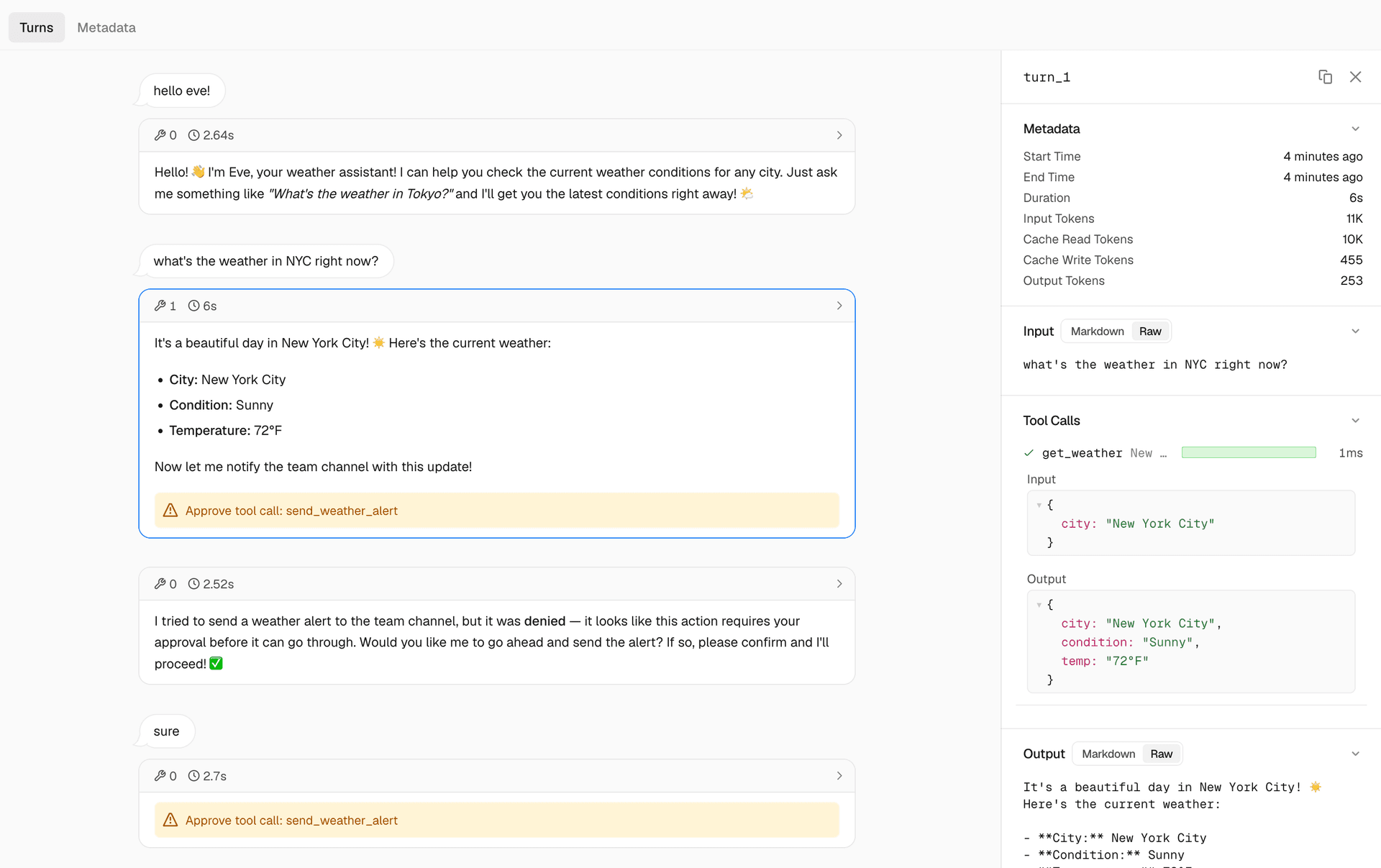

Exactly what the agent did, one turn at a time
That leaves the part no framework can write for you: what your agent actually does.
Link to headingExtend an agent one file at a time
The most common way to give an agent capabilities is to give it tools, and to teach it how to do things with skills. Today that means building the tool, writing the skill, and then wiring both into whatever runs your agent loop. With eve, a tool is one TypeScript file and a skill is one markdown file.
agent/tools/run_sql.ts
import { defineTool } from "eve/tools";import { z } from "zod";import { runReadOnlySql } from "../lib/sample-db";export default defineTool({ description: "Run a read-only SQL query against the orders and customers tables.", inputSchema: z.object({ sql: z.string().describe("A single read-only SELECT statement."), }), async execute({ sql }) { const { columns, rows } = await runReadOnlySql(sql); return { columns, rows: rows.slice(0, 500), truncated: rows.length > 500 }; },});A typed tool in one file, where the filename becomes the tool name
agent/skills/revenue-definitions.md
---description: How this team defines revenue. Load before answering any revenue question.---Revenue is recognized net of refunds, over the subscription term.Weeks are Monday-anchored, in UTC.Exclude trial and internal accounts from every number.A skill in one markdown file, loaded only when the topic comes up
Notice what is missing. Instead of writing all of the boilerplate to wire these up and register them with your agent, eve handles it for you.
A file's name and place in the tree are its definition. eve picks up the tool and skill at build time, hands the model their descriptions, and the model takes it from there. Just as Next.js turns a folder into a route by owning the routing, eve turns a file into an ability by owning the agent loop.
Link to headingAdd human-in-the-loop approval
Requiring approval for an action is one field on the tool.
agent/tools/run_sql.ts
export default defineTool({ description: "Run a read-only SQL query against the warehouse.", inputSchema: z.object({ sql: z.string() }), needsApproval: ({ toolInput }) => estimateScanGb(toolInput.sql) > 50, async execute({ sql }) { // unchanged },});Requiring approval when a query would scan more than 50GB
Now you can guard the expensive query, the destructive write, or anything else you would not want running unsupervised.
Link to headingLet the agent write its own code
The tools you define aren't the ceiling. eve gives your agent a real computer with a shell, so it can run bash, grep, and anything else you'd run in a terminal. When a job calls for code that doesn't exist yet, the agent writes and runs it.
> Break last week's revenue down by region and chart it⦿ write_file analysis/by_region.py⦿ bash python analysis/by_region.pyRevenue by region for the week of June 1. AMER $2.1M, EMEA $1.6M, APAC$0.5M. Chart saved to analysis/by_region.png.The agent writing and running its own code in its own sandbox
Your agent can solve problems on its own in a secure sandbox, reshaping a dataset, running a one-off analysis, or writing whatever code a job needs that no tool covers.
Link to headingDelegate work to a subagent
An eve agent can also delegate. A subagent is the same shape one level down, a directory inside subagents/ with its own instructions, tools, and sandbox. The parent calls it just like it calls a tool.
agent/subagents/investigator/agent.ts
import { defineAgent } from "eve";export default defineAgent({ description: "Investigates anomalies in the data before the analyst reports them.", model: "anthropic/claude-opus-4.8",});A subagent the analyst can hand work to
The child starts with a clean context window and only the tools you gave it, does the work, and hands the result back to the parent.
Link to headingStart and interact with your agent
Now comes the part every developer looks forward to, testing their agent. That used to mean starting the process, asking a question, and reading logs, with no simple view of which tools were used, what the model loaded, or why it answered the way it did. You wanted to talk to your agent and watch it work, and what you got was stdout. With eve, the dev loop is one command.
Link to headingRun the agent locally
To start an eve agent, you run its dev server.
eve devStarting the agent locally, with a terminal UI to talk to it
> What was revenue last week?⦿ load_skill revenue-definitions⦿ run_sql SELECT date_trunc('week', created_at) ...Revenue for the week of June 1 was $4.2M net of refunds, up 6% from theprior week.Every step of the run, visible as it happens
Everything the agent did is visible in the TUI. The agent loaded the skill, ran the query, answered by the team's rules, and each of those lines is a checkpointed step in the durable session. The terminal UI is just a client, and the agent serves the same structured events over HTTP, so curl, a test script, or CI can drive it and check exactly what it did.
Link to headingTest the agent with evals
Talking to the agent proves one run at a time. Evals test your agent the way you test the rest of your software, with scored checks written in files like everything else in the project.
evals/revenue.eval.ts
import { defineEval } from "eve/evals";import { includes } from "eve/evals/expect";export default defineEval({ description: "The analyst answers revenue questions by the team's rules.", async test(t) { await t.send("What was revenue last week?"); t.completed(); t.calledTool("run_sql"); t.check(t.reply, includes("net of refunds")); },});A suite that checks whether the analyst used its tool and followed the team's definitions
You can run eve eval locally or point it at a deployed app, so a prompt change or a model swap shows you what it broke before your users do.
<svg data-testid="geist-icon" height="16" stroke-l
関連記事
エージェント工学:新たな学問分野として確立
LangChain Blog は、AI エージェントの設計・構築を体系化する「エージェント工学」という新しい学問分野の確立を提案している。
Amazon SageMaker AI の非同期推論にリクエストペイロードの直接送信がサポートされるように
AWS は Amazon SageMaker AI の非同期推論機能において、API を呼び出す際にリクエスト本体に直接データを格納して送信できる機能を追加した。これにより、各実行前にデータを S3 にアップロードする必要がなくなり、ネットワーク往復の削減や運用負荷の軽減が可能になった。
大規模なデータと AI エージェントのための文脈知能
AWS は、AI エージェントがデータレイクやデータベースなど散在する情報源を統合し、大規模に推論できる「文脈知能」機能を発表した。これによりエージェントの判断精度向上を目指す。
今日のまとめ
AI日報で今日の重要ニュースをまとめ読み