Amazon Bedrock AgentCore に Web 検索機能を導入
AWS は Amazon Bedrock AgentCore に Model Context Protocol (MCP) 対応の Web Search 機能を一般提供し、エージェントの知識鮮度不足という構造的課題を解決する管理型インフラを提供した。
キーポイント
モデルコンテキストプロトコル(MCP)による標準化接続
AgentCore Gateway を介して MCP ツールとして標準的に接続可能となり、追加の API 設定や認証管理が不要でエージェントに直接組み込める。
AWS 独自の大規模ウェブインデックスとプライバシー
Amazon が維持する数百億件のドキュメントからなる専用インデックスを利用可能であり、クエリは AWS 内部で完結するためデータ流出の懸念がない。
開発工数の劇的削減と運用負荷の解消
サードパーティ製検索 API の契約管理、レート制限対応、結果パースロジックの実装など、独自実装時に発生する複雑な課題をすべて包括して解決する。
リアルタイム情報取得によるエージェントの能力向上
トレーニングデータに依存しないため、今日の株価や直近のニュースなど、最新情報を即座に取得・活用できる「生きた」エージェントの実現を可能にする。
IAM ロールによる自動認証
API キーの管理不要で、Gateway が自身の IAM サービスロールを使用して Web Search バックエンドに自動的に認証・接続します。
最小限の権限設定
アウトバウンド認証には `bedrock-agentcore:InvokeGateway` と AWS 所有リソース向けの `bedrock-agentcore:InvokeWebSearch` の2つのアクションのみが必要です。
MCP フレームワークとの連携
Strands や LangChain などの MCP 互換フレームワークは、自動的にツールをディスカバリーし、必要な場合に現在の情報を取得するために Web Search ツールを使用します。
影響分析・編集コメントを表示
影響分析
この発表は、AI エージェントの実用化における最大のボトルネックである「情報の鮮度」と「インフラ構築の複雑さ」を同時に解消する画期的な進展です。特に MCP(Model Context Protocol)という業界標準プロトコルへの完全対応により、AWS のリソースを汎用的かつ安全に活用できるため、企業によるエージェント開発のスピードと信頼性が大幅に向上すると予想されます。
編集コメント
MCP の標準化が進む中、主要クラウドプロバイダーが独自インデックスを備えた管理型サービスを提供したことは、業界全体の「検索拡張」基準を高める重要な一歩です。開発者がインフラ構築に悩まされずにエージェントの知能向上に集中できる環境が整いました。
AI agents are changing how organizations find and act on information, but they share one structural limitation: their knowledge is frozen at training time. When you ask an agent that relies only on its training data about today’s stock price, a sports score, or a release that shipped an hour ago, it can’t respond.
*Web Search* on Amazon Bedrock AgentCore, now generally available, addresses that gap. This fully managed, Model Context Protocol (MCP)-compatible web search capability lets your agents get information from the web without infrastructure overhead. It’s available as a managed target or connector that you connect to your AgentCore Gateway. Agents discover it with a standard tools/list call and invoke it like other MCP tools. There are no search APIs to provision, no outbound credentials to manage, and no result-parsing glue to maintain.
Behind that single connector sits a purpose-built web index maintained by Amazon, spanning tens of billions of documents. Amazon refreshes the index continually, reflecting new content within minutes. The privacy model makes sure that queries don’t leave AWS. Retrieval can combine a knowledge graph with semantic snippet extraction tuned for model context.
In this post, we walk through what makes Web Search on Amazon Bedrock AgentCore different, why it matters, and how to wire it in with a few lines of code.
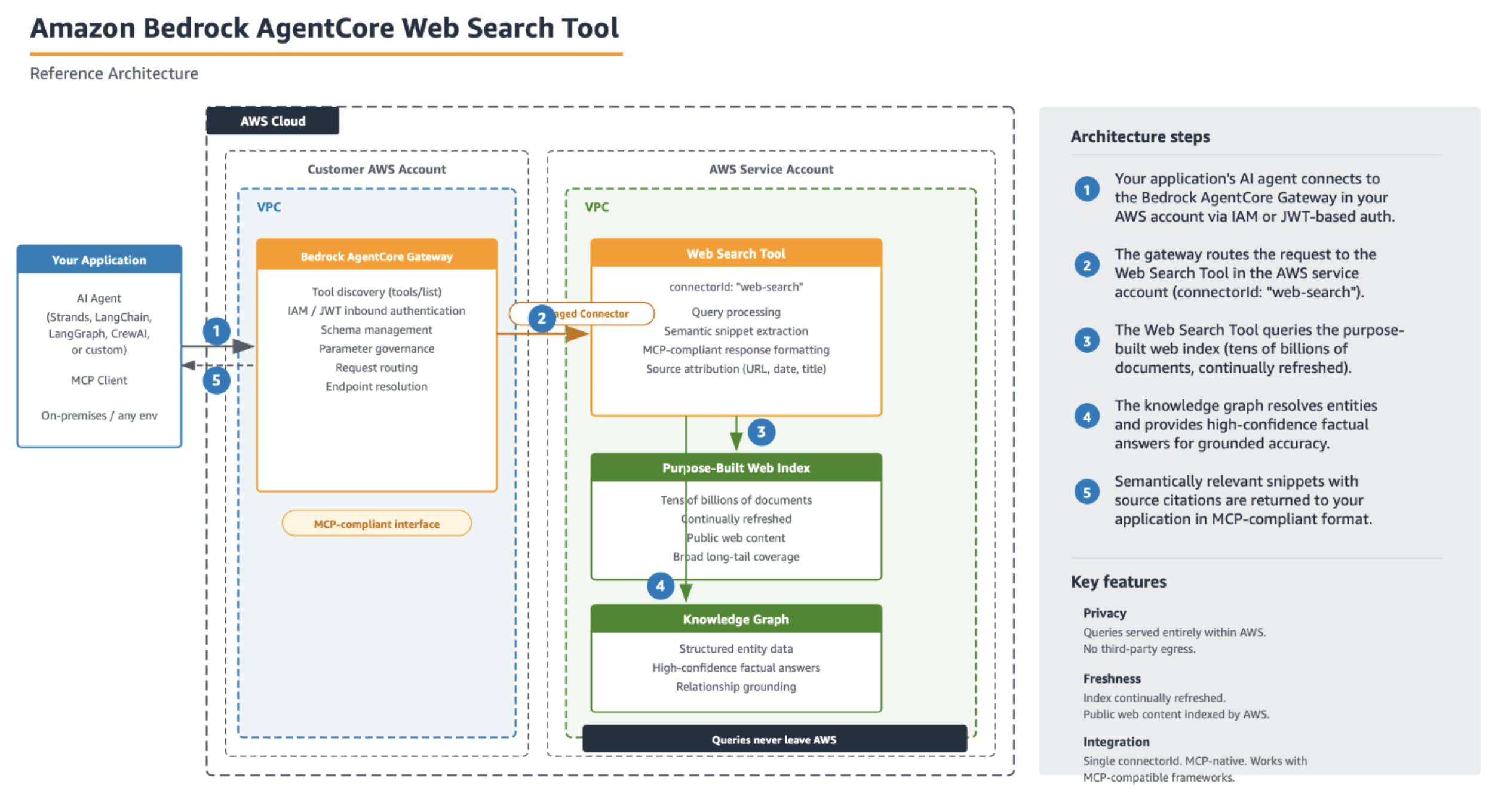
Figure 1: Your application connects to the AgentCore Gateway (AWS Identity and Access Management (IAM) or JSON Web Token (JWT) inbound auth), which routes queries through a managed connector to the Web Search tool in the AWS service account. Query traffic stays within AWS.
Grounding agents in the web is the fix for stale knowledge, but it’s also where many teams get stuck. Building it yourself means:
- Procuring a third-party search API and managing keys, quotas, and rate limits.
- Parsing inconsistent result formats across providers.
- Reasoning about where customer queries travel and how that data might be retained or reused.
- Building snippet extraction logic, so models get relevant passages, not raw HTML.
- Maintaining freshness, coverage, and quality over time.
Each of these is a project in itself. Web Search on Amazon Bedrock AgentCore addresses all of them.
A purpose-built web index
Many “add web search to your agent” solutions are wrappers around a third-party search engine. Web Search on Amazon Bedrock AgentCore is backed by a web index that Amazon operates directly, spanning tens of billions of documents. That scale matters for coverage. For example, the long-tail question about a niche library or an obscure product spec can be answered more effectively when the index is broad rather than limited to the most popular pages.
Updated continually
Amazon refreshes the index on an ongoing basis, reflecting new content within minutes. For agents that respond to questions about price movements or recently published announcements, that recency window is the difference between a grounded response and a confidently wrong one. When your agent searches for “what happened today,” the results reflect what actually happened today.
Knowledge graph for high-confidence facts
Web Search on Amazon Bedrock AgentCore includes a built-in knowledge graph that grounds entities and their relationships. For factual questions (like who holds a role or when something was founded), the knowledge graph provides high-confidence responses rather than leaving the model to infer them from extracted page text. This reduces the kind of subtle factual drift that creeps in when an agent stitches together a response from snippets alone.
Semantic snippet extraction optimized for model context
Rather than handing the model a raw HTML dump or a full page and hoping it finds the relevant part, the tool performs semantically relevant snippet extraction. It pulls the passages from each web page that bear on the query, then returns them in a form optimized for a model’s context window. The model sees the parts that matter, with fewer tokens spent on boilerplate and navigation chrome. This can help improve the precision of cited responses.
Private by design
For many enterprises, the question that stalls a web search rollout isn’t “does it work.” It’s “where do my users’ queries go, and what happens to them?” Web Search on Amazon Bedrock AgentCore is built so the answers to those questions are simple.
Queries don’t leave AWS
When your agent issues a search, the query is served entirely within AWS infrastructure. Customer queries don’t get sent to a third-party search engine or leave AWS. The Gateway authenticates to the connector owned by AWS and routes the request internally, so the data path stays inside AWS end to end. For teams with data-residency or third-party egress concerns, this removes an entire category of review.
Walkthrough
To get started with the Web Search Tool, you create an AgentCore Gateway (if you don’t want to use an existing one), add the web search tool target, and invoke it from an agent using MCP.
Prerequisites
To follow along with the setup steps in this post, you need the following:
- An AWS account with permissions to create IAM roles and Amazon Bedrock AgentCore resources.
- The AWS Command Line Interface (AWS CLI) v2 installed and configured, or access to the AWS Management Console.
- Python 3.10 or later (for the SDK and Strands examples).
- The boto3 SDK updated to the latest version.
- An Amazon Bedrock AgentCore Gateway. You can add the Web Search Tool as a target to an existing Gateway, or create a new one. For instructions on creating a Gateway, see Create an Amazon Bedrock AgentCore gateway in the Developer Guide.
Note: Following these steps creates AWS resources that incur charges. The Amazon Bedrock AgentCore Gateway and Web Search invocations are billable. See the Pricing section that follows for details, and remember to clean up resources when finished to avoid ongoing charges.
Setup
Adding web search to an agent comes down to attaching a Web Search Tool target to your Gateway using connectorId: "web-search". The Gateway snapshots the tool schema, provisions the integration, and handles schema management, parameter governance, endpoint resolution, and service authentication for you.
import boto3

gateway_client = boto3.client("bedrock-agentcore-control", region_name="us-east-1")

# Add the Web Search Tool as a target on an existing Gateway
gateway_client.create_gateway_target(
    gatewayIdentifier=gateway_id,  # your existing or newly created Gateway ID
    name="web-search-tool",
    targetConfiguration={
        "mcp": {
            "connector": {
                "source": {"connectorId": "web-search"},
                "configurations": [{"name": "WebSearch", "parameterValues": {}}],
            }
        }
    },
    credentialProviderConfigurations=[
        {"credentialProviderType": "GATEWAY_IAM_ROLE"}
    ],
)
Verify that you added the target by calling describe_gateway_target or list_gateway_targets and confirming that Web Search-tool appears in the response.
The outbound role and permissions
Notice the preceding credentialProviderConfigurations. This is the whole outbound-authorization story: instead of you provisioning API keys or managing search credentials, the Gateway authenticates to the Web Search backend using its own IAM service role.
That role needs a trust policy (so AgentCore can assume it, scoped to your account and Region) and a permissions policy with two actions:
{
  "Version": "2012-10-17",
  "Statement": [
    {
      "Sid": "InvokeGateway",
      "Effect": "Allow",
      "Action": "bedrock-agentcore:InvokeGateway",
      "Resource": "arn:aws:bedrock-agentcore:us-east-1::gateway/"
    },
    {
      "Sid": "InvokeWebSearch",
      "Effect": "Allow",
      "Action": "bedrock-agentcore:InvokeWebSearch",
      "Resource": "arn:aws:bedrock-agentcore:us-east-1:aws:tool/web-search.v1"
    }
  ]
}
The InvokeWebSearch resource ARN is owned by AWS (account = aws). Authorization is enforced per invocation against that ARN, so granting bedrock-agentcore:InvokeWebSearch on it is what lets the Gateway call web search on your behalf.
A couple of boundaries to keep clear:
- This role is for outbound auth only (Gateway reaching the Web Search backend). Inbound auth (who can call your Gateway) is handled separately, typically with an OAuth or JWT authorizer such as Amazon Cognito.
- The role doesn’t include bedrock:InvokeModel. Model access belongs to whatever identity runs your agent, not to the Gateway service role.
Invoking from MCP-compatible frameworks
Because Web Search is exposed over MCP, an MCP-compatible framework like Strands, LangChain, LangGraph, CrewAI, or your own can discover and invoke it. The agent calls tools/list, finds WebSearchTool, and uses it automatically whenever it needs current information:
from datetime import date
from strands import Agent
from strands.models.bedrock import BedrockModel
from strands.tools.mcp import MCPClient
from mcp_proxy_for_aws.client import aws_iam_streamablehttp_client

gateway_url = "https://gateway-.gateway.bedrock-agentcore.us-east-1.amazonaws.com/mcp"

mcp_client = MCPClient(lambda: aws_iam_streamablehttp_client(
    endpoint=gateway_url,
    aws_region="us-east-1",
    aws_service="bedrock-agentcore",
))

model = BedrockModel(model_id="us.anthropic.claude-sonnet-4-6")

system_prompt = (
    f"You are a helpful assistant. Today's date is {date.today().isoformat()}. "
    "Use the available tools when you need current information."
)

with mcp_client:
    tools = mcp_client.list_tools_sync()  # WebSearch tool discovered from the Gateway
    agent = Agent(model=model, tools=tools, system_prompt=system_prompt)

    result = agent("What are the latest AI breakthroughs announced this week?")
    print(result)
The agent determines it needs fresh information, invokes WebSearchTool with an appropriate query, and composes a grounded response with source citations. No tool-specific code on your side.
Response format
Results come back in the standard MCP tools/call envelope. The tool returns a single content block of type text that contains a serialized JSON document with the results. Parse that inner text and you get an id plus a results array of observations:
{
  "publishedDate": "04:43AM, Wednesday, June 17 2026, PDT",
  "text": "The 2026 NBA Finals was the championship...",
  "title": "2026 NBA Finals",
  "url": "https://en.wikipedia.org/wiki/2026_NBA_Finals"
}
Each web index observation (always returned) carries title, url, publishedDate, and text. Knowledge-graph observations (optional, for entity queries) have null title and url plus structured key/value facts in the text field.
Where the Web Search Tool fits
If you need to ground an agent in your own enterprise data, Amazon Bedrock Knowledge Bases and Amazon Bedrock Managed Knowledge Bases are the right tools. They ingest, index, and retrieve over content you own. The Web Search Tool is the complement. It grounds agents in the public web, for questions whose responses live outside your organization and change by the minute. Many production agents use both: a knowledge base for “what do our documents say” and web search for “what’s true in the world right now.”
Pricing
At $7 per 1,000 queries, you can run a web-search agent for less than a cent per question with a pay-as-you-go model.
Clean up resources
If you created resources while following along, you can remove them to avoid ongoing charges:
- Delete the Gateway target: call delete_gateway_target with your gatewayIdentifier and targetId.
- If the Gateway was created solely for this walkthrough, delete it with delete_gateway.
There is no persistent infrastructure on the AWS side beyond these resources. After they are removed, you stop incurring charges.
Conclusion
The Amazon Bedrock AgentCore Web Search Tool gives your agents current web knowledge through a single connectorId. There are no search APIs to provision and no result-parsing to maintain. Underneath that simplicity is a web index that AWS builds itself (tens of billions of documents, refreshed within minutes), a privacy model where queries don’t leave AWS, and retrieval that can combine a knowledge graph with semantic snippet extraction tuned for model context. The result is an agent that responds to timely questions accurately, cites its sources, and keeps your data where it belongs.
Because Amazon operates the full search stack, improvements to freshness, coverage, relevance, and snippet quality flow to your agents automatically through the same managed connector. No version upgrades or migrations are needed on your side.
You can access the Web Search Tool connector today in us-east-1 (US East (N. Virginia)).
To get started, see the Web Search Tool documentation.
About the authors

Veda Raman
Veda Raman is a Principal Specialist Solutions Architect for GenAI and machine learning based in Maryland. She has broad experience in architecting and building AgenticAI applications and helps customers apply best practices in building cost efficient and robust AgenticAI applications.

Kalyan Garimella
Kalyan Garimella is a Principal Product Manager at Amazon AGI, with over 15 years of expertise building enterprise and consumer applications. He leads the development and launch of web search capabilities for Amazon Bedrock AgentCore, tackling a core limitation of modern AI agents: their inability to access real-time, factual information beyond their training data, which leads to outdated responses and hallucinations. By enabling agents to retrieve and ground their reasoning in live web data, Kalyan’s work directly improves the reliability and accuracy of enterprise AI agents at scale. Over his six years at Amazon, he has led initiatives across AWS, Amazon Music, and AGI, and previously held leadership roles at Deloitte, where he drove enterprise digital transformation through large-scale Smart IoT initiatives. Kalyan lives in the Bay Area with his family.
関連記事
Adobe Marketing Agent for Amazon Quick によるキャンペーンワークフローの加速
AWS と Adobe は、Amazon Quick と Adobe Marketing Agent を連携させることで、マーケティングチームが自然言語で質問するだけで、ガバナンスされた会話環境内で数秒以内にキャンペーンのパフォーマンスやオーディエンスに関するインサイトにアクセスできるようにした。
Liquid AI、11言語対応の高速多言語検索向け新モデル「LFM2.5-Embedding-350M」と「LFM2.5-ColBERT-350M」を発表
Liquid AI は、11言語間の高速な多言語・異言語検索を実現する新たな取得モデル「LFM2.5-Embedding-350M」と「LFM2.5-ColBERT-350M」を公開した。両モデルはパラメータ数 3.5 億で、LFM ファミリー初の双方向型であり、Hugging Face で利用可能となった。
Domyn と AISquared が Ai2 のオープンリリースをどう活用したか
Domyn と AISquared は、透明性やライセンス管理が不可欠な規制業界向けに AI モデルを開発する際、Ai2 のオープンソースリリースを活用している。これにより顧客の信頼とコンプライアンス確保を実現している。
今日のまとめ
AI日報で今日の重要ニュースをまとめ読み