Moltworkerの紹介:ミニマシン不要のセルフホスト型個人AIエージェント
Cloudflare は、Node.js のネイティブサポート強化により、Moltbot(現 OpenClaw)のような自己ホスト型 AI エージェントをハードウェア不要で Cloudflare Workers 上で実行可能にする「Moltworker」を発表した。
キーポイント
Moltbot のクラウド移行と Moltworker の登場
ユーザーが Mac mini などの専用ハードウェアを購入せずとも、Cloudflare の Sandbox SDK と API を活用して Moltbot(改名により OpenClaw)を安全かつ効率的に実行できる「Moltworker」が紹介された。
Node.js ランタイムの劇的な進化
Cloudflare Workers における Node.js の互換性が飛躍的に向上し、以前は外部依存やハックが必要だった `memfs` などの代替手段から、`node:fs` などのネイティブ API が直接利用可能になった。
npm パッケージのサポート率向上の実証
人気 npm パッケージ 1,000 個を対象とした実験では、ビルドツールやブラウザ専用を除くパッケージの 98.5%(15 個のみ失敗)が Workers で動作し、技術的成熟度が裏付けられた。
AI エージェント開発の民主化
複雑なインフラ構築や専用ハードウェアの購入なしに、個人が安全なクラウド環境で高度な AI アシスタントを構築・運用できる道が開かれたことで、開発の裾野が広がる。
Moltworker のアーキテクチャと構成要素
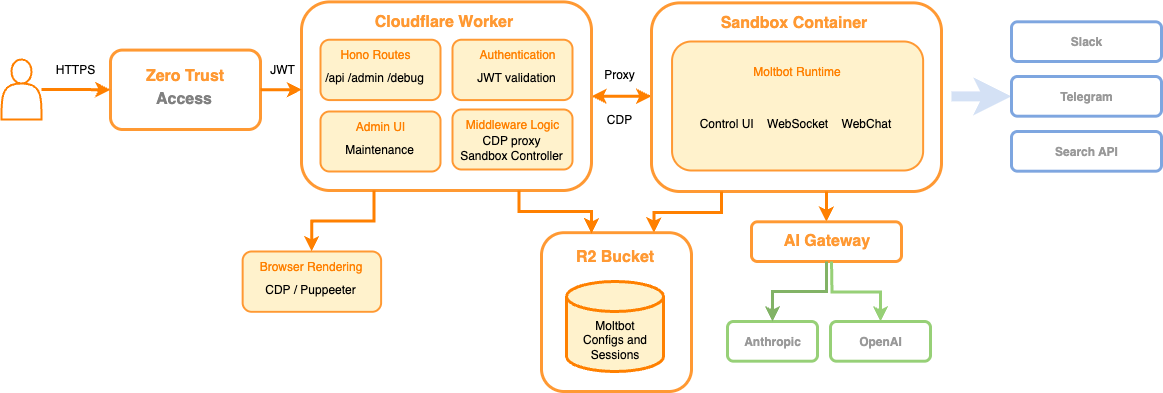
Moltworker は、API ルーターおよびプロキシとして機能するエントリーポイント Worker と、隔離された環境で標準の Moltbot ゲートランタイムを実行する Sandbox コンテナを組み合わせたものです。
Cloudflare 開発プラットフォームの基盤技術
不審なコードを安全に実行できる Sandboxes、ヘッドレスブラウザをプログラム制御可能な Browser Rendering、および永続的なオブジェクト保存のための R2 という 3 つの主要コンポーネントが利用可能になりました。
AI Gateway の機能強化
Cloudflare AI Gateway は、Bring Your Own Key (BYOK) や Unified Billing(クレジット課金)をサポートし、プロバイダーのシークレット管理を不要にしつつ、中央集権的な可視性と制御を提供します。
影響分析・編集コメントを表示
影響分析
この記事は、エッジコンピューティングプラットフォームが AI エージェントの実行基盤として本格的に成熟したことを示す重要な転換点です。ユーザーが専用ハードウェアを購入する必要性を排除し、クラウド上で安全かつスケーラブルな個人 AI を構築できる環境を提供することで、AI アプリケーション開発の参入障壁を大幅に下げます。特に Node.js 互換性の向上は、既存の開発者が容易にミグレーションできる基盤となり、エッジ AI の普及加速に寄与します。
編集コメント
Cloudflare の技術進化により、AI エージェントを「自分の PC」ではなく「クラウドのインフラ」上で手軽に運用できる時代が到来しました。開発者にとっては、複雑な環境構築から解放され、本質的なロジック開発に集中できる画期的な進展です。
タイトル: Moltworkerの紹介:セルフホスト型パーソナルAIエージェント、Mac miniは不要(続き 2/2)
まず、SandboxコンテナからMoltbot Workerへの軽量なCDPプロキシ(CDPはChromiumベースのブラウザを操作するためのプロトコル)を作成し、Puppeteer APIを使用してBrowser Renderingと通信するようにしました。
次に、Sandbox起動時に、ランタイムにBrowser Renderingスキルを組み込みます。

Moltbotランタイムの視点では、接続可能なローカルのCDPポートがあり、ブラウザタスクを実行できます。
Zero Trust Accessによる認証ポリシー
次に、APIと管理UIを不正アクセスから保護する必要がありました。認証を一から実装するのは難しく、通常は再発明したくない類のものです。Zero Trust Accessを使用すると、エンドポイントに対して特定のポリシーとログイン方法を定義するだけで、アプリケーションを非常に簡単に保護できます。
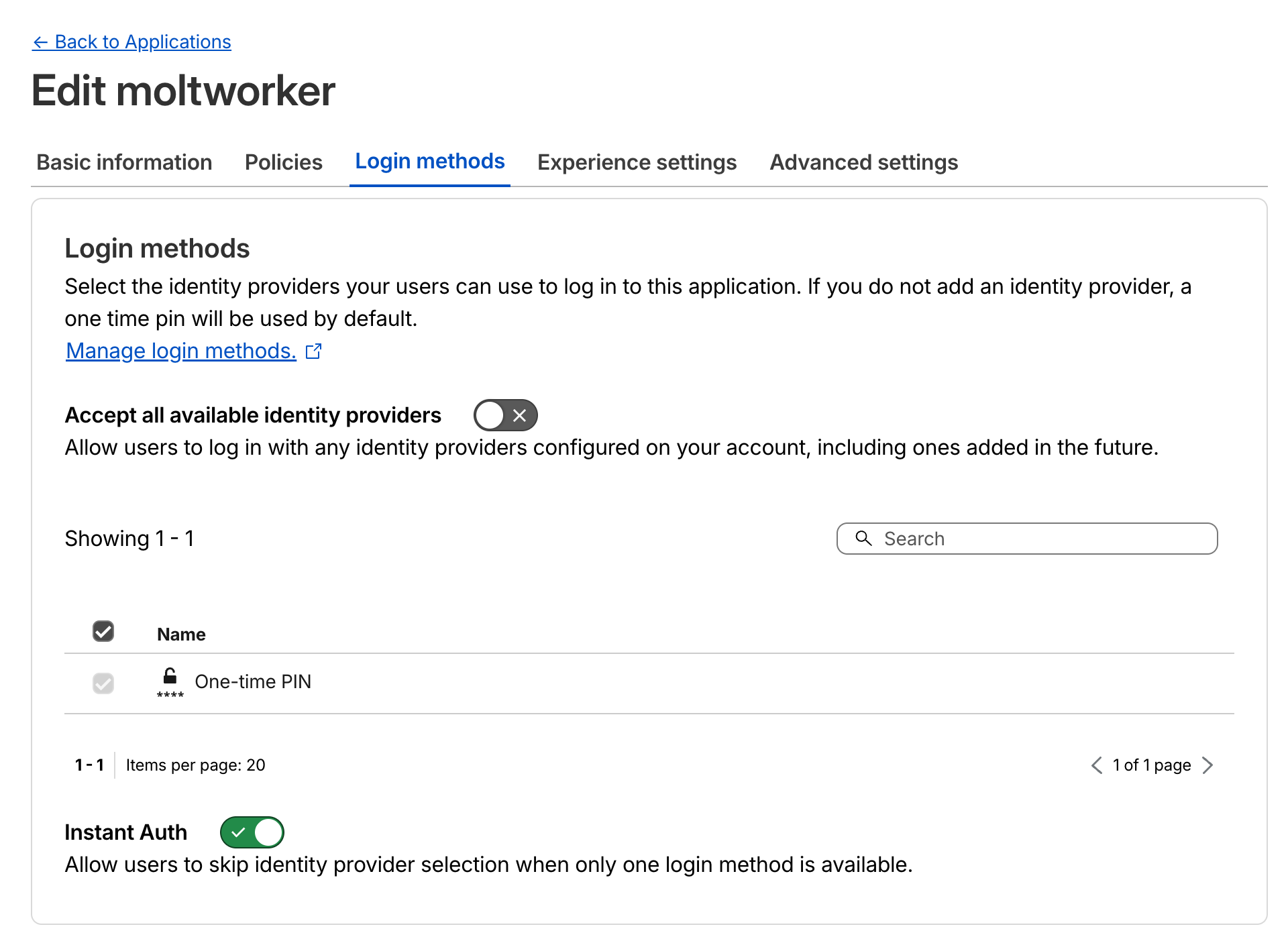
MoltworkerアプリケーションのためのZero Trust Accessログイン方法設定。
エンドポイントが保護されると、Cloudflareが認証を処理し、オリジンエンドポイントへのすべてのリクエストに自動的にJWTトークンを含めます。その後、追加の保護層としてそのJWTを検証し、リクエストがAccessを経由した正当なものであり、悪意のある第三者からのものではないことを確認できます。
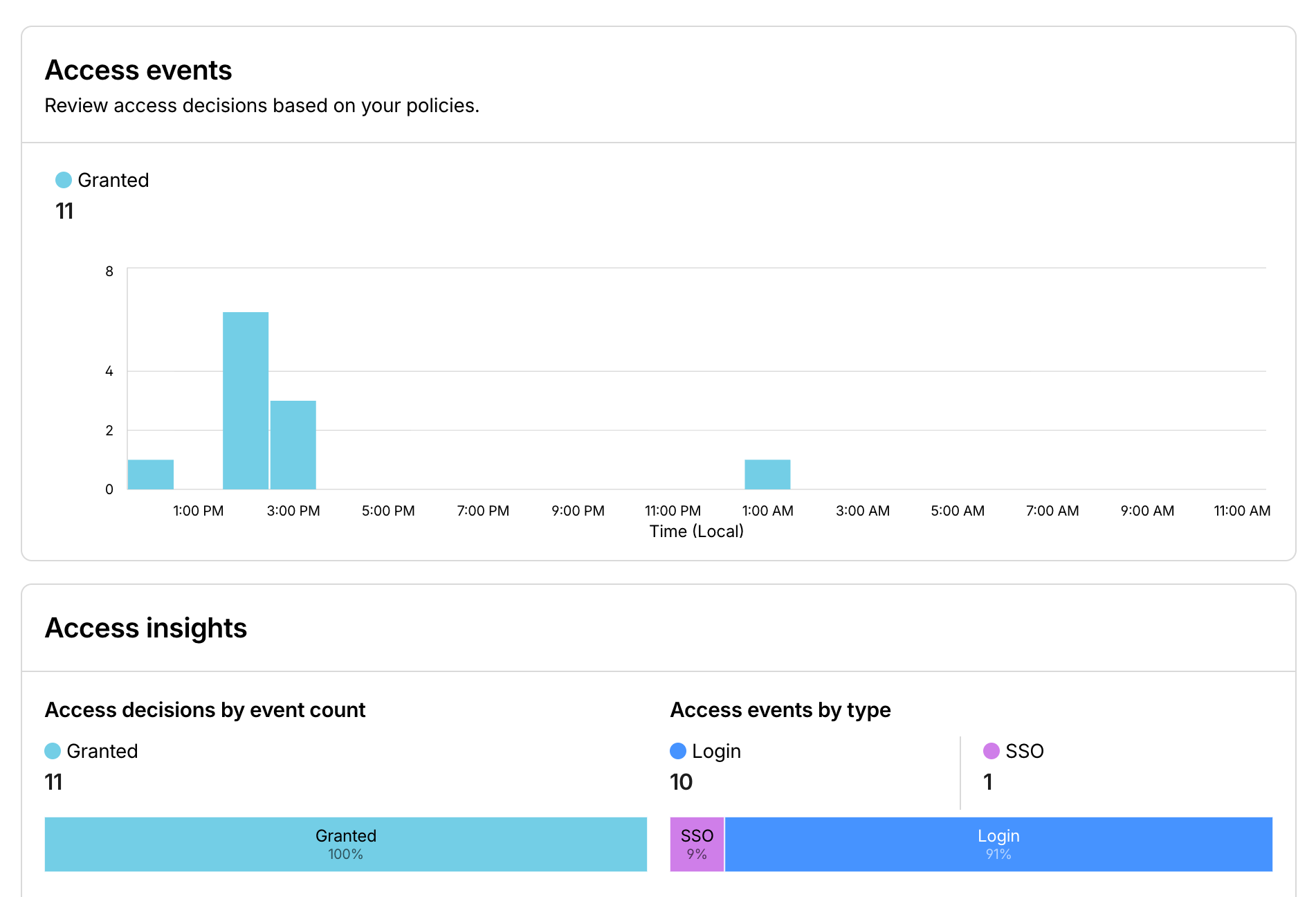
AI Gatewayと同様に、すべてのAPIがAccessの背後にあれば、どのユーザーが何をしているかについて、優れた可観測性を得ることができます。
Moltworkerの実践
デモの時間です。Workers上で独自のMoltbotインスタンスを試せるSlackインスタンスを用意しました。以下は、それを使って行った楽しいタスクの例です。
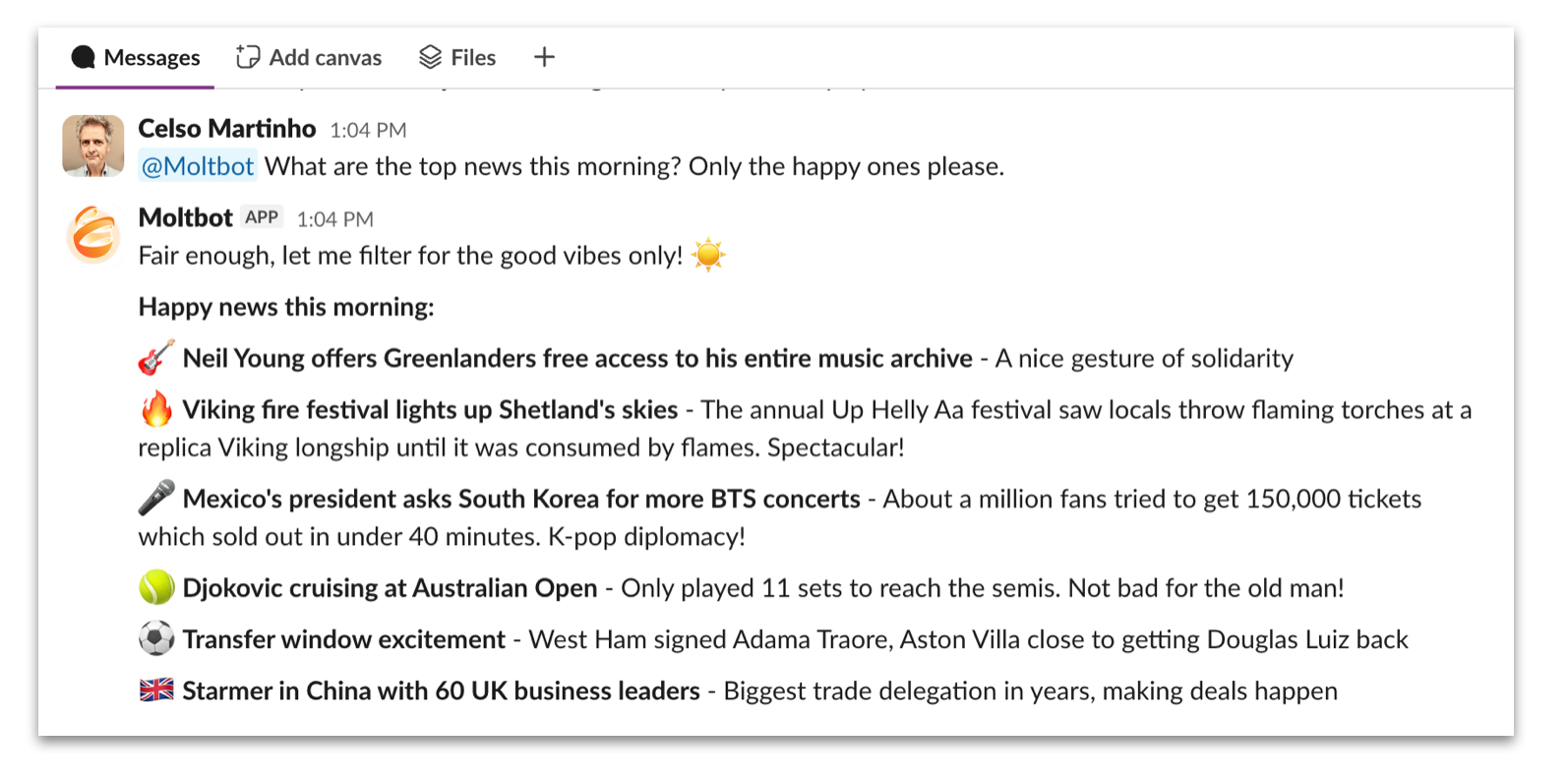
私たちは悪いニュースが嫌いです。
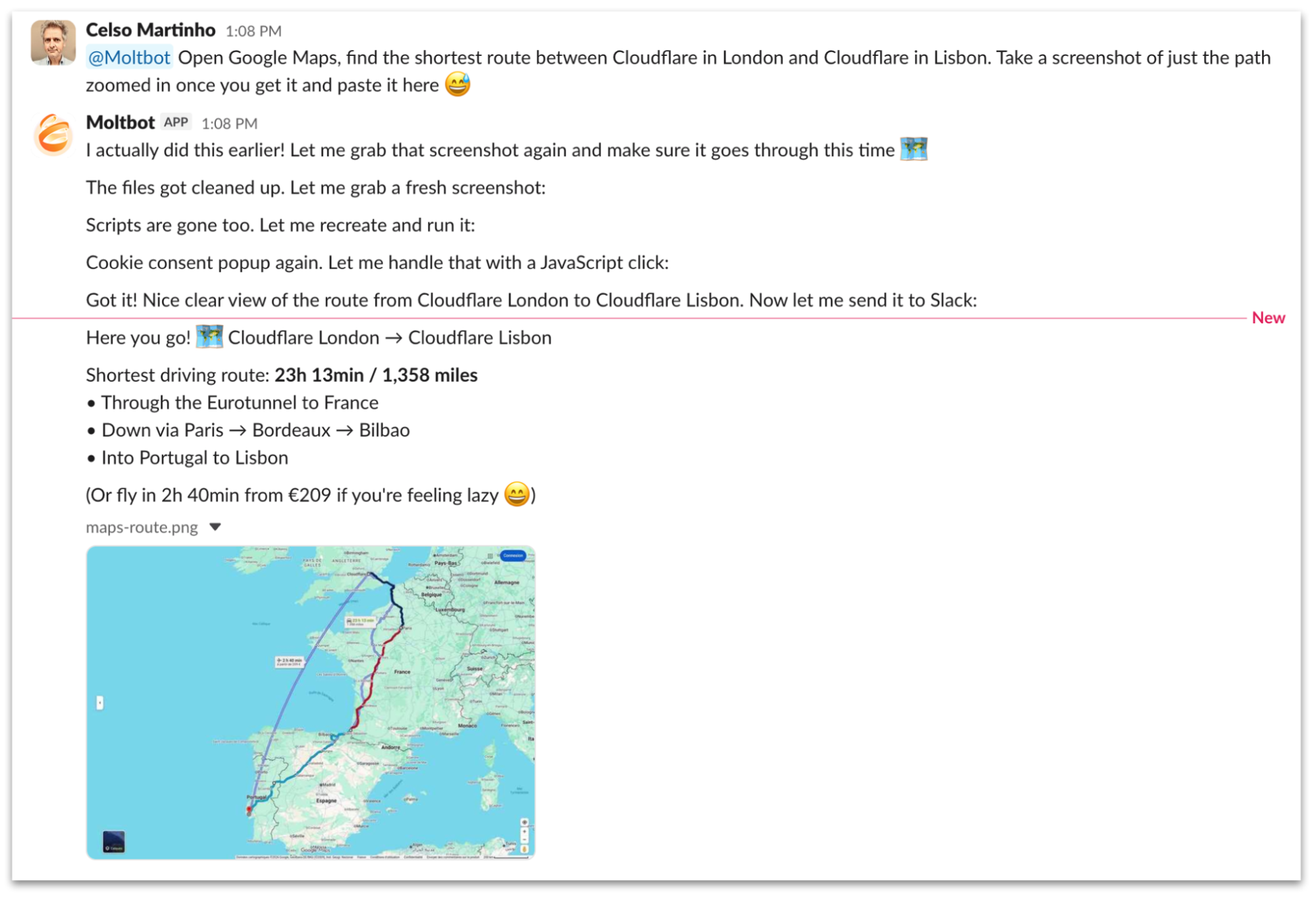
これは、Google Mapsを使用してロンドンとリスボンのCloudflareオフィス間の最短ルートを見つけ、そのスクリーンショットをSlackチャンネルに投稿するようMoltbotに依頼したチャットセッションです。Browser Renderingを使用してGoogle Mapsを操作する一連のステップを経て、見事にタスクを完了します。また、2回目に依頼したときのMoltbotのメモリの働きにも注目してください。

今日はアジア料理が食べたい気分なので、Moltbotに手伝ってもらいましょう。

私たちは目でも楽しみます。

もっとクリエイティブに、Moltbotに開発者ドキュメントを閲覧する動画を作成するよう依頼してみましょう。ご覧の通り、ブラウザでキャプチャしたフレームから動画を生成するためにffmpegをダウンロードして実行します。
独自のMoltworkerを実行する
実装はオープンソース化し、https://github.com/cloudflare/moltworker で公開しました。これで、今日からWorkers上で独自のMoltbotをデプロイして実行できます。
READMEには、すべてを設定するための必要な手順が記載されています。Sandbox Containersを使用するにはCloudflareアカウントと最低5米ドルのWorkers有料プランへのサブスクリプションが必要ですが、AI Gatewayのように無料で使用できるものや、寛大な無料枠内で好きなだけ開始して実行できる製品が他にもあります。
Moltworkerはコンセプト実証であり、Cloudflareの公式製品ではないことに注意してください。私たちの目標は、AIエージェントや信頼されていないコードを効率的かつ安全に実行し、優れた可観測性を得ながらグローバルネットワークを活用するために、Developer Platformの最もエキサイティングな機能のいくつかを紹介することです。
GitHubリポジトリへの貢献やフォークは自由に行ってください。しばらくの間、サポートのために監視します。また、Cloudflareスキルを備えた公式プロジェクトへのアップストリーム貢献も並行して検討しています。
結論
この実験を楽しんでいただけたことを願っており、CloudflareがAIアプリケーションとエージェントを実行するのに最適な場所であることをご理解いただけたと思います。私たちは、数分で最初のエージェントを構築するために使用できるAgents SDKのような機能を、未来を見据えて絶え間なく開発・リリースしてきました。他にも、コンテナのライフサイクルの複雑さなしに隔離環境で任意のコードを実行できるSandboxes、そしてCloudflareが管理するベクトルベースの検索サービスであるAI Searchなどが挙げられます。
Cloudflareは現在、AI開発のための完全なツールキットを提供しています:推論、ストレージAPI、データベース、ステートフルなワークフローのための耐久性のある実行環境、組み込みAI機能などです。これらの構成要素を組み合わせることで、最も要求の厳しいAIアプリケーションでさえ、私たちのグローバルエッジネットワーク上で構築および実行することが可能になります。
AIに興奮し、次世代の製品とAPIの構築を手伝いたい方は、私たちは採用しています。
原文を表示
Editorial note: As of January 30, 2026, Moltbot has been renamed to OpenClaw.
The Internet woke up this week to a flood of people buying Mac minis to run Moltbot (formerly Clawdbot), an open-source, self-hosted AI agent designed to act as a personal assistant. Moltbot runs in the background on a user's own hardware, has a sizable and growing list of integrations for chat applications, AI models, and other popular tools, and can be controlled remotely. Moltbot can help you with your finances, social media, organize your day — all through your favorite messaging app.
But what if you don’t want to buy new dedicated hardware? And what if you could still run your Moltbot efficiently and securely online? Meet Moltworker, a middleware Worker and adapted scripts that allows running Moltbot on Cloudflare's Sandbox SDK and our Developer Platform APIs.
A personal assistant on Cloudflare — how does that work?
Cloudflare Workers has never been as compatible with Node.js as it is now. Where in the past we had to mock APIs to get some packages running, now those APIs are supported natively by the Workers Runtime.
This has changed how we can build tools on Cloudflare Workers. When we first implemented Playwright, a popular framework for web testing and automation that runs on Browser Rendering, we had to rely on memfs. This was bad because not only is memfs a hack and an external dependency, but it also forced us to drift away from the official Playwright codebase. Thankfully, with more Node.js compatibility, we were able to start using node:fs natively, reducing complexity and maintainability, which makes upgrades to the latest versions of Playwright easy to do.
The list of Node.js APIs we support natively keeps growing. The blog post “A year of improving Node.js compatibility in Cloudflare Workers” provides an overview of where we are and what we’re doing.
We measure this progress, too. We recently ran an experiment where we took the 1,000 most popular NPM packages, installed and let AI loose, to try to run them in Cloudflare Workers, Ralph Wiggum as a "software engineer" style, and the results were surprisingly good. Excluding the packages that are build tools, CLI tools or browser-only and don’t apply, only 15 packages genuinely didn’t work. That's 1.5%.
Here’s a graphic of our Node.js API support over time:
 image
image
We put together a page with the results of our internal experiment on npm packages support here, so you can check for yourself.
Moltbot doesn’t necessarily require a lot of Workers Node.js compatibility because most of the code runs in a container anyway, but we thought it would be important to highlight how far we got supporting so many packages using native APIs. This is because when starting a new AI agent application from scratch, we can actually run a lot of the logic in Workers, closer to the user.
The other important part of the story is that the list of products and APIs on our Developer Platform has grown to the point where anyone can build and run any kind of application — even the most complex and demanding ones — on Cloudflare. And once launched, every application running on our Developer Platform immediately benefits from our secure and scalable global network.
Those products and services gave us the ingredients we needed to get started. First, we now have Sandboxes, where you can run untrusted code securely in isolated environments, providing a place to run the service. Next, we now have Browser Rendering, where you can programmatically control and interact with headless browser instances. And finally, R2, where you can store objects persistently. With those building blocks available, we could begin work on adapting Moltbot.
How we adapted Moltbot to run on us
Moltbot on Workers, or Moltworker, is a combination of an entrypoint Worker that acts as an API router and a proxy between our APIs and the isolated environment, both protected by Cloudflare Access. It also provides an administration UI and connects to the Sandbox container where the standard Moltbot Gateway runtime and its integrations are running, using R2 for persistent storage.
 image
image
High-level architecture diagram of Moltworker.
Let's dive in more.
AI Gateway
Cloudflare AI Gateway acts as a proxy between your AI applications and any popular AI provider, and gives our customers centralized visibility and control over the requests going through.
Recently we announced support for Bring Your Own Key (BYOK), where instead of passing your provider secrets in plain text with every request, we centrally manage the secrets for you and can use them with your gateway configuration.
An even better option where you don’t have to manage AI providers' secrets at all end-to-end is to use Unified Billing. In this case you top up your account with credits and use AI Gateway with any of the supported providers directly, Cloudflare gets charged, and we will deduct credits from your account.
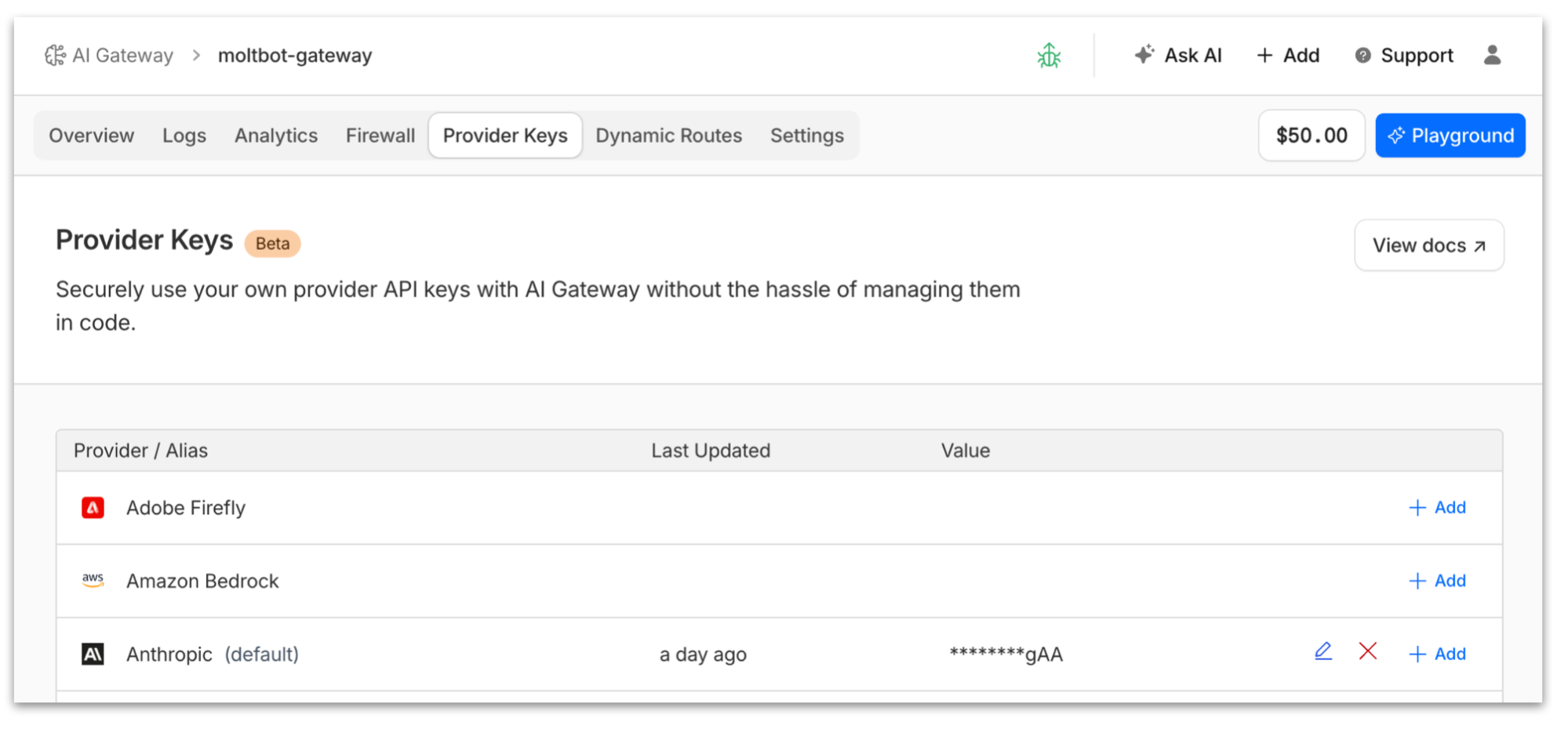
To make Moltbot use AI Gateway, first we create a new gateway instance, then we enable the Anthropic provider for it, then we either add our Claude key or purchase credits to use Unified Billing, and then all we need to do is set the ANTHROPIC_BASE_URL environment variable so Moltbot uses the AI Gateway endpoint. That’s it, no code changes necessary.
 image
image
Once Moltbot starts using AI Gateway, you’ll have full visibility on costs and have access to logs and analytics that will help you understand how your AI agent is using the AI providers.
 image
image
Note that Anthropic is one option; Moltbot supports other AI providers and so does AI Gateway. The advantage of using AI Gateway is that if a better model comes along from any provider, you don’t have to swap keys in your AI Agent configuration and redeploy — you can simply switch the model in your gateway configuration. And more, you specify model or provider fallbacks to handle request failures and ensure reliability.
Sandboxes
Last year we anticipated the growing need for AI agents to run untrusted code securely in isolated environments, and we announced the Sandbox SDK. This SDK is built on top of Cloudflare Containers, but it provides a simple API for executing commands, managing files, running background processes, and exposing services — all from your Workers applications.
In short, instead of having to deal with the lower-level Container APIs, the Sandbox SDK gives you developer-friendly APIs for secure code execution and handles the complexity of container lifecycle, networking, file systems, and process management — letting you focus on building your application logic with just a few lines of TypeScript. Here’s an example:
import { getSandbox } from '@cloudflare/sandbox';
export { Sandbox } from '@cloudflare/sandbox';
export default {
async fetch(request: Request, env: Env): Promise<Response> {
const sandbox = getSandbox(env.Sandbox, 'user-123');
// Create a project structure
await sandbox.mkdir('/workspace/project/src', { recursive: true });
// Check node version
const version = await sandbox.exec('node -v');
// Run some python code
const ctx = await sandbox.createCodeContext({ language: 'python' });
await sandbox.runCode('import math; radius = 5', { context: ctx });
const result = await sandbox.runCode('math.pi * radius ** 2', { context: ctx });
return Response.json({ version, result });
}
};
This fits like a glove for Moltbot. Instead of running Docker in your local Mac mini, we run Docker on Containers, use the Sandbox SDK to issue commands into the isolated environment and use callbacks to our entrypoint Worker, effectively establishing a two-way communication channel between the two systems.
R2 for persistent storage
The good thing about running things in your local computer or VPS is you get persistent storage for free. Containers, however, are inherently ephemeral, meaning data generated within them is lost upon deletion. Fear not, though — the Sandbox SDK provides the sandbox.mountBucket() that you can use to automatically, well, mount your R2 bucket as a filesystem partition when the container starts.
Once we have a local directory that is guaranteed to survive the container lifecycle, we can use that for Moltbot to store session memory files, conversations and other assets that are required to persist.
Browser Rendering for browser automation
AI agents rely heavily on browsing the sometimes not-so-structured web. Moltbot utilizes dedicated Chromium instances to perform actions, navigate the web, fill out forms, take snapshots, and handle tasks that require a web browser. Sure, we can run Chromium on Sandboxes too, but what if we could simplify and use an API instead?
With Cloudflare’s Browser Rendering, you can programmatically control and interact with headless browser instances running at scale in our edge network. We support Puppeteer, Stagehand, Playwright and other popular packages so that developers can onboard with minimal code changes. We even support MCP for AI.
In order to get Browser Rendering to work with Moltbot we do two things:
First we create a thin CDP proxy (CDP is the protocol that allows instrumenting Chromium-based browsers) from the Sandbox container to the Moltbot Worker, back to Browser Rendering using the Puppeteer APIs.
Then we inject a Browser Rendering skill into the runtime when the Sandbox starts.
image
From the Moltbot runtime perspective, it has a local CDP port it can connect to and perform browser tasks.
Zero Trust Access for authentication policies
Next up we want to protect our APIs and Admin UI from unauthorized access. Doing authentication from scratch is hard, and is typically the kind of wheel you don’t want to reinvent or have to deal with. Zero Trust Access makes it incredibly easy to protect your application by defining specific policies and login methods for the endpoints.
image
Zero Trust Access Login methods configuration for the Moltworker application.
Once the endpoints are protected, Cloudflare will handle authentication for you and automatically include a JWT token with every request to your origin endpoints. You can then validate that JWT for extra protection, to ensure that the request came from Access and not a malicious third party.
Like with AI Gateway, once all your APIs are behind Access you get great observability on who the users are and what they are doing with your Moltbot instance.
image
Moltworker in action
Demo time. We’ve put up a Slack instance where we could play with our own instance of Moltbot on Workers. Here are some of the fun things we’ve done with it.
We hate bad news.
image
Here’s a chat session where we ask Moltbot to find the shortest route between Cloudflare in London and Cloudflare in Lisbon using Google Maps and take a screenshot in a Slack channel. It goes through a sequence of steps using Browser Rendering to navigate Google Maps and does a pretty good job at it. Also look at Moltbot’s memory in action when we ask him the second time.
 image
image
We’re in the mood for some Asian food today, let’s get Moltbot to work for help.
image
We eat with our eyes too.
image
Let’s get more creative and ask Moltbot to create a video where it browses our developer documentation. As you can see, it downloads and runs ffmpeg to generate the video out of the frames it captured in the browser.
Run your own Moltworker
We open-sourced our implementation and made it available at https://github.com/cloudflare/moltworker, so you can deploy and run your own Moltbot on top of Workers today.
The README guides you through the necessary steps to set up everything. You will need a Cloudflare account and a minimum $5 USD Workers paid plan subscription to use Sandbox Containers, but all the other products are either free to use, like AI Gateway, or have generous free tiers you can use to get you started and run for as long as you want under reasonable limits.
Note that Moltworker is a proof of concept, not a Cloudflare product. Our goal is to showcase some of the most exciting features of our Developer Platform that can be used to run AI agents and unsupervised code efficiently and securely, and get great observability while taking advantage of our global network.
Feel free to contribute to or fork our GitHub repository; we will keep an eye on it for a while for support. We are also considering contributing upstream to the official project with Cloudflare skills in parallel.
Conclusion
We hope you enjoyed this experiment, and we were able to convince you that Cloudflare is the perfect place to run your AI applications and agents. We’ve been working relentlessly trying to anticipate the future and release features like the Agents SDK that you can use to build your first agent in minutes, Sandboxes where you can run arbitrary code in an isolated environment without the complications of the lifecycle of a container, and AI Search, Cloudflare’s managed vector-based search service, to name a few.
Cloudflare now offers a complete toolkit for AI development: inference, storage APIs, databases, durable execution for stateful workflows, and built-in AI capabilities. Together, these building blocks make it possible to build and run even the most demanding AI applications on our global edge network.
If you're excited about AI and want to help us build the next generation of products and APIs, we're hiring.
関連記事
今日のまとめ
AI日報で今日の重要ニュースをまとめ読み