How to Build an Agent
LangChain Blog は、エージェント構築の現実的なフレームワークを提示し、具体例と避けるべき罠を通じて実装への道筋を示している。
キーポイント
具体的なタスク定義とスコープ設定
エージェントに任せるタスクは「優秀な新人インターンでも可能か」で判断し、5-10 の具体例を挙げて範囲を明確化する必要がある。
従来ソフトウェアとの使い分け基準
ロジックが単純で固定されている場合はエージェントではなく既存のソフトウェアを使用すべきであり、コストと速度を考慮する。
期待値管理と非現実的な要件の排除
存在しない API やデータセットへの接続など「魔法」に依存せず、実現可能な範囲で期待値を設定することが重要である。
重要な引用
Pick something you could teach a smart intern.
Agents are slow, expensive, and can be finicky at times. If traditional software gets the job done - just use that!
If you can't come up with concrete examples, your scope is probably too broad.
影響分析・編集コメントを表示
影響分析
この記事は、AI エージェントブームの中で多くの企業が直面している「実装の壁」を打破するための実践的な指針を提供しています。技術的な革新性というよりは、開発プロセスや期待値管理といった運用面の知見が重視されており、現場の開発チームが失敗リスクを減らしながらエージェントを実用化するための重要なフレームワークとなっています。
編集コメント
技術的な新機能の発表ではなく、開発プロセスの成熟度を高めるための重要なマインドセット記事です。
今年、あらゆる企業がエージェントの構築について語っているように見えますが、実際にそれを成し遂げた企業はごくわずかです。エージェントがビジネスをどのように変革するかという想像力が膨らみやすい反面、多くのチームはどこから始めればよいか、どのように進歩を見ればよいか、そしてどのような期待値を設定すべきかについて不明確な状態にあります。
*このガイドでは、アイデアからインパクト(成果)への移行に関するフレームワークを、メールエージェントの構築という実例を交えて解説します。*
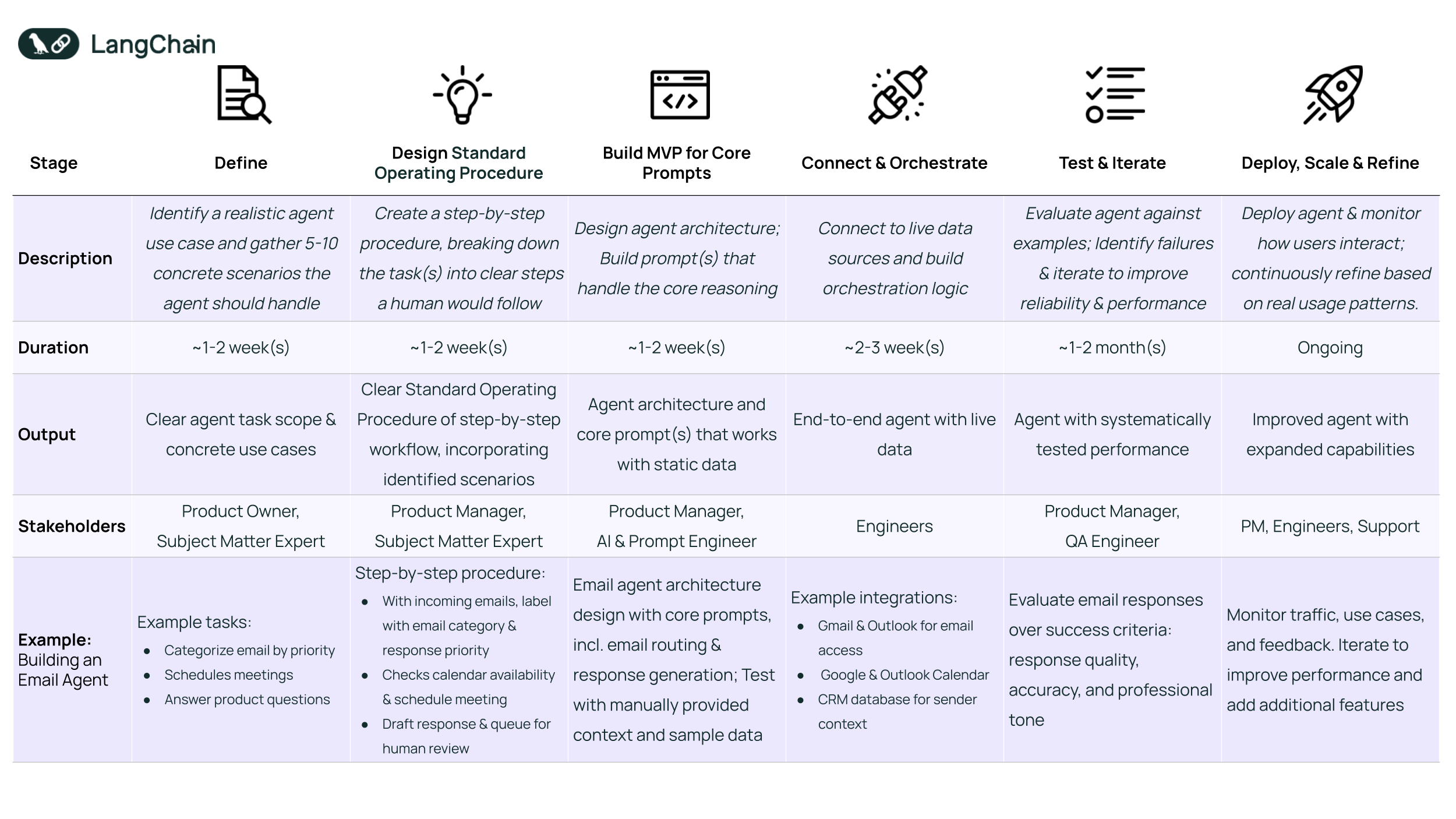
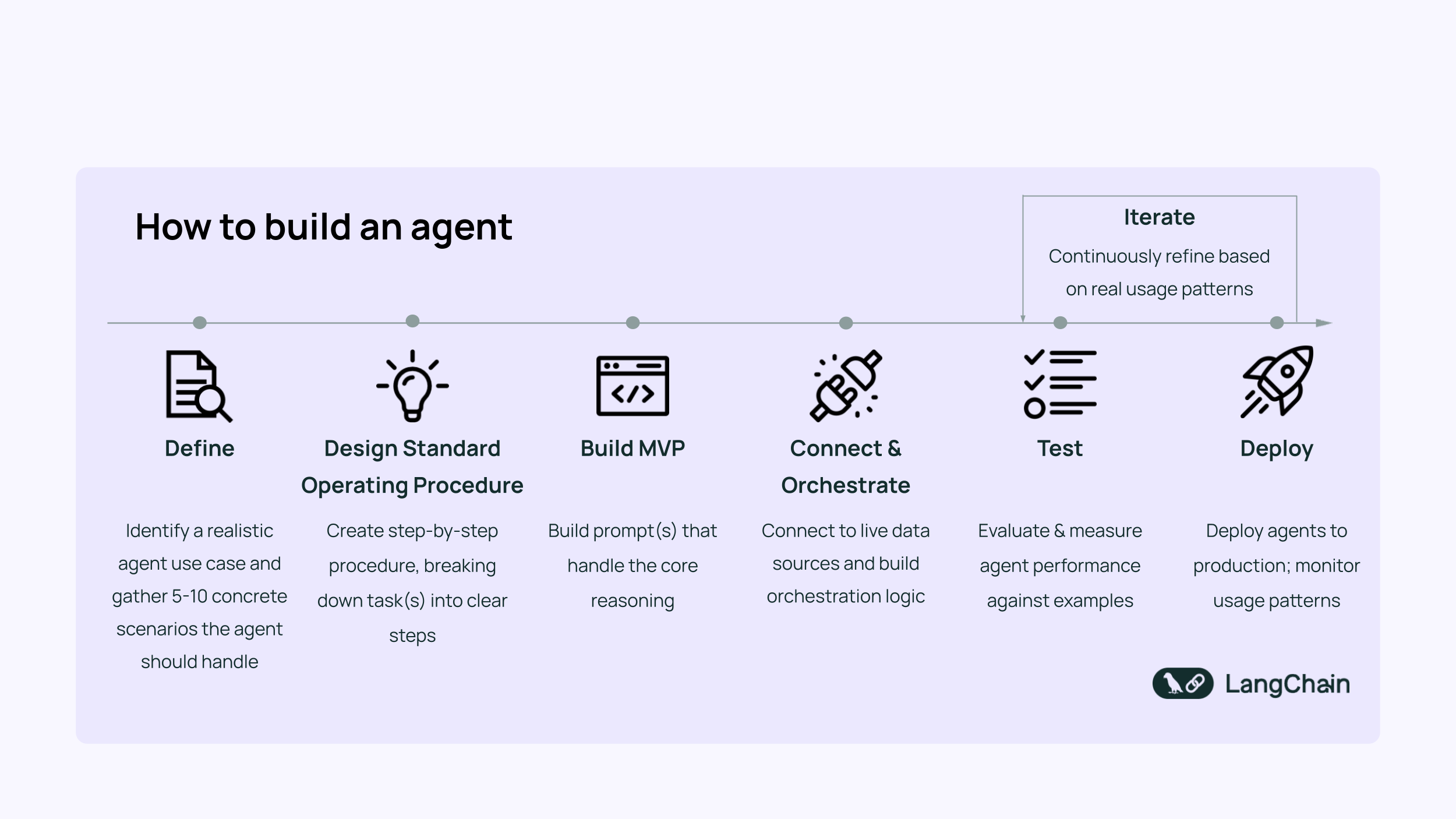
エージェント構築プロセスのステップバイステップ図
ステップ 1: 例を用いてエージェントの役割を定義する
現実的であり、かつエージェントにしかできないタスクを選ぶ。
賢いインターン(見習い社員)に教えられるようなタスクを選んでください。最高のインターンでも、十分な時間とリソースを与えられてもそのタスクを完了できない場合、そのタスクは非現実的すぎるか、野心が大きすぎます。エキスパートモード(高度な機能)を有効にする前に、基本的な部分の習得が可能であることを証明してください。
まず、そのタスクの具体的で明確な例を 5〜10 個挙げることから始めます。これには二つの目的があります。
- まず第一に、アイデアが適切にスコープ(範囲)設定されており、あまりにも単純すぎたり曖昧すぎたりしないことを検証します。
- 第二に、後ほどパフォーマンスを測定するためのベンチマーク(基準)を提供します。
例:メールエージェントの構築
この段階では、エージェントが処理すべきタスクを定義します。これにはおそらく以下が含まれます:
- 主要なステークホルダーからの緊急メールを優先する
- カレンダーの空き状況に基づいて会議をスケジュールする
- スパムや返信不要のメールを無視する
- 会社のドキュメントに基づいて製品に関する質問に答える
避けるべきレッドフラグ:
- 具体的な例が思いつかない場合、そのスコープは広すぎる可能性があります。
- 従来のソフトウェアの方が適している場合にエージェントを使用すること(例えば、ロジックが単純で固定されており、他の場所で既に実装されている場合など)。エージェントは低速で高コストであり、時として扱いにくいことがあります。従来のソフトウェアで作業が完結するなら、それを使用してください!
- 存在しない魔法(例えば、存在しないAPIやデータセットに接続する、またはまだ構築できないもの)を期待すること
ステップ 2:運用手順の設計
人間がタスクやプロセスを実行する方法について、ステップごとの指示を含む詳細な標準運用手順(SOP)を記述します。
このステップは、明確で妥当なスコープを持つ問題を選択したことを確認するのに役立ちます。また、エージェントが処理するために必要となる主要なステップ、意思決定、およびツールを浮き彫りにし、構築すべきものの基盤を築きます。
例:メールエージェントの構築
メールエージェントの場合、ステップごとの手順は以下のようになります:
- メールコンテンツと送信者の文脈を分析し、返信の優先度を分類する
- カレンダーの空き状況を確認し、ビデオ会議の予約を行う
- メール、送信者、およびスケジュールの文脈に基づいて返信をドラフトする
- 簡易な人間のレビューと承認を経てメールを送信する
これらを明確に記述することで、タスクの範囲が適切に定義され、エージェントが必要とするツールやロジックが浮き彫りになります。
ステップ 3: プロンプトでMVPを構築する
どこから始めるかを選ぶことは重要です。エージェントが複雑な場合、すべてを一気に実行しようとすると野心が大きすぎます。SOPで概説されたエージェントのアーキテクチャ、つまりフローの流れ、必要な意思決定、LLM(大規模言語モデル)の推論が不可欠な箇所から設計することから始めます。
その後、最も重要なLLMの推論タスク(例:分類、意思決定)に焦点を当て、それらを適切に処理するプロンプトを作成することでMVP(Minimum Viable Product:最小実行可能製品)を構築します。 多くのエージェントが失敗するのは、タスクに対してLLMの推論能力が不十分だからです。手動で提供されたデータを用いて単一のプロンプトを動作させることで、完全なエージェントの構築に進む前に自信を築くことができます。LangSmithのようなプロンプトエンジニアリングツールは、プロンプトバージョンの管理からシナリオやデータセット全体でのテスト、反復処理に伴うパフォーマンス追跡に至るまで、このプロセスを効率化するのに役立ちます。
シンプルに保つために:
- プロンプトが必要とするデータやコンテキストの手動入力から始める(現時点では自動化は控える)
- ステップ 1 で定義した例に対してテストを行い、一般的なユースケース全体でパフォーマンスを検証する
- LLM の推論プロセスが適切に行われることに注力する
例:メールエージェントの構築
この段階では、まず開始するために1 つの高レバレッジな推論タスクを特定し解決することを目指します。
メールエージェントの場合、これはメールの緊急性と意図による分類(例:会議リクエスト、サポート質問)に焦点を当てることを意味します。これはエージェントの残りの部分が依存する基盤的なステップだからです。
手動で入力されたデータを用いて、このタスクのみを行うコアプロンプトの作成から始めます。入力例は以下の通りです:
- メール本文:「来週、LangChain の製品ロードマップについて話し合うために会議を持ちたい」
- 送信者:「ジェフ・ベゾス」、肩書:「アマゾン CEO」
- 出力:意図 = 「会議リクエスト」、緊急性 = 「高」
テストケース全体でモデルがこれを一貫して正しく処理できるようになれば、コアロジックが妥当であるという確信が得られ、堅固な基盤を構築する準備が整います。
ステップ 4:接続とオーケストレーション
動作するプロンプトが完成したので、次はそのプロンプトを実データやユーザー入力に接続する時です。
まず、プロンプトが必要とするコンテキストやデータ(メール本文、カレンダーの空き状況、製品ドキュメントなど)を特定し、それらにプログラム的にアクセスする方法(API、データベース、ファイルシステム経由など)を計画します。
次に、適切なデータをプロンプトに接続するオーケストレーションロジックを記述します。単純なケースでは、入力を直接渡すだけで済むかもしれません。より複雑なワークフローの場合、LLM にプロンプトを送信する前に、どのデータソースを照会するか、いつ呼び出すか、そしてそれらの出力をどのように組み合わせるかを決定するエージェント型のロジックが必要になることがあります。
例:メールエージェントの構築
このメールエージェントの場合、このステップでは Gmail API(着信メールの読み取り用)、Google Calendar API(空き状況の確認用)、および CRM または連絡先データベース(送信者のコンテキストを強化するため)との統合が含まれる可能性があります。
その後、以下のようなオーケストレーションロジックを構築します:
- 新しいメールがエージェントをトリガーする
- エージェントは CRM またはウェブ検索から送信者情報を取得する
- 緊急性を判断し、返信が必要かどうかを決定するために、完全なコンテキストをプロンプトに渡す
- 会議が適切だと判断された場合、カレンダーの空き状況を確認し、提案する時間を提示する
- エージェントが返信をドラフト作成する
- 人間のレビューを経て、メールを送信する
ステップ 5:テストと反復
ステップ 1 で定義した例を使用して、MVP を手動でテストすることから始めます。目標は、エージェントが中核的なユースケースに対して合理的で正確な出力を生成していることを確認することです。システムに複数の LLM 呼び出しやステップが含まれる場合、LangSmith などのツールを使用してトレーシングを設定し、各段階での意思決定の仕組みを可視化してデバッグすると便利です。
手動テストが確実に行えるようになったら、自動テストへのスケーリングを行って一貫性を確保し、エッジケースを見逃さないようにします。チームは多くの場合、例を数十件に増強してエージェントの長所と短所をより明確に把握します。これにより、複雑さを追加する前にパフォーマンスを定量化することもできます:
- 元の例と新しい例のすべてをプログラムでエージェントに実行させる
- 自動成功指標を定義する — これにより、エージェントの期待される動作に関する明確さが強制される
- 指標が見逃す可能性のある問題を発見するために、人間のレビューを限定的に使用する
例:メールエージェントの構築
メールエージェントの場合、以下の主要な領域全体で成功を定義しテストする必要があります:
- トーンと安全性:回答は専門的で、敬意を表するものであり、幻覚や不適切なコンテンツが含まれていないこと
- 意図と優先度の検出:メールは、送信者と内容に基づいて正しく分類され、優先順位付けされること
- ツール使用の効率性:エージェントは必要なツールのみをトリガーする必要がある(例:スケジュール設定が必要ない場合はカレンダーを確認しない)
- 下書きの品質:提案された返信は、入力コンテキストに基づいて明確で、関連性があり、正確であること
ステップ 6:デプロイ、スケーリング、および精緻化
MVP(Minimum Viable Product)が確実に機能するようになったら、その範囲の拡大を開始します — 新しい機能の追加、より広範なユースケースの実装、あるいはマルチエージェントワークフローの導入などです。新しい機能や統合ごとに、既存の機能を壊していないことを確認するために、ステップ 5 のテストプロセスを繰り返す必要があります。
準備ができたら、ユーザーの手元に本番環境へデプロイします。LangGraph Platform を利用すれば、ワンクリックでデプロイできるため、エージェントの迅速な提供、スケーリング、管理が可能になります。
人々が実際にどのようにエージェントを使用しているかを監視します。LangSmith などのツールを使えば、エージェントの行動をリアルタイムでトレースでき、コストの急増や精度の問題、レイテンシ(応答遅延)を容易に把握できます。実際の使用状況は初期の想定とは異なることが多く、こうした洞察からギャップを発見し、予期せぬニーズを表面化させ、次のイテレーションにおける優先順位付けの指針とすることができます。
重要なのは、ローンチを開発の終了ではなく、イテレーション(反復改良)の開始として捉えることです。
例:メールエージェントの構築
メールエージェントをデプロイした後、トラフィックや一般的なユースケースを監視することで、未対応のユースケースを発見できるかもしれません。
こうした新たなパターンはスコープを拡大する機会を示しています。そこから、新しいインテグレーション(連携機能)を反復的に追加し、プロンプトやオーケストレーションロジックを更新していきます。さらにスケールする前に、各追加要素をテストとユーザーフィードバックによって常に検証することが重要です。
結論
このプロセスは、明確なユースケースに基づき、実際の例に対してテストされ、現実世界のフィードバックによって形作られるエージェントを構築することを支援するために設計されています。単にエージェントを実行可能にするだけでなく、有用で信頼性があり、人々の実際の作業方法と整合したものを構築することが目的です。
メールの振り分けを自動化するか、複雑なワークフローを調整するかにかかわらず、この6つのステップはアイデアからインパクトへの実用的な道筋を示します。しかし、デプロイメントで作業が終了するわけではありません。最も優れたエージェントは、反復を通じて構築されます。
したがって、小さく始め、ユーザー中心を堅持し、継続的に改善してください。
関連コンテンツ

エージェントアーキテクチャ (Agent Architecture)
LangSmith
オープンソース (Open Source)
LangSmith と LangChain OSS が EU AI Act の要件を満たすのをどう支援するか


J. Talbot,
B. Weng
2026年4月27日

7分

ケーススタディ (Case Studies)
LangSmith
Credit Genie が Insights Agent を活用して AI 財務アシスタントを改善した方法




D. Li,
J. Ngai,
G. Lozano Palacio,
C. Yuan
2026年4月20日
5分

観測可能性と評価(Observability & Evals)
LangSmith
LangSmithにおける再利用可能な評価器と評価テンプレート

C. Qiao,
J. Talbot
2026年4月16日
4分

エージェントの実際の動作を確認する
LangSmithは、エージェントエンジニアリングプラットフォームであり、開発者がすべてのエージェントの意思決定をデバッグし、評価の変更を確認し、ワンクリックでデプロイすることを支援します。
原文を表示
While seemingly every company is talking about building agents this year, far fewer have done it. It’s easy to let your imagination run wild with how agents can transform your business, but many teams are unsure where to begin, how to make progress, and where to set expectations.
*In this guide, we’ll walk through a framework for going from idea to impact— illustrated with a real-world example of building an email agent.*
Step 1: Define your agent’s job with examples
Choose something realistic and something that requires an agent.
Pick something you could teach a smart intern. If your best intern could never complete the task given enough time and resources, the task may be unrealistic or too ambitious. Prove you can get the basics down before activating expert mode.
Start by coming up with 5-10 concrete examples of the task. This serves two purposes:
- First, it validates that your idea is well-scoped - not too trivial or vague
- Second, gives you a benchmark for measuring performance later.
Example: Building an Email Agent
At this step, we’d define what tasks our agent needs to handle, which likely includes:
- Prioritize urgent emails from key stakeholders
- Schedule meetings based on calendar availability
- Ignore spam or emails that don't require responses
- Answer product questions based on company documentation
Red flags to avoid:
- If you can’t come up with concrete examples, your scope is probably too broad.
- Using an agent when traditional software would work better (e.g., when the logic is simple, fixed, and already implemented elsewhere). Agents are slow, expensive, and can be finicky at times. If traditional software gets the job done - just use that!
- Expecting magic that doesn't exist (e.g., connecting to APIs or datasets that don’t exist or can’t be built yet)
Step 2: Design operating procedure
Write up a detailed standard operating procedure (SOP), with step-by-step instructions for how a human would perform the task or process.
This step helps confirm that you’ve chosen a problem with a clear, reasonable scope. It also surfaces the key steps, decisions, and tools your agent will likely need to handle—laying the groundwork for what to build.
Example: Building an Email Agent
For our email agent, a step-by-step procedure could look like below:
- Analyze email content and sender context to categorize response priority
- Checks calendar availability; schedules video conference meeting
- Draft a response based on the email, sender, and scheduling context
- Send the email after a quick human review and approval
Writing this out helps ensure the task is scoped appropriately, and surfaces the tools and logic our agent will need to handle.
Step 3: Build MVP with prompt
Choosing a place to start is important. If your agent is complex, trying to do it all in one go is too ambitious. Start by designing the agent’s architecture outlined by the SOP: how it will flow, what decisions it needs to make, and where LLM reasoning is essential.
Then, build an MVP by focusing on the most critical LLM reasoning task(s) (e.g., classification, decision-making) and creating a prompt that handles them well. Most agents fail because the LLM can't reason well enough for the task. Getting a single prompt working with hand-fed data will help you build up confidence before proceeding to build the full agent. Prompt engineering tools like LangSmith can help streamline this process, from managing prompt versions, to testing across scenarios or datasets, and tracking performance over time as you iterate.
Keep it simple by:
- Starting with manual inputs for any data or context the prompt needs (hold off on automation for now)
- Testing against your outlined examples from Step 1 to validate performance across common use cases
- Focusing on getting the LLM reasoning right
Example: Building an Email Agent
At this stage, we’re identifying and solving *one* high-leverage reasoning task to start with.
For our email agent, that might mean focusing just on classifying emails by urgency and intent (e.g., meeting request, support questions), as this is a foundational step that the rest of the agent depends on.
Start by writing a core prompt that does just this, with hand-fed inputs like:
- Email content: “Can we meet next week about LangChain’s product roadmap?”
- Sender: “Jeff Bezos”, Title: “CEO of Amazon”
- Output: Intent = “Meeting Request”, Urgency = “High”
Once the model consistently gets this right across your test cases, you’ll have confidence that the core logic is sound—and a strong foundation to build on.
Step 4: Connect & Orchestrate
Now that we have a working prompt, it’s time to connect the prompt to real data and user inputs.
Start by identifying what context or data the prompt needs—such as email content, calendar availability, and documentation of products—and plan how to access it programmatically (e.g., via APIs, databases, or file systems).
Then, write orchestration logic to connect the right data into your prompt. In simple cases, this might just mean passing inputs directly. For more complex workflows, you may need agentic logic to decide which data sources to query, when to call them, and how to combine their outputs before prompting the LLM.
Example: Building an Email Agent
For our email agent, this step could involve integrating with the Gmail API (to read incoming emails), Google Calendar API (to check availability), and a CRM or contact database (to enrich sender context).
We’d then build orchestration logic like the following :
- A new email triggers the agent
- The agent fetches sender info from the CRM or via web search
- It passes the full context into the prompt to determine urgency and whether a response is needed
- If a meeting is appropriate, it checks calendar availability and proposes times
- The agent drafts a response
- After human review, it sends the email
Step 5: Test & Iterate
Begin by manually testing your MVP using the examples you defined in Step 1. The goal is to verify that your agent is producing reasonable, accurate outputs for your core use cases. If your system involves multiple LLM calls or steps, it’s helpful to set up tracing using tools like LangSmith to visualize the flow and debug how decisions are made at each stage.
Once manual testing is solid, scale to automated testing to ensure consistency and catch edge cases. Teams will often beef up examples to a few dozen to get a better sense of the agent’s strengths and weaknesses. This also helps you quantify performance before adding more complexity:
- Run all examples (original + new) programmatically through your agent
- Define automated success metrics — this forces clarity around your agent’s expected behavior
- Use human review selectively to catch issues that metrics might miss
Example: Building an Email Agent
For the email agent, we’d want to define and test success across several key areas:
- Tone and Safety: Responses should be professional, respectful, and free of hallucinated or inappropriate content
- Intent & Priority Detection: Emails should be correctly categorized and prioritized based on sender and content
- Tool Usage Efficiency: The agent should trigger only the necessary tools (e.g., avoid checking the calendar if no scheduling is required)
- Draft Quality: Suggested replies should be clear, relevant, and accurate based on the input context
Step 6: Deploy, Scale, and Refine
Once your MVP is performing reliably, begin expanding its scope—adding new capabilities, broader use cases, or even multi-agent workflows. For every new feature or integration, repeat the testing process from Step 5 to ensure you’re not breaking existing functionality.
When ready, deploy to production in users' hands. LangGraph Platform allows you to quickly ship, scale, and manage your agents with one-click deployment.
Monitor how people actually use your agent. Tools like LangSmith let you trace your agent’s actions in real time, making it easier to spot spikes in cost, accuracy issues, or latency. Real-world usage often differs from your initial assumptions, and these insights can reveal gaps, surface unexpected needs, and guide prioritization during your next iteration.
The key is treating launch as the beginning of iteration, not the end of development.
Example: Building an Email Agent
After deploying our email agent, we might discover unaddressed use cases through monitoring traffic and common use cases.
These emerging patterns signal opportunities to expand scope. From there, we can iteratively add new integrations and update our prompts and orchestration logic—always validating each addition with tests and user feedback before scaling further.
Conclusion
This process is designed to help you build agents that are grounded in clear use cases, tested against real examples, and shaped by real-world feedback. It’s not just about getting an agent to run, but about building something useful, reliable, and aligned with how people actually work.
Whether you're automating email triage or orchestrating complex workflows, these six steps offer a practical path from idea to impact. But the work doesn’t stop at deployment—the best agents are built through iteration.
So start small, stay user-focused, and keep refining.
Related content
Agent Architecture
LangSmith
Open Source
How LangSmith and LangChain OSS Help You Meet EU AI Act Requirements
J. Talbot,
B. Weng
April 27, 2026
7
min
Case Studies
LangSmith
How Credit Genie used Insights Agent to improve their AI financial assistant
D. Li,
J. Ngai,
G. Lozano Palacio,
C. Yuan
April 20, 2026
5
min
Observability & Evals
LangSmith
Reusable Evaluators and Evaluator Templates in LangSmith
C. Qiao,
J. Talbot
April 16, 2026
4
min
See what your agent is really doing
LangSmith, our agent engineering platform, helps developers debug every agent decision, eval changes, and deploy in one click.
関連記事
今日のまとめ
AI日報で今日の重要ニュースをまとめ読み