GitHub Copilot アプリ:エージェントネイティブなデスクトップ体験の提供
GitHub は、複数のエージェントを並列実行・管理し、開発ワークフローの断片化を解消するための「Copilot app」というデスクトップ型コントロールセンターを発表した。
キーポイント
エージェントネイティブなデスクトップ体験の提供
複数のエージェントが並列で動作する際のコンテキスト散逸や作業切り替えの問題を解決するため、GitHub 上で構築された専用デスクトップアプリ「Copilot app」が技術プレビューとして公開された。
一元管理によるワークフローの統合
My Work ビューからアクティブなセッション、イシュー、プルリクエスト、バックグラウンド自動化を一元で監視・操作でき、エージェントが生成したコードの検証やマージまでの軌跡を明確に追跡可能になった。
Git worktree による完全分離環境
各セッションは独立した Git worktree(ブランチの実体)で実行されるため、並列するエージェント間の干渉を防ぎつつ、安全にコードの変更を検証・テスト・マージできる仕組みが実装されている。
大規模開発への対応と市場動向
月間 14 億件のコミットや 20 億分以上の GitHub Actions 実行など、エージェント活用による開発速度の加速に対応し、GitHub が「すべての開発者(およびそのエージェント)のためのホーム」として基盤を強化している。
独立した Git ワークツリーによる並行処理
各セッションが独自の Git ワークツリー(ブランチの完全な孤立コピー)で実行されるため、複数のエージェントセッションを同時に安全に並列処理できます。
双方向のキャンバス機能による可視化
チャットでは扱いにくい作業内容を「キャンバス」という双方向のワークスペースで可視化し、人間とエージェントが計画やコードを直接編集・承認・誘導できる新しい体験を提供します。
ローカルおよびクラウドのサンドボックス環境
エージェントが安全にコードを実行・テスト・反復できるよう、ローカルまたはクラウド上の隔離された環境(サンドボックス)で動作し、セキュリティポリシーとリソース制約を柔軟に管理できます。
重要な引用
The new GitHub Copilot app is the agent-native desktop experience built on GitHub.
Every session runs in its own git worktree, a real, isolated copy of your branch. This helps parallel agent sessions work without stepping on each other.
Canvases are bidirectional work surfaces for humans and agents.
Chat is where you instruct, discuss, and reason through ambiguity. Canvases are where that intent becomes visible work you can inspect, steer, and verify.
One runtime for apps, tools, and agents.
The same agentic capabilities work across the terminal, the cloud, and even your own tools, on the same foundation.
影響分析・編集コメントを表示
影響分析
この記事は、AI エージェントが単なるコード生成ツールから、開発プロセスの中心となる自律的な存在へと進化していることを示唆しており、開発ワークフローの設計思想そのものが「人間による管理」から「エージェントの並列制御」へシフトしつつある重要な転換点である。GitHub のこの動きは、マルチエージェントシステムの実用化における標準的なインターフェースやベストプラクティスを確立する可能性があり、業界全体のエージェント開発ツールの進化を牽引すると考えられる。
編集コメント
単なるチャットボットの延長ではなく、開発現場の複雑な並列処理を管理する「OS」レベルのツールへと進化しようとする GitHub の戦略が明確に示されています。
エージェント型シフトにより開発は加速しましたが、その一方でワークフローが分断され、コンテキストの切り替えが増え、エージェント生成コードのレビューに費やす時間が多すぎるという課題も生じています。
エージェントがソフトウェア構築における永続的な要素となるためには、開発者ワークフローの中に明確な位置づけが必要です。しかし、現在の多くの開発ツールは、複数のエージェントを並行して指揮するために設計されたものではありません。コンテキストがウィンドウ間に散逸し、何を実行中かが把握できなくなります。コードはプルリクエストとして提出されますが、エージェントが何を試したか、何を検証したか、あるいは人間の判断がどこで必要となるのかという明確な軌跡がありません。
既存の Copilot Pro、Pro+、Business、または Enterprise プランをお持ちであれば、今日から GitHub Copilot アプリの利用を開始できます。詳しくはこちら >
GitHub 全体では、開発者がエージェントを活用して、プロンプトから計画へ、イシューからプルリクエストへ、レビューフィードバックからマージ済みコードへと移行しています。エージェント型ワークフローが標準となるにつれ、リポジトリの作成、プルリクエストのアクティビティ、API の利用すべてが加速しており、減速する兆候は見られません。GitHub 単体でも、コミット数は前年比でほぼ倍増し、月間 14 億件を超え、さらに週間で 20 億分以上の GitHub Actions が実行されています。
この需要に応え、すべての開発者(そして今やそのエージェントたち)のための拠点であり続けるために、私たちはスタックのあらゆる層において基盤システムのスケールアップと、すべてのサービスにおけるレジリエンスおよび安定性の向上に注力しています。
GitHub は、エージェント型フロンティアを支えるシステムを構築しており、それが本日 Microsoft Build で発表している内容です。
Copilot アプリ:エージェントネイティブ開発のためのコントロールセンター
一日の始まり、すでに三つの作業が進行中です。一つのエージェントが生産環境のバグを調査中、もう一つはバックログ課題の実装に取り組んでおり、三つ目はプルリクエストのレビューフィードバックに対応しています。それぞれが独自の隔離された環境で実行され、検査・転送・テスト・マージ可能な変更を生み出します。
それらに追いつける環境が必要です。
新しい GitHub Copilot アプリは、GitHub を基盤としたエージェントネイティブなデスクトップ体験です。単一の「My Work」ビューから、接続されたリポジトリ全体で進行中の作業——アクティブなセッション、課題、プルリクエスト、背景の自動化——を一望できます。Copilot アプリは現在、既存の Copilot Pro、Pro+、Business、Enterprise ユーザー向けに技術プレビューとして利用可能です。
GitHub Copilot アプリは、当社のビジネスを変革する GitHub 由来の AI ツール群における最新作です。AI の支援を超えて、本アプリはエージェント開発に必要な不可欠なコントロールセンターを提供しています。
Forward Deployed Engineers は、一箇所でエージェントのコホートを派遣し、複数のイニシアチブを管理できます。計画やオートパイロットへの簡単なアクセスに加え、インタラクティブセッションの実行や必要な箇所でのコードへの直接介入も可能です。
David Jobling | マスターテクノロジーアーキテクト、グローバルソリューション&デリバリー、Avanade Inc. 技術・デリバリーフューチャーズ統括
すべてのセッションは独自の git worktree で実行され、ブランチの実際の独立したコピーとなります。これにより、並行して動作するエージェント・セッションが互いに干渉することなく作業できます。アプリがすべての worktree を自動的に処理するため、手動での設定やクリーンアップ、ブランチの切り替えは一切不要です。プロンプトから始める場合でも、受信トレイからの課題から始める場合でも、Copilot は既存の課題、プル・リクエスト、接続したリポジトリから必要なコンテキストを取得します。
Copilot サブスクリプションをアップグレードする
エージェントのパワユーザー向けに、Copilot Max が Copilot Pro、Pro+、EDU からアップグレード可能として提供されており、フローを中断することなく高ボリュームのユースケースをサポートするように設計されています。
詳細はこちら >
次に Agent Merge は、そのプル・リクエストを検証、チェック、マージのプロセスへと導きます。CI を監視し、必要なレビュアーを追跡し、失敗したチェックに対処し、すべての条件が満たされるまで待機します。Copilot にどこまで実行させるかはあなたが選択できます:CI をグリーンに戻す、フィードバックに対応する、あるいは条件が満たされたらマージするです。どの自動化を有効にするか、何がリリースされるかを決定するのはあなたです。
Canvas: 意図を検査可能な作業へと変える場所
チャットは指示や曖昧さの解消には強力ですが、エージェントが実際の作業を開始すると、チャットスレッドは意思決定、ログ、修正の長いスクロールリストになってしまいます。作業そのものが可視化される場所が必要なのです。
本日、GitHub Copilot アプリに「キャンバス」機能も導入いたします。キャンバスは人間とエージェントのための双方向作業スペースです。キャンバスには計画、プルリクエスト、ブラウザセッション、ターミナル、デプロイ状況、ダッシュボード、ワークフローの状態などが表示されます。エージェントは作業を進めるにつれてキャンバスを更新し、開発者は同じ画面上でその作業を編集、並べ替え、承認、または方向転換することができます。
これは Copilot アプリにおけるエージェント体験(AX)の始まりです。人間とエージェントが協働して動作するインターフェースです。チャットは指示を出し、議論を行い、曖昧さを解消するための場所です。一方、キャンバスはその意図が目に見える作業として現れ、検査・誘導・検証が行える場所となります。
コードを提案するだけのエージェントでは、多くの作業を開発者自身が行う必要があります。より効果的なものとするには、エージェントは本番環境に触れることなく、コードを実行し、結果を検査し、変更をテストし、反復して改善する必要があります。
GitHub Copilot 向けのクラウドおよびローカルサンドボックスは、エージェントが行動できる制限された場所を提供します。Copilot の実行先をローカルマシンまたはクラウドから選択でき、セキュリティと企業ポリシーの適用を優先しつつ、ローカルのリソース制約に縛られることなく、エージェント駆動型のワークフローを次々と活用できるようになります。
ローカルサンドボックス機能により、Copilot は直接お客様のマシン上で孤立した環境で実行され、ファイルシステム、ネットワーク接続、およびシステム機能へのアクセスが制限されます。ローカルサンドボックスポリシーは中央から設定・適用することが可能です。
クラウド上では、各サンドボックスは GitHub がホストする完全に隔離された一時的な Linux 環境で実行されます。組織は独自のポリシーを定義できます。クラウドからは、あらゆるデバイスでどこでも Copilot セッションを引き継ぎ、リモートコントロールすることも可能です。
エージェント出力にスケールするコードレビュー
エージェントがより多くのプルリクエストを生成するにつれ、コードレビューへの負荷は増大します。Copilot コードレビューは、ノイズをフィルタリングするための適応型でエージェント型のシステムを提供し、Copilot がコードレビューを行う間、あなたがエネルギーを集中すべき重要な部分に注力できるようにします。
カスタムエージェントスキル、MCP サーバー接続、および構成可能なアクションワークフローを通じて、すべてのレビューがあなたの独自の基準、内部システム、エンジニアリングの文脈を反映するように Copilot を拡張できるようになりました。
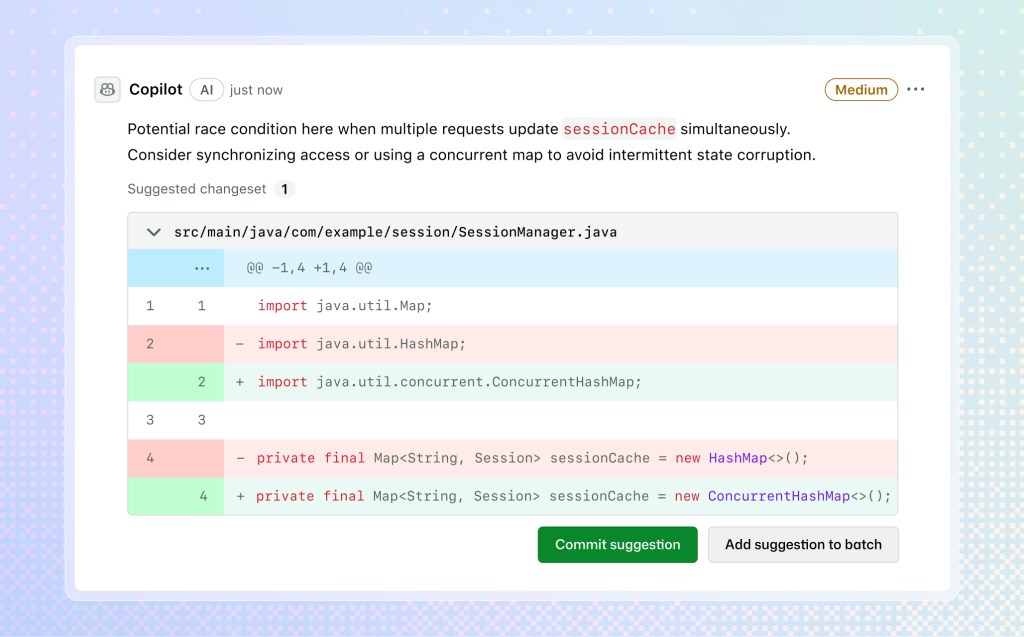
Copilot コードレビューは現在、より高い推論能力を持つモデルにプルリクエストをルーティングして精度と再現率を向上させる「ミディアムティアレビュー」を提供しています。管理者は個々のリポジトリに対して「ロー」または「ミディアム」のガイドラインを設定できます。これにより、リスクの低いコードには軽量でコスト効率の高いモデルを割り当て、より影響度の高いリポジトリには堅牢なモデルの使用を確保することができます。
/security-review スキルは、セキュリティに焦点を当てた評価のための Copilot 専用のパスを提供します。/rubberduck スキルは現在、一般利用可能となり、複数のモデルファミリーを使用して実装を批判し、新たな課題を見つけることができます。
Azure DevOps で作業している場合、Copilot コードレビューをネイティブで利用できるようになりました。期待されるワンクリックでのレビュー、インラインコメント、コミット可能な修正提案がそのまま利用でき、管理者は任意のリポジトリでコードレビューを有効化できます。
アプリ、ツール、エージェントのための単一のランタイム
同じアジェンシー機能は、ターミナル、クラウド、さらには独自のツール上でも、同じ基盤上で動作します。
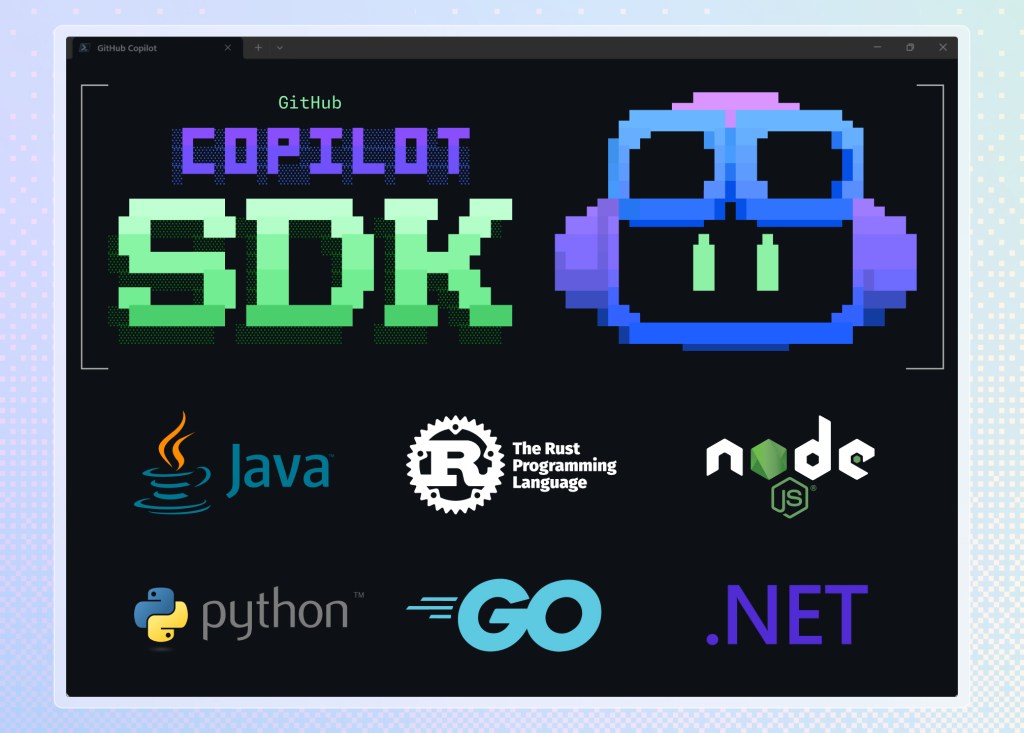
GitHub Copilot SDK を使用して、独自のツールを構築できるようになりました。Node.js/TypeScript、Python、Go、.NET、Rust、Java で一般利用可能となり、Cop アプリを支える同じアジェンシーランタイムを公開しています。チームに内部コード分析ツールやカスタムリリースノート生成器、サポートワークフローに埋め込まれたエージェントが必要な場合でも、独自スタックをつなぎ合わせるのではなく、同じ基盤上で構築できます。単一のランタイムで、多くの表面(インターフェース)に対応します。
ターミナルでの作業を好む開発者向けに、Copilot CLI には再設計されたインターフェース、音声入力、スケジュールタスクが追加され、ターミナルで作業し続けることができます。
Copilot CLI は /experimental モードで再設計された TUI(テキストユーザーインターフェース)を提供し、ターミナルからプルリクエスト、イシュー、ギストにタブ切り替えでアクセスできます。音声モードではオンデバイスでの音声認識を使用するため、オーディオデータが端末外に出ることはありません。/every コマンドは、定期的なプロンプトやバックグラウンドタスクをスケジュールします。
クラウド自動化機能により、エージェントはスケジュール通りに実行したり、GitHub のイベントに応答して課題を開いたりコメントを残したりできます。デフォルトでは、クラウドエージェントは各書き込みアクションの実行前に許可を求めます。信頼関係を築いた後は、オートパイロットモードに切り替えてください。
エンジニアリングはコード作成で終わるものではありません。課題の提出、議論の開始、レビュアーへの返信も含まれます。Copilot クラウドエージェントは、これらのすべてのステップを処理できるようになりました。
Memory++ と /chronicle により、Copilot はデバイス間や時間を超えて継続性を保ちます。アプリ、CLI、VS Code、または GitHub で開始されたセッションからのコンテキストを照会できます。
パートナーが構築したエージェントアプリは、GitHub Copilot と統合され、タスクの自動化、コード生成、コンテキスト分析、アクションの実行をサポートします。お気に入りのツールを GitHub を離れることなく使用できます。ワークフローに合った新しいエージェントに課題を割り当ててください。パートナーには LaunchDarkly、Bright、Amplitude、Sonar、Endor Labs、Octopus Deploy、Packfiles、PagerDuty、Miro が含まれます。これらのエージェントアプリを今日から使い始めましょう。また、待機リストに参加して、自社のエージェントアプリも GitHub に持ち込むことができるようにしてください。
私たちが目指すもの
プロフェッショナルなソフトウェアには、判断力、検証、責任が求められます。そのため、GitHub Copilot アプリ、サンドボックス、コードレビュー、自動化、コンテキスト、パートナーエコシステムは、一つのシステムとして統合されつつあります:エージェントがより多くの作業を担う一方で、開発者は品質、ポリシー、納期のコントロールを維持できます。
GitHub 上でリポジトリの作成からプルリクエストのアクティビティ、API 利用に至るまでエージェント型ワークフローが拡大するにつれ、プラットフォームもそれとともに成長する必要があります。私たちはまず可用性に焦点を当て続けるでしょう。チームが毎日依存できるほど、エージェントネイティブな開発が高速で、利用可能かつ信頼性のあるものとなるよう、これらのシステムを強化することにコミットしています。
GitHub はそのシステムが存在する場所です。なぜなら、コードもレビューも課題(issues)もチームも、すでにそこにあるからです。
共に作り上げましょう。
Microsoft Build での発表の詳細は GitHub Changelog でご確認ください >
本記事「GitHub Copilot app: The agent-native desktop experience」は、The GitHub Blog に最初に掲載されました。
原文を表示
While the agentic shift has made development faster, it’s also led to disjointed workflows, more context switching, and too much time spent reviewing agent-generated code.
If agents are going to be a durable part of how software gets built, they need a real place in the developer workflow. Yet most developer tools were not designed for directing multiple agents in parallel. Context scatters across windows. You lose track of what’s running. Code lands in pull requests without a clear trail of what the agent tried, what it validated, or where human judgment is needed.
Get started with the GitHub Copilot app today using your existing Copilot Pro, Pro+, Business, or Enterprise plan. Learn more >
Across GitHub, developers are using agents to move from prompt to plan, from issue to pull request, from review feedback to merged code. As agentic workflows become the norm, repository creation, pull request activity, and API usage are all accelerating with no evidence of slowing down. On GitHub alone, commits nearly doubled year over year, crossing 1.4 billion per month, plus over 2 billion GitHub Actions minutes a week.
To meet this demand and continue to be the home for all developers (and now their agents), our focus is scaling our underlying systems and improving resilience and stability across all of our services, at every layer of the stack.
GitHub is building that system for the agentic frontier, and that’s what we’re showing today at Microsoft Build.
Copilot app: A control center for agent-native development
You start the day with three pieces of work already in motion. One agent is investigating a production bug. Another is implementing a backlog issue. A third is working through review feedback on a pull request. Each is running in its own isolated environment, producing changes you can inspect, redirect, test, and merge.
You need an environment that can keep up.
The new GitHub Copilot app is the agent-native desktop experience built on GitHub. From a single My Work view, you can see work in motion across connected repositories: active sessions, issues, pull requests, and background automations. The Copilot app is now available in technical preview for existing Copilot Pro, Pro+, Business, and Enterprise users.
The GitHub Copilot app is the latest in a line of AI tooling from GitHub that is transforming our business. Moving beyond AI assistance, the app has provided a much-needed control center for agentic development.
Our Forward Deployed Engineers can dispatch a cohort of agents and manage multiple initiatives, all from one location. Easy access to plans and autopilots with the ability to run interactive sessions or step into code where needed.
David Jobling | Master Technology Architect, Head of Technology & Delivery Futures, Global Solutioning & Delivery, Avanade Inc.
Every session runs in its own git worktree, a real, isolated copy of your branch. This helps parallel agent sessions work without stepping on each other. The app handles every worktree for you: no manual setup, no cleanup, no branch juggling. Whether you start from a prompt or an issue from your inbox, Copilot gets the context it needs from existing issues, pull requests, and the repos you’ve connected.
Upgrade your Copilot subscription
For agent power users, Copilot Max is available as an upgrade from Copilot Pro, Pro+, and EDU, and is designed to support higher-volume usage without interrupting that flow.
Learn more >
Then Agent Merge helps carry that pull request through review, checks, and merge. It monitors CI, tracks required reviewers, addresses failing checks, and waits for all conditions to be satisfied. You choose how far Copilot should go: drive CI back to green, address feedback, or merge when your conditions are met. You decide what automation is enabled and what ships.
Canvas: Where intent becomes inspectable work
Chat is powerful for instruction and ambiguity. But once an agent starts doing real work, a chat thread becomes a long scroll of decisions, logs, and corrections. You need a place where the work itself is visible.
Today, we’re also introducing canvases in the GitHub Copilot app. Canvases are bidirectional work surfaces for humans and agents. A canvas might show a plan, pull request, browser session, terminal, deployment, dashboard, or workflow state. Agents update the canvas as they work, and developers can edit, reorder, approve, or redirect that work on the same surface.
This is the beginning of agent experience (AX) in the Copilot app: interfaces where people and agents operate together. Chat is where you instruct, discuss, and reason through ambiguity. Canvases are where that intent becomes visible work you can inspect, steer, and verify.
Agents that can only suggest code leave you do a lot of the work. To be more effective, agents need to run code, inspect results, test changes, and iterate, without touching production.
Cloud and local sandboxes for GitHub Copilot give agents a bounded place to act. Choose where Copilot runs—on your local machine or in the cloud—and begin unlocking agent-driven workflows while prioritizing security and enterprise policy enforcement, and without local resource constraints.
With local sandboxing, Copilot runs in an isolated environment directly on your machine, with restricted access to filesystems, network connectivity, and system capabilities. Local sandbox policies can be centrally configured and enforced.
In the cloud, each sandbox runs in a fully isolated, ephemeral Linux environment hosted by GitHub. Organizations define their own policies. From the cloud, you can pick up Copilot sessions anywhere, on any device, with remote control.
Code review that scales with agentic output
As agents produce more pull requests, the pressure on code review compounds. Copilot code review brings an adaptable, agentic system to filter through the noise, allowing you to focus your energy where it matters most while Copilot conducts code reviews.
You can now extend Copilot so every review reflects your own standards, internal systems, and engineering context via custom agent skills, MCP server connections, and configurable actions workflows.
Copilot code review now offers medium tier review, which routes pull requests to a higher-reasoning model for better precision and recall. Admins can set guidelines for individual repositories to “low” or “medium.” This lets you assign lighter, cost-efficient models for low-risk code and save more robust model use for repos with higher impact.
The /security-review skill gives Copilot a dedicated path for security-focused evaluation. The /rubberduck skill is now generally available to use multiple model families to critique your implementation and find novel issues.
And if you’re working on Azure DevOps, you can now use Copilot code review natively. Get the same one-click review, inline comments, and committable fix suggestions you expect, and admins can enable code review on whichever repos they want.
One runtime for apps, tools, and agents
The same agentic capabilities work across the terminal, the cloud, and even your own tools, on the same foundation.
You can now build your own tools with the GitHub Copilot SDK. Now generally available in Node.js/TypeScript, Python, Go, .NET, Rust, and Java, it exposes the same agentic runtime that powers the Copilot app. If your team needs an internal code analysis tool, a custom release-notes generator, or an agent embedded in a support workflow, you build it on the same foundation instead of wiring together a bespoke stack. One runtime, many surfaces.
For developers who prefer to work in the terminal, Copilot CLI now has a redesigned interface, voice input, and scheduled tasks to keep you there.
Copilot CLI has a redesigned TUI in /experimental mode with tabbed access to pull requests, issues, and gists from the terminal. Voice mode uses on-device speech-to-text, so audio never leaves your machine. /every schedules recurring prompts and background tasks.
Cloud automations let agents run on a schedule, respond to GitHub events, open issues, and leave comments. By default, the cloud agent asks permission before each write action. Switch to autopilot once you have established trust.
Engineering doesn’t end with writing code. It includes filing the issue, kicking off the discussion, and replying to reviewers. Copilot cloud agent can now handle every one of those steps.
Memory++ and /chronicle give Copilot continuity across devices and over time. Query context from sessions started in the app, CLI, VS Code, or on GitHub.
Partner-built agent apps integrate with GitHub Copilot to help automate tasks, generate code, analyze context, and execute actions. Use your favorite tools without leaving GitHub. Assign issues to new agents that fit your workflow. Partners include LaunchDarkly, Bright, Amplitude, Sonar, Endor Labs, Octopus Deploy, Packfiles, PagerDuty, and Miro. Start using these agent apps today. And join the waitlist so your company can also bring its own agent apps to GitHub.
What we’re building toward
Professional software demands judgment, verification, and accountability. That is why the GitHub Copilot app, sandboxes, code review, automation, context, and partner ecosystem are coming together as one system: agents can do more of the work, while developers keep control of quality, policy, and delivery.
As agentic workflows grow across GitHub, from repository creation to pull request activity and API usage, the platform has to grow with them. We will continue to focus on availability first. We are committed to hardening these systems so agent-native development is fast, available, and reliable enough for teams to depend on every day.
GitHub is where that system lives, because it is already where the code, the reviews, the issues, and the teams are.
Let’s build.
Learn more about our launches from Microsoft Build on the GitHub Changelog >
The post GitHub Copilot app: The agent-native desktop experience appeared first on The GitHub Blog.
関連記事
今日のまとめ
AI日報で今日の重要ニュースをまとめ読み