Amazon SageMaker AIのサーバーレスモデルカスタマイズでエージェントツール呼び出しを加速
AWSはAmazon SageMaker AIのサーバーレスモデルカスタマイズ機能を用いた強化学習手法(RLVR)により、AIエージェントのツール呼び出し精度を大幅に向上させ、実運用での信頼性向上とインフラ管理負荷の軽減を実現した。
キーポイント
AIエージェントの実運用課題の解決
ベースモデルがツールを幻覚したり誤ったパラメータを渡すなど、信頼性の問題が実運用展開を阻害している課題に対し、サーバーレスモデルカスタマイズで解決を図っている。
RLVRによる精度向上の実証
検証可能な報酬を用いた強化学習(RLVR)により、Qwen 2.5 7B Instructモデルをファインチューニングし、トレーニングで見ていないシナリオでもツール呼び出し報酬を57%向上させた。
運用負荷の大幅な軽減
自前で強化学習を運用する際のGPU調達、メモリ調整、報酬インフラ構築などの運用オーバーヘッドをSageMaker AIが肩代わりし、ユーザーはモデル・データ・報酬関数に集中できる。
幅広いモデルと手法のサポート
Amazon Nova、GPT-OSS、Llama、Qwen、DeepSeekなどのモデルファミリーと、SFT、DPO、RLVR、RLAIFなどのカスタマイズ手法をサポートしている。
GRPOの報酬関数による詳細な学習シグナル
ツール呼び出しの正解度に応じて1.0(完全一致)、0.5(部分一致)、0.0(完全不一致)の3段階で報酬を設定し、モデルが正しい方向性を学習できるようにしている。
トレーニング結果の改善と一般化能力
平均報酬が0.28から0.65-0.68に上昇し、未学習のツールやシナリオを含むテストデータでも性能が向上し、ツール呼び出しの一般的なパターンを学習したことを示している。
評価結果と実用的な改善
カスタムメトリック「Tool Call Reward」が0.35から0.55に57%改善し、正確なツール呼び出し、明確化要求、適切な拒否が大幅に向上した。
重要な引用
Agentic tool calling is what makes AI agents useful in production. It’s how they query databases, trigger workflows, retrieve real-time data, and act on a user’s behalf.
By the end, our fine-tuned model improved tool call reward by 57% over the base model on scenarios that it didn’t see during training.
SageMaker AI takes on that work so you can focus on your model, your data, and your reward function.
The three tiers (1.0, 0.5, and 0.0) give GRPO a richer learning signal. If several of the eight candidates get the function right but miss a parameter, the 0.5 score distinguishes them from completely wrong answers. This helps the model recognize that it’s on the right track.
Tool Call Reward is our custom metric and the most direct measure of what we trained for. It jumped from 0.35 to 0.55, a 57% improvement. In practical terms, this means that the fine-tuned model makes the correct tool calling decision significantly more often.
影響分析・編集コメントを表示
影響分析
この記事は、AIエージェントの実運用における最大の障壁である信頼性問題に対して、クラウドネイティブな解決策を提供する重要な進展を示している。特に、強化学習の運用負荷を大幅に軽減することで、より多くの企業が高度なモデルカスタマイズを実践可能になり、AIエージェントの本格的な実用化が加速する可能性がある。
編集コメント
AIエージェントの実用化における核心的な課題に正面から取り組み、具体的な改善数値(57%向上)を示した点で説得力がある。クラウドサービスによる強化学習の民主化は、今後の業界動向を左右する可能性のある重要なトレンドだ。
Agentic tool calling is what makes AI agents useful in production. It’s how they query databases, trigger workflows, retrieve real-time data, and act on a user’s behalf. But base models frequently hallucinate tools, pass bad parameters, and attempt actions when they should ask for clarification. These failures erode trust and block production deployment.
You can use Serverless model customization in Amazon SageMaker AI to fix these problems without managing infrastructure. With Reinforcement Learning with Verifiable Rewards (RLVR), the model generates its own candidate responses, receives a reward signal indicating quality, and updates its behavior to favor what works. You select a model, configure a technique, point to your data and reward function, and SageMaker AI handles the rest. In this post, we walk through how we fine-tuned Qwen 2.5 7B Instruct for tool calling using RLVR. We cover dataset preparation across three distinct agent behaviors, reward function design with tiered scoring, training configuration and results interpretation, evaluation on held-out data with unseen tools, and deployment. By the end, our fine-tuned model improved tool call reward by 57% over the base model on scenarios that it didn’t see during training.
Because tool calling has a naturally verifiable objective, whether the model called the right function with the right parameters, it maps well to RLVR. The challenge with self-managed reinforcement learning (RL) is the operational overhead. GPU procurement, memory orchestration between rollout and training phases, reward infrastructure, and checkpointing add up quickly. Hyperparameter sensitivity adds another layer of complexity. SageMaker AI takes on that work so you can focus on your model, your data, and your reward function.
SageMaker AI supports model families including Amazon Nova, GPT-OSS, Llama, Qwen, and DeepSeek, with techniques including Supervised Fine-Tuning (SFT), Direct Preference Optimization (DPO), RLVR, and Reinforcement Learning from AI Feedback (RLAIF). Training and validation metrics are tracked through integrated MLflow.
Why RLVR for tool calling
SFT requires labeled examples of each behavior that you want the model to learn. For tool calling, that means examples of calling a tool, asking for clarification, and refusing. But tool calling also requires the model to decide between those behaviors, and SFT can struggle to generalize that decision-making beyond the specific patterns in its training data.
RLVR works differently. For each prompt, the model generates multiple candidate responses (we use eight). A reward function verifies which ones are correct. The model then updates its policy to favor what worked, using Group Relative Policy Optimization (GRPO). GRPO compares each candidate’s reward score against the mean score of the group and reinforces responses that score above average. Over time, the model learns the format of a tool call and when to call compared to when to ask.
Prerequisites
To use serverless model customization in SageMaker AI, you must have the following prerequisites:
- An AWS account
- An AWS IAM role with the required permissions
- A SageMaker AI domain with Studio access
- An Amazon Simple Storage Service (Amazon S3) bucket
Fine-tune Qwen 2.5 7B Instruct in SageMaker AI
To get started, we open Amazon SageMaker AI Studio and choose Models in the left navigation pane to browse the foundation models (FM) that are available for customization.
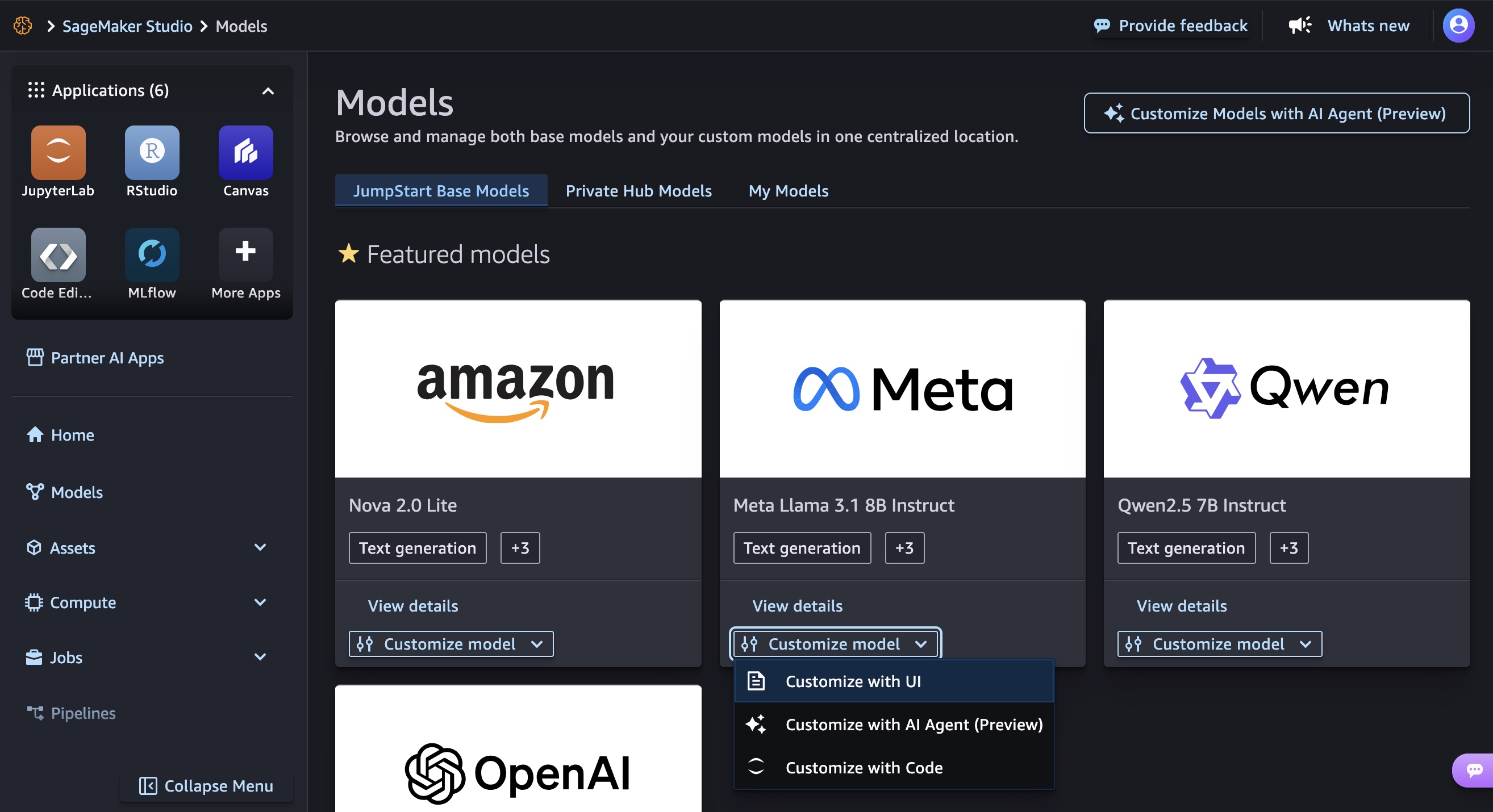
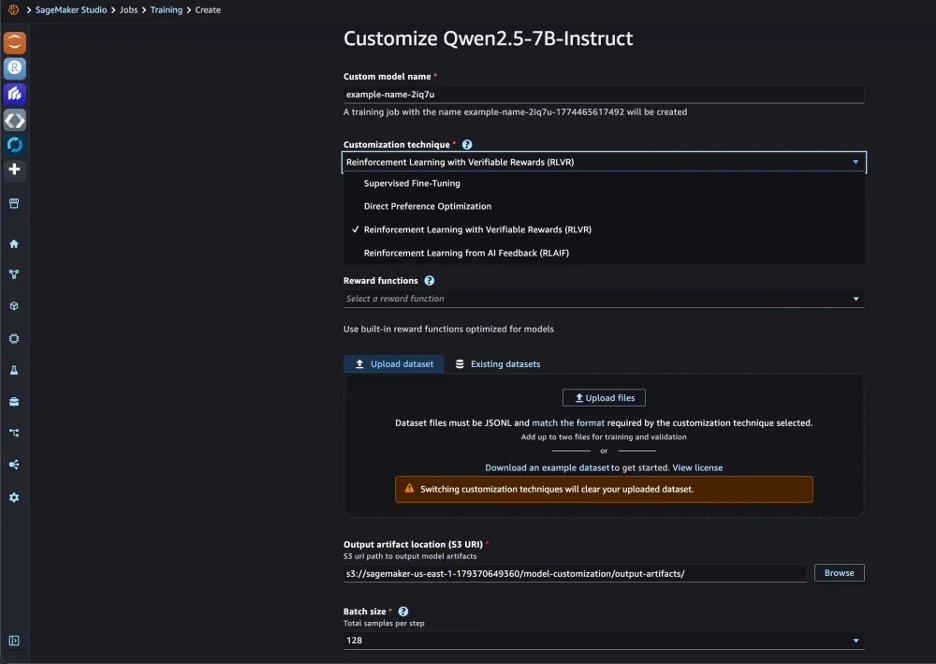
In the Customize model menu, select Qwen 2.5 7B Instruct, and choose Customize with UI. This opens the customization configuration page where you select your technique, point to your training data and reward function, and configure hyperparameters. We selected Reinforcement Learning from Verifiable Rewards (RLVR) as our customization technique.
Prepare your training data
A tool calling dataset needs to teach more than correct API invocations. Production agents face three distinct situations:
- The user provides enough information, and the model should call a tool.
- The user’s request is missing required parameters, and the model should ask for clarification.
- The request is harmful or out of scope, and the model should refuse.
We generated 1,500 synthetic training examples from our tool schemas (weather, flights, translation, currency conversion, statistics) using Kiro, the Amazon AI-powered IDE, to produce prompts with realistic variation in phrasing and specificity across the three behaviors. Here’s an example of the prompt we used:
Generate 1,500 JSONL training examples for RLVR tool-calling** fine-tuning across 5 tool schemas: get_weather_forecast,
search_flights, translate_text, currency_convert, and
get_statistics.
Each line must follow this format:
{"prompt": [{"role": "system", "content": "..."}, {"role": "user", "content": "..."}], "reward_model": {"ground_truth": "..."}}
Distribute examples across three behaviors:
1. Execute (60%): User provides all required params → ground_truth is the tool call JSON
2. Clarify (25%): User is missing required params → ground_truth is a clarifying question
3. Refuse (15%): Request is harmful or out of scope → ground_truth is a polite refusal
Vary phrasing between formal, casual, and terse.
Output valid JSONL only, no commentary.
This is a practical path for teams that don’t yet have production logs to draw from. For organizations already running agentic workflows, real user prompts and tool calls from production will yield even higher-quality training data.
Each training example contains a prompt (a system instruction and user request) and a ground truth in the reward_model field that the reward function scores against. Here are examples of each behavior.
Execute** when the user provides everything the tool needs:
{
  "prompt": [
    {"role": "system", "content": "You are a helpful assistant. When using tools, respond with: [...]"},
    {"role": "user", "content": "Get weather for San Francisco"}
  ],
  "reward_model": {
    "ground_truth": "[{"name": "get_weather_forecast", "arguments": {"city": "San Francisco"}}]"
  }
}
Clarify when a required parameter is missing:
{
  "prompt": [
    {"role": "system", "content": "You are a helpful assistant. When using tools, respond with: [...]"},
    {"role": "user", "content": "Get the weather"}
  ],
  "reward_model": {
    "ground_truth": "To provide you with the weather information, could you please specify the location?"
  }
}
Execute with multiple parameters:
{
  "prompt": [
    {"role": "system", "content": "You are a helpful assistant. When using tools, respond with: [...]"},
    {"role": "user", "content": "Convert 50 EUR to USD"}
  ],
  "reward_model": {
    "ground_truth": "[{"name": "currency_convert", "arguments": {"amount": 50, "from": "EUR", "to": "USD"}}]"
  }
}
Notice the difference between “Get weather for San Francisco” (tool call) and “Get the weather” (clarification). This is the kind of distinction GRPO learns well. For each prompt, the model generates eight candidates, the reward function scores them, and the scores are averaged across the group. Candidates above the mean get reinforced, and over time the model picks up when to call and when to ask.
Define your reward function
The reward function defines what *correct* means for our use case. We write it as a Python function that receives the model’s response and the ground truth from the training data and returns a numerical score. Ours extracts tool calls from the model’s response, parses them as JSON, and compares against the ground truth.
The full function handles response extraction, flexible parsing for alternative formats during early training, and edge cases around JSON type mismatches. Here is the core scoring logic:
# After extracting and parsing tool calls from model response and ground truth:

# Compare tool names
pred_names = {tool.get('name', '') for tool in pred_tools}
gt_names = {tool.get('name', '') for tool in gt_tools}

if pred_names == gt_names:
    # Right function(s) - check if arguments also match
    perfect_match = True
    for pred_tool in pred_tools:
        for gt_tool in gt_tools:
            if pred_tool.get('name') == gt_tool.get('name'):
                if pred_tool.get('arguments') != gt_tool.get('arguments'):
                    perfect_match = False
    score = 1.0 if perfect_match else 0.5
elif pred_names & gt_names:
    # Partial overlap in function names
    score = 0.5
else:
    # Wrong function entirely
    score = 0.0
The three tiers (1.0, 0.5, and 0.0) give GRPO a richer learning signal. If several of the eight candidates get the function right but miss a parameter, the 0.5 score distinguishes them from completely wrong answers. This helps the model recognize that it’s on the right track.
For clarification and refusal cases where the ground truth is natural language (no TOOLCALL tags), the reward function checks whether the model also avoided calling a tool. An unnecessary API call when the model should have asked a question earns 0.0.
Configure and launch training
On the customization configuration page, we point to our training dataset and reward function, then set our hyperparameters. We use a batch size of 128, learning rate of 5e-6, 3 epochs, and 8 rollouts per prompt.
The rollouts setting is the core GRPO mechanism. For each training prompt, the model generates eight different responses, the reward function scores each one, and responses that score above the group average get reinforced. Training and validation metrics are logged to MLflow. In this example, training takes approximately 40 minutes.
Training results
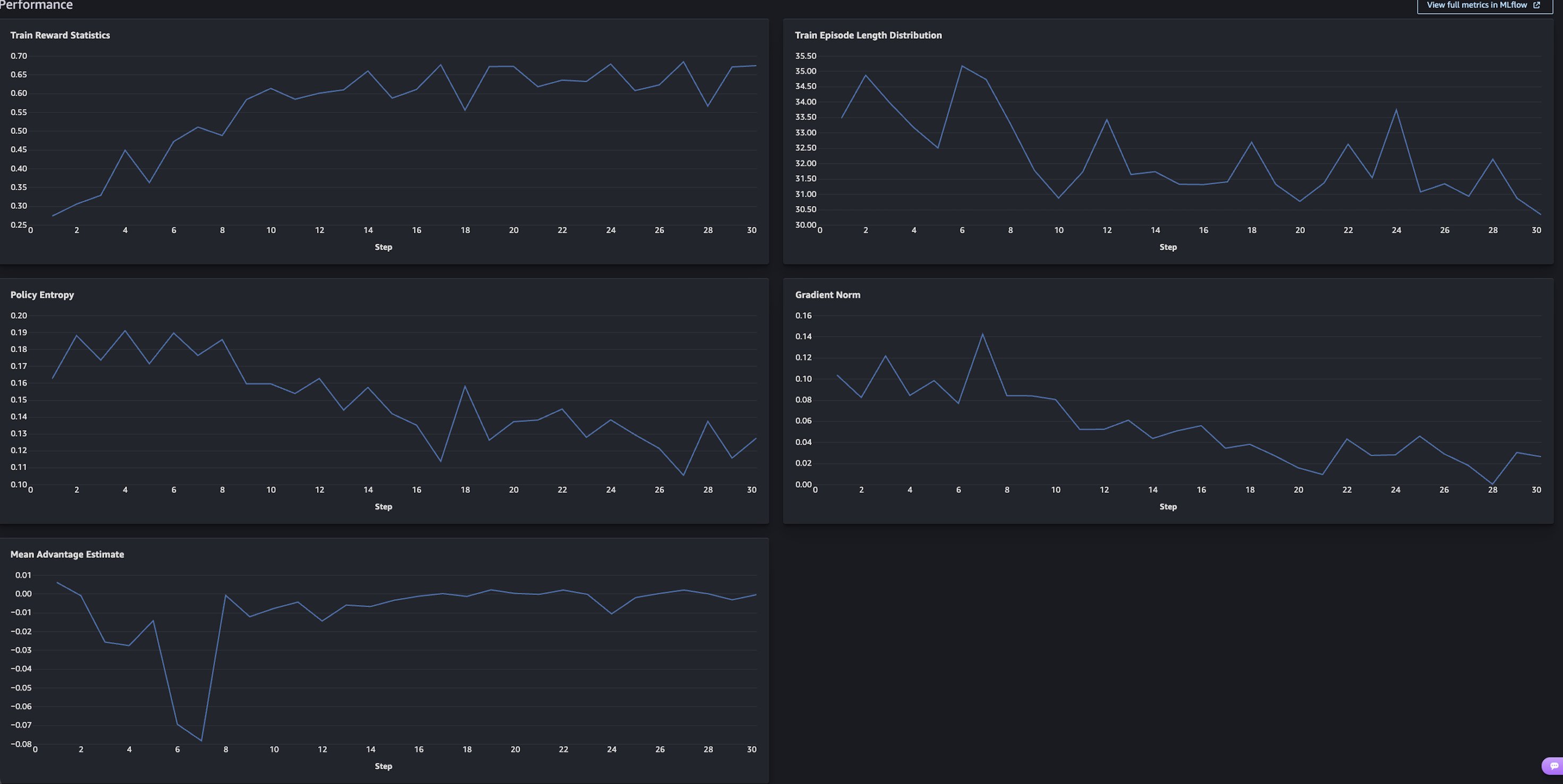
Train Reward Statistics (top left) is the chart to focus on. The mean reward across the roll outs started around 0.28 and climbed to 0.65–0.68 over 30 steps, more than doubling. The steepest gains happen in the first 10 steps as the model learns the basic tool calling format and decision structure. It then flattens after step 20 as it converges.
The other charts confirm healthy training:
- Policy Entropy decreases, meaning the model is getting more confident rather than guessing.
- Gradient Norm stabilizes, meaning updates are getting smaller and more refined.
- Mean Advantage Estimate converges toward zero, indicating that the model’s policy is stabilizing and the average response quality is aligning with the reward baseline.
Evaluate the fine-tuned model
After the training job is complete, you can see the models that you created in the My Models tab. To expand the details, choose View details on one of your models.
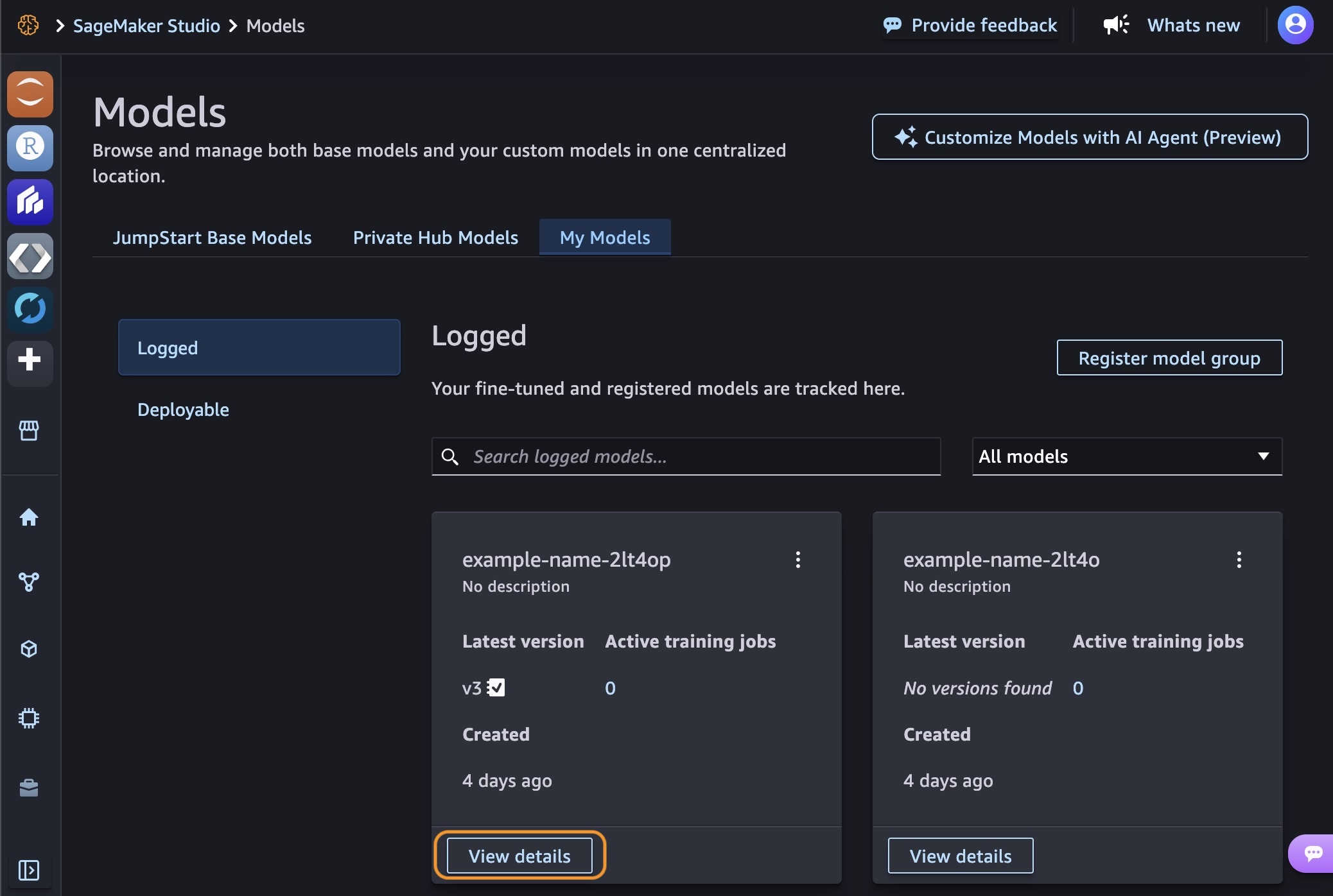
You can choose Continue customization to iterate further by adjusting hyperparameters or training with a different technique. Choose Evaluate to compare your customized model against the base model.
We evaluate on a separate test set of 300 examples that were excluded from training. The evaluation dataset covers the same three behaviors but includes tools, phrasings, and scenarios that the model hasn’t seen. It tests search_restaurants, get_stock_price, and calculate_standard_deviation, none of which appeared during training. It also includes refusal cases for harmful requests like generating violent content or creating malware, testing whether the model generalizes safe behavior to new threats.
The evaluation runs standard NLP metrics alongside our custom reward function against the held-out set.
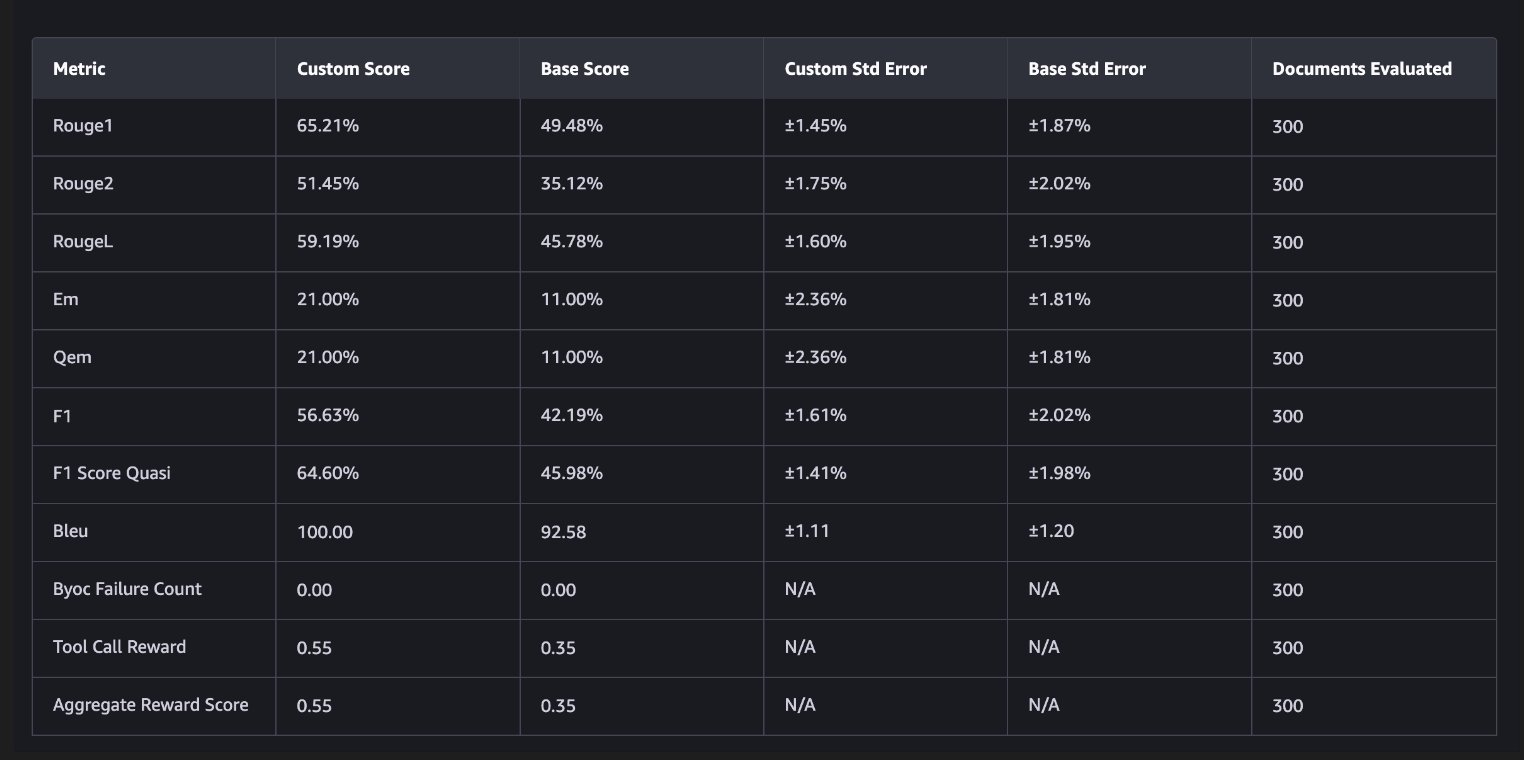
Tool Call Reward is our custom metric and the most direct measure of what we trained for. It jumped from 0.35 to 0.55, a 57% improvement. In practical terms, this means that the fine-tuned model makes the correct tool calling decision significantly more often. It calls the right function with the right parameters when it should, asks for clarification when information is missing, and refuses when appropriate.
F1 Score Quasi, Rouge1, and RougeL all improved by 14–19 percentage points, reflecting better generation of correct function names, parameter keys, and values across the board.
Exact Match doubled from 11% to 21%. This metric requires character-for-character output matching, so even small formatting differences count as a miss. The 21% exact match alongside 64.6% F1 suggests that the model often gets the semantics right even when surface formatting differs slightly.
These results are all on held-out data with tools and scenarios that the model didn’t see during training. The improvements carry over to new tools, which means the model picked up general tool calling patterns rather than memorizing the training set.
Here are responses from the fine-tuned model on prompts that it didn’t see during training:
Tool execution:
Prompt: “What’s the stock price of AMZN?” > > Model response:
[{"name": "get_stock_price", "arguments": {"ticker": "AMZN"}}]
Clarification:
Prompt: “Find me a restaurant nearby” > > Model response: “I’d be happy to help you find a restaurant! Could you please provide the cuisine type or location you’re interested in?”
Near-miss:
Prompt: “What’s the standard deviation of 10, 20, 30, 40, 50?” > > Model response:
[{"name": "calculate_standard_deviation", "arguments": {"numbers": "10, 20, 30, 40, 50"}}]
In the near-miss case, the model selected the correct tool but passed the numbers as a string instead of an array. This earns a 0.5 reward score (right function, wrong parameter format) and represents the kind of error that you’d target in the next iteration through additional training data or reward function refinement.
Deploy the fine-tuned model
With evaluation confirming improvement, deploy the fine-tuned model directly from the model details page. Choose Deploy, and select your deployment target: either a SageMaker AI endpoint or Amazon Bedrock.You can also download the model weights from Amazon S3 for self-managed deployment.
関連記事
今日のまとめ
AI日報で今日の重要ニュースをまとめ読み