Context Engineering
LangChain は、LLM のコンテキストウィンドウを効率的に管理する「Context Engineering」の概念と、エージェント開発における具体的な戦略(記述・選択・圧縮・隔離)を解説し、LangGraph の設計思想との関連性を明らかにした。
キーポイント
コンテキストエンジニアリングの定義
LLM を OS、コンテキストウィンドウを RAM と見なし、エージェントの各ステップで最適な情報だけをメモリに配置する「芸術と科学」として再定義されている。
4 つの主要戦略
エージェントの軌跡に沿って情報を管理するための具体的な手法として、「記述(write)」「選択(select)」「圧縮(compress)」「隔離(isolate)」の 4 つのカテゴリーが提示されている。
LangGraph の設計思想
これらの戦略を効果的に実装・サポートするために、LangChain の新しいオーケストレーションフレームワークである LangGraph がどのように設計されているかが解説される。
影響分析・編集コメントを表示
影響分析
この記事は、LLM アプリケーション開発における「コンテキストの扱い方」を、単なるパラメータ調整から体系的なエンジニアリング分野へと昇華させる重要な転換点を示しています。特にエージェント(Agent)が複雑化する現代において、コンテキストウィンドウの制約を克服し、コストと精度のバランスを最適化するための具体的な指針を提供することで、開発現場の実践レベルに即した影響を与えるでしょう。
編集コメント
LLM のコンテキストリソースをいかに有効活用するかが、次世代エージェント開発の鍵となる中、LangChain が提唱する体系的なアプローチは非常に示唆に富んでいます。特に LangGraph との連携を視野に入れた実装戦略は、複雑なワークフローを構築する開発者にとって即戦力となる内容です。
TL;DR
エージェントがタスクを遂行するには、コンテキスト(文脈)が必要です。コンテキストエンジニアリングとは、エージェントの行動軌跡における各ステップで、コンテキストウィンドウに最適な情報だけを充填する芸術かつ科学のことです。本稿では、様々な人気エージェントや論文をレビューし、「記述(write)」「選択(select)」「圧縮(compress)」「隔離(isolate)」という、コンテキストエンジニアリングにおける一般的な戦略をいくつか分解して解説します。その後、LangGraph がこれらをサポートするためにどのように設計されているかを説明します!
また、コンテキストエンジニアリングに関する当社の動画は こちら でご覧いただけます。
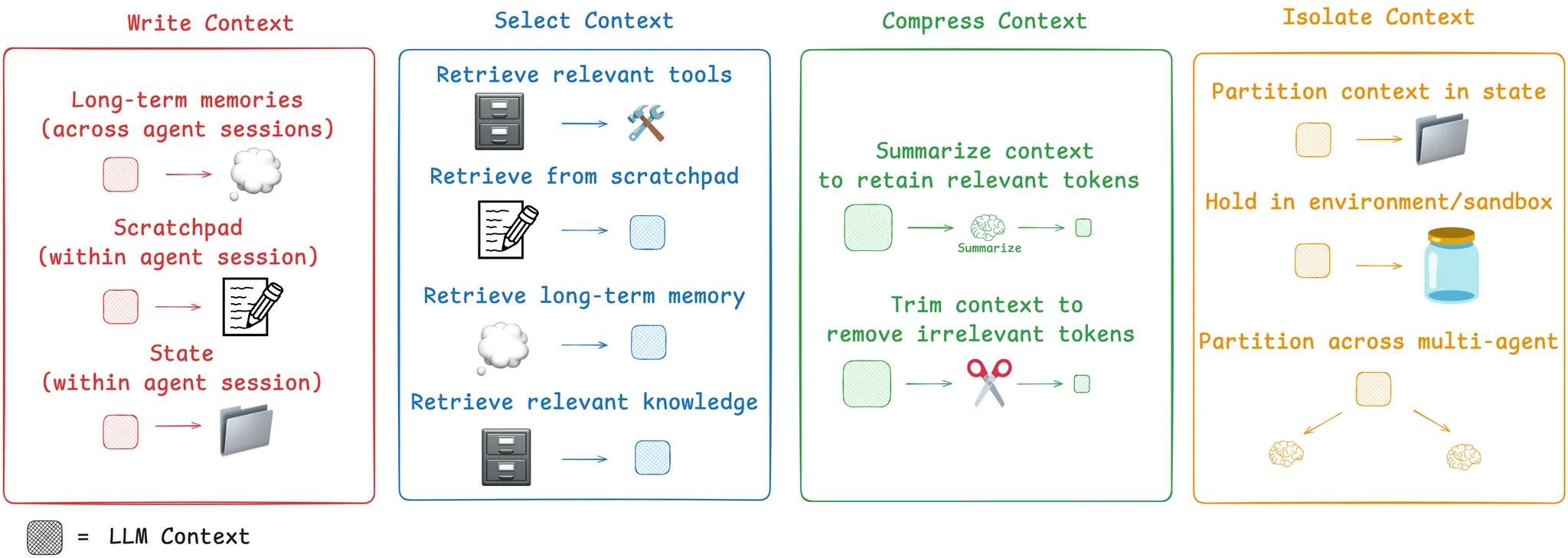
コンテキストエンジニアリングの一般的なカテゴリ
コンテキストエンジニアリング
アンドレイ・カルパティは、LLM(大規模言語モデル)を新しい種類のオペレーティングシステムに例えています。LLMはCPUのような存在であり、そのコンテキストウィンドウはRAMのようなもので、モデルの作業メモリとして機能します。RAMと同様に、LLMのコンテキストウィンドウには、さまざまなソースからのコンテキストを処理する限られた容量があります。また、オペレーティングシステムがCPUのRAMに何が適合するかを選別するように、「コンテキストエンジニアリング」も同様の役割を果たすと考えられます。カルパティはこれをよく要約しています:
*「コンテキストエンジニアリングとは、次のステップのために必要な情報だけをコンテキストウィンドウに充填するという『…繊細な芸術および科学』である。」*
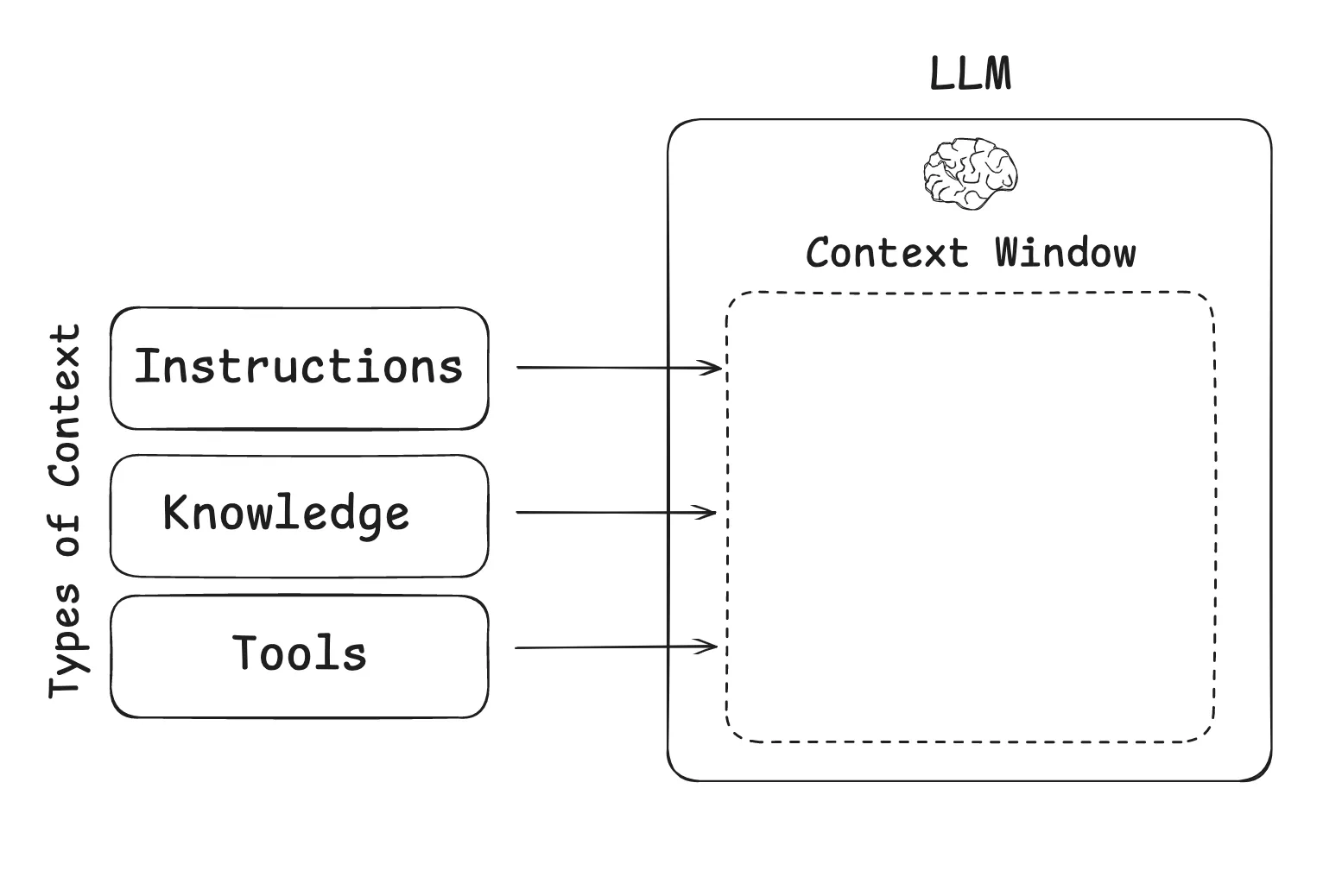
LLMアプリケーションで一般的に使用されるコンテキストの種類。LLMアプリケーションを構築する際に管理すべきコンテキストの種類は何でしょうか? コンテキストエンジニアリングは、いくつかの異なるコンテキストの種類全体に適用される包括的な概念として捉えることができます:
- 指示(プロンプト、メモリ、フューショット例、ツール説明など)
- 知識(事実、メモリなど)
- ツール(ツール呼び出しからのフィードバック)
エージェントのためのコンテキストエンジニアリング
今年、大規模言語モデル(LLM)が推論やツール呼び出しの能力を向上させるにつれ、エージェントへの関心が劇的に高まりました。エージェントは、LLMの呼び出しとツールの呼び出しを交互に行い、しばしば長時間実行されるタスクを処理します。エージェントは、ツールのフィードバックを用いて次のステップを決定しながら、LLM呼び出しとツール呼び出しをインターリーブ(交互実行)します。
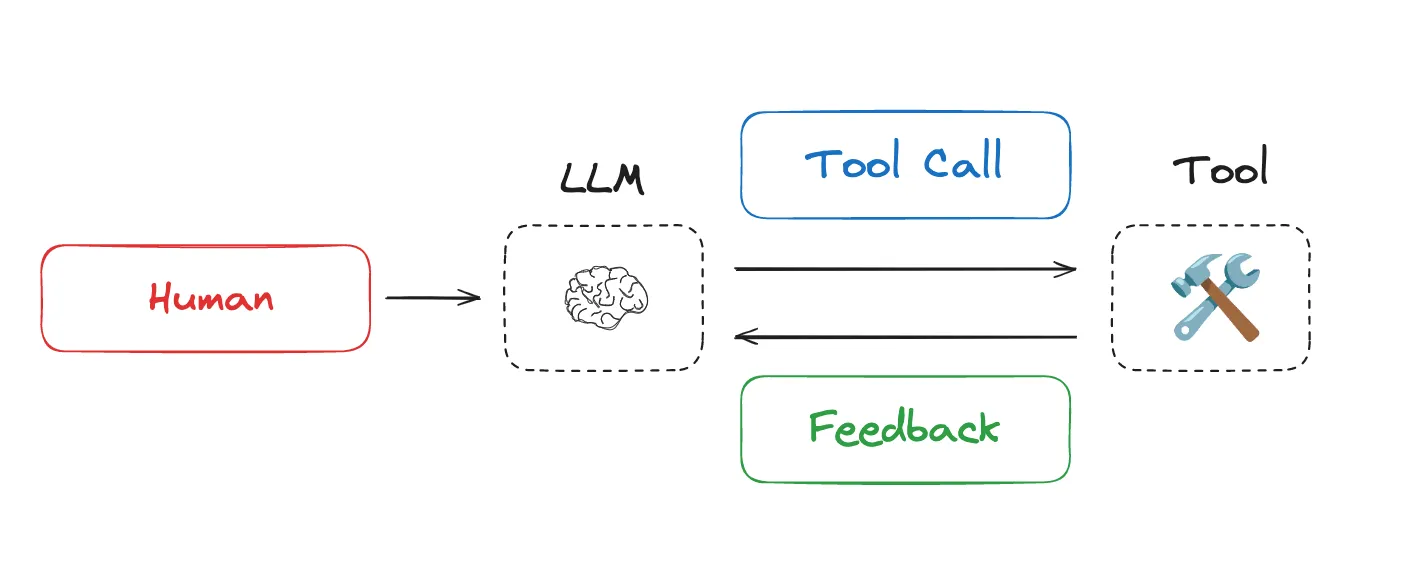
エージェントはLLM呼び出しとツール呼び出しを交互に行い、ツールのフィードバックを用いて次のステップを決定します。しかし、長時間実行されるタスクやツール呼び出しからの蓄積されたフィードバックにより、エージェントは多くのトークンを消費することがよくあります。これにはいくつかの問題が生じる可能性があります:コンテキストウィンドウのサイズを超えたり、コストやレイテンシが膨大になったり、エージェントのパフォーマンスが低下したりします。Drew Breunigは、より長いコンテキストがパフォーマンス上の問題を引き起こす具体的な方法として、以下を明確に概説しています:
- コンテキストポイズニング(Context Poisoning):幻覚がコンテキストに含まれる場合
- コンテキストディストラクション(Context Distraction):コンテキストが学習を圧倒する場合
- コンテキストコンフュージョン(Context Confusion):不要なコンテキストが応答に影響を与える場合
- コンテキストクラッシュ(Context Clash):コンテキストの一部が矛盾する場合
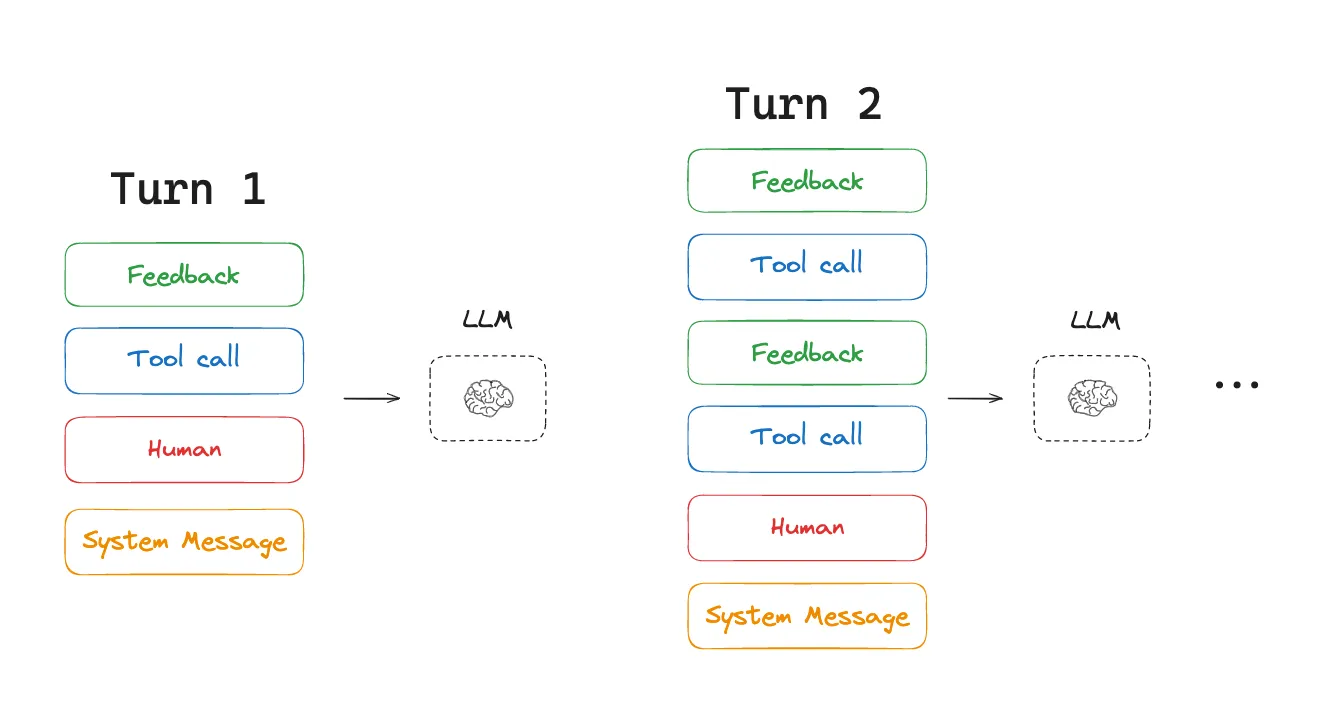
ツール呼び出しからのコンテキストは、複数のエージェントターンにわたって蓄積されます。この点を踏まえ、Cognitionはコンテキストエンジニアリングの重要性を指摘しています:
「『コンテキストエンジニアリング』……は、AIエージェントを構築するエンジニアにとって事実上最も重要な仕事です。」
Anthropic も明確に示しています:
*エージェントはしばしば数百ターンにわたる対話を行い、慎重なコンテキスト管理戦略が必要です。*
では、人々は現在この課題にどのように取り組んでいるのでしょうか?私たちは、エージェントのコンテキストエンジニアリングにおける一般的な戦略を「書き込み」「選択」「圧縮」「分離」の4つのカテゴリに分類し、人気のあるエージェント製品や論文をレビューした例をそれぞれ示します。その後、LangGraph がこれらをサポートするためにどのように設計されているかを説明します!
コンテキストエンジニアリングの一般的なカテゴリ
コンテキストの書き込み
*コンテキストの書き込みとは、エージェントがタスクを実行するのを支援するために、その情報をコンテキストウィンドウの外に保存することを意味します。*
スクラッチパッド
人間がタスクを解決する際、私たちはメモを取り、将来の関連タスクのために情報を記憶します。エージェントもこれらの能力を獲得しつつあります!「スクラッチパッド」を通じたメモ取りは、エージェントがタスクを実行している間に情報を永続化する方法の一つです。この考え方は、コンテキストウィンドウの外に情報を保存し、エージェントが利用可能にするというものです。Anthropic のマルチエージェント研究者 は、この明確な例を示しています:
*LeadResearcherは、まずアプローチについて考え、その計画をMemoryに保存してコンテキストを永続化することから始めます。なぜなら、コンテキストウィンドウが20万トークンを超過すると切り捨てられてしまうためであり、計画を保持することが重要だからです。*
Scratchpadsは、いくつかの異なる方法で実装できます。単にファイルへの書き込みを行うツール呼び出しとして実装することもできます。また、セッション中に永続化するランタイムの状態オブジェクト内のフィールドとして実装することもできます。いずれの場合でも、Scratchpadsはエージェントがタスクを達成するために役立つ情報を保存できるようにします。
Memories(メモリ)
Scratchpadsは、特定のセッション(またはスレッド)内でエージェントがタスクを解決するのを支援しますが、時にはエージェントが*複数の*セッションにわたって情報を記憶することが有益な場合があります。Reflexionは、各エージェントのターン後に反射を行い、これらの自己生成されたメモリを再利用するアイデアを導入しました。Generative Agentsは、過去のエージェントフィードバックのコレクションから定期的に合成されたメモリを作成しました。
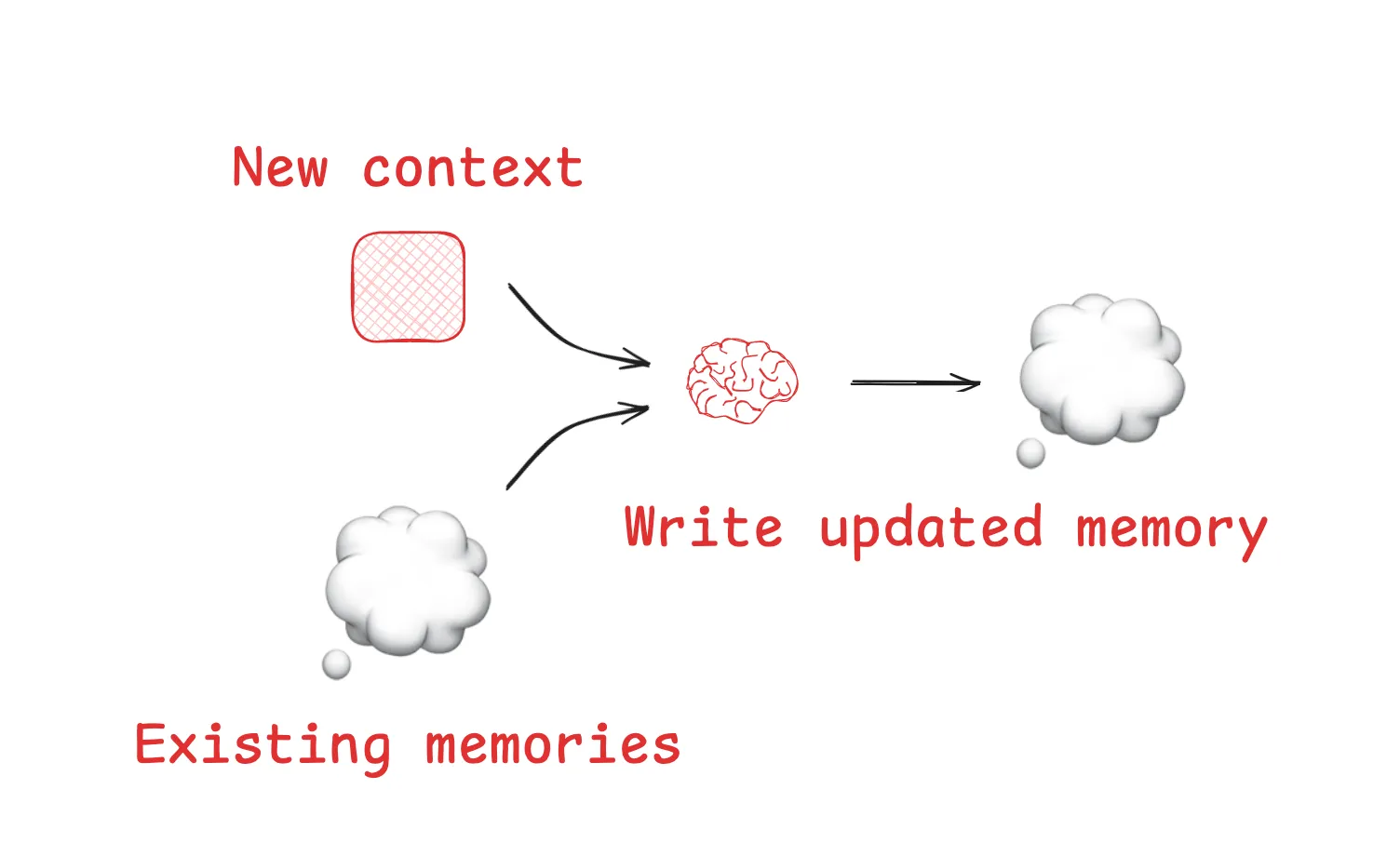
大規模言語モデル(LLM: Large Language Model)は、メモリを更新したり作成したりするために使用できます。これらの概念は、ChatGPT、Cursor、Windsurf といった人気製品に採用されており、これらはすべて、ユーザーとエージェントの相互作用に基づいてセッションをまたいで持続する長期メモリ(Long-term Memory)を自動生成するメカニズムを持っています。
コンテキストの選択
*コンテキストを選択とは、エージェントがタスクを実行するのを支援するために、それをコンテキストウィンドウ(Context Window)内に読み込むことを意味します。*
スクラッチパッド
スクラッチパッドからコンテキストを選択するメカニズムは、スクラッチパッドの実装方法に依存します。もしそれがツールである場合、エージェントはツール呼び出しを行うだけでそれを読み取ることができます。もしそれがエージェントの実行時状態の一部である場合、開発者は各ステップでエージェントに公開する状態の部分を自由に選択できます。これにより、後のターンにおいてスクラッチパッドのコンテキストをLLMに公開する際に、きめ細かいレベルの制御が可能になります。
メモリ
エージェントがメモリを保存する能力を持つ場合、実行中のタスクに関連するメモリを選択する能力も必要となります。これにはいくつかの理由があります。エージェントは、望ましい行動の例として「エピソードメモリ」(episodic memories)を選択したり、行動を誘導するための「手続型メモリ」(procedural memories)を選択したり、あるいはタスクに関連するコンテキストとして「意味論的メモリ」(semantic memories)を選択したりすることが有用です。
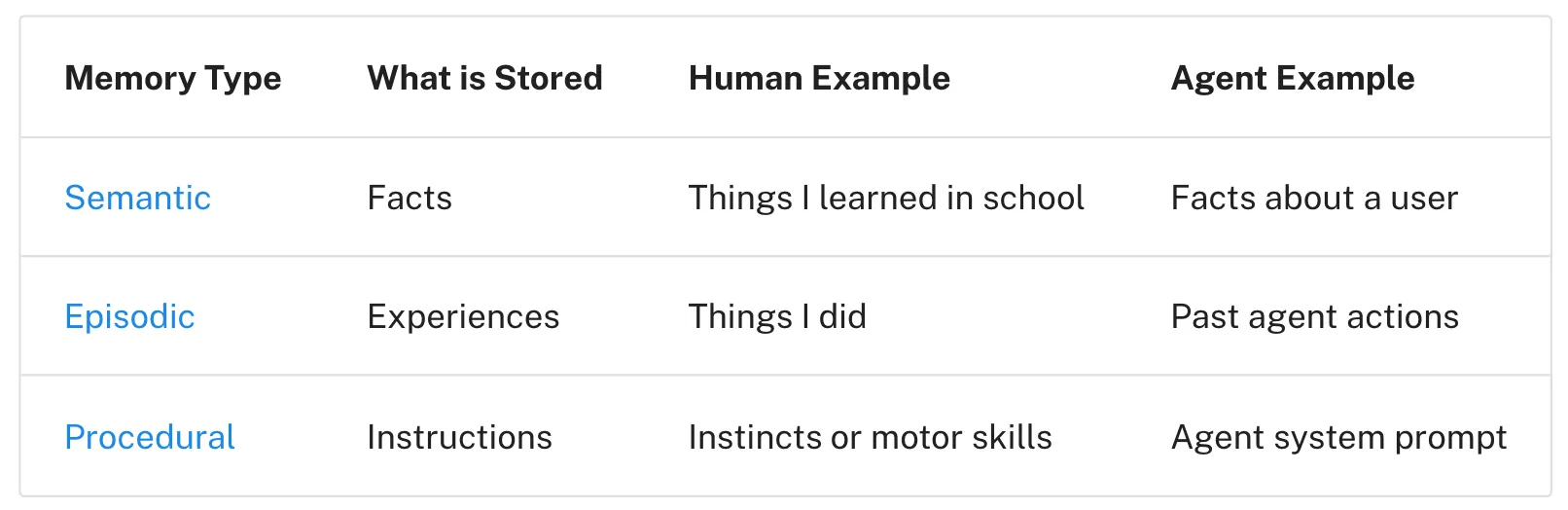
課題の一つは、関連するメモリが正しく選択されることを保証することです。一部の人気のあるエージェントは、コンテキストに*常に*読み込まれる限られたファイルセットのみを使用します。例えば、多くのコードエージェントは、指示(「手続型」メモリ)を保存するために特定のファイルを使用したり、場合によっては例(「エピソード」メモリ)を保存したりします。Claude Code は CLAUDE.md を使用しています。Cursor と Windsurf はルールファイルを使用しています。
しかし、エージェントがより大規模なコレクションの事実や/または関係性(例えば、セマンティックな記憶)を保存している場合、選択はより困難になります。ChatGPTは、ユーザー固有の記憶の大規模なコレクションを保存し、そこから選択を行う人気製品の良い例です。
メモリインデックス化には、エンベッディングや/またはナレッジグラフが一般的に使用され、選択を支援します。それでもなお、メモリの選択は困難です。AIEngineer World’s Fairにおいて、Simon Willisonは、選択が失敗した例を共有しました。ChatGPTは記憶から彼の場所情報を取得し、リクエストされた画像に予期せず挿入しました。この種の予期せぬ、あるいは望ましくないメモリ取得は、一部のユーザーにコンテキストウィンドウが「*もう自分のものでない*”」という感覚を抱かせる可能性があります。
ツール
エージェントはツールを使用しますが、提供されるツールの数が多すぎると過負荷になることがあります。これはしばしば、ツール説明が重複し、どのツールを使用すべきかについてモデルの混乱を招くためです。一つの手法は、タスクに関連するツールのみを取得するためにRAG(検索拡張生成)をツールの説明に適用することです。いくつかの最近の研究論文は、これによりツール選択の精度が3倍向上することを示しています。
知識
RAGは豊富なトピックであり、それは中心的なコンテキストエンジニアリングの課題となり得ます。コードエージェントは、大規模な本番環境におけるRAGの最も優れた例の一つです。WindsurfのVarun氏は、これらの課題の一部を以下のように明確に捉えています:
***コードのインデックス作成 ≠ コンテキストの取得 … [私たちはインデックス作成と埋め込み検索を行っています … [AST(抽象構文木)パースによるコード解析と、意味的に意味のある境界に沿ったチャンキング … コードベースの規模が大きくなるにつれて、埋め込み検索は取得ヒューリスティックとして信頼性が低下します … 私たちはgrepやファイル検索、知識グラフに基づく取得、および[コンテキスト]を関連性の順にランク付けする再ランク付けステップなどの技術の組み合わせに依存する必要があります。*]
コンテキストの圧縮
*コンテキストの圧縮とは、タスクを実行するために必要なトークンのみを保持することです。*
コンテキスト要約**
エージェント間のやり取りは、数百回のターンに及び、トークン消費の多いツール呼び出しを伴うことがあります。これらの課題に対処する一般的な方法の一つが要約です。Claude Codeを使用したことがあれば、その実例をご覧になったことがあるでしょう。Claude Codeは、コンテキストウィンドウの95%を超えた後に「auto-compact」を実行し、ユーザーとエージェントのやり取りの全履歴を要約します。この種のエージェント軌道にわたる圧縮には、再帰的または階層的な要約などの多様な戦略が用いられます。
要約を適用できるいくつかの箇所
エージェントの設計における特定のポイントで要約を追加することが有用な場合もあります。例えば、特定のツール呼び出し(トークン消費量の多い検索ツールなど)の後処理に使用できます。第二の例として、Cognitionは、知識の引き継ぎ時にトークン数を削減するためにエージェント間の境界で要約を行うことを提案しています。特定のイベントや意思決定を捕捉する必要がある場合、要約は課題となる可能性があります。Cognitionはこれに微調整されたモデルを使用しており、このステップに多大な労力がかかることを示しています。
コンテキストトリミング
要約では大規模言語モデル(LLM)を用いて最も関連性の高いコンテキストを抽出するのに対し、トリミングはコンテキストをフィルタリングしたり、Drew Breunigが指摘するように「prune」したりすることがよくあります。これには、リストから古いメッセージを削除するなど、ハードコードされたヒューリスティック(規則)を使用する方法があります。Drew氏はまた、質問応答用のトレーニング済みコンテキストプルーナーであるProvenceにも言及しています。
コンテキストの分離
*コンテキストを分離するとは、エージェントがタスクを実行できるよう、それを分割することを指します。*
マルチエージェント
コンテキストを分離する最も人気のある方法の一つは、それをサブエージェント間で分割することです。OpenAIのSwarmライブラリには、関心の分離という動機があり、エージェントのチームが特定のサブタスクを処理できます。各エージェントには、特定のツールセット、指示、および独自のコンテキストウィンドウがあります。
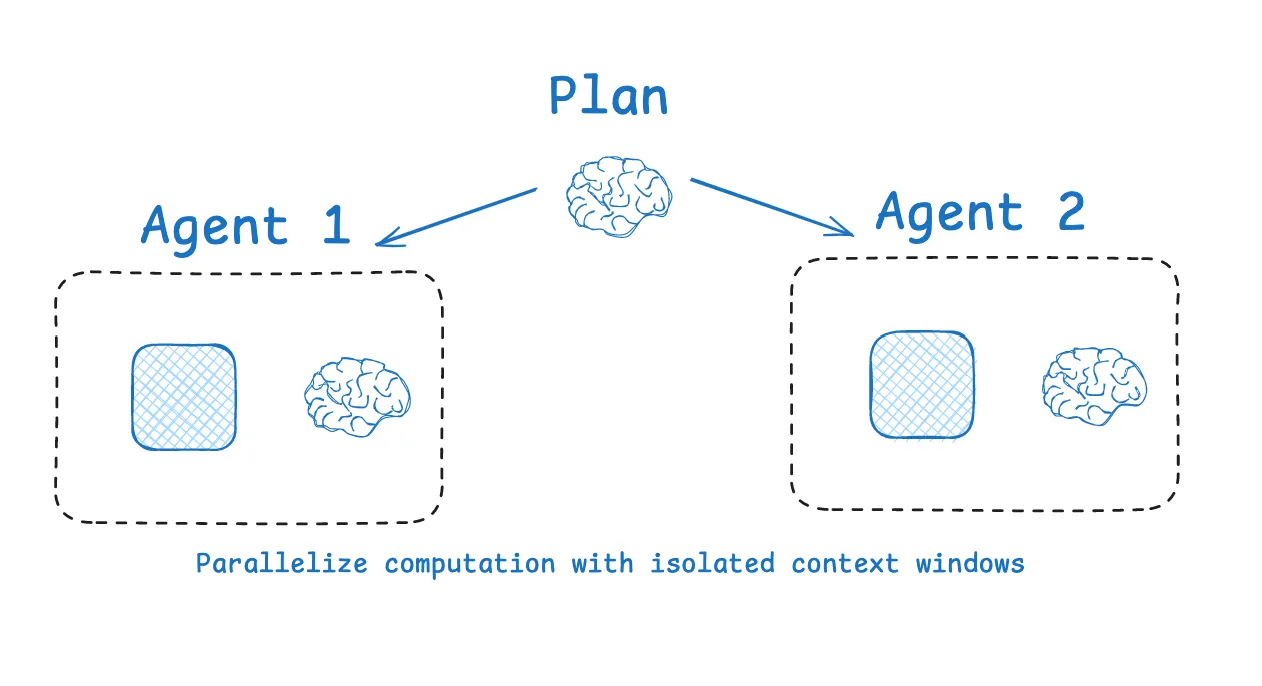
複数のエージェントにコンテキストを分割する
Anthropicのマルチエージェント研究者は、このアプローチの妥当性を示している。孤立したコンテキストを持つ複数のエージェントが、単一のエージェントよりも優れたパフォーマンスを示したのは、各サブエージェントのコンテキストウィンドウをより狭いサブタスクに割り当てられたためである。ブログ記事によると、次のように述べられている。
*[サブエージェントは] 独自のコンテキストウィンドウで並列に動作し、質問の異なる側面を同時に探索する。*
もちろん、マルチエージェントには課題もある。例えば、トークン使用量の増加(Anthropicの報告によればチャット比で最大15倍のトークン)、サブエージェントの作業を計画するための慎重なprompt engineeringの必要性、そしてサブエージェント間の調整などである。
環境を用いたコンテキストの分離**
HuggingFaceのdeep researcherは、コンテキストの分離(Context Isolation)に関する興味深い別の例を示しています。ほとんどのエージェントはツール呼び出しAPIを使用し、これはツール(例えば検索API)に渡されるJSONオブジェクト(ツールの引数)を返して、ツールフィードバック(例えば検索結果)を取得します。HuggingFaceはCodeAgentを使用しており、これは目的のツール呼び出しを含むコードを出力します。その後、そのコードはサンドボックス内で実行されます。ツール呼び出しから選択されたコンテキスト(例えば戻り値)がLLM(大規模言語モデル)に戻されます。
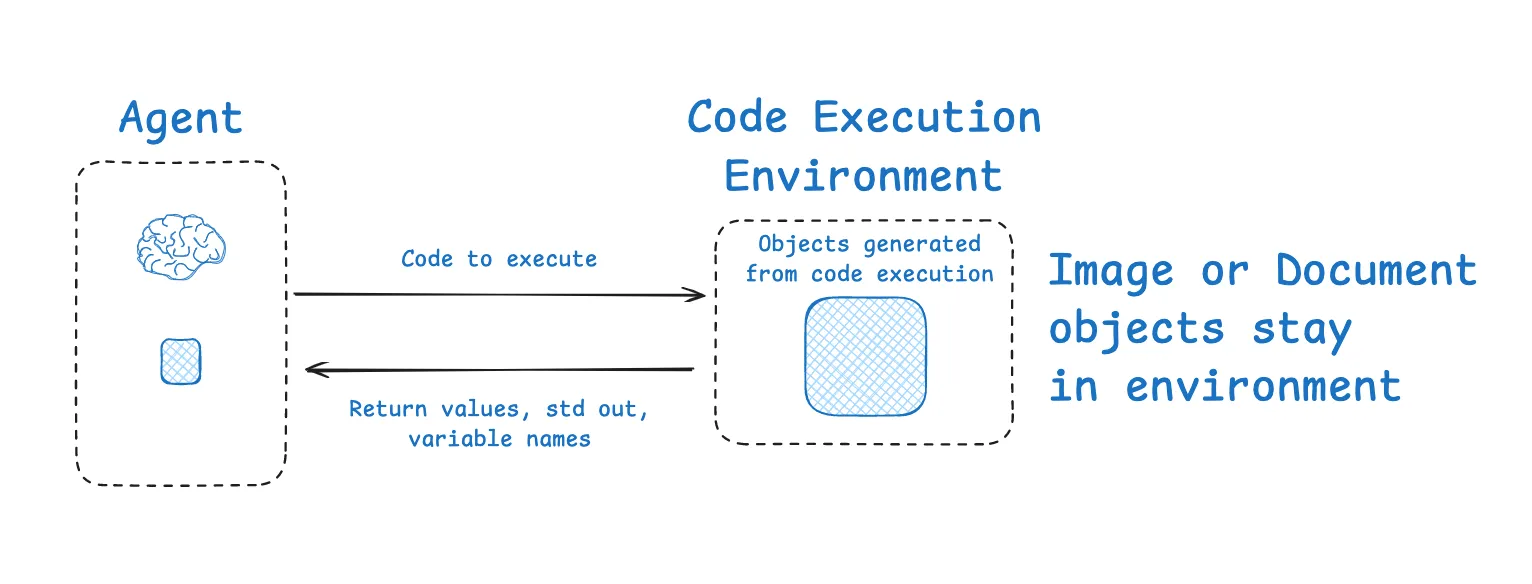
サンドボックスは、LLMからコンテキストを分離することができます。これにより、環境内でLLMからのコンテキストを隔離できます。Hugging Faceは、特にトークン数の多いオブジェクトを分離するのに優れた方法であると指摘しています:
***[Code Agentは]状態のより良い処理を可能にします…この画像/オーディオ/その他のデータを後で使用するために保存する必要がありますか?問題ありません、変数として割り当*[てください(あなたの状態の中で)、その後[後で使用します]](https://deepwiki.com/search/i-am-wondering-if-state-that-i_0e153539-282a-437c-b2b0-d2d68e51b873?ref=blog.langchain.com)*。
状態(State)
エージェントのランタイムにおける状態オブジェクトも、コンテキストを隔離するための優れた手段になり得る点に言及する価値があります。これはサンドボックス化と同じ目的を果たします。状態オブジェクトは、コンテキストが書き込まれるフィールドを持つスキーマで設計できます。スキーマの1つのフィールド(例:メッセージ)は、エージェントの各ターンでLLMに公開されますが、スキーマ内の他のフィールドにある情報を隔離し、より選択的な利用を可能にします。
LangSmith / LangGraphを用いたコンテキストエンジニアリング
では、これらのアイデアをどのように適用すればよいでしょうか?始める前に、役立つ2つの基礎的な要素があります。まず、エージェント全体にわたってデータを確認しトークン使用量を追跡する方法を確保してください。これにより、コンテキストエンジニアリングの取り組みをどこに最も効果的に適用すべきかという判断が下しやすくなります。LangSmithはエージェントのトレーシング/観測に適しており、これを行うための優れた手段を提供します。第二に、コンテキストエンジニアリングがエージェントのパフォーマンスを悪化させるのか改善するのかをテストする簡単な手段を持っていることを確認してください。LangSmithは、コンテキストエンジニアリングの取り組みの影響をテストするためのエージェント評価を可能にします。
コンテキストの記述
LangGraphは、スレッドスコープ(短期)および長期の両方のメモリを備えて設計されています。短期メモリは、チェックポイントを使用して、エージェントの全ステップにわたってエージェント状態を永続化します。これは「下書き」として極めて有用であり、エージェントの軌跡内の任意のステップで状態に情報を記録し、そこから取得することを可能にします。
LangGraphの長期メモリは、エージェントとの多くのセッションにわたってコンテキストを永続化することを可能にします。これは柔軟性が高く、小さなセットのファイル(例:ユーザープロファイルやルール)や、より大きなコレクションのメモリを保存できます。さらに、LangMemは、LangGraphのメモリ管理を支援するための広範な有用な抽象化セットを提供しています。
コンテキストの選択
LangGraph エージェントの各ノード(ステップ)内では、状態 を取得できます。これにより、各エージェントステップで LLM に提示するコンテキストを細かく制御することができます。
さらに、LangGraph の長期記憶(Long-term Memory)は各ノード内でアクセス可能であり、ファイルの取得や メモリコレクションに対する埋め込みベースの検索 など、さまざまなタイプの検索をサポートしています。長期記憶の概要については、私たちの Deeplearning.ai コース を参照してください。また、特定のエージェントに適用された記憶への入り口については、私たちの Ambient Agents コースをご覧ください。これでは、メールを管理し、フィードバックから学習できる長時間実行型のエージェントで LangGraph の記憶を使用する方法を示しています。
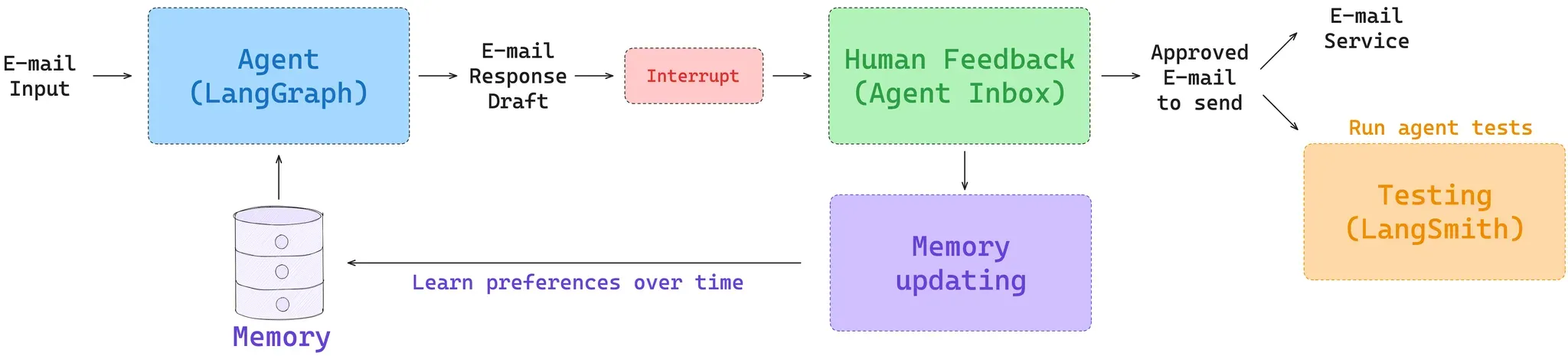
ユーザーフィードバックと長期記憶を備えたメールエージェント
ツール選択には、LangGraph Bigtool ライブラリが、ツール説明に対するセマンティック検索(意味的検索)を適用するための優れた方法です。これは、大規模なツールのコレクションを扱う際、タスクに最も関連性の高いツールを選択するのに役立ちます。最後に、LangGraph でさまざまなタイプの RAG(Retrieval-Augmented Generation:検索拡張生成)をどのように使用するかを示す、いくつかのチュートリアルと動画があります。
コンテキストの圧縮
LangGraph は低レベルのオーケストレーションフレームワークであるため、エージェントをノードのセットとして配置し、各ノード内のロジックを定義し、それらの間で渡される状態オブジェクトを定義します。この制御により、コンテキストを圧縮する複数の方法が可能になります。
よくあるアプローチとして、エージェントのステータスとしてメッセージリストを使用し、いくつかの組み込みユーティリティを用いて定期的に要約または切り捨てを行う方法があります。しかし、エージェントのツール呼び出しや作業フェーズを後処理するためのロジックを、いくつかの異なる方法で追加することもできます。特定のポイントに要約ノードを追加したり、ツール呼び出しノードに要約ロジックを組み込んで、特定のツール呼び出しの出力を圧縮したりすることが可能です。
コンテキストの分離
LangGraph は state オブジェクトを中心に設計されており、状態スキーマを指定し、各エージェントのステップで状態にアクセスすることができます。例えば、ツール呼び出しからのコンテキストを特定のフィールドに保存し、そのコンテキストが必要になるまで LLM から隔離することができます。さらに LangGraph は、コンテキストの分離のためにサンドボックスの使用にも対応しています。E2B サンドボックス をツール呼び出しに使用する LangGraph エージェントの例については、この リポジトリ を参照してください。状態を永続化できる Pyodide によるサンドボックス化の例については、この ビデオ を参照してください。LangGraph はまた、supervisor や swarm などのライブラリを用いたマルチエージェントアーキテクチャの構築にも多くのサポートを提供しています。LangGraph でのマルチエージェントの使用に関する詳細については、これらの ビデオ ビデオ ビデオ を参照してください。
結論
コンテキストエンジニアリングは、エージェントビルダーが習得を目指すべき技術となりつつあります。ここでは、現在多くの人気あるエージェントで共通して見られるいくつかの一般的なパターンについて解説しました:
- コンテキストの記述:エージェントがタスクを実行するのを支援するため、コンテキストをコンテキストウィンドウの外に保存する。
- コンテキストの選択:エージェントがタスクを実行するのを支援するため、コンテキストをコンテキストウィンドウ内に読み込む。
- コンテキストの圧縮:タスクを実行するために必要なトークンのみを保持する。
- コンテキストの分離:エージェントがタスクを実行するのを支援するため、コンテキストを分割する。
LangGraph はこれらすべてを実装しやすくし、LangSmith はエージェントのテストとコンテキスト使用量の追跡を容易に行う方法を提供します。LangGraph と LangSmith を組み合わせることで、コンテキストエンジニアリングを適用する最適な機会を特定し、実装し、テストし、繰り返すという好循環フィードバックループを実現できます。
原文を表示
TL;DR
Agents need context to perform tasks. Context engineering is the art and science of filling the context window with just the right information at each step of an agent’s trajectory. In this post, we break down some common strategies — write, select, compress, and isolate — for context engineering by reviewing various popular agents and papers. We then explain how LangGraph is designed to support them!
Also, see our video on context engineering here.
Context Engineering
As Andrej Karpathy puts it, LLMs are like a new kind of operating system. The LLM is like the CPU and its context window is like the RAM, serving as the model’s working memory. Just like RAM, the LLM context window has limited capacity to handle various sources of context. And just as an operating system curates what fits into a CPU’s RAM, we can think about “context engineering” playing a similar role. Karpathy summarizes this well:
[Context engineering is the] ”…delicate art and science of filling the context window with just the right information for the next step.”
What are the types of context that we need to manage when building LLM applications? Context engineering as an umbrella that applies across a few different context types:
- Instructions – prompts, memories, few‑shot examples, tool descriptions, etc
- Knowledge – facts, memories, etc
- Tools – feedback from tool calls
Context Engineering for Agents
This year, interest in agents has grown tremendously as LLMs get better at reasoning and tool calling. Agents interleave LLM invocations and tool calls, often for long-running tasks. Agents interleave LLM calls and tool calls, using tool feedback to decide the next step.
Agents interleave[LLM calls and tool calls, using tool feedback to decide the next step](https://cdn.prod.website-files.com/65c81e88c254bb0f97633a71/69cbaaa8d3aab32815f859dd_image-2.png)
However, long-running tasks and accumulating feedback from tool calls mean that agents often utilize a large number of tokens. This can cause numerous problems: it can exceed the size of the context window, balloon cost / latency, or degrade agent performance. Drew Breunig nicely outlined a number of specific ways that longer context can cause perform problems, including:
- Context Poisoning: When a hallucination makes it into the context
- Context Distraction: When the context overwhelms the training
- Context Confusion: When superfluous context influences the response
- Context Clash: When parts of the context disagree
With this in mind, Cognition called out the importance of context engineering:
“Context engineering” … is effectively the #1 job of engineers building AI agents.
Anthropic also laid it out clearly:
Agents often engage in conversations spanning hundreds of turns, requiring careful context management strategies.
So, how are people tackling this challenge today? We group common strategies for agent context engineering into four buckets — write, select, compress, and isolate — and give examples of each from review of some popular agent products and papers. We then explain how LangGraph is designed to support them!
Write Context
*Writing context means saving it outside the context window to help an agent perform a task.*
Scratchpads
When humans solve tasks, we take notes and remember things for future, related tasks. Agents are also gaining these capabilities! Note-taking via a “scratchpad” is one approach to persist information while an agent is performing a task. The idea is to save information outside of the context window so that it’s available to the agent. Anthropic’s multi-agent researcher illustrates a clear example of this:
The LeadResearcher begins by thinking through the approach and saving its plan to Memory to persist the context, since if the context window exceeds 200,000 tokens it will be truncated and it is important to retain the plan.
Scratchpads can be implemented in a few different ways. They can be a tool call that simply writes to a file. They can also be a field in a runtime state object that persists during the session. In either case, scratchpads let agents save useful information to help them accomplish a task.
Memories
Scratchpads help agents solve a task within a given session (or thread), but sometimes agents benefit from remembering things across *many* sessions! Reflexion introduced the idea of reflection following each agent turn and re-using these self-generated memories. Generative Agents created memories synthesized periodically from collections of past agent feedback.
These concepts made their way into popular products like ChatGPT, Cursor, and Windsurf, which all have mechanisms to auto-generate long-term memories that can persist across sessions based on user-agent interactions.
Select Context
*Selecting context means pulling it into the context window to help an agent perform a task.*
Scratchpad
The mechanism for selecting context from a scratchpad depends upon how the scratchpad is implemented. If it’s a tool, then an agent can simply read it by making a tool call. If it’s part of the agent’s runtime state, then the developer can choose what parts of state to expose to an agent each step. This provides a fine-grained level of control for exposing scratchpad context to the LLM at later turns.
Memories
If agents have the ability to save memories, they also need the ability to select memories relevant to the task they are performing. This can be useful for a few reasons. Agents might select few-shot examples (episodic memories) for examples of desired behavior, instructions (procedural memories) to steer behavior, or facts (semantic memories) for task-relevant context.
One challenge is ensuring that relevant memories are selected. Some popular agents simply use a narrow set of files that are *always* pulled into context. For example, many code agent use specific files to save instructions (”procedural” memories) or, in some cases, examples (”episodic” memories). Claude Code uses CLAUDE.md. Cursor and Windsurf use rules files.
But, if an agent is storing a larger collection of facts and / or relationships (e.g., semantic memories), selection is harder. ChatGPT is a good example of a popular product that stores and selects from a large collection of user-specific memories.
Embeddings and / or knowledge graphs for memory indexing are commonly used to assist with selection. Still, memory selection is challenging. At the AIEngineer World’s Fair, Simon Willison shared an example of selection gone wrong: ChatGPT fetched his location from memories and unexpectedly injected it into a requested image. This type of unexpected or undesired memory retrieval can make some users feel like the context window “*no longer belongs to them*”!
Tools
Agents use tools, but can become overloaded if they are provided with too many. This is often because the tool descriptions overlap, causing model confusion about which tool to use. One approach isto apply RAG (retrieval augmented generation) to tool descriptions in order to fetch only the most relevant tools for a task. Some recent papers have shown that this improve tool selection accuracy by 3-fold.
Knowledge
RAG is a rich topic and itcan be a central context engineering challenge. Code agents are some of the best examples of RAG in large-scale production. Varun from Windsurf captures some of these challenges well:
Indexing code ≠ context retrieval … [We are doing indexing & embedding search … [with] AST parsing code and chunking along semantically meaningful boundaries … embedding search becomes unreliable as a retrieval heuristic as the size of the codebase grows … we must rely on a combination of techniques like grep/file search, knowledge graph based retrieval, and … a re-ranking step where [context] is ranked in order of relevance.
Compressing Context
*Compressing context involves retaining only the tokens required to perform a task.*
Context Summarization
Agent interactions can span hundreds of turns and use token-heavy tool calls. Summarization is one common way to manage these challenges. If you’ve used Claude Code, you’ve seen this in action. Claude Code runs “auto-compact” after you exceed 95% of the context window and it will summarize the full trajectory of user-agent interactions. This type of compression across an agent trajectory can use various strategies such as recursive or hierarchical summarization.
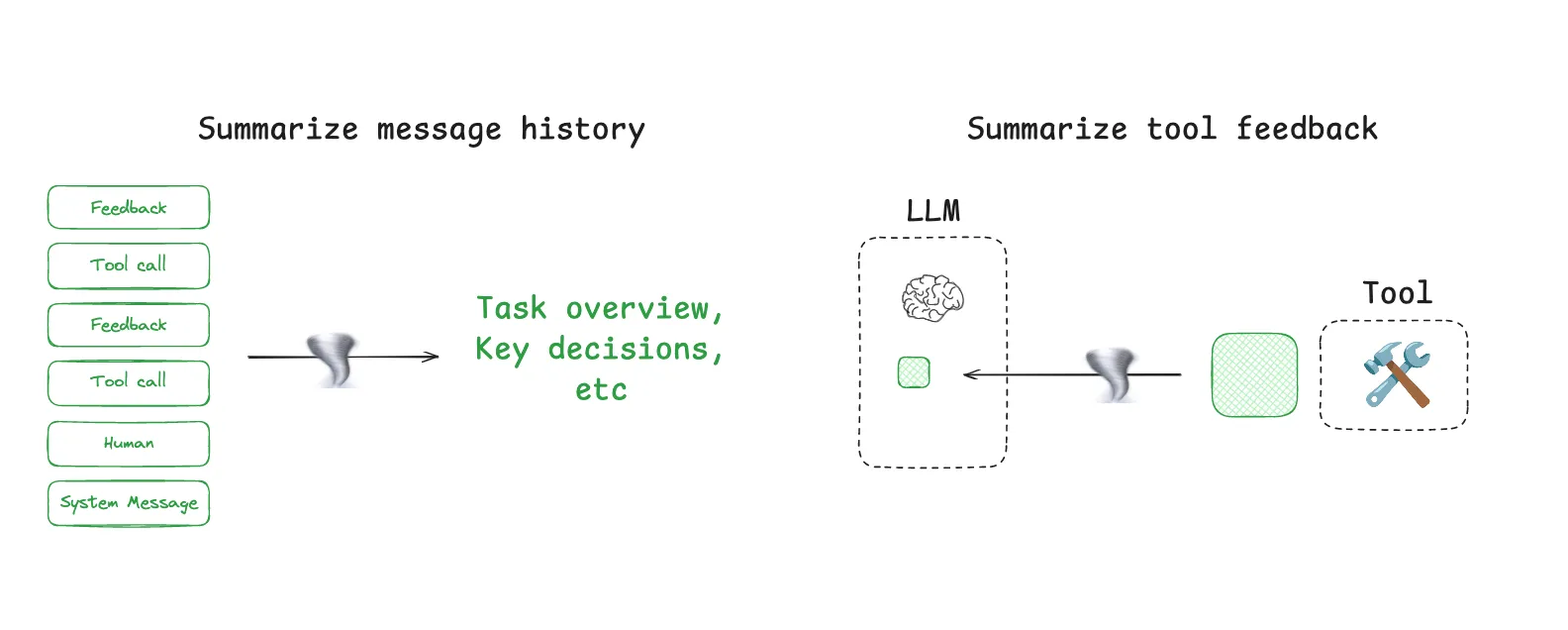
It can also be useful to add summarization at specific points in an agent’s design. For example, it can be used to post-process certain tool calls (e.g., token-heavy search tools). As a second example, Cognition mentioned summarization at agent-agent boundaries to reduce tokens during knowledge hand-off. Summarization can be a challenge if specific events or decisions need to be captured. Cognition uses a fine-tuned model for this, which underscores how much work can go into this step.
Context Trimming
Whereas summarization typically uses an LLM to distill the most relevant pieces of context, trimming can often filter or, as Drew Breunig points out, “prune” context. This can use hard-coded heuristics like removing older messages from a list. Drew also mentions Provence, a trained context pruner for Question-Answering.
Isolating Context
*Isolating context involves splitting it up to help an agent perform a task.*
Multi-agent
One of the most popular ways to isolate context is to split it across sub-agents. A motivation for the OpenAI Swarm library was separation of concerns, where a team of agents can handle specific sub-tasks. Each agent has a specific set of tools, instructions, and its own context window.
Anthropic’s multi-agent researcher makes a case for this: many agents with isolated contexts outperformed single-agent, largely because each subagent context window can be allocated to a more narrow sub-task. As the blog said:
[Subagents operate] in parallel with their own context windows, exploring different aspects of the question simultaneously.
Of course, the challenges with multi-agent include token use (e.g., up to 15× more tokens than chat as reported by Anthropic), the need for careful prompt engineering to plan sub-agent work, and coordination of sub-agents.
Context Isolation with Environments
HuggingFace’s deep researcher shows another interesting example of context isolation. Most agents use tool calling APIs, which return JSON objects (tool arguments) that can be passed to tools (e.g., a search API) to get tool feedback (e.g., search results). HuggingFace uses a CodeAgent, which outputs that contains the desired tool calls. The code then runs in a sandbox. Selected context (e.g., return values) from the tool calls is then passed back to the LLM.
This allows context to be isolated from the LLM in the environment. Hugging Face noted that this is a great way to isolate token-heavy objects in particular:
[Code Agents allow for] a better handling of state … Need to store this image / audio / other for later use? No problem, just assign it as a variable in your state and you [use it later].
State
It’s worth calling out that an agent’s runtime state object can also be a great way to isolate context. This can serve the same purpose as sandboxing. A state object can be designed with a schema that has fields that context can be written to. One field of the schema (e.g., messages) can be exposed to the LLM at each turn of the agent, but the schema can isolate information in other fields for more selective use.
Context Engineering with LangSmith / LangGraph
So, how can you apply these ideas? Before you start, there are two foundational pieces that are helpful. First, ensure that you have a way to look at your data and track token-usage across your agent. This helps inform where best to apply effort context engineering. LangSmith is well-suited for agent tracing / observability, and offers a great way to do this. Second, be sure you have a simple way to test whether context engineering hurts or improve agent performance. LangSmith enables agent evaluation to test the impact of any context engineering effort.
Write context
LangGraph was designed with both thread-scoped (short-term) and long-term memory. Short-term memory uses checkpointing to persist agent state across all steps of an agent. This is extremely useful as a “scratchpad”, allowing you to write information to state and fetch it at any step in your agent trajectory.
LangGraph’s long-term memory lets you to persist context *across many sessions* with your agent. It is flexible, allowing you to save small sets of files (e.g., a user profile or rules) or larger collections of memories. In addition, LangMem provides a broad set of useful abstractions to aid with LangGraph memory management.
Select context
Within each node (step) of a LangGraph agent, you can fetch state. This give you fine-grained control over what context you present to the LLM at each agent step.
In addition, LangGraph’s long-term memory is accessible within each node and supports various types of retrieval (e.g., fetching files as well as embedding-based retrieval on a memory collection). For an overview of long-term memory, see our Deeplearning.ai course. And for an entry point to memory applied to a specific agent, see our Ambient Agents course. This shows how to use LangGraph memory in a long-running agent that can manage your email and learn from your feedback.
For tool selection, the LangGraph Bigtool library is a great way to apply semantic search over tool descriptions. This helps select the most relevant tools for a task when working with a large collection of tools. Finally, we have several tutorials and videos that show how to use various types of RAG with LangGraph.
Compressing context
Because LangGraph is a low-level orchestration framework, you lay out your agent as a set of nodes, define the logic within each one, and define an state object that is passed between them. This control offers several ways to compress context.
One common approach is to use a message list as your agent state and summarize or trim it periodically using a few built-in utilities. However, you can also add logic to post-process tool calls or work phases of your agent in a few different ways. You can add summarization nodes at specific points or also add summarization logic to your tool calling node in order to compress the output of specific tool calls.
Isolating context
LangGraph is designed around a state object, allowing you to specify a state schema and access state at each agent step. For example, you can store context from tool calls in certain fields in state, isolating them from the LLM until that context is required. In addition to state, LangGraph supports use of sandboxes for context isolation. See this repo for an example LangGraph agent that uses an E2B sandbox for tool calls. See this video for an example of sandboxing using Pyodide where state can be persisted. LangGraph also has a lot of support for building multi-agent architecture, such as the supervisor and swarm libraries. You can see these videos for more detail on using multi-agent with LangGraph.
Conclusion
Context engineering is becoming a craft that agents builders should aim to master. Here, we covered a few common patterns seen across many popular agents today:
- Writing context - saving it outside the context window to help an agent perform a task.
- Selecting context - pulling it into the context window to help an agent perform a task.
- Compressing context - retaining only the tokens required to perform a task.
- Isolating context - splitting it up to help an agent perform a task.
LangGraph makes it easy to implement each of them and LangSmith provides an easy way to test your agent and track context usage. Together, LangGraph and LangGraph enable a virtuous feedback loop for identifying the best opportunity to apply context engineering, implementing it, testing it, and repeating.
関連記事
今日のまとめ
AI日報で今日の重要ニュースをまとめ読み