Vercel、エージェントのアクセス管理「Connect」を発表
Vercel は、AI エージェントの認証リスクを解決するため、永続的なトークン管理に代わり、タスク固有の短期資格証明を使用する「Vercel Connect」を公開ベータ版としてリリースした。
キーポイント
既存の認証モデルの課題
現在の AI エージェントは環境変数に保存された永続的なプロバイダートークンを使用しており、漏洩時に全システムへのアクセス権が侵害される重大なリスクがある。
ランタイム資格証明交換の導入
Vercel Connect では、エージェントが作業を行う際にのみ Vercel に身元を証明し、タスクにスコープされた短期間の資格証明を取得する仕組みを採用している。
セキュリティと機能性の両立
一度コネクタを登録するだけで済み、従来のトークン使用時の機能は維持しつつ、エージェントが常に権限を保持するのではなく都度アクセスを要求するモデルへ転換した。
重要な引用
These tokens are shared across every user, never expire, and give your agent full reach across every task, no matter how small the job.
A vault makes that token harder to steal. It doesn't make it less dangerous.
Vercel Connect replaces the stored token with runtime credential exchange.
影響分析・編集コメントを表示
影響分析
本記事は、AI エージェントの実装におけるセキュリティパラダイムシフトを示唆しており、従来の「設定して忘れ去る」トークン管理から、「都度検証・最小権限」のモデルへの移行を促す重要な転換点です。Vercel Connect の登場により、エージェントが複雑なシステム間を連携する際の信頼性基盤が強化され、企業による AI エージェントの実装におけるセキュリティ懸念が軽減される可能性があります。
編集コメント
AI エージェントが本格的に業務を担うようになる中で、セキュリティの脆弱性が最大のボトルネックとなる中、Vercel が提唱する「ランタイム資格証明交換」は実用的かつ画期的なアプローチです。永続トークンのリスクを根本から解決するこの手法は、今後 AI アプリケーション開発における標準的なプラクティスへと進化していく可能性が高いでしょう。
エージェントにツール、データ、サービスへのアクセス権を与えることが、それらを有用なものにする鍵です。システム間でより深い作業を行うにつれ、そのアクセスを認証・承認することがアプリケーションアーキテクチャの中心となります。
現在、エージェントへのアクセスは通常、環境変数に保存された長期有効なプロバイダートークンを通じて付与されます。これはエージェントが必要とするあらゆるものに対して用意され、すべてのユーザー間で共有され、期限切れになることもなく、どんなに小さなタスクであってもエージェントがあらゆる作業にフルアクセスできる権限を与えます。
バault(金庫)は、そのトークンを盗まれにくくします。しかし、危険性を減らすわけではありません。問題となるのは、トークンが漏洩した際に何が起こるかです:トークンで触れられるすべてのものが、今や露呈してしまうのです。
私たちはこの問題を解決するために Vercel Connect を構築しました。現在パブリックベータ版として提供されている Vercel Connect は、保存されたトークンの代わりにランタイム認証情報の交換を実現します。コネクターは一度だけ登録すればよく、エージェントに作業が必要な際、アプリケーションが Vercel Connect に対して自らの身元を証明し、タスクに限定された短期有効な認証情報を取得します。これまでトークンで行っていたすべての操作は依然として機能します。異なる点は、エージェントが権限を保持するのではなく、毎回アクセスを要求するようになることです。
 image
image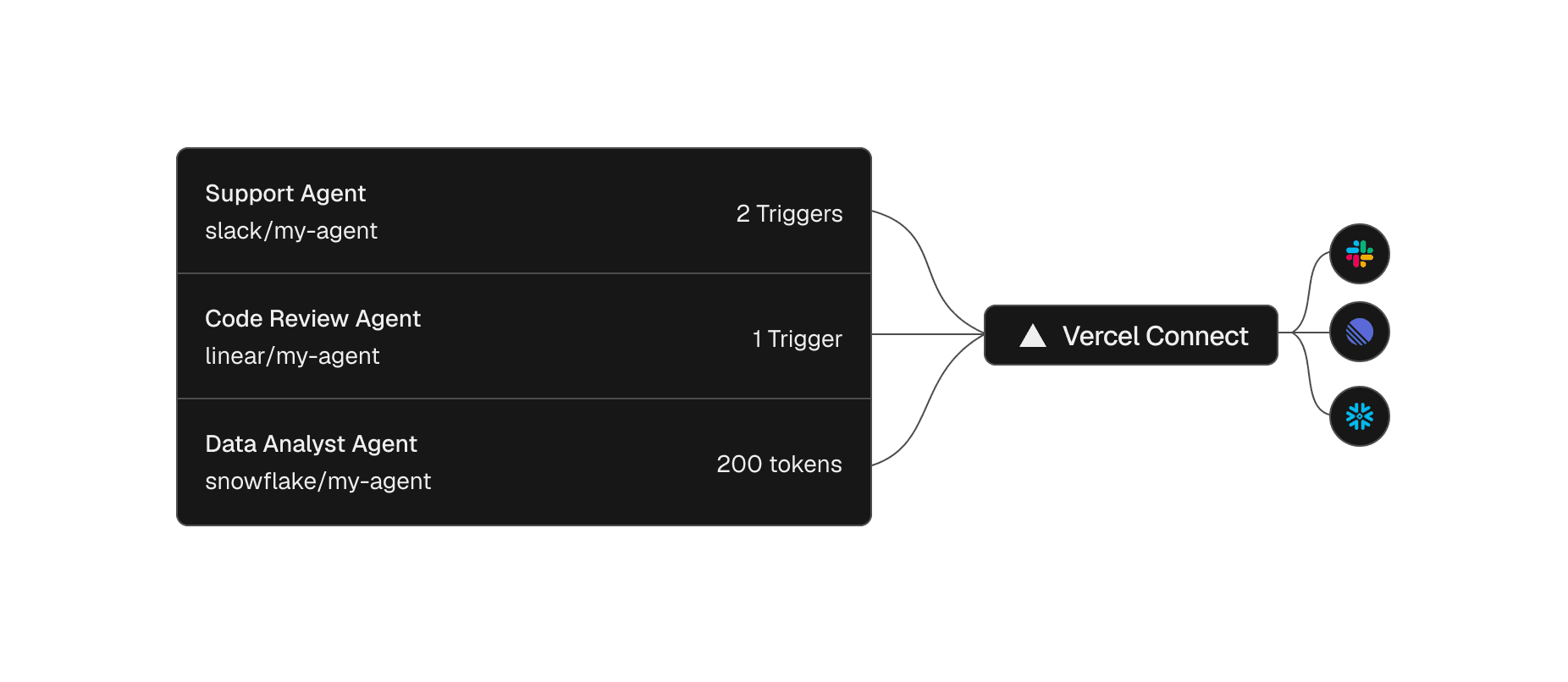 image
image
各エージェントは、独自のスコープ付きトークンとトリガーを備えた Vercel Connect を通じてサービスに到達します。
リンク見出し
コネクタを一度登録すれば、プロジェクトや環境全体で再利用できます。
コネクタとは、Vercel チームと Slack や GitHub などのプロバイダー間の再利用可能な接続のことです。ダッシュボードまたは CLI から一度作成し、必要なプロジェクトや環境にアタッチします。アクセス制御はプロジェクトレベルで行われます。
vercel connect create slack --name mybot
Slack コネクタの作成
プロバイダーとの関係性は、12 個もの環境変数パネルに散らばっているものではなく、回転(ローテーション)が発生した際にすべてのコピーを探し回る必要もない、単一の管理可能なエンティティとなります。
コーディングエージェントもこのセットアップを実行できます。vercel-connect スキルを npx skills add vercel/vercel-plugin --skill vercel-connect でインストールすれば、コネクタの作成とアタッチを代行してくれます。
リンク見出しランタイム時にスコープ付きトークンを要求
コネクタが設定されている場合、エージェントは作業を行う必要があるときにのみ資格情報を要求します。@vercel/connect SDK は、プロバイダー API に対して即座に使用するトークンを返しますが、アプリ内にプロバイダーの秘密鍵が存在することはありません。
app/lib/connect-token.ts
import { getToken } from '@vercel/connect';
const token = await getToken('slack/mybot', {
subject: { type: 'app' },
});
ランタイム時にトークンを要求
トークンは短期間で有効期限があり、その寿命はプロバイダーによって異なります。SDK は自動的にトークンを更新するため、秘密鍵を手動でローテーションする必要はありません。ここで残る疑問があります。アプリに秘密鍵を保持していない場合、何を根拠として要求が許可されるのでしょうか。
リンク見出しOIDC を用いてアプリが身元を証明します
その証明とは、アプリがすでに持っている身元です。Vercel 上のすべてのデプロイメントには OIDC 身元が付与されており、アプリやエージェントがトークンを要求すると、SDK はその身元を Vercel Connect に提示します。Vercel Connect はそれを検証し、プロジェクトと環境がコネクタの使用を許可されているかを確認した上で、プロバイダーの資格情報を返します。この往復通信がランタイム時の資格情報交換です。
同じ身元は、vercel link および vercel env pull を通じてローカル開発中にも利用可能です。また、Vercel 外では SDK が Vercel アクセストークンを受け入れます。いずれの場合も、アプリ内に漏洩させたり、コミットしたり、環境間でコピーしたりするプロバイダーの秘密鍵は存在しません。
ターゲットへのリンク:各トークンをタスクが必要とする範囲に厳密にスコープする
単一のエージェント内であっても、すべてのタスクが同じ広がりを持つ必要はありません。あるステップはリポジトリを読み取る一方で、次のステップはイシューを開くかもしれません。それぞれの要求は必要なアクセスを正確に求め、その要求自体が制限を設定します。要求には以下が含まれ得ます:
- プロバイダースコープ
- インストール ID
- リソース制限
- プロバイダ固有の認証詳細
GitHub は、トークンを特定のリポジトリと権限に制限できるため、最も鋭い例です。
app/lib/github-token.ts
import { getToken } from '@vercel/connect';
const token = await getToken('github/mybot', {
subject: { type: 'app' },
authorizationDetails: [
{
type: 'github_app_installation',
repositories: ['myorg/repo1'], // 一つのリポジトリ、組織全体ではない
permissions: ['contents:read'], // 読み取り専用、書き込み不可
},
],
});
トークンを一つのリポジトリにスコープし、読み取り専用に設定
デプロイメントエージェントは、その一つのリポジトリを読み取るだけで、他のことは何も行いません。ファイングラインド(細粒度)な GitHub App インストールも狭く設定できますが、インストールは一度設定され、それ以降信頼される恒久的な付与です。一方、この制限は一つの要求、一つのタスクのために存在します。最小権限の原則が、要求の形状そのものとなります。
Link to heading特定のユーザーを代表して行動し、ユーザーごとのトークンスコープを設定する
共有ボットトークンは、すべてのユーザーのリクエストに同じアイデンティティと権限を与えてしまいます。Vercel Connect を使用すれば、そのアイデンティティを設定できます。アプリケーションから名前付きのユーザーへ主体(subject)を切り替えることで、トークンはそのユーザーを代表して動作し、そのユーザーが許可した範囲にスコープされます。
app/lib/user-token.ts
import { getToken } from '@vercel/connect';
const token = await getToken('linear/mybot', {
subject: { type: 'user', id: 'user_123' },
});
特定のユーザーのトークンをリクエストする
ユーザーが最初にアクセスを許可した際、startAuthorization は、コールバック URL、Webhook(ウェブフック)、またはデバイスコードを通じて同意フローを実行します。その後、エージェントはそのユーザーとしてトークンを要求します。
Link to heading環境ごとのアクセスを制限し、必要に応じて取り消す
コネクターは、あなたが選択したプロジェクトおよび環境に紐付けられるため、開発用、プレビュー用、本番用のそれぞれに対して個別のコネクターを実行することができ、1 つのコネクターでこれらすべてを指し示す必要はありません。各環境が独自の認証付与とスコープを持つコネクターを持っている場合、開発環境で漏洩した資格情報は、本番環境に対して再使用(リプレイ)されません。
個別のコネクターは資格情報の有効範囲を制限しますが、すでに発行されたアクセス権限を取り消すわけではありません。通常、これが最も厄介な部分です。保存されたトークンの場合、これはローテーション(入れ替え)を意味します。新しい秘密鍵を発行し、古いものが使用されていたすべての場所を更新し、それに基づいて動作していたものを再デプロイする必要があります。Vercel Connect を用いれば、コネクターのトークンを取り消すことができます。自分自身のものでも、すべてのものであっても構いません。
コネクタのトークンを自分自身のもののみ取り消す
vercel connect revoke-tokens slack/mybot --my-tokens
または、すべてのユーザーとインストールAcrossしてすべてのトークンを取り消す
vercel connect revoke-tokens slack/mybot --all-tokens
コネクタのトークンの取り消し
トークンの取り消しが何を行うかはプロバイダーによって異なります。プロバイダーが取り消しをサポートしている場合、Vercel Connect はプロバイダー側でトークンを無効化します。サポートしていない場合、Vercel Connect はその権限に対して新しいトークンの発行を停止しますが、すでに発行されたトークンはプロバイダー側では有効なままとなり、期限が切れるまで使用可能です。これは取り消し API を持たないすべてのプロバイダーにおける現実的な制限であり、プロバイダーがトークンを保持する期間が短いほど、その有効期間は短くなります。
リンク:検証された Slack トリガーからイベント駆動型エージェントをリンクする
これまでに、エージェント側からアクションを起こす仕組みでした。必要な作業がある際に、エージェントはトークンを要求し、サービスに呼び出しを行います。一方、トリガーはその逆の方向で動作します。接続されたサービスがアプリへイベントを送信すると、それに対してエージェントが応答します。
Vercel Connect はプロバイダーからの Webhook を受信し、その正当性を検証した上でプロジェクトへ転送します。トリガー転送機能はベータ版として提供されており、現在は Slack、GitHub、Linear に対応しています。Slack コネクタは、検証された Webhook を最大 3 つのプロジェクトに転送できるため、Slack 上のメッセージがそれに応答するエージェントを起動させることが可能です。
このフローは、アプリ内にプロバイダーのシークレットを含めることなく、エンドツーエンドで実行されます:
- ユーザーが Slack にメッセージを投稿します。
- Slack がそのイベントを Vercel Connect に送信します。
- Vercel Connect は保持している Slack の署名シークレット(Slack signing secret)に対してイベントを検証し、OIDC 認証情報で再付与された上で、あなたの Vercel アプリに転送します。
- あなたのアプリはその認証情報を検証した後、スコープ付きのランタイムトークンを要求します。
- エージェントがアクションを実行して応答します。
Slack の署名シークレットが消滅するわけではありません。それはサーバーサイドで Vercel Connect へ移動し、Vercel Connect が上流の Webhook を検証した上で、あなたのアプリが確認できる認証情報を用いて転送されたリクエストに再署名を行います。あなたのアプリには、アクションを実行するためのボットトークンも、検証対象となる署名シークレットも保持されていません。
Vercel Connect は、すでに存在するコードの場所であなたを迎えます
その背後にあるのは一つの呼び出しです。あなたのエージェントが AI SDK(AI Software Development Kit)上で構築されているか、バックグラウンドジョブとして実行されているか、あるいは自分で記述したループであるかを問わず、トークンを取得する方法は同じで、getToken を使用します。この呼び出しを取り囲むように、あなたがすでに運用しているスタック用のアダプターが存在します。Better Auth (@vercel/connect/betterauth) と Auth.js (@vercel/connect/authjs) は、プロバイダー設定をそれぞれが期待する形式で取得し、@vercel/connect/ai-sdk と @vercel/connect/mcp も同様に AI SDK ツールと MCP クライアントに対して機能します。Nuxt starter により、GitHub と Linear が接続され、プロバイダーのシークレットも OAuth リフレッシュトークンもデータベースに保存されていない状態で、構築可能な動作中のアプリが提供されます。
フレームワークはこの先も進み、接続自体を宣言的に扱うことができます。Vercel が提供するオープンソースのエージェントフレームワークである eve では、接続は 1 つのファイルで構成され、@vercel/connect/eve アダプターがその接続の認証情報を提供します。
agent/connections/linear.ts
import { defineMcpClientConnection } from "eve/connections";
import { connect } from "@vercel/connect/eve";
export default defineMcpClientConnection({
url: "https://mcp.linear.app/sse",
auth: connect("linear/mybot"),
});
MCP を介した Linear への eve 接続
エージェントのコードにはトークン処理が含まれていません。connect が同意フロー、リフレッシュ、エラーケースを eve にマッピングするためです。OAuth をサポートする MCP サーバーであれば、その URL だけでコネクターとして機能できます。これが mcp.linear.app が Slack や GitHub と同じスコープ付きトークンモデルを持つ理由です。
同じアダプターが Slack チャンネルも接続します。connectSlackCredentials 1 つの呼び出しで双方向をカバーします:送信用のボット認証情報と、受信側のウェブフック検証用です。
agent/channels/slack.ts
import { slackRoute } from "eve/channels/slack";
import { connectSlackCredentials } from "@vercel/connect/eve";
export default slackRoute({
credentials: connectSlackCredentials("slack/mybot"),
});
eve の Slack チャンネル
通常、環境変数に保存される Slack インテグレーションの 2 つのシークレット、SLACK_BOT_TOKEN と SLACK_SIGNING_SECRET は、アプリから消滅します。設定や保存、ローテーションすべきものは何も残っていません。
リンク見出しへのアクセス
アクセスは、タスクにスコープを限定したリクエストとなるものになります。
エージェントが到達できる範囲が広くなるほど有用性が高まるため、アクセス制御を正しく実装することが極めて重要です。エージェントが触れることのできるすべてのシステムは、漏洩したトークンを通じて誰かが到達可能なシステムでもあります。ランタイム認証情報の交換により、「すべてに対してプロビジョニングする」ことはなく、「全ユーザーで共有する」こともなく、「永遠に有効な」ものも存在せず、「眼前のタスクを超えて届く」こともありません。
従来の認証情報管理はアーキテクチャの一部でした。回転スクリプト、環境間でのシークレットのコピー、そして誰かが漏洩させないことを祈るしかないほど広範なボットトークンがその典型です。しかし現在では、それらを一切保存する必要はありません。エージェントが必要とする瞬間にアクセスをリクエストし、タスクに限定したスコープで実行します。
Vercel Connect で構築を開始する
コネクタを登録し、最初のランタイムトークンをリクエストして、プロバイダーのシークレットを保存することなくエージェントを Slack や GitHub に接続できます。
コーディング用エージェントには単なるプロンプトが必要です:
このアプリで Vercel Connect を設定し、Slack トークンを保存せずに Slack へ投稿できるようにします。vercel-connect スキルを npx skills add vercel/vercel-plugin --skill vercel-connect でインストールして手順に従ってください。スキールがカバーしていない事項については vercel.com/docs/connect.md をお読みください。プロジェクトをリンクし(vercel link)、ローカルの OIDC トークンを取得し(vercel env pull)、vercel connect create slack --name mybot で Slack コネクタを作成してこのプロジェクトにアタッチしてください。その後、@vercel/connect をインストールし、ランタイムで getToken('slack/mybot', { subject: { type: 'app' } }) を呼び出してトークンを取得します。そのトークンを使用して、私が選択したチャンネルへテストメッセージを投稿します。プロジェクトの型チェック(typecheck)で検証し、私の指示がない限りコミットしないでください。
コーディングエージェントのための初期プロンプト
見出しへのリンクよくある質問
Vercel Connect とは?
Vercel Connect を使用すると、エージェントやサービスがユーザーやチームに代わって外部システムにアクセスできるようになります。プロバイダーの認証情報を長期有効な環境変数に保存する代わりに、プロジェクトレベルのアクセス制御を備えたランタイムでユーザー承認トークンを要求します。
Vercel Connect はどのような問題を解決するのでしょうか?
これは、ランタイム中に長期有効なサードパーティのシークレットを削除しつつも、エージェントが外部 API に対してアクションを実行できるようにする機能です。プロバイダー用のコネクターを登録し、プロジェクトや環境とリンクさせた上で、ランタイム時にプロバイダートークンをリクエストします。
Vercel Connect と Vercel Integrations のどちらを使用すべきか?
Vercel Integrations は、Vercel マーケットプレイス内のマーケットプレイス管理型インストールやプロバイダー管理型製品に使用してください。エージェントワークフロー(例:Slack ワークスペースへのプロジェクトスコープアクセスを必要とするエージェント)に対して委任されたランタイム認証情報とユーザーの承認が必要な場合は、Vercel Connect を使用してください。
利用可能なコネクターは?
Vercel Connect は、汎用的な OAuth および API キーコネクターをサポートしており、さらに Slack、GitHub、Linear、Discord、Notion、Salesforce、Figma、Snowflake 専用のコネクターも用意されています。Resend、Workday、Microsoft Teams など、今後追加予定の機能もあります。
料金体系は?
料金はトークンリクエスト数に基づきます。Hobby プランでは、月額 5,000 トークンのリクエストが追加費用なしで利用可能です。Pro および Enterprise プランでは、10,000 トークンリクエストあたり 3 ドルで課金されます。
現在のベータ版における制限事項は?
トリガー転送は Slack、GitHub、Linear に限定されています。コネクターのブランディングフィールドを設定した後に完全にクリアすることはできません。また、トークンの取り消し、有効期限、スコープの粒度は、プロバイダーのサポート状況に依存します。
原文を表示
Giving your agents access to your tools, data, and services is what makes them useful. As agents perform deeper work across systems, authenticating and authorizing that access becomes central to your application architecture.
Today, agent access is usually granted through long-lived provider tokens stored in your environment variables, provisioned for everything your agent might need. These tokens are shared across every user, never expire, and give your agent full reach across every task, no matter how small the job.
A vault makes that token harder to steal. It doesn't make it less dangerous. The problem is what happens when the token leaks: everything it can touch is now exposed.
We built Vercel Connect to solve this problem. Now in Public Beta, Vercel Connect replaces the stored token with runtime credential exchange. You register a connector once. When your agent has work to do, your app proves its identity to Vercel Connect and gets back a short-lived credential, scoped to the task. Everything you used the token for still works. The agent just requests access each time instead of holding it.
Each agent reaches its service through Vercel Connect, with its own scoped tokens and triggers.
Link to headingRegister a connector once, then reuse it across projects and environments
A connector is a reusable connection between your Vercel team and a provider like Slack or GitHub. You create it once from the dashboard or the CLI, then attach it to the projects and environments that need it, with project-level access controls.
vercel connect create slack --name mybotCreate a Slack connector
The relationship with the provider becomes a single entity you can see and manage, not something scattered across a dozen environment variable panels where a rotation means hunting down every copy.
Your coding agent can run this setup too. Install the vercel-connect skill with npx skills add vercel/vercel-plugin --skill vercel-connect, and it can create and attach connectors for you.
Link to headingRequest scoped tokens at runtime
With a connector in place, the agent asks for a credential only when it has work to do. The @vercel/connect SDK returns a token you use immediately against the provider API, and no provider secret lives in your app.
app/lib/connect-token.ts
import { getToken } from '@vercel/connect';const token = await getToken('slack/mybot', { subject: { type: 'app' },});Request a token at runtime
Tokens are short-lived, with a lifetime that depends on the provider. The SDK refreshes them automatically, so you never rotate a secret by hand. That leaves one question. If your app holds no secret, what proves it's allowed to ask?
Link to headingThe app proves its identity with OIDC
The proof is an identity your app already has. Every deployment on Vercel gets an OIDC identity, and when your app or agent requests a token, the SDK presents that identity to Vercel Connect. Vercel Connect verifies it, checks that the project and environment are allowed to use the connector, and returns the provider credential. That round trip is the runtime credential exchange.
The same identity is available during local development through vercel link and vercel env pull, and outside Vercel, the SDK accepts a Vercel access token. Either way, there is no provider secret in your app to leak, commit, or copy between environments.
Link to headingScope each token to exactly what the task needs
Not every task needs the same reach, even within a single agent. One step might read a repository while the next opens an issue. Each requests exactly the access it needs, and the request itself sets limits. A request can include:
- Provider scopes
- An installation ID
- Resource restrictions
- Provider-specific authorization details
GitHub is the sharpest example because it can restrict a token to specific repositories and permissions.
app/lib/github-token.ts
import { getToken } from '@vercel/connect';const token = await getToken('github/mybot', { subject: { type: 'app' }, authorizationDetails: [ { type: 'github_app_installation', repositories: ['myorg/repo1'], // one repo, not the whole org permissions: ['contents:read'], // read-only, not write }, ],});Scope a token to one repository, read-only
The deployment agent can read that one repository and do nothing else. A fine-grained GitHub App install can be narrow too, but an install is a standing grant, set up once and trusted from then on. This limit exists for one request, one task. Least privilege becomes the shape of the request.
Link to headingAct on behalf of a specific user, with per-user token scoping
A shared bot token gives every user's request the same identity and reach. Vercel Connect lets you set that identity. Switch subject from the app to a named user, and the token acts on that user's behalf, scoped to what that user authorized.
app/lib/user-token.ts
import { getToken } from '@vercel/connect';const token = await getToken('linear/mybot', { subject: { type: 'user', id: 'user_123' },});Request a token for a specific user
When a user first grants access, startAuthorization runs the consent flow through a callback URL, a webhook, or a device code. After that, the agent requests tokens as that user.
Link to headingContain access by environment, and revoke it when you need to
A connector is attached to the projects and environments you choose, so you can run a separate connector for development, preview, and production instead of pointing one at all three. When each environment has its own connector with an authorization grant and scopes, a credential compromised in development cannot be replayed against production.
Separate connectors limit where a credential works, but they don't pull back access already issued. That's normally the painful part. With a stored token, that means a rotation. You mint a new secret, update every place the old one lived, and redeploy whatever depended on it. With Vercel Connect, you revoke the connector's tokens, either your own or all of them.
# Revoke just your own tokens for a connectorvercel connect revoke-tokens slack/mybot --my-tokens# Or revoke every token, across all users and installationsvercel connect revoke-tokens slack/mybot --all-tokensRevoke a connector's tokens
What revoking does depends on the provider. Where the provider supports revocation, Vercel Connect revokes the token at the provider. Where it does not, Vercel Connect stops issuing new tokens for that grant, and a token already issued stays valid at the provider until it expires. That is a real limit on any provider without a revocation API, and the shorter the provider keeps its tokens, the smaller that window is.
Link to headingDrive event-driven agents from verified Slack triggers
So far, your agent has been the one reaching out. It requests a token and calls a service when it has work to do. Triggers run the other way. A connected service sends an event to your app, and your agent responds.
Vercel Connect receives the provider's webhook, verifies it, and forwards it to your project. Trigger forwarding is in beta and supports Slack, GitHub, and Linear today. A Slack connector can forward its verified webhooks to up to three of your projects, so a message in Slack can wake an agent that acts on it.
The flow runs end to end without a provider secret in your app:
- A user posts a message in Slack.
- Slack sends the event to Vercel Connect.
- Vercel Connect verifies the event against the Slack signing secret it holds, then forwards it to your Vercel app, re-attested with its OIDC identity.
- Your app verifies that attestation, then requests a scoped runtime token.
- The agent acts and responds.
The Slack signing secret does not disappear. It moves server-side to Vercel Connect, which verifies the upstream webhook and re-signs the forwarded request with an identity your app can check. Your app holds no bot token to act with and no signing secret to verify against.
Link to headingVercel Connect meets your code where it already is
Underneath everything is one call. Whether your agent is built on the AI SDK, runs as a background job, or is a loop you wrote yourself, it asks for a token the same way, with getToken. Around that call are adapters for the stack you already run. Better Auth (@vercel/connect/betterauth) and Auth.js (@vercel/connect/authjs) get provider configs in the shape they expect, and @vercel/connect/ai-sdk and @vercel/connect/mcp do the same for AI SDK tools and MCP clients. The Nuxt starter gives you a working app to build on, with GitHub and Linear connected, no provider secret, and no OAuth refresh token stored in its database.
Frameworks can take this further and make the connection itself declarative. In eve, the open-source agent framework by Vercel, a connection is one file, and the @vercel/connect/eve adapter supplies that connection's credential.
agent/connections/linear.ts
import { defineMcpClientConnection } from "eve/connections";import { connect } from "@vercel/connect/eve";export default defineMcpClientConnection({ url: "https://mcp.linear.app/sse", auth: connect("linear/mybot"),});An eve connection to Linear over MCP
There is no token handling in the agent's code, because connect maps the consent flow, refresh, and error cases onto eve. Any MCP server that supports OAuth can become a connector by its URL, which is how mcp.linear.app ends up with the same scoped-token model as Slack or GitHub.
The same adapter wires a Slack channel. One connectSlackCredentials call covers both directions: the bot credentials for sending and the webhook verification for receiving.
agent/channels/slack.ts
import { slackRoute } from "eve/channels/slack";import { connectSlackCredentials } from "@vercel/connect/eve";export default slackRoute({ credentials: connectSlackCredentials("slack/mybot"),});An eve Slack channel
The two secrets a Slack integration usually keeps in your environment, SLACK_BOT_TOKEN and SLACK_SIGNING_SECRET, are gone from your app. There is nothing left to provision, store, or rotate.
Link to headingAccess becomes something you request, scoped to the task
An agent becomes more useful the more it can reach, which is exactly why access is the part to get right. Every system the agent can touch is a system someone could reach through a leaked token. With runtime credential exchange, nothing is provisioned for everything. Nothing is shared by every user. Nothing lasts forever. Nothing reaches past the task in front of it.
Credential management used to be architecture. It was rotation scripts, secrets copied between environments, and bot tokens broad enough that you hoped no one leaked them. Now you store none of it. You request access the moment the agent needs it, scoped to the task.
Start building with Vercel Connect
Register a connector, request your first runtime token, and connect an agent to Slack or GitHub without storing a provider secret.
Coding agents just need a prompt:
Set up Vercel Connect in this app so it can post to Slack without storing a Slack token. Install the vercel-connect skill with `npx skills add vercel/vercel-plugin --skill vercel-connect` and follow it. Read vercel.com/docs/connect.md for anything the skill does not cover. Link the project (`vercel link`) and pull a local OIDC token (`vercel env pull`), create a Slack connector with `vercel connect create slack --name mybot`, and attach it to this project. Then install @vercel/connect and request a token at runtime with getToken('slack/mybot', { subject: { type: 'app' } }). Use the token to post a test message to a channel I choose. Verify with the project's typecheck, and do not commit unless I ask.A starting prompt for your coding agent
Link to headingFrequently asked questions
What is Vercel Connect?
Vercel Connect lets your agents and services access external systems on behalf of your users and teams. Instead of storing provider credentials in long-lived environment variables, you request user-authorized tokens at runtime with project-level access controls.
What problem does Vercel Connect solve?
It removes long-lived third-party secrets from your runtime while still letting agents act on external APIs. You register a connector for a provider, link it to projects and environments, and request provider tokens at runtime.
When should I use Vercel Connect instead of Integrations?
Use Vercel Integrations for marketplace-managed installs and provider-managed products in the Vercel Marketplace. Use Vercel Connect when you need delegated runtime credentials and user authorization for agent workflows, such as an agent that needs project-scoped access to a Slack workspace.
Which connectors are available?
Vercel Connect supports generic OAuth and API key connectors, plus dedicated connectors for Slack, GitHub, Linear, Discord, Notion, Salesforce, Figma, and Snowflake. Resend, Workday, Microsoft Teams, and more are coming soon.
How does pricing work?
Pricing is based on token requests. The Hobby plan includes 5K token requests per month at no additional cost. On Pro and Enterprise plans, token requests are billed at $3 per 10K token requests.
What are the current Beta limitations?
Trigger forwarding is limited to Slack, GitHub, and Linear, connector branding fields cannot be fully cleared after you set them, and token revocation, token lifetime, and scope granularity depend on provider support.
関連記事
今日のまとめ
AI日報で今日の重要ニュースをまとめ読み