ソフトウェアエンジニアとして SQL をテストする:単体テスト、CI/CD、データ品質の自動化
この記事は、SQL をソフトウェア開発と同様に扱うためのユニットテスト、バージョン管理、CI/CD の導入方法を解説し、データ品質の自動化と信頼性向上を提案している。
キーポイント
SQL のソフトウェアエンジニアリング的アプローチ
単に「動作する」SQL を書くだけでなく、変更やリファクタリングによって silently break しないよう、バージョン管理とテストを前提とした開発ワークフローへ移行する必要性を説く。
Amazon 面接課題を用いた実践的デモ
顧客の最高額注文を特定するという実際の面接問題を例に、SQL をテスト可能なコンポーネントとして再構築し、期待される出力を定義するプロセスを示す。
CI/CD とデータ品質自動化の実装
手動検証から脱却し、継続的インテグレーション(CI)とデプロイメント(CD)パイプラインに組み込むことで、SQL コードの変更が即座に検知・自動テストされる仕組みを構築する方法を解説する。
SQL をソフトウェアとして扱うアプローチ
クエリは正しく、安定しており、回帰(regression)に耐性があるべきであり、これはソフトウェア開発の原則と同じです。
上位スパイダー特定のための 3 ステップロジック
解決策は、顧客ごとの日次総支出を集計し、日付ごとにランク付けを行い、最終的に各日の最上位スパイダーのみを返すという論理に基づいています。
CTE を活用した複雑なクエリの構造化
Common Table Expressions (CTE) を使用して集計とランク付けのロジックを段階的に分離し、可読性と保守性を高めています。
SQL の脆弱性とテストの必要性
デフォルト値の変更やカラム名の変更など、些細な変更がサイレントエラーを引き起こす可能性があるため、テストによる保護が不可欠です。
重要な引用
Everyone focuses on writing SQL that "works," but very few test whether it keeps working tomorrow.
This article walks through a complete workflow, showing how to treat SQL like software: versioned, tested, and automated.
This problem is perfect for illustrating how SQL can be treated like software: the query must be correct, stable, and resistant to regressions.
The logic breaks down into three parts: Aggregate each customer's total spending per day; Rank customers by total spending for each date; Return only the daily top spenders.
SQL breaks more easily than most think. A changed default, a renamed column, or a new data source can introduce silent errors.
Because defining expected outputs creates a benchmark.
影響分析・編集コメントを表示
影響分析
この記事は、データエンジニアリングや分析領域における開発プラクティスの成熟度を高める重要な指針となる。SQL の品質保証を自動化する手法を広めることで、組織全体のデータ信頼性向上と運用コスト削減に寄与する可能性がある。
編集コメント
AI ツールの活用以前に、基礎的なデータ処理コードの品質保証をソフトウェア開発標準に引き上げる重要性を再認識させる良質な技術記事です。

# イントロダクション
**
誰もが「動作する」SQL を書くことに注力しますが、明日もその SQL が動作し続けるかどうかを検証している人はほとんどいません。新しい行の追加、前提条件の変更、あるいはリファクタリングによって、クエリが静かに壊れてしまう可能性があります。この記事では、SQL をソフトウェアとして扱うための完全なワークフローを紹介していきます。つまり、バージョン管理され、テストされ、自動化された SQL です。ここでは、顧客の日次支出額が最も高い顧客を特定するという実際の Amazon の面接問題 を取り上げます。その後、その SQL をテスト可能なコンポーネントに変換し、期待される出力を定義して、継続的インテグレーションと継続的デリバリー(CI/CD)を用いてテストを自動化します。
# ステップ 1: 面接形式の SQL 問題への取り組み
// 問題の理解

この Amazon の 面接問題 では、特定の期間内に顧客の日次注文合計コストが最も高い顧客を見つけることが求められています。
// データセットの理解
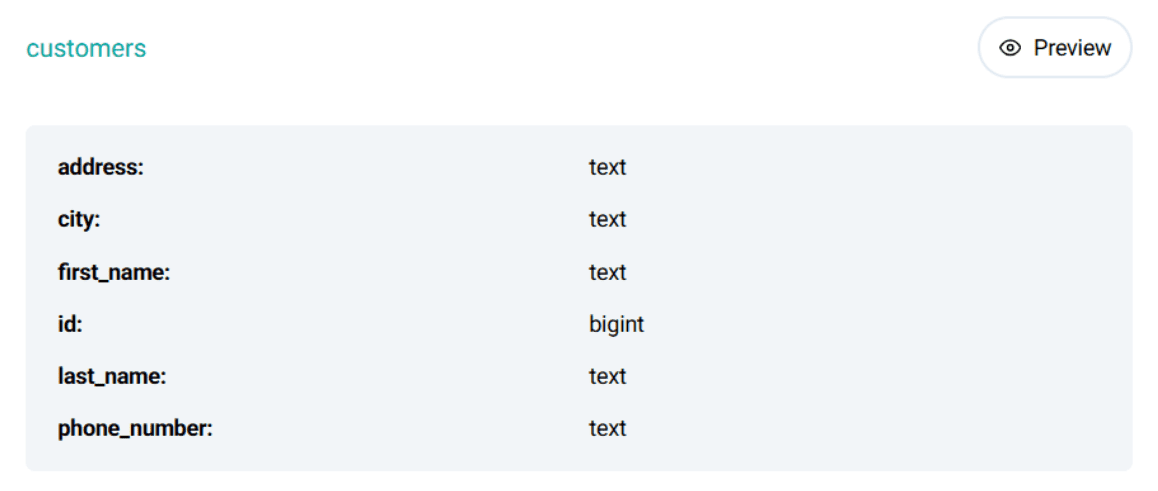
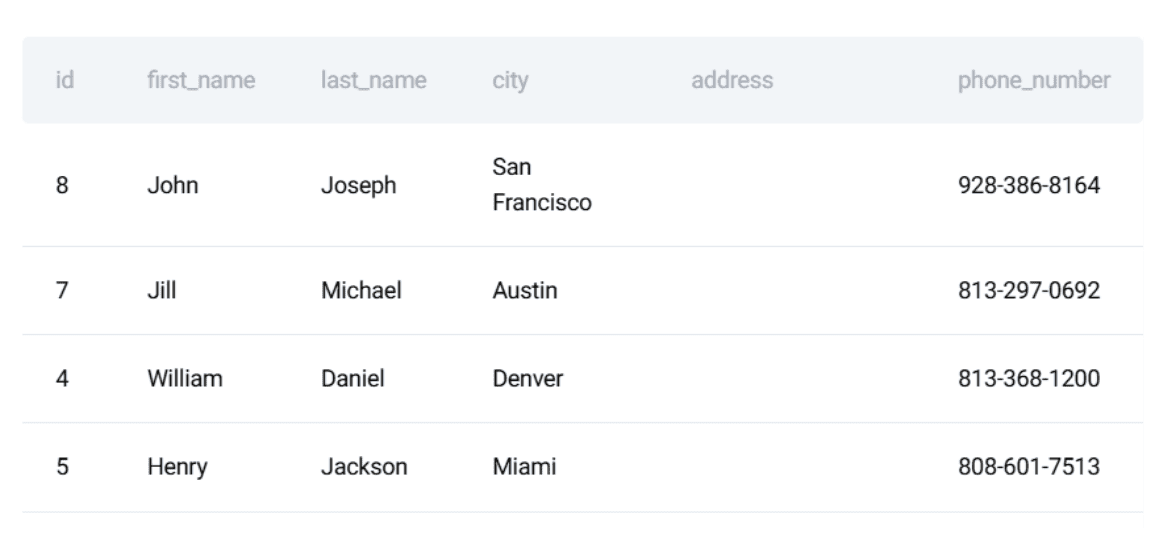
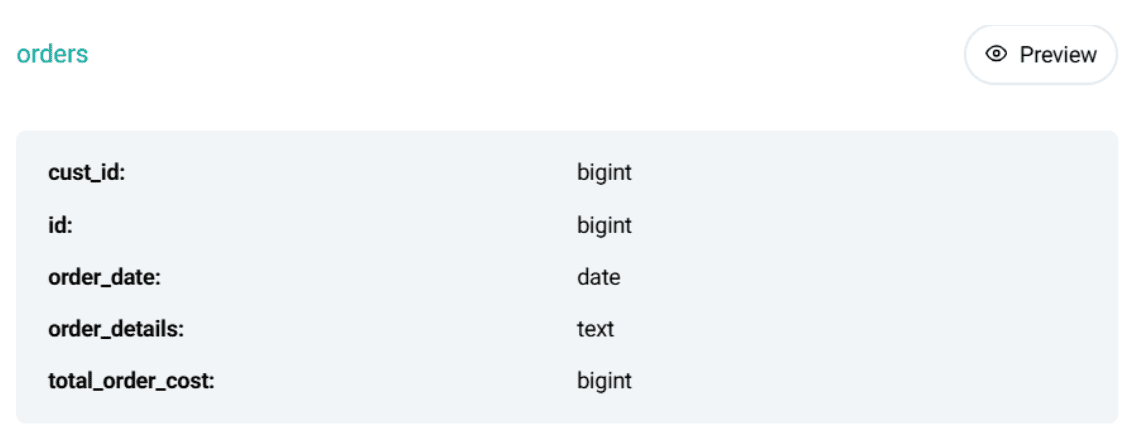
このプロジェクトには 2 つのデータテーブルがあります:customers(顧客)と orders(注文)です。
customers テーブル:
このデータセットのプレビューは以下の通りです:
orders テーブル:
このデータセットのプレビューは以下の通りです:
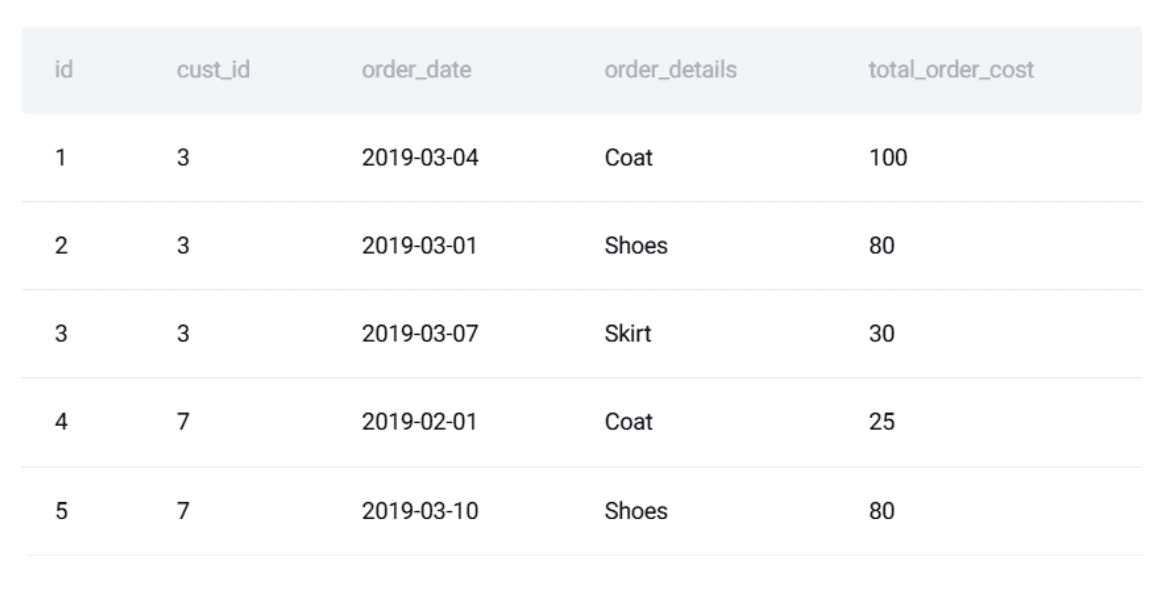
この問題は、SQL をソフトウェアとして扱う方法を説明するのに最適です。クエリは正しく、安定しており、回帰(regression)に対して耐性を持つ必要があります。
// SQL ソリューションの作成
ロジックは 3 つの部分に分解されます:
- 顧客ごとの日別総支出を集計する
- 各日の総支出に基づいて顧客をランク付けする
- 毎日の上位スパイダー(支出者)のみを返す
最終的な PostgreSQL** ソリューションは以下の通りです:
WITH customer_daily_totals AS (
  SELECT
    o.cust_id,
    o.order_date,
    SUM(o.total_order_cost) AS total_daily_cost
  FROM orders o
  WHERE o.order_date BETWEEN '2019-02-01' AND '2019-05-01'
  GROUP BY o.cust_id, o.order_date
),
ranked_daily_totals AS (
  SELECT
    cust_id,
    order_date,
    total_daily_cost,
    RANK() OVER (
      PARTITION BY order_date
      ORDER BY total_daily_cost DESC
    ) AS rnk
  FROM customer_daily_totals
)
SELECT
  c.first_name,
  rdt.order_date,
  rdt.total_daily_cost AS max_cost
FROM ranked_daily_totals rdt
JOIN customers c ON rdt.cust_id = c.id
WHERE rdt.rnk = 1
ORDER BY rdt.order_date;
// Defining the Expected Output
Here is the expected output:
**
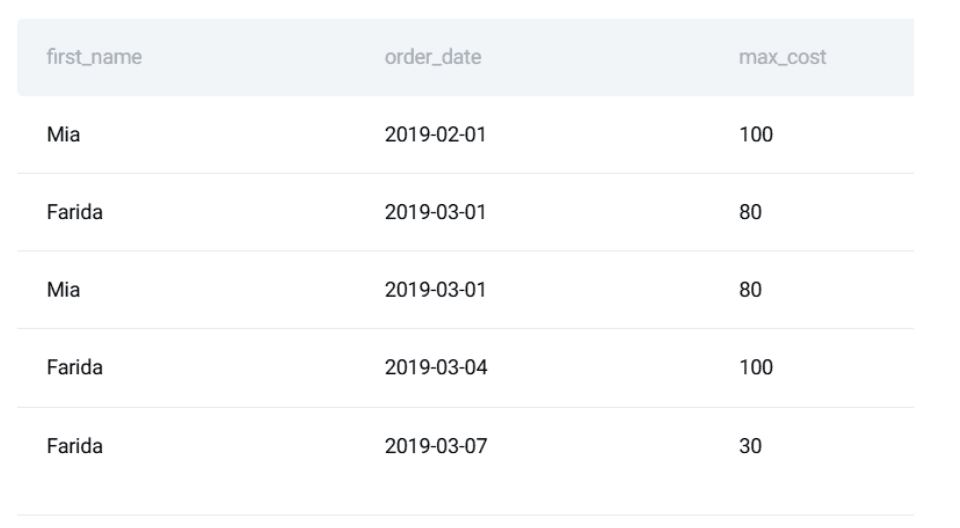
At this stage, most people stop.
# Step 2: Making the SQL Logic Reliable with Unit Tests
SQL breaks more easily than most think. A changed default, a renamed column, or a new data source can introduce silent errors. Testing protects you from these issues. There are three testing steps we will cover: converting the logic into a function, defining expected output, and writing a unit test suite.
// Turning the Query into a Reusable Component
SQL コードをテストするには、まず軽量なテストフレームワークである unittest を使用して、Python** 関数でコードをラップすることから始めます。最初に、テストしたいクエリを定義します:
    query = """
        WITH customer_daily_totals AS (
          SELECT
            o.cust_id,
            o.order_date,
            SUM(o.total_order_cost) AS total_daily_cost
          FROM orders o
          WHERE o.order_date BETWEEN '2019-02-01' AND '2019-05-01'
          GROUP BY o.cust_id, o.order_date
        ),
        ranked_daily_totals AS (
          SELECT
            cust_id,
            order_date,
            total_daily_cost,
            RANK() OVER (
              PARTITION BY order_date
              ORDER BY total_daily_cost DESC
            ) AS rnk
          FROM customer_daily_totals
        )
        SELECT
          c.first_name,
          rdt.order_date,
          rdt.total_daily_cost AS max_cost
        FROM ranked_daily_totals rdt
        JOIN customers c ON rdt.cust_id = c.id
        WHERE rdt.rnk = 1
        ORDER BY rdt.order_date;
    """
// テスト入力と期待される出力の定義
次に、テスト対象となる制御されたサンプルデータセットを作成する必要があります。
test_customers = [
    (15, "Mia"),
    (7, "Jill"),
    (3, "Farida")
]

test_orders = [
    (1, 3, "2019-03-04", 100),
    (2, 3, "2019-03-01", 80),
    (4, 7, "2019-02-01", 25),
    (6, 15, "2019-02-01", 100)
]
期待される出力も作成します:
expected = [
    ("Mia", "2019-02-01", 100),
    ("Farida", "2019-03-01", 80),
    ("Farida", "2019-03-04", 100)
]
なぜそうするのかというと、期待される出力を定義することでベンチマーク(基準)が作られるからです。
// SQL ユニットテストの記述
これでクエリ、テスト入力、そして期待される出力が定義されました。実際にユニットテストを書くことができます。その考え方はシンプルです:
- 独立したインメモリデータベースを作成する
- 制御されたテストデータをロードする
- SQL クエリを実行する
- 取得した結果が期待される出力と一致することをアサート(検証)する
**

Python の組み込み unittest フレームワークは、依存関係を最小限に保ちつつ、構造化と反復可能性を提供できるため非常に効果的です。まず、インメモリ SQLite データベースを作成することから始めます:
conn = sqlite3.connect(":memory:")
cursor = conn.cursor()
:memory: を使用することで以下のことが保証されます:
- テストデータベースが完全に独立している
- 外部の状態が結果に影響を与えることはない
- テスト終了後にデータベースは自動的に破棄される
次に、クエリで必要なテーブルのみを再作成します:
CREATE TABLE customers (...)
CREATE TABLE orders (...)
クエリで使用されているのは列の一部に過ぎませんが、スキーマは現実的な生産環境のテーブルを模倣しています。これにより、過度に単純化されたスキーマによって生じる誤った安心感(偽りの自信)のリスクを低減できます。その後、前述で定義した制御されたテストデータを挿入します:
cursor.executemany("INSERT INTO customers VALUES (?, ?, ?, ?, ?, ?)", test_customers)
cursor.executemany("INSERT INTO orders VALUES (?, ?, ?, ?, ?)", test_orders)
conn.commit()
この時点で、データベースには既知で決定論的な状態が含まれており、これは意味のあるテストにとって不可欠です。クエリを実行する前に、Pandas を使用してテストテーブルを読み込み、出力します:
customers_df = pd.read_sql("SELECT id, first_name, last_name, city FROM customers", conn)
orders_df = pd.read_sql("SELECT * FROM orders", conn)
このステップは自動化には厳密には必須ではありませんが、開発やデバッグの際には非常に有用です。テストが失敗した場合、入力データを即座に検査できることは、SQL ロジックを確認するよりもはるかに多くの時間を節約します。なぜなら、コードが段階的に何を計算しているかを理解できるからです。さて、テスト対象のクエリを実行します:
result = pd.read_sql(query, conn)
結果は DataFrame に読み込まれ、以下を提供します:
- 行と列への構造化されたアクセス
- 期待される出力との簡単な比較
- デバッグ用の可読な印刷
次に、結果を1行ずつ検証する必要があります。検証ロジックでは、クエリの出力と期待される結果の間で手動のアサーション(アサーション)を行います:
all_correct = True

if len(result) != len(expected):
    all_correct = False
最初のチェックでは、クエリによって返される行数が期待値と一致しているかを確認します。ここで不一致が生じれば、即座にレコードの欠落または余分な存在を示唆します。次に、期待される出力を反復処理し、実際のクエリ結果と比較します:
for i, (fname, lname, date, cost) in enumerate(expected):
    if i < len(result):
        actual = result.iloc[i]
        if not (
            actual["first_name"] == fname
            and actual["last_name"] == lname
            and actual["order_date"] == date
            and actual["max_cost"] == cost
        ):
            all_correct = False
各行は、関連するすべての次元でチェックされます:
- 顧客名
- 注文日付
- 集計された日次コスト
期待値と異なる値が一つでもあれば、テストは失敗としてマークされます。最後に、テスト結果は明確な合格/不合格メッセージとして要約されます:
if all_correct and len(result) == len(expected):
    print("ALL TESTS PASSED")
else:
    print("SOME TESTS FAILED")
その後、データベース接続がクローズされます:
conn.close()
テストに合格した場合の期待される出力は以下の通りです:
**
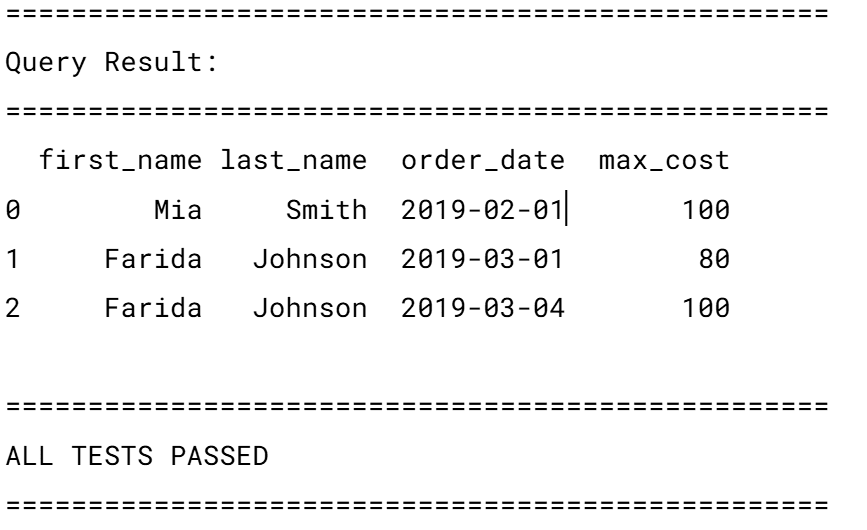
このテストには、注意すべきいくつかの前提条件が含まれています:
- 安定した行順序(ORDER BY order_date)
- すべての値における完全一致
- 同点や1日あたりの重複する勝者に対する許容範囲なし
そのまま使用可能な完全なスクリプトは、こちらで確認できます。
# ステップ 3:継続的インテグレーションと継続的デリバリーによる SQL テストの自動化
テストスイートは、必要なときに一貫して実行される場合にのみ有用です。コード変更が行われるたびにテストを自動化するために、CI/CD を活用します。
// プロジェクトの整理
最小限のリポジトリ構造は以下のようになります。
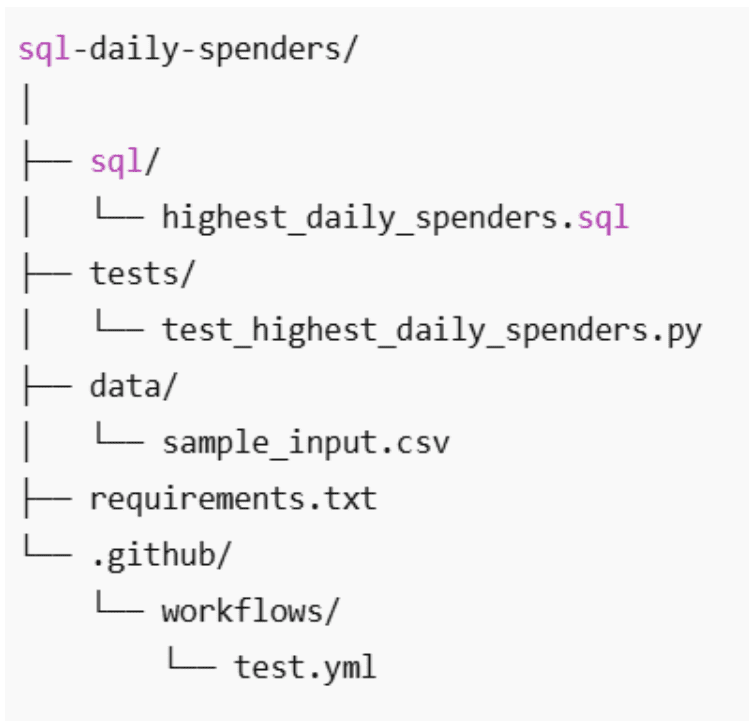
// GitHub Actions ワークフローの作成
次のステップは、コードが変更されるたびにこれらのテストが自動的に実行されるようにすることです。これには GitHub Actions を使用します。このツールを使用すると、コードがプッシュされたときやプルリクエストが開かれたときに SQL テストを実行する CI ワークフローを定義できます。
ワークフローファイルの作成: リポジトリ内に、まだ存在しない場合は以下のフォルダ構造を作成してください:.github/workflows/。このフォルダ内に test_sql.yml という名前の新しいファイルを作成します。名前には特別な意味はありません。GitHub が重要視するのは、そのファイルが .github/workflows/ ディレクトリ内にあるかどうかだけです。何と命名しても構いませんが、test_sql.yml とすることで内容が明確でシンプルになります。
ワークフローの実行タイミングの定義: 以下に完全なワークフローファイルを示します:
name: Run SQL Tests

on:
  push:
    branches: [ "main" ]
  pull_request:
    branches: [ "main" ]
このセクションでは、ワークフローがいつ実行されるかを定義しています:
- main ブランチへのプッシュのたびに
- main を対象としたすべてのプルリクエストに対して
実際には、以下を意味します:
- main へ直接プッシュするとテストがトリガーされます
- プルリクエストの作成または更新は、テストの実行もトリガーします
これは、マージされる前に SQL の回帰問題を検出するのに役立ちます。
テストジョブの定義: 次に、test という名前のジョブを定義します:
jobs:
  test:
    runs-on: ubuntu-latest
これは GitHub に以下のように指示します:
- 新しい Linux マシンを作成する
- その中ですべてのテストステップを実行する
各ワークフローの実行はクリーンな環境から始まるため、「自分のマシンでは動く」問題を防ぎます。
// ワークフローステップの追加
次に、マシンが実行すべきステップを定義します:
- name: Checkout repository
  uses: actions/checkout@v4
このステップにより、リポジトリのコードがランナーにダウンロードされ、SQL ファイルやテストにアクセスできるようになります。
- name: Set up Python
  uses: actions/setup-python@v5
  with:
    python-version: "3.10"
これは Python 3.10 をインストールし、すべての実行でランタイムを統一します。
- name: Install dependencies
  run: |
    python -m pip install --upgrade pip
    pip install -r requirements.txt
これは requirements.txt に定義された必要な Python ライブラリ(Pandas など)をすべてインストールします。
- name: Run unit tests
  run: python -m unittest discover
最後に、このコマンドは:
- テストファイルを自動的に発見し
- tests/ フォルダに定義されたすべての SQL テストを実行し
- 1 つでもテストが失敗した場合、ワークフローを失敗させます
完全なワークフローは こちら で確認できます。
ワークフローの実行: このファイルを手動で実行する必要はありません。コミットするだけで:
- main ブランチへのプッシュがワークフローをトリガーします
- プルリクエストを開くとワークフローがトリガーされます
GitHub のリポジトリの「Actions」タブに移動することで、結果を直接確認できます。
**

各実行ごとに、SQL テストが成功したか失敗したかが表示されます。
# ステップ 4: データ品質の自動化
ユニットテストは、ロジックが依然として期待通りの出力を返すかどうかを確認し、CI(継続的インテグレーション)によりこれらのテストが自動的に実行されることを保証します。しかし、実際のデータ環境では、入力データ自体が失敗の原因となることがあります:遅れて到着する行、書式が崩れた日付、欠落したキー、予期せぬ重複などにより、SQL ロジックに問題が生じるよりも前にクエリが破綻してしまう可能性があります。ここで登場するのがデータ品質の自動化です。テストとバージョン管理はコード変更に対する安全網を形成しますが、データ品質の自動化はこの安全網をデータ自体へと拡張し、結果に影響を与える前に下流の問題を防ぎます。
// SQL ワークフローにおいてデータ品質チェックが重要な理由
私たちのインタビュー問題では、以下の事象によりクエリが誤った結果を返す可能性があります:
- 顧客のファーストネームが一意でなくなっている。
- 注文に負のコストが含まれている。
- 日付が期待される範囲外にある。
- 日次集計データに、同じ顧客と日付に対する重複行が含まれている。
- 顧客が存在するが、orders テーブルには存在しない顧客がいる(またはその逆)。

自動化されたチェックがない場合、これらの問題は結果を静かに歪める可能性があります。SQL は多くのシナリオで明白な例外を発生させないため、エラーは気づかれずに広がります。自動化されたデータ品質チェックはこれらの問題を早期に検出し、破損または不完全なデータを含むパイプラインが実行されるのを防ぎます。
// データの前提条件を自動化されたルールへ変換する
すべての SQL クエリはデータに関する前提条件に依存しています。問題は、これらの前提条件がほとんど記述されておらず、ほぼ確実に強制されていないことです。私たちの日常支出クエリでは、正しさは SQL ロジックだけでなく、入力データの形状と有効性にも依存します。それらの前提条件を暗黙的に信頼するのではなく、自動化されたデータ品質ルールとして表現することができます。その考え方は単純です。
- 各前提条件を SQL チェックとして表現する
- それらのチェックを自動的に実行する
- いずれかの前提条件が違反された場合は即座に失敗させる
名前は一意であること: 私たちのクエリは顧客を ID で結合しますが、first_name を識別子として返します。もし first_name がもはや一意でなければ、出力は曖昧になります。
SELECT first_name, COUNT(*)
FROM customers
GROUP BY first_name
HAVING COUNT(*) > 1;
このクエリがどの行も返さない場合、前提条件は破綻しています。
注文コストは非負であること: 負の注文値は通常、データ取り込みまたは上流の変換における問題を示唆します。
SELECT *
FROM orders
WHERE total_order_cost < 0;
ここでの単一の行でも、財務集計を無効化します。
注文日付は有効であり、期待範囲内である必要があります: 欠落している日付や著しく範囲外の日付は、同期エラーやパースエラーを示すことがよくあります。
SELECT *
FROM orders
WHERE order_date IS NULL
   OR order_date < '2010-01-01'
   OR order_date > CURRENT_DATE;
これは、クエリが悪質な時系列データを黙って含めてしまうのを防ぎます。
すべての注文は有効な顧客を参照している必要があります: 存在しない顧客を参照する注文がある場合、結合(JOIN)処理によって行が黙って除外されてしまいます。
SELECT o.*
FROM orders o
LEFT JOIN customers c ON c.id = o.cust_id
WHERE c.id IS NULL;
このルールは、分析ロジックを実行する前に参照整合性を保証します。
// ルールを自動化されたチェックに変換
これらのチェックを手動で実行するのではなく、いずれかのルールが違反された場合に即座に失敗する単一の Python 関数にラップすることができます。
import pandas as pd

def run_data_quality_checks(conn):
    checks = {
        "Duplicate first names": """
            SELECT first_name
            FROM customers
            GROUP BY first_name
            HAVING COUNT(*) > 1;
        """,
        "Negative order costs": """
            SELECT *
            FROM orders
            WHERE total_order_cost < 0;
        """,
        "Invalid order dates": """
            SELECT *
            FROM orders
            WHERE order_date IS NULL
               OR order_date < '2010-01-01'
               OR order_date > CURRENT_DATE;
        """,
        "Orders without customers": """
            SELECT o.*
            FROM orders o
            LEFT JOIN customers c ON c.id = o.cust_id
            WHERE c.id IS NULL;
        """
    }

    for rule_name, query in checks.items():
        result = pd.read_sql(query, conn)
        if not result.empty:
            raise ValueError(f"Data quality check failed: {rule_name}")

    print("All data quality checks passed.")
この関数は以下の動作を行います。
- 各ルールを実行する
- 結果として行が返されるか確認する
- 違反が見つかった場合は即座にエラーを発生させる
現時点では、データ品質ルールはユニットテストと同じように振る舞います:合格または不合格です。テストに合格すると、以下のような出力が表示されます。
**
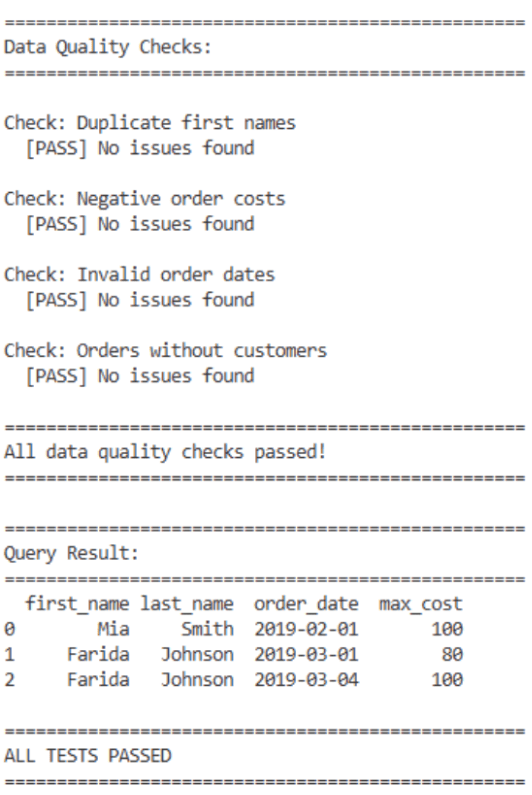
データ品質チェックは Python 内部で実行されるため、既存の GitHub Actions ワークフローによって自動的に検出されます。
- name: Run unit tests
  run: python -m unittest discover
CI パイプラインは、以下のいずれかの条件が発生した直ちに停止します:
- テストファイルによって関数がインポートまたは実行される
- 失敗が例外を発生させる
# 結びの言葉
多くの人は SQL クエリが正しい答えを返すだけで満足してしまいます。しかし、実際のデータ環境では、クエリの安定性、テスト可能性、バージョン管理を実現した人々が評価されます。
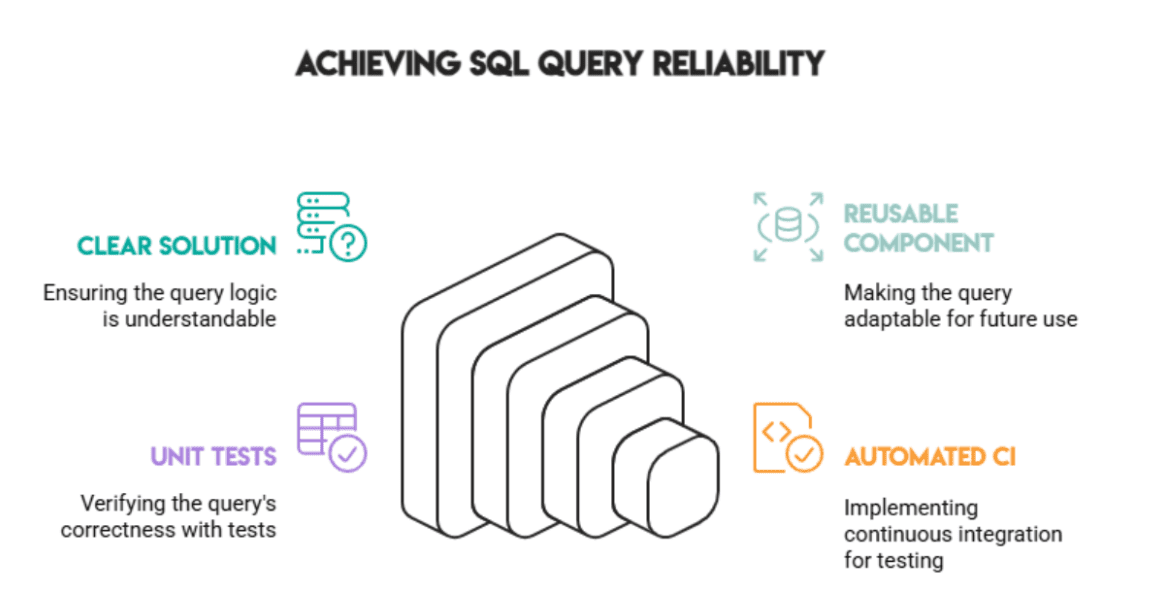
以下のプラクティスを組み合わせることで、データが時間とともに変化しても、クエリが信頼できる結果を継続して提供し続けることができます:
- 明確な解決策
- 再利用可能なコンポーネント
- ユニットテスト
- 自動化された CI (Continuous Integration)
正しさは良いことですが、信頼性が不可欠です。
Nate Rosidi** はデータサイエンティストであり、製品戦略に従事しています。また、分析を教える非常勤教授でもあり、トップ企業からの実際の面接質問でデータサイエンティストの準備をサポートするプラットフォーム「StrataScratch」の創設者です。Nate はキャリア市場の最新動向について執筆し、面接アドバイスを提供し、データサイエンスプロジェクトを共有し、SQL に関するあらゆるトピックを取り上げています。
原文を表示
# Introduction
**
Everyone focuses on writing SQL that "works," but very few test whether it keeps working tomorrow. A single new row, a changed assumption, or a refactor can break a query silently. This article walks through a complete workflow, showing how to treat SQL like software: versioned, tested, and automated. We'll use a real Amazon interview question about identifying customers with the highest daily spending. Then we will convert the SQL into a testable component, define expected outputs, and automate testing with continuous integration and continuous deployment (CI/CD).
# Step 1: Solving an Interview-Style SQL Question
// Understanding the Problem
In this interview question from Amazon, you are asked to find the customers with the highest daily total order cost between a certain date range.
// Understanding the Dataset
There are two data tables in this project: customers and orders.
The customers table:
Here is a preview of the dataset:
The orders table:
Here is a preview of the dataset:
This problem is perfect for illustrating how SQL can be treated like software: the query must be correct, stable, and resistant to regressions.
// Writing the SQL Solution
The logic breaks down into three parts:
- Aggregate each customer's total spending per day
- Rank customers by total spending for each date
- Return only the daily top spenders
Here is the final PostgreSQL** solution:
WITH customer_daily_totals AS (
SELECT
o.cust_id,
o.order_date,
SUM(o.total_order_cost) AS total_daily_cost
FROM orders o
WHERE o.order_date BETWEEN '2019-02-01' AND '2019-05-01'
GROUP BY o.cust_id, o.order_date
),
ranked_daily_totals AS (
SELECT
cust_id,
order_date,
total_daily_cost,
RANK() OVER (
PARTITION BY order_date
ORDER BY total_daily_cost DESC
) AS rnk
FROM customer_daily_totals
)
SELECT
c.first_name,
rdt.order_date,
rdt.total_daily_cost AS max_cost
FROM ranked_daily_totals rdt
JOIN customers c ON rdt.cust_id = c.id
WHERE rdt.rnk = 1
ORDER BY rdt.order_date;// Defining the Expected Output
Here is the expected output:
**
At this stage, most people stop.
# Step 2: Making the SQL Logic Reliable with Unit Tests
SQL breaks more easily than most think. A changed default, a renamed column, or a new data source can introduce silent errors. Testing protects you from these issues. There are three testing steps we will cover: converting the logic into a function, defining expected output, and writing a unit test suite.
// Turning the Query into a Reusable Component
To test the SQL code, we begin by wrapping it in a Python function using a lightweight testing framework like unittest**. First, we define the query that we want to test:
query = """
WITH customer_daily_totals AS (
SELECT
o.cust_id,
o.order_date,
SUM(o.total_order_cost) AS total_daily_cost
FROM orders o
WHERE o.order_date BETWEEN '2019-02-01' AND '2019-05-01'
GROUP BY o.cust_id, o.order_date
),
ranked_daily_totals AS (
SELECT
cust_id,
order_date,
total_daily_cost,
RANK() OVER (
PARTITION BY order_date
ORDER BY total_daily_cost DESC
) AS rnk
FROM customer_daily_totals
)
SELECT
c.first_name,
rdt.order_date,
rdt.total_daily_cost AS max_cost
FROM ranked_daily_totals rdt
JOIN customers c ON rdt.cust_id = c.id
WHERE rdt.rnk = 1
ORDER BY rdt.order_date;
"""// Defining Test Input and Expected Output
Next, we must create a controlled sample dataset to test against.
test_customers = [
(15, "Mia"),
(7, "Jill"),
(3, "Farida")
]
test_orders = [
(1, 3, "2019-03-04", 100),
(2, 3, "2019-03-01", 80),
(4, 7, "2019-02-01", 25),
(6, 15, "2019-02-01", 100)
]We also create the expected output:
expected = [
("Mia", "2019-02-01", 100),
("Farida", "2019-03-01", 80),
("Farida", "2019-03-04", 100)
]Why? Because defining expected outputs creates a benchmark.
// Writing SQL Unit Tests
Now we have the query defined, the test inputs, and the expected outputs. We can write an actual unit test. The idea is simple:
- Create an isolated, in-memory database
- Load controlled test data
- Execute the SQL query
- Assert that the result obtained matches the expected output
**
Python's built-in unittest framework is highly effective because it allows us to keep dependencies minimal while providing structure and repeatability. We start by creating an in-memory SQLite** database:
conn = sqlite3.connect(":memory:")
cursor = conn.cursor()Using :memory: ensures that:
- the test database is fully isolated
- no external state can affect the result
- the database is discarded automatically once the test finishes
Next, we recreate only the tables required by the query:
CREATE TABLE customers (...)
CREATE TABLE orders (...)Even though the query only uses a subset of columns, the schema mirrors a realistic production table. This reduces the risk of false confidence caused by oversimplified schemas. We then insert the controlled test data defined earlier:
cursor.executemany("INSERT INTO customers VALUES (?, ?, ?, ?, ?, ?)", test_customers)
cursor.executemany("INSERT INTO orders VALUES (?, ?, ?, ?, ?)", test_orders)
conn.commit()At this point, the database contains a known, deterministic state, which is essential for meaningful tests. Before executing the query, we load and print the test tables using Pandas:
customers_df = pd.read_sql("SELECT id, first_name, last_name, city FROM customers", conn)
orders_df = pd.read_sql("SELECT * FROM orders", conn)While this step is not strictly required for automation, it is highly useful during development and debugging. When a test fails, being able to immediately inspect the input data saves significantly more time than checking the SQL logic, because it allows you to understand step-by-step what the code is computing. Now we run the query under test:
result = pd.read_sql(query, conn)The result is loaded into a DataFrame, which provides:
- structured access to rows and columns
- easy comparison with expected outputs
- readable printing for debugging
Next, we must verify the results row by row. The verification logic makes a manual assertion between the query output and the expected result:
all_correct = True
if len(result) != len(expected):
all_correct = FalseThe first check confirms whether the number of rows returned by the query matches what we expect. A mismatch here immediately indicates missing or extra records. Next, we iterate through the expected output and compare it to the actual query result row by row:
for i, (fname, lname, date, cost) in enumerate(expected):
if i < len(result):
actual = result.iloc[i]
if not (
actual["first_name"] == fname
and actual["last_name"] == lname
and actual["order_date"] == date
and actual["max_cost"] == cost
):
all_correct = FalseEach row is checked on all relevant dimensions:
- customer name
- order date
- aggregated daily cost
If any value differs from the expected, the test is marked as failed. Finally, the test result is summarized in a clear pass/fail message:
if all_correct and len(result) == len(expected):
print("ALL TESTS PASSED")
else:
print("SOME TESTS FAILED")The database connection is then closed:
conn.close()If the tests pass, the expected output is:
**
This test carries some assumptions worth noting:
- a stable row order (ORDER BY order_date)
- exact matches on all values
- no tolerance for ties or duplicate winners per day
The full script, ready to be used, can be seen here.
# Step 3: Automating SQL Tests with Continuous Integration and Continuous Deployment
A test suite is only useful if it runs consistently whenever needed. We utilize CI/CD to automate testing whenever a code change is made.
// Organizing the Project
A minimal repository structure can look like this:
// Creating the GitHub Actions Workflow
The next step is to ensure these tests run automatically whenever the code changes. For this, we use GitHub Actions**. This tool allows us to define a CI workflow that runs the SQL tests every time code is pushed or a pull request is opened.
Create the workflow file: In your repository, create the following folder structure if it doesn't already exist: .github/workflows/. Inside this folder, create a new file called test_sql.yml. The name is not special; GitHub only cares that the file lives inside the .github/workflows/ directory. You can name it anything, but test_sql.yml keeps things clear and simple.
Define when the workflow should run: Here is the full workflow file:
name: Run SQL Tests
on:
push:
branches: [ "main" ]
pull_request:
branches: [ "main" ]This section defines when the workflow runs:
- on every push to the main branch
- on every pull request targeting main
In practice, this means:
- pushing directly to main will trigger the tests
- opening or updating a pull request will also trigger the tests
This helps catch SQL regressions before they get merged.
Define the test job: Next, we define a job called test:
jobs:
test:
runs-on: ubuntu-latestThis tells GitHub to:
- create a fresh Linux machine
- run all test steps inside it
Each workflow run starts from a clean environment, which prevents "it works on my machine" problems.
// Adding the Workflow Steps
Now we define the steps the machine should execute:
- name: Checkout repository
uses: actions/checkout@v4This step downloads your repository's code into the runner so it can access your SQL files and tests.
- name: Set up Python
uses: actions/setup-python@v5
with:
python-version: "3.10"This installs Python 3.10, ensuring a consistent runtime across all runs.
- name: Install dependencies
run: |
python -m pip install --upgrade pip
pip install -r requirements.txtThis installs all required Python libraries (such as Pandas) defined in requirements.txt.
- name: Run unit tests
run: python -m unittest discoverFinally, this command:
- automatically discovers test files
- runs all SQL tests defined in the tests/ folder
- fails the workflow if any test fails
The full workflow can be found here.
Running the workflow: You don't need to run this file manually. Once committed:
- pushing to main will trigger the workflow
- opening a pull request will trigger the workflow
You can view the results directly in GitHub by navigating to your repository's Actions tab.
**
Each run will show whether your SQL tests passed or failed.
# Step 4: Automating Data Quality
Unit tests confirm whether the logic still returns the expected output, and CI ensures these tests run automatically. But in real data environments, the input data itself can cause failures: late-arriving rows, malformed dates, missing keys, and unexpected duplicates can break queries long before the SQL logic does. This is where data quality automation comes in. Testing and versioning form a safety net for code changes; data quality automation extends that safety net to the data itself, preventing downstream issues before they impact results.
// Understanding Why Data Quality Checks Matter for SQL Workflows
In our interview problem, the following issues could make the query return incorrect results:
- A customer's first name is no longer unique.
- An order arrives with a negative cost.
- Dates fall outside the expected range.
- Daily aggregates contain duplicate rows for the same customer and date.
- A customer exists in orders but not in customers.
Without automated checks, these issues may silently distort results. Because SQL doesn't raise obvious exceptions in many of these scenarios, errors spread unnoticed. Automated data quality checks detect these issues early and prevent the pipeline from running with corrupted or incomplete data.
// Turning Data Assumptions into Automated Rules
Every SQL query relies on assumptions about the data. The problem is that these assumptions are rarely written down and almost never enforced. In our daily spenders query, correctness depends not only on SQL logic, but also on the shape and validity of the input data. Instead of trusting those assumptions implicitly, we can turn them into automated data quality rules. The idea is simple:
- express each assumption as a SQL check
- run those checks automatically
- fail fast if any assumption is violated
First names must be unique:** Our query joins customers by ID, but returns first_name as an identifier. If first names are no longer unique, the output becomes ambiguous.
SELECT first_name, COUNT(*)
FROM customers
GROUP BY first_name
HAVING COUNT(*) > 1;If this query returns any rows, the assumption is broken.
Order costs must be non-negative: Negative order values usually indicate ingestion or upstream transformation issues.
SELECT *
FROM orders
WHERE total_order_cost < 0;Even a single row here invalidates financial aggregates.
Order dates must be valid and within expectations: Dates that are missing or wildly out of range often reveal synchronization or parsing errors.
SELECT *
FROM orders
WHERE order_date IS NULL
OR order_date < '2010-01-01'
OR order_date > CURRENT_DATE;This protects the query from silently including bad temporal data.
Every order must reference a valid customer: If an order refers to a non-existent customer, joins will silently drop rows.
SELECT o.*
FROM orders o
LEFT JOIN customers c ON c.id = o.cust_id
WHERE c.id IS NULL;This rule ensures referential integrity before analytics logic runs.
// Converting Rules into an Automated Check
Instead of running these checks manually, we can wrap them into a single Python function that fails immediately if any rule is violated.
import pandas as pd
def run_data_quality_checks(conn):
checks = {
"Duplicate first names": """
SELECT first_name
FROM customers
GROUP BY first_name
HAVING COUNT(*) > 1;
""",
"Negative order costs": """
SELECT *
FROM orders
WHERE total_order_cost < 0;
""",
"Invalid order dates": """
SELECT *
FROM orders
WHERE order_date IS NULL
OR order_date < '2010-01-01'
OR order_date > CURRENT_DATE;
""",
"Orders without customers": """
SELECT o.*
FROM orders o
LEFT JOIN customers c ON c.id = o.cust_id
WHERE c.id IS NULL;
"""
}
for rule_name, query in checks.items():
result = pd.read_sql(query, conn)
if not result.empty:
raise ValueError(f"Data quality check failed: {rule_name}")
print("All data quality checks passed.")This function:
- executes each rule
- checks whether any rows are returned
- raises an error immediately if a violation is found
At this point, data quality rules behave just like unit tests: pass or fail. If tests pass, you will see something like:
**
Because the data quality checks run inside Python, they are automatically picked up by the existing GitHub Actions workflow:
- name: Run unit tests
run: python -m unittest discoverThe CI pipeline will stop immediately as long as:
- the function is imported or executed by your test file
- a failure raises an exception
# Concluding Remarks
Most people stop once the SQL query produces a correct answer. But real data environments reward those who make their queries stable, testable, and version-controlled.
Combining the following practices ensures the query continues to deliver reliable results, even as data changes over time:
- a clear solution
- a reusable component
- unit tests
- automated CI
Correctness is good, but reliability is essential.
Nate Rosidi** is a data scientist and in product strategy. He's also an adjunct professor teaching analytics, and is the founder of StrataScratch, a platform helping data scientists prepare for their interviews with real interview questions from top companies. Nate writes on the latest trends in the career market, gives interview advice, shares data science projects, and covers everything SQL.
関連記事
今日のまとめ
AI日報で今日の重要ニュースをまとめ読み