Cloudflare のデータプラットフォームと AI エージェントの構築方法
Cloudflare は、データのスプレッドとアクセスの難解さを解消するため、統一 SQL インターフェースを持つ「Town Lake」と、自然言語で質問できる AI エージェント「Skipper」を構築し、大規模データ分析の民主化を実現した。
キーポイント
データスプレッドとアクセスの課題
7 億件以上のイベント/秒を処理する環境において、数十もの分散システム(Postgres, ClickHouse, BigQuery など)間でのデータ探索に複雑な資格情報や専門知識が必要で、インサイト抽出が困難だった。
Town Lake の構築と役割
すべてのデータを単一の SQL インターフェースとして統合する「Town Lake」を構築し、サンプリングされたデータと生データの区別や、複雑な結合ロジックの隠蔽を実現した。
AI エージェント Skipper の導入
専門知識がなくても自然言語で質問できる AI エージェント「Skipper」を Town Lake 上に実装し、数秒内で正確かつ監査可能な回答を提供する仕組みを確立した。
組織文化の変革
データインフラを単なるバックオフィス機能から、ビジネスに不可欠なクリティカルインフラへと位置づけ直し、属人的なナレッジ依存からの脱却を図った。
データレイクハウスアーキテクチャの採用
オブジェクトストレージから読み取るクエリエンジンと、ストレージをデータベースのように振る舞わせるメタデータ層を組み合わせた「Town Lake」というプラットフォームを構築しました。
Apache Trinoによる多様なソースの統合
Postgres、ClickHouse、R2上のIcebergテーブルなどを中間結果の転送なしで結合できる単一のSQLクエリを実現し、複雑な分析を高速に実行可能にしました。
コスト効率とデータ階層化
R2のApache Icebergサービスにより、データの鮮度に応じて冷温データを自動変換し、Parquet形式での保存によりOLAPデータベースよりも大幅に低コストでクエリ可能にしています。
重要な引用
To answer a simple question like 'How many domains that signed up today are in the Top 100 by traffic?', an analyst at Cloudflare had to know which system to ask, what credentials to use... and whether the data they were looking at was sampled, fresh, or seven-days stale.
A query that asks "what are the top 100 paying customers by Workers requests this week" compiles into a plan that pushes filters into ClickHouse, joins against an account dimension in Postgres, and ranks against billing rollups in R2, all in one go.
At its core, our data platform's architecture is a data lakehouse: a query engine that reads from object storage, with a metadata layer that makes the storage behave like a database.
"The traditional answer to this is: open by default, restrict by exception. Allow access to everything, then audit and lock down sensitive tables when someone notices."
"Findings flow into DataHub and into Lifeguard's allowlist to allow human-in-the-loop review."
Users can see what tables exist, but unreviewed columns are hidden from DESCRIBE and SHOW COLUMNS and from SELECT *.
影響分析・編集コメントを表示
影響分析
このアプローチは、大規模テック企業におけるデータ民主化の新たな標準を示しており、複雑なデータ基盤を AI で抽象化する手法が実証された点で業界に大きな影響を与える。特に、サンプリングデータの扱いや厳密な監査可能性を確保しつつ自然言語クエリを実現した点は、金融や課金システムなど信頼性が求められる領域への応用可能性を示唆している。
編集コメント
大規模イベント処理を扱う企業ならではの、データスプレッドの深刻さとその解決策としての AI エージェント実装が非常に説得力があります。特に「サンプリングされたデータ」と「課金用生データ」の使い分けという実務的な課題に AI がどう応答するかは、他社でも参考になる事例です。
Cloudflare は毎秒 10 億件以上のイベントを処理しています。当社のネットワークは 120 カ国以上、330 都市以上に広がっています。すべての HTTP リクエスト、すべての Worker 呼び出し、すべての R2 読み取り操作の背後にはデータがあり、その量は膨大です。
長年にわたり、このデータへのアクセスは容易ではありませんでした。それは数十の生産用データベース、ClickHouse クラスター、Kafka ストリーム、Google Cloud バケット、BigQuery データセット、そして長いパイプラインの尾に存在していました。「今日登録したドメインのうち、トラフィックで上位 100 位以内にあるのはどれか」といった単純な質問に答えるために、Cloudflare のアナリストはどのシステムを問い合わせるべきか、どのような認証情報を使用すべきか、どのようなクエリ言語を書くべきか、そして見ているデータがサンプリングされたものなのか新鮮なものなのか、あるいは 7 日前の古いデータなのかを知る必要がありました。その結果、データから洞察に満ちた知見を引き出すことは困難でした。
この問題を解決するために、私たちは 2 つの社内ツールを構築しました。それが Cloudflare の統合データ分析プラットフォームである Town Lake と、その上で動作する AI データエージェントである Skipper です。Town Lake は Cloudflare が知るすべてのものに対する単一の SQL インターフェースであり、Skipper は Cloudflare の誰でもが平易な英語で質問し、数秒以内に正確で監査可能な回答を得られる方法です。
これが、私たちがこれら 2 つをどのように構築したかの物語です。
問題の形状
もしあなたが、急成長期を経験した企業で働いた経験があるなら、データのスプレッド(データの散逸)がどのようなものかご存知でしょう。当社にもいくつか特有の症状がありました:
あまりにもバラバラなシステムが多すぎます。顧客の問題を調査したい製品エンジニアは、アカウントメタデータをクエリするために Postgres を、分析イベントのために ClickHouse を、使用量の集計のために BigQuery を、生ログのために R2 を、リアルタイム信号のために Kafka トピックをそれぞれ利用する必要がありました。各システムには独自の認証情報、独自言語、独自の保持ポリシーが存在していました。
サンプリングされたデータ。これはダッシュボードには問題ありませんが、請求のようなドメインでは機能しません。私たちの分析パイプラインは、1 秒あたり 7 億件以上のイベントを処理するためにデータをダウンサンプルしています。これは分析ダッシュロードの読み込み速度を重視する場合に適切な動作ですが、請求書発行に必要な使用量を計算しようとしている場合には、まさに逆の行為となってしまいます。
内部データの外部依存。以前の内部レポートスタックの一部は外部ベンダーによって支えられていました。コストの問題に加え、重要なデータの一部については他クラウドに対する厳しい外部依存関係が存在していました。
誰もデータを発見できませんでした。適切な認証情報をすべて持っていたとしても、「アカウントごとの請求対象 Workers リクエスト数」の正しいテーブルが特定の ClickHouse クラスター内の特定のスキーマに存在し、特定の Postgres 次元テーブルと結合されており、その結合には目立たない顧客 ID の変換が必要であることを知らなければなりませんでした。属人的な知識が多すぎました。
私たちには文化的な課題もありました:データインフラは歴史的にビジネスを支えるバックオフィス機能として扱われてきたのであり、それ自体が重要なインフラであるとは見なされてこなかったのです。
私たちが望んだもの
私たちは、適切な権限と知る必要がある社内の誰でも、Cloudflare に関する質問への回答を得られる一つの場所を作りたかったのです。「直近の四半期で収益が上位 100 位の顧客を表示」「特定の ASN から発生し、過去 48 時間以内に Bot Management ML スコアリングイベントでスコアが 0.9 を超えるものをすべてリストアップ」「支出額が$100 を超える顧客からの請求サポートチケットの上位 100 件を検索」などです。
私たちは、その場所において、必要とするクエリ(請求やセキュリティ調査など)には新鮮で正確なサンプリングされていないデータを提供し、不要なクエリ(ダッシュボードや探索的分析など)には高速なダウンサンプルされたデータを供給することを望んでいました。
セキュリティとガバナンスは組み込まれており、個人識別情報 (PII) は自動的に検出され、機密性の高いテーブルはデフォルトでロックダウンされることを望んでいました。すべてのアクセスは監査可能であり、ユーザーが実際に必要なタスクに取り組んでいる間のみデータにアクセスできる時間制限付きの権限付与を持つべきでした。
私たちはこれを Cloudflare 独自のプラットフォーム上に構築することを望んでいました:ストレージには R2 を、コンピューティングには Workers を、認証には Cloudflare Access を、オーケストレーションには Workflows を使用します。データインフラストラクチャに大規模な投資を行うのであれば、それは顧客に販売している同じ製品の上に構築されるべきでした。
そして最終的には、SQL を一切知らなくても済むインターフェースを構築したかったのです。目標は、適切な権限と知る必要があるすべての社員が、アナリストだけでなく、ネットワークを流れるデータストリームを確認できるようにすることでした。
その最後の要件こそが、Skipper として実現されました。
Town Lake、プラットフォーム
中核となる私たちのデータプラットフォームのアーキテクチャは、データレイクハウスです。オブジェクトストレージから読み取るクエリエンジンと、ストレージをデータベースのように振る舞わせるメタデータ層で構成されています。この名前は、テキサス州オースティンにある同名の湖にちなんで名付けられました。

その最も重要な構成要素は以下の通りです。
クエリエンジン。これには Apache Trino を採用しました。Postgres テーブル、ClickHouse テーブル、R2 上の Iceberg テーブルを結合する単一の SQL クエリにおいて、中間結果を別のシステムにマテリアライズする必要はありません。「今週の Workers リクエストによる上位 100 件の課金顧客は誰か」というクエリは、フィルタを ClickHouse にプッシュし、Postgres のアカウント次元に対して結合を行い、R2 の集計ロールアップに対してランク付けを行う計画にコンパイルされ、すべてが一度に行われます。
R2 データカタログは、当社の管理型 Apache Iceberg サービスであり、コールドデータとウォームデータが格納される場所です。Iceberg により、スキーマの進化、タイムトラベル機能、パーティションの進化、および経年したデータのコンパクト化が可能になります。先週の分単位の利用データは時間単位に、前四半期の時間単位データは日次単位に変換され、そのように階層化されます。鮮度に応じてストレージコストが低下する一方、データは引き続きクエリ可能です。R2 内の Parquet ファイルは、同じデータを OLAP データベースに保持し続ける場合と比較して、はるかに安価です。
DataHub はメタデータカタログです。すべてのテーブル、列、所有者、ラインエッジ(系譜エッジ)、および用語集の用語がここに格納されています。ユーザーが「townlake.dim.accounts には何が含まれているか」と質問した場合、DataHub はテーブルの説明、列の説明、所有チーム、それを供給する上位テーブル、そしてそれを利用する下位テーブルを含む回答を提供します。
Lifeguard はアクセス制御サービスです。D1 にアクセスルールを格納し、内部アクセス管理システムからユーザーおよびグループの所属情報を動的に取得し、Trino が HTTP を介して読み取る統合された JSON ポリシーを生成します。また、Lifeguard は Skipper およびゲートウェイにも基本的なアクセス情報を提供するため、ユーザーはクエリ実行時ではなく、入口段階でブロックされます。
Skimmer は PII(個人識別情報)検出スキャナーです。これは継続的に実行され、すべてのテーブルのすべての列から行をサンプリングし、Workers AI を使用して各列に PII が含まれているかどうかを分類します。このプロセスは 2 つのパスで実施されます:まず高速な列ごとの分類器を実行し、次に何かが検出された場合に、完全なテーブルコンテキストを取得し、Trino に直接クエリして検証を行うエージェントによる第 2 パスを実行します。発見結果は DataHub および Lifeguard の許可リストに流れ、人間が関与するレビューを可能にします。
Transformer は Workflows を基盤とした ELT(抽出、ロード、変換)エンジンです。ユーザーは YAML フロントマター(対象テーブル、マテリアライゼーションモード、依存関係、スケジュール)を使用して、SQL 変換の有向非巡回グラフ(DAG)を定義します。Transformer はこのグラフをコンパイルし、Trino で実行します。状態管理は Durable Objects が担当し、定義は R2 に保存され、実行履歴は D1 に格納されます。
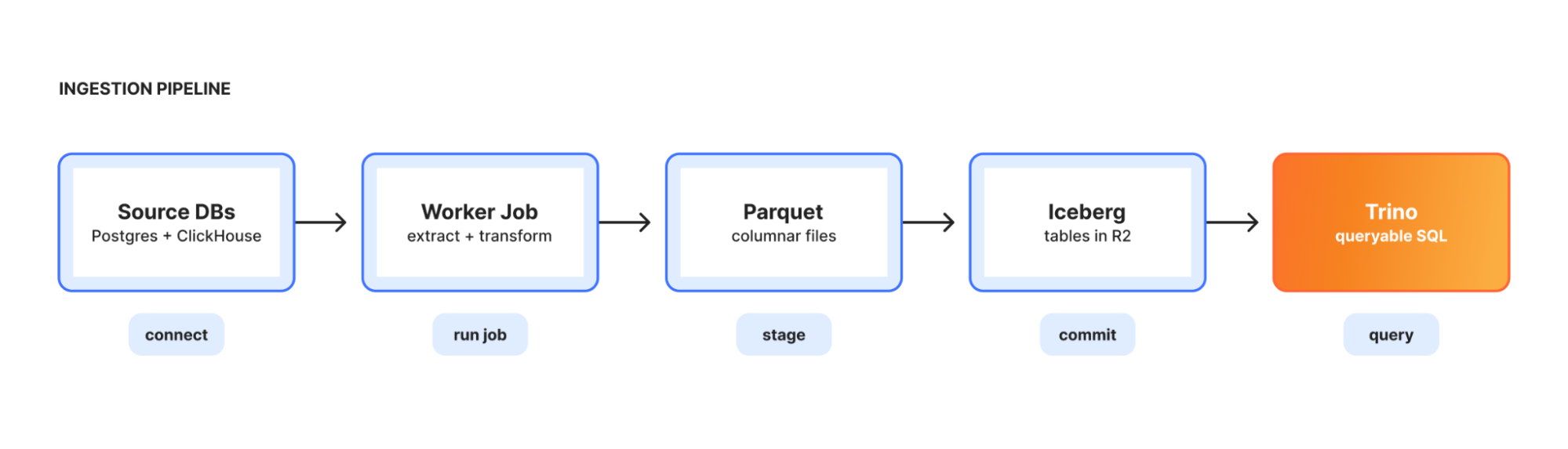
Ingestion は運用システムからデータレイクへの橋渡し役です。オーケストレーターは長寿命の Kubernetes デプロイメントとして実行され、パイプライン設定を読み取り、短寿命のワーカージョブを起動して Postgres または ClickHouse から抽出し、Parquet 形式に変換後、Iceberg テーブルとして R2 にロードします。各パイプラインは完全置換または増分追加のいずれかとして実行されます。
 image
image
デフォルトで閉じられている:構築によるガバナンス
統合データプラットフォームを構築する際の現実的な懸念は、大規模な機密データの表面領域を構築してしまうことです。従来の答えは「デフォルトで公開し、例外として制限する」です。すべてのアクセスを許可し、誰かが気づいた時点で監査して機密テーブルをロックダウンします。
Town Lake はこれとは逆のアプローチを取ります。レビューが完了するまで、テーブルはクエリに対してアクセス不可となります。新しいデータベースが Trino に接続された場合や、新しいテーブルが作成された場合、Skimmer がそれをスキャンし、列を分類して、中央の許可リストに保留中として登録します。レビュアーがテーブルと、その中の特定の列を承認するまで、ユーザーはクエリを実行できません。これは面倒に思えるかもしれませんが、2 つの理由でそうではありません。
第一に、自動化されている点です。Skimmer の分類器は reasonably good(十分に良好)であり、明白な PII(個人識別情報:電子メール、IP アドレス、氏名、電話番号)や、特定のプレフィックスと一致する API トークンやユーザーに遡って追跡可能な不透明な ID といった、目立たない機密データの長尾も検出します。レビュアーは検出された内容を確認し、承認、上書き、または拒否を行います。ほとんどのレビューは数秒で完了します。
第二に、ワークフローがセルフサービスである点です。アクセス権限のないテーブルをクエリしようとすると、エラーメッセージは「アクセス拒否」ではなく、「このテーブルのレビューが必要です。ここをクリックしてリクエストしてください」となります。AI エージェントの Skipper は、リクエストすべき適切な RBAC(ロールベースアクセス制御)グループを提案し、直接リンクします。
スキーマの発見とデータアクセスは分離されています。ユーザーは存在するテーブルを確認できますが、未審査のカラムは DESCRIBE や SHOW COLUMNS、および SELECT * からは非表示になります。この微妙な区別は重要です:承認されたテーブルの他の部分に基づいて構築された既存のダッシュボードを、新しい未審査のカラムが破壊しないことを意味します。
PII(個人識別情報)はセッションごとにオプトイン制です。デフォルトでは、Trino が機密カラムが画面に表示される前にマスキング処理を行います。不正調査など生データへの正当な必要性がある場合、セッションでフラグを切り替えることで、権限チェックが行われ、マスキングが解除されます。この切り替えとすべてのクエリはログに記録されます。
Skipper:AI データエージェント
現在の状況では、クエリエンジンだけでは不十分です。SQL は依然として障壁であり、数万あるテーブルの中からどのテーブルを照会すべきかを知ることも必要です。つまり、正規のスキーマを理解している必要があります。
Skipper は、自然言語での質問から、会社の実際のデータ、コード、組織的なナレッジに基づいた検証済みの回答へと至る対話型 AI エージェントとしての私たちの取り組みです。私たちはこれを Town Lake と、Workers、Workers AI、Durable Objects、D1、R2、Workflows、KV からなる開発プラットフォームの上に構築しました。
インターフェースはチャットボックスです。質問を投げかけてください:
過去 30 日間の R2 ストレージコストで上位 10 位の顧客と、前年同期との増減を示してください。
必ず JSON 形式で返してください。translation フィールドのみ。他のフィールド (technical_terms 等)は一切追加しないこと — 余計なフィールドを書こうとして本文翻訳がトークン上限で打ち切られる事故を防ぐため:
{"translation": "スキーマの発見とデータアクセスは分離されています。ユーザーは存在するテーブルを確認できますが、未審査のカラムは DESCRIBE や SHOW COLUMNS、および SELECT * からは非表示になります。この微妙な区別は重要です:承認されたテーブルの他の部分に基づいて構築された既存のダッシュボードを、新しい未審査のカラムが破壊しないことを意味します。
PII(個人識別情報)はセッションごとにオプトイン制です。デフォルトでは、Trino が機密カラムが画面に表示される前にマスキング処理を行います。不正調査など生データへの正当な必要性がある場合、セッションでフラグを切り替えることで、権限チェックが行われ、マスキングが解除されます。この切り替えとすべてのクエリはログに記録されます。
Skipper:AI データエージェント
現在の状況では、クエリエンジンだけでは不十分です。SQL は依然として障壁であり、数万あるテーブルの中からどのテーブルを照会すべきかを知ることも必要です。つまり、正規のスキーマを理解している必要があります。
Skipper は、自然言語での質問から、会社の実際のデータ、コード、組織的なナレッジに基づいた検証済みの回答へと至る対話型 AI エージェントとしての私たちの取り組みです。私たちはこれを Town Lake と、Workers、Workers AI、Durable Objects、D1、R2、Workflows、KV からなる開発プラットフォームの上に構築しました。
インターフェースはチャットボックスです。質問を投げかけてください:
過去 30 日間の R2 ストレージコストで上位 10 位の顧客と、前年同期との増減を示してください。
必ず JSON 形式で返してください。translation フィールドのみ。他のフィールド (technical_terms 等)は一切追加しないこと — 余計なフィールドを書こうとして本文翻訳がトークン上限で打ち切られる事故を防ぐため:
{"translation": "スキーマの発見とデータアクセスは分離されています。ユーザーは存在するテーブルを確認できますが、未審査のカラムは DESCRIBE や SHOW COLUMNS、および SELECT * からは非表示になります。この微妙な区別は重要です:承認されたテーブルの他の部分に基づいて構築された既存のダッシュボードを、新しい未審査のカラムが破壊しないことを意味します。
PII(個人識別情報)はセッションごとにオプトイン制です。デフォルトでは、Trino が機密カラムが画面に表示される前にマスキング処理を行います。不正調査など生データへの正当な必要性がある場合、セッションでフラグを切り替えることで、権限チェックが行われ、マスキングが解除されます。この切り替えとすべてのクエリはログに記録されます。
Skipper:AI データエージェント
現在の状況では、クエリエンジンだけでは不十分です。SQL は依然として障壁であり、数万あるテーブルの中からどのテーブルを照会すべきかを知ることも必要です。つまり、正規のスキーマを理解している必要があります。
Skipper は、自然言語での質問から、会社の実際のデータ、コード、組織的なナレッジに基づいた検証済みの回答へと至る対話型 AI エージェントとしての私たちの取り組みです。私たちはこれを Town Lake と、Workers、Workers AI、Durable Objects、D1、R2、Workflows、KV からなる開発プラットフォームの上に構築しました。
インターフェースはチャットボックスです。質問を投げかけてください:
過去 30 日間の R2 ストレージコストで上位 10 位の顧客と、前年同期との増減を示してください。"}
Skipper は適切なテーブル(DataHub 検索)を見つけ、それらのスキーマと系譜情報を取得し、SQL を記述して Trino に送信し、結果をポーリングして表やチャートを表示します。続けて「地域ごとに内訳を示し、Cloudflare の内部アカウントは除外してください」と指示すると、Skipper はその文脈を引き継いでクエリを精緻化し、再実行します。もし何かがおかしい場合、例えば結合で 0 行しか返されなかったり、フィルタリングによって期待したデータが除外されていたりする場合は、Skipper が調査して調整し、再度試みます。これは閉ループ推論と呼ばれるプロセスです。最も難しい点は、適切な文脈を準備することでした。
Skipper はまた、チャートをダッシュボードにパッケージ化して社内共有や他の内部アプリケーションへの埋め込みも可能です。さらに、Transformer を用いて変換グラフを構築するためのツールや、Lifeguard を通じてアクセス権限を確認するツールも備えています。
Skipper はユーザーがいるあらゆる場所で利用できます。これらのツールはすべて、Workers AI によって駆動される組み込みのエージェントハッチバックされた Worker を介して利用可能です。一方で、多くの社内ユーザーはローカルでエージェントフローを通じて作業しており、Skipper のツールは MCP サーバー経由でも利用可能です。
文脈の層
LLM に SQL プロンプトとテーブル名のリストを与えただけでは、結合を誤って推測したり、列を誤用したりして、自信満々に全く間違った数値を出力してしまうことがあります。これは初期の実験で痛い目にあって学んだ教訓です。その解決策は、検索時にモデルが参照できる複数の層の根拠ある文脈を用意することです。
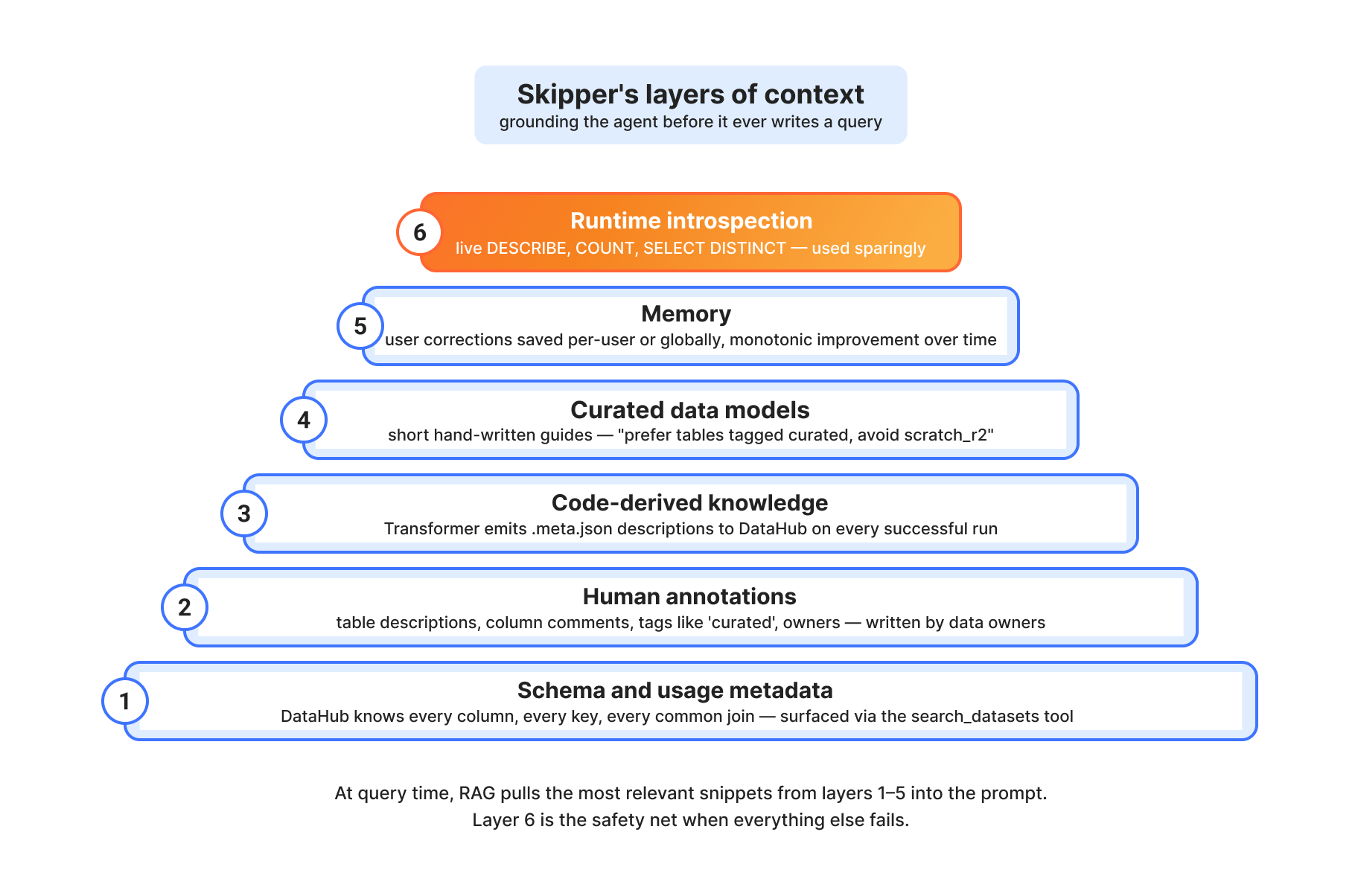
レイヤー 1: スキーマと使用メタデータ。DataHub は、すべてのテーブルのすべての列、すべての型、すべての主キー、すべての外部キーを把握しています。また、過去のクエリパターンに基づいて、どのテーブルが一般的に結合されるかも知っています。Skipper の search_datasets および get_entity_details ツールは、この情報を直接取り出します。
レイヤー 2: 人間の注釈。dim.accounts を所有するチームが「アカウントレベルのエンティティ。account_id あたり 1 行。すべてのアカウントは customer_id という外部キーを介して、ちょうど 1 つの顧客に属する」といった説明を書いた場合、その説明は DataHub に保存され、Skipper のコンテキストに含まれます。「curated」というタグは、Scratch space(一時領域)よりも Skipper が優先すべき検証済みテーブルを示します。
レイヤー 3: コード由来の知識。最も価値のある文脈の一部は、どのカタログにも存在しません。それは、テーブルを生成する SQL にあります。Transformer パイプラインは、すべての成功した実行時に、ノードごとの .meta.json ドキュメントを DataHub に出力します。したがって、Skipper が fct.billings_allocated を見る際、単にスキーマを見るだけでなく、これが dim.accounts、dim.customers、seed.product_classification から構築された事前結合済みのファクトテーブルであり、alloc_amount 列が年次では billed_amount / 12 で計算され、月次では billed_amount そのものであることも知ることになります。この種の微妙なニュアンスこそが、正解と自信を持って間違っている答えを分けるものです。
レイヤー4:キュレーションされたデータモデル。私たちは、請求、顧客、アカウント、ゾーンについてどのように考えるべきかを説明する、短く人間が作成した文書である「データモデル」ページを少数維持しています。「'curated'タグ付きのテーブルを優先し、scratch_r2や'tagged 'internal''のテーブルは避けてください。自然言語ではなく、データモデル用語(例:'billing product revenue')で検索してください」といった指針です。これらはMCPリソースとして公開され、質問が一致した場合にエージェントが参照できます。
レイヤー5:ランタイムインスペクション。他のすべてが失敗した際、SkipperはTrinoに対して生クエリを発行できます:DESCRIBE table、SELECT DISTINCT col LIMIT 20、SELECT COUNT(*)などです。ランタイムコンテキストのコストが高いため使用は控えめにしますが、これはシステムの残りを堅牢にする安全網として機能します。
Skipper as MCP: Code Mode
独自にCloudflareらしい解決策となっているため、特に注目すべき実装詳細があります。
ツールを用いてAIエージェントを構築する際、標準的なパターンは、プロンプト内でツールを定義し、モデルが一度に1つずつ呼び出し、レスポンスを解析して実行し、結果を返すというものです。これは問題ありませんが、会話量が多くなります:5つのツールのワークフローでは5回のモデルとの往復が必要となり、それぞれでコンテキストの再確立が行われます。
私たちのMCPサーバーでは「Code Mode」を使用します。30個の個別ツールを定義するのではなく、検索と実行という2つの機能を公開しています。モデルはJavaScriptスニペットを作成し、プログラム全体としてツールセットを呼び出します:
const datasets = await skipper.search_datasets({ query: "billing product revenue" })
const queryId = await skipper.start_query({ sql: "SELECT ..." })
const results = await skipper.fetch_results({ queryId, mode: "inject" })
return skipper.create_chart({ chartType: "bar", data: results.rows, ... })
この JavaScript は、WorkerLoader を介してサンドボックス化された Dynamic Worker のアイソレート内で実行されます。モデルは、すでに非常に熟知している言語で、複雑な多段階ワークフローを単一のラウンドトリップで表現できます。これはより高速かつ低コストであり、生成されるワークフローはコードとして監査可能です。
セキュリティモデルがデータモデルである
Skipper が行うすべての処理は、呼び出し元のユーザーとして実行されます。テーブルへのアクセス権がない場合、Skipter はそのテーブルをクエリすることはできません。PII(個人識別情報)を要求した場合、権限がチェックされます。保存したクエリをチームメイトと共有する場合でも、グループメンバーシップの変更があるため、アクセス権は保存時ではなく閲覧時にチェックされます。
共有ダッシュボードには独自の工夫があります。これらは、単一のプレースホルダー div とスクリプトタグを用いて、Cloudflare の内部ツールであればどこにでも埋め込むことができます:
iframe はコンテンツに合わせて自動的にリサイズされます。コンテンツセキュリティポリシー(CSP)の frame-ancestors 設定により、企業ドメイン外のどこからの埋め込みもブロックされています。Cloudflare Access によって iframe の中身は依然としてゲートされており、認証されていない閲覧者はデータを見るのではなく、iframe 内で Access のログインページが表示されます。所有者以外の閲覧者については、基盤となるテーブルに対して権限チェックが行われ、アクセス権がない場合は適切なグループへリクエストするよう案内されます。

これが支えるもの:極めて高速な回答
請求書管理。これはもともとのユースケースです。顧客向けに、従量課金ユーザーが正確に支払うべき金額を表示する「Billable Usage Dashboard(請求可能使用量ダッシュボード)」は、R2 に保存された Iceberg テーブル群を Trino を経由してクエリするメータリングパイプラインによって支えられています。このダッシュボードの API は、請求システムが使用するのと同じコンパクトな形式(日付、アカウント ID、メトリック名、使用量)の行を取得するため、ダッシュボードに表示される数値と請求書に記載された数値は一致します。
請求書関連のクエリは、Town Lake が処理するすべてのクエリの 53% を占めています。直近の測定期間では、324 名の異なる Cloudflare 従業員から 91,760 件のクエリが実行されました。かつて顧客ごとに収益集計を計算するために使用されていた 200〜300 行に及ぶレガシーな SQL クエリは、現在はわずか 5 行で済むようになりました。
ビジネスインテリジェンス。"収益上位 100 社"という質問は、現在 Skipper では約 3 秒で回答できます。"今日登録したドメインのうち上位 100 社にどれが含まれるか"といった問いも同様です。以前は Jira チケットとして提出していたデータ関連の質問のほとんどがこれに含まれます。
セキュリティ分析。Bot Management チームは、Town Lake を用いて、過去 48 時間以内に ASN と地理的位置でフィルタリングされたスコアが 0.9 より大きい機械学習(ML)スコアリングイベントを照会しています。脅威研究者たちは、その上に独自のクエリツールキットを構築しました。Trust & Safety チームは、悪用行為の取り締まりを支援するシグナルを引き出します。
カスタマーサポート。"支出が 100 ドルを超える顧客からの請求サポートチケット上位 100 件を探す"という作業は、以前は数日かかるプロジェクトでした。現在は Skipper のクエリで完了します。
私たちが学んだこと
いくつかの驚きがありました。
プロンプトは少なくてもよい。Skipper の初期バージョンでは、詳細で指示的なシステムプロンプトが用意されていました:"まず search_datasets を使用し、次に get_entity_details を使用し、必要に応じて list_schema_fields を使用する……"などです。しかし品質は低下しました。モデルは分析ワークフローに関する推論に優れており、細かく管理される必要はありません。私たちは指示的なプロンプトを高レベルのガイダンスに置き換え、モデル自身に経路を選ばせました。その結果、性能が向上しました。
ツールの重複は毒です。当初、私たちはあらゆるツールのすべてのバリエーションを公開していました:3 つの異なる「結果取得」ツール、2 つの「検索」ツール、いくつかの「リスト」ツールなどでした。その結果、モデルが混乱して間違ったツールを呼び出してしまいました。そこで統合を行いました。現在では、fetch_results には 3 つの別々のツールの代わりに、inject(注入)/display(表示)/both(両方)というモードパラメータがあります。すべてのツールは存在する単一の理由を持っています。
コードこそが意味を捉えるものです。最大の精度向上は、テーブルのスキーマだけでなく、そのテーブルを生成する実際の SQL を取り込み始めたときに起こりました。contract、paygo、free という値を持つ customer_type カラムは、どちらの文脈でも同じように見えますが、SQL には Salesforce データが存在しない場合に customer_type がデフォルトで paygo になるという情報が含まれています。そのような文脈はカラムの説明には決して存在しません。
記憶は予想以上に重要です。「X のような場合はこうフィルタリングする必要があります」や「Y とタグ付けされたテーブルは無視してください」といった修正の長い尾があります。メモリ層がないと、エージェントは会話ごとにこれらを再発見し、再学習してしまいます。メモリ層があれば、それらは単調な
原文を表示
Cloudflare processes more than a billion events every second. Our network spans 330+ cities in 120+ countries. Behind every HTTP request, every Worker invocation, every R2 read operation, there is data, and a lot of it.
For years, that data was not very easy to access. It lived in dozens of production databases, ClickHouse clusters, Kafka streams, Google Cloud buckets, BigQuery datasets, and a long tail of pipelines. To answer a simple question like "How many domains that signed up today are in the Top 100 by traffic?", an analyst at Cloudflare had to know which system to ask, what credentials to use, what query language to write, and whether the data they were looking at was sampled, fresh, or seven-days stale. As a result, it was difficult to glean informed insights from the data.
To solve this problem, we built two in-house tools: Town Lake, Cloudflare's unified data analytics platform, and Skipper, an AI data agent that runs on top of it. Town Lake is a single SQL interface to everything Cloudflare knows, and Skipper is how anyone at Cloudflare can ask questions in plain English and get correct, auditable answers back in seconds.
This is the story of how we built both.
The shape of the problem
If you have ever worked at a company that went through a hyper-growth period, you know what data sprawl looks like. Ours had a few specific symptoms:
Too many disparate systems. A product engineer who wanted to investigate a customer issue might need to query Postgres for account metadata, ClickHouse for analytics events, BigQuery for usage rollups, R2 for raw logs, and Kafka topics for real-time signals. Each system had its own credentials, its own language, and its own retention policy.
Sampled data. This is fine for dashboards, but doesn’t work for domains like billing. Our analytics pipeline downsamples to handle 700M+ events per second. That is the right behavior when you want an analytics dashboard to load, but it’s exactly the wrong behavior when you are trying to compute someone’s usage required to issue an invoice.
External dependencies for internal data. Parts of our previous internal reporting stack were powered by external vendors. Beyond the cost, we had a hard external dependency on another cloud for some of our critical data.
No one could find the data. Even if you had all the right credentials, you needed to know that the right table for "Billable Workers requests by account" lived in a specific ClickHouse cluster, in a specific schema, joined to a specific Postgres dimension table, and that the join required an obscure customer ID translation. There was too much tribal knowledge.
We had a cultural challenge too: data infrastructure had historically been treated as a back-office function that was in service of the business, rather than critical infrastructure in its own right.
What we wanted
We wanted to create one place where anyone at the company with appropriate permissions and a need to know could get answers to questions about Cloudflare: “Show me the top 100 customers by revenue in the last quarter”, “List all Bot Management ML scoring events with score > 0.9 in the last 48 hours coming from a specific ASN”, “Find the Top 100 billing support tickets from customers who have spent >$100”, etc.
We wanted that place to give fresh, accurate, unsampled data for the queries that need it (like billing or security investigations) and fast, downsampled data for the queries that don't (like dashboards or exploration).
We wanted security and governance baked in, with personally identifiable information (PII) detected automatically, and sensitive tables locked down by default. All access should be auditable, and have time-bounded permission grants so that users could only access data when they were actively working on tasks that required it.
We wanted it to be built on Cloudflare’s own platform: R2 for storage, Workers for compute, Cloudflare Access for authentication, Workflows for orchestration. If we were going to make a major investment in our data infrastructure, it was going to be built on the same products we sell to customers.
And we wanted, eventually, an interface that did not require knowing any SQL. The goal was to empower anyone at the company with appropriate permissions and a need to know to look at the stream of data flowing through our network, not just analysts.
That last requirement is what became Skipper.
Town Lake, the platform
At its core, our data platform’s architecture is a data lakehouse: a query engine that reads from object storage, with a metadata layer that makes the storage behave like a database. We call it Town Lake, after its namesake in Austin, Texas.
Its most important components are:
Query engine. We chose Apache Trino for that: a single SQL query can join a Postgres table, a ClickHouse table, and an Iceberg table on R2 without a need to materialize the intermediate results into a different system. A query that asks "what are the top 100 paying customers by Workers requests this week" compiles into a plan that pushes filters into ClickHouse, joins against an account dimension in Postgres, and ranks against billing rollups in R2, all in one go.
R2 Data Catalog, our managed Apache Iceberg service, is where the cold and warm data lives. Iceberg gives us schema evolution, time travel, partition evolution, and the ability to compact data as it ages. Per-minute usage from last week becomes hourly, hourly from last quarter becomes daily, etc. The storage cost decreases as recency does, while the data stays queryable. Parquet files in R2 are much cheaper compared to keeping the same data in an OLAP database.
DataHub is our metadata catalog. Every table, column, owner, lineage edge, and glossary term lives there. When a user asks "what's in townlake.dim.accounts," DataHub provides an answer, including the table description, the column descriptions, the owning team, the upstream tables that feed it, and the downstream tables that consume it.
Lifeguard is our access control service: it stores access rules in D1, dynamically pulls user and group membership from our internal access management system, and renders a combined JSON policy that Trino reads over HTTP. Lifeguard also feeds basic access information to Skipper and the Gateway, so users get blocked at the front door rather than at query time.
Skimmer is a PII detection scanner. It runs continuously, samples rows from every column in every table, and uses Workers AI to classify whether each column contains PII. It does this in two passes: first, a fast per-column classifier; then, if anything is flagged, an agentic second pass that gets full table context and can query Trino directly to verify. Findings flow into DataHub and into Lifeguard's allowlist to allow human-in-the-loop review.
Transformer is our ELT (extract, load, transform) engine built on Workflows. Users define a Directed Acyclic Graph (DAG) of SQL transformations with YAML frontmatter (target table, materialization mode, dependencies, schedule). Transformer compiles the graph and runs it on Trino, with state managed by Durable Objects, definitions stored in R2, and run history in D1.
Ingestion is the bridge from operational systems into the lake. An orchestrator runs as a long-lived Kubernetes deployment, reads pipeline configs, and spawns short-lived worker jobs to extract from Postgres or ClickHouse, transform to Parquet, and load into R2 as Iceberg tables. Each pipeline runs as either full-replace or incremental-append.
Default-closed: governance by construction
A real concern when you build a unified data platform is that you have just built a large sensitive-data surface. The traditional answer to this is: open by default, restrict by exception. Allow access to everything, then audit and lock down sensitive tables when someone notices.
Town Lake takes the opposite approach. Tables are inaccessible for querying until they have been reviewed. When a new database is connected to Trino or a new table is created, Skimmer scans it, classifies its columns, and registers it in the central allowlist as pending. Until a reviewer approves the table, and the specific columns within it, users can't query it. This sounds painful, and it would be, except for two things.
First, it's automated. Skimmer's classifier is reasonably good: it catches obvious PII (emails, IPs, names, phone numbers) and the long tail of non-obvious sensitive data (API tokens that match certain prefixes, opaque IDs that can be traced back to users). Reviewers see what was detected and either approve, override, or deny. Most reviews take seconds.
Second, the workflow is self-serve. If you query a table you don't have access to, the error message is not "permission denied." It's "this table needs review, click here to request one." Skipper, the AI agent, will even suggest the right RBAC group to request and link you straight to it.
We separate schema discovery from data access. Users can see what tables exist, but unreviewed columns are hidden from DESCRIBE and SHOW COLUMNS and from SELECT *. That subtle distinction matters: it means a new unreviewed column doesn't break existing dashboards built on the rest of an approved table.
PII is opt-in per session. By default, Trino redacts sensitive columns before they ever hit your screen. If you have a legitimate need for raw PII (e.g., fraud investigation), you flip the bit on the session, your permissions are checked, and the redaction is lifted. The flip and every query is logged.
Skipper: the AI data agent
A query engine alone isn’t enough these days. SQL is still a barrier, as is knowing which of tens of thousands of tables to query — you need to know the canonical schema.
Skipper is our take on a conversational AI agent that goes from natural-language question to validated answer, grounded in the company's actual data, code, and institutional knowledge. We built it on top of Town Lake and on top of our developer platform: Workers, Workers AI, Durable Objects, D1, R2, Workflows, KV.
The interface is a chat box. Ask a question:
Show me the top 10 customers by R2 storage cost in the last 30 days, and the change versus the previous 30 days.
Skipper finds the right tables (DataHub search), pulls their schemas and lineage, writes the SQL, submits it to Trino, polls for results, and shows you a table or a chart. Follow up:
Now break it down by region, and ignore internal Cloudflare accounts.
It carries the context, refines the query, and reruns it. If something looks wrong, e.g., a join produced zero rows or a filter excluded what you expected, then Skipper investigates, adjusts, and tries again, in the closed-loop reasoning. The hard part was having the right context.
Skipper can also package charts into dashboards that can be shared internally and embedded into other internal applications. It also has tools for building transformation graphs via Transformer and for checking access and permissions via Lifeguard.
Skipper meets its users wherever they are. All of these tools are available via a Worker backed by a built-in agentic harness powered by Workers AI. On the flip side, many of our internal users work via local agentic flows, and Skipper’s tools are additionally available via an MCP server.
Layers of context
An LLM, given a SQL prompt and a list of table names, can hallucinate joins, misuse columns, and confidently produce a number that is completely wrong. We learned this the hard way during early experiments. The fix is multiple layers of grounded context that the model can pull from at retrieval time.
Layer 1: Schema and usage metadata. DataHub knows every column, every type, every primary key, every foreign key for every table. It also knows which tables are commonly joined together based on historical query patterns. Skipper's search_datasets and get_entity_details tools surface this directly.
Layer 2: Human annotations. When the team that owns dim.accounts writes a description like "Account-level entity. One row per account_id. Every account belongs to exactly one customer (via customer_id FK)," that description lives in DataHub and ends up in Skipper's context. Tags like curated mark validated tables that Skipper should prefer over scratch space.
Layer 3: Code-derived knowledge. Some of the most valuable context is not in any catalog: it's in the SQL that produces the table. The Transformer pipeline emits per-node .meta.json documentation to DataHub on every successful run. So when Skipper looks at fct.billings_allocated, it doesn't just see the schema; it sees that this is a pre-joined fact table built from dim.accounts, dim.customers, and seed.product_classification, with its alloc_amount column computed as billed_amount / 12 for annual; billed_amount for monthly. That's the kind of nuance that separates a correct answer from a confidently wrong one.
Layer 4: Curated data models. We maintain a small set of "data model" pages: short, human-written documents that describe how to think about billing, customers, accounts, and zones. "Prefer tables tagged 'curated'. Avoid scratch_r2 and tables tagged 'internal'. Search with data model terms (e.g., 'billing product revenue') not natural language." These are surfaced as MCP resources that the agent can pull when the question matches.
Layer 5: Runtime introspection. When everything else fails, Skipper can issue live queries to Trino: DESCRIBE table, SELECT DISTINCT col LIMIT 20, SELECT COUNT(*). It uses these sparingly as runtime context is expensive, but it's the safety net that makes the rest of the system robust.
Skipper as MCP: Code Mode
One specific implementation detail is worth pulling out, because it is uniquely a Cloudflare-shaped solution.
When you build an AI agent with tools, the standard pattern is to define the tools in your prompt, let the model call them one at a time, parse the response, execute, and return results. This is fine, but it is chatty: a five-tool workflow is five model round-trips, each of which has to re-establish context.
For our MCP server, we use Code Mode. Instead of defining 30 individual tools, we expose two: search and execute. The model writes a JavaScript snippet that calls our entire toolset programmatically:
const datasets = await skipper.search_datasets({ query: "billing product revenue" })
const queryId = await skipper.start_query({ sql: "SELECT ..." })
const results = await skipper.fetch_results({ queryId, mode: "inject" })
return skipper.create_chart({ chartType: "bar", data: results.rows, ... })
That JavaScript runs in a sandboxed Dynamic Worker isolate via WorkerLoader. The model gets to express complex multi-step workflows in a single round-trip, in a language it already knows extremely well. It's faster, it's cheaper, and the workflows it produces are auditable as code.
The security model is the data model
Everything Skipper does runs as the calling user. If you don't have access to a table, Skipper can't query it for you. If you ask for PII, your permissions are checked. If a query you save is shared with a teammate, their access is checked at view time, not at save time, because group membership changes.
Shared dashboards have their own twist. They can be embedded in any internal Cloudflare tool with a single placeholder div and a script tag:
The iframe auto-resizes to fit content. Content Security Policy (CSP) frame-ancestors blocks embedding from anywhere outside the corporate domain. Cloudflare Access still gates the iframe contents, so an unauthenticated viewer hits the Access login page in the iframe rather than seeing the data. Non-owner viewers are checked against the underlying tables: if they don't have access, they get pointed at the right group to request.
What it powers: really fast answers
Billing. This was the original use case. Our Billable Usage Dashboard, the customer-facing dashboard that shows pay-as-you-go users exactly what they owe, is powered by a metering pipeline whose source of truth is a set of Iceberg tables in R2, queried via Trino. The dashboard's API pulls the same compact (date, account_id, metric_name, usage) rows that the invoicing system uses, so the number on the dashboard matches the number on the bill.
Billing-related queries account for 53% of all queries Town Lake serves: 91,760 queries from 324 distinct Cloudflare employees in a recent measurement period. The 200–300 line legacy SQL queries that used to compute revenue rollups by customer are now five lines.
Business intelligence. The "top 100 customers by revenue" question takes about three seconds in Skipper now. So does "how many domains that signed up today are in the top 100." So do most of the data-related questions we used to file Jira tickets for.
Security analytics. Our Bot Management team uses Town Lake to query ML scoring events with score > 0.9 in the last 48 hours filtered by ASN and geography. Threat researchers have built their own query toolkit on top of it. Trust & Safety pulls signals to help police abuse.
Customer support. "Find the top 100 billing support tickets from customers who have spent >$100" used to be a multi-day project. Now it's a Skipper query.
What we have learned
A few things have surprised us.
Less prompting is more. Early versions of Skipper had elaborate, prescriptive system prompts: "First, use search_datasets. Then, use get_entity_details. Then, use list_schema_fields if needed..." Quality went down. The model is good at reasoning about analytical workflows; it doesn't need to be micromanaged. We replaced the prescriptive prompts with high-level guidance and let the model pick its own path. Results got better.
Tool overlap is poison. We initially exposed every variant of every tool: three different "fetch results" tools, two "search" tools, several "list" tools. The model got confused and called the wrong one. We consolidated. Now fetch_results has a mode parameter (inject / display / both) instead of three separate tools. Every tool has a single reason to exist.
Code, not metadata, captures meaning. The biggest accuracy wins came when we started ingesting the actual SQL that produces a table, not just its schema. A customer_type column with values contract, paygo, free looks identical in either context, but the SQL tells you that customer_type defaults to paygo when Salesforce data is missing. That kind of context never lives in column descriptions.
Memory matters more than we expected. There is a long tail of corrections that look like "you have to filter for X like this" or "ignore tables tagged Y." Without a memory layer, the agent rediscovers and re-learns these every conversation. With one, it gets monot
関連記事
今日のまとめ
AI日報で今日の重要ニュースをまとめ読み