ComfyUI で Luma Uni-1 が利用可能に
ComfyUI Blog は、Diffusion モデルに代わる新しいアーキテクチャである Luma Uni-1 が ComfyUI を通じて利用可能になったと発表し、その推論能力や多様な機能について詳述しています。
キーポイント
アーキテクチャの革新性
Uni-1 は拡散モデルではなく、テキストと画像を単一のインタリーブされたシーケンスとして扱うデコーダー専用自己回帰型トランスフォーマーであり、生成前にプロンプトに対する推論(分解・制約解決・構成計画)を行います。
主要機能と特徴
写真のようなリアリズム、読みやすいテキストレンダリング、アイデンティティ保持を伴う参照生成、画像編集、マルチパネル出力、Web 検索統合、多言語対応などの高度な機能を備えています。
柔軟な出力形式
3:1 の超ワイドから 1:3 の超縦長まで、9 つのアスペクト比に対応し、パンoramic バナーやポートレートなど多様な用途に柔軟に対応します。
導入方法
最新の ComfyUI を更新するか Comfy Cloud にアクセスすることで、Node Library から Luma UNI-1 Image ノードを検索して利用可能です。
重要な引用
Unlike most image models, Uni-1 isn't a diffusion model — it's a decoder-only autoregressive transformer that treats text and images as a single interleaved sequence
It thinks first, then draws.
Uni-1 supports 9 aspect ratios ranging from 3:1 ultra-wide panoramic banners down to 1:3 ultra-tall portrait formats
影響分析・編集コメントを表示
影響分析
このニュースは、画像生成 AI の技術的潮流が「単なるパターンの拡散」から「論理的推論と計画」へと移行する重要な転換点を示しています。ComfyUI ユーザーにとって、より複雑な指示や厳密な制約を持つプロジェクトを処理できる強力なツールが即座に利用可能になることは、ワークフローの質と効率を大幅に向上させるでしょう。
編集コメント
拡散モデルの壁を打ち破る「推論先行型」の画像生成モデルが実用化されたことは、AI の文脈理解能力と生成精度の飛躍的な向上を意味します。ComfyUI ユーザーは、この新しいアーキテクチャを活用することで、より高度で制御性の高いクリエイティブ作業が可能になるでしょう。
Luma の「Uni-1」が、パートナーノード経由で ComfyUI に対応しました。多くの画像生成モデルとは異なり、Uni-1 は拡散モデルではなく、テキストと画像を一つの連続したシーケンスとして扱うデコーダー専用自己回帰型トランスフォーマーです。時間、空間、論理を単一のアーキテクチャ内で統合的に処理するこのモデルは、生成前にプロンプトの内容を推論します。指示の分解、制約条件の解決、構成計画などを行い、最先端の大規模言語モデル(LLM)のように振る舞うのです。
Comfy Cloud で試す

生成だけでなく、推論を重視した設計
一般的な画像モデルはプロンプトから直接ピクセルを生成する単一ステップの処理が主流です。しかし Uni-1 は異なります。まず考え、その後で描画します。
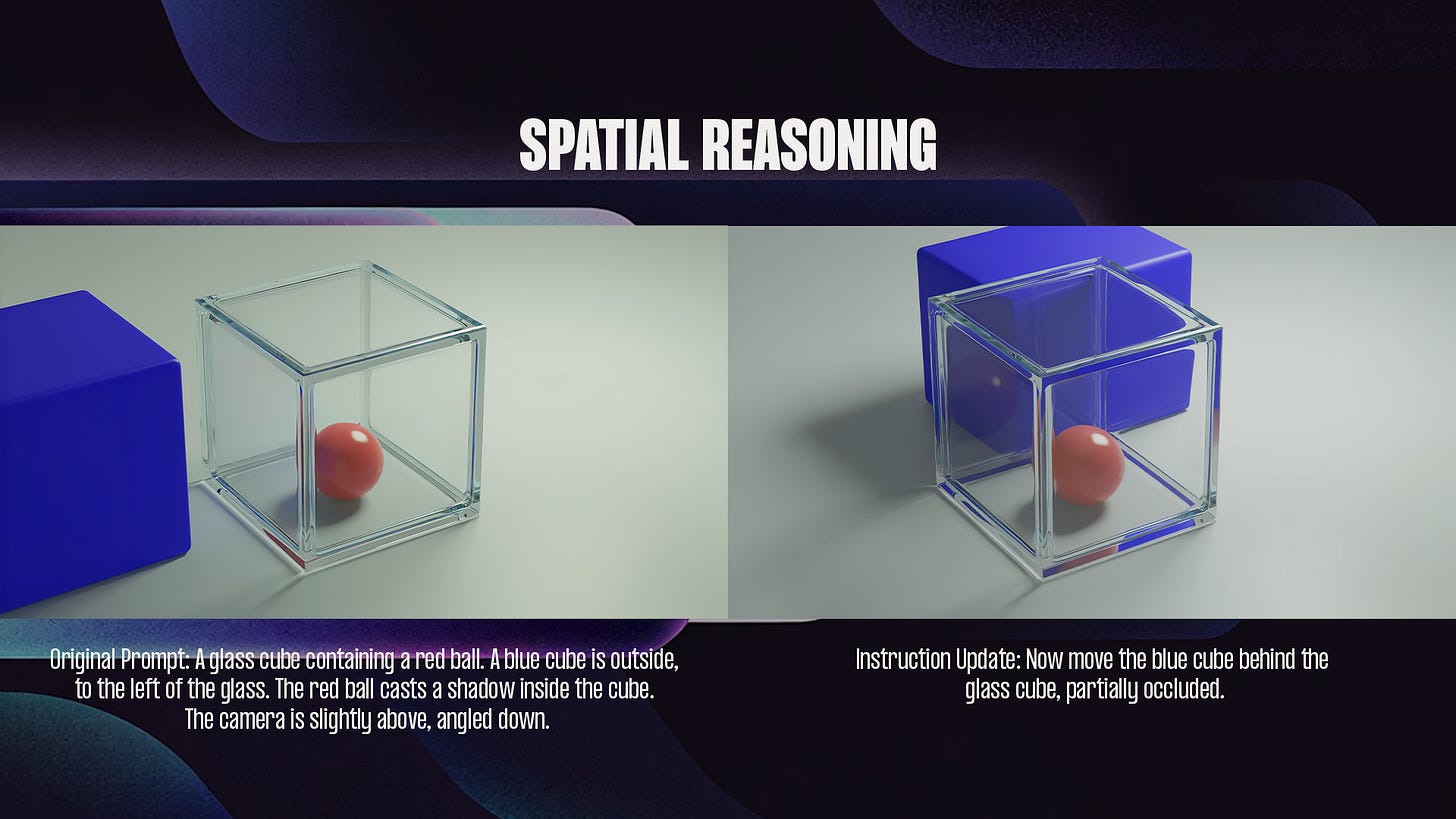
Uni-1 は自己回帰型であり、テキストと画像を同じ種類のシーケンスとして扱うため、何らかの出力を生成する前にプロンプトの内容を推論できます。指示を細分化し、「いくつあるか」「どこに配置するか」「どのような論理的条件があるか」といった複雑な部分を解決した上で、構成を計画します。ピクセルを確定させる前段階で、こうした処理が完結するのです。
主な機能
Photorealism with material accuracy
Text rendering that's actually readable
Reference-guided generation with identity preservation
Image editing and multi-turn refinement
Multi-panel output with temporal consistency
Web search grounding
Multilingual prompts
Output flexibility
Uni-1 supports 9 aspect ratios ranging from 3:1 ultra-wide panoramic banners down to 1:3 ultra-tall portrait formats, with everything in between — 16:9, 1:1, 9:16, 2:3, and more.
Getting Started
Update ComfyUI to the latest version, or access Comfy Cloud.
Find the Luma UNI-1 Image node via the Node Library, or load a template from the Templates panel.
Drop in your prompt (and a source image if you're editing), connect outputs, and run.
Try it on Comfy Cloud
UNI-1 joins the growing roster of image models available through ComfyUI Partner Nodes. Try it out and let us know what you build.
Thanks for reading ComfyUI Blog! Subscribe to receive new posts.
原文を表示
Luma’s Uni-1 is now available in ComfyUI via Partner Nodes. Unlike most image models, Uni-1 isn’t a diffusion model — it’s a decoder-only autoregressive transformer that treats text and images as a single interleaved sequence, jointly modeling time, space, and logic in one architecture. The result: a model that reasons about your prompt before generating — decomposing instructions, resolving constraints, and planning composition like a frontier LLM.
Try it on Comfy Cloud
Built around reasoning, not just generation
Most image models go straight from prompt to pixels in a single step. Uni-1 works differently. It thinks first, then draws.
Because Uni-1 is autoregressive and treats text and images as the same kind of sequence, it can reason through your prompt before generating anything. It breaks the instruction into parts, works out the tricky bits (how many of something, what goes where, any logical conditions), and plans the composition — all before committing to pixels.
Features
Photorealism with material accuracy
Text rendering that’s actually readable
Reference-guided generation with identity preservation
Image editing and multi-turn refinement
Multi-panel output with temporal consistency
Web search grounding
Multilingual prompts
Output flexibility
Uni-1 supports 9 aspect ratios ranging from 3:1 ultra-wide panoramic banners down to 1:3 ultra-tall portrait formats, with everything in between — 16:9, 1:1, 9:16, 2:3, and more.
Getting Started
Update ComfyUI to the latest version, or access Comfy Cloud.
Find the Luma UNI-1 Image node via the Node Library, or load a template from the Templates panel.
Drop in your prompt (and a source image if you’re editing), connect outputs, and run.
Try it on Comfy Cloud
UNI-1 joins the growing roster of image models available through ComfyUI Partner Nodes. Try it out and let us know what you build.
Thanks for reading ComfyUI Blog! Subscribe to receive new posts.
関連記事
今日のまとめ
AI日報で今日の重要ニュースをまとめ読み