Amazon Nova の Amazon SageMaker HyperPod におけるマルチターン RL インフラのデプロイ
AWS は Amazon Nova を用いたマルチターン RL のインフラを SageMaker HyperPod で提供し、エージェントの複雑なワークフロー学習とエラー回復能力の向上を実現した。
キーポイント
マルチターン RL の重要性
従来の RLHF が単発応答の最適化に留まる中、データベース照会や API 呼び出しなど多段階のワークフローにおける意思決定とエラー回復を学習するための手法として位置づけられている。
SageMaker HyperPod と Nova Forge の連携
Amazon Nova モデルと Nova Forge SDK を活用し、GRPO アルゴリズムを用いた重み更新や報酬ルーティングを管理されたインフラ上で実行可能にする。
イベント駆動型の自動化パイプライン
S3 へのデータアップロードをトリガーに、Step Functions と EventBridge が連携して計算リソースの割り当てからトレーニング実行までを自動で処理する仕組みを提供する。
自動トリガーと手動実行の柔軟性
S3へのファイルアップロードでEventBridgeが自動的にパイプラインを開始する一方、開発中はパラメータをオーバーライドしてイベントブローカーをバイパスし、即座にテスト実行が可能です。
多層的な監視と可観測性
Step Functionsコンソールで各ステップの進捗や履歴を追跡でき、CloudWatch Logs や SQS の状態を監視することで、HyperPod や ECS などの各レイヤーでの障害を迅速に特定できます。
失敗時の通知アラート機能
Step Functionsの実行が失敗すると、KMSで暗号化されたSNSトピックを通じてメールやSlack、PagerDutyへ即座に通知が送信され、迅速な対応を可能にします。
トリガー失敗のデバッグ
S3アップロード後のパイプライン起動失敗時は、EventBridgeからLambdaへの呼び出しエラーが記録されたDLQ(死着キュー)を確認する必要があります。
重要な引用
Standard reinforcement learning from human feedback (RLHF) optimizes single responses in isolation.
Multi-turn reinforcement learning (RL) addresses this gap by optimizing over entire interaction sequences.
Amazon Nova delivers frontier intelligence and industry-leading price performance, and Amazon Nova Forge extends this with multi-turn RL training capabilities.
The infrastructure provides observability at every layer so you can isolate issues quickly.
Subscribe to receive alerts by email, Slack, or PagerDuty.
Failed EventBridge-to-Lambda invocations are stored here with the original S3 event data and error details
影響分析・編集コメントを表示
影響分析
この発表は、エンタープライズ向けエージェント開発における最大の課題の一つであった「複雑なワークフローの信頼性確保」を、マネージドサービスとして解決する道を開くものです。特に Nova モデルとの統合により、高コストになりがちな RL トレーニングのハードルを下げ、実用的な自律型エージェントの実装を加速させる可能性があります。
編集コメント
単発の応答生成に留まらず、実世界での複雑なタスク実行を可能にする RL 技術が、主要クラウドプロバイダーによって本格的にマネージドサービス化された点は業界にとって大きな転換点です。
多ステップワークフローを実行するエンタープライズエージェントを構築する場合、根本的なトレーニングの課題に直面します。これらのエージェントはデータベースへの照会、API 呼び出し、結果の相互参照、およびプロセス中の障害からの回復を行います。単一のアクションの品質は、数ステップ後に何が起こるかに依存します。
標準的な 人間のフィードバックに基づく強化学習 (RLHF) は、個々の応答を孤立して最適化します。このアプローチでは、進行前にデータを検証するエージェントが下流のエラーの連鎖を防ぐような多ステップワークフローには不十分です。マルチターン強化学習 (RL) は、このギャップを埋め、相互作用のシーケンス全体にわたって最適化を行います。あなたのエージェントは、試行錯誤を通じてツールのオーケストレーション、エラー回復、および多ステップ推論を学習します。教師あり微調整 (SFT)、検索拡張生成 (RAG)、継続的な事前トレーニングは補完的な技術ですが、それら単独では通常、これらの逐次的意思決定能力を教えるものではありません。
Amazon SageMaker AI は、多ターン RL(強化学習)を完全に管理されたサーバーレス機能として提供しており、インフラの管理不要で SageMaker 学習ジョブにこの技術を導入できます。トレーニングスタックに対する完全な制御が必要となる場合、つまり独自のエージェント環境やカスタムオーケストレーション、特定のインスタンス構成が必要なケースでは、Amazon SageMaker HyperPod 上の Amazon Nova 向け多ターン RL インフラストラクチャが、これらの複雑なワークフローでエージェントを訓練するための計算リソース、オーケストレーション機能、報酬ルーティング層を提供します。Amazon Nova は最先端の知能と業界最高水準のコストパフォーマンスを実現し、Amazon Nova Forge はこれに多ターン RL 学習機能を追加して拡張しています。
本記事では、Amazon SageMaker HyperPod 上で Amazon Nova Forge を用いて、多ターン RL の 2 フェーズ構成インフラをデプロイする方法を解説します。完了すれば、Amazon Simple Storage Service (Amazon S3) にデータをアップロードした際に学習を開始するイベント駆動型パイプラインが構築されます。この学習ジョブでは、モデルに Wordle というゲームをプレイさせることで、ご自身の RL タスクのプレースホルダーとして機能します。
ソリューションの概要
本ソリューションはイベント駆動型のパイプラインです。データセットを Amazon S3 にアップロードすると、インフラストラクチャが自動的に計算リソースのプロビジョニング、報酬のルーティング、およびマルチターン RL 学習を実行します。この作業は 3 つのレイヤーによって担われます。SageMaker HyperPod クラスターが応答を生成し、GRPO(Group Relative Policy Optimization)による重み更新を適用します。AWS Fargate 上の ECS が報酬環境を実行します。Nova Forge SDK はモデルと環境の間でメッセージをルーティングし、ターン間を通じて会話の状態を追跡します。AWS Step Functions が実行をオーケストレーションし、データが S3 に着信した際に Amazon EventBridge によってトリガーされます。
アーキテクチャは 2 つのフェーズに分割されています。1 つ目は AWS Cloud Development Kit(AWS CDK)による一度きりのデプロイで、VPC、EKS/HyperPod、ECS、S3、IAM、およびパイプラインといった永続的な基盤をプロビジョニングします。2 つ目は各学習実行時に一時的なリソースを起動するフェーズです。これにより、実行間の GPU 計算リソースがアイドル状態になるのを防ぎ、再デプロイせずに反復処理を行えるようになります。
以下の図は、学習実行中にこれらのコンポーネントがどのように相互作用するかを示しています。
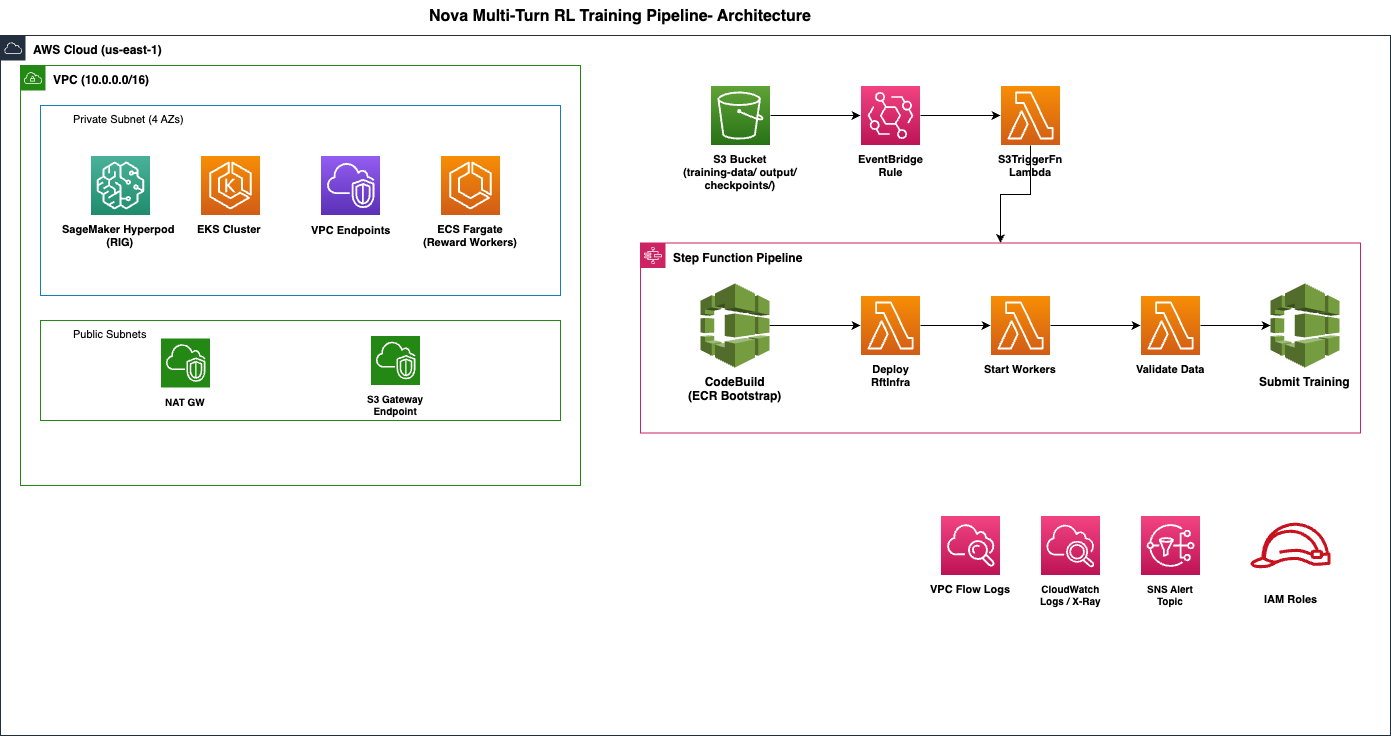
Amazon SageMaker HyperPod インフラストラクチャにおけるマルチターン RL
このパイプラインは、3 つの計算表面にわたってマルチターンの会話ループをオーケストレーションします。
- Amazon SageMaker HyperPod (EKS): トレーニングのプライマリ、ワーカーポッド、および vLLM 生成レプリカは P5 インスタンス上で実行されます。モデルが応答を生成します。トレーニングポッドは報酬信号を使用して GRPO の重み更新を実行します。
- ECS on Fargate: 報酬ワーカーは、Wordle やカスタムの Bring Your Own Orchestrator (BYOO) 環境などのユーザーの環境を実行します。モデルからの応答を SQS を介して受け取り、評価基準に対してスコアリングを行い、報酬信号を返却します。
- Amazon Nova Forge: SDK のプロキシ層は、モデルと報酬環境間のメッセージルーティングを担当し、ターンを超えた会話状態を追跡します。
前提条件
デプロイする前に、以下の準備が整っていることを確認してください。
- Amazon Nova Forge サブスクリプション:Nova Forge SDK およびモデル学習 API にアクセスするには、このサブスクリプションが必要です。
- SageMaker HyperPod インスタンスクォータ:generation_replicas が 4 の場合、最小で 10 × ml.p5.48xlarge が必要です。本番ワークロードでは 12–14 をリクエストしてください。ml.p5en.48xlarge もサポートされています。
- ブートストラップされた CDK 環境:最初のデプロイ前に cdk bootstrap コマンドを実行してください。
- Python 3.12+:CDK アプリおよび AWS Lambda ランタイムにはこのバージョンが必要です。
- AWS CDK v2:npm install -g aws-cdk でインストールします。これにより、AWS CloudFormation スタックが合成されデプロイされます。
- AWS Command Line Interface (AWS CLI) v2:VPC、E クラスター、SageMaker HyperPod クラスター、IAM ロール、Step Functions を作成する権限を持つ資格情報で構成してください。
- Docker:Nova Forge SDK をパッケージ化した Lambda コンテナイメージを構築するために Docker を使用します。
**
重要:このインフラストラクチャは稼働時(10–12 個の ml.p5.48xlarge インスタンス)に、約 1 時間あたり $786–$1,180 のコストがかかります。コスト内訳セクションを確認し、学習を積極的に行っていない間はスタックを破棄する計画を立ててください。
インフラストラクチャのデプロイ
クローンとインストール
まず、サンプルリポジトリをクローンして、AWS CDK アプリ用の Python 依存関係をインストールします。これらのコマンドは、ローカルマシンまたは開発環境から実行してください:
git clone https://github.com/aws-samples/nova-multi-turn-rl-infra.git
cd nova-multi-turn-rl-infra
pip install -r requirements.txt
設定
cdk.json の context キー配下にすべてのパラメータを設定してください。最初のデプロイを行う前に、以下の 2 つのパラメータが必要です:
| パラメータ | 説明 |
|---|---|
| project_tag | すべてのリソース名の一意なプレフィックス(例:my-nova-rl)。EKS クラスター名、HyperPod クラスター名、S3 バケットタグの一部となります。 |
| sdk_resource_prefix | SDK が作成するリソースのプレフィックス(例:nrl-myproject)。Nova Forge SDK は、CloudFormation スacks、Lambda 関数、SQS キューの名付けにこの値を使用します。 |
主要なインフラストラクチャパラメータ:
| パラメータ | デフォルト | 説明 |
|---|---|---|
| instance_type | ml.p5.48xlarge | HyperPod インスタンスタイプ |
| instance_count | 10 | Restricted Instance Group 内のインスタンス数 |
| nova_model | NOVA_LITE_2 | 学習対象モデル:NOVA_MICRO、NOVA_LITE、NOVA_LITE_2、または NOVA_PRO |
| vf_env_id | wordle | 検証用の組み込み報酬環境(reward environment) |
| use_custom_env / custom_env_id | — | BYOO(Bring Your Own Environment)を行う場合は、use_custom_env を「true」に設定し、custom-environments/ 配下のディレクトリ名を指定してください。 |
| reward_cpu / reward_memory | 2048 CPU, 4096 MiB | Fargate タスクのサイズ指定 |
| eks_kubernetes_version | 1.32 | EKS クラスターバージョン |
トレーニングパラメータ。これらはパイプラインイベントを通じて学習ジョブに引き継がれます:
| パラメータ | デフォルト | 説明 |
training_method
—
RFT_MULTITURN_FULL または RFT_MULTITURN_LORA
max_steps
10
トレーニングステップ数
generation_replicas
4
vLLM 生成レプリカ数
global_batch_size
64
トレーニングステップあたりのサンプル数
デプロイ時に任意のパラメータを上書きできます:
cdk deploy -c instance_count=1 -c max_steps=20
デプロイ
cdk deploy --require-approval never
2 フェーズ構成のデプロイモデル
本インフラストラクチャは、永続的な基盤リソースと実行ごとの一時的なリソースを分離する 2 フェーズ構成のデプロイモデルに従っています。この分離により、必要な時にのみ高価な計算リソースを作成することでコストを削減し、各トレーニング実行ごとに完全な再デプロイを行わないことで反復開発を高速化し、各レイヤーに独立したライフサイクルを与えることで管理を簡素化します。
フェーズ 1: AWS CDK のデプロイ(一度きり): cdk deploy を実行すると、基盤インフラストラクチャがプロビジョニングされます:
- プライベートサブネットと VPC エンドポイントを持つ Amazon Virtual Private Cloud (Amazon VPC)。
- HyperPod Restricted Instance Group (RIG) を備えた Amazon Elastic Kubernetes Service (Amazon EKS) クラスター。
- リワードワーカー用の AWS Fargate 上で動作する Amazon Elastic Container Service (Amazon ECS) クラスター。
- トレーニングデータとチェックポイント用の Amazon Simple Storage Service (Amazon S3) バケット。
- AWS Identity and Access Management (IAM) ロール。
- AWS Step Functions パイプライン。
- Amazon EventBridge ルール。
デプロイには約 30〜40 分かかります。時間の大部分は E クラスターの作成(約 15 分)に費やされ、その後、AWS CodeBuild を介した SageMaker HyperPod Helm チャートのインストール(約 5 分)、SageMaker HyperPod クラスターのプロビジョニング(P5 の容量により 15〜25 分)、Lambda コンテナイメージのビルド(約 5 分)が続きます。
フェーズ2:ランタイム(各トレーニング実行ごと): .jsonl ファイルを S3 バケットの training-data/ プレフィックスにアップロードすると、EventBridge が Step Functions パイプラインをトリガーし、そのトレーニング実行用のランタイムリソースを作成します。Nova Forge SDK は、会話プロキシとして機能する AWS Lambda 関数、モデルと環境間のメッセージルーティングを行う Amazon Simple Queue Service (Amazon SQS) FIFO キュー、会話状態の追跡用の Amazon DynamoDB テーブル、および報酬計算ワーカーとして機能する ECS Fargate タスクを含む独自の AWS CloudFormation スack をデプロイします。SDK はこれらのリソースのライフサイクルを管理します。
トレーニング実行のトリガー
インフラストラクチャをデプロイした後、S3 への単一のアップロードでトレーニング実行を開始できます。EventBridge はバケットの training-data/ プレフィックスを監視し、Step Functions パイプラインを自動的に起動します。
成功したトレーニング実行では、Amazon CloudWatch メトリクス上で successive なステップを通じて報酬スコアが増加する様子が確認されます。Wordle 環境の場合、モデルはフィードバックに基づいて推測を絞り込むことを学習するにつれ、平均報酬がほぼゼロから 0.6〜0.8 に改善されながら、50〜100 ステップ以内に収束すると予想されます。
トレーニングデータの準備
.jsonl ファイルはメタデータベースの形式を使用します:各行にはプロンプトと、報酬環境が採点に使用する正解(ground-truth)が含まれています。
{"id": "wordle_train_001", "metadata": {"prompt": "Guess the 5-letter word", "answer": "crane"}}
{"id": "wordle_train_002", "metadata": {"prompt": "Guess the 5-letter word", "answer": "slate"}}
{"id": "wordle_train_003", "metadata": {"prompt": "Guess the 5-letter word", "answer": "plumb"}}
各レコードにおいて id フィールドは一意である必要があります。モデルは各会話の開始時に metadata.prompt を参照し、報酬環境(reward environment)は metadata.answer を用いて、多ターンにわたるモデルの回答を採点します。各トレーニング例は多ターンの対話として機能し、モデルが推測を行い、報酬環境からのフィードバックを受け取り、パズルを解決するかターンを使い果たすまでこれを反復します。
自動アップロードとトリガー
# CDK の出力からバケット名を取得する
BUCKET=$(aws cloudformation describe-stacks --stack-name NovaMultiTurnRlStack \
--query "Stacks[0].Outputs[?OutputKey=='TrainingBucketName'].OutputValue" --output text)
アップロード: パイプラインが自動的に開始される
aws s3 cp training-data.jsonl s3://$BUCKET/training-data/training-data.jsonl
トレーニングデータディレクトリにファイルが配置されると、EventBridge が PutObject イベントを検知し、S3TriggerFn Lambda 関数を呼び出します。この関数はファイルパスを抽出し、cdk.json に格納されたトレーニングパラメータと結合して、Step Functions にイベントデータを渡します。これにより、Step Functions はパイプラインを 5 つのステージを通じて実行します。進行状況は Step Functions コンソールで確認でき、各ステップの入力、出力、所要時間、リトライ回数が表示されます。
手動トリガーによるアドホック実行
データを再アップロードせずにパラメータを変更して反復処理を行うには、セットアップスクリプトを使用して EventBridge をバイパスし、パイプラインを直接呼び出します:
# クイックテスト用にトレーニングパラメータを上書き
./scripts/setup.sh \
--data-path s3://$BUCKET/training-data/training-data.jsonl \
--max-steps 5 \
--global-batch-size 32 \
--training-method RFT_MULTITURN_LORA
これは開発中に役立ちます。cdk.json を変更したり再デプロイしたりすることなく、既存のデータセットを指し示して、異なるステップ数やバッチサイズ、トレーニング手法(フルファインチューニングと LoRA の比較)を実験できます。
モニタリングとデバッグ
このマルチステージパイプラインは SageMaker HyperPod、ECS、Lambda、SQS にわたって展開されており、各レイヤーの監視とトラブルシューティングが可能です。インフラストラクチャはすべてのレイヤーで観測性(observability)を提供するため、問題を迅速に特定できます。
パイプライン監視
Step Functions コンソールが主要なダッシュボードとなります。各実行では、タイミング、入力・出力データ、リトライ履歴とともにステップごとの進行状況が表示されます。各ステップは独自の Amazon CloudWatch ロググループに書き込まれます。
通常運用時には、各 Step Functions ステップは予想される時間枠内で完了します:インフラストラクチャのセットアップが 2〜3 分、報酬ワーカーのデプロイが 1〜2 分、データ検証が 1 分未満、トレーニングの送信が 3〜5 分です。SQS キューでは、メッセージが順調に流れ、持続的なバックログが発生していないことを確認できます。
障害アラート通知
Amazon Simple Notification Service (Amazon SNS) トピックは、AWS Key Management Service (AWS KMS) で暗号化されており、Step Functions の実行が失敗した際に通知を発行します。メール、Slack、または PagerDuty を介してアラートを受け取るには、このトピックを購読してください:
# CDK 出力からトピック ARN を取得する
TOPIC_ARN=$(aws cloudformation describe-stacks --stack-name NovaMultiTurnRlStack \
--query "Stacks[0].Outputs[?OutputKey=='AlertTopicArn'].OutputValue" --output text)
メールで購読し確認を行う
aws sns subscribe \
--topic-arn $TOPIC_ARN \
--protocol email \
--notification-endpoint your-team@example.com
トリガーによる障害
S3 アップロードがパイプラインを開始しない場合は、デッドレターキューを確認してください。EventBridge から Lambda への呼び出しで失敗したものは、元の S3 イベントデータとエラー詳細とともにここに保存されます:
DLQ_URL=$(aws cloudformation describe-stacks --stack-name NovaMultiTurnRlStack \
--query "Stacks[0].Outputs[?OutputKey=='TriggerDlqUrl'].OutputValue" --output text)
aws sqs receive-message --queue-url $DLQ_URL --max-number-of-messages 5
一般的な原因としては、ファイル名の形式不正(トリガーは .jsonl 拡張子を期待しています)、IAM 権限のズレ、および Lambda の並列処理制限が挙げられます。
トレーニング停止のデバッグ
パイプラインが開始されたにもかかわらずトレーニングが停止した場合、その根本原因は通常、モデルと報酬環境間のメッセージルーティング層にあります。SDK に組み込まれた診断機能を使用して SQS キューの健全性を確認してください:
from rft_infra import check_all_queues
全ての FIFO キューについて、保留中・利用可能・遅延中のメッセージ数を返します
check_all_queues()
リクエストキューにバックログが蓄積し、レスポンスキューが空である場合は、報酬ワーカーが処理を行っていないことを示しています。レスポンス q
原文を表示
When you build enterprise agents that execute multi-step workflows, you face a fundamental training challenge. These agents query databases, call APIs, cross-reference results, and recover from mid-process failures. The quality of any single action depends on what happens several steps later.
Standard reinforcement learning from human feedback (RLHF) optimizes single responses in isolation. This approach falls short for multi-step workflows where an agent that validates data before proceeding prevents a cascade of downstream errors. Multi-turn reinforcement learning (RL) addresses this gap by optimizing over entire interaction sequences. Your agents learn tool orchestration, error recovery, and multi-step reasoning through trial and error. Supervised fine-tuning (SFT), retrieval-augmented generation (RAG), and continued pre-training are complementary techniques, but they typically do not teach these sequential decision-making capabilities on their own.
Amazon SageMaker AI also offers multi-turn RL as a fully managed, serverless capability, bringing this technique to SageMaker training jobs with no infrastructure to manage. When you need full control over the training stack: your own agent environment, custom orchestration, or specific instance configurations. For these cases, the multi-turn RL infrastructure for Amazon Nova on Amazon SageMaker HyperPod gives you the compute, orchestration, and reward-routing layers to train agents on these complex workflows. Amazon Nova delivers frontier intelligence and industry-leading price performance, and Amazon Nova Forge extends this with multi-turn RL training capabilities.
In this post, you deploy a two-phase infrastructure for multi-turn RL using Amazon Nova Forge on Amazon SageMaker HyperPod. By the end, you have an event-driven pipeline that starts training when you upload data to Amazon Simple Storage Service (Amazon S3). The training job teaches the model to play Wordle, a placeholder for your own RL task.
Solution overview
The solution is an event-driven pipeline: you upload a dataset to Amazon S3, and the infrastructure provisions compute, routes rewards, and runs multi-turn RL training automatically. Three layers do the work. A SageMaker HyperPod cluster generates responses and applies GRPO (Group Relative Policy Optimization) weight updates. ECS on AWS Fargate runs your reward environment. The Nova Forge SDK routes messages between the model and that environment while tracking conversation state across turns. AWS Step Functions orchestrates the run, triggered by Amazon EventBridge when data lands in S3.
The architecture is split into two phases: a one-time AWS Cloud Development Kit (AWS CDK) deployment provisions the long-lived foundation (VPC, EKS/HyperPod, ECS, S3, IAM, and the pipeline), while each training run spins up its own ephemeral resources. This keeps GPU compute from sitting idle between runs and lets you iterate without redeploying.
The following diagram shows how these components interact during a training run.
Multi-turn RL on Amazon SageMaker HyperPod infrastructure architecture
The pipeline orchestrates a multi-turn conversation loop across three compute surfaces:
- Amazon SageMaker HyperPod (EKS): Training primary, worker pods, and vLLM generation replicas run on P5 instances. The model generates responses. Training pods perform GRPO weight updates using reward signals.
- ECS on Fargate: Reward workers run your environment (for example, Wordle or a custom Bring Your Own Orchestrator (BYOO) environment). They receive model responses via SQS, score them against your rubric, and return reward signals.
- Amazon Nova Forge : The SDK’s proxy layer routes messages between the model and the reward environment, tracking conversation state across turns.
Prerequisites
Before you deploy, make sure you have the following:
- Amazon Nova Forge subscription: You need this subscription to access the Nova Forge SDK and model training APIs.
- SageMaker HyperPod instance quota: Minimum of 10 × ml.p5.48xlarge for generation_replicas: 4. Request 12–14 for production workloads. ml.p5en.48xlarge is also supported.
- Bootstrapped CDK environment: Run cdk bootstrap before your first deploy.
- Python 3.12+: The CDK app and AWS Lambda runtime require this version.
- AWS CDK v2: Install with npm install -g aws-cdk. This synthesizes and deploys the AWS CloudFormation stack.
- AWS Command Line Interface (AWS CLI) v2: Configured with credentials that have permissions to create VPCs, EKS clusters, SageMaker HyperPod clusters, IAM roles, and Step Functions.
- Docker: You use Docker to build the Lambda container images that package the Nova Forge SDK.
Important: This infrastructure costs approximately $786–$1,180 per hour when running (10–12 ml.p5.48xlarge instances). Review the Cost breakdown section and plan to destroy the stack when you are not actively training.
Deploy the infrastructure
Clone and install
Start by cloning the sample repository and installing the Python dependencies for the AWS CDK app. Run these commands from your local machine or development environment:
git clone https://github.com/aws-samples/nova-multi-turn-rl-infra.git
cd nova-multi-turn-rl-infra
pip install -r requirements.txtConfigure
Set all parameters in cdk.json under the context key. Two parameters are required before your first deployment:
Parameter
Description
project_tag
Unique prefix for all resource names (for example, my-nova-rl“. Becomes part of your EKS cluster name, HyperPod cluster name, and S3 bucket tags.
sdk_resource_prefix
Prefix for SDK-created resources (for example, nrl-myproject). The Nova Forge SDK uses this when naming its CloudFormation stacks, Lambda functions, and SQS queues.
Key infrastructure parameters:
Parameter
Default
Description
instance_type
ml.p5.48xlarge
HyperPod instance type
instance_count
10
Number of instances in the Restricted Instance Group
nova_model
NOVA_LITE_2
Model to train: NOVA_MICRO, NOVA_LITE, NOVA_LITE_2, or NOVA_PRO
vf_env_id
wordle
Built-in reward environment for validation
use_custom_env / custom_env_id
—
Set use_custom_env to “true” and specify the directory name under custom-environments/ for BYOO
reward_cpu / reward_memory
2048 CPU, 4096 MiB
Fargate task sizing
eks_kubernetes_version
1.32
EKS cluster version
Training parameters. These flow through the pipeline event to the training job:
Parameter
Default
Description
training_method
—
RFT_MULTITURN_FULL or RFT_MULTITURN_LORA
max_steps
10
Number of training steps
generation_replicas
4
vLLM generation replicas
global_batch_size
64
Samples per training step
You can override any parameter at deploy time:
cdk deploy -c instance_count=1 -c max_steps=20Deploy
cdk deploy --require-approval neverTwo-phase deployment model
The infrastructure follows a two-phase deployment model that separates long-lived foundational resources from ephemeral per-run resources. This separation reduces costs by creating expensive compute resources only when you need them, speeds up iteration by avoiding full redeployment for each training run, and simplifies management by giving each layer an independent lifecycle.
Phase 1: AWS CDK deploy (one-time): When you run cdk deploy, you provision the foundational infrastructure:
- An Amazon Virtual Private Cloud (Amazon VPC) with private subnets and VPC endpoints.
- An Amazon Elastic Kubernetes Service (Amazon EKS) cluster with a HyperPod Restricted Instance Group (RIG).
- An Amazon Elastic Container Service (Amazon ECS) cluster on AWS Fargate for reward workers.
- An Amazon Simple Storage Service (Amazon S3) bucket for training data and checkpoints.
- AWS Identity and Access Management (IAM) roles.
- An AWS Step Functions pipeline.
- Amazon EventBridge rules.
The deployment takes approximately 30-40 minutes. The majority of time is spent on EKS cluster creation (~15 minutes), followed by SageMaker HyperPod Helm chart installation via AWS CodeBuild (~5 minutes), SageMaker HyperPod cluster provisioning (~15-25 minutes, depending on P5 capacity), and Lambda container image builds (~5 minutes).
Phase 2: Runtime (per training run): When you upload a .jsonl file to the S3 bucket’s training-data/ prefix, EventBridge triggers a Step Functions pipeline that creates the runtime resources for that training run. The Nova Forge SDK deploys its own AWS CloudFormation stack containing AWS Lambda functions (conversation proxy), Amazon Simple Queue Service (Amazon SQS) FIFO queues (message routing between model and environment), an Amazon DynamoDB table (conversation state tracking), and ECS Fargate tasks (reward workers). The SDK manages the lifecycle of these resources.
Trigger a training run
After you deploy the infrastructure, you start a training run with a single S3 upload. EventBridge watches the bucket’s training-data/ prefix and starts the Step Functions pipeline automatically.
A successful training run shows increasing reward scores in the Amazon CloudWatch metrics over successive steps. For the Wordle environment, expect the model to converge within 50-100 steps, with average reward improving from near-zero to 0.6-0.8 as the model learns to narrow guesses based on feedback.
Prepare your training data
The .jsonl file uses a metadata-based format: each line contains a prompt and the ground-truth answer that the reward environment uses for scoring:
{"id": "wordle_train_001", "metadata": {"prompt": "Guess the 5-letter word", "answer": "crane"}}
{"id": "wordle_train_002", "metadata": {"prompt": "Guess the 5-letter word", "answer": "slate"}}
{"id": "wordle_train_003", "metadata": {"prompt": "Guess the 5-letter word", "answer": "plumb"}}The id field must be unique across all records. The model sees metadata.prompt at the start of each conversation, and the reward environment uses metadata.answer to score the model’s responses across turns. Each training example becomes a multi-turn conversation: the model generates a guess, receives feedback from the reward environment, and iterates until it solves the puzzle or exhausts its turns.
Upload and trigger automatically
# Get the bucket name from CDK outputs
BUCKET=$(aws cloudformation describe-stacks --stack-name NovaMultiTurnRlStack \
  --query "Stacks[0].Outputs[?OutputKey=='TrainingBucketName'].OutputValue" --output text)

# Upload:pipeline starts automatically
aws s3 cp training-data.jsonl s3://$BUCKET/training-data/training-data.jsonl
When a file lands in the training-data/ prefix, EventBridge detects the PutObject event and invokes the S3TriggerFn Lambda function. This function extracts the file path, merges it with the training parameters from cdk.json, and passes the resulting event data to Step Functions, which executes the pipeline through five stages. You can watch progress in the Step Functions console, where each step shows its input, output, duration, and retry count.
Trigger manually for ad-hoc runs
To iterate on parameters without re-uploading data, use the setup script to bypass EventBridge and invoke the pipeline directly:
# Override training parameters for a quick test run
./scripts/setup.sh \
  --data-path s3://$BUCKET/training-data/training-data.jsonl \
  --max-steps 5 \
  --global-batch-size 32 \
  --training-method RFT_MULTITURN_LORA
This helps during development: point at an existing dataset and experiment with different step counts, batch sizes, or the training method (full fine-tuning versus LoRA) without modifying cdk.json or redeploying.
Monitor and debug
You can monitor and troubleshoot every layer of this multi-stage pipeline across SageMaker HyperPod, ECS, Lambda, and SQS. The infrastructure provides observability at every layer so you can isolate issues quickly.
Pipeline monitoring
The Step Functions console is the primary dashboard. Each execution shows step-by-step progress with timing, input and output data, and retry history. Every step writes to its own Amazon CloudWatch Log Group.
During normal operation, each Step Functions step completes within its expected time window: infrastructure setup in 2-3 minutes, reward worker deployment in 1-2 minutes, data validation in under 1 minute, and training submission in 3-5 minutes. SQS queues should show messages flowing steadily with no sustained backlog.
Failure alerting
An Amazon Simple Notification Service (Amazon SNS) topic, encrypted with AWS Key Management Service (AWS KMS), publishes a notification when a Step Functions execution fails. Subscribe to receive alerts by email, Slack, or PagerDuty:
# Get the topic ARN from CDK outputs
TOPIC_ARN=$(aws cloudformation describe-stacks --stack-name NovaMultiTurnRlStack \
  --query "Stacks[0].Outputs[?OutputKey=='AlertTopicArn'].OutputValue" --output text)

# Subscribe and confirm via email
aws sns subscribe \
  --topic-arn $TOPIC_ARN \
  --protocol email \
  --notification-endpoint your-team@example.com
Trigger failures
If an S3 upload does not start the pipeline, check the dead-letter queue. Failed EventBridge-to-Lambda invocations are stored here with the original S3 event data and error details:
DLQ_URL=$(aws cloudformation describe-stacks --stack-name NovaMultiTurnRlStack \
  --query "Stacks[0].Outputs[?OutputKey=='TriggerDlqUrl'].OutputValue" --output text)

aws sqs receive-message --queue-url $DLQ_URL --max-number-of-messages 5
Common causes include malformed file names (the trigger expects a .jsonl extension), IAM permission drift, and Lambda concurrency limits.
Training stall debugging
If the pipeline starts but training stalls, the root cause is usually in the message-routing layer between the model and the reward environment. Check SQS queue health using the SDK built-in diagnostic:
from rft_infra import check_all_queues

# Returns message counts (in-flight, available, delayed) for all FIFO queues
check_all_queues()
A growing backlog in the request queue with an empty response queue indicates that reward workers are not processing. A growing backlog in the response q
関連記事
今日のまとめ
AI日報で今日の重要ニュースをまとめ読み