Amazon QuickSight、自然言語分析の文脈連携強化を発表
本文の状態
日本語全文を表示中
詳細モードで約18分の本文を読めます。
同じ出来事の情報源
この情報源を基点に整理
AWS Machine Learning Blog
Amazon は AI パワーアナリティクスでビジネスコンテキストの重要性を強調し、データカタログから定義情報を直接消費・推論する新機能「Agentic Catalog Experience」を Amazon QuickSight に導入。
AI深層分析を開く2026年8月1日 05:23
AI深層分析
キーポイント
シロスの解消とメタデータの連携
Amazon Quick が孤立して動作するのではなく、AWS Glue Data Catalog や Databricks Unity Catalog などの既存システムから定義やガバナンスメタデータをネイティブに消費・推論する仕組みへ移行する。
3 つの複合的な課題
データ資産の発見困難さ、既存メタデータの分断による手動再作成の必要性、そしてインサイトまでの時間遅延と意味のズレ(セマンティックドリフト)が現状の課題として指摘される。
投資対効果の最大化
データチームが既に投資し構築した表説明や列の意味、キー関係などのメタデータを再利用することで、エンドユーザーへの信頼性の高い AI 分析を迅速に提供できる。
自然言語による資産の発見
キュレーターは数千もの表を手動で検索する代わりに、必要な情報を自然言語で記述することで関連する表を即座に見つけられる。
一括アジェンティック・データセット作成
Quick Agent は単一のガイド付きワークフローでカタログ表現(データセット)を一括作成し、上位カタログから意味情報を継承する。
重要な引用
Products like Amazon Quick can no longer operate in isolation.
This shift from siloed metadata to connected, catalog-aware AI is what enables intelligent analytics at scale.
The combination of manual discovery and manual recreation means that the time from data to actionable insights stretches from hours to weeks.
Curator: "I'm a Senior Analyst on the Finance team. I need tables for quarterly revenue reporting and cost analysis."
編集コメントを表示
編集コメント
この発表は、AI とデータガバナンスの統合において「最後の1マイル」を埋める重要なステップである。企業側が既に構築したメタデータの資産価値を最大化し、AI の信頼性を高めるための実用的なアプローチを示していると言える。
Source Article
元記事を日本語で読む
本文に関係しない購読案内、埋め込み通知、サイト内プロモーションは除いています。
AI を活用した分析の導入が進む中、自然言語(Text2SQL)による回答の価値は、その背後にあるビジネスコンテキストの質にかかっています。今や、表や列の説明、関係性といった「意味的な豊かさ」は、上流のデータカタログやセマンティックツールで記述された場所から直接、エンドユーザーにサービスを提供する AI プロダクトへと流れ込むべきフェーズを迎えています。
Amazon Quick などのプロダクトが孤立して動作することはもはや許されません。データチームが AWS Glue Data Catalog や Databricks Unity Catalog といったシステムで整備した定義、関係性、ガバナンスメタデータをネイティブに消費し、推論できる必要があります。この「サイロ化されたメタデータ」から「カタログと連携する AI」への転換こそが、スケールするインテリジェントな分析を可能にする鍵です。
課題:最後の 1 マイルの橋渡し
基盤整備は完了している
エンタープライズレベルのデータチームは、すでに困難な作業を成し遂げています。AWS Glue、Databricks Unity Catalog、Snowflake Horizon、Collibra、dbt といった上流のカタログプラットフォームへの投資は着実に進んでいます。これらのプラットフォーム上で、表の説明や列の意味、主キー・外部キーの関係性、用語集、メトリクスの定義などが綿密に記述されています。
しかし、営業マネージャーやマーケティングディレクター、財務責任者などのエンドユーザーが、実務で使える AI や信頼できるダッシュボードを利用できるようにするには、依然として大きな隔たりが残っています。
3 つの複合的な課題
Amazon Quick でデータキュレーター(ビジネスインテリジェンスエンジニア、分析責任者、シニアアナリスト)がビジネスユーザーを支援しようとする際、3 つの複合的な課題に直面します。
- 発見可能性の限界:エンタープライズカタログには数千ものテーブルが存在するため、レポート用にキュレーションされ承認された適切なアップストリーム資産を見つけるのは「干し草の山の中の針を探す」ような困難な作業です。必要なものを言葉で指定してシステムに見つける仕組みがありません。
- セマンティック(意味論的)な断片化と手動での再構築:テーブルやカラムに関するビジネス説明、主キー・外部キーの関係など、アップストリームに既に存在する豊富なメタデータが引き継がれません。キュレーターは資産をゼロから作り直し、説明を再定義し、定義を手動で整合させる必要があります。「収益」という言葉が粗利を指すのか純利益を指すのか、「アクティブ顧客」が過去 30 日以内の購入者なのか 90 日以内のものなのか。これらの定義はアップストリームに存在しますが、手動での再入力が必要です。
- インサイト(洞察)までの期間が数時間ではなく数週間:手動による発見と手動による再構築の組み合わせにより、データから実行可能なインサイトに至るまでに数時間ではなく数週間を要してしまいます。さらに厄介なのは、アップストリームの定義が変更された場合、Quick Datasets で手動で作成されたセマンティクスが陳腐化し、時間の経過とともに AI の回答やダッシュボードへの信頼性を損なう「セマンティックドリフト」が発生することです。
課題の本質
問題の根源はアップストリーム側にはありません。メタデータは存在します。ガバナンスも定義されています。関係性もマッピング済みです。
課題は「最後の 1 マイル」にあります。つまり、豊富なカタログの文脈を、信頼できる AI の回答と決定論的なダッシュボードを提供する、編集された使いやすい体験へと変換することです。
Amazon Quick に「エージェント型カタログ体験」を導入
本日、Amazon Quick で「エージェント型カタログ体験(Agentic Catalog Experience)」を発表します。これは AI を活用したワークフローで、データキュレーターが素早く文脈の範囲を定義し、上位レイヤーからの意味情報を継承できるように支援します。これにより、大規模な grounded な Q&A や信頼できるダッシュボードをエンドユーザーに提供可能になります。
この体験の中核となるのは「Quick Agent」です。カタログ内の発見、作成、継承というタスクに特化しています。Quick Agent は、カタログ接続から得られる意味文脈を活用し、以下のことができます。
- カタログ全体を一瞥で要約する
- 自然言語での対話を通じて顧客と関わり合う
- 顧客のユースケースに基づき、最も関連性の高いテーブルや関係性を提示する
- メタデータの準備状況を評価する
そして、会話による単一の確認だけで、上位カタログからターゲットを絞ったメタデータを継承した「カタログ生成型データセット(Catalog-Generated Datasets)」と「トピック」を自動的に作成します。
手動設定は不要。コンテキストの切り替えも不要。数週間のセットアップ期間も不要です。
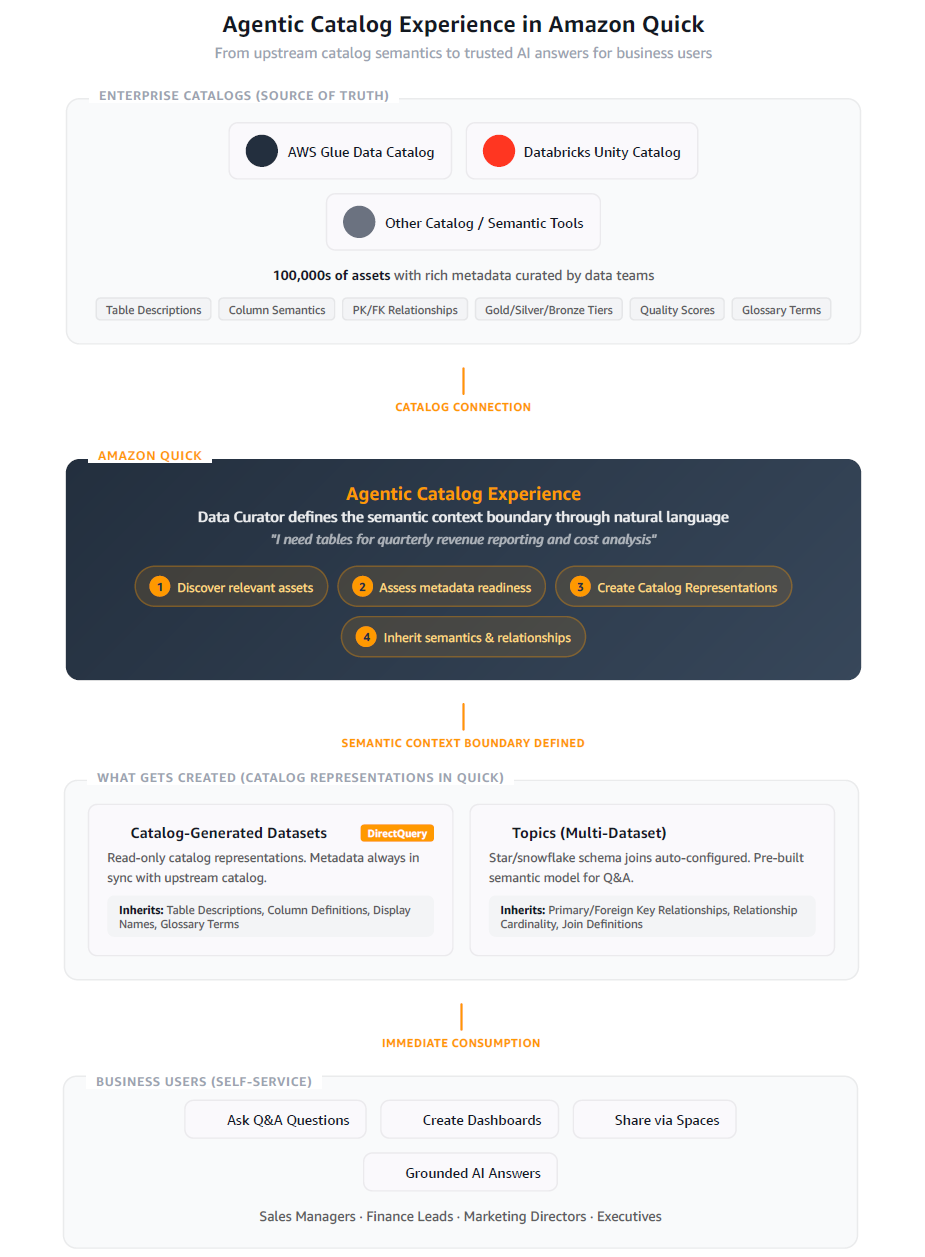
仕組み
自然言語によるアセットの発見
数千ものテーブルをスクロールして適切なものを探す代わりに、キュレーターは自然言語で操作できます。Agentic Catalog Experience では、必要なものを言葉で説明するだけで済みます。
**
キュレーター:「財務チームのシニアアナリストです。四半期ごとの収益報告とコスト分析用のテーブルが必要です。」
**
Quick Agent は、ビジネス記述、タグ、Gold/Silver/Bronze の分類、品質スコア、テーブルヘルススコア、用語集の用語など、利用可能なすべてのメタデータを活用して、カタログ全体を検索し、最も関連性の高いテーブルを即座に表示します。手動での閲覧も、推測による探索も不要です。
一括で実行するエージェント型データセット作成
キュレーターがテーブルを選択した後、Quick Agent は単一のガイド付きワークフロー内で、カタログ表現(データセット)を一括して作成します。デフォルトの作成パスは「直接クエリ」であるため、アップストリームのカタログが唯一の信頼できる情報源として維持されます。
意味情報が継承されたデータセットには、「Semantics Inherited(意味情報を継承)」という明確なバッジが付与され、そのメタデータは読み取り専用になります。著者は、カタログとの整合性を保つため、必要に応じて「同期」ボタンを選択して継承されたメタデータを更新できます。
Quick Agent:「6 つのカタログ生成型データセットを作成中:revenue_by_region(直接クエリ、読み取り専用メタデータ)、cost_centers、gl_transactions を作成しました。」
セマンティックと関係性の継承
Quick Agent は、カタログからターゲットを絞ったメタデータを取得し、作成するアセットに引き継ぎます。現在、ノイズを排除してデータセットをクリーンに保つため、この継承機能は2つの主要領域に意図的に焦点を当てています。
- データセットへのテーブルとカラム定義:ビジネス説明やカラムの定義は作成されたデータセットに直接引き継がれるため、キュレーターやエンドユーザーが必要なセマンティックな文脈を保持できます。
- トピックへの主キー・外部キー関係:エージェントはこれらの関係を検出し、スター型およびスノーフレーク型の結合が事前に設定されたマルチデータセット構成(トピック)の提案と作成に活用します。
注記: 適切なテーブルを見つけるための検索プロセスでは、利用可能なすべてのメタデータ(ゴールド/シルバー分類、品質スコア、タグ、ヘルススコアなど)が使用されます。ただし、データセットへの継承は現時点でテーブル定義とカラム定義に限定されています。将来的には、より多くのメタデータタイプをデータセットへ追加する予定です。
Quick Agent: 「これらのテーブル間に3つの関係を検出し、『Finance Revenue Model』という名前のトピックを作成しました。スター型結合が事前に設定されており、テーブルとカラムの定義は上流カタログから継承されています。」
即座の利用
キュレーションされたデータセットとトピックは、すぐに利用可能です:
新しいデータセットとの Q&A 会話を開始できます。AI エージェントは、継承されたビジネス記述や用語集の用語、品質スコアを活用して、根拠のある回答を提供します。
ダッシュボードの作成も可能です。すでに完全なセマンティック・コンテキストが備わった状態で、確実性の高い可視化を構築できます。
エンドユーザーとの共有も簡単です。データセットをスペースに追加し、ビジネスユーザーに提供すれば、セルフサービスでの Q&A が可能になります。
作成後、これらのデータセットやトピックに関連するメタデータは Amazon Quick のセマンティック・ストアへ取り込まれ、AI による Q&A で再ランク付けや統一されたコンテキストを実現します。カタログ接続から最初のビジネス質問に至るまで、数週間かかるのではなく、わずか数分で完了します。
アーキテクチャ:カタログではなく消費者
この体験を支える重要な設計原則があります。Amazon Quick は専用のカタログそのものではなく、上位層のカタログメタデータを消費する「消費者」です。つまり、以下のようになります:
データ複製の不要性:カタログ生成型データセットは DirectQuery を利用するため、データのコピーや移動は一切行われません。
文脈のためのメタデータ活用:Amazon Quick 内で継承されたセマンティクスは参照専用として読み込まれ、セマンティックストアに流れ込んで再ランク付けや AI 回答の根拠付けを強化します。ただし、上位ソースであるカタログ自体が権威ある情報源であり続けます。
手動でのセマンティック同期:作成者は「同期」ボタンを選択することで、継承されたメタデータを随時更新できます。スケジュールによる自動同期機能は今後のロードマップに含まれています。
透明性を伴う拡張性:カタログ生成型データセットでは、継承されたセマンティクスは参照専用(カタログ表現としてマーク)として表示されます。もし作成者がデータセットの編集を選択した場合、Amazon Quick は明確な通知を表示し、「編集するとカスタムデータセットが作成され、以降はセマンティック同期の対象外になる」ことを伝えます。これにより、デフォルトではカタログの整合性が保たれつつ、作成者には完全な制御権が与えられます。
現在サポートされているカタログ
| カタログプラットフォーム | 認証方法 |
|---|---|
| AWS Glue Data Catalog | AWS Identity and Access Management (IAM) ロール ARN |
| Databricks Unity Catalog | OAuth 2.0 / パーソナルアクセストークン |
追加のカタログプラットフォームへの対応も近日予定されています。
継承される情報
データセットを清潔に保ち、本番環境で即座に使用可能にするため、メタデータの継承は意図的に範囲を限定しています。
データセット(テーブルおよび列定義)へ継承されるもの
- テーブルのビジネス説明と技術的説明
- 列の説明と表示名
- データ型と NULL 許容性
- ギャラリー用語とシノニム
トピック(関係性)の理解
- 主キーと外部キーの関係
- リレーションシップ定義とカーディナリティ
- スター型およびスノーフレーク型のスキーマモデル
エンドユーザー体験
これがビジネスユーザーにとって何を意味するか、具体例を見てみましょう。
営業マネージャーが「四半期ごとの地域別売上はどうなっていたか?」と質問します。
裏側では AI エージェントが以下を実行します:
- トピックの定義や用語集に基づいてカタログ生成されたデータセットを検索
- 品質レベルが高く(ゴールド、98%)、"sales.revenue_by_product" テーブルを特定
- トピックに事前設定された結合ルールを用いて、関連する次元データを統合
- カタログメタデータから取得した個人情報保護(PII)マスキング規則を遵守
- 数秒で根拠のある信頼できる回答を返す
手動でのデータセット設定は不要です。キュレーターが Quick Agent を使って一度だけ文脈の範囲を定義すれば、すべてのエンドユーザーが即座に恩恵を受けられます。
統合された企業コンテキスト
Agentic Catalog Experience は孤立して存在するものではありません。Slack、Outlook、ドキュメント、ナレッジベースとの連携など、Amazon Quick の広範なプラットフォーム機能と組み合わせることで、エンドユーザーは包括的な企業コンテキストを享受できます。
カタログから生成されたデータセットを通じて構造化データを取得し、ドキュメントやメール、会話記録などから非構造化コンテキストを統合します。さらに、用語集の用語や指標定義といったビジネスルールも取り込みます。
これらを一元的に管理することで、組織固有のデータと意味体系に基づいた、実運用可能な AI 回答を実現できます。
AWS Glue データカタログへの接続
アジェンティック・カタログ体験(Agentic Catalog Experience)を利用するには、Amazon Quick で AWS Glue データカタログへのデータソース接続を作成します。接続を確立すると、Quick Agent がディスカバリー、スキーマの探索、トピック作成までを一連の会話ワークフローで案内してくれます。
ここでは、Glue データカタログに接続して「財務分析」トピックを構築する手順を紹介します。
Amazon Quick で新しいデータソースを作成し、接続タイプのリストから Glue Data Catalog(プレビュー版)を選択して「次へ」をクリックします。この接続はメタデータの取得用です。これにより、Amazon Quick は AWS Glue でチームが既に整備したテーブル定義、カラム定義、およびそれらの関連性をそのまま読み込むことができます。
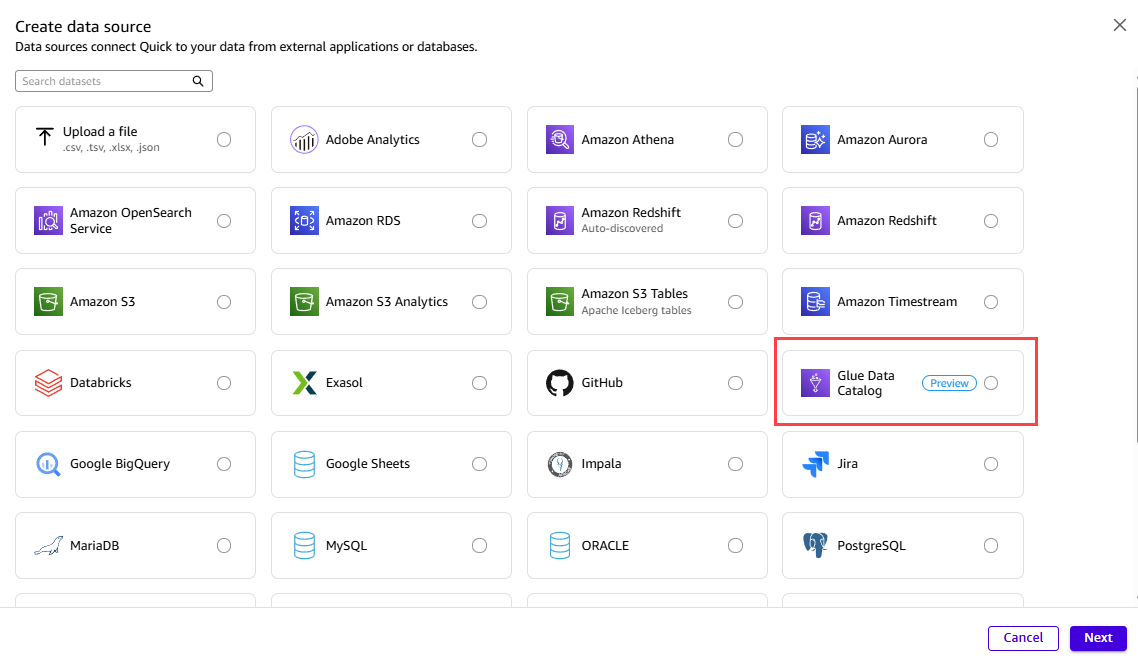
図 1: Amazon Quick で Glue Data Catalog の接続タイプを選択する画面
Glue Data Catalog の接続は、Amazon Athena 接続と連携して動作します。Glue はメタデータを管理し、Athena は Amazon Simple Storage Service (Amazon S3) 内のデータ自体へのクエリパスを提供します。Amazon Quick が基盤となるデータに対してクエリを実行できるようにするには、Athena データソースも作成する必要があります。両方を作成すると、「データソース」ページに 2 つのエントリが並んで表示されます。1 つはメタデータ用の Glue Data Catalog ソース、もう 1 つはデータ自体用の Athena ソースです。
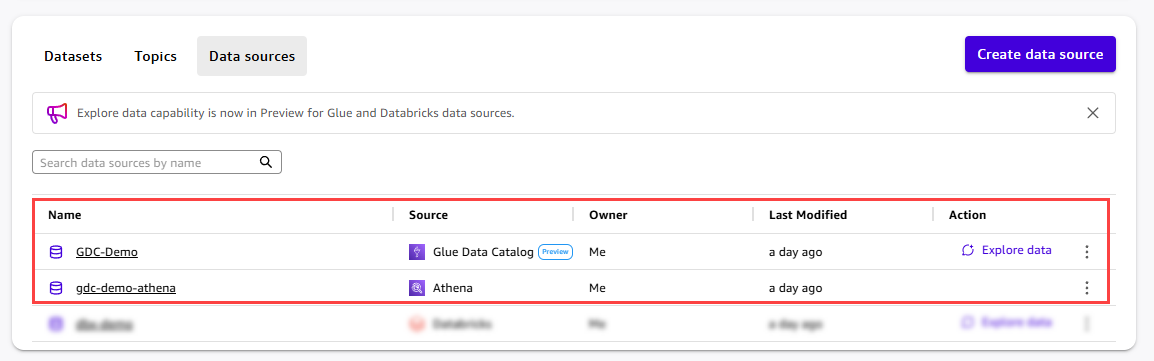
図 2: Glue Data Catalog と Athena データソースが並んでリスト表示されています
「GDC-Demo」データソースの詳細ページを開くと、「データ接続」セクションに、Amazon Quick がデータのクエリに使用するリンクされた Athena データソースが表示されます。ここで「データを探索する」を選択すると、このデータソースにスコープを限定した Quick Agent が起動します。
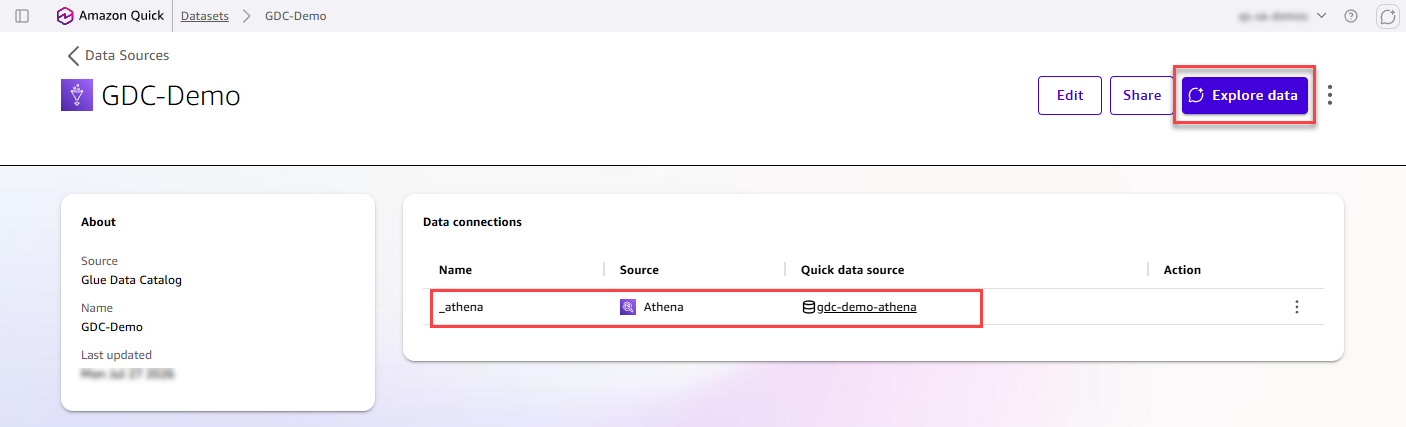
図 3: データソース詳細ページから Quick Agent を起動する
Quick Agent パネルが画面右側に開き、自動的に Glue Data Catalog データソースにスコープされます。「特定のデータ」モードが選択されており、「GDC-Demo」がコンテキストの境界として固定されています。その結果、Agent はこの特定のカタログ接続からのメタデータのみを表示します。
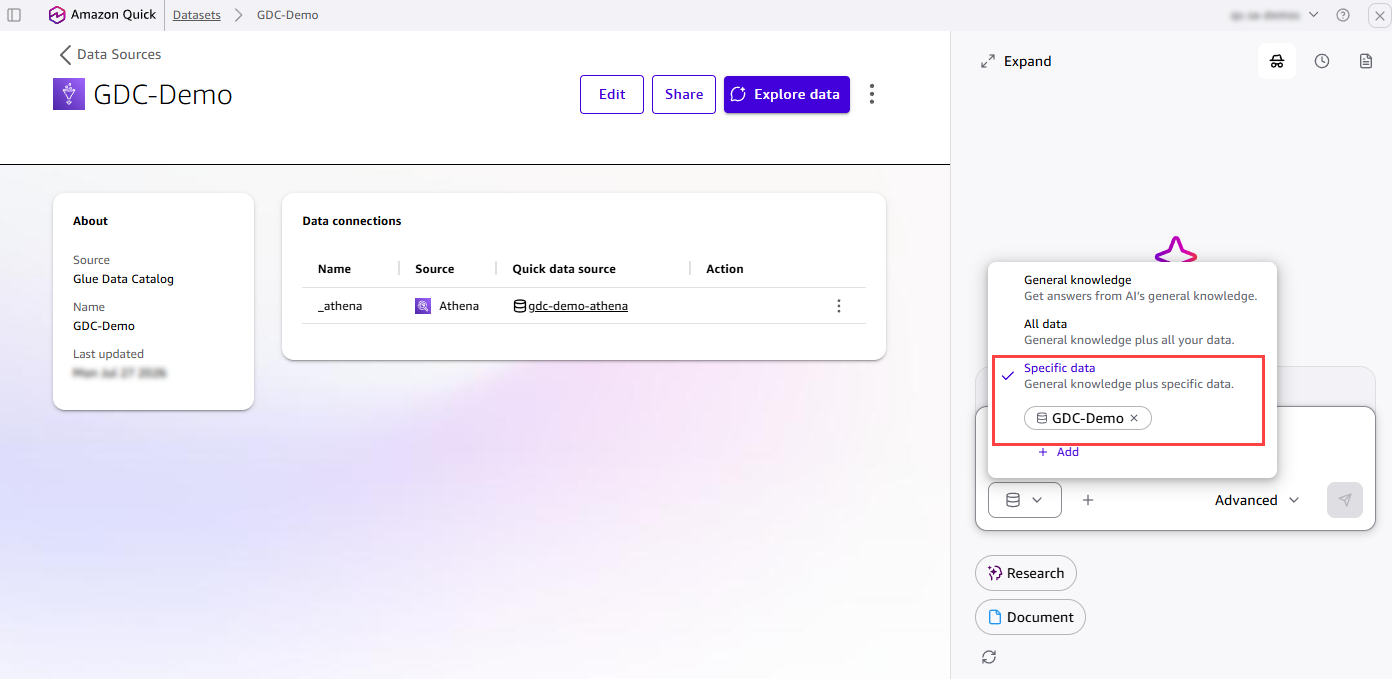
図 4:特定のカタログ接続にスコープされたクイックエージェント
エージェントにカタログの探索を依頼しましょう。エージェントは利用可能なカタログとデータベースを一目で要約して表示するため、Glue データカタログに整理されている内容を手早く把握できます。本記事では例として「fa-demo」データベースを使用します。これは銀行分析向けの財務分析デモ用スター型スキーマです。この手順は機能の仕組みを示すためのウォークスルーであり、実際のシナリオそのままではありませんが、同じステップを自身のカタログに適用することは可能です。
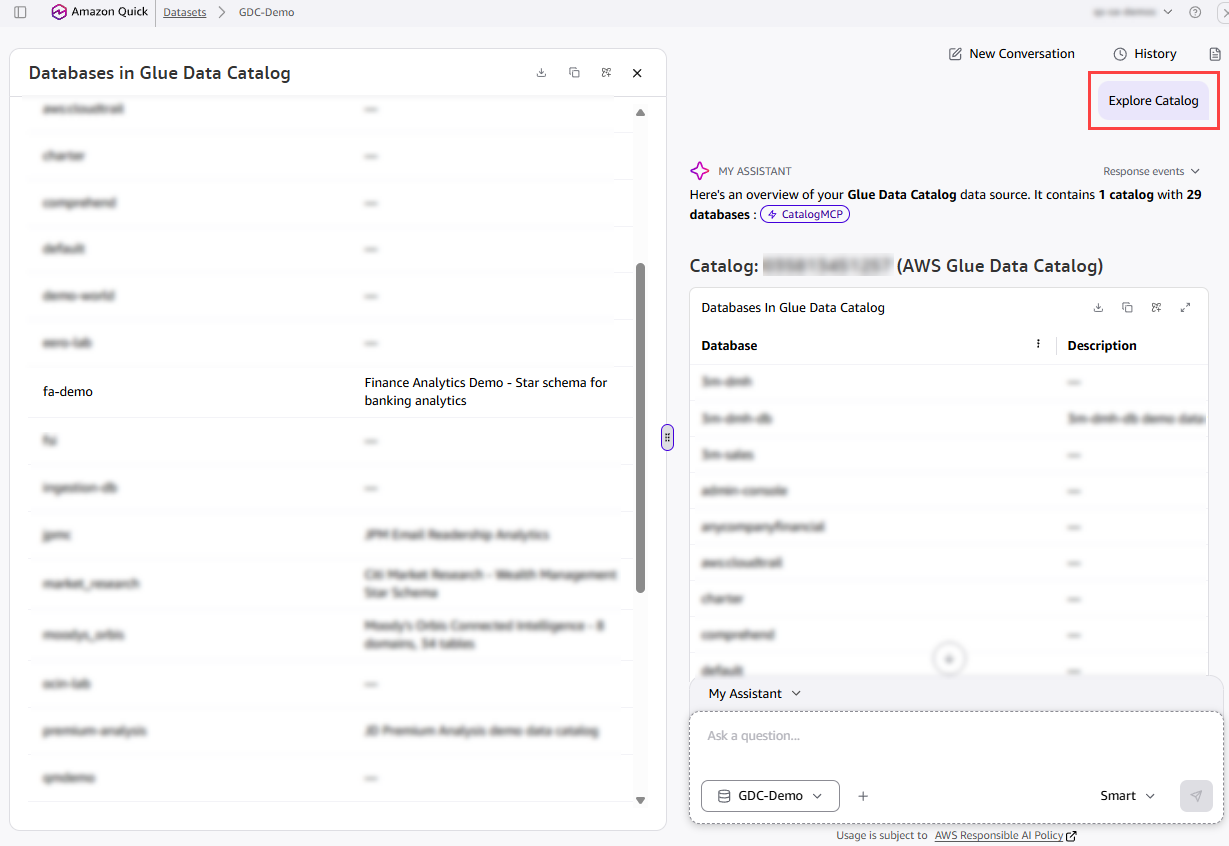
図 5:利用可能なカタログとデータベースを要約するエージェント
エージェントに「fa-demo」データベースの探索を依頼すると、7 つのテーブルからなる古典的なスター型スキーマが特定されます。具体的には、2 つのファクトテーブル(fact_transactions と fact_loans)と、5 つのディメンションテーブル(dim_account, dim_date_transactions, dim_date_loans, dim_merchant, dim_txn_category)です。これらはすべて Amazon S3 上の外部テーブルとして保存されています。エージェントは、このスキーマが顧客口座取引やローンポートフォリオをカバーし、商社、取引カテゴリ、日付階層に関する補完的なディメンションを含んでいることを認識します。
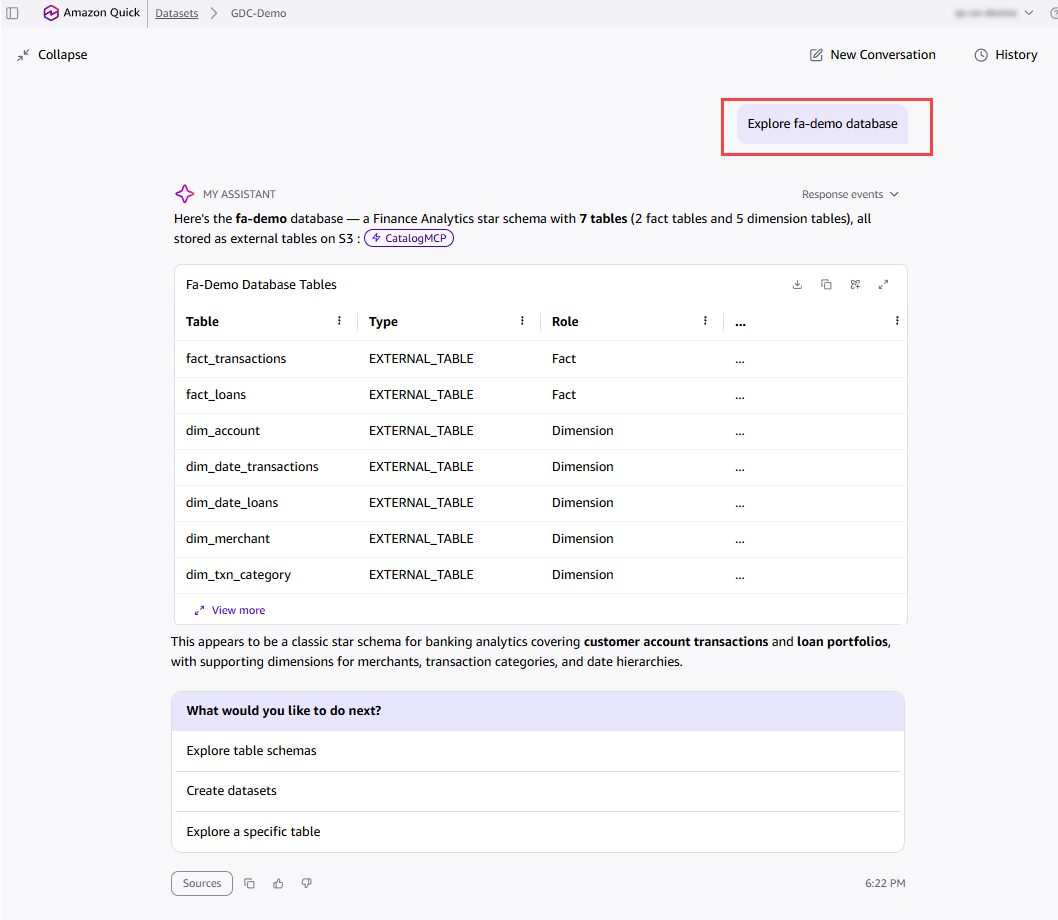
図 6:「fa-demo」データベース内のファクトテーブルとディメンションテーブルを特定するエージェント
エージェントに「fa-demo」のスター型スキーマ図を作成させるよう指示します。エージェントはテーブルを分析し、主キーと外部キーの関係を特定して、スキーマ概要付きの完全な論理データモデルを提示します。ここでは dim_account テーブルが両方のファクトテーブルをつなぐ共有された適合次元であることを強調しています。
「Create datasets & Topic」を選択すると、エージェントはすべての設定を自動で構築してくれます。
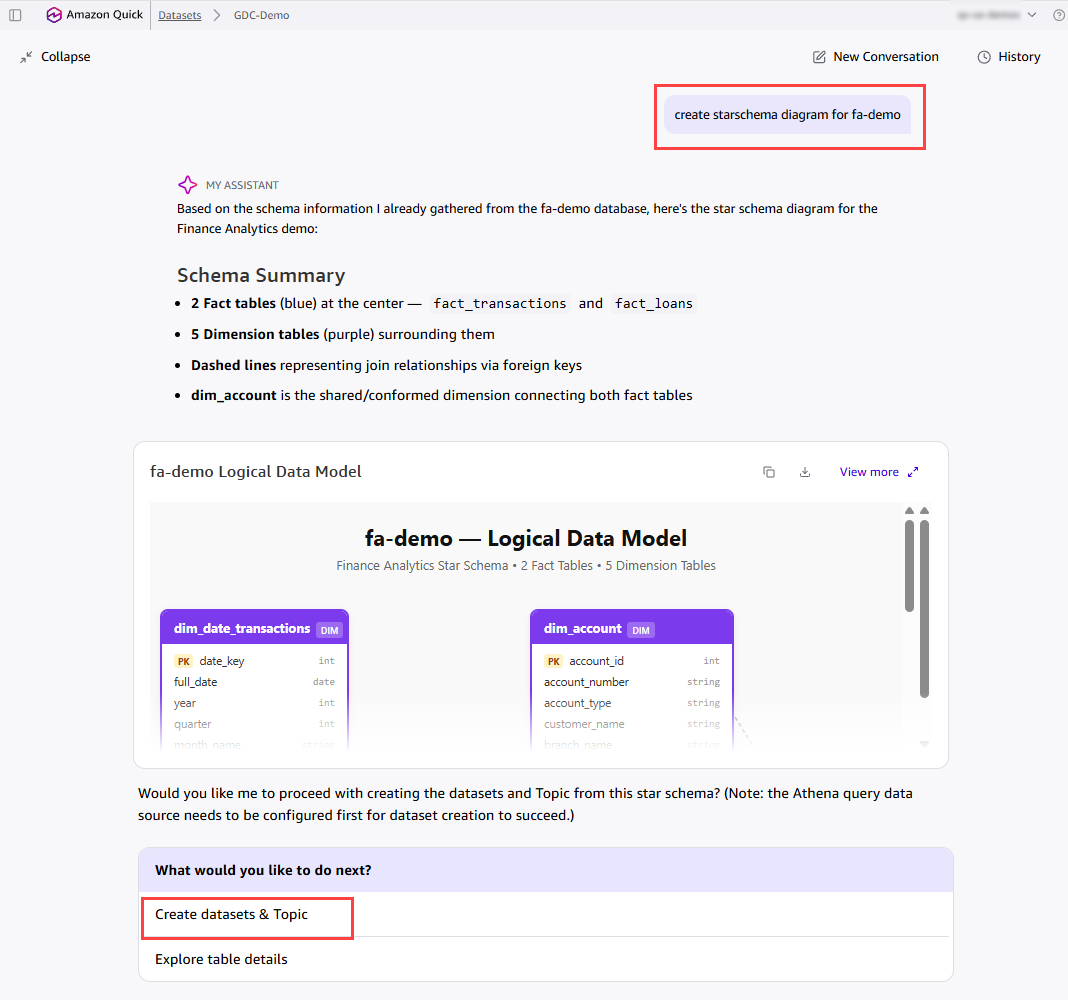
図 7: fa-demo スキーマ用に生成された論理データモデル
エージェントは、すべてのデータセットとリレーションシップが設定された完全なトピックを作成します。この例では、「Financial Analytics」トピックが作成され、fa-demo データベース内の 7 つのデータセットと、6 つの事前設定済みスター型スキーマ結合が含まれます。各データセットには継承されたビジネス説明が付与されており、ファクトテーブルと次元テーブル間の結合関係は自動的に検証されます。このトピックはすぐに自然言語での Q&A に使用できるため、「 merchant カテゴリごとの取引総額は?」や「リスク評価別の延滞ローンを見せる」などの質問が可能です。
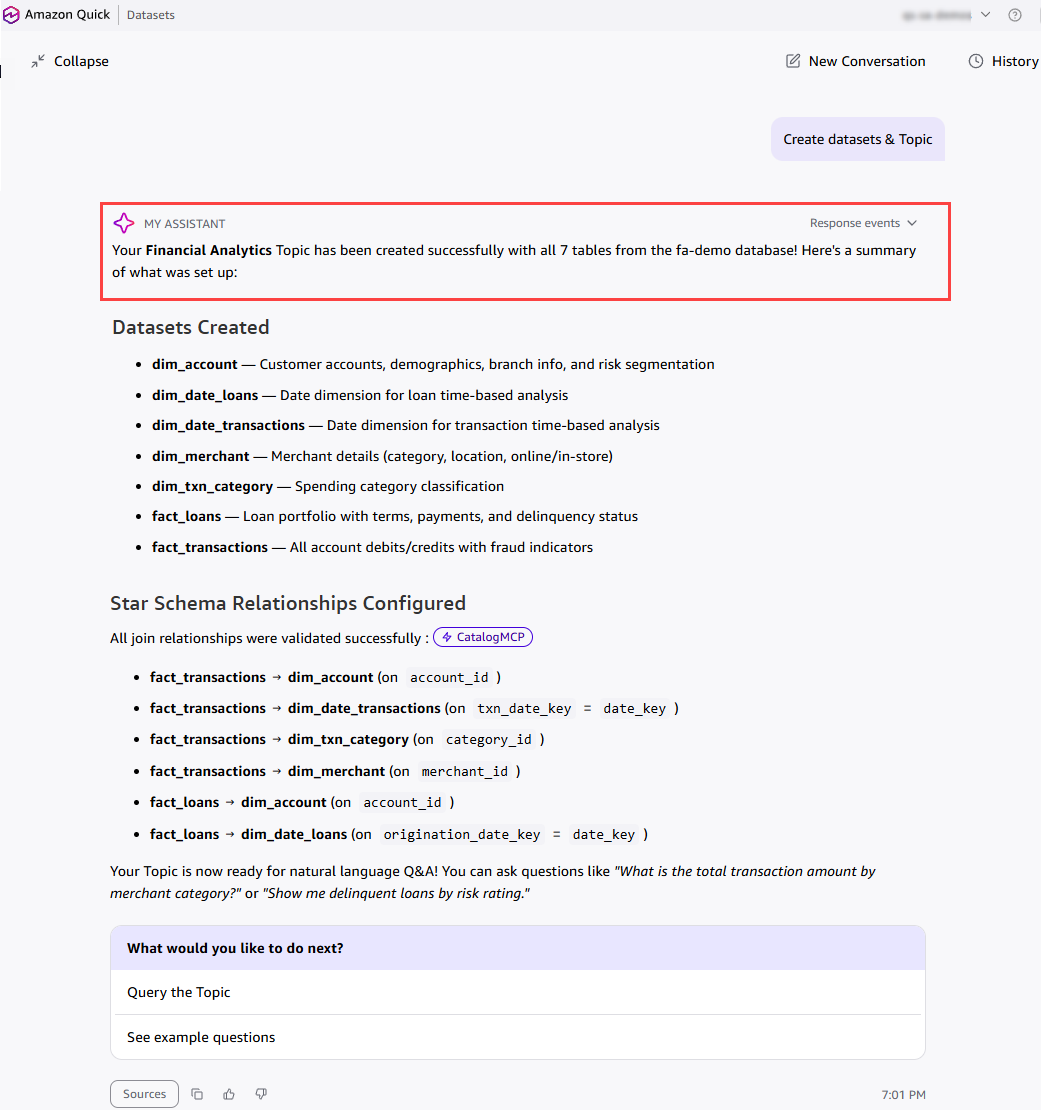
図 8: 完全設定された「Financial Analytics」トピック
では、Glue Data Catalog から作成された「財務分析トピック」が実際にどのように機能するかを見てみましょう。このトピックをコンテキストとして固定しておけば、エンドユーザーは自然な言葉で質問し、即座に根拠のある回答を得ることができます。例えば、「業者別取引総額」を尋ねれば、エージェントは主要なポイントを強調した順位付き内訳を返します。その後、「リスク等級別の延滞ローン」と続ければ、リスクレベルごとの要約を確認できます。
原文を表示
As organizations embrace AI-powered analytics, the value of a natural language (Text2SQL) answer is only as good as the business context behind it. We’re entering a phase where semantic richness (table and column descriptions, and relationships) must flow directly from where it’s authored in upstream data catalogs and semantic tools into the AI products that serve end users. Products like Amazon Quick can no longer operate in isolation. They need to natively consume and reason over the definitions, relationships, and governance metadata that data teams curate in systems like AWS Glue Data Catalog and Databricks Unity Catalog. This shift from siloed metadata to connected, catalog-aware AI is what enables intelligent analytics at scale.
The challenge: Bridging the last mile
The investment is done
Enterprise data teams have done the hard work. They have invested heavily in upstream catalog platforms such as AWS Glue, Databricks Unity Catalog, Snowflake Horizon, Collibra, and dbt. On these platforms, they meticulously define table descriptions, column semantics, primary and foreign key relationships, glossary terms, and metric definitions.
Yet when it comes to enabling end users (such as sales managers, marketing directors, and finance leads) for production-ready AI and trusted dashboards, a significant gap remains.
Three compounding challenges
When data curators (business intelligence engineers, analytics leads, and senior analysts) need to enable their business users in Amazon Quick, they face three compounding challenges:
- Limited discoverability: With thousands of tables in enterprise catalogs, discovering the right upstream assets that are curated and approved for reporting is a needle-in-a-haystack problem. There’s no way to describe what you need and have the system find it.
- Semantic fragmentation and manual recreation: Rich metadata that already exists upstream (business descriptions on tables and columns, and primary and foreign key relationships) does not flow through. Curators must recreate assets from scratch, redefine descriptions, and reconcile definitions manually. Does “revenue” mean gross or net? Does “active customer” mean a purchase within 30 days or 90 days? These definitions exist upstream but require manual re-entry.
- Time to insight in weeks, not hours: The combination of manual discovery and manual recreation means that the time from data to actionable insights stretches from hours to weeks. Worse, when upstream definitions change, manually created semantics in Quick Datasets become stale, causing semantic drift that erodes trust in AI answers and dashboards over time.
The gap
The problem isn’t upstream. The metadata exists. The governance is defined. The relationships are mapped.
The problem is the last mile: translating that rich catalog context into a curated, consumable experience that delivers grounded AI answers and deterministic dashboards end users can trust.
Introducing the Agentic Catalog Experience in Amazon Quick
Today, we’re announcing the Agentic Catalog Experience in Amazon Quick, an AI-powered workflow that helps data curators rapidly define their context boundary, inherit upstream semantics, and enable end users for grounded Q&A and trusted dashboards at scale.
At the heart of this experience is the Quick Agent, scoped to discovery, creation, and inheritance tasks within the catalog context. It uses the semantic context from the catalog connection to summarize the entire catalog at a glance, engage the customer in natural language conversation, surface the most relevant tables and relationships based on the customer’s use case, and assess metadata readiness. Then, with a single conversational confirmation, it auto-creates Catalog-Generated Datasets and Topics with targeted metadata inherited from the upstream catalog.
No manual configuration. No context-switching. No weeks of setup.
How it works
Natural language asset discovery
Instead of scrolling through thousands of tables to find the right ones, curators use natural language. With the Agentic Catalog Experience, curators describe what they need:
Curator: “I’m a Senior Analyst on the Finance team. I need tables for quarterly revenue reporting and cost analysis.”
The Quick Agent searches across your entire catalog to surface the most relevant tables instantly, using all available metadata including business descriptions, tags, Gold/Silver/Bronze classifications, quality scores, table health scores, and glossary terms. No more manual browsing. No more guessing.
Bulk agentic dataset creation
After the curator selects their tables, the Quick Agent creates catalog representations (Datasets) at scale in a single guided workflow. Your upstream catalog remains the source of truth because the default creation path is Direct Query. Datasets with inherited semantics are flagged with a clear “Semantics Inherited” badge, and their metadata is read-only. Authors can refresh inherited metadata on demand by choosing the sync button to stay aligned with their catalog.
Quick Agent: “Creating 6 Catalog-Generated Datasets now: revenue_by_region created (DirectQuery, read-only metadata), cost_centers created, and gl_transactions created.”
Semantic and relationship inheritance
The Quick Agent carries forward targeted metadata from your catalog into the assets it creates. Today, inheritance is deliberately focused on two key areas to avoid noise and keep Datasets clean:
- Table and column definitions to Datasets: Business descriptions and column definitions are inherited directly into the created Datasets, so that curators and end users have the semantic context they need.
- Primary and foreign key relationships to Topics: The Agent detects relationships and uses them to suggest and create multi-dataset constructs (Topics) with star and snowflake schema joins preconfigured.
Note: While all available metadata (Gold/Silver classifications, quality scores, tags, and health scores) is used during discovery to find the right tables, inheritance into Datasets is intentionally scoped to table and column definitions today. We plan to add more metadata types to Datasets over time.
Quick Agent: “I detected 3 relationships between these tables and created a Topic called ‘Finance Revenue Model’ with the star schema joins preconfigured. Table and column definitions have been inherited from the upstream catalog.”
Immediate consumption
The curated Datasets and Topics are ready for use immediately:
- Ask questions: Start a Q&A conversation with your new Datasets. The AI agent uses inherited business descriptions, glossary terms, and quality scores to deliver grounded answers.
- Create dashboards: Build deterministic visualizations with full semantic context already in place.
- Share with end users: Add Datasets to a Space and share them with business users for self-service Q&A.
After creation, the metadata tied to these Datasets and Topics feeds into the Amazon Quick semantic store, which powers re-ranking and unified context for AI-powered Q&A. Getting from catalog connection to the first business question takes minutes, not weeks.
Architecture: Consumer, not catalog
A key design principle underpins this experience: Amazon Quick is a consumer of upstream catalog metadata, not a dedicated catalog itself. This means:
- No data duplication: Catalog-Generated Datasets use DirectQuery. No data is copied or moved.
- Metadata consumed for context: Inherited semantics are read-only in Amazon Quick and flow into the semantic store to power re-ranking and AI answer grounding. Your upstream catalog remains the authoritative source.
- Manual semantic sync: Authors can refresh inherited metadata on demand by choosing the sync button. Scheduled automatic sync is on the roadmap.
- Extensibility with transparency: Catalog-Generated Datasets show inherited semantics as read-only (marked as catalog representations). If an Author chooses to edit a Dataset, Amazon Quick provides a clear notification that editing creates a custom Dataset and that semantic sync no longer applies. This gives Authors full control while preserving catalog integrity by default.
Supported catalogs today
Catalog platform
Authentication
AWS Glue Data Catalog
AWS Identity and Access Management (IAM) Role ARN
Databricks Unity Catalog
OAuth 2.0 / Personal Access Token
Support for additional catalog platforms is coming soon.
What gets inherited
Metadata inheritance is intentionally focused to keep Datasets clean and production-ready:
Into Datasets (table and column definitions)
- Table business and technical descriptions.
- Column descriptions and display names.
- Data types and nullability.
- Glossary terms and synonyms.
Into Topics (relationships)
- Primary and foreign key relationships.
- Relationship definitions and cardinality.
- Star and snowflake schema models.
The end-user experience
Here’s what this means for the business users downstream:
A sales manager asks: “What were our Q4 sales by region?”
Behind the scenes, the AI agent:
- Searches Catalog-Generated Datasets using business descriptions and glossary terms.
- Identifies the sales.revenue_by_product table (Gold, 98 percent quality).
- Applies preconfigured joins from the Topic to combine relevant dimensions.
- Respects personally identifiable information (PII) masking rules from catalog metadata.
- Returns a grounded, trusted answer in seconds.
No manual dataset configuration required. The curator defined the context boundary once with the Quick Agent, and every end user benefits immediately.
Unified enterprise context
The Agentic Catalog Experience doesn’t exist in isolation. Combined with the broader platform capabilities of Amazon Quick (including integration with Slack, Outlook, documents, and knowledge bases), end users get the full enterprise context:
- Structured data from catalogs through Catalog-Generated Datasets.
- Unstructured context from documents, email messages, and conversations.
- Business rules from glossary terms and metric definitions.
This unified context enables production-ready AI answers, grounded in your organization’s specific data and semantics.
Connecting to AWS Glue Data Catalog
To get started with the Agentic Catalog Experience, create a data source connection to your AWS Glue Data Catalog in Amazon Quick. After you establish the connection, the Quick Agent guides you through discovery, schema exploration, and Topic creation in a single conversational workflow. In this walkthrough, we connect to a Glue Data Catalog and build a Financial Analytics Topic.
In Amazon Quick, create a new data source. From the list of connection types, select Glue Data Catalog (available in preview), and then choose Next. This connection is for the metadata. With it, Amazon Quick can consume the table and column definitions and the relationships your teams have already curated in AWS Glue.
**Figure 1: Selecting the Glue Data Catalog connection type in Amazon Quick
A Glue Data Catalog connection works together with an Amazon Athena connection. Glue provides the metadata, and Athena provides the query path to the data itself in Amazon Simple Storage Service (Amazon S3). Create the Athena data source as well, so that Amazon Quick can run queries against the underlying data. After you create both, the Data sources page shows the two entries side by side: the Glue Data Catalog source for the metadata and the Athena source for the data.
Figure 2: The Glue Data Catalog and Athena data sources listed together
Open the GDC-Demo data source detail page. Under Data connections, you can see the linked Athena data source that Amazon Quick uses to query the data. Choose Explore data** to launch the Quick Agent scoped to this data source.
**Figure 3: Launching the Quick Agent from the data source detail page
The Quick Agent panel opens on the right side of the screen, automatically scoped to the Glue Data Catalog data source. The “Specific data” mode is selected, with “GDC-Demo” pinned as the context boundary. As a result, the Agent surfaces only metadata from this specific catalog connection.
Figure 4: The Quick Agent scoped to a specific catalog connection
Ask the Agent to explore your catalog. The Agent summarizes the available catalogs and databases at a glance, so you can quickly see what is curated in your Glue Data Catalog. For this post, we use the “fa-demo” database as our example, a Finance Analytics Demo star schema for banking analytics. This walkthrough illustrates how the feature works and is not an exact scenario, so you can apply the same steps to your own catalog.
Figure 5: The Agent summarizing available catalogs and databases
Ask the Agent to explore the fa-demo database. The Agent identifies a classic star schema with 7 tables: 2 fact tables (fact_transactions and fact_loans) and 5 dimension tables (dim_account, dim_date_transactions, dim_date_loans, dim_merchant, and dim_txn_category). All are stored as external tables in Amazon S3. The Agent recognizes the schema as covering customer account transactions and loan portfolios, with supporting dimensions for merchants, transaction categories, and date hierarchies.
Figure 6: The Agent identifying the fact and dimension tables in the fa-demo database
Ask the Agent to create a star schema diagram for fa-demo. The Agent analyzes the tables, identifies the primary and foreign key relationships, and presents a complete logical data model with a schema summary. It highlights that dim_account is the shared conformed dimension connecting both fact tables. Choose Create datasets & Topic** to let the Agent build everything automatically.
Figure 7: The generated logical data model for the fa-demo schema
The Agent creates a fully configured Topic with all Datasets and relationships in place. In this example, it creates the “Financial Analytics” Topic with all seven Datasets from the fa-demo database and 6 preconfigured star schema joins. Each Dataset carries its inherited business description, and the join relationships between the fact and dimension tables are validated automatically. The Topic is immediately ready for natural language Q&A, so you can ask questions like “What is the total transaction amount by merchant category?” or “Show me delinquent loans by risk rating.”
Figure 8: The fully configured Financial Analytics Topic
Now, let’s see how the Financial Analytics Topic created from the Glue Data Catalog works in action. With the Topic pinned as context, end users can ask questions in plain language and get grounded answers instantly. For example, a user can ask “Total transaction amount by merchant category” and the Agent returns a ranked breakdown with key highlights. The user can then follow up with “Delinquent loans by risk rating” to see a risk-level summary w
関連記事
今日のまとめ
AIデイリーブリーフで今日の重要ニュースをまとめ読み