Together AI、専用モデル推論の設定方法を公開
Together AI は、エンドポイント、デプロイメント、設定の 3 つを容量ベースで結合する新アーキテクチャを発表し、ロールアウトや A/B テストなどの高度な運用機能を可能にする。
AI深層分析を開く2026年7月29日 05:28
AI深層分析
キーポイント
リソースモデルの構成要素
エンドポイント(呼び出し先)、デプロイメント(モデルとハードウェアの組み合わせ)、設定(実行レシピ)という 3 つの要素が容量ベースのトラフィックスプリットで統合される。
設定とデプロイメントの特性
設定は不変のレシピであり、デプロイメントは自動スケーリングポリシーを持つ一時的なリソースとして設計され、作成と破棄が日常業務となる。
高度な運用機能の実現
新しいデプロイメントを追加しトラフィック重みを割り当てるだけで、A/B テストやシャドウ実験、ゼロダウンタイムの変更が可能になる。
ウェイトベースのトラフィックスプリットの仕組み
トラフィックは各デプロイメントの「ウェイト×準備完了レプリカ数」で計算される容量に基づいて配分され、等しいウェイトは等しいレプリカあたりの負荷を意味する。
オートスケーリングとの統合と柔軟性
この設計によりデプロイメントのスケール変更が自動的にトラフィック配分へ反映され、準備完了していないレプリカは容量に含められないため負荷分散が最適化される。
重要な引用
Dedicated Model Inference on the Together AI platform consists of three parts: the endpoint, deployments, and configs.
An advanced operation in the platform is just 'add a deployment, and assign it a traffic routing weight'.
A shadow experiment is a deployment at weight zero receiving mirrored traffic.
Equal weights mean equal per-replica load, not equal traffic share.
編集コメントを表示
編集コメント
容量ベースのルーティングを採用することで、従来の静的な負荷分散モデルに比べ、リソース効率と運用の柔軟性が大幅に向上する。これは大規模な LLM サービスを運用する企業にとって、コスト削減と信頼性向上の両立を実現する重要な技術的転換点となる。
Source Article
元記事を日本語で読む
本文に関係しない購読案内、埋め込み通知、サイト内プロモーションは除いています。
エンドポイント、デプロイメント、設定がどのように連携し、なぜルーティングが固定された割合ではなく容量に基づいて行われるのか。
概要
Together AI プラットフォームにおける専用モデル推論は、3 つの要素で構成されています。1 つ目はエンドポイント(ユーザーやクライアントが呼び出す安定した名前)、2 つ目はデプロイメント(その背後で実行される特定のモデルとハードウェアの組み合わせにレプリカを配置したもの)、そして 3 つ目が設定(モデルの実行方法を定義するレシピ)です。これら 3 つの要素を結びつけるのが、容量を認識したトラフィック分割機能です。このアーキテクチャにより、ロールアウトや A/B テスト、シャドウ実験、ダウンタイムゼロでの変更など、さまざまな機能が実現可能になります。
以下では、測定されたトラフィックに対して容量認識型ルーティングがどのように動作するか、実際のエンドポイントを例に解説します。
リソースモデルの仕組み
設定(Config)は、使用するエンジンや GPU の種類・数、並列処理の設定、そしてスループットやレイテンシを最適化するプロファイルといった詳細を記したレシピのようなものです。設定は不変であり、それぞれに cr_... 形式の一意な ID が付与されます。デプロイメントは常に、テスト済みの特定の設定を指し示すことになります。
デプロイメントは、特定のバージョンのモデルを一つの設定に紐付け、自動スケーリングポリシーを設定し、複数のレプリカを実行します。デプロイメントは意図的に使い捨てのものとして設計されており、作成や削除は日常的な作業として捉えるべきです。
エンドポイントは、アプリケーションが通常推論 API でモデルパラメータとして渡す、固定された識別子(qualified name)です。このエンドポイントにはトラフィック分割の設定があり、どのデプロイメントにリクエストを振り分けるかを決定するために使用されます。
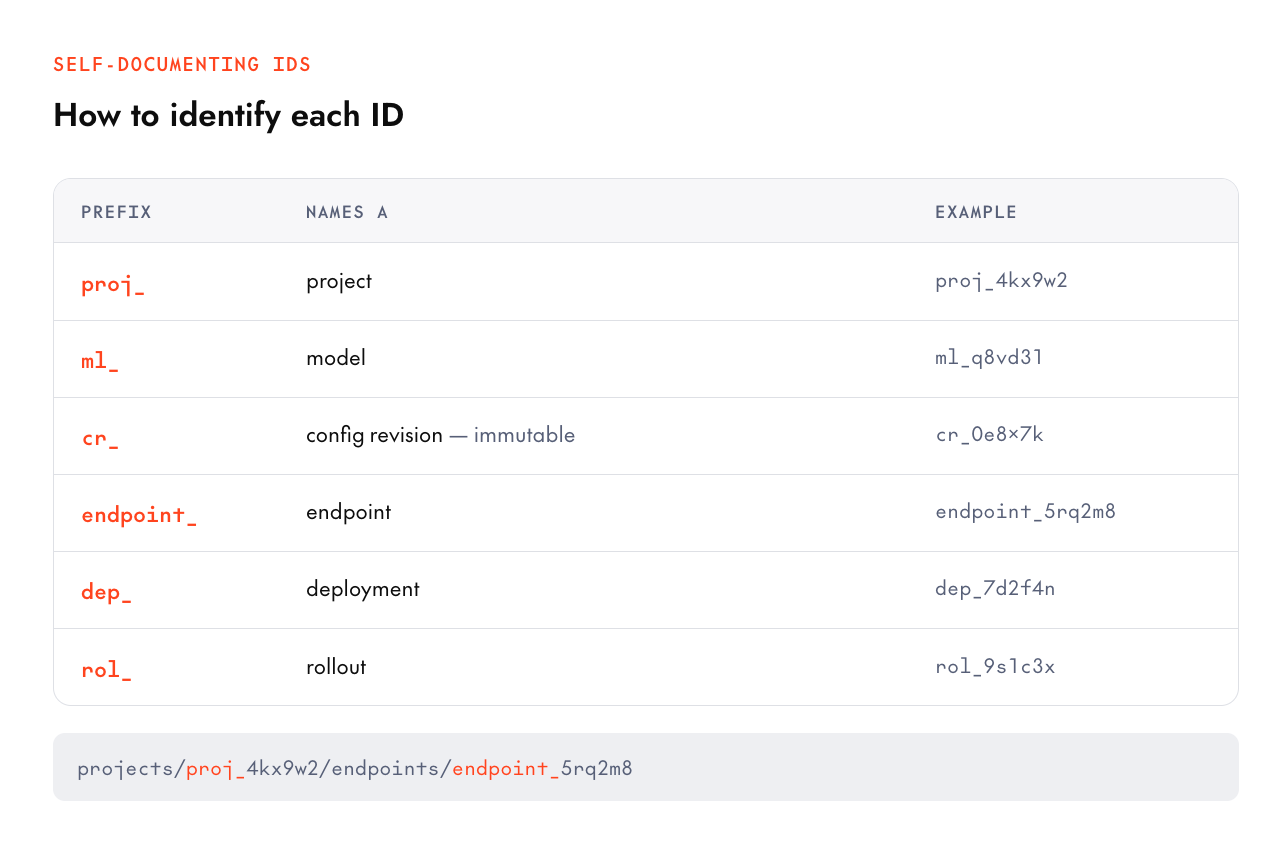
これらを理解する簡単な方法は、ID のプレフィックスを確認することです。システム内のすべての ID は、先頭文字列でその正体を示しており、ログやスクリプトが自己文書化されるように設計されています。具体的には proj_ がプロジェクト、ml_ がモデル、cr_ が設定のバージョン、endpoint_ がエンドポイント、dep_ がデプロイメント、そして rol_ がロールアウトを指します。
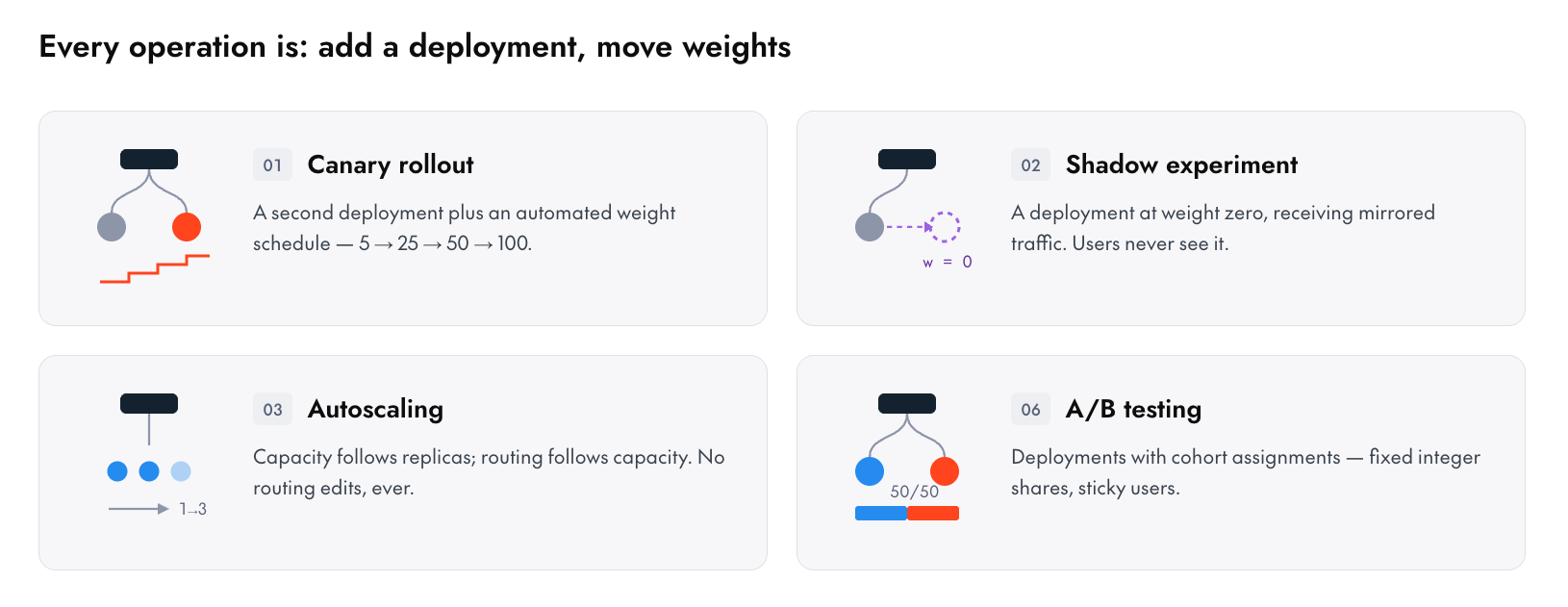
このプラットフォームにおける高度な操作は、すべて「デプロイメントを追加し、そのトラフィックルーティングの重みを割り当てる」という行為に集約されます。 A/B テストとは、コホートごとに割り当てられた複数のデプロイメントのことです。シャドウ実験(Shadow experiment)は、重みがゼロのデプロイメントにミラーリングされたトラフィックを送る仕組みです。また、デプロイメントを停止するには、最小および最大レプリカ数を 0 に設定すればよいのです。
重み付けによるトラフィック分割
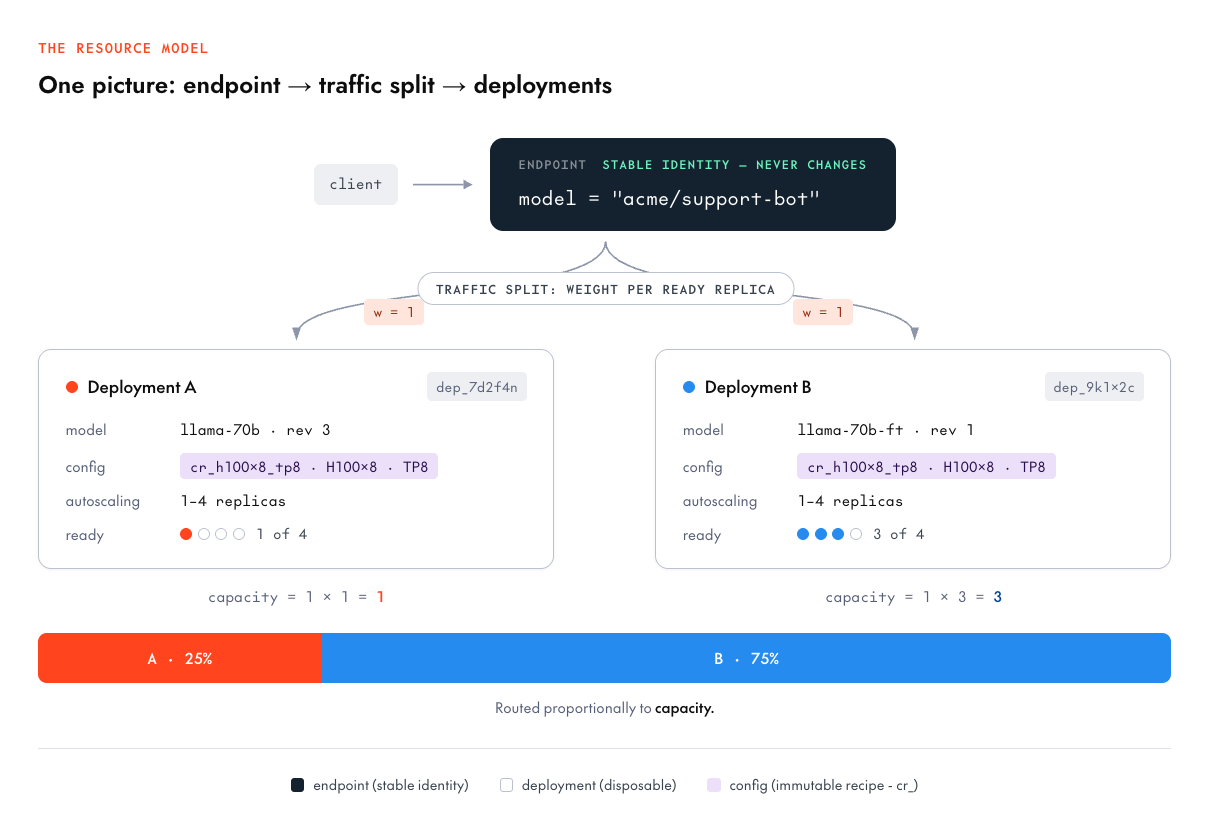
トラフィック分割は、{deployment_id, weight} のエントリリストで構成されます。ここでいう「重み」は、*準備完了したレプリカ(ready replica)* 1 つあたりの値です。
ルーターはこの重みに「準備完了しているレプリカの数」を乗じて各デプロイメントの実効容量を計算し、その容量に比例してトラフィックを振り分けます。
上記の図を見てみましょう。両方のデプロイメントで重みは 1 ですが、デプロイメント A は準備完了したレプリカが 1 つ(実効容量 1)、デプロイメント B は 3 つ(実効容量 3)あります。そのため、トラフィックは 25% : 75% の割合で分割されます。
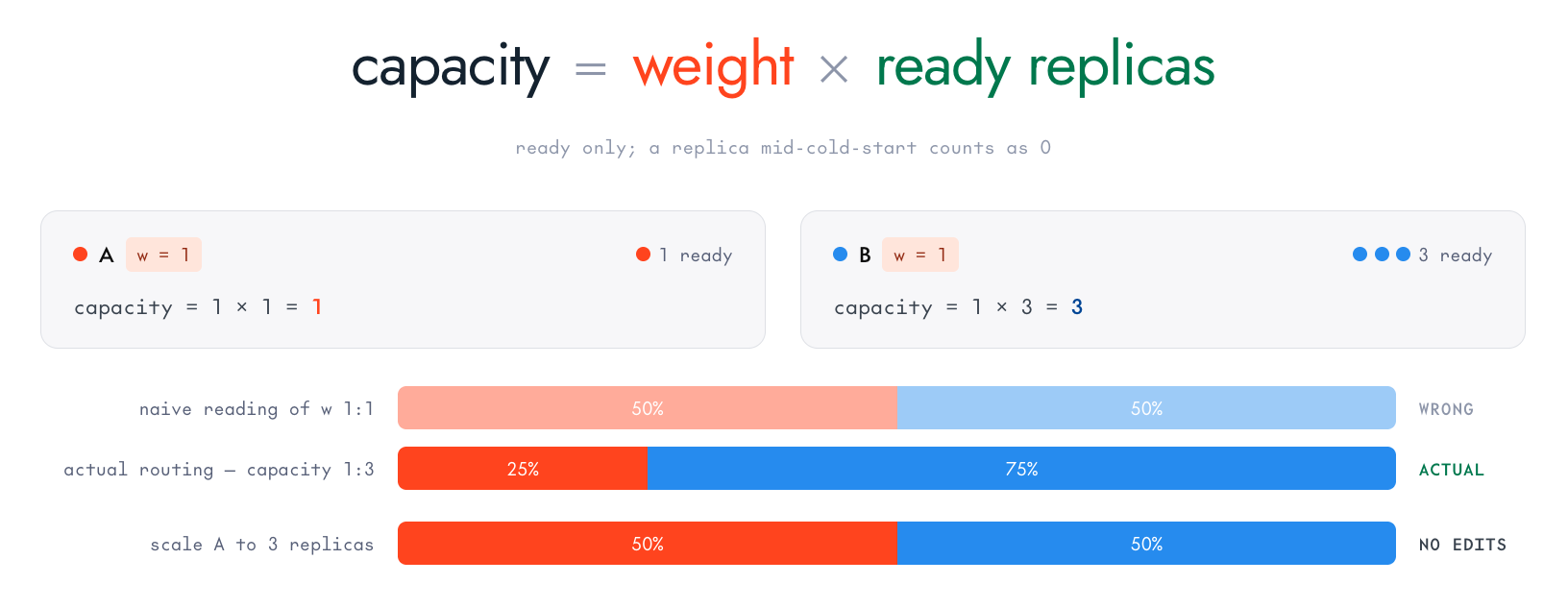
重みが等しい場合でも、それは「各レプリカにかかる負荷が均等になる」ことを意味するだけで、「全体のトラフィックシェアが半分ずつになる」というわけではありません。
このように設計した理由は、ルーティングとスケーリングを同じ文脈で考えられるようにするためです。
オートスケーリングは無料で利用できます。デプロイメント A が 1 つのレプリカから 3 つにスケールアップすると、その処理能力も 3 倍になり、自動的に比例してより多くのトラフィックを吸収します。単純なパーセンテージ指定だと、デプロイメントが「25%」に固定されている場合、スケールダウン時には飽和状態になり、スケールアップ時にはアイドル状態になるという問題が生じます。
重要なのは、レプリカごとの負荷を制御できる点です。「重み 1 vs 重み 2」という設定は、「B の各レプリカが A の各レプリカの 2 倍の負荷を負担するべきだ」という意味になります。
準備ができていないレプリカはカウントされません。コールドスタート中や、準備完了したレプリカ数が 0 に低下しているデプロイメントは処理能力をゼロとして扱われるため、実際にリクエストに応えられる先にトラフィックが流れます。
重みは正の数であり、合計値に制約はありません。つまり、「0.7/0.3」も「700/300」も同じルーティングを意味します。レプリカ数に関わらずトラフィックの割合を固定したい場合は、A/B テスト用のコホート設定を行うことで、100% に合計する整数パーセントを指定できるようになります。
分割設定は、フィールドマスクを使用した 1 つの PATCH リクエストで実行できます:
tg beta endpoints update $DEPLOYMENT_A --traffic-weight 1
tg beta endpoints update $DEPLOYMENT_B --traffic-weight 1
デプロイメントをスケーリングダウンさせることなく、ルーティングから外すには以下のようにします:
`tg beta endpoints update $DEPLOYMENT_B --traffic-weight 0
⚠️ 重要
新しいデプロイメントは、エンドポイントのトラフィック分割設定に反映されるまで、一切のトラフィックを受け付けません。もしエンドポイントとデプロイメントを作成して「READY」状態にしたにもかかわらず、リクエストを送信した際に `routing_error` が返ってくる場合は、おそらくトラフィック分割の設定が抜けており、ルーター側でそのデプロイメントにトラフィックを割り当てる指示が出ていないことが原因です。
CLI の `together beta endpoints deploy` コマンドは自動的に分割設定を行ってくれるため、クイックスタートでは「そのまま動く」のですが、生 API や SDK を直接使用する場合はこの設定を手動で行う必要があります。
## 仕組み:設定の選び方
設定をゼロから作成する必要はありません。サポートされているモデルカタログに含まれるすべてのモデルには、**デプロイメントプロフィール**が付属しています。これはベンチマーク済みで継続的に改善されている「認証済みのモデルと設定の組み合わせ」です。
tg beta models public zai-org/GLM-5.2 --json | jq '.data[0].deploymentProfiles[]'
# または、モデル ID を取得した後は、そのデプロイ可能な設定を直接一覧表示できます:
tg beta models configs ml_CcEtnFUbitJYNja6TTR6U
{
"profileId": "profile-cabcbcec874c",
"certifiedConfigRevisionId": "cr_Cd35DNpQuHM3RihtCkN59",
"certifiedModelRevisionId": "rv_CcEuPu4Gk6c4M7v4PTYuG",
"gpuType": "NVIDIA-B200",
"gpuCount": 4,
"quantization": "FP4",
"performanceBenchmarks": {},
"config": "projects/proj_CbdXDuLRFhUPv1mGfxwUc/configs/cr_Cd35DNpQuHM3RihtCkN59",
"model": "projects/proj_CbdXDuLRFhUPv1mGfxwUc/models/ml_CcEtnFUbitJYNja6TTR6U/revisions/rv_CcEuPu4Gk6c4M7v4PTYuG",
"parallelism": "TP4"
}
そこから、モデルと設定リソースの名前をコピーして、デプロイ作成に使用できます。
tg beta endpoints deploy zai-org/GLM-5.2 \
--endpoint my-glm-endpoint \
--config cr_Cd35DNpQuHM3RihtCkN59 \
--traffic-weight 1
設定を複数選択する際は、各セレクトボックスがどのレシピの最適化を表しているかを確認してください。
- **accelerator_type**: H100, H200, B200 など。コスト、メモリ帯域幅、利用可能性のトレードオフを決定します。
- **accelerator_count**: 1, 2, 4, 8。モデルと KV キャッシュ用の余裕を収容する数を指定します。
- **optimization**: latency(レイテンシ)、throughput(スループット)、balanced(バランス型)。これは基本的なサービス提供のトレードオフです(後述)。
- **topology**: 集約型や非集約型など。モデルが GPU にどのように分散されるかを定義します。
この中で最も時間を割いて検討すべきは、最適化軸(optimization axis)です。
レイテンシプロファイルは、最初のトークン生成までの時間を最適化します。バッチサイズを小さくし、要求を即座にスケジューリングすることで、各リクエストがより早く処理されます。その代わり、GPU 1 秒あたりの総トークン数は低下します。
一方、スループットプロファイルは大きなバッチを組むことを目指します。これは GPU 時間あたりの集計トークン数を最大化するもので、個々のリクエストはバッチに組み込まれるまで少し待ちます。対話型のチャットシステムを構築しているならレイテンシ重視の設定を選ぶべきでしょう。一方、オフラインパイプラインやバッチ処理による要約タスクであれば、スループット設定を採用するのが適切です。
トラフィックの両方の特性(レイテンシとスループットのバランス)を考慮する必要がある場合、「balanced」がデフォルトとして推奨されます。
設定は不変(immutable)です。cr_ のリビジョンは一度作成されると変更されないため、誰かが共有設定で「フラグをちょっといじった」ことでデプロイの挙動が思わぬ方向に drifting することはありません。変更を加えることは新しいリビジョンを作成する行為であり、古いバージョンは有効なロールバック先として残されます。また、スペキュレーティブ・ディコーディング(推測的デコード)もここからトリガーできます。なぜならドラフトモデル自体が「設定」のプロパティだからです。
## 特殊ケース
**1. トラフィックスプリットに含まれているが、準備完了したレプリカが 0 のデプロイ**
容量 = ウェイト × 0 = 0 となるため、このデプロイにはトラフィックが流れません。その分の負荷は他のデプロイが吸収します。レプリカが回復すると、自動的に、かつ比例してトラフィックが戻ってきます。
**2. まだトラフィックスプリットに含まれているデプロイを削除できるか?**
まずスプリットから除外し、その後で削除してください。テardown(撤去)の手順は「トラフィックの停止 → 停止 → 削除」の順序です。API もこの順序に従うよう案内します。

3. トラフィックスプリット、A/B メンバー割合、カナリーステップの比較
「トラフィックスプリットの重み付け」は容量に応じた相対的な値で、定常状態でのルーティングに使用されます。「A/B メンバーの割合」は整数で表されるコホートシェアであり、レプリカ数に関わらず合計が 100% になるように固定されています。一方、「カナリーステップの割合」はロールアウト時の移行スケジュールを定義するものです。
これらはそれぞれ異なる目的を持つ 3 つのツールですが、決まった順序で連携して動作します。まずルーティング処理で「重み付けスプリット」が解決され、容量に基づいて候補デプロイメントがサンプリングされます。次に、その候補が A/B 実験のコントロール群に該当する場合、「A/B 実験」によって再サンプリングが行われ、コントロール群のシェアを各アーム間で分割します。さらに、候補がロールアウトのソース(元バージョン)である場合、「アクティブなロールアウト」が再サンプリングを実行し、現在のステップ割合に基づいてソースとターゲットの間でトラフィックを分けます。最後に、勝ったデプロイメント内のクラスタが選択されます。この一連の流れにおいて、ロールアウトはユーザーに代わって各ステージの管理を行います。

4. クライアントが使用する名前は?
標準的な推論 API において、`/` のようなエンドポイントをモデル文字列として指定できます。ロールアウトの実行やハードウェアの切り替え、A/B テストの実施などを実施した場合でも、この名前は変更されません。
## 容量対応型ルーティングの実験
この実験は、ライブエンドポイントに対して実行しました。ここでは H100 GPU を単一搭載したデプロイメントを 2 つ用意し、重み付けされたモデルトラフィックの分割が実際に機能している様子を確認します。両方のデプロイメントにはそれぞれ重み 1 が割り当てられ、初期状態では各 1 つずつレプリカが準備されていました。
まず 599 件のタグ付きリクエストを送信し、それぞれのリクエストをどのデプロイメントで処理されたかを記録しました。その後、デプロイメント A のレプリカ数を 1 から 2 にスケールアップし、さらに 599 件のリクエストを追加送信しました。
その結果、各デプロイメント側から観測されたルーティングデータは以下の通りでした:
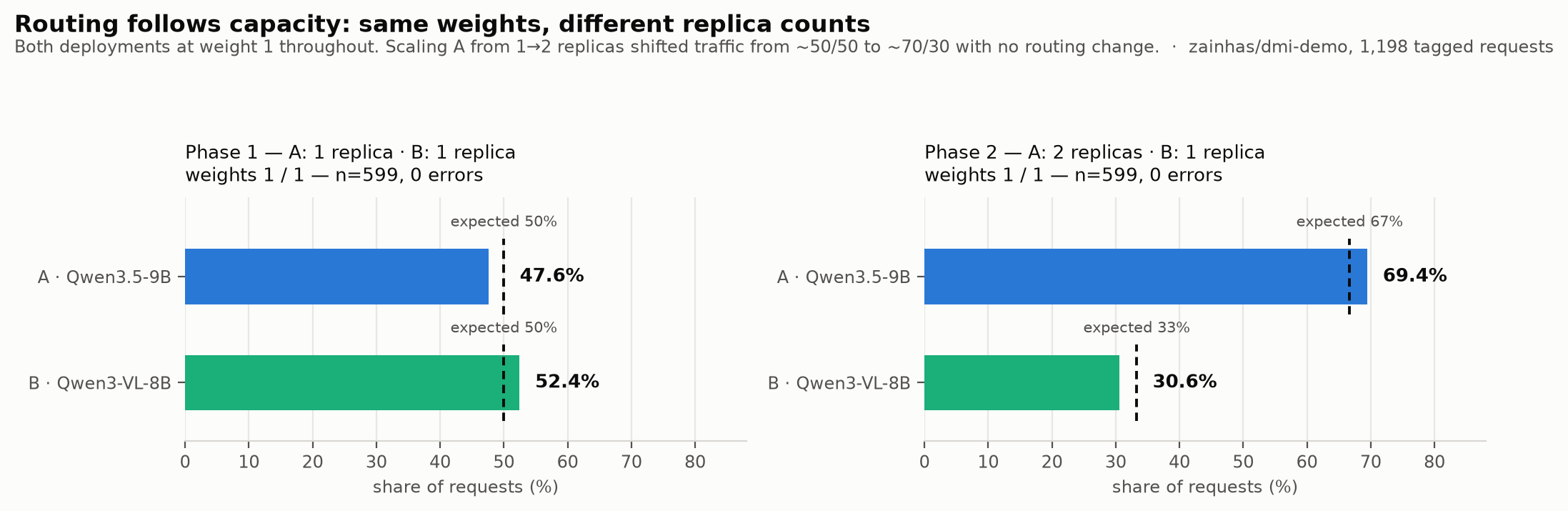
| フェーズ | レプリカ数 (A : B) | 期待される配分 | 測定された配分 | リクエスト数 |
|---|---|---|---|---|
| 1 | 1 : 1 | 50 / 50 | 47.6 / 52.4 | 599 |
| 2 | 2 : 1 | 66.7 / 33.3 | 69.4 / 30.6 | 599 |
**最適化の観点**
- レイテンシ、スループット、バランスの取れた運用
- 根本的なサービス提供におけるトレードオフ(後述)
**トポロジーの観点**
- 例:集約型または非集約型
- モデルが GPU 間でどのように分割されるか
ルーティングはレプリカ数に依存し、それが容量に基づいて行われます。デプロイメント A の内部では、2 つのポッドがそれぞれ全体のトラフィックの約 30〜40% を処理しており(具体的には 39.6% と 29.9%)、ルーターはポッド間でも負荷をバランスよく配分しています。
このトレードオフを具体的に理解するために、デモエンドポイントから 1 つずつレプリカを持つ 2 つの認定済みプロファイルに対してスキャンを行いました。並行度は 4 / 8 / 16 の 3 レベルで、各レベルは 60 秒間のクローズドループテストを実施しました。生成トークン数は 200 で、実際の使用量は API から取得した利用フィールドの値に基づいています。

プロフィール
c=4
c=8
c=16
TTFT p95 @ c16
A · Qwen3.5-9B (BF16, TP1)
362 tok/s
789 tok/s
1,464 tok/s
368 ms
B · Qwen3-VL-8B (BF16, TP1)
495 tok/s
243 tok/s
240 tok/s
323 ms
最適化
レイテンシ / スループット / バランス
根本的な提供のトレードオフ(以下)
トポロジー
例:集約型/非集約型
モデルを GPU にどう分散させるか
この表は、測定すべきことの核心です。**低同時実行数では B が有利ですが、そこからは性能が急激に低下します**。A は c4 から c16 にかけてバッチ処理がうまく機能し、スループットは 4 倍になりますが、TTFT p95 の上昇は約 17% に抑えられています。B は同時実行数 4 では A よりも高速ですが、そこで頭打ちになります。c≈4 を超えると実質的なリクエスト処理速度の増加が止まり、集計スループットは半分になり、数分ごとに一部の要求が完全に停止し始めます。もし同時実行数 4 の環境だけで負荷テストを行っていたら、高同時実行数のワークロードに B を選んでしまい、本番環境になって初めてこの挙動の欠陥に気づくことになります。
どちらのプロフィールも「間違っている」わけではありません。単に提供のフロンティア上の異なる地点に過ぎず、モデルごとのプロフィールにはそれぞれ独自の曲線が存在します。初期設定はテストのスタート地点として機能し、今回のような 1 時間のスキャンによって、自社のトラフィックにどの設定が適しているかを判断できます。
## 実際に試してみましょう!
たった 5 つのコマンドでモデル全体を動かす方法:
# 1. 自己確認:誰か / 何のプロジェクトか
tg whoami
# 2. モデルに合った認定プロフィールを選択する
tg beta models public --product dedicated
3. 1 コマンドで完結:エンドポイントの作成、デプロイ、トラフィック分割、待機
tg beta endpoints deploy $MODEL --endpoint my-endpoint --traffic-weight 1
4. 呼び出し — 資格付き名前はモデル文字列そのもの
resp = client.chat.completions.create(
model="my-project/my-endpoint", # エンドポイントの資格付き名前はそのままモデル文字列として使用
messages=[{"role": "user", "content": "Hello!"}],
)
5. 構築したものを確認する
together beta endpoints get $ENDPOINT_ID
ここから先、本シリーズで取り上げる他の機能も、デプロイを 1 つ追加すればすぐに利用可能です。
📚 **ドキュメント:** 専用モデル推論 → [クイックスタート](https://docs.together.ai/docs/dedicated-endpoints/quickstart) · [コンセプト](https://docs.together.ai/docs/dedicated-endpoints/concepts) · [トラフィックのルーティング](https://docs.together.ai/docs/dedicated-endpoints/route-traffic)原文を表示
How endpoints, deployments, and configs fit together, and why routing follows capacity, not fixed percentages.
Summary
Dedicated Model Inference on the Together AI platform consists of three parts: the endpoint (a stable name you or your clients call), deployments (specific model + hardware combinations running replicas behind it), and configs (recipes for how a model runs). A capacity-aware traffic split ties these three entities together. This architecture enables various other features such as rollouts, A/B tests, shadow experiments, zero-downtime changes possible. Below we'll show how capacity-aware routing works against a live endpoint with measured traffic.
How the resource model works
- A config is a recipe that specifies the engine, the GPU type and count as well as the parallelism and optimization profile (throughput, latency, balanced). Configs are immutable and every config has an ID like cr_... . Your deployment always points at exactly the config that was tested.
- A deployment binds one model (at a specific revision) to one config, gives it an autoscaling policy, and runs replicas. Deployments are disposable on purpose and creating and destroying should be considered routine.
- An endpoint is a fixed identity: a qualified name (/) that your applications pass as the model parameter in the ordinary inference API. The endpoint has a traffic split which is used to determine request routing over its deployments.
One easy way to understand this is by referring to the ID, every ID in the system tells you what it is by prefix, which makes logs and scripts self-documenting: proj_ (project), ml_ (model), cr_ (config revision), endpoint_, dep_ (deployment), rol_ (rollout).
Every advanced operation in the platform is just "add a deployment, and assign it a traffic routing weight" An *A/B test* is deployments with cohort assignments. A *shadow experiment* is a deployment at weight zero receiving mirrored traffic. Stopping a deployment is bounding min and max replicas to 0/0.
Weight based traffic split
The traffic split is a list of {deployment_id, weight} entries where a weight is per *ready replica*. The router computes each deployment's effective capacity as weight × ready_replicas and routes proportionally to this capacity.
Walk through the diagram above: both deployments have weight 1 but deployment A has 1 ready replica (capacity 1), deployment B has 3 (capacity 3), so traffic follows a 25%/75% split. Equal weights mean *equal per-replica load*, not equal traffic share.
We designed it this way because it makes routing and scaling the same conversation:
- Autoscaling composes for free. When deployment A scales from 1 replica to 3, its capacity triples and it automatically absorbs proportionally more traffic. With naive percentages, a deployment pinned at "25%" would saturate when scaled down and be idle when scaled up.
- Per-replica load is what you control. Weight 1 vs weight 2 says "each replica of B should work twice as hard as each replica of A"
- Replicas that aren't ready don't count. A deployment mid-cold-start, or degraded to 0 ready replicas, contributes zero capacity, so traffic flows to what can actually serve.
Weights are positive numbers with no sum constraint so 0.7/0.3 and 700/300 describe identical routing. If you *want* fixed traffic shares regardless of replica count you can setup A/B experiment cohorts which allow for integer percents that sum to 100%.
Setting a split is one PATCH with a field mask:
      tg beta endpoints update $DEPLOYMENT_A --traffic-weight 1
tg beta endpoints update $DEPLOYMENT_B --traffic-weight 1

# take a deployment out of rotation without scaling it down
tg beta endpoints update $DEPLOYMENT_B --traffic-weight 0
⚠️ Important

A brand-new deployment will not get any traffic until it appears in the endpoint's traffic split. If you create an endpoint and a deployment and have it `READY`, send a request, and get back a `routing_error` it is probably because the traffic split is not specified and the router hasn’t yet been told that this deployment should receive traffic. The CLI's `together beta endpoints deploy` sets the split for you, which is why the quickstart "just works" but the raw-API/SDK path needs this set.
Under the hood: choosing a config
You don't need to write configs from scratch. Every model in the supported-models catalog ships with deployment profiles which are certified model + config pairs we benchmark and continuously improve:
      tg beta models public zai-org/GLM-5.2 --json | jq '.data[0].deploymentProfiles[]'

# or, once you have the model ID, list its deployable configs directly:
tg beta models configs ml_CcEtnFUbitJYNja6TTR6U
{
  "profileId": "profile-cabcbcec874c",
  "certifiedConfigRevisionId": "cr_Cd35DNpQuHM3RihtCkN59",
  "certifiedModelRevisionId": "rv_CcEuPu4Gk6c4M7v4PTYuG",
  "gpuType": "NVIDIA-B200",
  "gpuCount": 4,
  "quantization": "FP4",
  "performanceBenchmarks": {},
  "config": "projects/proj_CbdXDuLRFhUPv1mGfxwUc/configs/cr_Cd35DNpQuHM3RihtCkN59",
  "model": "projects/proj_CbdXDuLRFhUPv1mGfxwUc/models/ml_CcEtnFUbitJYNja6TTR6U/revisions/rv_CcEuPu4Gk6c4M7v4PTYuG",
  "parallelism": "TP4"
}
From there you can copy the model and config resource names into a deployment create:
      tg beta endpoints deploy zai-org/GLM-5.2 \
  --endpoint my-glm-endpoint \
  --config cr_Cd35DNpQuHM3RihtCkN59 \
  --traffic-weight 1
When you're choosing *between* configs, the selectors tell you what each recipe optimizes:
Selector
Values
The tradeoff it encodes
accelerator_type
H100, H200, B200, …
Cost vs memory bandwidth vs availability
accelerator_count
1, 2, 4, 8
Fit the model + KV-cache headroom
optimization
latency / throughput / balanced
The fundamental serving tradeoff (below)
topology
e.g. aggregated/disaggregated
How the model splits across GPUs
The optimization axis is the one you'll spend the most time choosing between.
- A latency profile optimizes for time-to-first-token: smaller batches, eager scheduling, each request gets attention sooner, at the cost of total tokens/sec per GPU.
- A throughput profile packs bigger batches: maximizing aggregate tokens per GPU-hour, and individual requests wait a bit longer to join a batch. If you’re building an interactive chat you probably want to go with latency whereas offline pipelines and batch summarization can use a throughput config.
- balanced is a good default when your traffic has both.
Configs are immutable because cr_ revisions never change, i.e. a deployment's behavior can't drift because someone "just tweaked a flag" on a shared config. A change is a new revision; the old one remains a valid, tested rollback target. Speculative decoding can be triggered from here too because a draft model is a property of the *config.*
Edge cases
1. A deployment is in the split but has 0 ready replicas.
Because capacity = weight × 0 = 0 it receives no traffic; other deployments will absorb its share. When replicas recover, traffic flows back automatically and proportionally.
2. Can I delete a deployment that's still in the traffic split?
You should remove it from the split first, then delete. The teardown sequence consists of drain traffic → stop → delete, and the API will push you towards that order.

3. Traffic splits vs. A/B member percents vs. canary step percentages
traffic-split weights (capacity-relative, steady-state routing), A/B member percents (integer cohort shares, sum to 100 and are fixed regardless of replica counts), and canary step percentages (a rollout's transition schedule). These are three different tools for three different jobs and they compose in a fixed order: routing first resolves the weight split (a candidate deployment sampled by capacity), then an A/B experiment re-samples if the candidate is its control (subdividing the control's share among the arms), then an active rollout re-samples if the candidate is its source (splitting between source and target by the current step percentage) and finally a cluster is chosen inside the winning deployment. A rollout manipulates its stage on your behalf.

4. What is the name my clients use?
The endpoint which looks something like: / can be passed as a model string in the standard inference API. This will stay the same even if you choose to perform a rollout, swap hardware, run A/B tests.
Experiment showing capacity-aware routing
We ran this against a live endpoint with two single-H100 deployments to show the weight model traffic split in action. Two deployments each with weight 1 and each starting with 1 ready replica. We sent 599 tagged requests and attributed each to its serving deployment, then scaled A from 1 → 2 replicas and sent 599 more requests and the following routing was captured as seen by the deployments:

Phase
Replicas (A : B)
Expected share
Measured share
n
1
1 : 1
50 / 50
47.6 / 52.4
599
2
2 : 1
66.7 / 33.3
69.4 / 30.6
599
optimization
latency / throughput / balanced
The fundamental serving tradeoff (below)
topology
e.g. aggregated/disaggregated
How the model splits across GPUs
Because routing follows capacity which in turn followed the replicas. Within deployment A, its two pods each carried ~30–40% of total traffic (39.6% and 29.9%), the router balances across pods, too.
To make the profile tradeoff concrete, we swept the two certified profiles from our demo endpoint with one replica each, 60-second closed-loop levels at concurrency 4 / 8 / 16, 200-token generations, token counts taken from the API's own usage field:

Profile
c=4
c=8
c=16
TTFT p95 @ c16
A · Qwen3.5-9B (BF16, TP1)
362 tok/s
789 tok/s
1,464 tok/s
368 ms
B · Qwen3-VL-8B (BF16, TP1)
495 tok/s
243 tok/s
240 tok/s
323 ms
optimization
latency / throughput / balanced
The fundamental serving tradeoff (below)
topology
e.g. aggregated/disaggregated
How the model splits across GPUs
This table is the whole argument for measuring: B wins at low concurrency, then degrades sharply. A batches well with 4× the throughput from c4 to c16 with TTFT p95 rising only ~17%. B is *faster* than A at concurrency 4, then saturates: past c≈4 its effective request rate stops growing, aggregate throughput halves, and a few requests per minute begin to stall outright. If you'd only load-tested at concurrency 4, you'd have picked B for a high-concurrency workload and only found out about this behavior in production.
Neither profile is "wrong" they're just different points on the serving frontier, and profiles for *your* model will have their own curves. The starting configs give you a way to test starting points; a one-hour sweep like this one tells you which one fits your traffic.
Try it yourself!
The whole model, in five commands:
      # 1. Identity: who am I / what project
tg whoami

# 2. Pick a certified profile for your model
tg beta models public --product dedicated

# 3. One command: endpoint + deployment + traffic split + wait
tg beta endpoints deploy $MODEL --endpoint my-endpoint --traffic-weight 1

# 4. Call it — the qualified name is the model string
resp = client.chat.completions.create(
model="my-project/my-endpoint",   # the endpoint's qualified name IS the model string
messages=[{"role": "user", "content": "Hello!"}],
)

# 5. See what you built
together beta endpoints get $ENDPOINT_ID
From here, everything else in this series is one more deployment away.
📚 Docs: Dedicated Model Inference → Quickstart · Concepts · Route traffic
AI算出
技術分析ainew評価標準
Together AI の専用推論機能(エンドポイント、デプロイメント、構成)の詳細な仕組みと設定方法を扱っており、AI インフラの実装知識として関連度が高いが、既存のプラットフォーム機能の解説であり新規性や日本固有の価値は限定的である。
6つの評価軸を見る
- AI関連度
- 75
- 情報源の信頼性
- 100
- 新規性
- 25
- 調べる価値
- 75
- 重複の少なさ
- 100
- 日本での有用性
- 25
関連記事
今日のまとめ
AIデイリーブリーフで今日の重要ニュースをまとめ読み