2026 年データ分析に推奨する AI ツール 5 つ
KDnuggets は、2026 年のデータ分析業務で試すべき AI ツールとして 5 つのツールを推薦した。
AI深層分析を開く2026年7月28日 22:29
AI深層分析
キーポイント
Deepnote の多機能エージェント
プロジェクト文脈を理解して計画を作成する Deepnote Agent が、Python や SQL ブロックの追加・編集を行い、エラー修正やコード説明も可能にする。
ChatGPT によるファイル直接分析
CSV や Excel ファイルをアップロードして自然言語で指示するだけで、データクリーニング、傾向探索、Python 計算、チャート作成が可能になる。
カスタムモデルと MCP のサポート
Deepnote はエンタープライズ向けにカスタム OpenAI 互換モデルのサポートを提供し、Codex や Claude などのツールを連携させる Deepnote MCP を実装している。
反復作業からの解放
これらのプラットフォームはデータクリーニングから可視化までを自動化し、利用者が反復作業に時間を割くことなく、適切な問いかけと結果の取得に集中できる環境を提供する。
ファイルアップロードと自然言語分析
CSVやExcelファイルをアップロードして、データクリーニング、傾向の探索、外れ値の特定、Pythonベースの計算を実行できる。
重要な引用
Gone are the days when you had to write Python code for every step of data cleaning, analysis, and visualization.
These platforms can inspect your files, clean messy data, write and run code, generate charts, explain patterns, and even help you build reusable analysis workflows.
"You can upload a CSV or Excel file and simply ask it to clean the data, explore trends, find outliers, run Python-based calculations, create tables and charts, and summarize the main findings in plain English."
"OpenAI says the new model family improves professional analysis and spreadsheet outputs."
編集コメントを表示
編集コメント
本記事は 2026 年という未来の視点で、データ分析ツールの進化方向を示唆しており、特に Deepnote のような専門プラットフォームと ChatGPT のような汎用ツールの役割分担が明確になっている点が興味深い。AI エージェントによるコード生成やエラー修正機能の実用化が進む中、利用者が技術的負担を減らすための具体的な選択肢として参考になる内容である。
Source Article
元記事を日本語で読む
本文に関係しない購読案内、埋め込み通知、サイト内プロモーションは除いています。
 image**
# イントロダクション
データクリーニング、分析、可視化の各ステップで Python コードを記述する必要はもうありません。現在、AI を活用した次世代のデータツールが登場し、プロセス全体をより高速かつ容易に実行できるようになりました。
これらのプラットフォームはファイルを検索してデータを整え、コードの作成と実行を行い、チャートを生成し、パターンの解説を行うだけでなく、再利用可能な分析ワークフローの構築も支援します。反復作業に時間を費やす代わりに、適切な問いを立てて有益な結果を素早く得ることに集中できます。
本記事では、2026 年に特におすすめできるデータ分析用 AI ツールを 5 つ厳選しました。Python や SQL、ノートブック、ローカルプロジェクト、あるいは接続されたデータソースを使用している場合でも、これらのツールが生のデータから有用なインサイトへと導くまでの時間を大幅に短縮します。
# 1. Deepnote
**
Deepnote** は、コラボレーションを重視したノートブックを中心に構築された AI 活用型データワークスペースです。その「Deepnote Agent」はプロジェクトの文脈を理解し、計画を作成してノートブック内の Python、SQL、テキストブロックを追加・編集・削除することで、多段階にわたる分析タスクを完遂します。
**
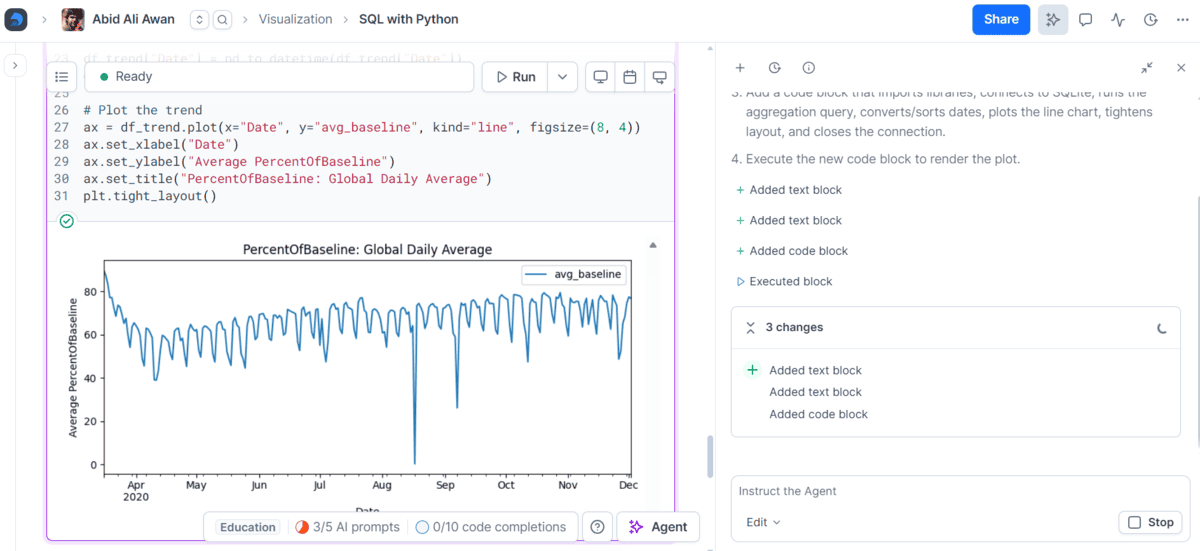
さらに、生成分析や SQL 生成、コード補完・編集、データ可視化、エラー修正、コード解説などに対応する AI ツールも用意されています。自然な英語で質問すれば、生成された結果をノートブック内で直接確認したり編集したりできます。
Deepnote はエンタープライズ向けワークスペースでカスタムの OpenAI 互換 AI モデルのサポートも可能で、Deepnote MCPを通じて Codex や Claude、Cursor、VS Code などのツールと連携させ、プロジェクトやノートブック上で動作させることもできます。
こんなチームにおすすめ: AI を活用したデータ分析、共同編集可能なノートブック、Python と SQL のワークフローを扱うチーム、そして分析環境内で AI が直接作業できる仕組みを求めている組織です。
# 2. ChatGPT
ChatGPT は、データ分析に使える AI ツールの中でも最も手軽なものの一つです。CSV や Excel ファイルをアップロードするだけで、「データをクリーニングして」「トレンドを探して」「外れ値を検出して」といった指示を出すことができます。Python を使った計算の実行や、表・グラフの作成、そして主要な発見点を平易な英語で要約することも可能です。
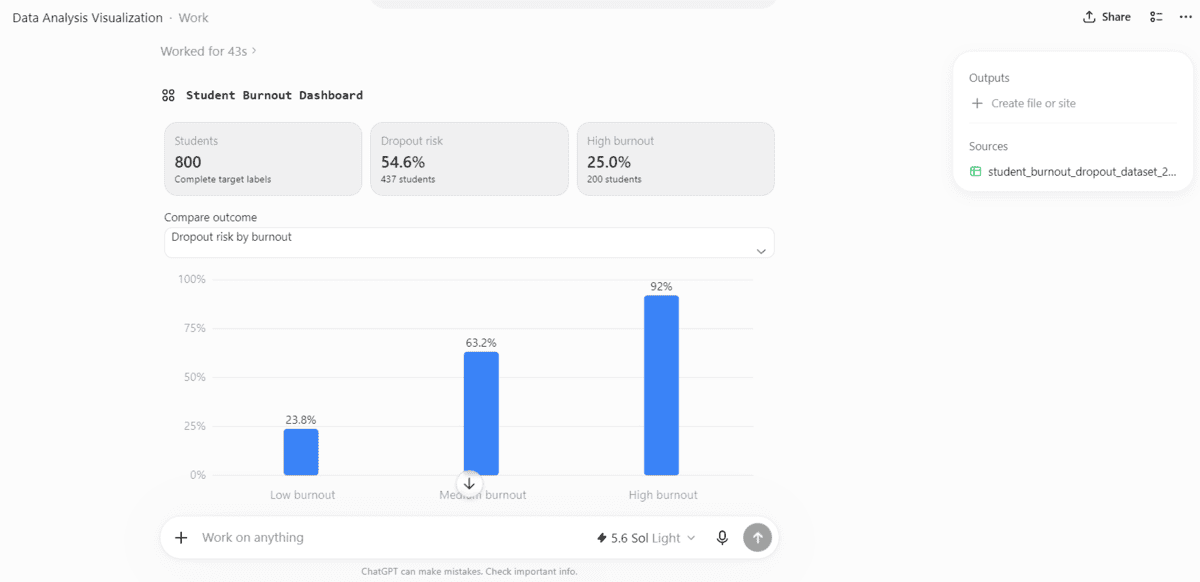
私のテストでは、学生の燃え尽き症候群に関するデータセットをアップロードし、分析と可視化を依頼しました。その結果、私が分析コードを書く手間なくとも、主要な指標やチャート、そして明確な要約を含むダッシュボード形式の回答が即座に生成されました。
新しい ChatGPT Work の体験は、この可能性をさらに広げます。ファイルと最終目標を入力するだけで、情報を分析してレポート、スプレッドシート、プレゼンテーション、さらには Web サイトまで生成できます。ChatGPT 全体で GPT-5.6 が利用可能になり、プランに応じて「Sol」「Terra」「Luna」も Work で利用可能です。OpenAI によると、新モデルファミリーは専門的な分析やスプレッドシートの出力能力を向上させています。
向いている用途: データセットのアップロード、探索的データ分析、可視化、迅速なインサイトの抽出、生データを明確な要約やレポートへの変換。
# 3. Claude Code
Claude Code は従来のデータ分析プラットフォームではありませんが、データサイエンスタスクやレポート作成において非常に有用であることがわかりました。プロジェクトフォルダにデータセットを配置し、Claude Code のターミナルインターフェースを開いて、データの点検、Python スクリプトの作成、分析の実行、エラー修正、可視化の生成、そして最終的なレポート作成までを一貫して指示できます。
**
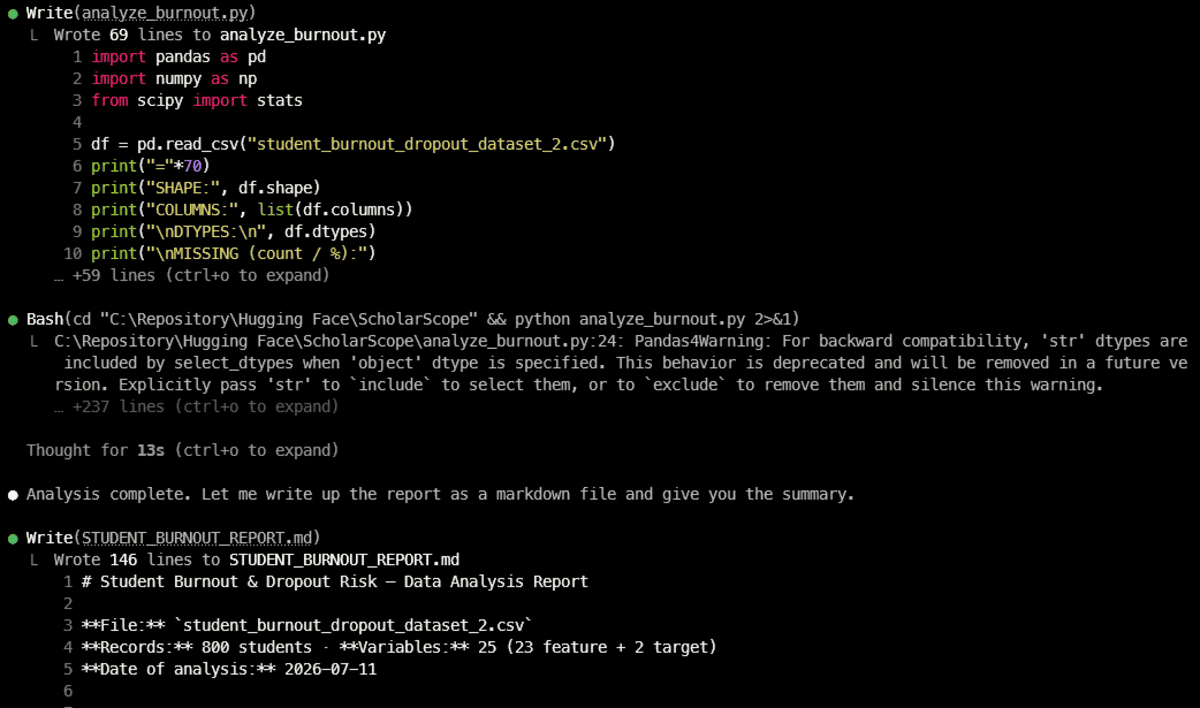
私のテストでは、Claude Code は完全な分析スクリプトを作成し、学生の燃え尽き症候群に関するデータセットで実行、結果を確認、146 行にわたる Markdown レポートを生成しました。ファイルの読み込み、コード編集、ターミナルコマンドの実行が直接可能であるため、このワークフローは非常にスムーズです。**
ターミナルへの依存も不要になりました。Claude Code は、ターミナルインターフェース、デスクトップアプリ、VS Code 拡張機能、そして Web ベースの環境で利用可能です。VS Code 拡張機能ではインライン差分表示やプランレビューが可能で、デスクトップアプリでは複数のローカルおよびリモートセッションを並行して実行できます。また、Web 版を使えばブラウザからタスクを委任することもできます。
こんな方に最適: Python を使ったデータ分析、自動化されたデータサイエンスワークフロー、再利用可能なスクリプト作成、そしてデータセットからの詳細なレポート生成。
# 4. DataLab
**
DataLab は、DataCamp が提供するAI パワー搭載のデータノートブック**です。分析ワークスペースに ChatGPT に似た AI アシスタントが直接組み込まれています。データソースを接続し、自然な英語でやりたいことを指示するだけで、AI が Python、R、または SQL のコードを生成し、結果を分析して知見を解説してくれます。
**
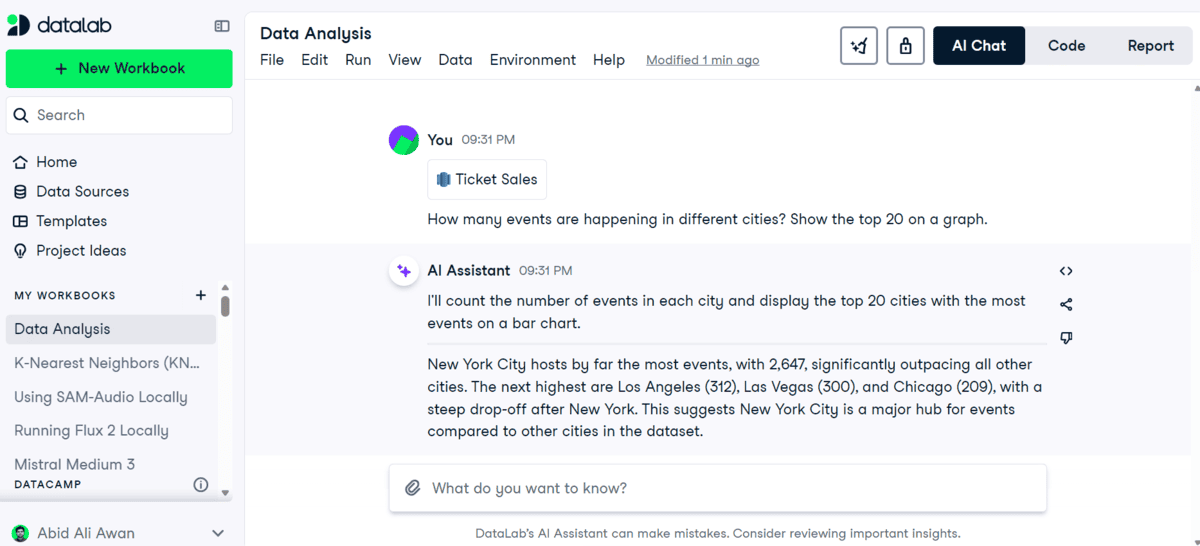
私のテストでは、Google BigQuery データソースに接続し、チケット販売に関する簡単な質問を投げかけました。DataLab はデータを調査し、分析を実行、可視化を作成、そして主要な結果を解説してくれました。
AI の機能はチャットだけではありません。プロンプトによるコードの生成と編集、インラインでのコード補完、エラーのデバッグ、またコードの修正や解説をアシスタントに依頼することも可能です。生成された作業内容は常に表示されるため、確認、編集、再実行が容易です。
多くの点で、DataLab は Deepnote と非常に似ています。両方とも、コラボレーティブなノートブック、接続されたデータソース、AI チャット、コード生成、レポート作成を一つのワークスペースに統合しています。ただし、DataCamp でデータ分析を学ぶ人にとって、DataLab は特に親しみやすいと感じられるでしょう。
こんな方に最適: 会話型データ分析、Python や SQL の初心者、データベース接続分析、デバッグ、AI が生成した作業成果物を編集可能なノートブックやレポートに変換したい方。
# 5. VS Code と Codex
Codex は、ChatGPT デスクトップアプリ、CLI、IDE 拡張機能、クラウド/ウェブワークフローを通じて利用可能です。デスクトップ版は長時間のタスク管理に役立ち、CLI はローカルファイルやターミナルツールと直接連携し、Codex クラウドでは隔離された環境で並列処理が可能です。
**
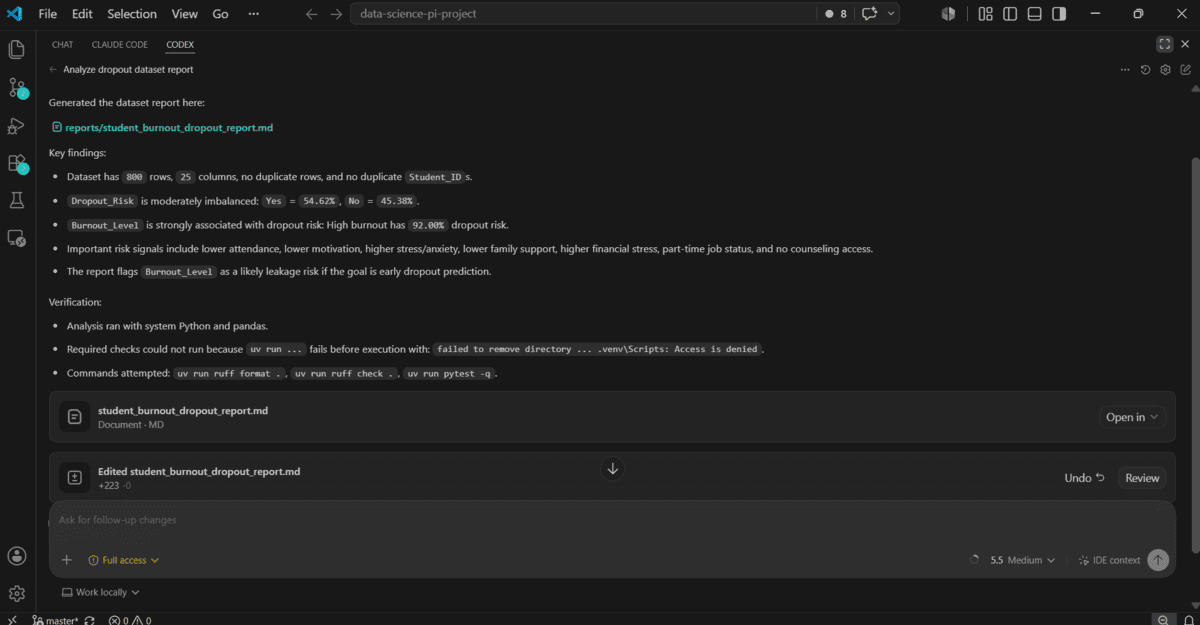
しかし、データ分析においては、VS Code 内の Codex 拡張機能が最も自然に感じられます。ノートブック、Python スクリプト、CSV ファイル、レポートを同じプロジェクト内で開き、Codex に文脈の把握、ファイル編集、分析実行、問題のデバッグ、その後の修正などを指示できます。IDE 拡張機能では、現在開いているファイルや選択したコードを文脈として利用でき、ソースコードの横で編集内容を直接確認することも可能です。
私にとって、これはデータ分析をより対話的で反復的なものにします。チャットウィンドウで答えが得られるだけでなく、プロジェクト内に実際のスクリプト、ノートブック、チャート、レポートが生成されるようになります。
向いている人: Pythonベースのデータ分析、ノートブック、再現性の高いプロジェクト、デバッグ、そしてすでに VS Code で作業しているアナリスト向けです。
最後のまとめ
AI は私のデータ分析へのアプローチを根本から変えました。もうクリーニングの手順やチャート、レポートをすべて一から書く必要はありません。データをアップロードまたは接続し、タスクの説明を加えるだけで、AI が反復的な作業の大部分を処理してくれます。
迅速な分析には ChatGPT を使います。Deepnote や DataLab は、AI 搭載型のノートブック体験を求める場合に最適です。大規模な Python プロジェクトや自動化されたレポート作成には、Claude Code が非常に効果的です。
個人的には、本格的なデータ分析には VS Code と Codex の組み合わせが最も自然に感じます。ノートブック、スクリプト、データ、レポートを一つの場所で管理でき、追加のプロンプトを通じて分析を継続的に改善できるからです。
私のアドバイスはシンプルです。AI を使ってスピードを上げつつ、コードや計算結果、最終的な結論は必ず自分で確認してください。
原文を表示
**
# Introduction
Gone are the days when you had to write Python code for every step of data cleaning, analysis, and visualization. Today, a new generation of AI-powered data tools is making the entire process faster and much easier.
These platforms can inspect your files, clean messy data, write and run code, generate charts, explain patterns, and even help you build reusable analysis workflows. Instead of spending hours on repetitive tasks, you can focus more on asking the right questions and getting useful results faster.
In this article, I have selected five of the best AI tools for data analysis in 2026**. Whether you work with Python, SQL, notebooks, local projects, or connected data sources, these tools can help you move from raw data to useful insights much faster.
# 1. Deepnote
**
Deepnote is an AI-powered data workspace built around collaborative notebooks. Its Deepnote Agent** can understand your project context, create a plan, and add, edit, or remove Python, SQL, and text blocks across the notebook to complete multi-step analysis tasks.
**
It also includes AI tools for generative analysis, SQL generation, code completion, code editing, data visualization, error fixing, and explaining code**. You can ask questions in plain English and review or edit the generated work directly inside the notebook.
Deepnote also supports custom OpenAI-compatible AI models for Enterprise workspaces and provides Deepnote MCP, which lets tools such as Codex, Claude, Cursor, and VS Code work with Deepnote projects and notebooks.
Best for: AI-powered data analysis, collaborative notebooks, Python and SQL workflows, and teams that want AI to work directly inside their analysis environment.
# 2. ChatGPT
**
ChatGPT is one of the easiest AI tools for data analysis. You can upload a CSV or Excel file** and simply ask it to clean the data, explore trends, find outliers, run Python-based calculations, create tables and charts, and summarize the main findings in plain English.
**
In my test, I uploaded a student burnout dataset and asked ChatGPT to analyze it and create visualizations. It generated a dashboard-style result with key metrics, charts, and a clear summary without me having to write the analysis code myself.
The new ChatGPT Work experience takes this further. You can give it files and a final goal, then ask it to analyze the information and produce a report, spreadsheet, presentation, or even a Site. GPT-5.6 is also now available across ChatGPT, with Sol, Terra, and Luna** available in Work depending on your plan; OpenAI says the new model family improves professional analysis and spreadsheet outputs.
Best for: Uploading datasets, exploratory data analysis, visualizations, quick insights, and turning raw data into clear summaries and reports.
# 3. Claude Code
**
Claude Code is not a traditional data analysis platform, but I have found it surprisingly useful for data science tasks and report generation**. You can place a dataset in your project folder, open Claude Code's terminal interface, and ask it to inspect the data, write Python scripts, run the analysis, fix errors, generate visualizations, and produce a final report.
**
In my test, Claude Code created a complete analysis script, ran it against a student burnout dataset, checked the results, and generated a 146-line Markdown report**. This workflow feels easy because Claude Code can read files, edit code, and run terminal commands directly.
You are also no longer limited to the terminal. Claude Code is available through its terminal interface, desktop app, VS Code extension, and the web. The VS Code extension provides inline diffs and plan reviews, the desktop app can run multiple local and remote sessions in parallel, and the web version lets you delegate tasks from the browser.
Best for: Python-based data analysis, automated data science workflows, reusable scripts, and generating detailed reports from datasets.
# 4. DataLab
**
DataLab by DataCamp is an AI-powered data notebook with a ChatGPT-like AI Assistant built directly into the analysis workspace**. You can attach a data source, explain what you want in plain English, and the AI can generate Python, R, or SQL code, analyze the results, and explain the findings.
**
In my test, I connected a Google BigQuery data source** and asked a simple question about ticket sales. DataLab inspected the data, generated the analysis, created the visualization, and explained the key result for me.
The AI features go beyond chat. You can generate and edit code with prompts, get inline code completion, debug errors, and ask the assistant to fix or explain code. The generated work stays visible, so you can inspect, edit, and rerun it.
In many ways, DataLab feels quite similar to Deepnote. Both combine collaborative notebooks, connected data sources, AI chat, code generation, and reporting in one workspace. DataLab, however, feels especially approachable for people learning data analysis through DataCamp.
Best for: Conversational data analysis, Python and SQL beginners, connected database analysis, debugging, and turning AI-generated work into editable notebooks and reports.
# 5. VS Code with Codex
**
Codex is available through the ChatGPT desktop app, CLI, IDE extension, and cloud/web workflows**. The desktop experience is useful for managing longer tasks, the CLI works directly with local files and terminal tools, and Codex cloud can run tasks in parallel in isolated environments.
**
However, for data analysis, I find the Codex extension in VS Code much more natural**. I can open my notebook, Python scripts, CSV files, and reports in the same project, then ask Codex to inspect the context, edit files, run the analysis, debug issues, and make follow-up changes. The IDE extension can use open files or selected code as context and lets you review edits directly beside the source.
For me, this makes data analysis more interactive and iterative. Instead of only getting an answer in a chat window, I end up with the actual scripts, notebooks, charts, and reports inside my project.
Best for: Python-based data analysis, notebooks, reproducible projects, debugging, and analysts who already work in VS Code.
# Final Thoughts
**
AI has completely changed how I approach data analysis. I no longer need to write every cleaning step, chart, or report from scratch. I can upload or connect my data, explain the task, and let the AI handle most of the repetitive work.
For quick analysis, I would use ChatGPT. Deepnote and DataLab are great when I want an AI-powered notebook experience. For larger Python projects and automated reports, Claude Code** works really well.
Personally, I find VS Code with Codex the most natural for serious data analysis. I can keep my notebooks, scripts, data, and reports in one place and continue improving the analysis through follow-up prompts.
My only advice is simple: use AI to move faster, but always check the code, calculations, and final conclusions.
Abid Ali Awan (@1abidaliawan) is a certified data scientist professional who loves building machine learning models. Currently, he is focusing on content creation and writing technical blogs on machine learning and data science technologies. Abid holds a Master's degree in technology management and a bachelor's degree in telecommunication engineering. His vision is to build an AI product using a graph neural network for students struggling with mental illness.
関連記事
News to Guide
ニュースの次に確認する
発表内容を、現在の料金や仕様と照らし合わせられる関連ガイドです。
今日のまとめ
AIデイリーブリーフで今日の重要ニュースをまとめ読み