LangSmith を用いた回帰テスト手法
LangChain は、LLM アプリケーションの品質保証において従来のソフトウェアテストとは異なる「不完全さ」を許容し、時間経過によるパフォーマンス追跡と個々のデータポイント比較機能を強化した LangSmith の新機能を発表しました。
キーポイント
AI テストと従来テストの根本的な違い
LLM アプリケーションは常に 100% 合格するとは限らないため、従来のソフトウェアテストとは異なり、時間経過に伴うパフォーマンスの追跡と、個々のデータポイントの行方比較が不可欠である。
LangSmith の改善された回帰テスト機能
新しい機能により、異なるプロンプトやモデル、認知アーキテクチャを評価する際の結果を時間軸で追跡し、正解だったものが誤答になった(またはその逆)個々のデータポイントを容易に比較できる。
手動検査インフラの重要性
優れた AI 研究者は大量のデータを人手で精査する姿勢を持ち、それを迅速に行えるためのインフラを構築することが重要であり、これが直感的な洞察をもたらす。
影響分析・編集コメントを表示
影響分析
この発表は、生成 AI の実装段階における品質保証(QA)のパラダイムシフトを示しており、従来の「バグゼロ」志向から「確率的な性能の推移管理」へと開発者の意識を転換させる重要な指針となります。特に、個々の失敗事例を迅速に特定・分析できる機能は、LLM アプリケーションの実運用におけるデバッグ効率を劇的に向上させ、より信頼性の高い AI システム構築を可能にします。
編集コメント
LLM の非確定的な性質を理解した上で、効果的なテスト戦略を構築するための具体的なツール機能とマインドセットの両方を示唆する実践的な記事です。
このブログ記事では、LangSmith の改善された回帰テストの体験について詳しく解説します。動画形式の方がお好みであれば、こちらから YouTube のウォークスルーをご覧ください here。無料で LangSmith にサインアップして、ご自身で試してみてください!here
- YouTube Walkthrough
- LangSmith
LLM アプリケーションを迅速かつ確実に評価できる能力は、AI エンジニアが自信を持って反復開発を行うことを可能にします。私たちが目にする中で最も急速に進化し、最も成功しているチームの多くは、効率的なテストと実験プロセスを持っています。一般的には、(1) 入力(およびオプションで期待される出力)のデータセットを設定し、(2) いくつかの評価基準を定義することから始まります。そこから、さまざまなプロンプト、モデル、認知アーキテクチャなどを評価することができます。
この種のテストと従来のソフトウェアテストの間には、いくつかの重要な違いがあります。主な違いの一つは、AI アプリケーションをテストする際、評価データセットで完璧なスコアを獲得できない可能性があることです。これは、テストが常に合格することを期待するソフトウェアテストとは対照的です。この違いには 2 つの downstream の影響があります。第一に、テストの結果を時間経過とともに追跡することが重要になります。ソフトウェアテストでは常に 100% 合格するため、これは不要ですが、AI エンジニアリングではパフォーマンスを時間経過とともに追跡することは、改善が行われていることを確認するために必要です。第二に、2 つ(またはそれ以上)の実行間で個々のデータポイント(datapoint)を比較できることが重要です。モデルが以前は正解していたが現在は誤答しているデータポイント(あるいはその逆)を確認できるようにする必要があります。
私が気づいた一つの傾向として、優れた AI 研究者たちは、多くのデータを手動で検査することに惜しみなく取り組んでいます。それ以上に、彼らはデータを迅速に手動で検査できるインフラストラクチャを構築しています。華やかではありませんが、データを人手で点検することは、問題に対する貴重な直観をもたらします。
- Jason Wei, OpenAI
Jason Wei のこの言葉は、データを見ることの重要性と、それを実現するためのインフラストラクチャの重要性を完璧に表しています。LangSmith では、そのようなインフラストラクチャの構築に努めており、それが回帰テスト(regression testing)フローにおける大きな改善につながりました。
では、私たちが考えるそのインフラストラクチャとは何で構成されるのでしょうか?
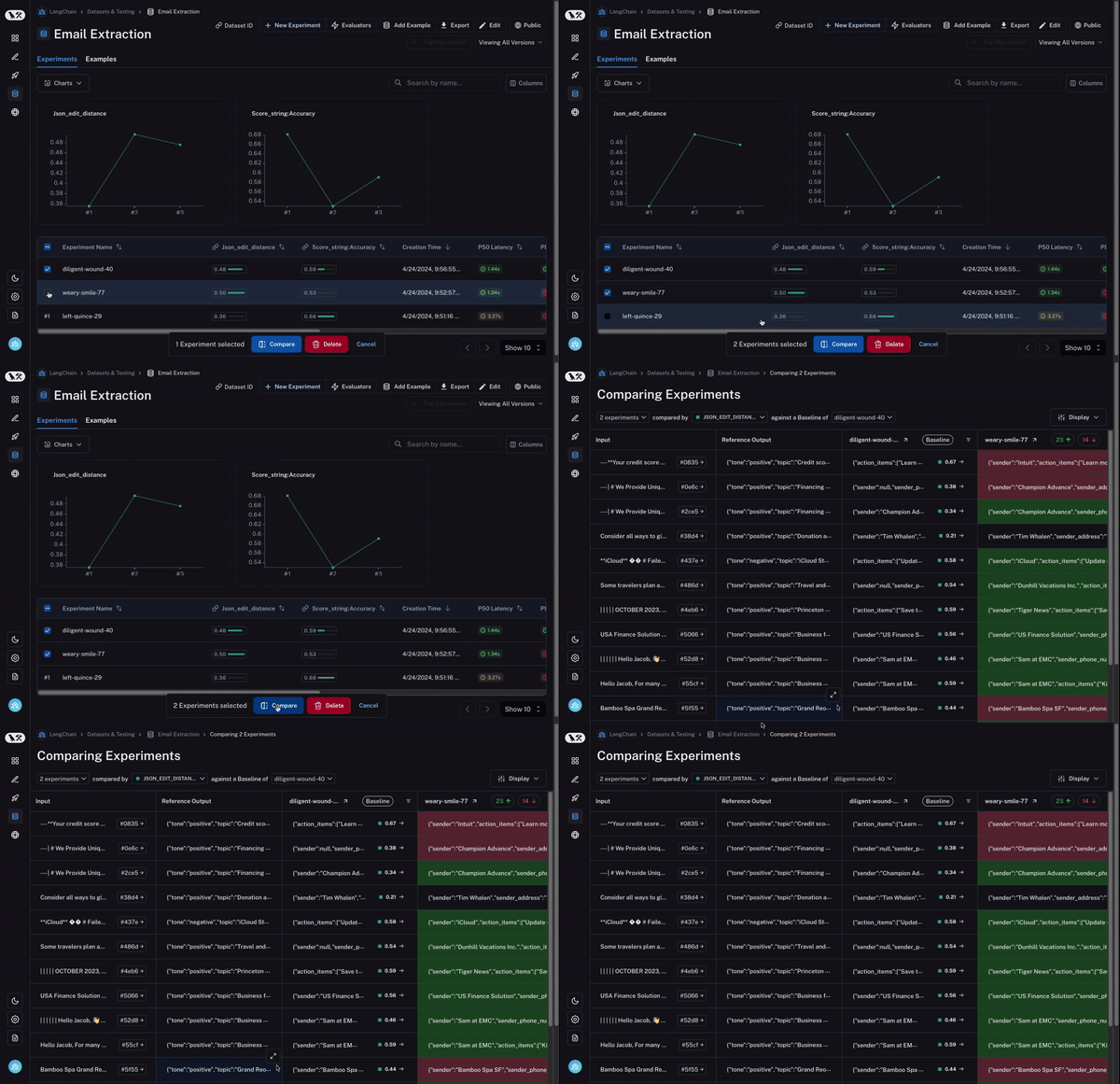
まず、複数の実験を選択して比較できる必要があります。少なくとも 2 つ以上ですが、3 つや 4 つを同時に表示できる機能があると非常に便利です。これを可能にするために、私たちは「比較ビュー(Comparison View)」を開発しました。これにより、任意の数のラン(run)を選択し、すべての結果を一度に確認できるビューを開くことができます。
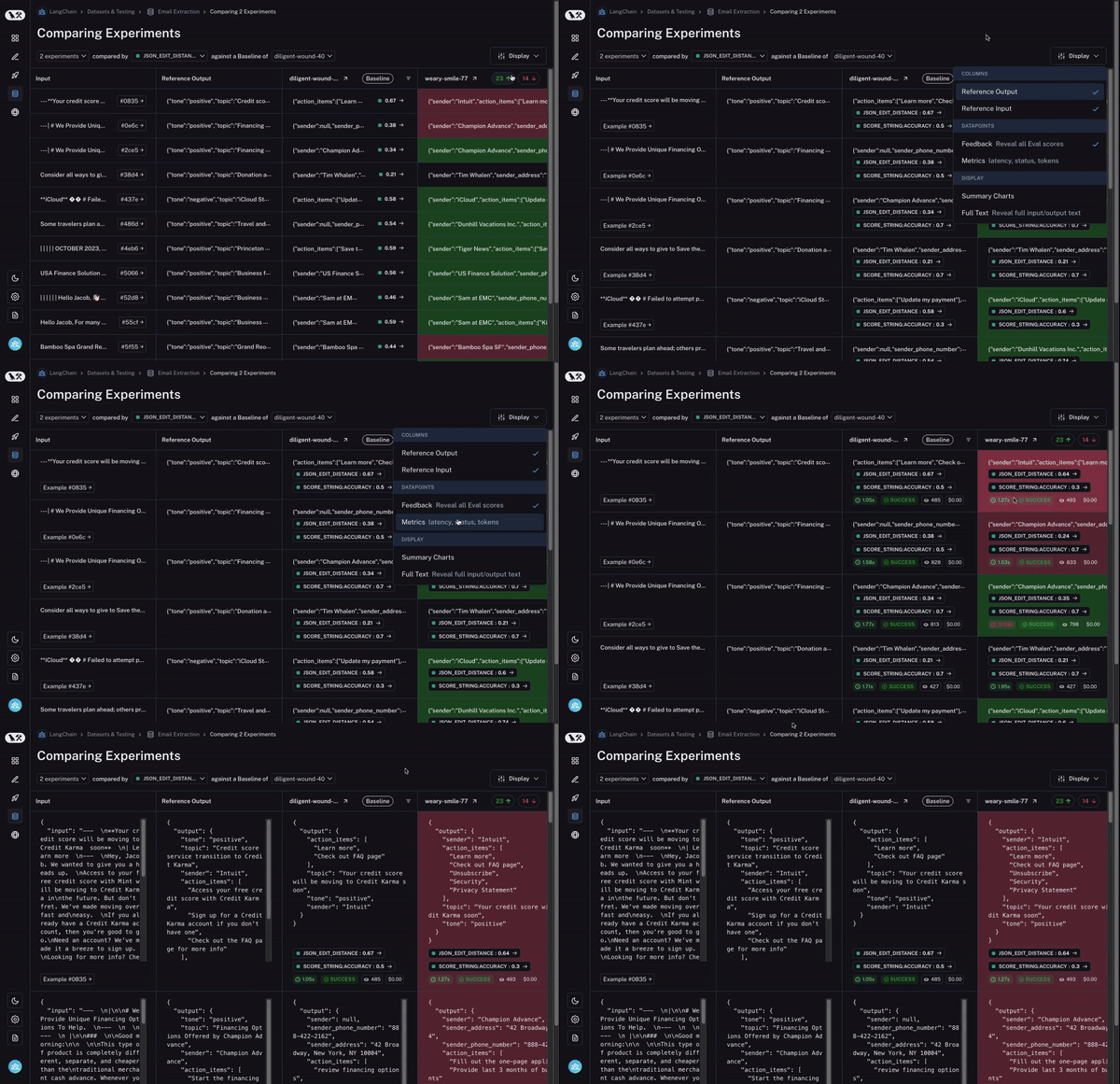
次に、この比較ビューに対して多くの制御機能が必要です。探している内容に応じて、情報を異なる方法で表示したい場合があります。例えば、高レベルの概要だけを見たい場合もあれば、すべてのテキストを表示したい場合や、各呼び出しのレイテンシ(latency)を確認したい場合もあります。「表示オプション(Display options)」を使用すれば、表示させたい情報を簡単に選択できます。
第三に、そして何より重要なのは、2 つのラン間で挙動が異なるデータポイント(datapoint)をすばやく詳細確認できることです。もし挙動が異なっているなら、そこには何か興味深いことが起こっているはずです!では、これをどのように実現するのでしょうか?
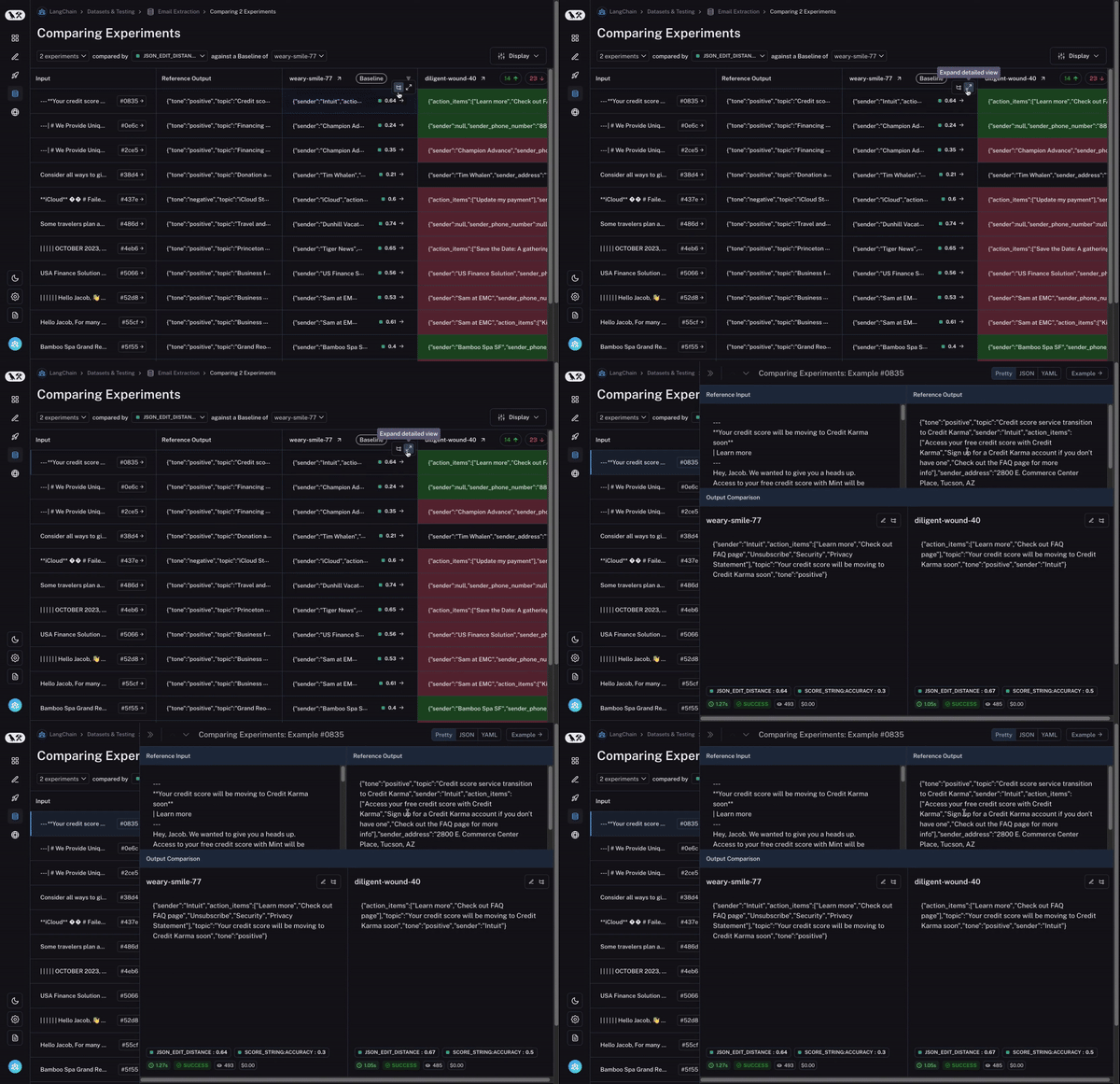
まず、ベースラインとなるランを設定します。次に、あなたが計算した 評価指標(evaluation metrics) のいずれかを用いて、その指標においてベースラインと比較して増加または減少したデータポイントを自動的にハイライト表示します。これにより、一部のセルが緑色または赤色で着色されます。

でも、それだけではありません!列の上部にあるトグル(切り替えスイッチ)を選択することで、増加または減少したデータポイントのみを簡単にフィルタリングできます。データポイントが多い場合、これにより最も興味深いものに素早く焦点を当てることができます。

最後に、関心のある行を特定したら、その行を展開して、特定のデータポイントと異なるラン(実行)がそれに対してどのようにパフォーマンスを発揮したかについて、より包括的で具体的なビューを取得できます。
これらの機能により、複数の評価ラン(実行)にわたるデータの探索が容易になります。このような探索は、迅速な反復を可能にするために不可欠です。複数のランを比較するというこの概念は、AI とソフトウェアテストの間で異なる現象であり、これをさらに容易にするいくつかの追加機能(近日公開予定!)も用意されています。
動画形式の方がお好みであれば、こちらの YouTube 解説 こちら をご覧ください。LangSmith は無料でサインアップ こちら して、実際に試してみてください!
原文を表示
This blog post walks through our improved regression testing experience in LangSmith. If video form is more your style, you can check out our YouTube walkthrough here. Sign up for LangSmith here for free to try it out for yourself!
- YouTube Walkthrough
- LangSmith
The ability to quickly and reliably evaluate your LLM application allows AI engineers to iterate with confidence. Many of the fastest moving and most successful teams we see have efficient testing and experimentation processes. This generally involves (1) setting up a dataset of inputs and (optionally) expected outputs, (2) defining some evaluation criteria. From there, you can evaluate different prompts, models, cognitive architectures, etc.
There are a few key differences between this type of testing and traditional software testing. One main difference: when testing AI applications they may not achieve a perfect score on the evaluation dataset. This is in contrast to software testing where you expect tests to always pass. This difference has two downstream effects. First, it becomes important to track the results of your tests over time. This isn’t necessary in software testing because it’s always 100% passing, but in AI engineering tracking this performance over time is necessary for making sure you’re improving. Second, it’s important to be able to compare the individual datapoints between two (or more) runs. You want to be able to see which datapoints the model used to get correct that it now gets wrong (or vice versa).
One pattern I noticed is that great AI researchers are willing to manually inspect lots of data. And more than that, they build infrastructure that allows them to manually inspect data quickly. Though not glamorous, manually examining data gives valuable intuitions about the problem.
- Jason Wei, OpenAI
This quote from Jason Wei perfectly describes the importance of looking at data, and the importance of infrastructure that allows them to do that. At LangSmith we strive to build that infrastructure, and it’s led to some big improvements in our regression testing flow.
So what do we think that infrastructure consists of?
First, you need to be able to select multiple experiments to compare. At least two, but it’s often useful to be able to view three or four at the same time. To enable this, we’ve built our Comparison View. This allows you to select any number of runs and open up into a view where you can see all the results at the same time.
Second, you need a lot of control over this comparison view. You may want to view information in different ways depending on what you’re looking for. For example, sometimes you just want a high level overview, other times you want to see all the text, other times you want to see the latency of each call. With our Display options, you can easily select what information you want to see.
Third - and most importantly - you want to be able to quickly drill into datapoints that behaved different between the two runs. If they behaved differently - there’s something interesting happening there! So how do we enable this?
To start, we set a baseline run. We then take one of the evaluation metrics that you calculated and automatically highlight which datapoints increased or decreased on that metric compared to the baseline. This will shade some cells green or red.
But that’s not all! You can easily filter to only the datapoints that increased/decreased by choosing the toggle at the top of the column. If you have lots of datapoints, this lets you quickly drill in on the most interesting ones.
And finally, once you’ve identified a row that you’re interested in, you can easily expand that row to get a more holistic and specific view of just that datapoint and how the different runs performed on it.
These features make it easy to explore data across multiple evaluation runs. This type of exploration is crucial for being able to quickly iterate. This concept of comparing multiple runs is phenomenon that is different between AI and software testing, and we’ve got a few more features (coming soon!) that make this even easier!
If video form is more your style, you can check out our YouTube walkthrough here. Sign up for LangSmith here for free to try it out for yourself!
関連記事
今日のまとめ
AI日報で今日の重要ニュースをまとめ読み