Cline、ヒルクライミング法による性能向上ガイド
Clineチームはベンチマークで他社に遅れをとったため、週末に3人でヒルクライミング法を実践し、Terminal Benchの89件の課題に対して体系的な測定と改善を試みた。
Source Article
元記事を日本語で読む
本文に関係しない購読案内、埋め込み通知、サイト内プロモーションは除いています。

あるパートナーから、Cline のベンチマーク数値について問い合わせがありました。当時、第三者によるベンチマークでは、Cline は Cursor や Claude Code、他のエージェントに比べて劣っている状況でした。私たちはパフォーマンスを体系的に測定・改善する方法を持っていませんでした。
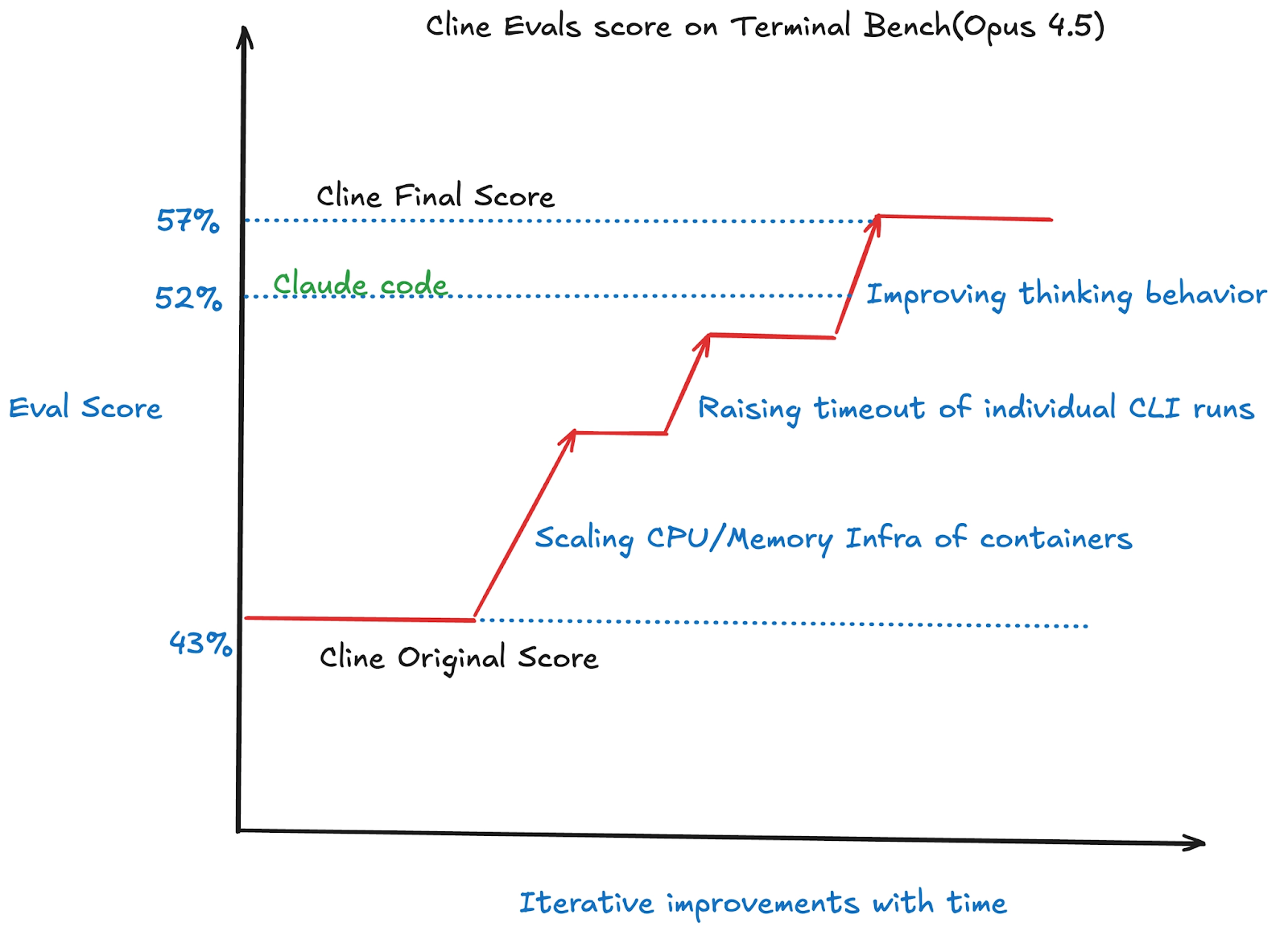
そこで週末の 2 日間にわたり、3 人のチームで Cline を Terminal Bench の 89 の実務的なコーディングタスクに実行させ、すべての失敗箇所を診断し、针对性的な修正を行いました。その結果、スコアは 47% から 57% に向上し、Claude Code や OpenHands、OpenCode を抜いて首位となりました。
このガイドでは、モデルとエージェントの組み合わせをベンチマークし、スコアを改善するために私たちが行った「ヒルクライミング」のプロセスを紹介します。これは Cline のために構築されたものですが、Claude Code、Codex、OpenHands、Cursor、Gemini CLI など、お好みのモデルやエージェントの組み合わせにも応用可能です。
ヒルクライミングとは?
ヒルクライミングは、AI エージェントやモデルを反復的に改善する手法です。標準化されたコーディングタスクセットに対して AI コーディングエージェントを実行し、スコアを測定します。その後、プロンプトの微調整、バグ修正、設定フラグの変更など「一つだけ」変更を加えて再度実行し、スコアが向上すればその変更を採用します。逆にスコアが下がれば元に戻します。これを繰り返すのがヒルクライミングです。
コーディングエージェントの評価は、往々にして単発のタスクに限定されていたり、評価手法が飽和していたりするものです。しかし、Terminal Bench は、エージェントとしての一連の流れ全体をテストするための課題と検証器を用意しました。これにより、コーディングエージェントが実行可能な幅広いタスクや、その過程で行われるすべてのステップを包括的に評価・採点することが可能になります。
AI エージェント向けの高品質な評価指標の構築については多くの記事が書かれており、Anthropic の「Demystifying evals」ブログ(リンク)では、高品質な評価指標を設計し実行する方法について詳しく解説されています。
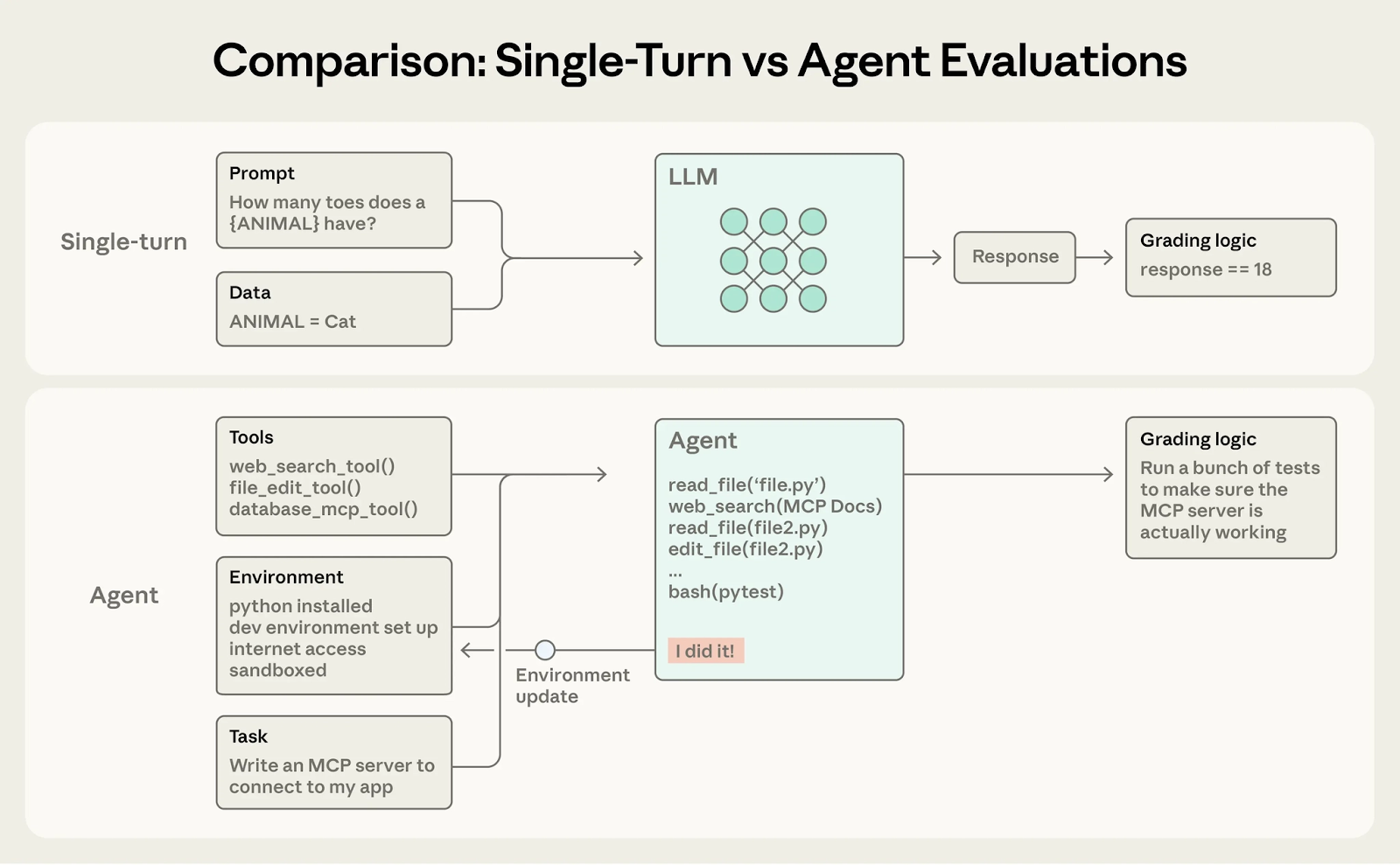 image出典:Demystifying evals for AI agents
前提条件
インフラ、モデル、推論環境のセットアップにはいくつかの準備が必要です。しかし、一度設定が完了すれば、数十もの評価テストを並列かつ高速に実行できるアクティブなパイプラインが利用可能になります。
本ガイドでは、Python、Docker(オプションで Modal または Daytona)、および uv が既にマシンにインストールされていることを前提としています。
このガイドの主要ツールとして使用するのは Harbor です。Harbor は Terminal-Bench の開発者によって構築された、広く採用されているエージェント評価フレームワークです。これにより、評価におけるサンドボックス管理、エージェントループ、ロールアウト監視といった複雑な部分を抽象化して扱えるようになります。
Harbor のタスクは、単なるディレクトリ構成です。Harbor はサンドボックスの起動からエージェントの実行、結果検証、そして環境の破棄に至るまでの試行ライフサイクル全体を管理します。また、異なるデータセットへの対応も可能で、最適化目標に応じてデータセットを柔軟に切り替えることができます。
本リポジトリで主に評価に用いられているのは「Terminal Bench」です。これはターミナル環境内で動作する AI エージェント向けのベンチマークであり、89 の多様なタスクから構成されています。各タスクは複雑さや目的が異なります。今回の評価では、Cline CLI をこれら 89 の全タスクで実行し、全体の成功率を算出します。その結果は集計されたパーセンテージスコアとして提示されます。
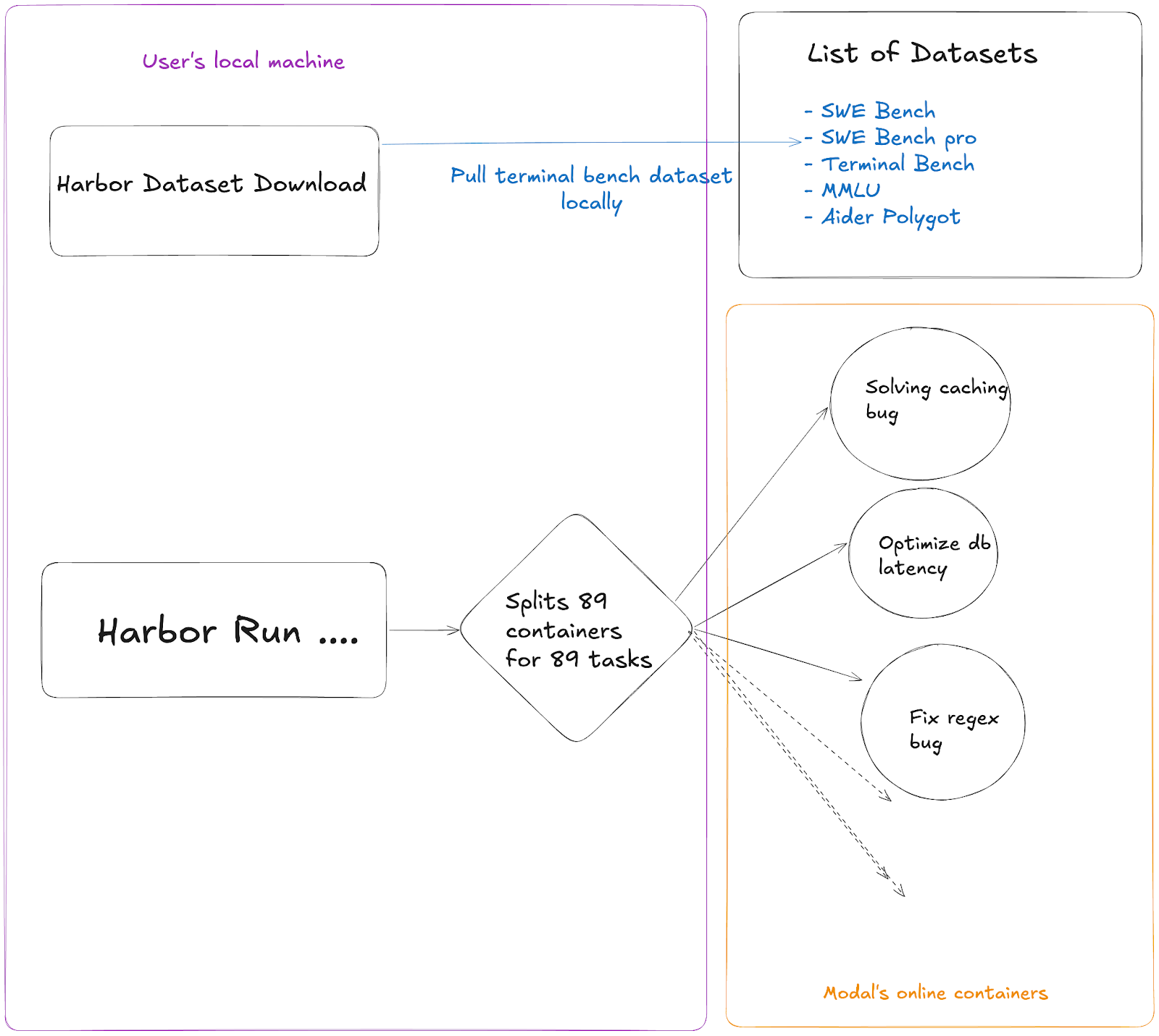
Harbor はローカル環境で起動され、Terminal Bench のデータセット全体をダウンロードした上で、Modal 上に 89 個のコンテナを並列に生成して各タスクを処理します。これにより、すべてのタスクが並列実行されるため、評価プロセスを大幅に高速化できます。
1. Harbor のインストール
pip install harbor
# または
uv tool install harbor
2. API キーの取得
少なくとも 1 つのプロバイダー用 API キーが必要です。評価においては「OpenRouter」の使用が推奨されます。ローカル実行ではインフラやレート制限の問題により他のプロバイダーが不安定になる傾向がある一方、OpenRouter は最も信頼性が高いからです。
理想的な .env ファイルの構成は以下のようになります。
export CPUS=14
export MEMORY_MB=8192
export OPENROUTER_API_KEY="sk-or-v1-someotherwords"
export API_KEY=$OPENROUTER_API_KEY
ここでは CPU とメモリの割り当てを多めに設定しています。Harbor がタスクを実行する際、各タスクが個別にリソースを必要とするためです。
Harbor では、API_KEY を主要な変数として利用し、あらゆるプロバイダーから API キーを取得します。
- Modal のセットアップ(並列クラウド実行用)
Modal を使えば、89 以上のタスクを順次ではなく並列で実行できます。これは高速なイテレーションのために不可欠です。
pip install modal
modal setup
認証フローに従ってください
Modal がなくても Docker (--env docker) を使ってローカルで実行は可能ですが、自分のマシンがタスクを順次処理しなければならないため、非常に遅くなります。単一の評価ランでも数時間かかることは珍しくありません。一方、Modal を使えば、評価全体を 35〜45 分で完了させることができます。このプロセスを通じて私たちをサポートしてくれた Modal プラットフォームに心から感謝しています。
セットアップの確認
source ~/.env
harbor run \\
-d terminal-bench@2.0 \\
-a cline-cli \\
-m openrouter:anthropic/claude-opus-4.5 \\
--env modal \\
-n 3 \\
-l 3
セットアップが正しく機能しているか確認するには、クイックテストを成功させる必要があります。このテストでは並列で 3 つのタスクを実行しますが、Harbor のセットアップに時間がかかるため、各タスク自体には約 15 分かかります。その後、すべてのタスクが同時に完了します。もしエラーなく正常に終了すれば、セットアップは問題なく機能していると確信できます。
出力の読み方
89/89 Mean: 0.573
━━━━━━━━━━━━━━━━━━━━━━━━━━━━━━━━━━━━━━━━
0:45:05 0:00:00Mean = pass rate (0.573 = 57.3%)
reward = 1.0 = tasks passed
タスク失敗時の報酬は 0.0 です。
AgentTimeoutError は、タスク完了前に Cline の実行時間が尽きてしまったエラーです。
VerifierTimeoutError は、結果検証時にタイムアウトが発生したエラーです。
調整可能なパラメータ
これらはすべて、Harbor に対して --ak (agent kwargs) フラグを指定して設定します。これは、当社の Harbor PR (#585) で定義された Cline CLI アダプターにマッピングされます。
Cline を扱う際、多くのパラメータを調整できます。これらの設定はエージェントの微調整や使いこなし方の理解に不可欠です。詳細は agent kwargs のドキュメントをご覧ください。
ヒルクライミングの実践プレイブック
ステップ 1:ベースラインの確立
現在の最適構成で、89 タスク分のフルスweep を実行し、スコアを記録します。これが突破すべき目標値となります。
source ~/.env && export API_KEY=$OPENROUTER_API_KEY
harbor run \
-d terminal-bench@2.0 \
-a cline-cli \
-m openrouter:anthropic/claude-opus-4.6 \
--env modal \
--ak thinking=6000 \
--ak timeout=2400 \
-n 89 -l 89 \
--override-cpus $CPUS --override-memory-mb $MEMORY_MB
このコマンドは、各タスクに 40 分(2400 秒)のタイムアウトを設定して Harbor の評価を全実行します。同時に Terminal Bench 2.0 の 89 タスクも並列処理されます。Modal のセットアップ時間やタスク準備、CLI 実行などのオーバーヘッドを含めると、全体で約 40〜50 分程度かかる見込みです。
ステップ 2:失敗原因の分析
harbor jobs summarize ./jobs/LATEST --failed -m haiku
このコマンドは、タスクが失敗した理由をカテゴリ分けします。私たちが発見した一般的な失敗パターンは以下の通りです。
AgentTimeoutError — Cline CLI のデフォルト設定である 600 秒のタイムアウトでは短すぎました。解決策:--ak timeout=2400
必要なファイルが見つからない — Cline は検証を行わずに成功と判断してしまいました。解決策:PR #9154(完了前に検証を必須化)
コマンドの終了コードが反映されていない — Cline がコマンドの失敗を検知できませんでした。解決策:PR #9156
長時間実行されるコマンドが途中で切断される — ビルド、テスト、トレーニングなどのコマンドが早期に強制終了されてしまいます。解決策:PR #9159
推論エラー(プロバイダーからのレート制限、API プロバイダーの残高不足など)
失敗したケースを扱う際は、まずカテゴリ化して分類することが重要です。どんなにパラメータを調整してもカバーしきれない失敗も存在します。こうしたケースは全体の 25% 程度を想定しており、モデル自体のステップ関数的な改善が必要です。それ以外の失敗については、モデルが愚かな行動をとっているのか、あるいはプロンプトやアルゴリズムロジックの不足により設定が不適切だったのかを確認する必要があります。
発生した失敗の種類を区別し、適切に分類できるかが評価(evals)における真の要諦であり、そこには担当者の勘所が問われます。モデルのどこで間違えたかを正確に見極められれば、その教訓はポストトレーニングやその他の AI プロセスにも活かすことができます。
ステップ 3:コード変更の A/B テスト
ここが本格的なヒルクライミング(改善)が行われる場所であり、Cline そのものの向上に直結します:
main ブランチのテスト
harbor run -d terminal-bench@2.0 -a cline-cli \
-m openrouter:anthropic/claude-opus-4.5 \
--ak github_user=cline --ak commit_hash=main \
--ak thinking=6000 --ak timeout=2400 \
--env modal -n 89 \
--override-cpus $CPUS --override-memory-mb $MEMORY_MB
PR ブランチのテスト
harbor run -d terminal-bench@2.0 -a cline-cli \
-m openrouter:anthropic/claude-opus-4.5 \
--ak github_user=cline --ak commit_hash=saoud/fix-exit-codes \
--ak thinking=6000 --ak timeout=2400 \
--env modal -n 89 \
--override-cpus $CPUS --override-memory-mb $MEMORY_MB
スコアを比較し、PR でスコアが向上すれば成功とみなします。
ステップ 4: ノイズの多い結果には Pass@k を活用する
単一の試行ではノイズが含まれやすく、実行ごとに数ポイントスコアが変動することがあります。変更による差が僅かな場合や、どちらが優れているか迷う場合は、同じ設定で 3〜6 回実行して平均値を求めましょう。これにより信頼性の高い信号を得られます。
ステップ 1 から 3 の結果に確信を持ちたいとき、特にスコアが数ポイントしか差がない 2 つの設定を比較する際に、この手法を活用してください。
Opus 4.5 に thinking=6000 を適用し、ダブルチェックを 6 回実行した 2 月 8 日のデータ(変更前)は以下の通りです:
0.49, 0.43, 0.45, 0.44, 0.48, 0.46 → 平均 0.458、中央値 0.455
本ガイドでは harbor を Modal と併用していますが、これはローカルマシンでの処理負荷をほとんど増やさないため、nohup コマンドを使って並列で多数の評価実行を行うことが可能です。
モデルを微調整する際、どのような小さな変更が効果的か推測できる場合や、複数の異なるバージョンの Cline を試して並列で評価を行いたい場合があります。そのようなケースに対応するため、Cline では --ak github_user=cline や --ak commit_hash=main というフラグをサポートしています。これを使えば、マージ作業をせずに異なるコミット間でのテストが可能です。
このインフラは決して安価なものではありませんが、ここまでお読みいただいている方なら、おそらく予算に余裕のある企業にお勤めのことと推察します。
ステップ 5:反復こそが全て
上記の手順を通じて、大規模な評価の仕組みや、エージェントが生じうる基本的な失敗パターンについての理解を深めることができます。実際には、エージェントとモデルの対話におけるこれらの失敗モードに対処するだけで、数日間の作業が必要になることもあります。
例えば、私たちは上記の手順に従って進めましたが、Opus 4.5 の初期評価スコアは 47% でした。しかし、評価ハネス(評価枠組み)を微調整した結果、57% まで引き上げることができました。これは SOTA(最良の性能)に匹敵するレベルであり、Claude Code をも 5% 上回る成果です。
今後の展望
私たちは現在も「ヒルクライミング(最適化手法)」の探求を続けており、新しいモデルがリリースされるたびに自動実行を自動化しています。これにより、結果は数時間以内に公開されます。また、他の評価フレームワークや Harbor 互換データセットへの展開も進めています。
一緒にヒルクライミングを行いたい方、あるいは自社のモデルを当社のパイプラインで検証したい方は、X(旧 Twitter)の Ara (@arafatkatze) までご連絡ください。
関連リンク
https://www.anthropic.com/engineering/demystifying-evals-for-ai-agents
https://novasky-ai.notion.site/skyrl-harbor
https://www.primeintellect.ai/blog/lab
原文を表示
imageA potential partner asked for Cline's benchmark numbers. At the time, third-party benchmarking had us behind Cursor, Claude Code, and other agents. We didn't have a systematic way to measure or improve our performance. Over a weekend, three of us ran Cline against Terminal Bench's 89 real-world coding tasks, diagnosed every failure, and shipped targeted fixes. We improved our score from 47% to 57%, putting us ahead of Claude Code, OpenHands, and OpenCode.
This guide outlines the process of hill climbing that we used to benchmark model/agent combo and improve its score. While this was built for Cline, the process works with Claude Code, Codex, OpenHands, Cursor, Gemini CLI, or any other model/agent combo you like.
What is Hill Climbing?
Hill climbing is an iterative improvement process for AI agents/models. You run an AI coding agent on a standardized set of coding tasks, measure the score, change one thing (a prompt tweak, a bug fix, a config flag), run again, and keep the change if the score goes up. Revert if it goes down. Repeat.
Most coding agent evaluations are either single-turn or too saturated. However, the Terminal Bench has created problems and verifiers that test the entire agentic flow, allowing you to test the full range of tasks your coding agent could do and grade the entire set of steps it performs. There’s a ton that’s been written about building high quality evals for AI agents and Anthropic’s ‘Demystifying evals’ blog (link) dives into how to design and run high‑quality evals.
imageSource: Demystifying evals for AI agentsPrerequisites
There are some pre-requisites to make the infra+model+inference setup, but once you're done you have an active pipeline that can easily run dozens of eval tests in parallel really fast. These instructions assume you already have Python, Docker(optionally Modal/Daytona) and uv installed on your machine.
For this guide the main tool we use is Harbor. Harbor is a widely-adopted agent evaluation framework, built by the creators of Terminal-Bench. It abstracts away sandbox management, agent loop, and rollout monitoring for evals.
A Harbor task is a simple directory. Harbor handles the full trial lifecycle: spinning up the sandbox, running the agent, verifying the result, and tearing everything down. It also supports different datasets so you can swap between them if you have different goals to optimize for.
The primary evaluation dataset utilized in this repository is the Terminal Bench, a benchmark designed for AI agents operating within terminal environments. This benchmark comprises 89 diverse tasks, each varying in complexity and objective. The goal of this evaluation is to run the Cline CLI across all 89 tasks and determine the overall success rate, presented as an aggregate percentage score.
We run harbor locally which downloads the entire terminal bench dataset then spins up 89 different containers on Modal that handle each individual task of the terminal bench. This helps make the evals run much faster as all the tasks are parallelized.
image1. Install Harbor
pip install harbor
or
uv tool install harbor
- Get API Keys
You need at least one provider API key. OpenRouter is recommended, it's been the most reliable for evals (other providers have been unreliable for local runs because of infra/rate limiting issues).
Ideally your .env file should look like this:
export CPUS=14
export MEMORY_MB=8192
export OPENROUTER_API_KEY="sk-or-v1-someotherwords"
export API_KEY=$OPENROUTER_API_KEY
We set a higher CPU and memory here because when harbor runs the tasks it runs each task.
Harbor uses API_KEY as the main variable to pull the API key of any provider.
- Set Up Modal (for parallel cloud runs)
Modal lets you run 89+ tasks in parallel instead of sequentially. This is critical for fast iteration.
pip install modal
modal setup
Follow the auth flowWithout Modal, you can run locally with Docker (--env docker) but it will be much slower as your own machine has to run these tasks sequentially which can easily take many hours for a single eval run. Whereas with Modal you can get a whole eval run done in 35-45 minutes. We are very thankful to Modal platform for supporting us through this whole process.
Verify your setup
source ~/.env
harbor run \\
-d terminal-bench@2.0 \\
-a cline-cli \\
-m openrouter:anthropic/claude-opus-4.5 \\
--env modal \\
-n 3 \\
-l 3
To ensure that your setup works correctly, make sure the quick test passes. This will just run 3 tasks in parallel, but since Harbor setup takes time, each task itself would take roughly 15 minutes and then they will all finish together. If this finishes correctly without errors, you can be certain that your setup is working.
Understanding the output
89/89 Mean: 0.573
━━━━━━━━━━━━━━━━━━━━━━━━━━━━━━━━━━━━━━━━
0:45:05 0:00:00Mean = pass rate (0.573 = 57.3%)
reward = 1.0 = tasks passed
reward = 0.0 = tasks failed
AgentTimeoutError = Cline ran out of time before completing the task
VerifierTimeoutError = the verifier timed out checking the result
The Knobs You Can Turn
These are all passed via --ak (agent kwargs) flags to Harbor. They map to the Cline CLI adapter in our Harbor PR (#585). There are many knobs you can turn while you work with Cline, and they are all somewhat necessary as they help you tweak the agent and get a better feel for how to work with it, you can read documentation of agent kwargs.
The Hill Climbing Playbook
Step 1: Establish a Baseline
Run a full 89-task sweep with your current best config. Record the score. This is what you're trying to beat.
source ~/.env && export API_KEY=$OPENROUTER_API_KEY
harbor run \\
-d terminal-bench@2.0 \\
-a cline-cli \\
-m openrouter:anthropic/claude-opus-4.6 \\
--env modal \\
--ak thinking=6000 \\
--ak timeout=2400 \\
-n 89 -l 89 \\
--override-cpus $CPUS --override-memory-mb $MEMORY_MBThis command will run the entire harbor eval run with a timeout of 40 minutes(2400 seconds) for each task and then all the 89 tasks of terminal bench 2 in parallel. The total run should take roughly 40-50 minutes because of Modal setup time, task setup, CLI run etc.
Step 2: Analyze Failures
harbor jobs summarize ./jobs/LATEST --failed -m haikuThis command categorizes why tasks failed. Common failure patterns we found:
AgentTimeoutError — Cline CLI's default 600s timeout was too short. Fix: --ak timeout=2400
Missing expected files — Cline assumed success without verifying. Fix: PR #9154 (require verification before completion)
Command exit codes not surfaced — Cline didn't know commands failed. Fix: PR #9156
Long-running commands cut off — Build/test/train commands killed early. Fix: PR #9159
Inference errors like: rate limits from providers, insufficient balance on the API provider etc
Your goal with any set of failures is to portfolio allocate them in a category and then bucket them. There are some failures that won’t be able to cover no matter how much you tweak the params etc. Atleast 25% of the failures are supposed to be this way. Those would need an actual step function improvement in the model itself but for the rest of the failures you would have to look at both the model doing something stupid or alternatively the model being configured the wrong way and missing some prompt/algorithmic logic.
To be able to differentiate and bucket the kind of failures you get is the real magic sauce of evals and is a question of your taste. If you are good at figuring out where your model went wrong you can take those lessons to post training and other AI steps as well.
Step 3: A/B Test Code Changes
This is where the real hill climbing happens which is improving Cline itself:
Test main branch
harbor run -d terminal-bench@2.0 -a cline-cli \\
-m openrouter:anthropic/claude-opus-4.5 \\
--ak github_user=cline --ak commit_hash=main \\
--ak thinking=6000 --ak timeout=2400 \\
--env modal -n 89 \\
--override-cpus $CPUS --override-memory-mb $MEMORY_MB
Test a PR branch
harbor run -d terminal-bench@2.0 -a cline-cli \\
-m openrouter:anthropic/claude-opus-4.5 \\
--ak github_user=cline --ak commit_hash=saoud/fix-exit-codes \\
--ak thinking=6000 --ak timeout=2400 \\
--env modal -n 89 \\
--override-cpus $CPUS --override-memory-mb $MEMORY_MBCompare scores. If the PR improves the score you can consider it a success
Step 4: Use Pass@k When Results Are Noisy
Single runs can be noisy, scores vary by several percentage points run to run. If a change looks like a close call, run the same config 3–6 times and average to get a reliable signal. Use this whenever you need confidence in Steps 1–3, especially when comparing two configs that score within a few points of each other.
Our Feb 8 data for Opus 4.5 + thinking 6000 + double-check across 6 runs(this was before any changes):
0.49, 0.43, 0.45, 0.44, 0.48, 0.46 → Avg 0.458, Median 0.455
Because you are using harbor with Modal in this guide it doesn’t actually take much processing power on your machine so you can run many eval runs in parallel with nohup linux command.
We realize that sometimes you have a few guesses as to what tiny tweak can make the model and that you might want to try a few. different version of cline and run evals on them simultaneously. For this Cline supports --ak github_user=cline and --ak commit_hash=main as flags as that helps you test between different commits(without necessarily merging them into cline). The infra for this is not cheap but if you have read this far you are probably working at a company that can afford this.
Step 5: Iterate Iterate Iterate
Most of the above steps are fairly good at having a mental model of how large scale evals work, it will teach you basic failure modes of your agent and you can easily spend a couple days just working through those failure modes of the agent+model convo.
As an example we followed the steps above and our scores for Opus 4.5 out of the box started at 47% and then rose up to 57% by making tweaks to the eval harness, which is a borderline SOTA score and 5% above Claude Code.
imageWhat’s next
We're still climbing and exploring hill climbing and are automating runs on every new model drop so results publish within hours, expanding to other eval frameworks and other Harbor-compatible datasets. If you want to hill climb with us or run your model through our pipeline, reach out to Ara on X(@arafatkatze).
Related Links
https://www.anthropic.com/engineering/demystifying-evals-for-ai-agents
https://novasky-ai.notion.site/skyrl-harbor
https://www.primeintellect.ai/blog/lab
関連記事
今日のまとめ
AIデイリーブリーフで今日の重要ニュースをまとめ読み