Pinecone BYOC:AWS、GCP、Azureのアカウント内にPineconeを展開し、ベンダーへのアクセスを不要に
Pineconeは、顧客のクラウド環境(AWS/GCP/Azure)内に独自に展開するBYOCオプションを提供。これにより、ベンダー側が顧客データにアクセスできず、セキュリティとコンプライアンスを強化する。
Source Article
元記事を日本語で読む
本文に関係しない購読案内、埋め込み通知、サイト内プロモーションは除いています。
検索、レコメンデーション、またはエージェントを本番環境に導入する場合、最終的には同じチェックポイントに直面します:セキュリティレビューです。
セキュリティが知識層の進捗を阻害すると、すべてのプロセスが遅延します。チームはパイロットモードのままになります。所有権も曖昧になり、「ボルトオンスタック」や「部分的なセルフホスティング」といった「迅速な修正」は、運用負荷の高さやアクセス表面積の拡大といった新たな問題を生み出すことがあります。
コストはすぐに現れます。セキュリティレビューに足止めされる毎週は、AI 機能が本番環境で稼働していない毎週です。
障害となっているのはパフォーマンスでも機能でもありません。単一のセキュリティ要件、すなわちクラウドアカウントやクラスターへのベンダーアクセスの禁止です。必要なのは、配信計画を変更せずにその基準をクリアし、本番環境へ到達する道筋です。
Pinecone Bring Your Own Cloud (BYOC) は現在、すべての Enterprise ユーザー向けにパブリックプレビューとして提供されており、ゼロアクセス運用モデルで Pinecone を AWS、GCP、または Azure のアカウント内に導入します。
BYOC では、Pinecone データベースのデータプレーンがお客様の VPC 内で実行されます。ベクトルはそこで保存され、照会されます。Pinecone がクラウドアカウント、VPC、Kubernetes クラスター、ノード、ワークロードへの SSH、VPN、またはインバウンドネットワークアクセスを必要とすることはありません。また、Pinecone がシステムを運用するためにインバウンドファイアウォールポートを開く必要もありません。
インデックスのライフサイクル、認証、利用状況の可視化については、引き続き Pinecone コントロールプレーン(API およびコンソール)を使用します。
TL;DR
BYOC を利用すると、以下が得られます:
- クラウドアカウント内のデータプレーン:ベクトルは VPC 内で保存および照会されます。
- アクセス不要な操作:Pinecone は、VPC やクラスターへの SSH、VPN、またはインバウンドアクセスパスを必要としません。
- アウトバウンドのみによる操作:クラスター内のコンポーネントが TLS を介してキューされた操作を取得し、ローカルで実行します。
- 監査可能な操作:操作は Kubernetes カスタムリソースとして表現されるため、何を実行したか、いつ実行したかを把握できます。
- データの露出なしでのモニタリング:送信されるのは運用メトリクスとトレースのみです。ベクトル、レコードのメタデータ、およびリクエストペイロードはすべてクラウドアカウント内に留まります。
- パブリックエンドポイントまたは AWS PrivateLink/GCP PSC/Azure Private Link のみによる接続性:パブリックエンドポイントを選択するか、パブリックアクセスを無効化して、AWS PrivateLink、GCP Private Service Connect (GCP PSC)、または Azure Private Link を経由して接続します。
- 同じコントロールプレーンのワークフロー:Pinecone API およびコンソールを通じてインデックスの作成、一覧表示、削除を行います。
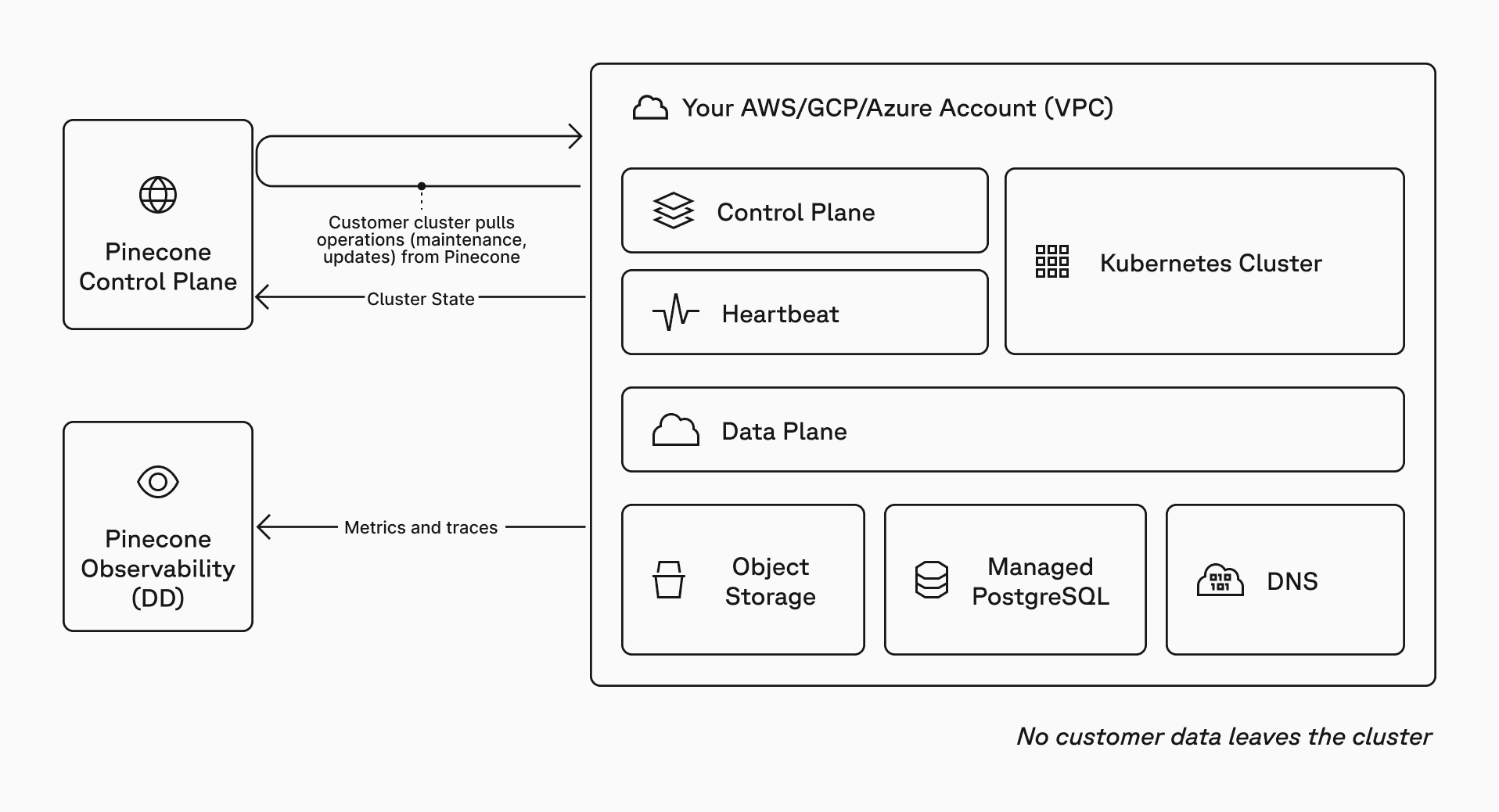
BYOC とは何か?
BYOC は、最も厳しい要件を持つチームに対して、妥協のないガバナンスと安全性を提供します。
BYOC とは、ゼロアクセスというエンタープライズセキュリティの姿勢に適用された Pinecone の分割プレーンアーキテクチャです:
- コントロールプレーン(Pinecone が管理):インデックスのライフサイクル、認証、ユーザー管理、請求、利用状況の可視化。コントロールプレーンはベクトルを保存または処理しません。
- データプレーン(ユーザーがホスト):クラウドアカウント内の専用 VPC 内でのベクトルストレージおよびクエリ実行。
これにより、データプレーンをセキュリティ境界内に維持しつつ、チームがすでに利用しているコントロールプレーンの体験を保持できます。
チームが BYOC を選択する理由
本番環境の AI を迅速に展開し、セキュリティレビューで立ち往生しないことが目的の場合、「データを自社のクラウド内に保つ」だけでは不十分なことが多いです。実際には通常、運用のためであっても本番環境への外部アクセス経路が存在しないことが真の要件となります。
一般的な選択肢には高コストな失敗モードが生じます:
- ベンダーアクセス付きマネージドサービス:開始は迅速ですが、セキュリティレビューで立ち往生したり、サードパーティのアクセス表面積が拡大したりする可能性があります。
- 完全セルフホスト型:アクセス経路をクリアできますが、信頼性、アップグレード、インシデント対応のすべてがチームに移管されます。
BYOC は、マネージドオペレーションとデータプレーンの分離を組み合わせたものです。データプレーンはクラウドアカウント内に維持され、運用はクラスター内で実行されます。Pinecone がインフラストラクチャに直接アクセスする必要はありません。
- エンタープライズガバナンスと安全性:ベクトルおよびクエリ実行は、お客様のクラウド境界内で行われます。運用は監査可能であり、責任の所在も明確です。
- 本番環境への迅速な移行:完全にセルフホスト型モデルへ切り替えることなく、厳格なアクセス要件を満たすことができます。
- 運用の一貫性:チームがすでに使用しているコントロールプレーンのワークフローを維持でき、インフラストラクチャに直接アクセスする経路を導入する必要はありません。
BYOC のゼロアクセスセキュリティモデル
BYOC はゼロアクセス境界を中心に設計されています。Pinecone はデータプレーンを運用するために、お客様のインフラストラクチャへの対話型アクセスを必要としません。
ゼロアクセスの意味
- Pinecone が SSH、VPN、またはクラスターへのインバウンドアクセスを必要とするわけではありません。
- クラウドアカウントの境界、ネットワーク、Kubernetes アクセスはお客様が管理します。
- 運用変更は、明示的でソフトウェア仲介型のワークフローを通じて実行されます。
ゼロアクセスではないこと
- Pinecone のコントロールプレーンを失うわけではありません。インデックスライフサイクル、認証、可視性については、引き続き API とコンソールを使用します。
- すべての作業を手動で行うわけではありません。運用は依然としてコントロールプレーンによってオーケストレーションされ、お客様のクラスターがローカルでそれを実行します。
- Pinecone からのサポートがないわけではありません。お客様のカウントやインフラストラクチャへのアクセス権限はありませんが、メトリクスとトレースを通じて BYOC デプロイメントの可視性を有しており、サポート対応もオンコール体制で行います。
直接アクセスなしでの動作原理
BYOC は、コントロールプレーンの運用とデータプレーンのリクエストを分離します。
コントロールプレーンの操作
コントロールプレーンの操作(アップグレード、スケーリング、メンテナンスなど)は Pinecone によってキューに積まれ、アウトバウンド専用でプルベースのモデルを用いてお客様の環境内で実行されます。
- お客様の Pinecone 管理者がクラスター操作(スケーリング、アップグレード、再起動など)を開始します。
- コントロールプレーンがお客様の環境に対する操作をキューに積みます。
- クラスター内のコンポーネントが保留中の操作を取得し、ローカルで実行します。
- お客様のクラスターはヘルス状態とステータスをコントロールプレーンへ報告します。
データプレーンのリクエスト
データプレーンのリクエストとは、アプリケーションが日常的に行う処理(アップサート、クエリ、フェッチ、およびその他のインデックス操作)のことです。これらのリクエストは、お客様の VPC 内で実行されているデータプレーンに直接クライアントから送信されます。
- お客様のアプリケーションは BYOC インデックスエンドポイントに接続します。
- リクエストはお客様のアカウント内にあるデータプレーンによって処理されます。
- Pinecone はデータプレーンのトラフィックを処理するために、お客様の VPC へのネットワークアクセスを必要としません。
モニタリング
モニタリングとサポートのため、クラスターは運用メトリクスとトレースを Pinecone の観測スタックへ送信しますが、ベクトル、レコードのメタデータ、リクエストペイロードは一切送信しません。
重要なポイント:コントロールプレーンの操作はアウトバウンドでプルされ、データプレーンのリクエストはお客様の VPC 内で処理されます。
クラウドアカウントから流出するもの(およびしないもの)
クラウドアカウントから流出しないもの:
- ベクトル、メタデータ、インデックスの内容。
- クエリとアップサートのペイロード。
- カスタマーデータ。
クラウドアカウントから流出する可能性があるもの:
- オペレーショナルメトリクスとトレース(CPU、メモリ、レイテンシなど)。
- クラスターの健全性と運用ステータス。
デプロイメントモデル
BYOC は、標準的なプラットフォームワークフローに適合するセルフサービスキットを使用してデプロイされます。
典型的なロールアウトは以下のようになります:
- 本番環境のネットワークとポリシー制御に一致する、非本番の AWS、GCP、または Azure アカウントで開始します。
- BYOC セルフサービスキットを使用してデプロイし、CI/CD または GitOps フローに統合します。
- 同じデプロイメントモデルを本番環境へプロモートします。
BYOC のデプロイステップは以下のようになります:
- インタラクティブなセットアップウィザードを実行します。これは前提条件を確認し、AWS/GCP/Azure のクォータを検証します。
- ウィザードが環境用の Pulumi プロジェクトを生成します。
pulumi upコマンドを使用してクラウド上にデプロイします。
*詳細については、BYOC GitHub リポジトリ および ドキュメント を参照してください。*
プロビジョニングにより、専用 VPC と EKS/GKE/AKS クラスターに加え、ストレージ、システム状態、TLS/DNS 用のサポートクラウドサービスを含む、データプレーン環境がお客様のクラウドアカウント上に作成されます。
プライベート接続オプション
お客様の環境に適合するネットワーク姿勢を選択できます:
- パブリックアクセス有効化:標準のインデックスホスト URL を使用して接続します。
- パブリックアクセス無効化:AWS PrivateLink、GCP PSC、または Azure Private Link およびプライベートホスト URL を使用し、VPC 内からのみ接続します。
いずれのモードでもコントロールプレーンの操作は機能します。
今日利用可能な機能
BYOC は、パブリックプレビュー版として Enterprise ユーザー向けに AWS、GCP、Azure で利用可能です。今回のリリースでは、BYOC は以下の機能をサポートしています:
- シングルネームスペース専用リードノード (DRN) インデックス
- コントロールプレーンとデータプレーンの分離アーキテクチャ
- プルベースの操作およびアップグレード
- モニタリング用の運用テレメトリー
- ネットワークアクセスモード: パブリックまたは AWS PrivateLink/GCP PSC/Azure Private Link のみ対応
- Pinecone CLI と互換性あり
クラウドアカウント外で Pinecone がホストするサービスに依存する一部の Pinecone 機能は、BYOC ではまだ利用できません。具体的には以下が該当します:
- Assistant
- Inference
- オンデマンドデータベースインデックス
- 統合埋め込み機能を備えた DRN インデックス
*詳細については、BYOC ドキュメント をご覧ください。*
はじめに
BYOC を利用すれば、管理型インフラストラクチャを維持したまま、あるいは生産環境への移行速度を落とすことなく、最も厳しいセキュリティ要件を満たすことが可能です。BYOC はパブリックプレビュー版として Enterprise ユーザー向けにセルフサービスで利用できます。デプロイするには、まず BYOC GitHub リポジトリ のセットアップウィザードを開始し、その後 BYOC ドキュメント に従ってください。ご質問がある場合やサポートが必要な場合は、アカウントチームまでお問い合わせいただくか、お問い合わせフォーム からリクエストを送信してください。
原文を表示
If you’re taking search, recommendations, or agents to production, you eventually hit the same checkpoint: security review.
When security blocks the knowledge layer, it slows everything down. Teams stay in pilot mode. Ownership gets muddy. “Quick fixes” like bolt-on stacks or partial self-hosting often create new problems, like higher operational burden and a bigger access surface area.
The cost shows up fast. Every week you’re stuck in security review is a week your AI features aren’t in production.
The blocker isn’t performance or features. It’s a single security requirement: no vendor access into your cloud account or cluster. What you need is a path to production that clears that bar without changing your delivery plan.
Pinecone Bring Your Own Cloud (BYOC), available now in public preview for all Enterprise users, brings Pinecone into your AWS, GCP, or Azure account with a zero-access operating model.
With BYOC, the Pinecone Database’s data plane runs inside your VPC. Your vectors are stored and queried there. Pinecone doesn’t need SSH, VPN, or inbound network access to your cloud account, VPC, Kubernetes cluster, nodes, or workloads. You don’t open inbound firewall ports for Pinecone to operate the system.
You still use the Pinecone control plane (API and console) for index lifecycle, auth, and usage visibility.
TL;DR
With BYOC, you get:
- Data plane in your cloud account: Vectors are stored and queried inside your VPC.
- Zero-access operations: Pinecone doesn’t need SSH, VPN, or inbound access paths into your VPC or cluster.
- Outbound-only operations: Components in your cluster pull queued operations over TLS and execute them locally.
- Auditable operations: Operations are represented as Kubernetes custom resources, so you can see what ran and when.
- Monitoring without data exposure: Only operational metrics and traces are sent. Your vectors, record metadata, and request payloads stay in your cloud account.
- Public or AWS PrivateLink/GCP PSC/Azure Private Link-only connectivity: Choose a public endpoint or disable public access and connect via AWS PrivateLink, GCP Private Service Connect (GCP PSC), or Azure Private Link.
- Same control plane workflow: Create, list, and delete indexes through the Pinecone API and console.
What is BYOC?
BYOC delivers uncompromising governance and safety for teams with the strictest requirements.
BYOC is Pinecone’s split-plane architecture applied to a zero-access enterprise security posture:
- Control plane (managed by Pinecone): Index lifecycle, authentication, user management, billing, and usage visibility. The control plane does not store or process your vectors.
- Data plane (hosted by you): Vector storage and query execution inside a dedicated VPC in your cloud account.
This keeps your data plane inside your security boundary while preserving the control plane experience your teams already use.
Why teams choose BYOC
When the point is to ship production AI without getting stuck in security review, “keep data in our cloud” is often not enough. The real requirement is usually: no external access paths into production, even for operations.
The usual options create costly failure modes:
- Managed service with vendor access: Faster to start, but can stall in security review and expand your third-party access surface area.
- Fully self-hosted: Clears the access line, but shifts reliability, upgrades, and incident response entirely onto your team.
BYOC combines managed operations with data plane isolation. You keep the data plane inside your cloud account. Operations execute inside your cluster. Pinecone does not need direct access to your infrastructure.
- Enterprise governance and safety: Vectors and query execution stay inside your cloud boundary. Operations are auditable, and responsibilities are clear.
- Faster path to production: You can meet strict access requirements without switching to a fully self-hosted model.
- Operational consistency: You keep the control plane workflow your teams already use, without introducing direct access paths into your infrastructure.
BYOC’s zero-access security model
BYOC is designed around a zero-access boundary. Pinecone does not need interactive access to your infrastructure to operate the data plane.
Zero-access means
- Pinecone does not need SSH, VPN, or inbound access to your cluster.
- You control cloud account boundaries, networking, and Kubernetes access.
- Operational changes run through explicit, software-mediated workflows.
Zero-access does not mean
- You lose the Pinecone control plane. You still use the API and console for index lifecycle, auth, and visibility.
- You do everything manually. Operations are still orchestrated through the control plane. Your cluster executes them locally.
- You have no support from Pinecone. We don’t have access to your cloud account or infrastructure, but we have visibility into your BYOC deployment via metrics and traces and are on-call for support.
How it works without direct access
BYOC separates control plane operations from data plane requests.
Control plane operations
Control plane operations – upgrades, scaling, maintenance, etc. – are queued by Pinecone and executed inside your environment using an outbound-only, pull-based model.
- Your Pinecone admin initiates a cluster operation (scale, upgrade, restart, etc.).
- The control plane queues operations for your environment.
- Components in your cluster pull pending operations and execute them locally.
- Your cluster reports health and state back to the control plane.
Data plane requests
Data plane requests are things your apps do every day: upsert, query, fetch, and other index operations. These requests go directly from your clients to the data plane running in your VPC.
- Your apps connect to the BYOC index endpoint.
- Requests are served by the data plane inside your account.
- Pinecone doesn't need network access into your VPC to serve data plane traffic.
Monitoring
For monitoring and support, the cluster sends operational metrics and traces to Pinecone’s observability stack – never vectors, record metadata, and request payloads.
The key point: control plane operations are pulled outbound, and data plane requests are served inside your VPC.
What leaves your cloud account (and what doesn’t)
Does not leave your cloud account:
- Vectors, metadata, and index contents.
- Query and upsert payloads.
- Customer data.
Can leave your cloud account:
- Operational metrics and traces (for example, CPU, memory, latency).
- Cluster health and operation status.
Deployment model
BYOC is deployed using a self-serve kit that fits standard platform workflows.
A typical rollout looks like this:
- Start in a non-production AWS, GCP, or Azure account that matches your production network and policy controls.
- Deploy with the BYOC self-serve kit and integrate it into CI/CD or GitOps flow.
- Promote the same deployment model to production.
The BYOC deployment step looks like this:
- Run an interactive setup wizard. It checks prerequisites and validates AWS/GCP/Azure quotas.
- The wizard generates a Pulumi project for your environment.
- You deploy into your cloud with pulumi up.
*See the BYOC GitHub repository and documentation for more information.*
Provisioning creates the data plane environment in your cloud account, including a dedicated VPC and an EKS/GKE/AKS cluster, plus supporting cloud services for storage, system state, and TLS/DNS.
Private connectivity options
You can choose the network posture that matches your environment:
- Public access enabled: connect using the standard index host URL.
- Public access disabled: connect only from within your VPC using AWS PrivateLink, GCP PSC, or Azure Private Link and the private host URL.
Control plane operations still work in either mode.
What’s available today
BYOC is available on AWS, GCP, and Azure for Enterprise users in public preview. In this release, BYOC supports:
- Single-namespace Dedicated Read Nodes (DRN) indexes
- Split control plane/data plane architecture
- Pull-based operations and upgrades
- Operational telemetry for monitoring
- Network access modes: public or AWS PrivateLink/GCP PSC/Azure Private Link-only
- Compatible with the Pinecone CLI
Some Pinecone capabilities that depend on Pinecone-hosted services outside your cloud account are not yet available in BYOC, such as:
- Assistant
- Inference
- Database On-Demand indexes
- DRN indexes with integrated embedding
*See the BYOC documentation for more information.*
Getting started
BYOC lets you meet the strictest security requirements without giving up managed infrastructure or slowing your path to production. BYOC is self-serve for Enterprise users in public preview. To deploy, start with the setup wizard in the BYOC GitHub repo, then follow the BYOC documentation. If you have any questions or need any assistance, contact your account team or send a request through our contact us form.
関連記事
今日のまとめ
AIデイリーブリーフで今日の重要ニュースをまとめ読み