OpenRouter、LangChain統合パッケージ公開と設定ガイドを掲載
OpenRouterはLangChainとの統合に専用パッケージ「langchain-openrouter」を提供し、従来のChatOpenAIベースURL上書き方式から新しい設定パスへ移行するよう案内した。
AI深層分析を開く2026年7月29日 09:41
AI深層分析
キーポイント
専用パッケージの提供
OpenRouter は「langchain-openrouter」パッケージ(PyPI/npm)を公開し、従来の手動設定に代わる標準的な統合経路を提供している。
高度なルーティング機能
ChatOpenRouter を使用することで、プロバイダの負荷分散、障害回避、クロスプロバイダ間のフェイルオーバーを自動的に処理する。
コストとエラーの防止
システムがリトライや不完全なリクエストを内部で管理するため、開発者はコード側での再試行ロジック不要となり、無駄な請求を防ぐ。
パラメータとモデル引数の動作
temperature, max_tokens, max_retries は通常の LangChain チャットモデルと同様に振る舞う。model 引数には provider/model フォーマットのスラッグを指定する必要がある。
OpenRouter エンドポイントの検証方法
LangChain を接続する前に、curl コマンドを使用して OpenAI チャット形式でキーの有効性を確認できる。同じキーとモデル文字列を使用すれば、レスポンス形状も同一となる。
重要な引用
The integration now has a dedicated package: langchain-openrouter on PyPI and @langchain/openrouter on npm
our routing layer handles provider load balancing, outage avoidance, and cross-provider failover automatically
an incomplete request doesn't cost you anything
"ChatOpenRouter is a typed LangChain wrapper over that endpoint."
編集コメントを表示
編集コメント
OpenRouter が提供する専用パッケージは、LangChain ユーザーにとってマルチモデル戦略を容易に実現する重要なステップとなる。開発者はこのツールを活用することで、単一プロバイダへの依存リスクを分散しつつ、コストと性能のバランスを最適化できる。
Source Article
元記事を日本語で読む
本文に関係しない購読案内、埋め込み通知、サイト内プロモーションは除いています。
既存の LangChain アプリに OpenRouter の 400 種類以上のモデルを追加したい場合、ゼロから作り直す必要はありません。現在では専用のパッケージが提供されており、PyPI では langchain-openrouter、npm では @langchain/openrouter として利用可能です。しかし、多くの古いガイドではまだ「ChatOpenAI に base_url を上書きする」という旧来の方法を教えているため注意が必要です。本記事では、現在推奨される最新の導入方法について解説します。
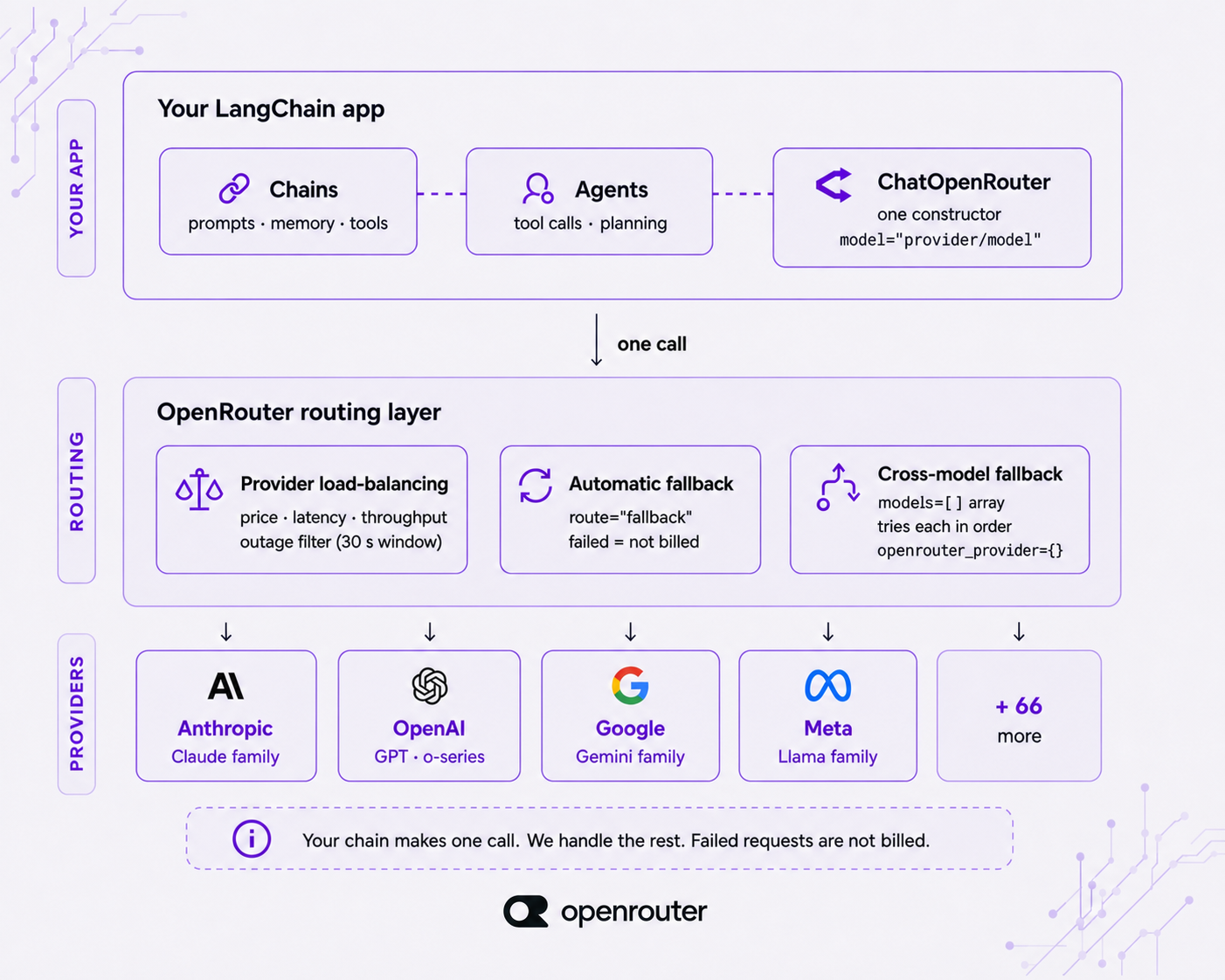
LangChain のチェーンを ChatOpenRouter に接続すると、ルーティング層がプロバイダー間の負荷分散や障害回避、そして他社プロバイダーへの自動フェイルオーバーを自動的に処理します。そのため、チェーン側のコードでリトライロジックを意識する必要はありませんし、不完全なリクエストが発生しても課金されることはありません。LangChain の公式ドキュメントではパラメータの詳細がカバーされていますが、本記事ではその背後にあるルーティングの挙動についても詳しく解説します。
5 分で始める:LangChain アプリへの OpenRouter 導入
モデル呼び出しを機能させるには、以下の 3 ステップを実行するだけです。インストール、認証、そして呼び出し。
OpenRouter は、1 つの OpenAI 互換 API の背後に位置するモデルルーターです。エンドポイントは 1 つだけで、400 種類以上のモデルと 70 社以上のプロバイダーを扱います。ChatOpenRouter は、他の LangChain チャットモデルと同様に、あらゆるチェーンやエージェントにすんなりと組み込むことができます。OpenRouter 固有の部分は、モデル名を指定する文字列のみです。
ステップ 1: インストールと認証
langchain-openrouter をインストールし、環境変数に API キーを設定してください。キーは openrouter.ai/settings/keys で生成できます。
まず、パッケージを最新バージョンに更新してインストールします。
pip install -U langchain-openrouter
export OPENROUTER_API_KEY="sk-or-..."
-U フラグを使用してください。このパッケージはベータ版であり開発が活発なため、常に最新版を入手することが重要です。ChatOpenRouter は自動的に環境変数 OPENROUTER_API_KEY を読み込みます。シークレットの管理方法が異なる場合は、明示的に api_key 引数として渡すことも可能です。
ステップ 2: インスタンス化と呼び出し
次に、モデルを初期化して使用します。
from langchain_openrouter import ChatOpenRouter

model = ChatOpenRouter(
    model="anthropic/claude-sonnet-4.5",
    temperature=0,
    max_tokens=1024,
    max_retries=2,
)

response = model.invoke("Summarize this support ticket in one sentence.")
print(response.content)temperature、max_tokens、max_retries は、他の LangChain チャットモデルと同じように動作します。model 引数には、プロバイダーとモデル名をスラッシュで区切った形式の文字列(例:provider/model)を指定します。
LangChain に接続する前にキーが正しく機能するか確認したい場合は、OpenRouter エンドポイントが OpenAI のチャットフォーマットに直接対応しているため、cURL コマンドでテストできます。
curl https://openrouter.ai/api/v1/chat/completions \
  -H "Authorization: Bearer $OPENROUTER_API_KEY" \
  -H "Content-Type: application/json" \
  -d '{
    "model": "anthropic/claude-sonnet-4.5",
    "messages": [{"role": "user", "content": "Summarize this support ticket in one sentence."}]
  }'
使用するキー、モデル文字列、レスポンスの形式はすべて同じです。ChatOpenRouter は、このエンドポイントを型安全にラップした LangChain のラッパー機能です。
ステップ 3: TypeScript
TypeScript を利用する場合も、@langchain/openrouter パッケージを使用する点は同様です。
import { ChatOpenRouter } from '@langchain/openrouter';

const model = new ChatOpenRouter('anthropic/claude-sonnet-4.5', {
  temperature: 0.8,
});

const response = await model.invoke('Summarize this support ticket in one sentence.');
nconsole.log(response.content);
npm でインストールするには、npm install @langchain/openrouter を実行してください。現在のバージョンは [npm](https://www.npmjs.com/package/@langchain/openrouter) に公開されています。

完全なセットアップの詳細については、[OpenRouter の LangChain 統合ページ](https://openrouter.ai/docs/guides/community/langchain) および [LangChain の ChatOpenRouter リファレンス](https://docs.langchain.com/oss/python/integrations/chat/openrouter) をご覧ください。

## モデルの選択:プロバイダー/モデル文字列

model パラメータには、OpenRouter 固有の "provider/model" 形式のスラグを指定します。モデルを変更する際は、この文字列だけを書き換えれば済みます。チェーン内の他の要素、つまりプロンプトやツールの定義、出力フォーマットなどは一切変更する必要がありません。

今日は model="anthropic/claude-sonnet-4.5" に設定し、明日は openai/gpt-5-mini や deepseek/deepseek-r1 に切り替えても、チェーンの動作はそのまま維持されます。

利用可能なプロバイダーとモデルの一覧、およびトークンあたりの料金は [openrouter.ai/models](https://openrouter.ai/models) で確認できます。本ガイドで使用しているスラグは例示であり、実際のソース情報は同ページに掲載されているカタログが唯一の信頼できる情報源となります。

LangChain エージェントを利用する場合は、コンストラクタを省略した簡易記述も可能です:

from langchain.agents import create_agent

agent = create_agent(model="openrouter:anthropic/claude-sonnet-4.5")

このコードでは、`create_agent` に渡した `openrouter:provider/model` というプレフィックスが、ChatOpenRouter を経由してモデルを解決するよう指示しています。これは、一つ上のレイヤーで同じように文字列を置き換えるだけのシンプルな仕組みです。

## ストリーミングレスポンスの実装

ストリーミングでトークンを取得するには `stream_events` を使用します。非同期処理のチェーン内では、同様の機能を持つ `astream_events` が利用可能です。

ストリーミングによるコストは、通常のリクエストと同じトークン単価です。ユーザー体験を向上させるためにストリーミングを行うのであって、請求額を抑えるためのものではありません。

```python
for event in model.stream_events(
    "Explain provider routing in three sentences.",
    version="v3"
):
    if event["event"] == "on_chat_model_stream":
print(event["data"]["chunk"].text, end="", flush=True)最新のイベントスキーマを取得するには、version="v3" を指定してください。非同期版でも astream_events と async for を使うことで同様の処理が可能です。
async for event in model.astream_events(
    "Explain provider routing in three sentences.",
    version="v3"
):
    if event["event"] == "on_chat_model_stream":
        print(event["data"]["chunk"].text, end="", flush=True)
トークン数のカウントは、最終的に集約されたメッセージに含まれる usage_metadata から取得できるため、追加で API を呼び出す必要はありません。
ツール呼び出しと構造化出力
ツール呼び出しには bind_tools を、型付きのレスポンスには with_structured_output を使用します。どちらも strict=True を指定することで、スキーマへの厳密な準拠を強制できます。この strict パラメータは function_calling と json_schema メソッドで有効ですが、json_mode では利用できません。
Pydantic スキーマを使用したツールのバインド
from pydantic import BaseModel, Fieldclass GetWeather(BaseModel):
"""Get the current weather for a city."""
city: str = Field(description="City name, e.g. 'Lisbon'")
model_with_tools = model.bind_tools([GetWeather], strict=True)
result = model_with_tools.invoke("What's the weather in Lisbon?")
print(result.tool_calls)
strict=True makes the model adhere to the tool schema rather than improvising arguments.
Get structured output
with_structured_output binds a schema to the whole response:
class TicketSummary(BaseModel):
sentiment: str
priority: int
summary: str
structured = model.with_structured_output(TicketSummary, method="json_schema")
summary = structured.invoke("Customer is furious the export button is broken again.")
print(summary.priority, summary.summary)
The default method is function_calling. Passing method="json_schema" uses native JSON-schema enforcement where the model supports it.
Not every model supports every method; check the model catalog for per-model capabilities. Setting require_parameters: true in the provider object (covered next) keeps requests on providers that honor the parameters you sent.
Provider routing and fallbacks
ChatOpenRouter exposes our routing layer through openrouter_provider and route, so a single chain can survive a provider going down with no extra resilience code in your app.
API を呼び出した際のデフォルト動作について説明します。OpenRouter は、選択したモデルを提供する複数のプロバイダー間で負荷分散を行い、過去 30 秒間に障害が発生したプロバイダーを自動的に除外して、残りのプロバイダーを生きたフェイルオーバー先として利用します。
この処理はチェーン側のコードからは隠蔽され、リトライの事実自体がコードに反映されることはありません。最終的に完了しなかったリクエストに対しては課金も発生しません。
openrouter_provider でプロバイダーを制御する
model = ChatOpenRouter(
model="anthropic/claude-sonnet-4.5",
openrouter_provider={
"order": ["Anthropic", "Google"],
"allow_fallbacks": True,
"data_collection": "deny",
"sort": "throughput",
},
)
order でプロバイダーの優先順位を設定します。allow_fallbacks: True を指定すると、優先したプロバイダーが利用できない場合に、それら以外のプロバイダーへ自動的にフォールバックできます。
sort には「throughput(スループット)」または「latency(レイテンシ)」を指定でき、価格よりも速度を重視する状況で有効です。data_collection: "deny" を設定すると、プロンプトデータを学習に利用するプロバイダーへのリクエストが自動的に除外されます。
なお、「allow」や「exclude」は特定のプロバイダーのみを対象とする場合に使用し、それら以外のプロバイダーには影響しません。「require_parameters: True」を指定すると、送信しているパラメータを正確にサポートしているプロバイダーのみが選択され、リクエストが外れることがなくなります。
プロバイダーオブジェクトの詳細な仕様は、openrouter.ai/docs/guides/routing/provider-selection をご覧ください。
プロバイダーだけでなくモデル間でもフェイルオーバーする
プロバイダー間のフェイルオーバーはデフォルトで有効になっており、route="fallback" と明示的に記述することも可能です。異なるモデル間でのフェイルオーバーも実現したい場合は、model_kwargs を通じてモデルの配列を渡してください。OpenRouter は指定されたモデルを順次試行します。
ChatOpenRouter の設定ガイド
model = ChatOpenRouter(
model="anthropic/claude-sonnet-4.5",
route="fallback",
model_kwargs={
"models": [
"anthropic/claude-sonnet-4.5",
"openai/gpt-5-mini",
"google/gemini-3-flash-preview",
],
},
)
models は名前付きのコンストラクタ引数ではないため、model_kwargs に含めて API へそのまま渡します。メインモデルがリクエストに応えられない場合、次のプロバイダや配列内の次モデルへと自動的に切り替わります。
また、openrouter_provider で sort: {by, partition: "none"} を指定すると、リストされたすべてのモデルにわたってエンドポイントをグローバルにランク付けできます。
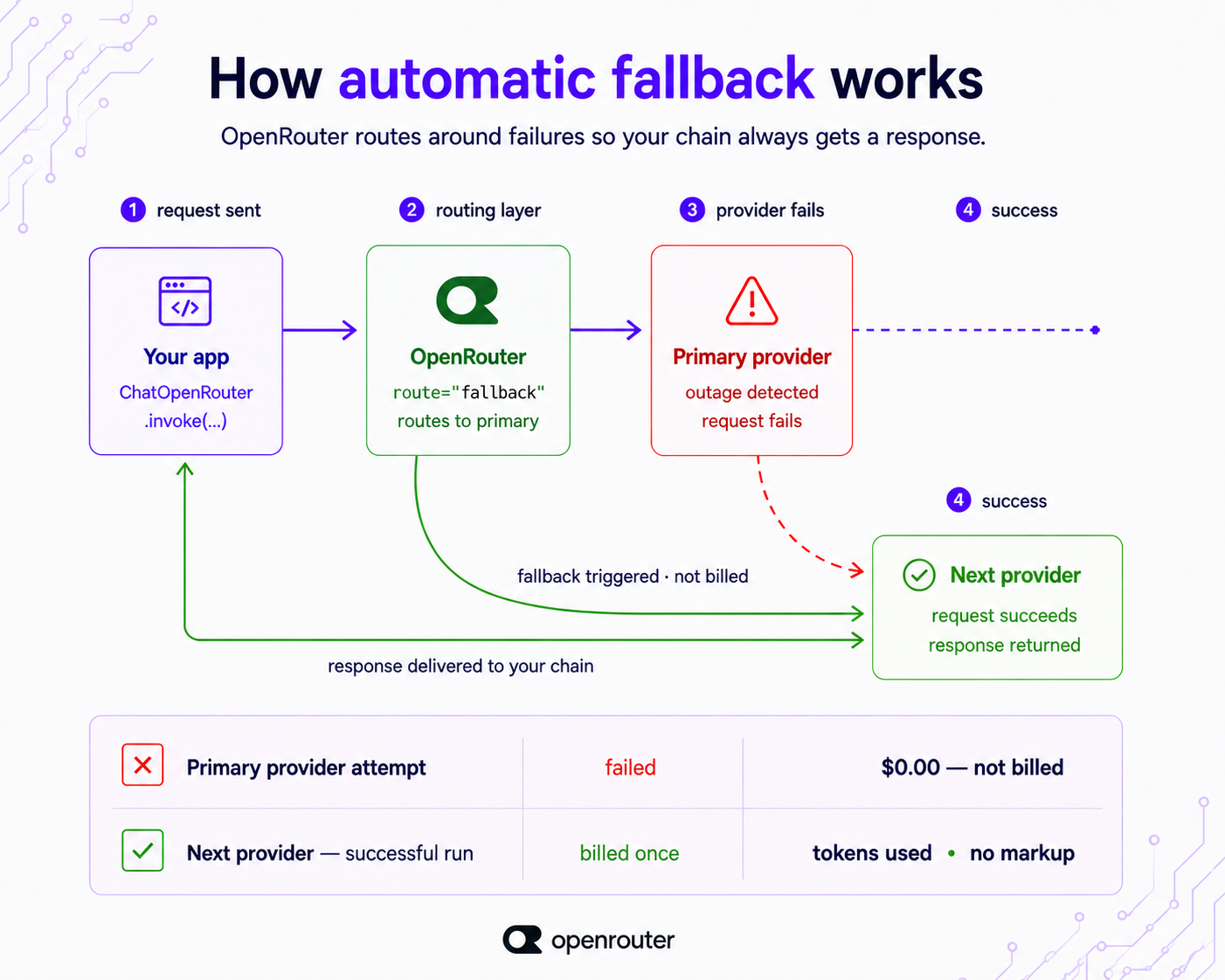
LangChain のチェーンは 1 つの ChatOpenRouter を指しますが、リクエストはプロバイダ間で分散され、成功した実行分のみが課金されます。
リーニング、マルチモーダル、キャッシング、および観測性
これらすべては、コンストラクタまたはリクエストパラメータとして 1 つずつ設定可能です。
リーニング(推論)
reasoning パラメータで推論予算を設定します:
model = ChatOpenRouter(
model="anthropic/claude-sonnet-4.5",
reasoning={"effort": "high", "summary": "auto"},
)
effort は、xhigh から high、medium、low、minimal、none まで設定できます。推論トークンのカウントは usage_metadata.output_token_details.reasoning に表示されるため、思考にかかるコストを正確に把握できます。
マルチモーダル入力
画像、音声、動画、PDF などの入力は、LangChain がマルチモーダルモデルを扱う際と同様に、HumanMessage のコンテンツブロックを通じて処理されます。ただし、実際にどのモダリティがサポートされるかは利用するモデルに依存するため、各モデルの機能については カタログ を確認してください。
プロンプトキャッシング
メッセージのコンテンツブロックに cache_control: {"type": "ephemeral"} ブレークポイントを設定すると、プロンプトキャッシングが有効になります。キャッシュによる読み取りは usage_metadata.input_token_details.cache_read に反映されるため、各呼び出しごとの削減効果を把握できます。コストに関する詳細は プロンプトキャッシングガイド をご覧ください。
可観測性(オプザバビリティ)
関連するリクエストをグループ化するために session_id(最大 256 文字)と、各リクエストごとのメタデータを持つ trace オブジェクトを渡すことができます。これらは設定済みの Broadcast 宛先へ転送されるため、追加の計測コードなしで既存のスタックにトレースデータを格納できます。
いずれの設定も、チェーン構造の変更は不要です。これはすでに構築したシステムの上に重ねるコンストラクタまたはリクエストパラメータとして機能します。
よくある問題と解決策
頻出する 4 つの問題があり、それぞれに対応する解決策があります。
ベータ版パッケージにおけるバージョン互換性
langchain-openrouter は最近リリースされたベータ版であり、最新の LangChain を必要とします。古い LangChain のバージョンとの後方互換性は保証されていません。PyPI に記載されているバージョンに固定し、LangChain も同時にアップグレードしてください。また、古いチュートリアルからコピーしたバージョン指定をそのまま使用しないよう注意しましょう。
ChatOpenAI と base_url の組み合わせパターン
LangChain のバージョンが古く、専用のパッケージが存在する以前のものを使っている場合でも、ChatOpenAI の base_url を https://openrouter.ai/api/v1 に設定し、OpenRouter キーを使用することで動作します。アップグレードできない場合に限り、この方法を利用してください。
現在の LangChain では、専用の ChatOpenRouter パッケージを使うことで、プロバイダーのルーティングや推論機能、構造化出力へのアクセスがよりスムーズになります。ただし、既存の設定で問題なく動いているのであれば、すぐに移行する必要はありません。
モデルが毎回同じ回答を返してくる場合
モデルが常に同じ応答を返す場合、それは不具合ではなく、温度パラメータ(temperature)やキャッシュの動作によるものです。温度をゼロ以外の値に設定し、プロンプトキャッシュが有効になっていないか確認してください。
モデルごとのパラメータサポート状況
すべてのモデルが、渡せるパラメータをすべてサポートしているわけではありません。不安な場合は、openrouter_provider に require_parameters: true を設定して、指定したパラメータを受け入れるプロバイダーのみへルーティングされるようにするか、カタログ内の該当モデルページで事前に確認してください。
ChatOpenRouter パッケージを標準として採用し、PyPI または npm からバージョンを固定(ピン留め)します。また、openrouter.ai/models で最新のモデル名を確認して常に最新に保ちましょう。openrouter_provider は一度設定しておけば、チェーン内のすべての呼び出しでプロバイダー間のフォールオーバーが自動的に適用され、成功した実行分のみが課金されます。
よくある質問
OpenRouter と LangChain は同じものですか?
いいえ、これらは競合するものではなく、むしろ補完し合うものです。OpenRouter はモデルプロバイダー兼ルーターであり、1 つの OpenAI 互換 API の背後に位置して、70 社以上のプロバイダーから 400 以上ものモデルを利用可能にします。一方、LangChain はチェーンやエージェントを構築するためのオーケストレーションフレームワークです。
OpenRouter を LangChain で利用するには、ChatOpenRouter を使用します。
OpenRouter と LangChain の連携方法
まず「langchain-openrouter」パッケージをインストールし、「OPENROUTER_API_KEY」を設定してください。その後、ChatOpenRouter を「model="provider/model"」の形式でインスタンス化します。これで、他の LangChain チャットモデルと同様に、.invoke(...) や .stream_events(...)、.bind_tools(...)、.with_structured_output(...) などのメソッドを呼び出すことができます。
なお、このパッケージはベータ版です。PyPI または npm から特定のバージョンを固定して使用することをお勧めします。TypeScript の場合は「@langchain/openrouter」を使用し、同じような形状で利用可能です。
LangChain は OpenRouter のツール呼び出しと構造化出力に対応していますか?
はい、対応しています。ツール呼び出しには「model.bind_tools([...])」を、型付きの応答には「model.with_structured_output(Schema, method="json_schema")」を使用します。どちらも「strict=True」を指定してスキーマを厳格に適用してください。
これらは現在の ChatOpenRouter パッケージで正式にサポートされているメソッドであり、従来の LangChain における JSON スキーマのワークアラウンドよりも上位互換となります。
LangChain からプロバイダーのルーティングやフォールバックを設定できますか?
はい、可能です。「openrouter_provider={...}」を渡して特定のプロバイダーを指定したり、「model_kwargs={"models": [...] }」で複数のモデルを指定してフェイルオーバーを設定したりできます。
デフォルトではプロバイダーのフェイルオーバーが有効になっており、OpenRouter は価格と負荷に基づいてバランスを取りつつ、過去 30 秒以内に障害が発生したプロバイダーからのリクエストを自動的に回避します。失敗したリクエストは課金されず、成功した実行分のみが請求対象となります。
ChatOpenAI と base_url の組み合わせはもう必要ない?
現在の LangChain では、ChatOpenAI を使って base_url を https://openrouter.ai/api/v1 に設定し、OpenRouter キーを指定する従来の方法に頼る必要はありません。代わりに、専用の「ChatOpenRouter」パッケージを利用するのが推奨されるアプローチです。これにより、プロバイダーの自動ルーティングや推論機能、構造化出力へのアクセスがよりシンプルになります。
なお、古いバージョンの LangChain(専用パッケージが存在しない環境)では、上記の ChatOpenAI 設定をフォールバックとして利用可能です。
どのモデルを使える?
カタログに登録されている 400 以上のモデルから、プロバイダー名とモデル名のスラッグ(例:provider/model-slug)を指定して利用できます。最新のモデル一覧や各モデルの機能、料金体系については、openrouter.ai/models を必ず確認してください。
利用可能なモデルやトークンあたりの料金は頻繁に変更されるため、カタログ情報を常に最新の情報源として扱う必要があります。
原文を表示
You want to add OpenRouter’s 400+ models to your existing LangChain app without rebuilding anything. The integration now has a dedicated package: langchain-openrouter on PyPI and @langchain/openrouter on npm, but many older guides still teach the ChatOpenAI plus base_url override. This guide covers the current path.
When you point a LangChain chain at ChatOpenRouter, our routing layer handles provider load balancing, outage avoidance, and cross-provider failover automatically. Your chain code never sees the retry, and an incomplete request doesn’t cost you anything. LangChain’s docs cover the parameters; this guide also covers the routing behavior behind them.
Quickstart: OpenRouter in a LangChain app in 5 minutes
Get a working model call in three steps: install, authenticate, invoke.
OpenRouter is a model router behind one OpenAI-compatible API: one endpoint, 400+ models, 70+ providers. ChatOpenRouter slots into any chain or agent like any other LangChain chat model. The model string is the only OpenRouter-specific piece.
Step 1: Install and authenticate
Install langchain-openrouter and put your key in the environment. Generate a key at openrouter.ai/settings/keys.
pip install -U langchain-openrouter
export OPENROUTER_API_KEY="sk-or-..."
Use the -U flag. The package is beta and moves fast; always pull the latest. ChatOpenRouter automatically reads OPENROUTER_API_KEY from the environment. You can also pass it explicitly as api_key if you manage secrets differently.
Step 2: Instantiate and invoke
from langchain_openrouter import ChatOpenRouter

model = ChatOpenRouter(
    model="anthropic/claude-sonnet-4.5",
    temperature=0,
    max_tokens=1024,
    max_retries=2,
)

response = model.invoke("Summarize this support ticket in one sentence.")
print(response.content)temperature, max_tokens, and max_retries behave exactly as they do on any LangChain chat model. The model argument is our slug in provider/model format.
If you want to confirm your key works before wiring up LangChain, the endpoint speaks the OpenAI Chat format directly:
curl https://openrouter.ai/api/v1/chat/completions \
  -H "Authorization: Bearer $OPENROUTER_API_KEY" \
  -H "Content-Type: application/json" \
  -d '{
    "model": "anthropic/claude-sonnet-4.5",
    "messages": [{"role": "user", "content": "Summarize this support ticket in one sentence."}]
  }'
Same key, same model string, same response shape. ChatOpenRouter is a typed LangChain wrapper over that endpoint.
Step 3: TypeScript
The TypeScript path is the same shape with @langchain/openrouter:
import { ChatOpenRouter } from '@langchain/openrouter';

const model = new ChatOpenRouter('anthropic/claude-sonnet-4.5', {
  temperature: 0.8,
});

const response = await model.invoke('Summarize this support ticket in one sentence.');
console.log(response.content);
Install with npm install @langchain/openrouter. The current version lives on npm.
Full setup details are on OpenRouter’s LangChain integration page and in LangChain’s ChatOpenRouter reference.
Pick a model: the provider/model string
The model parameter is OpenRouter’s slug in provider/model form, and swapping models is a one-string change. Nothing else in your chain moves: your prompts, tool definitions, and output stay as they are.
Set model="anthropic/claude-sonnet-4.5" today, change it to openai/gpt-5-mini or deepseek/deepseek-r1 tomorrow, and your chains stay exactly as they are.
Pull current provider/model strings from openrouter.ai/models. That page shows which models are available, which providers offer them, and how much each one costs per token. The slugs in this guide are illustrations; the catalog is the source of truth.
For LangChain agents, there’s a shorthand that skips the constructor entirely:
from langchain.agents import create_agent

agent = create_agent(model="openrouter:anthropic/claude-sonnet-4.5")
The openrouter:provider/model prefix tells create_agent to resolve through ChatOpenRouter. Same one-string swap, one layer up.
Streaming responses
Use stream_events to get tokens as the model produces them. The async variant, astream_events, does the same within an async chain.
Streaming costs the same per-token rate as a non-streaming call. You stream for the user experience, not the bill.
for event in model.stream_events(
    "Explain provider routing in three sentences.",
    version="v3"
):
    if event["event"] == "on_chat_model_stream":
        print(event["data"]["chunk"].text, end="", flush=True)
Pass version="v3" to get the current event schema. The async form is the same with astream_events and an async for:
async for event in model.astream_events(
    "Explain provider routing in three sentences.",
    version="v3"
):
    if event["event"] == "on_chat_model_stream":
        print(event["data"]["chunk"].text, end="", flush=True)
usage_metadata is available on the final aggregated message, so you can read token counts without making a second call.
Tool calling and structured output
Use bind_tools for tool calling and with_structured_output for typed responses. Both accept strict=True to force schema adherence. strict works with the function_calling and json_schema methods, not with json_mode.
Bind tools with a Pydantic schema
from pydantic import BaseModel, Field

class GetWeather(BaseModel):
    """Get the current weather for a city."""
    city: str = Field(description="City name, e.g. 'Lisbon'")

model_with_tools = model.bind_tools([GetWeather], strict=True)
result = model_with_tools.invoke("What's the weather in Lisbon?")
print(result.tool_calls)
strict=True makes the model adhere to the tool schema rather than improvising arguments.
Get structured output
with_structured_output binds a schema to the whole response:
class TicketSummary(BaseModel):
    sentiment: str
    priority: int
    summary: str

structured = model.with_structured_output(TicketSummary, method="json_schema")
summary = structured.invoke("Customer is furious the export button is broken again.")
print(summary.priority, summary.summary)
The default method is function_calling. Passing method="json_schema" uses native JSON-schema enforcement where the model supports it.
Not every model supports every method; check the model catalog for per-model capabilities. Setting require_parameters: true in the provider object (covered next) keeps requests on providers that honor the parameters you sent.
Provider routing and fallbacks
ChatOpenRouter exposes our routing layer through openrouter_provider and route, so a single chain can survive a provider going down with no extra resilience code in your app.
Here’s what happens by default when you make a call. We price-load-balance across the providers serving your chosen model and route away from any provider that had an outage in the last 30 seconds, using the rest as live fallbacks. Your chain code never sees the retry. A request that ultimately can’t be completed isn’t billed.
Steer providers with openrouter_provider
model = ChatOpenRouter(
    model="anthropic/claude-sonnet-4.5",
    openrouter_provider={
        "order": ["Anthropic", "Google"],
        "allow_fallbacks": True,
        "data_collection": "deny",
        "sort": "throughput",
    },
)
order sets your provider preference. allow_fallbacks: True lets us fall back past your preferred providers if they’re unavailable. sort accepts "throughput" or "latency" when speed matters more than price. data_collection: "deny" routes away from providers that train on your prompts. only and ignore allow or exclude specific providers. require_parameters: True keeps requests on providers that support the exact parameters you’re sending.
The full provider object reference is at openrouter.ai/docs/guides/routing/provider-selection.
Fail over across models, not just providers
Provider failover is on by default; route="fallback" states it explicitly. To also fail over to different models, pass a models array through model_kwargs and we try each model in sequence:
model = ChatOpenRouter(
    model="anthropic/claude-sonnet-4.5",
    route="fallback",
    model_kwargs={
        "models": [
            "anthropic/claude-sonnet-4.5",
            "openai/gpt-5-mini",
            "google/gemini-3-flash-preview",
        ],
    },
)
models isn’t a named constructor argument, so it rides in model_kwargs, which forwards extra parameters to the API unchanged. If the primary can’t serve the request, we try the next provider, then the next model in the array. Pair the array with sort: {by, partition: "none"} in openrouter_provider to rank endpoints globally across all listed models rather than per-model.
Your LangChain chain points at one ChatOpenRouter, we spread the request across providers, and you’re billed only for the run that succeeds.
Reasoning, multimodal, caching, and observability
Each of these is one constructor or request parameter.
Reasoning
Set a reasoning budget with the reasoning parameter:
model = ChatOpenRouter(
    model="anthropic/claude-sonnet-4.5",
    reasoning={"effort": "high", "summary": "auto"},
)
effort runs from xhigh down through high, medium, low, minimal, to none. Reasoning token counts appear in usage_metadata.output_token_details.reasoning, so you can see exactly what the thinking cost.
Multimodal inputs
Image, audio, video, and PDF inputs pass through HumanMessage content blocks, just as LangChain handles multimodal models. Which modalities are supported depends on the model; check the catalog for per-model capabilities.
Prompt caching
Drop a cache_control: {"type": "ephemeral"} breakpoint on a message content block to enable caching. Cache reads surface in usage_metadata.input_token_details.cache_read, so you can see the savings per call. The prompt caching guide covers the cost side.
Observability
Pass a session_id (up to 256 characters) to group related requests, and a trace object for per-request metadata. We forward both to your configured Broadcast destinations, so traces land in your existing stack without extra instrumentation.
None of these require changes to your chain structure; they’re constructor or request parameters that layer on top of whatever you’ve already built.
Common problems and how to fix them
Four problems come up often, and each has a fix.
Version compatibility on a beta package
langchain-openrouter is recent and in beta, so it requires a current LangChain. It’s not backward-compatible with older LangChain versions. Pin to the version on PyPI, upgrade LangChain alongside it, and don’t copy a version pin from an older tutorial.
The ChatOpenAI + base_url pattern
If you’re on an older LangChain version that predates the dedicated package, pointing ChatOpenAI’s base_url at https://openrouter.ai/api/v1 with your OpenRouter key still works. Use it when you can’t upgrade. With current LangChain, the dedicated ChatOpenRouter package provides cleaner access to provider routing, reasoning, and structured output, but there’s no urgency to migrate if your current setup is working.
The model returns the same answer every time
If a model keeps returning the same response, that’s almost always temperature or caching behavior, not a defect. Set a non-zero temperature and check whether prompt caching is active.
Per-model parameter support
Not every model supports every parameter you can pass. When in doubt, set require_parameters: true in openrouter_provider so we only route to providers that accept your parameters, or check the model page in the catalog first.
Standardize on the ChatOpenRouter package, pin it from PyPI or npm, and keep model strings current from openrouter.ai/models. Set openrouter_provider once and every call in your chain inherits cross-provider failover, billed only for the run that succeeds.
Frequently asked questions
Is OpenRouter the same as LangChain?
No. They compose rather than compete. OpenRouter is a model provider and router that sits behind one OpenAI-compatible API, giving you 400+ models from 70+ providers. LangChain is the orchestration framework you build chains and agents in. You use OpenRouter as a model inside LangChain through ChatOpenRouter.
How do I use OpenRouter with LangChain?
Install langchain-openrouter, set OPENROUTER_API_KEY, and instantiate ChatOpenRouter(model="provider/model"). Then call .invoke(...), .stream_events(...), .bind_tools(...), or .with_structured_output(...) like any LangChain chat model. The package is beta; pin the version from PyPI or npm. The TypeScript path uses @langchain/openrouter with the same shape.
Does LangChain support OpenRouter tool calling and structured output?
Yes. Use model.bind_tools([...]) for tools and model.with_structured_output(Schema, method="json_schema") for typed responses, both with strict=True to enforce the schema. These are first-class methods on the current ChatOpenRouter package and supersede the older JSON-schema workarounds on the legacy ChatOpenAI path.
Can I set provider routing or fallbacks from LangChain?
Yes. Pass openrouter_provider={...} to steer providers, and model_kwargs={"models": [...]} to fail over across models. Provider failover is on by default: OpenRouter price-load-balances and routes away from providers with an outage in the last 30 seconds. Failed requests aren’t billed; you pay only for the run that succeeds.
Do I still need the ChatOpenAI + base_url pattern?
Not on the current LangChain. The dedicated ChatOpenRouter package is the current path and gives cleaner access to provider routing, reasoning, and structured output. The ChatOpenAI override, pointing base_url at https://openrouter.ai/api/v1 with your OpenRouter key, still works as a fallback for older LangChain versions that predate the package.
Which models can I use?
Any of the 400+ models in the catalog, via the provider/model slug. Check openrouter.ai/models for current strings, per-model capabilities, and pricing. The available models and per-token rates change, so treat the catalog as the source of truth.
AI算出
技術分析ainew評価高い
OpenRouter が LangChain 向けに公式サポートする専用パッケージ「langchain-openrouter」の導入方法を詳述しており、AI エージェント開発における実装知見として高い価値を持つ。また、Claude-sonnet-4.5 のような具体的なモデル名を例示しているため検索意図との一致度が高い。
6つの評価軸を見る
- AI関連度
- 100
- 情報源の信頼性
- 25
- 新規性
- 75
- 調べる価値
- 75
- 重複の少なさ
- 100
- 日本での有用性
- 50
関連記事
今日のまとめ
AIデイリーブリーフで今日の重要ニュースをまとめ読み