Anthropic、Claude 5 の文脈エンジニアリング新ルールを公開
Anthropic は Claude 5 世代モデル向けに、厳格なルールや例示の代わりに判断力への委譲、インタフェース設計の重視、段階的情開示という新しい文脈工学の原則を発表した。
AI深層分析を開く2026年7月28日 00:09
AI深層分析
キーポイント
ルールから判断への移行
過去のモデルでは必須だった厳格な禁止事項やルールを撤廃し、新モデルの高い判断力に委ねてコードの書き方やコメント密度を文脈に合わせて柔軟に行う方針へ転換した。
例示からインタフェース設計へ
ツール使用時の具体例提示が探索範囲を制限する傾向があるため、パラメータの表現力や状態遷移の定義など、インタフェース自体の設計に注力するよう推奨している。
段階的情開示の実装
コードレビューや検証など必須ではない情報をシステムプロンプトの冒頭に全て記載せず、Claude Code が必要な時にのみ呼び出すスキルとして分離・管理する手法を採用した。
重要な引用
Write code that reads like the surrounding code: match its comment density, naming, and idiom.
Instead of using examples, think more about the design of your tools, scripts and files- what parameters does Claude have and how can they be more expressive?
Claude Code has gotten very competent at using progressive disclosure- loading the right context at the right times.
編集コメントを表示
編集コメント
Claude の判断能力が向上したことで、プロンプトエンジニアリングのあり方そのものが刷新される重要な転換点である。開発者は従来の「指示」中心から、モデルの自律性を引き出す「設計」中心への思考転換を迫られている。
過去と現在
以前から存在した「コンテキストエンジニアリングのベストプラクティス」の中には、すでに神話化されてしまったものがいくつかありました。以下にその一例を挙げます。
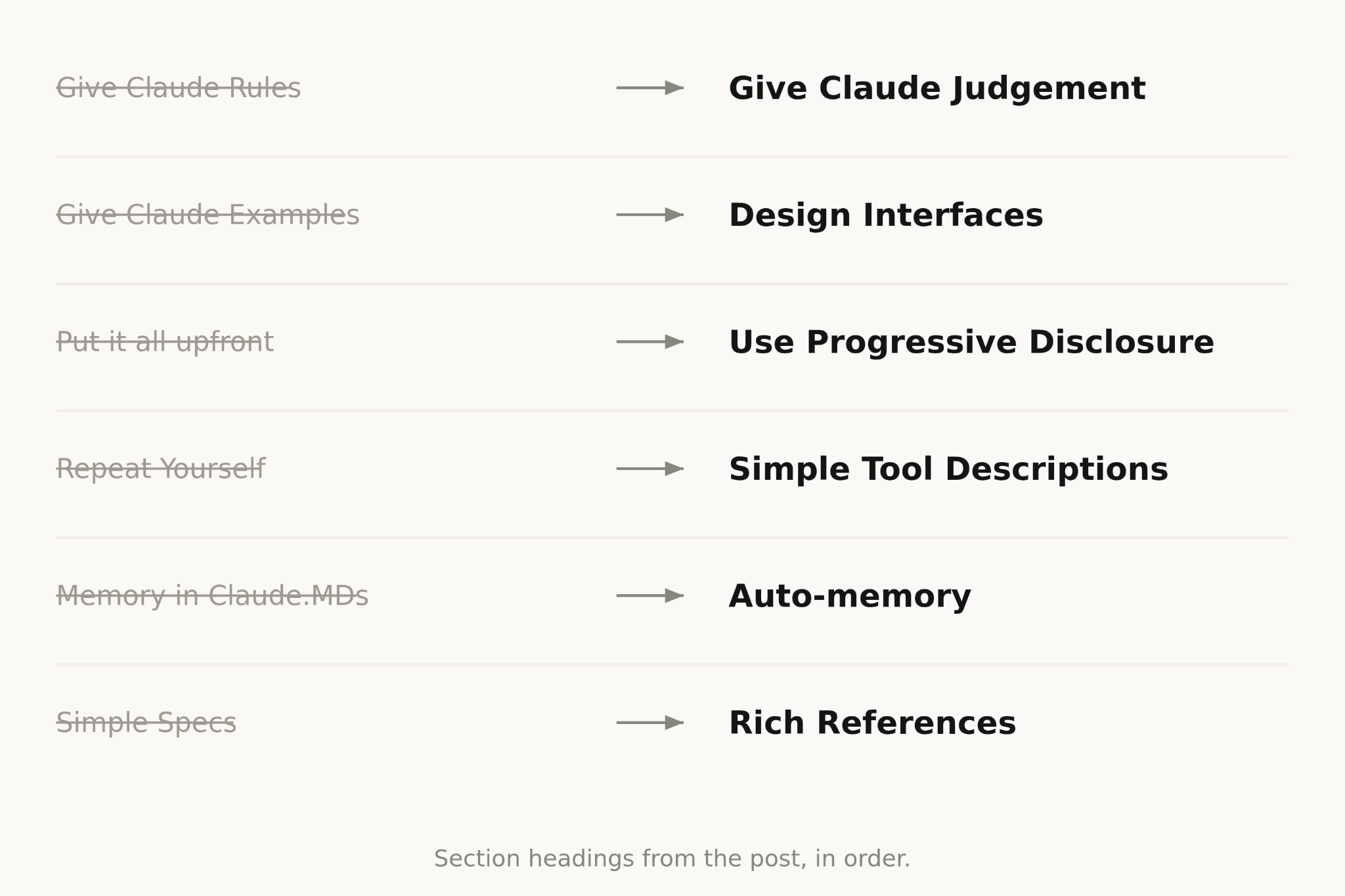
過去:Claude にルールを与える
現在:Claude の判断に任せる
Claude Code を初めて導入した際、ファイル削除といった最悪の事態を回避させる必要がありました。そのため、必ずしも常に正しいとは限らない、非常に強い指示を出す必要があったのです。
例えば、当時のシステムプロンプトには以下のように記載されていました。
*コードではデフォルトでコメントを書かないこと。マルチパラグラフのドキュストリングや複数行のコメントブロックは書かないこと。1 行に短くまとめること。ユーザーが要求しない限り、計画・意思決定・分析用の文書を作成しないこと。中間ファイルではなく、会話のコンテキストに基づいて作業すること。
しかし、特定の種類のプロンプトにおいては、この指示は誤りとなることがありました。ドキュメント作成の場合、ユーザーには独自の好みがある場合や、非常に複雑なコードの一部に複数行のコメントブロックが必要なケースもあるからです。
それでも当時のモデルでは、これらのガードレール(安全装置)がなければ Claude が生成するコメントは多くの場合で不適切となり、私たちはこのトレードオフを受け入れざるを得ませんでした。しかし、新しいモデルは判断力に優れており、明示的なルールがなくてもこうした意思決定を適切に行うことができます。
新しいシステムプロンプトでは、以下のように定めています。
*周囲のコードに合わせて書くこと:コメント密度、命名規則、慣習(イディオム)を揃えること。*
過去:Claude に例示を与える
今:インターフェースの設計を重視する
ツール利用における最大のルールは、Claude に使用例を示すことでした。しかし最新のモデルでは、使用例を与えることが逆に探索範囲を制限してしまうことが判明しました。
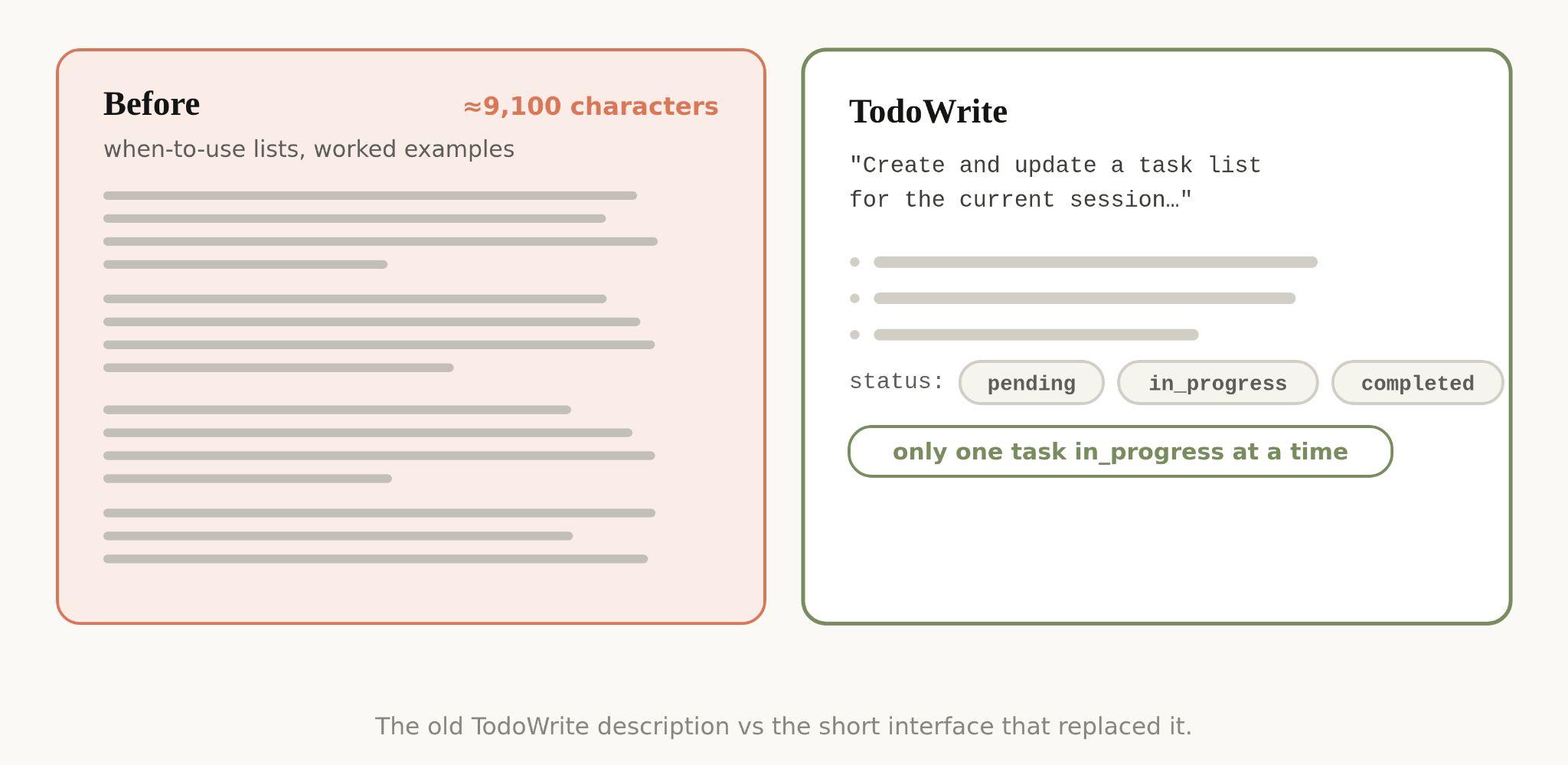
代わりに、使用例に頼るのではなく、ツールやスクリプト、ファイルの設計そのものに焦点を当てましょう。Claude がアクセスできるパラメータは何か、それらをどうすればより表現力豊かにできるかを考えるのです。
例えば、Todo ツールの例では、「pending(未着手)」「in_progress(進行中)」「completed(完了)」という列挙体として status を定義するだけで、Claude に対してその使い方を暗示することになります。また「1 つのアイテムを in_progress に保つ」という指示は、私たちが求める動作を明確に定義する役割を果たします。
次に:すべてを冒頭に配置する
今:段階的な情報開示を活用する
Claude Code はコーディングに特化していたため、システムプロンプトにはコードレビューや検証の方法に関する詳細な情報が含まれていました。これらは常に必要なわけではありませんが、必要となった際には極めて重要な情報でした。
その後、Claude Code は段階的な情報開示を非常に巧みに使いこなせるようになりました。つまり、必要なタイミングで適切なコンテキストを読み込むのです。例えば、検証とコードレビューの機能を独立したスキルとして切り出し、Claude Code が状況に応じて選択的に呼び出せるようにしました。
プログレッシブ・ディスクロージャー(段階的開示)はスキルだけでなく、ツールにも適用されます。一部のツールは「遅延読み込み」方式を採用しており、エージェントが実際に使用する前に ToolSearch で完全な定義を検索する必要があります。これにより、必要な時までコンテキストを占有しない Task ツールなど、より多くのツールを用意することが可能になります。
この考え方は、ユーザー自身の CLAUDE.md や Skill.md ファイルにも応用できます。「Claude がそれを見つけられないからといって、遭遇しうるあらゆるプラクティスを網羅した中央リポジトリにする必要がある」というのはよくある誤解です。むしろ、必要なタイミングで読み込めるファイルツリーを構築することを検討してください。
以前:繰り返し
現在:シンプルなツール説明
以前の Claude モデルでは、同じ指示が繰り返されたり、コンテキストウィンドウの末尾にある指示の方が先頭にあるものより重視されたりすることがありました。そのため、システムプロンプトにツールの参照を含める一方で、ツール説明内にも使用手順を記載するという重複が生じていました。
しかし、こうした繰り返しを削除し、ツールの使用方法に関する指示はシステムプロンプトではなく、ツール説明自体に記載するだけで十分であることがわかりました。
以前:CLAUDE.md ファイル内のメモリ
今:自動メモ機能
以前は、# キーボードショートカットを使って CLAUDE.md に自動的に書き込むことで、ユーザーに情報を保存するよう推奨していました。しかし現在は、Claude が作業内容やあなたに関連する記憶を自動的に保存します。
昔:シンプルな仕様書
今:豊富な参照機能
プランモードでは、Claude Code は主に計画を記した Markdown ファイルに依存してきました。これらのファイルを計画として保存することで、必要な時に Claude が参照できるようになっていました。また、より長期的なプロジェクトで作業する際に Claude が参照できるように、コードベース内に仕様書を保存しておくことも同様のベストプラクティスでした。
しかし私たちは、Claude がますます複雑な参照を処理できることを発見しました。単純な Markdown ファイルの代わりに、新しいアーティファクト機能で作成された HTML アーティファクトを参照できるようになりました。
また、コード形式で Claude に参照を与えることも可能です。仕様書は詳細なテストスイートであってもよく、あるいは別のコードベースにある関数(Claude が移植する対象となるもの)でも構いません。
評価基準(ルブリック)も参照の一種です。ルブリックを使えば、ダイナミックワークフロー を活用して検証エージェントを起動し、特定の分野におけるあなたの嗜好(例えば「良い API デザインとはどのようなものか」など)を試行・検証させることができます。
これらをコンテキストに適用する
これらすべてを組み合わせてコンテキストを構築すると、実際にはどのような形になるのでしょうか?
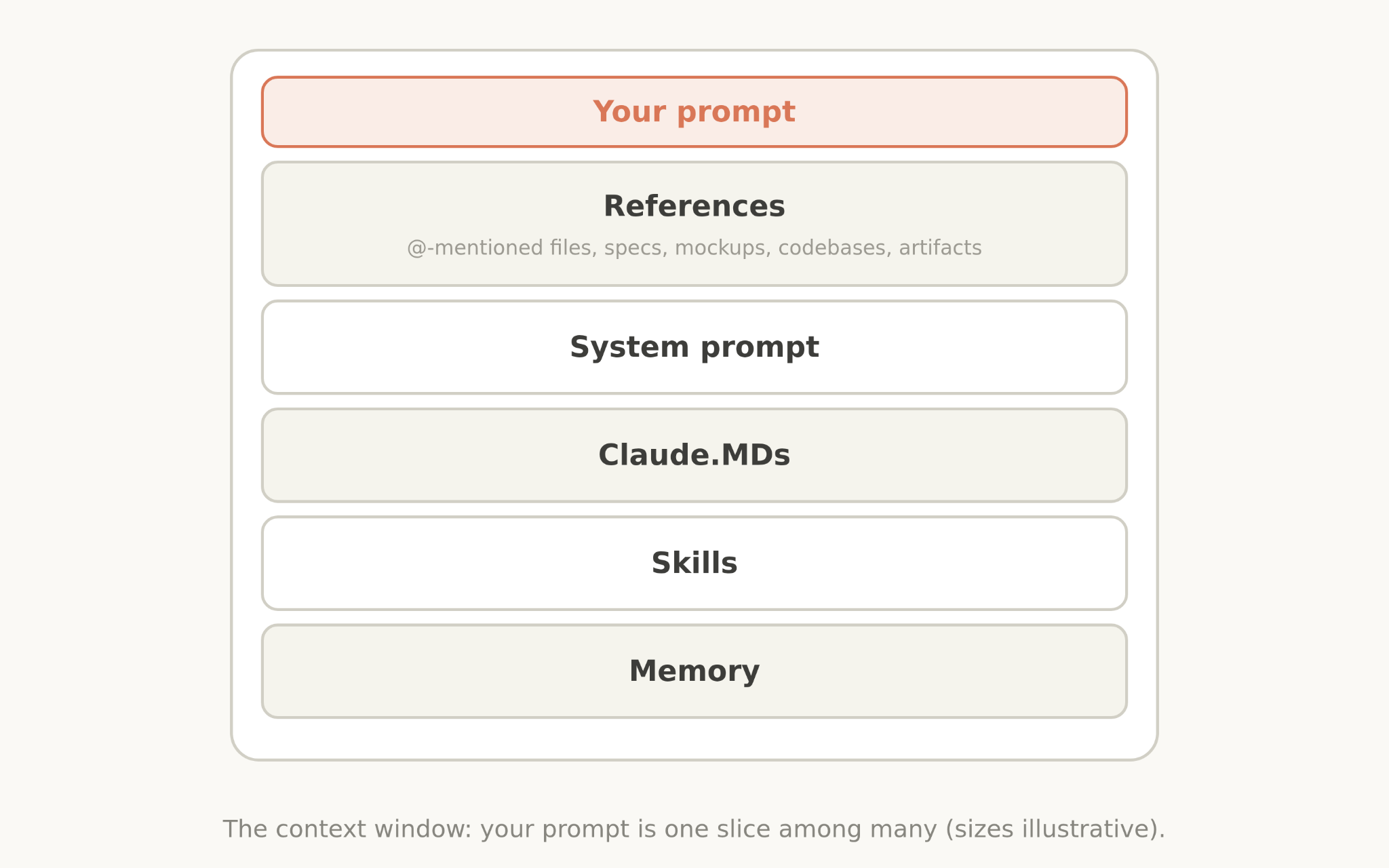
システムプロンプト
システムプロンプトは、製品ごとの文脈と深く結びついています。これは Claude に「どの製品で動作しているか」「何をしているのか」を伝える役割を果たします。
Claude Code を使う場合、この設定を変更することはまずないでしょう。ただし、独自のエージェントハネス(枠組み)を構築する場合は、ここにお金をかけるべきです。
CLAUDE.md
CLAUDE.md は軽量に保ち、リポジトリの目的を簡潔に記述しましょう。その代わり、トークンの多くはコードベース内の「落とし穴」や注意点の説明に割くのが効果的です。
例えば、「型定義は単一の巨大なファイルにまとめており、他の場所には存在しない」といったルールがある場合も、それを明記できます。「ファイルシステムやリポジトリ構造を見ればわかるはずの当然のこと」を列挙するのは避けましょう。
段階的な情報開示(プログレッシブ・ディスクロージャー)を積極的に活用してください。例えば、作業検証に関する複数の独自手順がある場合は、「検証スキル」としてまとめた上で、CLAUDE.md から参照するようにします。
スキル
スキルは、Claude が必要な時に情報を素早く見つけられるよう導く、軽量なガイドと捉えてください。
ただし、極めて重要な領域を除き、過度に制約を設けるのは避けましょう。長いスキルドキュメントを作成する必要がある場合は、段階的な情報開示を意識して、複数のファイルに分割・整理するのがベストです。
最も効果的なのは、あなた自身やチーム、製品固有の意見、知識、あるいはベストプラクティスをスキルとして組み込む場合です。
リファレンス
@ 記号を使ってファイルをメンション(言及)することで、リファレンスとして含めることができます。これにより、Claude は現在の計画に関する詳細な情報を参照できるようになります。
これは仕様書やモックアップ、あるいはコードベース全体に含まれている可能性があります。一般的には、Claude が非常に得意とする言語で記されたファイルを選ぶべきです。例えば、デザインの HTML モックアップは、その説明やスクリーンショットよりも、Claude に対して明確で忠実な指示を提供し、より良い結果をもたらす傾向があります。
シンプル化を試みる
システムプロンプト、スキル定義、CLAUDE.md ファイル全体を通じて、私たちが行ったのと同じようにシンプル化が必要になる場合があります。これらを自動的に支援するために、新しいコマンド claude doctor を導入しました。特に高度なモデルに対するプロンプト作成の詳細については、Fable フィールドガイドをご覧ください。
*この記事は、Anthropic の技術スタッフである Thariq Shihipar によって執筆されました。
原文を表示
Then and now
There were a number of previous context engineering best practices that had become myths. Including:.
Then: Give Claude rules
Now: Let Claude use judgement
When we first rolled out Claude Code, we needed to be sure that Claude avoided worst case scenarios, such as deleting files. This meant we would give particularly strong guidance that might not always be true, For example, in the system prompt we used to say:
*In code: default to writing no comments. Never write multi-paragraph docstrings or multi-line comment blocks — one short line max. Don't create planning, decision, or analysis documents unless the user asks for them — work from conversation context, not intermediate files.*
But for a certain subset of prompts, this guidance would be wrong. In the case of documentation, the user may have their own preferences, or specific parts of very complex code might need multi-line comment blocks.
Still, without these guardrails for older models, the comments Claude wrote would be incorrect in many cases and we had to accept this tradeoff. But newer models have better judgement and can handle these decisions well without explicit rules.
In the new system prompt we say: *Write code that reads like the surrounding code: match its comment density, naming, and idiom.*
Then: Give Claude examples
Now: Design interfaces
The number one rule for tool usage was to give Claude examples on how to use them. With our newest models, we’ve found that giving examples actually constrains them to a certain exploration space.
Instead of using examples, think more about the design of your tools, scripts and files- what parameters does Claude have and how can they be more expressive?
For example, in the Todo tool example, just listing status as an enumeration between pending, in_progress, and completed, hints to Claude about how to use it. The instruction on keeping one item in_progress helps define our requested behavior.
Then: Put it all upfront
Now: Use progressive disclosure
Because Claude Code was focused on coding, our system prompt included detailed information on how to do code review and verification. These were not always needed, but when they were, it was crucial information.
Since then, Claude Code has gotten very competent at using progressive disclosure- loading the right context at the right times. For example, we moved verification and code review into their own skills that Claude Code could selectively call.
But progressive disclosure is not just for skills, we also use it for tools. Some of our tools are ‘deferred loading,’ which means the agent must search for their full definitions using ToolSearch before using them. This allows us to have more tools (such as our Task tools) that don’t take up context until they’re needed.
The same can be applied to your own CLAUDE.md and Skill.md files. A common myth is that you want to make these a central repository for every known practice that you *might* run into, because Claude would not find it otherwise. Instead, consider having a tree of files that can be loaded at the right time.
Then: Repeat yourself
Now: Simple tool descriptions
Earlier Claude models could sometimes need repeated instructions or be more likely to listen to instructions at the end of their context window than at the start. This meant our system prompt would sometimes have references to tools in the main system prompt as well as instructions in the tool description.
We found we could delete these repeat examples and put instructions on how to use tools in the tool descriptions rather than the system prompt.
Then: Memory in CLAUDE.md files
Now: Auto-memory
We used to encourage users to save things to Claude’s memory, by using the # hotkey to write to their CLAUDE.md automatically. Instead, Claude now automatically saves memories that are relevant to the work and to you.
Then: Simple specs
Now: Rich references
In plan mode, Claude Code has heavily relied on markdown files with plans. Storing these files as plans helped Claude refer to them when needed. Another similar best practice was to store specs in the codebase for Claude to refer to while working across longer projects.
But we’ve found that Claude can handle increasingly more complicated references. Instead of simple markdown files, Claude can reference HTML artifacts created by our new artifacts feature.
You may also give Claude references in the form of code. A spec may also be a detailed test suite, or a function in a different codebase that Claude might port.
Rubrics are another form of references. Rubrics allow Claude to try and verify your taste in a particular field (e.g. what does a good API design look like) by using dynamic workflows and spinning up verifier agents with those rubrics.
Applying this to your context
Pulling this all together, what does this look like when you assemble your context?
System Prompt
A system prompt is heavily tied to the product context. It tells Claude what product it’s operating in and what it’s doing. For Claude Code, you will likely never modify this, but if you are building your own agent harness, this is where you should spend a lot of time.
CLAUDE.md
Keep your CLAUDE.md lightweight and briefly describe what your repo is for, but spend most of the tokens on gotchas inside of the codebase. For example, you may organize your code to keep types in one monolithic file and nowhere else. Avoid stating ‘the obvious’ things Claude should know by looking at your file system or your repo.
Use progressive disclosure heavily, for example if you have several unique instructions on how to verify your work, create a verification skill and reference it from your CLAUDE.md.
Skills
Think of skills as lightweight guides to let Claude find information when needed. Avoid making them overconstrained, except in highly important areas.
For long skills, try and use progressive disclosure as much as possible- divide it into many files and split them out.
It’s best when skills encode particular opinions, knowledge, or best practices that are particular to you, your team, or product.
References
You can @ mention files to include them as references. References allow Claude to refer to in-depth information about the current plan.
This might be in specs files, mockups, or even entire codebases. Generally you should prefer files that are in code as it provides clear, high-fidelity instructions to Claude in a language it knows very well. For example, a HTML mockup of a design will generally produce better results than a description of the design or a screenshot.
Try simplifying
Across your system prompt, skills, and CLAUDE.md files, you may need to simplify just like we did. We rolled out a new command called claude doctor, which will help you do this automatically as well. For more details on prompting more advanced models specifically, check out our Fable field guide.
*This article was written by Thariq Shihipar, member of technical staff, Anthropic.*
関連記事
News to Guide
ニュースの次に確認する
発表内容を、現在の料金や仕様と照らし合わせられる関連ガイドです。
今日のまとめ
AIデイリーブリーフで今日の重要ニュースをまとめ読み