GitHub Copilot アプリにスタックセッションとプルリクエスト機能
GitHub は Copilot アプリの「スタックセッション」という新機能を発表し、単一のリポジトリ内で複数のタスクを連鎖的に実行できる仕組みを紹介した。
AI深層分析を開く2026年7月31日 03:26
AI深層分析
キーポイント
スタックセッション機能の導入
GitHub Copilot アプリに、同じリポジトリ内の関連するタスクを連続して処理できる「スタックセッション」機能が追加された。
複雑なレガシーコードの刷新事例
著者は10年以上前のReact 15やLessを使用する古いプロジェクトを、AIを活用してモダン化を試みる過程でこの機能を実践した。
計画モードと試行錯誤のプロセス
著者はまず詳細なプロンプトで「Plan mode」を用いてリファクタリングの計画を立て、Claude Opus 4.8やGPT-5.5との対話を経て実行に移した。
AIによる自動化の限界と課題
一度目の大規模な書き換えは失敗したが、これは著者のプロンプト構成の問題であり、スタックセッションのような逐次的アプローチが有効であることを示唆している。
セッションの切り替えによる作業の整理
既存の開発ブランチとの整合性問題に直面した際、新しいセッションを開始してプルリクエストをクローズし、スタイリングの変更を別ブランチへ適用することで混乱を回避した。
重要な引用
This image is a set of stacked sessions. They're a series of tasks in the same repository, where each session builds off each other!
Trying to untangle this absolute mess before AI would have taken me weeks.
I passed this into Claude Opus 4.8 got a Rubber Duck review from GPT-5.5
Which is really just a new form of procrastination, ha.
編集コメントを表示
編集コメント
本記事は、GitHub Copilot アプリが単発のコード生成を超えて、プロジェクト全体の文脈を理解し、複数のタスクを連鎖的に処理する「スタックセッション」機能を強化したことを示している。著者の実体験を通じて、AIによる大規模リファクタリングにおいては、一度にすべてを書き換えるのではなく、計画と実行を段階的に繰り返すアプローチの有効性が浮き彫りになっている。
Source Article
元記事を日本語で読む
本文に関係しない購読案内、埋め込み通知、サイト内プロモーションは除いています。
GitHub Copilot アプリのスクリーンショットを少しご覧ください。小さな画面ですが、多くのアイコンが並び、私が非常に楽しみにしている素晴らしい物語を語っています。
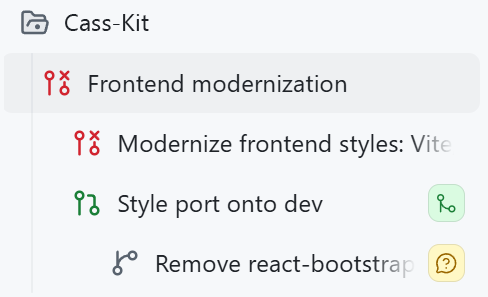
この画像は「スタックセッション」の集合です。同じリポジトリ内で行われる一連のタスクで、それぞれのセッションが前の成果を踏襲して進んでいきます。
詳細については後ほど触れますが、まずはなぜこのスクリーンショットがこれほどまでに魅力的なのか、その背景を10 年以上前に遡って説明しましょう。
私が所有する古いリポジトリの一つに、個人用のアプリがあります。2014 年頃につくったもので、長年にわたり私の期待に応えてくれました。カレンダーやスマート家電の管理、タスク処理などを含む、私専用の「ライフダッシュボード」のような役割を果たしてきたのです。
時々アップデートは行ってきましたが、その作業は年々難しくなってきていました。
依存関係があまりにも古くなってしまったのです。恥ずかしいほどに古いバージョンです。React 15(2016 年リリース)を使い、CSS の前処理には Less を採用し、当時の react-bootstrap も使用していました。はい、お読みいただいた通りです。Bootstrap です。これはもう時代遅れでした。
AI が登場する前にこの複雑な状況を整理しようとしたら、数週間かかる計算だったでしょう。以前も挑戦して断念したことがあります。世界最大のアプリではありませんが、決して小さくなく、手を入れるのは苦痛を伴う作業でした。その労力に見合う価値があるとは到底思えなかったのです。
しかし、私たちは今や AI を利用できます。そこで GitHub Copilot アプリを起動し、リポジトリを追加して作業を開始しました。
まず試したかったのは、一発で解決できるかということでした。
結論から言うと、できませんでした。それでも私は挑戦しました。Plan モードで使用したプロンプトは以下の通りです。
「このプロジェクトのフロントエンドをモダン化したいです。10 年以上前に書いたコードが多く残っており、大幅な整理が必要です。まずは Tailwind の採用か、あるいはバニラ CSS の使用を検討しています(どちらが適切か判断できるよう、両方を精査してください)。Less やその他の古いスタイル記法はすべて削除し、アクセシビリティとレスポンシブ対応の観点からコードをクリーンアップしましょう。今はまずスタイリングに集中し、その後に段階的に React の機能整理と統合を進めたいと考えています。依存関係のモダナイゼーションも検討する価値があるかもしれません。着手前に計画を立てましょう。
- 既存のコードはすべて聖域ではありません。必要であれば部分的にはじめから作り直すことも厭いません。
- リンクはホバー時やフォーカス時に色を変え、アンダーラインを表示するようにします。
- 入力ボックスは全体的に角丸を小さくし、ラベルはよりシンプルで明瞭なデザインにします。
- コンテナには適切な幅制限と最大幅を設定し、入力ボックスが広いモニター上で横いっぱいに広がらないようにします。」
このプロンプトを Claude Opus 4.8 に渡し、GPT-5.5 でラバーダックレビュー(自己検証)を行い、意思決定に至るまで何度もやり取りを行いました。ようやく納得できる計画に到達したところで「実行」ボタンを押すと、アプリがプロジェクトに対して作業を開始しました。
…しかし結果は失敗でした。原因は私自身にあります。
次に気づいたのは、この試みは以前にも行ったことがあるという事実でした。
以前、「試しては諦めた」と言ったのを覚えていますか?実は、古い開発ブランチ(devbranch)に一部を近代化済みのコードが残っていたことに気づきました。その際、自分が直面した互換性の問題には気づいていなかったのです。
でも、これは良いことでした!
このセッションから新しいバージョンを実行すると、メインブランチから分岐していることはわかったものの、普段使っている現在のデプロイ環境は、部分的に更新された開発版(dev)に基づいていることに気づきました。そのため、私が自分用に実装した機能のうち、いくつかはこの変更セットに含まれる必要がありました。しかし、その変更量は大きすぎたため、開発ブランチからの変更をメインに取り込むのではなく、自分の精神衛生を守るために、まず開発ブランチにこれらの変更を適用する必要があったのです。
AI 以前なら、こんな状況で頭を抱えていたかもしれません。正直、私もここでイライラしました。そこそこの計画だと思って時間を費やし、トークンを消費して実行しようとしたからです。でも!簡単な指示一つで方向転換(セッションの切り替え)ができました。これは私が予想していたよりもずっとクールでした。
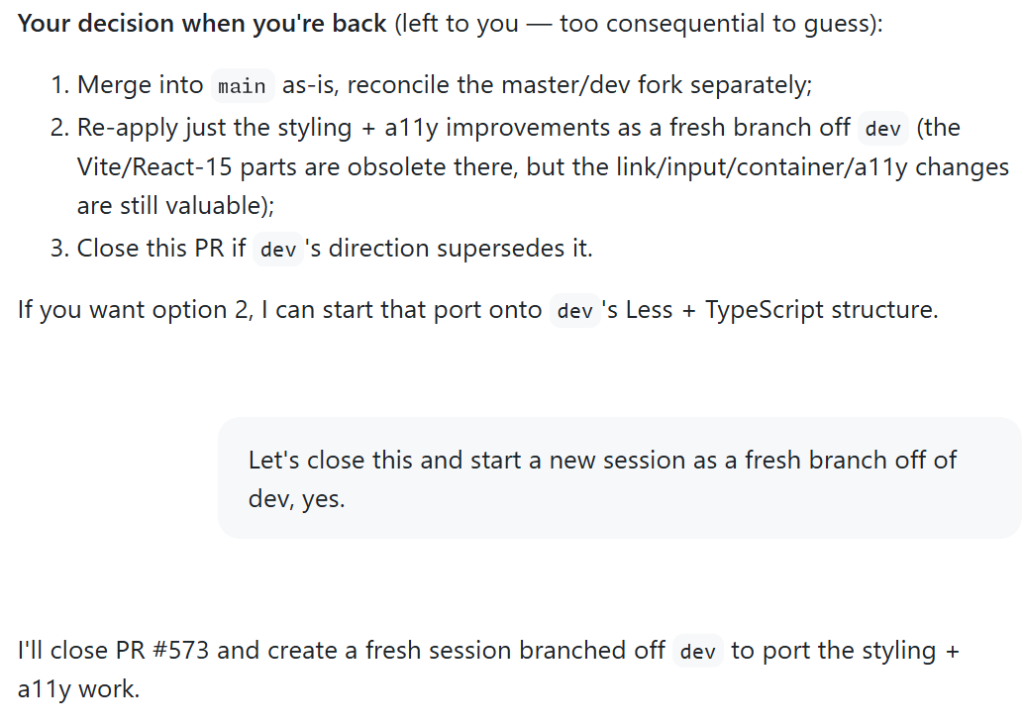
すべてが無駄になったわけではありません。Copilot が新しいセッションを作成し、私が試みたプルリクエストをクローズ、そして私が行ったスタイル変更を、開発ブランチに適用する際の変更点として取り込みました。
3 つ目のステップ:テスト後の発見
さて、まずは良いブランチを作り、それなりに満足できるプルリクエストも作成していました。しかしテストを始めてみると、コンソールに古い警告が表示されているのに気づかざるを得ませんでした。
「findDOMNode」や「componentWillReceiveProps」といった関数への古い参照を目にした瞬間、胸が重くなりました。これらは私が何年も触っていないものですから。
これらの参照は私のコードベースにはほとんど残っていませんでしたが、react-bootstrap にはまだ存在していました。そこで Plan モードを再度起動し、ライブラリをアップグレードすべきか、それとも完全に削除すべきかを判断する必要がありました。
「react-bootstrap を完全に削除して現代的な代替品に置き換えるべきでしょうか?それとも既存のコンポーネントをアップグレード・移行するだけでよいでしょうか?」
この問いに対して、適切なプランが提示されました。選択肢について議論した結果、ライブラリ自体を完全に置き換えることが推奨されました。
4 つ目のステップ:セッションを重ねる
変更内容が既存の作業に悪影響を与えないよう確認する必要がありましたが、react-bootstrap の置き換えは現在の作業範囲から考えると規模が大きすぎると感じました。
「エージェント型」の開発業務において、この種の範囲拡大(スコープクリープ)を避けるのは特に難しいと感じています。コードをすべて自分で書く必要がないため、「やりたいことをすべて解決する 10,000 行ものプルリクエストを作成したくなる」という誘惑に駆られがちです。しかし、それは実質的に新しい形の先延ばし行為に過ぎません。
そこで、自分自身でテストするための巨大なプルリクエストを作成するのではなく、新しいセッションを立ち上げて作業を分割しました。そして以下のようにプロンプトを入力しました:
既存の作業に対してプルリクエストを作成し、その成果物をベースに新しいセッションを開始して React-Bootstrap の置き換え作業に取り掛かりましょう。この新しい作業は独立したブランチとなり、今回の変更がマージされた後に dev ブランチへ別のプルリクエストとして統合されます。
この部分こそが、私がこの記事を書くに至った「魔法のような」体験でした。GitHub Copilot アプリの機能は以下の通りです。
- 現在の
devブランチからのすべての変更をまとめてプルリクエストを作成した - React-Bootstrap の削除作業に対して「スタックセッション」を開始しました(既存の文脈を引き継ぎ、その後に実行するセッションを作成し、計画を立てて承認を求め、実際に実行した)
- 既存の作業に続く形で、独立したスタック形式のプルリクエストも作成した
これは本当に素晴らしい体験でした。スタックされたセッションとスタックされたプルリクエスト?これが未来なのでしょうか。
答えは YES です。
名前だけでは意味が伝わりにくい方のために説明しましょう。「スタック」とは、同じリポジトリ内で複数のプルリクエストが連鎖している状態を指します。各プルリクエストは、その下のプルリクエストのブランチを対象とし、最終的にメインブランチに到達する順序付けられたチェーンを形成します。
私のケースでは、セッション自体が連続して実行されただけでなく、その変更内容もまた連鎖していました。
5 ステップ:スタックされたプルリクエストと共に夕日を背にして進む
少し軽率なほど興奮しているかもしれませんが、私の喜びは本物です。長年放置していた古いコードベースを扱うストレスから解放され、これらの変更をスムーズにリリースできた体験は非常に心地よいものでした。
最初のスクリーンショットをもう一度見てみましょう。一つずつ解説していきます。
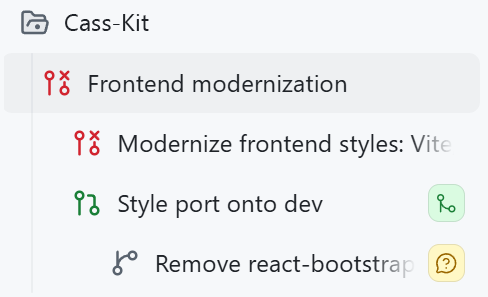
画面の上部には、取り込んだリポジトリが表示されています。
その下にある「Frontend modernization」は、最初のセッション名です。
さらにその下にネストされているのは、最終的にマージしなかったプルリクエストへの最初の試行です(赤いアイコンがそのことを示しています)。
同じレベルでネストされている次の層は、devbranch に対して機能するプルリクエストが完成した場所です。
さらに下のネストされたセッションでは、React Bootstrap の変更を加えたドラフトのプルリクエストが進行中です。
ソフトウェア開発が常に順調に進むわけではありません。しかし、こうした最新のツールを使えば、プロジェクトは格段にスムーズになります。
ご自身のコードベースを近代化したいとお考えなら、ぜひお試しください!
GitHub でコードをコミットする場所であればどこでもプルリクエストのスタックを確認できますし、GitHub Copilot アプリ内ではセッションのスタックも確認可能です。
原文を表示
I want you to look at this screenshot for a moment from the GitHub Copilot app. It’s a small one, it’s got a lot of icons, and it tells the most glorious story that I’m really excited about.
This image is a set of stacked sessions. They’re a series of tasks in the same repository, where each session builds off each other!
More on those below, but first, why is this screenshot so magical? We need to go back more than a decade to start. I have this very old repo of mine for a personal app. I first made it ages ago (end of 2014-ish), and it’s done what I want it to do (it’s like a personal “life” dashboard of calendars and smart devices in my home and task management) for all those years. I occasionally do some updates, but those have gotten harder and harder to wrangle.
My dependencies had gotten old. Embarrassingly old. I was using React 15 (which was released in 2016), Less for CSS pre-processing, and a version of react-bootstrap from around that time. Yes, you read that right. Bootstrap. This was old.
Trying to untangle this absolute mess before AI would have taken me weeks. I had tried and given up before. It’s not the largest app in the world, but it’s juuuust big enough that it would be painful, and the juice was simply not worth the squeeze.
…but we do have AI now, and so I fired up the GitHub Copilot app, added the repo, and got started.
First step: Could I one-shot this?
No.
I tried though! This is the prompt that I used in Plan mode:
I want to modernize the frontend for this project. I first wrote a lot of this code more than 10 years ago and it should be cleaned up a lot. I'm thinking we start either using Tailwind or just vanilla CSS (please vet everything to help me decide), we remove all Less (etc), and clean everything up accessibility-wise and responsiveness-wise. Right now I really want to just focus on styles, and then slowly but surely organize and consolidate the React functionality. It might be worth modernizing dependencies, too. Let's come up with a plan around this before diving in.
- Nothing is sacred, it's okay if we have to completely start over some parts
- Links should change colors and add underlines on hover/focus
- Input boxes should have a smaller border radius in general, and their labels should be cleaner
- There should be good wrapping and a max-width on containers so that an input box doesn't span an entire wide monitor.
I passed this into Claude Opus 4.8 got a Rubber Duck review from GPT-5.5, and had to do quite a bit of back-and-forth to make decisions. Once I got to a place I was happy with, I hit “go” and let the app go to town on my project to see if it would work!
…it didn’t, and it was my fault.
Second step: Realizing I had tried this before
So, remember when I said I’d “tried and given up before?” Turns out, I actually had an old devbranch where I actually had modernized some parts, and didn’t realize the compatibility issues I’d run into.
But, that was a good thing!
When I ran the new version from this session, I realized that I was branching off main, but that my current deployment that I was using regularly was using my partially updated version on dev. So, some wanted features that I had made for myself needed to be included in this set of changes. But, the changes were just big enough that I actually had to apply those changes to the devbranch to save my sanity a bit, rather than pull in the devchanges to main.
Pre-AI… my word, this would have made me pull my hair out in frustration. I was admittedly frustrated here, too. I had spent time and tokens trying to get this running with what I thought was a decent plan. But! I was able to switch gears (and sessions) with a simple ask, which was way cooler than I expected it to be:
All was not wasted! Copilot made a new session for me, closed the pull request I had attempted, and ported my styling decisions to changes it was applying to the dev branch.
Third step: Findings after testing
Whew, okay, so I had a good branch going, and a pull request I was decently happy with. As I started testing, though, I couldn’t help but notice some old warnings in my console.
My heart filled with dread as I saw old references to findDOMNodeand componentWillReceiveProps, functions I personally hadn’t touched in years and years. Ugh.
Those references were not in my codebase as much anymore, but they were in react-bootstrap. I opened up Plan mode again, because I needed to figure out if an upgrade would work, or if I should remove the library entirely:
Do you think we should remove react-bootstrap entirely (and replace with a modern alternative), or just upgrade/migrate existing components?
Running this gave me a decent plan, talked through the options, and recommended replacing the library entirely.
Fourth step: Stacking a session on top of the other
I needed to make sure my changes were safe from the existing work, but the react-bootstrap replacement felt like a lot of scope creep for what I was currently doing.
I’ve found that in a lot of my “agentic” engineering work, it’s particularly hard to avoid that kind of scope creep. Because I don’t have to write all the code myself, it’s so tempting to make 10,000 line pull requests that take care of all of the things I want to do! Which is really just a new form of procrastination, ha.
So, instead of making this mega pull request for myself to test, I broke it up with a new session, and prompted:
Let's make a pull request for the existing work, and then start a new session for this react-bootstrap replacement work that will branch off this existing work here, and be a separate pull request to merge into dev after this one.
This is the part that felt magical enough to make me want to write this blog post. The GitHub Copilot app:
Made a pull request for all of my current changes off dev
Made a “stacked session” for react-bootstrap removal (it took the previous context, made a session to run after the existing session, created a plan, had me approve the plan, and ran)
Made a stacked pull request following my existing work
THIS WAS SO COOL. Stacked sessions and stacked pull requests? Is this the future?
YES.
In case you don’t get what that means by name: A stack is a series of pull requests in the same repository where each pull request targets the branch of the pull request below it, forming an ordered chain that ultimately lands on your main branch.
In my case, not only did the sessions follow each other, but their changes did too!
Fifth step: Sailing off into the sunset with stacked pull requests
I know I’m being somewhat cheeky with my excitement, but my happiness is sincere. The ease of shipping these changes was a delightful experience after neglecting my old codebase for ages.
Let’s look at that first screenshot again: I’ll walk you through it.
At the top, you can see the repo I pulled in.
Next “Frontend modernization” is the initial session name.
That next layer nested in is the first attempt at a pull request, that we ultimately didn’t ship (hence the red icon).
The next layer nested at the same level is where we got a working pull request for the devbranch.
The nested session below that is the draft pull request in progress, with the react-bootstrap changes.
Software development has never been smooth. But this project was made a whole lot easier with these modern tools.
If you’re looking to modernize your own codebases, give this a try!
Check out pull request stacks anywhere you commit code on GitHub, and stacked sessions in the GitHub Copilot app >
The post Stacked sessions and pull requests in the GitHub Copilot app appeared first on The GitHub Blog.
AI算出
主要ニュースainew評価高い
AI エージェントによるコード生成・実行プロセスの革新(スタックセッション)を報じており、具体的な新機能として明確な新規性があるため高評価とした。ただし、日本固有の導入事例や規制情報は含まれていないため関連性は低め。
6つの評価軸を見る
- AI関連度
- 75
- 情報源の信頼性
- 100
- 新規性
- 75
- 調べる価値
- 75
- 重複の少なさ
- 100
- 日本での有用性
- 25
関連記事
News to Guide
ニュースの次に確認する
発表内容を、現在の料金や仕様と照らし合わせられる関連ガイドです。
今日のまとめ
AIデイリーブリーフで今日の重要ニュースをまとめ読み