Olostepを用いたドキュメントサイト全体のクロール方法
この記事は、ドキュメントサイトの構造化データをAIエージェント用に抽出する際、従来のスクレイピングツールよりも効率的なOlostepツールの活用方法とGradioを用いたフロントエンド実装を解説している。
キーポイント
Olostepの優位性
ScrapyやSeleniumに比べ、検索・クローリング・構造化出力(Markdown/JSON)を1つのAPIで完結させ、LLMフレンドリーなデータ抽出を可能にする。
ドキュメントサイトの課題
ネストされたページや重複リンク、不規則な構造を持つドキュメントサイトからAIが利用可能な形式へ変換するプロセスの複雑さを指摘している。
実装アプローチ
Olostepを用いたスクリプト作成と、Gradioを使用したユーザーフレンドリーなフロントエンドによるクローリングツールの構築手順を提示している。
Olostep の主な利点
Scrapy や Selenium と異なり、検索、クロール、構造化を API 1 つで完結させ、Markdown や JSON などの LLM 対応フォーマットへの直接出力に対応しています。
必要な Python パッケージ
プロジェクトには Olostep SDK (python 3.11 以上)、API キー管理用の python-dotenv、進捗状況表示用の tqdm が必要です。
環境設定とセキュリティ
Olostep ダッシュボードから API キーを生成し、.env ファイルに記述することでコードから機密情報を分離し、安全に管理できます。
設定の定義
開始URL、最大ページ数、クロール深さ、除外ルールなどの主要なクロールパラメータをコード内で明確に定義して制御します。
影響分析・編集コメントを表示
影響分析
本記事は、RAG(検索拡張生成)やAIエージェント構築におけるデータ収集のボトルネックを解消する具体的なソリューションを示しており、開発現場での実装コスト削減に寄与します。特に、複雑なドキュメント構造からのデータ抽出において、従来のスクリプトベースのアプローチからAPI駆動型アプローチへの移行を促す意義があります。
編集コメント
AIエージェントの学習用データセット構築において、クローリングと前処理の工程をどう効率化するかという実務的な課題に対する有益なガイドです。ただし、特定ツールの紹介色が強いため、代替手段との比較検討も併せて行うことを推奨します。
 image**
画像提供:著者
# イントロダクション
ウェブクロール(web crawling)とは、ウェブサイトから構造化された方法で自動的にページを訪問し、リンクを追跡してコンテンツを収集するプロセスです。これは、ドキュメントサイト、記事、ナレッジベース、その他の Web リソースから大量の情報を収集するために一般的に使用されます。
ウェブサイト全体をクロールしてそのコンテンツを AI エージェントが実際に使用できる形式に変換することは、言葉ほど単純ではありません。ドキュメントサイトには、ネストされたページ、繰り返されるナビゲーションリンク、定型文(boilerplate content)、一貫性のないページ構造が含まれていることがよくあります。さらに、抽出したコンテンツは、検索、質問応答、またはエージェントベースのシステムなどの下流の AI ワークフローで有用となるように、クリーニングされ、整理され、保存される必要があります。
本ガイドでは、Scrapy や Selenium ではなく Olostep を使用する理由を学び、ウェブクロールプロジェクトに必要なものをセットアップし、ドキュメントサイトをスクレイピングするためのシンプルなクロールスクリプトを作成し、最後に誰でもリンクや他の引数を入力してウェブサイトページをクロールできるフロントエンドを Gradio で作成する方法について解説します。
# Scrapy や Selenium ではなく Olostep を選ぶ理由
**
Scrapy は強力ですが、フルスクレイピングフレームワークとして構築されています。深い制御を必要とする場合には有用ですが、その分セットアップやエンジニアリングの工数が増えるという側面もあります。
Selenium はブラウザ自動化でよりよく知られています。JavaScript を多用するページとの対話には有用ですが、それ自体がドキュメントクロールワークフローとして設計されているわけではありません。
Olostep の売りははるかに直接的です:1 つのアプリケーションプログラミングインターフェース(API)を通じてウェブデータを検索、クロール、スクレイプ、構造化し、Markdown、テキスト、HTML、構造化された JSON のように LLM に優しい出力に対応しています。つまり、発見、抽出、フォーマット、下流の AI 利用のためのピースを手動でつなぎ合わせる必要がなくなります。
ドキュメントサイトの場合、クロールスタックを自分で構築する時間を減らし、実際に必要なコンテンツと作業に集中できるため、URL から実用的なコンテンツまでの道のりがはるかに速くなります。
# パッケージのインストールと API キーの設定
**
まず、本プロジェクトで使用される Python パッケージをインストールしてください。公式の Olostep ソフトウェア開発キット(SDK)には Python 3.11 以降が必要です。
pip install olostep python-dotenv tqdm
これらのパッケージはワークフローの主要部分を処理します:
- olostep は、スクリプトを Olostep API に接続します
- python-dotenv は .env ファイルから API キーを読み込みます
- tqdm はプログレスバーを追加し、保存されたページの進捗を追跡できるようにします
次に、無料の Olostep アカウントを作成し、ダッシュボードを開いて、API キーページから API キーを生成してください。Olostep の公式ドキュメントと統合機能では、ユーザーに API キーの設定のためにダッシュボードを利用するよう案内しています。
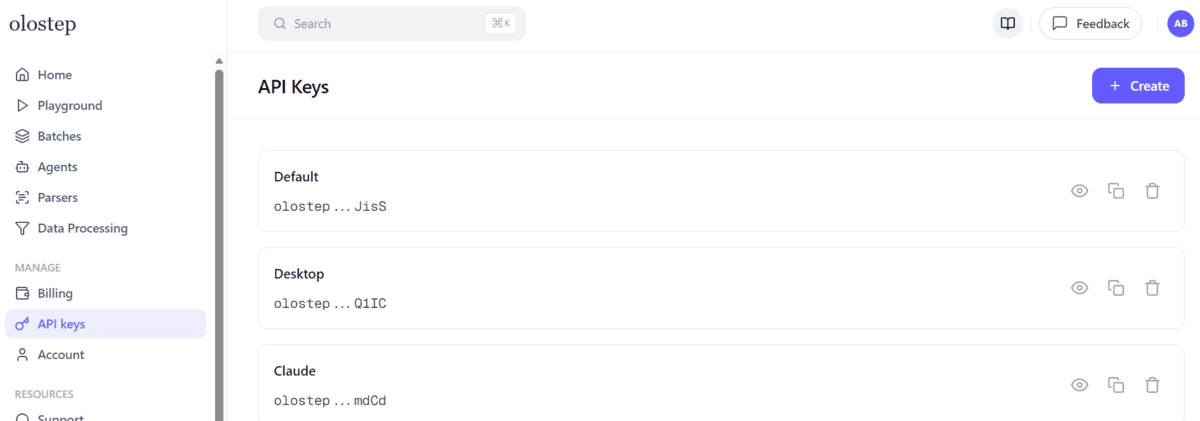
次に、プロジェクトフォルダー内に .env ファイルを作成します:
OLOSTEP_API_KEY=your_real_api_key_here
これにより、API キーを Python コードから分離でき、認証情報を管理するためのよりクリーンで安全な方法となります。
# クロールスクリプトの作成
**
このプロジェクトの一部では、ドキュメントウェブサイトをクロールし、各ページを Markdown 形式で抽出し、コンテンツをクリーニングしてローカルに個別ファイルとして保存する Python スクリプトを作成します。プロジェクトフォルダーを作成し、Python ファイルを追加した後、コードを段階的に記述していくため、追跡やテストが容易になります。
まず、クロラー用のプロジェクトフォルダーを作成してください。そのフォルダー内に、crawl_docs_with_olostep.py という名前の新しい Python ファイルを作成します。
次に、このファイルにコードをセクションごとに追加していきます。これにより、スクリプトの各部分が何を行うか、そして完全なクロラーがどのように連携して動作するかが理解しやすくなります。
// クロール設定の定義
必要なライブラリをインポートすることから始めます。次に、開始 URL、クロール深度、ページ制限、含める・除外するルール、および Markdown ファイルが保存される出力フォルダなど、主要なクロール設定を定義します。これらの値は、ドキュメントサイトのどの部分がクロールされ、結果がどこに保存されるかを制御します。
import os
import re
from pathlib import Path
from urllib.parse import urlparse

from dotenv import load_dotenv
from tqdm import tqdm
from olostep import Olostep

START_URL = "https://docs.olostep.com/"
MAX_PAGES = 10
MAX_DEPTH = 1

INCLUDE_URLS = [
    "/**"
]

EXCLUDE_URLS = []

OUTPUT_DIR = Path("olostep_docs_output")
// セーフなファイル名を生成するためのヘルパー関数の作成
クロールされた各ページは、それぞれ独立した Markdown ファイルとして保存する必要があります。そのためには、URL をクリーンでファイルシステム対応のファイル名に変換するヘルパー関数が必要です。これにより、ファイル名に適合しないスラッシュ、記号、その他の文字による問題を回避できます。
def slugify_url(url: str) -> str:
    parsed = urlparse(url)
    path = parsed.path.strip("/")

    if not path:
        path = "index"

    filename = re.sub(r"[^a-zA-Z0-9/_-]+", "-", path)
    filename = filename.replace("/", "__").strip("-_")

    return f"{filename or 'page'}.md"
// Markdown ファイルを保存するためのヘルパー関数の作成
次に、抽出されたコンテンツを保存する前に処理するためのヘルパー関数を追加します。
最初の関数は、余分なインターフェーステキストの削除、繰り返される空行の除去、フィードバックプロンプトなどの不要なページ要素の排除により、Markdown をクリーンアップします。これにより、保存されたファイルが実際のドキュメントコンテンツに焦点を当てた状態を保つことができます。
def clean_markdown(markdown: str) -> str:
    text = markdown.replace("\r\n", "\n").strip()
    text = re.sub(r"\[\s*\u200b?\s*\]\(#.*?\)", "", text, flags=re.DOTALL)

    lines = [line.rstrip() for line in text.splitlines()]

    start_index = 0
    for index in range(len(lines) - 1):
        title = lines[index].strip()
        underline = lines[index + 1].strip()
        if title and underline and set(underline) == {"="}:
            start_index = index
            break
    else:
        for index, line in enumerate(lines):
            if line.lstrip().startswith("# "):
                start_index = index
                break

    lines = lines[start_index:]

    for index, line in enumerate(lines):
        if line.strip() == "Was this page helpful?":
            lines = lines[:index]
            break

    cleaned_lines: list[str] = []
    for line in lines:
        stripped = line.strip()
        if stripped in {"Copy page", "YesNo", "⌘I"}:
            continue
        if not stripped and cleaned_lines and not cleaned_lines[-1]:
            continue
        cleaned_lines.append(line)

    return "\n".join(cleaned_lines).strip()
2 つ目の関数は、クリーニングされた Markdown を出力フォルダに保存し、ファイルの先頭にソース URL を追加します。また、新しいクローリング結果を保存する前に古い Markdown ファイルをクリアするための小さなヘルパー関数も用意されています。
def save_markdown(output_dir: Path, url: str, markdown: str) -> None:
output_dir.mkdir(parents=True, exist_ok=True)
filepath = output_dir / slugify_url(url)
content = f"""
source_url: {url}
{markdown}
"""
filepath.write_text(content, encoding="utf-8")
新しいクローリング結果を保存する前に古い Markdown ファイルをクリアするための小さなヘルパー関数も用意されています。
def clear_output_dir(output_dir: Path) -> None:
if not output_dir.exists():
return
for filepath in output_dir.glob("*.md"):
filepath.unlink()
// メインのクローラーロジックの作成
これはスクリプトの中核部分です。.env ファイルから API キーを読み込み、Olostep クライアントを作成し、クローリングを開始して完了を待ち、各クローリングされたページを Markdown 形式で取得し、コンテンツをクリーニングしてローカルに保存します。
このセクションではすべての要素をつなぎ合わせ、個々のヘルパー関数を実働するドキュメントクローラーに変換します。
def main() -> None:
load_dotenv()
api_key = os.getenv("OLOSTEP_API_KEY")
if not api_key:
raise RuntimeError(".env ファイルに OLOSTEP_API_KEY が不足しています。")
crawl = client.crawls.create(
start_url=START_URL,
max_pages=MAX_PAGES,
max_depth=MAX_DEPTH,
include_urls=INCLUDE_URLS,
exclude_urls=EXCLUDE_URLS,
include_external=False,
include_subdomain=False,
follow_robots_txt=True,
)
print(f"Started crawl: {crawl.id}")
crawl.wait_till_done(check_every_n_secs=5)
pages = list(crawl.pages())
clear_output_dir(OUTPUT_DIR)
for page in tqdm(pages, desc="Saving pages"):
try:
content = page.retrieve(["markdown"])
markdown = getattr(content, "markdown_content", None)
if markdown:
save_markdown(OUTPUT_DIR, page.url, clean_markdown(markdown))
except Exception as exc:
print(f"Failed to retrieve {page.url}: {exc}")
print(f"Done. Files saved in: {OUTPUT_DIR.resolve()}")
if __name__ == "__main__":
main()
注釈:完全なスクリプトは以下で利用可能です: kingabzpro/web-crawl-olostep。これは Olostep を用いて構築された Web クローラーおよびスターター Web アプリです。
// Web クローリングスクリプトのテスト
スクリプトが完成したら、ターミナルから実行してください:
python crawl_docs_with_olostep.py
スクリプトの実行中、クローラーがページを処理し、出力フォルダに 1 つずつ Markdown ファイルとして保存していく様子が表示されます。
クロールが完了したら、保存されたファイルを開いて抽出されたコンテンツを確認します。ドキュメントページのクリーンで読みやすい Markdown バージョンが表示されるはずです。
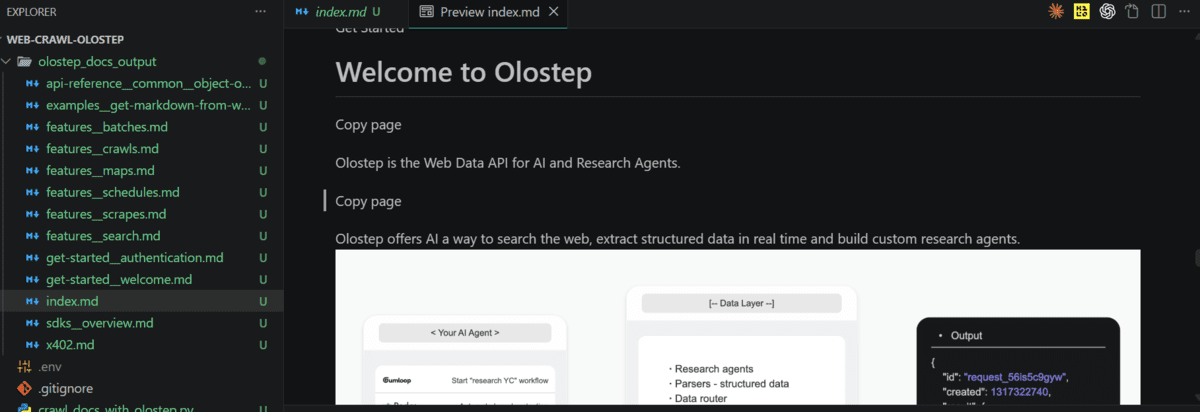
その時点で、検索、取得(retrieval)、またはエージェントベースのシステムなどの AI ワークフローでドキュメントコンテンツを使用できるようになります。
Olostep ウェブクローリング Web アプリケーションの作成
**
このプロジェクトの一部では、クローラースクリプトの上にシンプルな Web アプリケーションを構築します。毎回 Python ファイルを編集するのではなく、このアプリケーションを使えば、ドキュメント URL の入力、クロール設定の選択、クロールの実行、保存された Markdown ファイルのプレビューを一つの場所で簡単に実行できます。
このアプリケーションのフロントエンドコードは、リポジトリ内の app.py にあります:web-crawl-olostep/app.py**。
このアプリケーションはいくつかの有用な機能を実行します:
- クロールする開始 URL を入力できます
- クロールする最大ページ数を設定できます
- クロールの深さを制御できます
- 対象とする URL パターンと除外する URL パターンの追加が可能です
- インターフェースからバックエンドのクローラーを直接実行できます
- クロールしたページを URL に基づいてフォルダに保存します
- 保存されたすべての Markdown ファイルをドロップダウンリストに表示します
- アプリケーション内で各 Markdown ファイルを直接プレビューできます
- 1 つのボタンで以前のクロール結果をクリアできます
アプリケーションを開始するには、以下を実行してください:
python app.py
その後、Gradio がローカル Web サーバーを起動し、以下の形式のリンクを提供します:
- ローカル URL で実行中: http://127.0.0.1:7860
- 公開リンクを作成するには、
launch()関数内でshare=Trueを設定してください。
アプリケーションが稼働したら、ブラウザでローカル URL を開きます。今回の例では、Claude Code のドキュメント URL を入力し、50 ページを深さ 5 でクロールするよう指示しました。
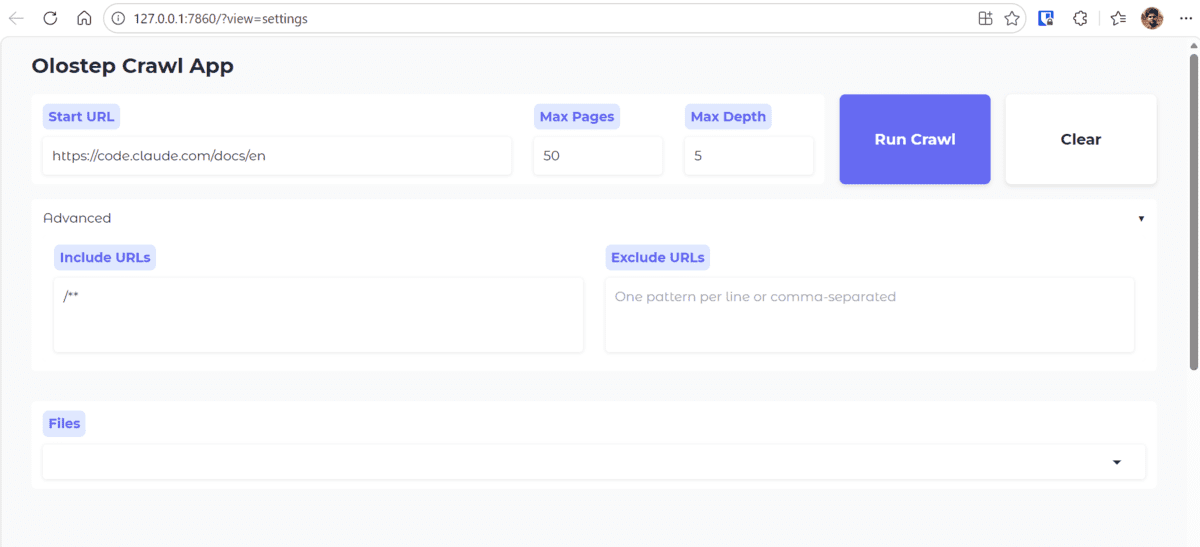
Run Crawl(クロール実行)をクリックすると、アプリケーションは設定をバックエンドのクローラーに渡してクロールを開始します。ターミナルでは、ページが一つずつクロールされ保存される様子をリアルタイムで確認できます。

クロールが完了すると、出力フォルダに保存された Markdown ファイルが含まれます。この例では、50 件のファイルが追加されていることが確認できます。
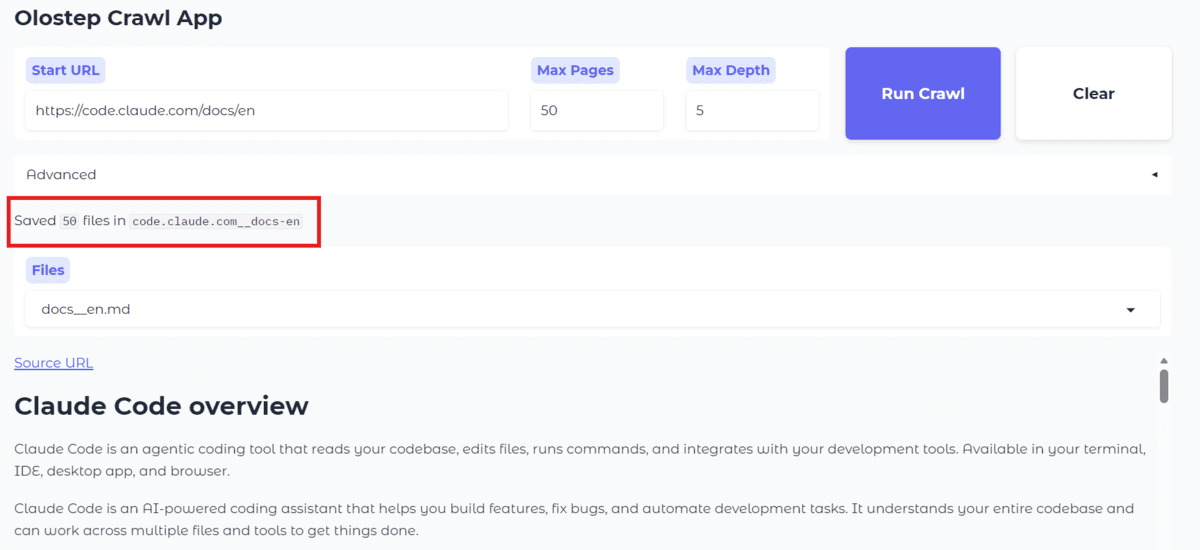
アプリケーション内のドロップダウンは自動的に更新されるため、保存されたファイルを開いて、適切にフォーマットされた Markdown(マークダウン)として Web インターフェース上で直接プレビューできます。
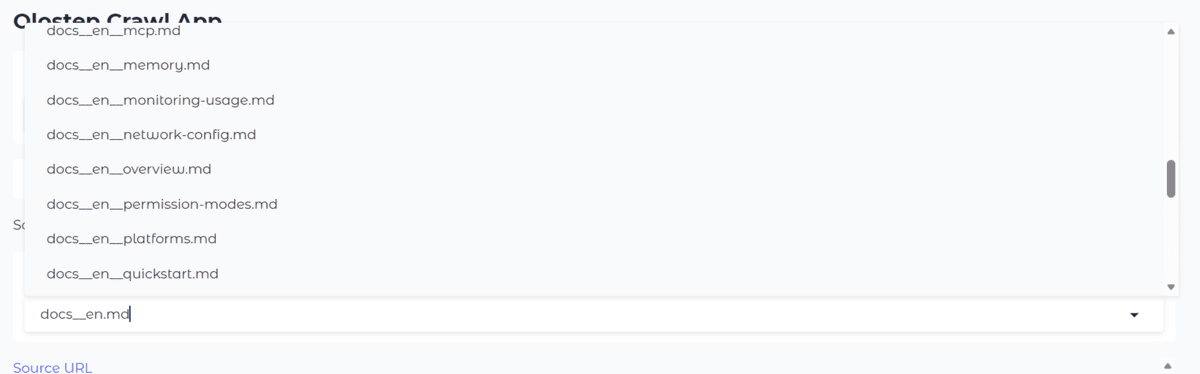
これにより、クローラーの使いやすさが大幅に向上します。毎回コード内の値を変更する必要はなく、シンプルなインターフェースを通じてさまざまなドキュメントサイトやクローリング設定をテストできます。また、Python で直接作業したくない他の人とのプロジェクト共有も容易になります。
# 最後のまとめ
**
Web クローリング(ウェブクローリング)は単に Web サイトからページを集めることだけではありません。真の課題は、そのコンテンツを AI システムが実際に活用できるクリーンで構造化されたファイルに変換することです。本プロジェクトでは、このプロセスをより簡単にするために、シンプルな Python スクリプトと Gradio アプリケーションを使用しました。
同様に重要なのは、ワークフローが実用レベルで十分な速度を持っていることです。例では、深さ 5 で 50 ページのクローリングに約 50 秒しかかからず、重いパイプラインを構築しなくてもドキュメントデータを迅速に準備できることが示されています。
この設定は一度きりのクローリングを超えて活用できます。cron やタスクスケジューラーを使用して毎日実行スケジュールを設定したり、変更されたページのみを更新したりすることも可能です。これにより、ドキュメントを常に最新の状態に保ちつつ、必要なクレジット数を最小限に抑えることができます。
この種のワークフローをビジネスとして成立させる必要があるチームのために、Olostep はその点を意識して設計されています。内部でクローリングソリューションを構築または維持するよりもはるかに手頃な価格であり、市場の同等の代替手段と比較しても少なくとも 50% 安価です。
利用規模が拡大するにつれて、1 リクエストあたりのコストはさらに低下し、大規模なドキュメントパイプラインにとって実用的な選択肢となります。この信頼性、スケーラビリティ、そして堅牢なユニットエコノミクスの組み合わせこそが、急速に成長している AI ネイティブのスタートアップの一部がデータインフラストラクチャを駆動するために Olostep を採用する理由です。
Abid Ali Awan ** (@1abidaliawan) は、機械学習モデルの構築を愛する認定データサイエンティストのプロフェッショナルです。現在、彼はコンテンツ作成に注力し、機械学習およびデータサイエンス技術に関する技術ブログの執筆を行っています。Abid はテクノロジーマネジメントの修士号と電信工学の学士号を取得しています。彼のビジョンは、精神疾患に苦しむ学生のためにグラフニューラルネットワーク(Graph Neural Network)を用いた AI 製品を構築することです。
原文を表示
**
Image by Author
# Introduction
Web crawling is the process of automatically visiting web pages, following links, and collecting content from a website in a structured way. It is commonly used to gather large amounts of information from documentation sites, articles, knowledge bases, and other web resources.
Crawling an entire website and then converting that content into a format that an AI agent can actually use is not as simple as it sounds. Documentation sites often contain nested pages, repeated navigation links, boilerplate content, and inconsistent page structures. On top of that, the extracted content needs to be cleaned, organized, and saved in a way that is useful for downstream AI workflows such as retrieval, question-answering, or agent-based systems.
In this guide, we will learn why to use Olostep instead of Scrapy or Selenium, set up everything needed for the web crawling project, write a simple crawling script to scrape a documentation website, and finally create a frontend using Gradio** so that anyone can provide a link and other arguments to crawl website pages.
# Choosing Olostep Over Scrapy or Selenium
**
Scrapy is powerful, but it is built as a full scraping framework. That is useful when you want deep control, but it also means more setup and more engineering work.
Selenium is better known for browser automation. It is useful for interacting with JavaScript-heavy pages, but it is not really designed as a documentation crawling workflow on its own.
With Olostep, the pitch is a lot more direct: search, crawl, scrape, and structure web data through one application programming interface (API), with support for LLM-friendly outputs like Markdown, text, HTML, and structured JSON**. That means you do not have to manually stitch together pieces for discovery, extraction, formatting, and downstream AI use in the same way.
For documentation sites, that can give you a much faster path from URL to usable content because you are spending less time building the crawling stack yourself and more time working with the content you actually need.
# Installing the Packages and Setting the API Key
**
First, install the Python** packages used in this project. The official Olostep software development kit (SDK) requires Python 3.11 or later.
pip install olostep python-dotenv tqdmThese packages handle the main parts of the workflow:
- olostep connects your script to the Olostep API
- python-dotenv loads your API key from a .env file
- tqdm adds a progress bar so you can track saved pages
Next, create a free Olostep account, open the dashboard, and generate an API key from the API keys page. Olostep’s official docs and integrations point users to the dashboard for API key setup.
Then create a .env file in your project folder:
OLOSTEP_API_KEY=your_real_api_key_hereThis keeps your API key separate from your Python code, which is a cleaner and safer way to manage credentials.
# Creating the Crawler Script
**
In this part of the project, we will build the Python script that crawls a documentation website, extracts each page in Markdown format, cleans the content, and saves it locally as individual files. We will create the project folder, add a Python file, and then write the code step by step so it is easy to follow and test.
First, create a project folder for your crawler. Inside that folder, create a new Python file named crawl_docs_with_olostep.py.
Now we will add the code to this file one section at a time. This makes it easier to understand what each part of the script does and how the full crawler works together.
// Defining the Crawl Settings
Start by importing the required libraries. Then define the main crawl settings, such as the starting URL, crawl depth, page limit, include and exclude rules, and the output folder where the Markdown files will be saved. These values control how much of the documentation site gets crawled and where the results are stored.
import os
import re
from pathlib import Path
from urllib.parse import urlparse
from dotenv import load_dotenv
from tqdm import tqdm
from olostep import Olostep
START_URL = "https://docs.olostep.com/"
MAX_PAGES = 10
MAX_DEPTH = 1
INCLUDE_URLS = [
"/**"
]
EXCLUDE_URLS = []
OUTPUT_DIR = Path("olostep_docs_output")// Creating a Helper Function to Generate Safe File Names
Each crawled page needs to be saved as its own Markdown file. To do that, we need a helper function that converts a URL into a clean and filesystem-safe file name. This avoids problems with slashes, symbols, and other characters that do not work well in file names.
def slugify_url(url: str) -> str:
parsed = urlparse(url)
path = parsed.path.strip("/")
if not path:
path = "index"
filename = re.sub(r"[^a-zA-Z0-9/_-]+", "-", path)
filename = filename.replace("/", "__").strip("-_")
return f"{filename or 'page'}.md"// Creating a Helper Function to Save Markdown Files
Next, add helper functions to process the extracted content before saving it.
The first function cleans the Markdown by removing extra interface text, repeated blank lines, and unwanted page elements such as feedback prompts. This helps keep the saved files focused on the actual documentation content.
def clean_markdown(markdown: str) -> str:
text = markdown.replace("\r\n", "\n").strip()
text = re.sub(r"\[\s*\u200b?\s*\]\(#.*?\)", "", text, flags=re.DOTALL)
lines = [line.rstrip() for line in text.splitlines()]
start_index = 0
for index in range(len(lines) - 1):
title = lines[index].strip()
underline = lines[index + 1].strip()
if title and underline and set(underline) == {"="}:
start_index = index
break
else:
for index, line in enumerate(lines):
if line.lstrip().startswith("# "):
start_index = index
break
lines = lines[start_index:]
for index, line in enumerate(lines):
if line.strip() == "Was this page helpful?":
lines = lines[:index]
break
cleaned_lines: list[str] = []
for line in lines:
stripped = line.strip()
if stripped in {"Copy page", "YesNo", "⌘I"}:
continue
if not stripped and cleaned_lines and not cleaned_lines[-1]:
continue
cleaned_lines.append(line)
return "\n".join(cleaned_lines).strip()The second function saves the cleaned Markdown into the output folder and adds the source URL at the top of the file. There is also a small helper function to clear old Markdown files before saving a new crawl result.
def save_markdown(output_dir: Path, url: str, markdown: str) -> None:
    output_dir.mkdir(parents=True, exist_ok=True)
    filepath = output_dir / slugify_url(url)

    content = f"""---
source_url: {url}
---

{markdown}
"""
    filepath.write_text(content, encoding="utf-8")
There is also a small helper function to clear old Markdown files before saving a new crawl result.
def clear_output_dir(output_dir: Path) -> None:
    if not output_dir.exists():
        return

    for filepath in output_dir.glob("*.md"):
        filepath.unlink()
// Creating the Main Crawler Logic
This is the main part of the script. It loads the API key from the .env file, creates the Olostep client, starts the crawl, waits for it to finish, retrieves each crawled page as Markdown, cleans the content, and saves it locally.
This section ties everything together and turns the individual helper functions into a working documentation crawler.
def main() -> None:
    load_dotenv()
    api_key = os.getenv("OLOSTEP_API_KEY")

    if not api_key:
        raise RuntimeError("Missing OLOSTEP_API_KEY in your .env file.")

    client = Olostep(api_key=api_key)

    crawl = client.crawls.create(
        start_url=START_URL,
        max_pages=MAX_PAGES,
        max_depth=MAX_DEPTH,
        include_urls=INCLUDE_URLS,
        exclude_urls=EXCLUDE_URLS,
        include_external=False,
        include_subdomain=False,
        follow_robots_txt=True,
    )

    print(f"Started crawl: {crawl.id}")
    crawl.wait_till_done(check_every_n_secs=5)

    pages = list(crawl.pages())
    clear_output_dir(OUTPUT_DIR)

    for page in tqdm(pages, desc="Saving pages"):
        try:
            content = page.retrieve(["markdown"])
            markdown = getattr(content, "markdown_content", None)

            if markdown:
                save_markdown(OUTPUT_DIR, page.url, clean_markdown(markdown))
        except Exception as exc:
            print(f"Failed to retrieve {page.url}: {exc}")

    print(f"Done. Files saved in: {OUTPUT_DIR.resolve()}")

if __name__ == "__main__":
    main()
Note: The full script is available here: kingabzpro/web-crawl-olostep**, a web crawler and starter web app built with Olostep.
// Testing the Web Crawling Script
Once the script is complete, run it from your terminal:
python crawl_docs_with_olostep.pyAs the script runs, you will see the crawler process the pages and save them one by one as Markdown files in your output folder.

After the crawl finishes, open the saved files to check the extracted content. You should see clean, readable Markdown versions of the documentation pages.
At that point, your documentation content is ready to use in AI workflows such as search, retrieval, or agent-based systems.
# Creating the Olostep Web Crawling Web Application
**
In this part of the project, we will build a simple web application on top of the crawler script. Instead of editing the Python file every time, this application gives you an easier way to enter a documentation URL, choose crawl settings, run the crawl, and preview the saved Markdown files in one place.
The frontend code for this application is available in app.py in the repository: web-crawl-olostep/app.py**.
This application does a few useful things:
- Lets you enter a starting URL for the crawl
- Lets you set the maximum number of pages to crawl
- Lets you control crawl depth
- Lets you add include and exclude URL patterns
- Runs the backend crawler directly from the interface
- Saves the crawled pages into a folder based on the URL
- Shows all saved Markdown files in a dropdown
- Previews each Markdown file directly inside the application
- Lets you clear previous crawl results with one button
To start the application, run:
python app.pyAfter that, Gradio will start a local web server and provide a link like this:
* Running on local URL: http://127.0.0.1:7860
* To create a public link, set `share=True` in `launch()`.
Once the application is running, open the local URL in your browser. In our example, we gave the application the Claude Code documentation URL and asked it to crawl 50 pages with a depth of 5.
When you click Run Crawl, the application passes your settings to the backend crawler and starts the crawl. In the terminal, you can watch the progress as pages are crawled and saved one by one.
After the crawl finishes, the output folder will contain the saved Markdown files. In this example, you would see that 50 files were added.
The dropdown in the application is then updated automatically, so you can open any saved file and preview it directly in the web interface as properly formatted Markdown.
This makes the crawler much easier to use. Instead of changing values in code every time, you can test different documentation sites and crawl settings through a simple interface. That also makes the project easier to share with other people who may not want to work directly in Python.
# Final Takeaway
**
Web crawling is not only about collecting pages from a website. The real challenge is turning that content into clean, structured files that an AI system can actually use. In this project, we used a simple Python script and a Gradio application to make that process much easier.
Just as importantly, the workflow is fast enough for real use. In our example, crawling 50 pages with a depth of 5 took only around 50 seconds, which shows that you can prepare documentation data quickly without building a heavy pipeline.
This setup can also go beyond a one-time crawl. You can schedule it to run every day with cron or Task Scheduler, and even update only the pages that have changed. That keeps your documentation fresh while using only a small number of credits.
For teams that need this kind of workflow to make business sense, Olostep is built with that in mind. It is significantly more affordable than building or maintaining an internal crawling solution, and at least 50% cheaper than comparable alternatives on the market.
As your usage grows, the cost per request continues to decrease, which makes it a practical choice for larger documentation pipelines. That combination of reliability, scalability, and strong unit economics is why some of the fastest-growing AI-native startups rely on Olostep to power their data infrastructure.
Abid Ali Awan** (@1abidaliawan) is a certified data scientist professional who loves building machine learning models. Currently, he is focusing on content creation and writing technical blogs on machine learning and data science technologies. Abid holds a Master's degree in technology management and a bachelor's degree in telecommunication engineering. His vision is to build an AI product using a graph neural network for students struggling with mental illness.
関連記事
今日のまとめ
AI日報で今日の重要ニュースをまとめ読み