Amazon Bedrock AgentCore Gateway の MCP サポート拡張
AWS は Amazon Bedrock AgentCore Gateway に MCP ツールスキーマ、プロンプト、リソースの正式サポートや OAuth トークン交換機能などを追加し、企業向け MCP デプロイメントのセキュリティと管理性を強化した。
キーポイント
MCP プラimitives の正式サポート拡大
ツールスキーマ、プロンプト、リソースをファーストクラスプリミティブとして扱い、エリートレベルの MCP サーバー機能への対応を強化した。
エンタープライズ向けセキュリティと管理性の向上
OAuth 2.0 ベンフォールトークン交換や中央集権的な認証管理により、データ漏洩防止やチームごとのアクセス制御を可能にした。
動的ディスカバリーとリアルタイムインタラクション
ランタイムでの MCP サーバー動的リスト機能やストリーミングセッション管理を導入し、状態保持型のリアルタイム対話をサポートした。
実行中の入力要求(Elicitation)対応
処理の最中にユーザーからの追加入力を求める「elicitation」機能を標準化し、より柔軟な AI エージェント動作を実現した。
重要な引用
Amazon Bedrock AgentCore Gateway sits between MCP servers and the clients that consume them, centralizing credential management, observability, and secure connectivity into a single trusted entry point.
This post covers extended MCP tool schema support, MCP prompts and MCP resources as first-class primitives, dynamic listing for runtime discovery of MCP servers...
Without a centralized gateway, every MCP server that your organization builds must independently handle credentials, policy enforcement, private connectivity, and logging.
影響分析・編集コメントを表示
影響分析
この発表は、Model Context Protocol (MCP) が単なる実験的なプロトコルから、大規模なエンタープライズ環境で運用可能な標準規格へと成熟する重要な転換点を示しています。AWS のゲートウェイ機能強化により、セキュリティや監査の課題が解決され、各部門が個別に MCP サーバーを構築・管理していた非効率な構造から脱却し、組織全体での統一された AI エージェント基盤の構築が可能になります。
編集コメント
MCP の実装が本格化する中、AWS がセキュリティと管理性を担保するゲートウェイ機能の拡充を図ったことは、企業導入における最大の障壁である「運用コスト」と「リスク管理」への明確な回答と言えます。
本番環境で Model Context Protocol (MCP) サーバーを展開する際、企業はサーバー全体にわたるきめ細やかなアクセス制御、どのチームがどのツールを使用しているかの可視性、データ漏洩に対するセキュリティ保証、そして大規模な集中型認証情報管理を必要とします。Amazon Bedrock AgentCore Gateway は、MCP サーバーとそれらを利用するクライアントの間に位置し、認証情報の管理、可視性、および安全な接続性を単一の信頼できるエントリーポイントに集約します。
本日、私たちはエンタープライズ MCP デプロイメントに対するサポートをさらに強化するため、AgentCore Gateway に新しい機能を追加して拡張します。本記事では、MCP ツールスキーマ MCP tool schema、MCP プロンプト MCP prompts、および MCP リソース MCP resources をファーストクラスプリミティブとしてサポートする拡張機能、ランタイムでの MCP サーバーの発見のための動的リスト表示 dynamic listing、状態を保持したリアルタイム対話のためのストリーミングとセッション管理、実行中の入力要求のためのエリシテーション elicitation、委任認証のための OAuth 2.0 オンビハーフオブトークン交換 OAuth 2.0 on-behalf-of token exchange について取り上げます。実践的な例については、GitHub サンプルリポジトリ をご覧ください。
エージェントコアゲートウェイを介してエンタープライズ向け MCP サーバーを統合
集中型ゲートウェイが存在しない場合、組織が構築するすべての MCP サーバーは、認証情報、ポリシー適用、プライベート接続、およびログ記録を個別に処理しなければなりません。つまり、法務チームの契約レビュー用 MCP サーバー、財務チームのデータ取得用 MCP サーバー、運用チームのインシデント対応用 MCP サーバーそれぞれが、同じインフラストラクチャ上の負担を背負うことになります。セキュリティチームは各サーバーを個別に審査し、開発者は承認待ちとなり、組織全体における MCP インフラストラクチャ(MCP: Model Context Protocol)の利用状況を一元化して把握できる人は誰もいません。
AgentCore Gateway は、MCP トラフィックが流れる単一のエントリーポイントを確立することで、この重複を回避します。以下の図は、中央集権的なガバナンスと制御を可能にする AgentCore Gateway の主要機能を示しています。
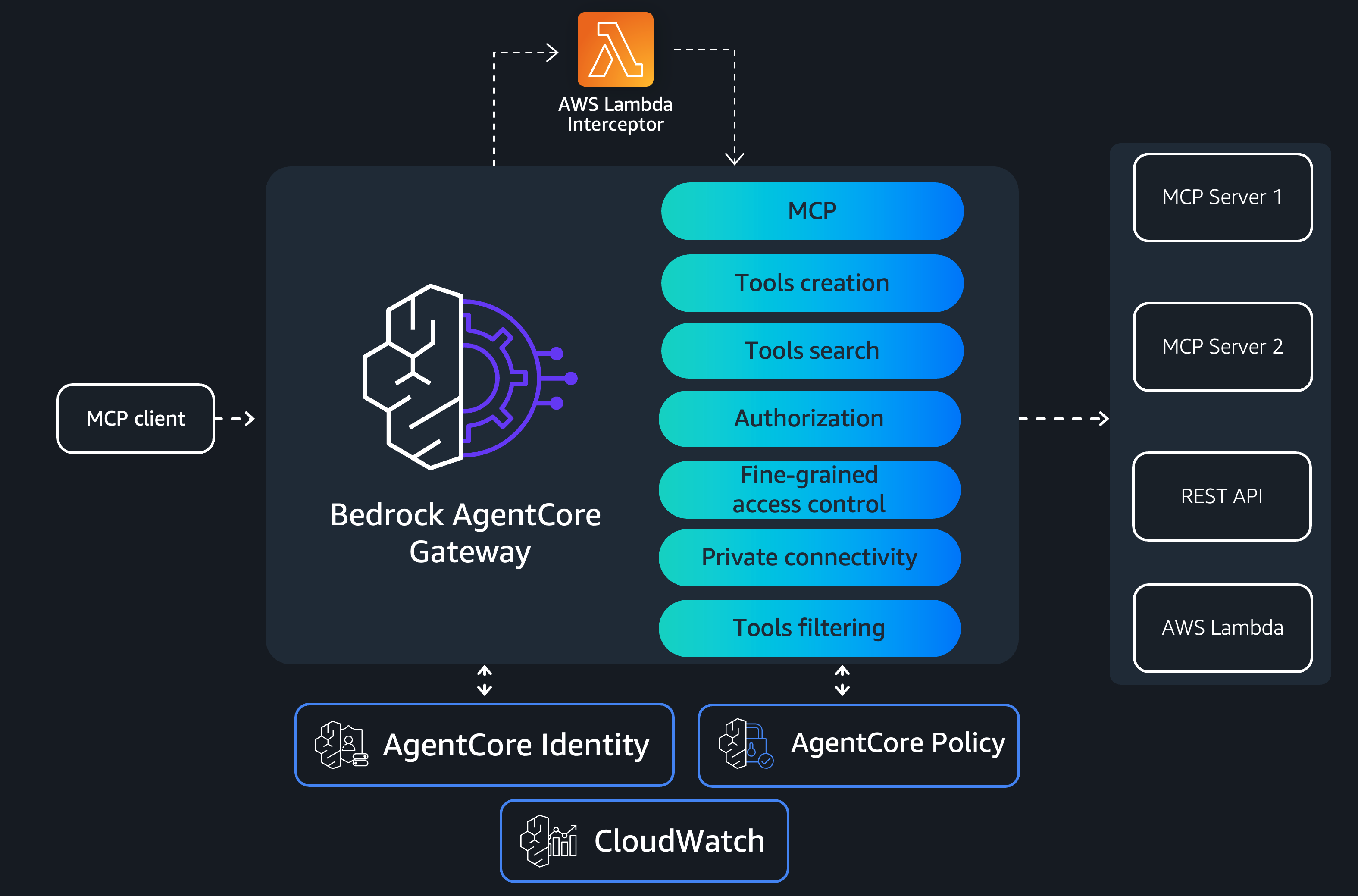
各チームは、自社の MCP サーバーのビジネスロジックのみを実装します。それ以外のすべては AgentCore Gateway が処理します。これは MCP サーバー、REST APIs、AWS Lambda 関数、および その他 の異なるターゲットタイプにわたる機能を統合します。リソースベースのポリシー (RBP) は、AgentCore Gateway を誰が呼び出せるかを制御し、例えば Amazon Virtual Private Cloud (Amazon VPC) への呼び出しに制限するなどします。サービスコントロールポリシー (SCPs) は、AWS オrganization 内で AgentCore Gateway がどのように維持管理されるかを規定します。
ネットワーク分離のため、AgentCore Gateway は制御プレーンおよびデータプレーンの両方の操作に対して AWS PrivateLink をサポートしており、トラフィックを Amazon VPC の境界内にとどめることができます。また、管理された VPC リソースモード を通じて、プライベート API エンドポイントや MCP サーバーにも接続可能です。中央集権型の アプリケーション および アイデンティティ ログにより、監査およびコンプライアンス要件の管理を支援します。
インターセプター機能により、AWS Lambda 関数でリクエストとレスポンスをカスタマイズでき、細粒度のアクセス制御、サニタイゼーション、カスタム認証ロジックなどを実現できます。AgentCore Policy (Preview) と統合することで、ツールを中心に定義されたエージェント用ガードレールを提供し、集中管理平面で決定論的なポリシー適用を可能にします。また、AgentCore Gateway は OAuth 2.0 認証コードフロー の支援も行うため、ツールの呼び出し前にエージェントがユーザーに代わって認証を行うことができます。
次に、エンタープライズ向けの MCP サポートをさらに強化するために AgentCore Gateway に追加する新機能について順を追って解説します。
MCP サーバーのプリミティブを単一のゲートウェイを通じて公開する
AgentCore Gateway は、組織内のすべての MCP サーバーから機能を集約した単一の MCP エンドポイントとなります。クライアントは管理すべき 20 の個別接続ではなく、統一されたツールカタログ、プロンプトライブラリ、およびリソース名前空間を 1 つだけ見ることになります。内部では、AgentCore Gateway はツールの定義を含む MCP の 3 つのプリミティブ(tools, prompts, resources)すべてをサポートします。MCP におけるツールの定義には、標準的な名称、アイコン、説明、入力スキーマに加え、オプションの出力スキーマ(outputSchema)が含まれており、これは期待される出力構造を定義するために使用されます。また、ツールが読み取り専用か破壊的かなどの振る舞い特性を示す注釈も含まれます。ゲートウェイは、tools/list, tools/call, prompts/list, prompts/get, resources/list, resources/read, resources/templates/list という一連の MCP メソッドを通じて、プロンプト、リソース、およびリソーステンプレート(resource templates)もサポートします。以下のアーキテクチャ図は、AgentCore Gateway がリスト呼び出しとインボーク呼び出しをどのように支援するかを示しています。
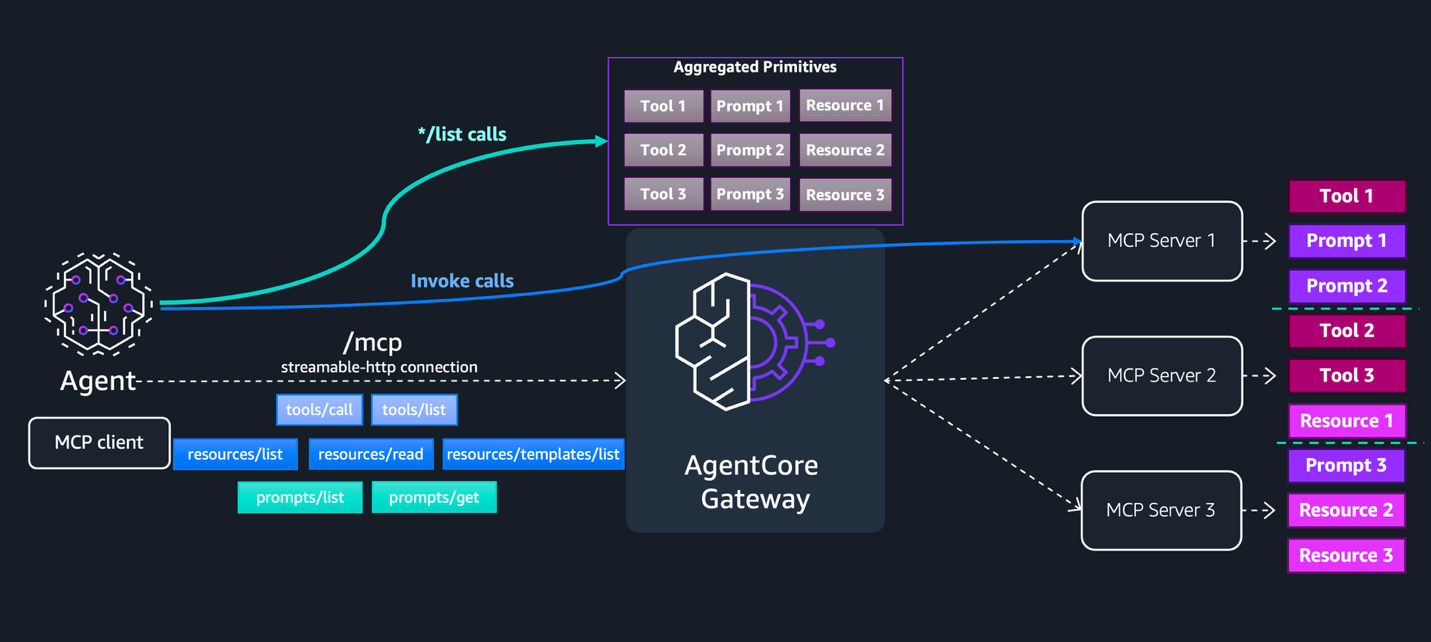
デフォルトのリストモードでは、AgentCore Gateway は接続された MCP サーバーターゲットからツール、プロンプト、リソースを検出してキャッシュします。このキャッシュは、CreateGatewayTarget または UpdateGatewayTarget を呼び出すたびに自動的に更新され、SynchronizeGatewayTargets API を使用して手動で更新することも可能です。クライアントが tools/list、prompts/list、resources/list などのリスト呼び出しを行う場合、AgentCore Gateway は MCP サーバーターゲットを呼び出すことなく、このキャッシュから直接応答を返します。MCP サーバーターゲットとの実際のやり取りは、tools/call、prompts/get、resources/read のようなインボーク操作の際のみ発生します。その際、AgentCore Gateway はリクエストを適切なターゲットにルーティングします。
AgentCore Gateway が返すツールとプロンプトは、targetName___ という形式でターゲット名を接頭辞として付与されます。一方、リソース URI はターゲット名の接頭辞なしで返され、下流の MCP サーバーからの元の URI がそのまま通過します。
MCP サーバーターゲットを作成してリソースを公開する際、複数のターゲットが同じリソース URI を公開した場合に AgentCore Gateway が競合を解決する方法を制御するために、オプションで resourcePriority 値(1〜1000)を指定できます。優先度が定義されていない場合、デフォルト値の 1000 が適用されます。競合が発生した際、AgentCore Gateway は最も低い resourcePriority 値を持つターゲットからのリソースを返します。2 つの競合するリソースが同じ優先度を持つ場合、最初に同期されたターゲットからのリソースが返されます。
リソース URI は下流の MCP サーバーターゲットによって提供され、AgentCore Gateway によって検証またはサニタイズされないため、信頼できないターゲットには注意が必要です。悪意のあるまたは侵害された MCP サーバーは、内部エンドポイントやローカルファイルシステムへのパスを指す URI を返す可能性があります。これらの URI に従う前にリソース URI の検証とサニタイズを行い、信頼できない MCP サーバーターゲットからの URI を自動的にフェッチしたりレンダリングしたりしないでください。
ランタイムにおける動的リスト表示
一部の MCP サーバーは、ユーザーごとに機能をパーソナライズします。権限認識型のサーバーでは、経費承認機能を経理管理者のみに対して公開したり、マルチテナント型サーバーでは、医療関係者向け顧客に対して HIPAA 準拠のツールのみを表示したりすることがあります。動的リスト表示を使用すれば、サーバー側のアクセス制御を維持したまま、AgentCore Gateway を経由してルーティングすることができます。
ターゲットを作成する際、2 つのリスト表示モードから選択できます:*デフォルト*と*動的*です。デフォルトのリスト表示モードでは、AgentCore Gateway は CreateGatewayTarget または UpdateGatewayTarget 操作の実行時に MCP サーバーを呼び出し、ツール、プロンプト、リソースを検出してキャッシュします。このキャッシュは SynchronizeGatewayTargets API を使用して明示的に更新できます。クライアントがリスト取得呼び出しを行う際、AgentCore Gateway はバックエンドサーバーに問い合わせることなく、このキャッシュから直接応答を返します。一方、動的リスト表示モードでは、AgentCore Gateway は CreateGatewayTarget または UpdateGatewayTarget 操作の実行時に MCP サーバーを呼び出しません。代わりに、リスト取得呼び出しは、呼び出し元のユーザーの ID を使用して、リクエスト実行時にリアルタイムで MCP サーバーに転送されます。どちらのモードにおいても、tools/call、prompts/get、resources/read などの呼び出し操作は、直接 MCP サーバーターゲットへルーティングされます。以下のアーキテクチャ図は、両方のモードがどのように連携して動作するかを示しています。
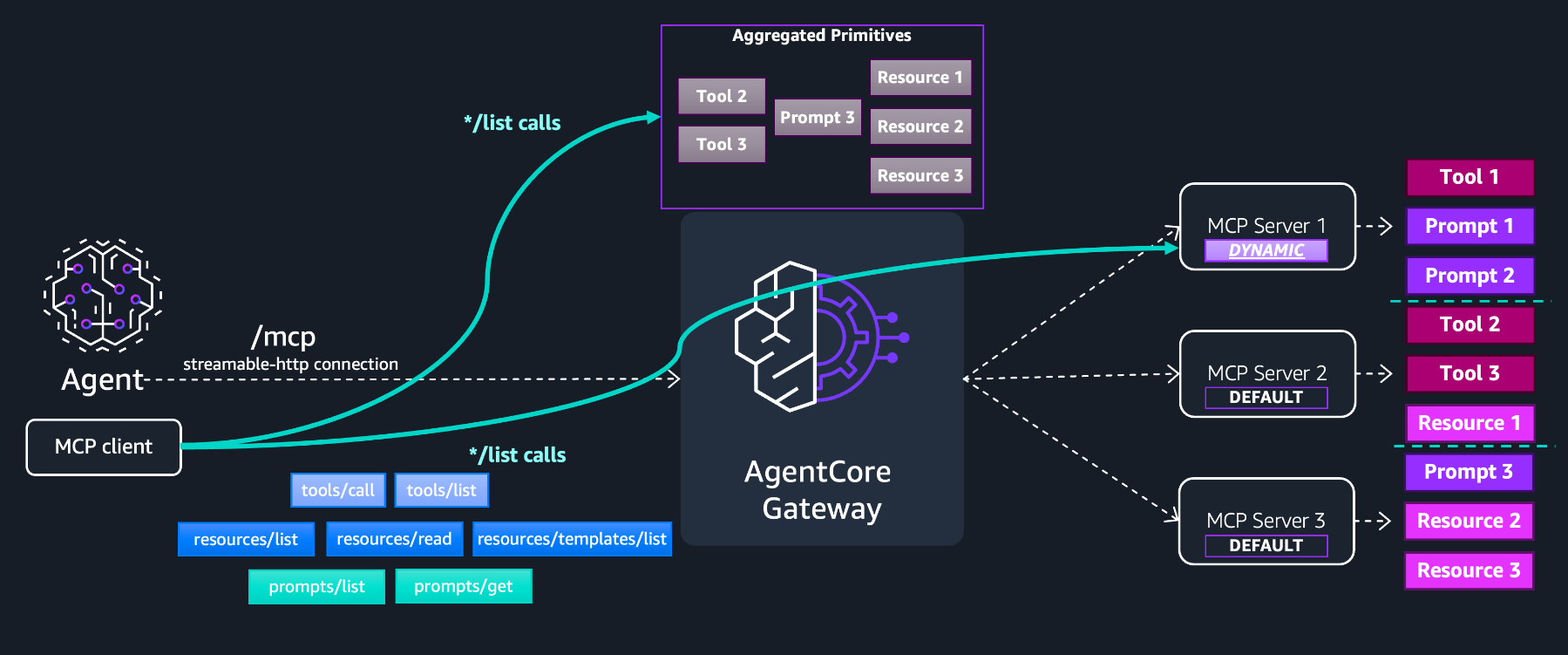
MCP サーバー 1 は動的リストモードで構成されており、MCP サーバー 2 と 3 はデフォルトのリストモードを使用しています。AgentCore Gateway のキャッシュには、デフォルトモードのサーバーからの機能のみが含まれています。リスト呼び出し時にはレスポンスがページ分割され、キャッシュされたプリミティブと MCP サーバー 1 のプリミティブは異なるページで返されます。動的リスト対象のプリミティブは AgentCore Gateway でインデックスされていないため、セマンティックツール検索機能を使用することはできません。
このデュアルモードアーキテクチャにより、マルチテナンシーと細粒度アクセス制御(FGAC)に対する柔軟性も提供されます。両方のリストモードにおいて、AgentCore Policy または AWS Lambda のレスポンスインターセプターを使用してポリシーを中央で適用し、テナントのアイデンティティに基づいて機能をフィルタリングできます。例えば、テナントが読み取り専用ツールのみを表示できるように制限することも可能です。動的リストモードでは、リスト操作がエンドユーザーのアイデンティティの下で実行され、MCP サーバーターゲットがそのユーザーがアクセス権限を持つ機能のみを返すため、アクセス制御を MCP サーバー自体で直接管理できます。
ストリーミング、セッション管理、およびelicitation(情報要求)
多くのエンタープライズ向け MCP ワークフローは、単純なリクエスト・レスポンス型のツール呼び出しを超えています。MCP サーバーは、レポート生成中に進捗更新をストリーミングする必要がある場合や、機密性の高いアクションを実行する前に実行途中に一時停止してユーザーの承認を求める必要がある場合、あるいは複数のツール呼び出しにわたる多段階の会話全体でコンテキストを維持する必要がある場合があります。AgentCore Gateway は、Streamable HTTP 転送、MCP セッション管理、および elicitation(情報要求)をサポートしており、これにより状態保持型・リアルタイム・人間がループに参加するインタラクションが可能になります。
Streamable HTTP(ストリーミング対応 HTTP)
ストリーミングがない場合、45 秒かかるツール呼び出しは完了まで何も返さず、ユーザーはスピナーを見つめることになります。一方、ストリーミングを使用すれば、リアルタイムで進捗イベントを確認できます。クライアントが Accept: application/json, text/event-stream を指定して tools/call リクエストを送信すると、AgentCore Gateway は SSE(Server-Sent Events)ストリームを開き、MCP サーバーターゲットからのイベントをリアルタイムで転送します。これには進捗通知、ログメッセージ、および最終的なツール結果が含まれます。Accept: application/json のみを指定するクライアントは引き続き単一の JSON 応答を受け取り、完全な後方互換性が維持されます。
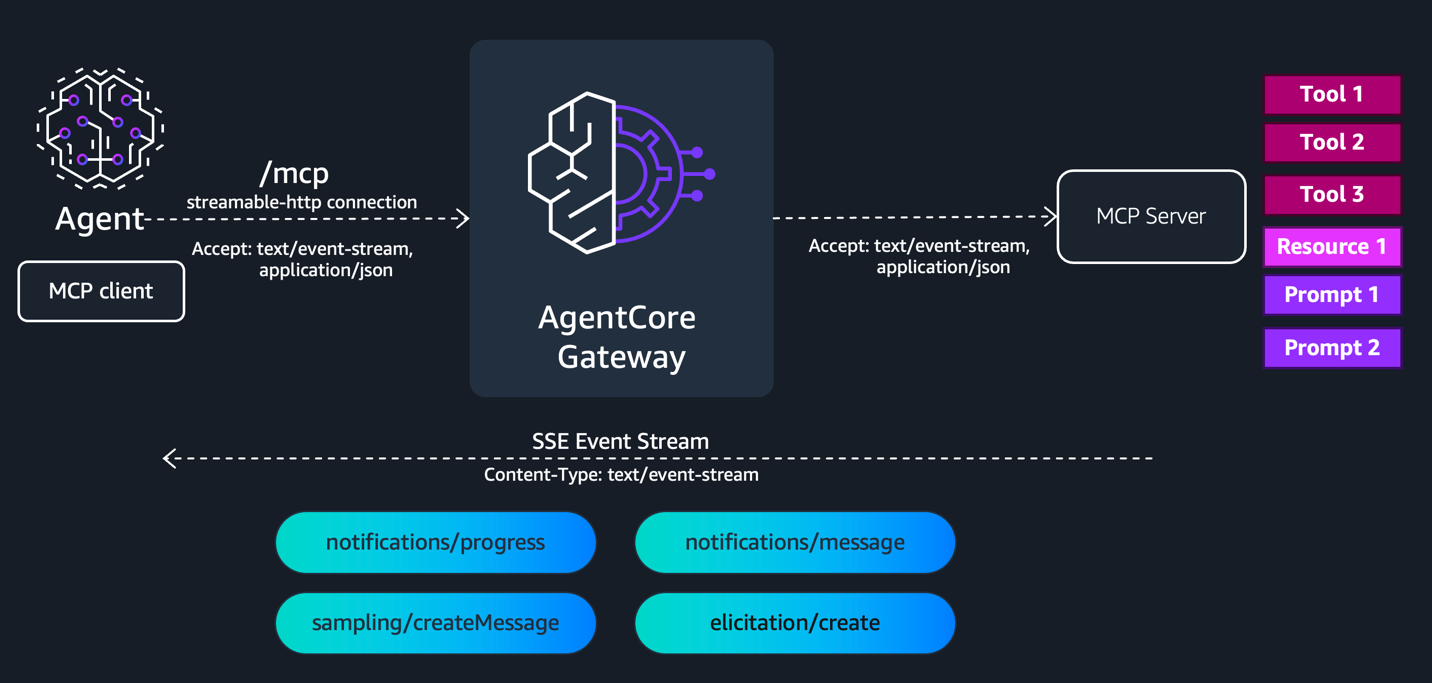
AgentCore Gateway でレスポンスストリーミングを有効にすると、レスポンスインタセプタの動作が変化し、ストリーミングと非ストリーミングのレスポンスを区別するために gatewayResponse 内の isStreamingResponse フィールドを確認する必要があります。レスポンスインタセプタは、JSON-RPC の id フィールドを含むイベントに対して呼び出されます。一方、通知/進捗、通知/メッセージ、およびピングについてはレスポンスインタセプタは呼び出されません。ストリーミングを有効にするには、CreateGateway または UpdateGateway API コール時に enableResponseStreaming ブロックを設定してください。
"protocolConfiguration": {
  "mcp": {
    "streamingConfiguration": {
      "enableResponseStreaming": true
    }
  }
}
AgentCore Gateway を用いたストリーミングユースケースを考える際には、以下の点に注意してください。AgentCore Gateway は、ストリーム内の最初のイベントから HTTP ステータスコードを決定します。ストリーミング中にエラーが発生した場合、ステータスは既に送信済みであるため、HTTP ステータスコードとしてではなく、SSE フレーム内の JSON-RPC エラーオブジェクトとして配信されます。認証失敗、スロットリング、またはバリデーションエラーなどのストリーム開始前のエラーは、標準的な JSON-RPC エラーレスポンスとして返され、SSE フレーム付けは行われません。
セッション管理
セッション管理により、AgentCore Gateway に状態を保持する多段階ワークフローが導入されます。セッションを有効にすると、AgentCore Gateway は最初の初期化リクエスト時に Mcp-Session-Id を生成し、レスポンスヘッダーとして返します。クライアントはこのヘッダーを後続のリクエストに含めることで、AgentCore Gateway がクライアントのやり取りを追跡し、下流の MCP サーバーセッションへのマッピングを維持し、ツール呼び出し全体で要求の関連付けを行うことを可能にします。
セッションを有効にするには、CreateGateway または UpdateGateway API コール中に sessionConfiguration ブロックを追加してください。セッションタイムアウトは最小 15 分から最大 8 時間の範囲で設定できます。デフォルト値は 1 時間です。
"protocolConfiguration": {
  "mcp": {
    "sessionConfiguration": {
      "sessionTimeoutInSeconds": 3600
    }
  }
}
セッションは認証されたユーザーにスコープされます。AgentCore Gateway は、認可コンテキスト(OAuth 入力の JWT ベアートークンまたは AWS_IAM 入力の IAM 資格情報)からユーザーIDを導出し、セッション内のすべてのリクエストが同じユーザーから発信されていることを検証します。これにより、あるクライアントが別のクライアントのセッション識別子を使用しようとするセッションハイジャッキングを防ぐのに役立ちます。AgentCore Gateway は、セッション有効化ゲートウェイに Mcp-Session-Id ヘッダーなしのリクエストが届いた場合に HTTP 400 を返し、期限切れまたは存在しないセッションに対しては HTTP 404 を返します。
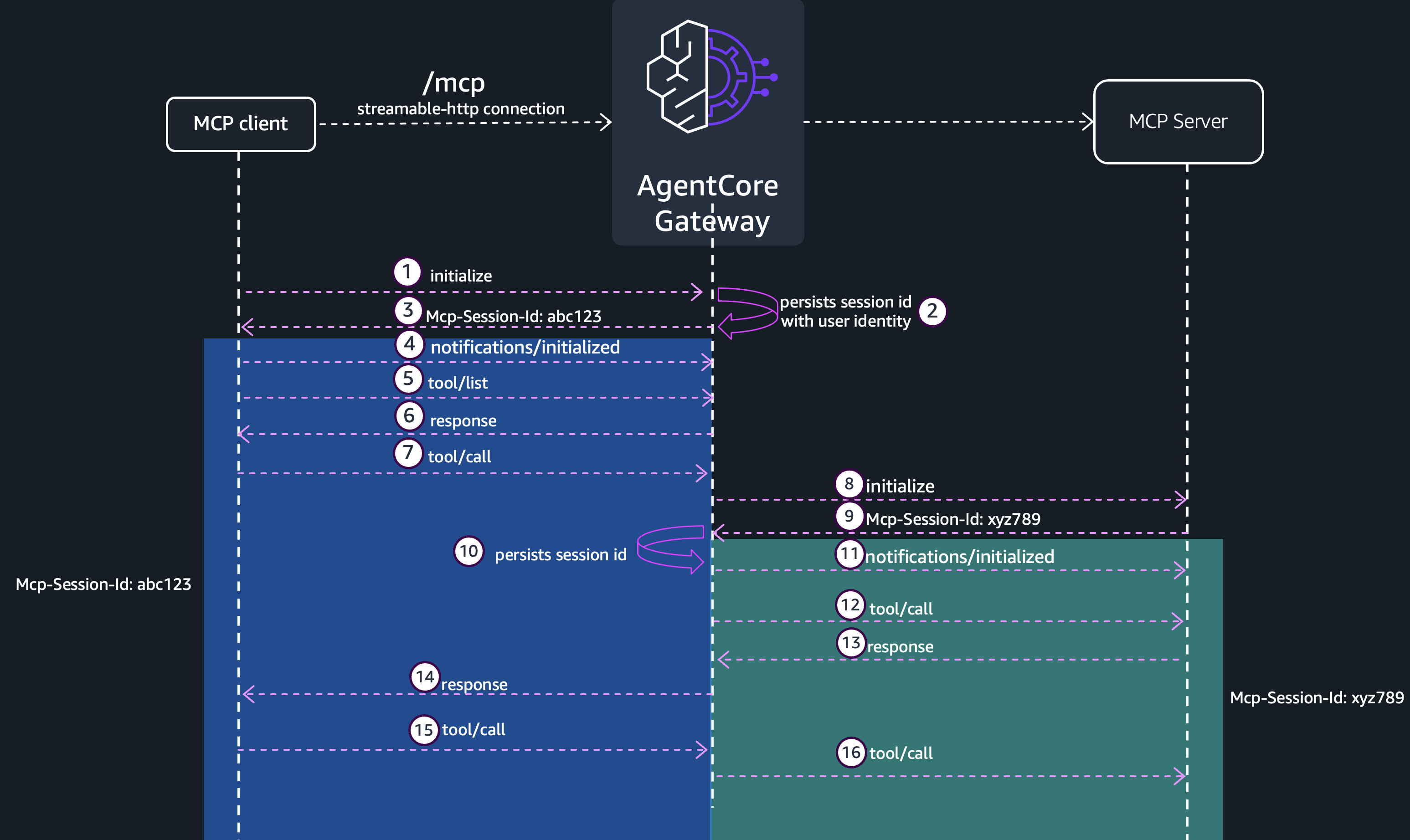
裏側では、AgentCore Gateway はセッション ID を完全に管理された永続ストレージに保存し、リクエスト間でのセッションを管理しています。ある MCP サーバーターゲットに対して、セッション内で最初のツール呼び出しが AgentCore Gateway によって受信されると、そのターゲットへの接続が初期化され、クライアントに代わって機能がネゴシエートされ、ターゲット側のセッション識別子が保存されます。同じセッション内での同一ターゲットに対する後続のツール呼び出しは、このマッピングを再利用するため、繰り返し初期化するオーバーヘッドを回避できます。この動作により、AgentCore Runtime は各リクエストごとに新しいマイクロ VM をコールドスタートする必要がなくなり、応答時間が短縮されます。
AgentCore Gateway のセッションについて考える際は、以下の点に留意してください。セッションの有効化は、elicitation(要求)を行うための前提条件です。現在、Mcp-Session-Id ヘッダーを転送するためにヘッダー伝播を使用している場合、ゲートウェイがセッションライフサイクルを管理する必要があるため、セッション管理を同時に有効にすることはできません。下流の MCP サーバー側のセッションが期限切れになった場合は
原文を表示
While deploying Model Context Protocol (MCP) servers in production, enterprises need fine-grained access control across servers, observability into which teams use which tools, security guarantees against data exfiltration, and centralized credential management, all at scale. Amazon Bedrock AgentCore Gateway sits between MCP servers and the clients that consume them, centralizing credential management, observability, and secure connectivity into a single trusted entry point.
Today, we’re extending AgentCore Gateway with new capabilities that further strengthen support for enterprise MCP deployments. This post covers extended MCP tool schema support, MCP prompts and MCP resources as first-class primitives, dynamic listing for runtime discovery of MCP servers, streaming and session management for stateful real-time interactions, elicitation for mid-execution input requests, and OAuth 2.0 on-behalf-of token exchange for delegated authentication. For hands-on examples, visit the GitHub samples repository.
Unite MCP servers for enterprise through AgentCore Gateway
Without a centralized gateway, every MCP server that your organization builds must independently handle credentials, policy enforcement, private connectivity, and logging. This means that your legal team’s contract review MCP server, your finance team’s data retrieval MCP server, and your operations team’s incident response MCP server each carry the same infrastructure burden. Security teams review each server individually, developers wait for approvals, and nobody has a unified view of how MCP infrastructure is being used across the organization.
AgentCore Gateway helps avoid this duplication by establishing a single-entry point that MCP traffic flows through. The following diagram shows the main features for AgentCore Gateway that allow central governance and control.
Each team builds only the business logic for their MCP server. AgentCore Gateway handles everything else. It aggregates capabilities across different target types, including MCP servers, REST APIs, AWS Lambda functions, and more. Resource-based policies (RBP) control who can invoke AgentCore Gateway, for example, restricting invocation to an Amazon Virtual Private Cloud (Amazon VPC). Service control policies (SCPs) govern how AgentCore Gateway is maintained within your AWS organization.
For network isolation, AgentCore Gateway supports AWS PrivateLink for both control plane and data plane operations so that traffic stays within your Amazon VPC boundaries. You can also connect to private API endpoints or MCP servers through managed VPC resource mode. Centralized application and identity logs help you manage audit and compliance requirements.
With interceptor capability, AWS Lambda functions can customize requests and responses, enabling fine-grained access control, sanitization, custom authorization logic, and more. Integration with AgentCore Policy (Preview) provides agentic guardrails defined around your tools for deterministic policy enforcement at a centralized plane. AgentCore Gateway also helps facilitate the OAuth 2.0 authorization code flow, where the agent authenticates on behalf of a user before invoking tools.
Now, you will walk through the new capabilities that we’re adding to AgentCore Gateway to further strengthen enterprise MCP support.
Surface your MCP server primitives through a single gateway
AgentCore Gateway becomes a single MCP endpoint that aggregates capabilities from every MCP server in your organization. Clients see one unified tool catalog, one prompt library, and one resource namespace, not 20 separate connections to manage. Under the hood, AgentCore Gateway supports all three MCP primitives: tools, prompts, and resources. Tool definitions in MCP include an optional outputSchema for defining expected output structure and annotations describing behavioral properties such as whether a tool is read-only or destructive, alongside the standard name, icons, description, and inputSchema. The gateway also supports prompts, resources, and resource templates through their full set of MCP methods: tools/list, tools/call, prompts/list, prompts/get, resources/list, resources/read, and resources/templates/list. The following architecture diagram shows how AgentCore Gateway facilitates list and invoke calls.
In the default listing mode, AgentCore Gateway discovers and caches tools, prompts, and resources from connected MCP server targets. This cache is implicitly refreshed whenever you call CreateGatewayTarget or UpdateGatewayTarget, and can be explicitly refreshed using the SynchronizeGatewayTargets API. When clients make list calls such as tools/list, prompts/list, or resources/list, AgentCore Gateway returns the response directly from this cache without invoking the MCP server target. The actual interaction with the MCP server target only happens during invoke operations: tools/call, prompts/get, and resources/read. At that point AgentCore Gateway routes the request to the correct target.
Tools and prompts returned by AgentCore Gateway are prefixed with the target name using the format targetName___. Unlike tools and prompts, resource URIs are returned without a target name prefix; the original URI from the downstream MCP server is passed through. When creating an MCP server target that exposes resources, you can optionally specify a resourcePriority value (1–1000) to control how AgentCore Gateway resolves conflicts when multiple targets expose the same resource URI. If no priority is defined, a default value of 1000 is applied. When a conflict occurs, AgentCore Gateway returns the resource from the target with the lowest resourcePriority value. If two conflicting resources share the same priority, the resource from the target that was synchronized first is returned.
Because resource URIs are provided by the downstream MCP server target and aren’t validated or sanitized by AgentCore Gateway, take care with untrusted targets. A malicious or compromised MCP server could return URIs pointing to internal endpoints or local file system paths. Validate and sanitize resource URIs before following them, and don’t automatically fetch or render URIs from untrusted MCP server targets.
Dynamic listing for runtime flexibility
Some MCP servers personalize their capabilities per user. A permissions-aware server might expose approve_expense only to managers, or a multi-tenant server might surface HIPAA-compliant tools only for healthcare customers. Dynamic listing lets you preserve that server-side access control while still routing through AgentCore Gateway.
When creating a target, you choose between two listing modes: *default* and *dynamic*. In default listing mode, AgentCore Gateway invokes the MCP server during CreateGatewayTarget or UpdateGatewayTarget operations to discover and cache tools, prompts, and resources. This cache can be explicitly refreshed using the SynchronizeGatewayTargets API. When clients make list calls, AgentCore Gateway serves the response directly from this cache without contacting the backend server. In dynamic listing mode, AgentCore Gateway doesn’t invoke the MCP server during CreateGatewayTarget or UpdateGatewayTarget operations. Instead, list calls are forwarded live to the MCP server at request time, using the identity of the calling user. In both modes, invoke operations such as tools/call, prompts/get, and resources/read route directly to the MCP server target. The following architecture diagram illustrates how both modes work together.
MCP Server 1 is configured with dynamic listing mode, while MCP Server 2 and 3 use default listing mode. The AgentCore Gateway cache contains only the capabilities from the default mode servers. During list calls, the response is paginated; the cached and MCP Server 1 primitives are returned on different pages. Because the primitives aren’t indexed at AgentCore Gateway for dynamic listing targets, the semantic tool search capability can’t be used.
This dual-mode architecture also gives you flexibility for multi-tenancy and fine-grained access control (FGAC). For both listing modes, you can enforce policies centrally using AgentCore Policy or AWS Lambda response interceptors to filter capabilities based on tenant identity. For example, you can restrict a tenant to only see read-only tools. For dynamic listing mode, you can manage access control directly at the MCP server itself, since list operations execute under the end user’s identity, and the MCP server target returns only the capabilities that user is authorized to access.
Streaming, session management, and elicitation
Many enterprise MCP workflows go beyond straightforward request-response tool calls. An MCP server might need to stream progress updates while generating a report, pause mid-execution to ask a user for approval before performing a sensitive action, or maintain context across a multi-step conversation that spans several tool invocations. AgentCore Gateway supports Streamable HTTP transport, MCP session management, and elicitation, which enable stateful, real-time, human-in-the-loop interactions.
Streamable HTTP
Without streaming, a tool call that takes 45 seconds returns nothing until completion, and the user stares at a spinner. With streaming, they see progress events in real time. When a client sends a tools/call request with Accept: application/json, text/event-stream, AgentCore Gateway opens an SSE stream and forwards events from the MCP server target in real time, including progress notifications, logging messages, and the final tool result. Clients that send only Accept: application/json continue to receive a single JSON response, preserving full backward compatibility.
When response streaming is enabled on AgentCore Gateway, the response interceptor behavior changes and must check the isStreamingResponse field in gatewayResponse to distinguish between streaming and non-streaming responses. The response interceptor is invoked for events that contain a JSON-RPC id field. The response interceptor isn’t invoked for notifications/progress, notifications/message, and pings. To enable streaming, set the enableResponseStreaming block during the CreateGateway or UpdateGateway API call.
"protocolConfiguration": {
"mcp": {
"streamingConfiguration": {
"enableResponseStreaming": true
}
}
}When thinking about streaming use cases with AgentCore Gateway, keep the following in mind. AgentCore Gateway determines the HTTP status code from the first event in the stream. If an error occurs mid-stream, it’s delivered as a JSON-RPC error object within an SSE frame rather than as an HTTP status code, since the status has already been sent. Pre-stream errors such as authentication failures, throttling, or validation errors are returned as standard JSON-RPC error responses with no SSE framing.
Session management
Session management introduces stateful multi-turn workflows to AgentCore Gateway. When you enable sessions, AgentCore Gateway generates a Mcp-Session-Id on the first initialize request and returns it as a response header. The client includes this header on subsequent requests, allowing AgentCore Gateway to track client interactions, maintain mappings to downstream MCP server sessions, and correlate elicitation requests across tool calls.
To enable sessions, add a sessionConfiguration block during the CreateGateway or UpdateGateway API call. You can configure the session timeout from a minimum of 15 minutes to a maximum of 8 hours. The default is 1 hour.
"protocolConfiguration": {
"mcp": {
"sessionConfiguration": {
"sessionTimeoutInSeconds": 3600
}
}
}Sessions are scoped to the authenticated user. AgentCore Gateway derives the user identity from the authorization context, the JWT bearer token for OAuth ingress or the IAM credentials for AWS_IAM ingress, and validates that every request within a session originates from the same user. This helps prevent session hijacking, where one client attempts to use another client’s session identifier. AgentCore Gateway returns HTTP 400 if a session-enabled gateway receives a request without an Mcp-Session-Id header, and HTTP 404 for expired or non-existent sessions.
Behind the scenes, AgentCore Gateway persists the session ID in a fully managed durable store to manage sessions across requests. When AgentCore Gateway receives the first tool call for a given MCP server target within a session, it initializes a connection to that target, negotiates capabilities on behalf of the client, and stores the target session identifier. Subsequent tool calls to the same target within the session reuse this mapping, avoiding repeated initialization overhead. Because of this behavior, AgentCore Runtime doesn’t need to cold-start a new micro-VM on each request, resulting in faster response times.
When thinking about sessions for your AgentCore Gateway, keep the following in mind. Enabling sessions is a prerequisite for elicitation. If you’re using header propagation to forward Mcp-Session-Id to targets today, you can’t simultaneously enable session management because the gateway needs to own the session lifecycle. If a downstream MCP server session expires be
関連記事
今日のまとめ
AI日報で今日の重要ニュースをまとめ読み