Browser Run が Cloudflare コンテナ上で稼働し、高速化とスケーラビリティが向上
Cloudflare は Browser Run の基盤を Cloudflare Containers へ移行し、処理速度の向上とスケーラビリティの大幅な改善を実現した。
キーポイント
パフォーマンスとスケーリングの劇的向上
1 分間に最大 60 ブラウザを起動し、同時に 120 個まで実行可能となり、以前より 4 倍のスループットを実現した。また、クイックアクションの応答時間が 50% 以上短縮された。
インフラ基盤の再構築と分離
従来の Browser Isolation (BISO) と共有していたリソースから独立し、Cloudflare Containers を採用することで、起動時間の遅延やグローバルなレイテンシの問題を解消した。
AI エージェントへの重要な基盤強化
Web 上の操作を自動化する AI エージェントにとって不可欠なプラットフォームとして、より大規模で信頼性の高い環境を提供できるようになった。
地域別プールの導入によるレイテンシ低減
グローバルなリクエストに対応するため、DO とコンテナの距離を制限する地域別の事前ウォームアッププールを導入し、ユーザーから DO、そして DO からコンテナまでの両方のホップで遅延を最小化しました。
KV の最終整合性によるスケーリングボトルネック
AI エージェントからの需要急増に対し、Workers KV の約 30 秒の最終整合性がボトルネックとなり、コンテナが既に確保されているにもかかわらず利用可能と判定される競合状態が発生し、迅速なスケールアウトを阻害していました。
KV から D1 と Queues への移行
キャッシュ TTL の遅延や整合性問題を解決するため、コンテナの状態管理を KV から D1 データベースと Queues サービスへ移行し、よりリアルタイムで信頼性の高いスケーリングを実現しました。
D1 を使用したトランザクション管理と競合防止
ブラウザ状態を D1 に移行し、SQLite のトランザクション機能を活用することで、ブラウザの排他的割り当てを保証し、同時アクセスによる競合条件を防いでいます。
影響分析・編集コメントを表示
影響分析
この発表は、Web ブラウザをプログラム制御するインフラのボトルネックを解消し、大規模な AI エージェントや自動化テストの実行を現実的なコストと速度で可能にする重要な転換点です。特に Cloudflare の独自技術である Containers と Workers の連携強化により、クラウドネイティブな自動ブラウザ実行プラットフォームとしての地位が確立されました。
編集コメント
AI エージェントが実社会の Web と安全かつ高速に相互作用するための基盤インフラとして、この技術的刷新は極めて重要です。特にスケーラビリティの向上は、大規模な自動化タスクの実行を可能にする決定的な要因となります。
Browser Run のパフォーマンスを向上させるために、Cloudflare のコンテナ上で再構築を行いました。これにより、使用制限の引き上げ、高速化、および信頼性の向上が実現されています。
Workers バインディングを通じて、1 分間に最大 60 ブラウザを起動し、同時に最大 120 ブラウザを実行できるようになりました。これは以前の制限の 4 倍に相当します。また、クイックアクションの応答時間が 50% 以上短縮されました。設定変更は不要で、これらの改善点は本日すぐに利用可能です。さらに、以前よりも迅速に修正と新機能の提供を行っています。詳細については以下をご覧ください。
リマインダー:Browser Run とは何ですか?
Browser Run は、Cloudflare のグローバルネットワーク上で動作するヘッドレスブラウザインスタンスをプログラムで制御・操作することを開発者に可能にするサービスです。これは、Web アプリケーションの包括的なテスト、不審な URL の安全な調査、PDF ドキュメントの容易なレンダリング機能の活用、スクリーンショットのキャプチャやコンテンツ抽出などのクイックアクションなど、多岐にわたる用途で有用です。最近では、AI エージェントが Web と対話するための重要な基盤としても注目されています。私たちは、大規模かつ安全に自動化されたブラウザを責任を持って利用するためのデファクトプラットフォームとして Browser Run を構築しています。
成長の限界:二段ベッドから脱却
Cloudflare Containers を採用する前に、私たちは Browser Isolation (BISO) とインフラを共有していました。技術的には類似していましたが、BISO のコンテナイメージは大きいため起動や開発が遅れていました。決定的な問題として、BISO のブラウザには最適なグローバル展開が欠けており、耐障害性とレイテンシーが損なわれていました。さらに、典型的な BISO ユーザーの長く安定したセッションと、Browser Run の短くスパイク状の利用パターンが衝突し、スケーリングのボトルネックや可用性の遅延を生み出していました。
幸いなことに、多くの内部開発を経て、Cloudflare は昨年 Durable Object (DO) 対応コンテナのオープンベータ版をリリースしました。これにより、両方のプロダクトプラットフォームに利益をもたらす暫定的な採用が可能となりました。成功したほとんどのプロダクトプラットフォームと同様に、私たちは可能な限り自社のプラットフォーム上で構築することにコミットしており、外部顧客が直面する前にあらゆる課題点を把握し解決できるようにしています。
移行:コンテナ
移行は段階的に開始され、着信リクエストパスに Worker を挿入して、BISO 由来のブラウザに加えて、一部のユーザーに対してコンテナ駆動型のブラウザを提供しました。開発中のこの二重サポートが鍵となりました:これによりパフォーマンスを比較し、実装上のバグを特定し、最終的にはコンテナ駆動アプローチのメリットに対する自信を得ることができました。
採用拡大のため、まずすべてのクイックアクションエンドポイントにコンテナブラウザを使用し、次に無料アカウントのワーカーブラウザバインディングを介した接続、さらに安定性を検証してから残りの契約顧客すべてへの展開前に従量課金型アカウントを対象としました。これにより、お客様が何らかのアクションを起こしたり既存のワーカーを再デプロイする必要のない移行を実現しています。
課題:パフォーマンスとスケーラビリティのボトルネック
一方、私たちは文書化が不十分で、観測機能(observability)が不足しており、同じタイムゾーンに所属する同僚も少ない、新規かつ不安定な初期段階のコンテナプラットフォームインターフェースに慣れるという新たな課題に直面しました。しかし、顧客ゼロとして自社のチームへのフィードバックを提供したことで、外部のお客様にも恩恵をもたらす大幅なアップグレードにつながる緊密なフィードバックループを構築することができました。それでも当初は克服すべき摩擦が多くありましたが、これは開発中のクローズドベータでは当然予想されるものでした。他にも乗り越えるべき障壁があり、それらは新しい技術環境に固有のものです。
例えば、ブラウザをグローバルに実行できるようになった際、アーキテクチャも適応する必要がありました。DO(Durable Object)対応のコンテナは、着信リクエストに可能な限り近い場所に Durable Object を作成しますが、接続されたコンテナが世界の反対側で起動する可能性があります。これは「アプリを開始する」といったワンショットメッセージには問題ありませんが、両者の間で WebSocket を確立し、スクリーンショット要求のために数十回のメッセージを交換する場合、地球をまたぐ追加のミリ秒が蓄積され始めます。
私たちの解決策は?DO 対応ブラウザコンテナの事前ウォームアップされたリージョンプールを作成し、DO とコンテナ間の最大距離(ひいては最大レイテンシ)を制限することです。リクエストが入力されると、そのリージョン内でユーザーに最も近い DO-コンテナペアを選択します。これにより、ユーザーから DO へ、そして DO からコンテナへの両方のホップでレイテンシが低く保たれます。これは全体のアーキテクチャにいくつかの追加要素を加えますが、各ブラウザのグローバル状態を監視可能であり、変化する需要に応じて容量を割り当てたり再割り当てしたりできる限り、その価値があると判断しました。Workers KV の完璧なユースケース…という点まで。
昨年初頭から、ヘッドレスブラウザに対する需要は高まり続けています。簡単に言えば、AI エージェントビルダーが Browser Run を発見し、既存のキャパシティを凌駕するリクエスト量を短期間で押し上げました。私たちは、スケーラブルなアプローチでこの新たな需要に応えるためにプールキャパシティを調整できる速度の限界にすぐに直面しました。KV の約 30 秒という最終的な一貫性(eventual consistency)が、重要なリクエストパスにおけるボトルネックとなっていました。KV を確認した時点でコンテナが「利用可能」と表示されても、ルーティングして接続する頃には(30 秒後)、すでに他のリクエストに確保されてしまっているのです。この遅延は競合状態(race conditions)を引き起こし、ブラウザの過剰割り当てを招くため、需要急増に対応してスケールアップできる速度が著しく制限されていました。
KV から D1 + Queues への移行
以前は、各コンテナの状態を KV に保存していました。これにより、キャッシュ TTL(Time To Live)のために常に 1 分前の状態を取得し続けてしまうという問題がありました(最近 KV は最小キャッシュ TTL を 30 秒に変更しましたが、それでもこの値はまだ高すぎます)。
私たちはコンテナの状態を D1 インスタンスへ移行することを決定しました。D1 のトランザクション処理の性質がここには適しています。一度ブラウザをユーザーに割り当てれば、それはそのユーザー専有のものとなります。ブラウザは共有リソースではないのです。SQLite トランザクションにより、割り当てが原子的に保証され、2 つのリクエストが同時に同じブラウザを確保しようとする競合状態を防ぐことができます。
以下に、ブラウザ取得クエリの簡略化されたバージョンを示します:
WITH candidate_pool AS (
-- latency およびその他のルールに基づいて候補を選択するロジック
)
UPDATE containers
SET status = 'picked'
WHERE sessionId IN (
SELECT sessionId
FROM candidate_pool
ORDER BY RANDOM()
LIMIT ?5
)
RETURNING data
各ロケーションには D1 シャードを保持しており、数千のコンテナが実行されている可能性があり、かつ各コンテナは 5 秒ごとに状態を更新する必要があるため、データベースが過負荷になるという問題に頻繁に行き当たっていました。例えば、各書き込みが 1ms かかると仮定すると、最大で 1,000 回の書き込みしか行えず、1 回の書き込みにつき 1 行更新される場合、データベースを過負荷にする前に保持できるコンテナ数は最大でも 5,000 個に限られます。
しかし、これらの書き込みをバッチ処理(バッチ書き込み)すれば、はるかに高い数値を得ることができます。なぜなら、バッチ書き込みは個別の書き込みと比べて大幅に時間がかからないため、スループットを桁違いに向上させることができるからです。私たちのケースでは 100 行分のバッチを使用しており、これにより各ロケーションで最大 500,000 個のコンテナを更新できるようになりました。この余裕があることで、容量計画はもはやボトルネックではありません。
現在、バッチ書き込みの P95 は 0.1ms です!
書き込みをバッチ処理するために Queues(キュー)を使用します:5 秒ごとに各コンテナが自身の状態を計算し、そのロケーションのキューに追加します。その後、バッチサイズを 100、バッチタイムアウトを 1 秒に設定したワーカーコンシューマーを設定します:
この設定により、2 秒を大幅に下回る許容可能なラグ時間を達成できます。ただし、キューのバックログが依然として古い状態を引き起こす可能性があります。その場合、各リージョンはプライマリキューが追いつくまで、指定されたバックアップリージョンにフォールバックします。
クイックアクションのための追加メリット
専用インフラストラクチャにより、BISO などの他の製品に不要な副作用や肥大化をもたらすことなく、ブラウザコンテナイメージのアップグレードが可能になりました。これにより、スクリーンショットやコンテンツ抽出といったクイックアクションの最適化への道が開かれました。従来、ワーカーはリモートブラウザへ WebSocket を確立し、1 つずつ指示を送信していました:ページを開く、URL に移動する、読み込みを待機してスクリーンショットを撮るです。各ステップは次のステップを開始する前に完了する必要がありました。
しかし現在は、すべてのパラメータを単一の HTTP リクエストとしてコンテナに直接送信し、ワーカーとブラウザ間の往復通信なしで、一連のフローが内部で実行されます。
結果:劇的なパフォーマンス向上と制限の拡大
平均クイックアクションの応答時間が劇的に短縮されました。ユーザーは、ブラウザセッションから必要な情報をより短い時間で取得できるようになりました。これは、ブラウザが準備されるまでの待機時間が短くなり、DevTools Protocol メッセージの処理速度が向上したためです。
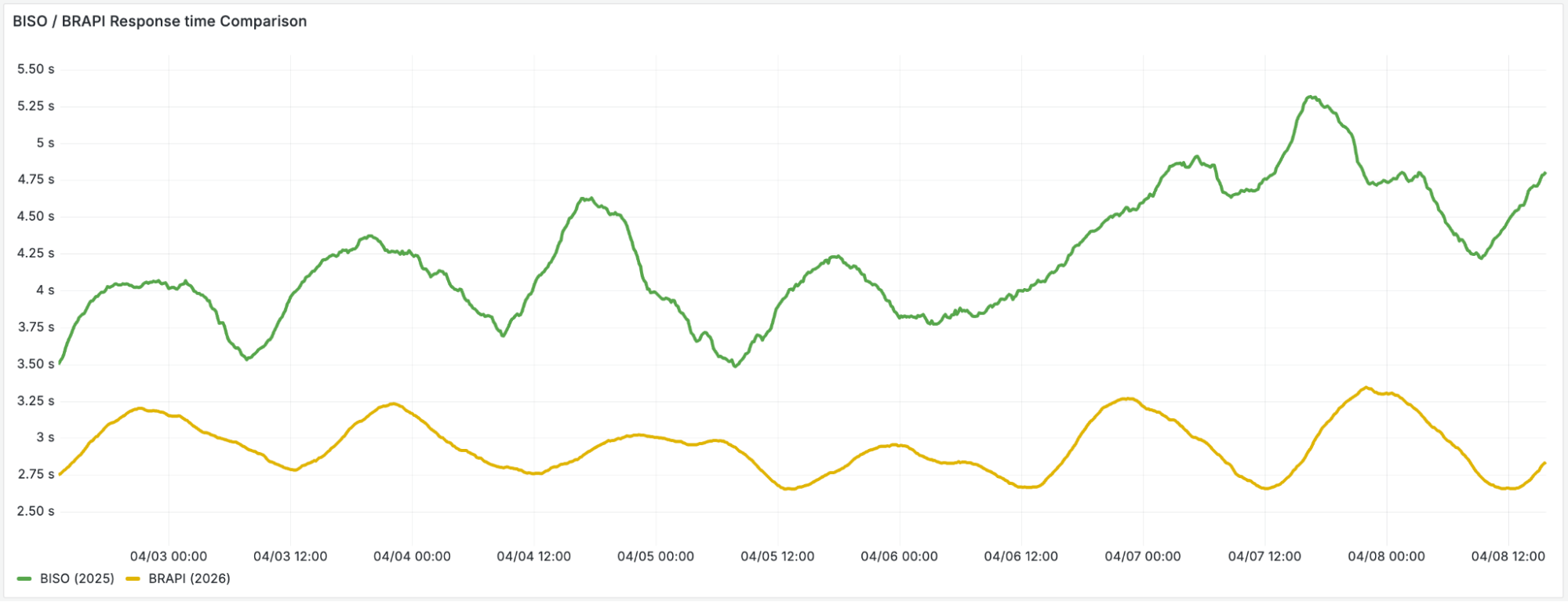
この新たなスケールでリアルタイムのステート管理を克服したことで、私たちはより多くの時間をプレイグラウンドに費やすことができました。その結果、最近リリースされた/crawl エンドポイントのような新機能の開発や発見に注力することが可能になりました。
ブラウザの柔軟性の向上
共有型の Browser Isolation コンテナ(ブラウザ分離コンテナ)から移行したことで、もう一つの重要な恩恵である「アップグレードの高速化」も享受できるようになりました。
以前はブラウザを共有製品インフラ上で実行していたため、Chrome のアップグレードには複数のチームや製品間での調整が必要でした。各チームや製品には独自のロードマップと優先順位が存在していたからです。しかし、現在は独自のコンテナイメージを実行しているため、より高速なテンポでアップグレードを行うことができます。例えば、多くの要望があった WebGL は、ブラウザベースのレンダリングに対応するようになりました。また、WebMCP(Model Context Protocol for the web)も利用可能になり、これにより新しいエージェント型インタラクションパターンが実現しています。どちらも、他の Cloudflare 製品に望ましくない副作用をもたらすことなく、ブラウザバージョンやフラグを制御できるからこそ可能になった機能です。
要するに、特にエージェント型開発において、大規模なブラウザの力を解放し始めるばかりです。皆様もぜひご参加ください — 当社のドキュメントをご覧ください。
始めましょう
Browser Run はすべての Workers プランで利用可能です。クイックスタートガイドから始めたり、Quick Actions を探索したり、/crawl エンドポイントを使ってサイト内のリンクをたどりながら任意の Web ページからデータを深く抽出したりしてみてください。
AI エージェントを構築する場合は、内蔵された Browser Run サポートを備えた Agents SDK をご覧ください。
原文を表示
We’ve enabled higher usage limits, faster performance, and better reliability for Browser Run by rebuilding on top of Cloudflare’s Containers.
You can now spin up 60 browsers per minute via the Workers binding and run up to 120 concurrently — 4x the previous limit. Also, Quick Action response times dropped more than 50%. You don't need to change anything: these improvements are live today. On top of that, we’re shipping fixes and new features faster than before. Read on to learn how we did it and see the data.
Remind me: what is Browser Run?
Browser Run enables developers to programmatically control and interact with headless browser instances running on Cloudflare’s global network. That’s useful for end-to-end testing of web applications, securely investigating suspicious URLs, and leveraging how browsers can easily render PDF documents, amongst other quick actions like capturing screenshots and extracting content. More recently, it’s become a critical enabler of AI agents to interact with the web. We’re building Browser Run to be the go-to platform to responsibly utilize automated browsers securely at massive scale.
Outgrowing our bunk bed
Before adopting Cloudflare Containers, we shared infrastructure with Browser Isolation (BISO). While technically similar, BISO’s larger container images slowed startup and development. Crucially, BISO browsers lacked optimal global distribution, compromising resiliency and latency. Additionally, typical BISO users’ long, steady sessions clashed with Browser Run’s short, spiky usage, creating scaling bottlenecks and availability delays.
Thankfully, after much internal development, Cloudflare released Durable Object (DO)-enabled Containers open beta last year, meaning we were ready for a tentative adoption that ultimately benefited both product platforms. Like most successful product platforms, we’re committed to building on our own platform wherever feasible so that we can feel and fix any pain points ahead of any external customers.
The migration: Containers
We started a gradual migration by inserting a Worker in our incoming request paths to provide some Container-powered browsers to a handful of users alongside those from BISO. This dual support during development was key: it allowed us to compare performance, isolate implementation bugs and ultimately gain confidence in the benefits of the Container-driven approach.
Ramping up adoption, we first used the Container browsers for all of our Quick Actions endpoints, then for connections via the Workers browser binding on free accounts, followed by pay-as-you-go accounts in order to validate stability before we rolled it out to all remaining contract customers, ensuring a transition that required no action or existing worker redeployments from our customers.
Challenges: performance and scale bottlenecks
On our end, though, we faced a fresh set of challenges getting familiar with a novel, unstable early-stage Containers platform interface that was light on documentation, light on observability, and light on colleagues in an overlapping timezone. However, our feedback to our own teams as Customer Zero meant that we could provide a tight feedback loop leading to substantial upgrades that benefit our external customers too. Nevertheless, there was a lot of friction to overcome initially, most of which were to be expected for a closed beta in active development. Other hurdles to overcome were intrinsic to the new technical environment.
For example, once our browsers could run globally, our architecture had to adapt. DO-enabled Containers create a Durable Object as close to the incoming request as possible, but the connected Container may spin up on the other side of the world. This works fine for one-shot messages like "start my app," but when you're establishing a WebSocket between them and exchanging dozens of messages for a screenshot request, those extra milliseconds crossing the globe start adding up.
Our solution? Create regional pools of pre-warmed DO-backed browser containers to constrain the max distance (and hence max latency) between DOs and containers. When a request comes in, we pick a DO-container pair closest to the user within that region. This keeps latency low on both hops: user to DO, and DO to container. It adds a few more moving parts to our overall architecture, but we figured that was worthwhile so long as we had observability into the global state of each browser so that we could allocate and re-allocate capacity according to changing demand. A perfect use case for Workers KV…to a point.
Demand for our headless browsers has been ramping up since the beginning of last year. In short, AI agent builders discovered Browser Run and quickly brought request volumes outpacing our existing capacity. We quickly hit the limits of how quickly we could adjust our pool capacity to serve this new demand with a scalable approach. KV’s eventual consistency of around 30 seconds was becoming a bottleneck on our critical request path. You might check KV, see a container as "available," but by the time you route to it (30 seconds later), it's already claimed. That lag creates race conditions and overallocation of browsers, severely limiting how fast we could scale to meet demand spikes.
Migrating from KV to D1 + Queues
We previously stored each container state in KV. This meant that we could keep getting a minute old state due to cache TTL (recently KV changed the minimum cache TTL to 30 seconds, but even so that value is still too high).
We decided to migrate the container state into D1 instances instead. D1's transactional nature is a good fit here. Once we assign a browser to a user, it's exclusively theirs. Browsers are not shared resources. SQLite transactions ensure atomic assignment and prevent race conditions where two requests might claim the same browser simultaneously.
Here’s a simplified version of our browser acquisition query:
WITH candidate_pool AS (
-- candidate pool logic to pick based on latency and other rules
)
UPDATE containers
SET status = 'picked'
WHERE sessionId IN (
SELECT sessionId
FROM candidate_pool
ORDER BY RANDOM()
LIMIT ?5
)
RETURNING data
We keep D1 shards per location and given that we may have several thousand containers running, and that each container needs to update its state every 5 seconds, we kept running into a problem: we would overload the database. For instance, if each write takes 1ms we can only write at most 1,000 times, which at one row per write would mean that we could only have 5,000 containers before overloading the database.
However, if we batch those writes, we can get much higher values, because batch writes are not significantly longer than individual ones, so we can increase the throughput in orders of magnitude. In our case, we use 100 row batches, which means we can now update a maximum of 500,000 containers per location. This headroom means capacity planning is no longer a bottleneck.
Currently, our P95 for batch write is 0.1ms!
To batch writes, we use Queues: every 5 seconds, each container computes its own state and adds it to its location queue. We then configure a worker consumer with 100 batch size and 1 second batch timeout:
{
...
"queues": {
"consumers": [
{
"queue": "production-core-containers-queue-weur",
"max_batch_size": 100,
"max_batch_timeout": 1,
"max_retries": 1,
},
...
]
...
}
}
With this configuration, we achieve acceptable lag times well below 2 seconds. That said, queue backlogs can still cause stale state. When this happens, each region falls back to a designated backup region until the primary queue catches up.
Additional perks for quick actions
With dedicated infrastructure, we could now make upgrades to the browser container image without unwanted side effects or bloat for other products like BISO. This opened the door to optimize quick actions like screenshots and content extraction. Previously, our workers established a WebSocket to the remote browser and sent instructions one at a time: open a page, navigate to the URL, wait for it to load and take the screenshot. Each step had to be completed before the next could begin.
However, now we send all parameters in a single HTTP request directly to the container, and the entire flow executes internally without any back-and-forth between the worker and browser.
Results: massive performance boost and increased limits
We’ve seen a sharp decrease in average quick-action response time, as users are able to get what they need from a browser session in less time: less time waiting for browsers to be ready and faster processing of their DevTools Protocol messages.
image
Overcoming our real-time state management at this new scale meant we could spend more time in the playground, discovering and cooking up new features such as our recently launched /crawl endpoint.
Better browser flexibility
We also benefitted from another important perk by leaving behind shared Browser Isolation containers: faster upgrades.
When our browsers ran on shared product infrastructure, upgrading Chrome meant coordinating across multiple teams and products, each with their own roadmap and priorities. However, now that we run our own container image, we can upgrade at a faster tempo. For example, WebGL, a much-requested feature, is now available for browser-based rendering along with WebMCP (Model Context Protocol for the web) which enables new agentic interaction patterns. Both are made possible because we can control the browser version and flags without unwanted side effects in other Cloudflare products.
In a nutshell, we’re just getting started with unleashing the power of browsers at scale, especially for agentic development. We hope you’re diving in too — check out our docs.
Get started
Browser Run is available on all Workers plans. Start with the quick start guide, explore the Quick Actions, or try the /crawl endpoint to deeply extract data from any webpage, following links across the site.
Building AI agents? Check out our Agents SDK with built-in Browser Run support.
関連記事
今日のまとめ
AI日報で今日の重要ニュースをまとめ読み