Claude Cowork の始め方におけるベストプラクティス
Anthropic は、Claude Cowork を効果的に活用するための具体的な実践方法と推奨事項をブログ記事で発表した。
Source Article
元記事を日本語で読む
本文に関係しない購読案内、埋め込み通知、サイト内プロモーションは除いています。
2024 年、私たちはチャットウィンドウの中で Claude を利用していました。質問をすると回答が返ってきましたが、その回答を実用的な形に変換するのはあなた次第でした。2025 年、Claude Code はエンジニアたちが他者を少しうらやましく思わせるスピードで成果物をリリースできるようになりました。
今年こそ、私たちは Claude Cowork でその遅れを取り戻すことができます。
私は昨年、チャットでは対応しきれない長期かつ多段階のタスクに Claude Code を使い始めました。わずか 1 週間でターミナル(端末)が何かも知らなかった私が、30 分かかるタスクを 30 秒で完了させる Claude Code のワークフロー を構築するようになりました。当時は Claude Cowork がまだ存在していなかったので、非技術的な業務にも Claude Code を活用していました。
現在、私の仕事の 90% は Claude Cowork で完結しています。この投稿では、どのタスクがそこに適しているかを判断する方法を解説し、実際の業務例を紹介しながら、約 10 分で最初の完成品(デリバラブル)に到達する手順をご案内します。
チャット、Claude Cowork、Claude Code の使い分け
あなたの仕事が非技術的な知識労働(メール、プレゼン資料、スプレッドシート、ドキュメント、会議、「これを要約してほしい」といった依頼)である場合、それは Claude Cowork 向けです。コーディングの知識は不要です。「エージェント」が何か、あるいはどうやって構築するかを知る必要もありません。
もしあなたが過去2年間、100ものタブやファイルの間にAIチャットタブを開きっぱなしにして、プロンプトや質問をコピー&ペーストしては回答をまたコピー&ペーストしていたなら、あなたはすでにClaude Coworkの使い方を理解しています。それは、コピー&ペーストの手間が省かれたものです。
チャット、Claude Cowork、Claude Code、Claude Design、そしてClaudeが登場するあらゆる場所で動作しているのは、同じClaudeモデルです。これらは異なる種類の作業に使用する別々のワークスペースですが、内部で動いているのは同じモデルです。どのツールをいつ使うべきかについて考えるためのフレームワークをご紹介します。
- チャットは、知識労働者がClaudeと初めて出会う際の入り口となることが多いです。ユーザーが持っているものをClaudeに持ち込みます:ファイルをアップロードする、テキストを貼り付ける、状況を説明する、そして回答を受け取ります。チャットは、回答の取得、ブレインストーミング、思考のプロセスを声に出して行うためのものです。
- Claudeデスクトップアプリ内のClaude Coworkは、その逆のアプローチをとります。作業をClaudeに持ち込むのではなく、Claudeをあなたの作業環境に持ち込みます。コンピュータ上のフォルダを指し示し、すでに使用しているアプリケーションに接続し、何をやってほしいかを指示します。Claude Coworkでは、成果物を説明して離れ、完了した仕事に戻ってくればよいのです。
- Claude Codeは、ソフトウェアの構築とリリースを行う開発者向けに作られています。あなたの作業がコードで構成されているなら、そこから始めてください。
多くの人が知らないことですが、Claude CoworkとClaude Codeは、同じエンジン(engine)を基盤として動作しています。
クロード・カークワーを使うべきタイミングは?
クロード・カークワーとチャット、どちらを使うべきかを見極めるのが多くの人が行き詰まるポイントなので、私の経験則をお伝えします:
- 数回のやり取りで済む質問、説明、ブレインストーミング、あるいは直感的な確認などであれば、チャットを使用してください。
- クロード・カークワーは、誰かが開くファイル、誰かが発表する資料、または整列させる必要があるスプレッドシートなど、「納品物」が必要な場合に使用してください。多段階のプロセスを要する場合や、複数のファイル/ファイルタイプ、あるいは複数のアプリにまたがる場合、あるいは「質問」ではなく「タスク」として説明できるようなあらゆるケースで利用しましょう。クロード・カークワーでは、作業をクロードに委任することになります。
境界線がどこにあるかの具体例をいくつか挙げます:
サンプルの質問またはタスク
使用法
ビジネスレビュー会議で何をカバーすべきでしょうか?
チャット
この Google ドライブフォルダにある過去 3 か月の議事録を読み込み、テンプレートを使用して QBR(四半期ビジネスレビュー)用の資料を作成してください。
クロード・カークワー
VLOOKUP の使い方はどうすればよいですか?
チャット
スプレッドシートを確認し、すべての VLOOKUP を INDEX MATCH に変更してください。
クロード・カークワー
このページのより適切なタイトルタグとメタディスクリプションを提案してください。
チャット
このシートにあるこれらの 30 ページに対して、新しいタイトルタグとメタディスクリプションを使用し、CMS コネクタを使用して更新してください。
Claude Cowork
最も一般的な間違いは、あらゆることにチャットに頼り、Claude Cowork がもたらす違いを実感しないことです。反対の過ちは、Claude Cowork への単発的な質問を処理した後、5 秒でチャットが答えていたことを待ってしまうことです。
Claude Cowork のタスクに求められる 5 つの要素
初めて Claude Cowork に任せるプロジェクトを決められない場合は、このチェックリストを通じて検討してください。5 つすべての基準を満たす必要はありませんが、適切な候補は少なくともいくつかの条件に合致しています:
- 複数の入力が必要になることもあります。複数のファイル、フォルダ全体、あるいはファイルにいくつかのコネクタを組み合わせる場合などです。入力が一つだけの場合でも、チャット機能で概ね問題なく処理できることが多いですが(それでも実験は行うべきです)。
- 出力として一つのファイルが得られます。添付、提示、共有、または再利用可能な成果物が必要です:ドキュメント、プレゼン資料、スプレッドシート、あるいは CSV ファイルなどです。
- 同じ作業を繰り返し行います。一度きりのタスクでも構いませんが、反復的な業務こそが最も適しています。デスクに着く前にもスケジュールして実行させることも可能です。
- 成果物の「良い状態」をすでに知っています。出力の形に慣れているため、15 秒程度でそれが正しいか、間違っているか、あるいは 70% 完成しているかを判断できます。
- 中間工程は退屈なものです。思考は開始時(何を望むかを決める)と終了時(それが正しいかどうかを判断する)に集中します。その間のすべて(抽出、統合、照合、再フォーマット)は、引き渡す部分です。
Anthropic における Claude Cowork の活用方法
私は Anthropic で成長マーケティングを担当しているため、私の例はマーケティング寄りの内容になります。これらを読んで「そのままコピーできるワークフロー」を探さないでください。長期的には役立ちません。各事例が上記のチェックリストのどの項目に合致しているかに注目してください。それが、あなた自身の Claude Cowork ワークフローで探すべきパターンだからです。
Daily briefing
マーケターが毎日受け取る Slack チャンネルやメールの数は、あまりにも膨大になりがちです。私は毎朝 6 時に実行される「デイリー・ブリーフィング」タスクを持っています。Claude Cowork は私の Slack と Gmail に接続されており、プロンプトでは未読メールと私が関心を持つチャンネルを確認し、それらをカテゴリ別に整理して短いレポートを作成するよう指示しています。
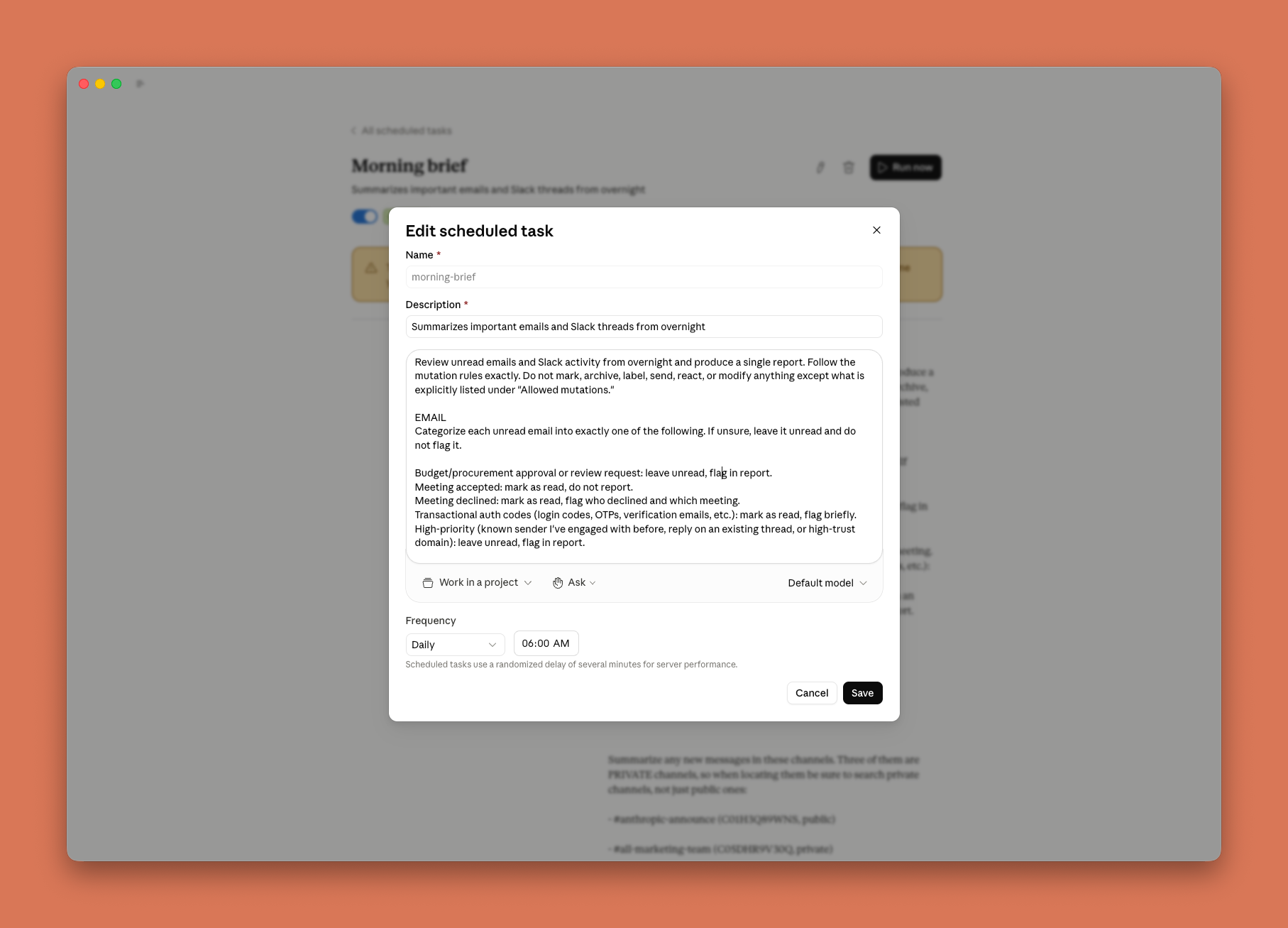
このレポートには、確認すべき事項の要約(TLDR)、タイプ別に分類されたフラグ付きメール、チャンネルのサマリー、およびマーケティングに影響を及ぼす可能性のある夜間の製品関連インシデントが含まれています。Slack やメールに溺れている人なら誰でも、このワークフローの類似バージョンを実行できます。
Budget pacing
私の仕事のうちの一部には、パフォーマンスマーケティングのための予算ペース管理(budget pacing)も含まれます。これは退屈で面倒な作業のため、誰もやりたがらない仕事です。多くのパフォーマンスマーケティングチームは、目標に対するペースを推定するために Google スプレッドシートで毎日の支出とランニングレート(run rate)を追跡しています。どちらかといえば、各チャンネルからの毎日の支出を手動でエクスポートしてスプレッドシートに貼り付けるか、データを抽出・変換・ロードするためのサードパーティ製ツールにお金を払うかのどちらかです。

Claude Cowork を使用すると、Google Ads と Meta Ads に接続し、デスクトップアプリ内でライブアーティファクト(基本的に HTML ダッシュボード)を作成できます。これにより、毎日の支出が自動的に取得され、ペース配分も計算してくれます。また、Claude に対して自然な英語でキャンペーンのフィルタリング方法や注意すべき点を指示することも可能です。
上記のチェックリストと比較してみましょう:複数のソースからの入力(各チャネルの支出)、ファイルとしての出力(この場合はダッシュボード)、そして頻繁に再実行します。その中間には、私が絶対に自分で行いたくない、無意味で魂を削るようなダウンロード・コピー・ペーストの地獄のような作業があります。広告プラットフォームはコネクタを通じて統合されているため、いつでもこのダッシュボードを更新できます。
レポーティング
CSV の山をエクスポートしてピボットテーブルを作成したり、ファイルを手動で結合したりする代わりに、Claude Cowork を Google Search Console に接続しています。私が関心を持つデータ(クエリ、国、ページ)を取得し、手動でデータをエクスポートする場合のデフォルトである「次元ごとに 1 つの CSV ファイル」という形式ではなく、単一のシートに統合・照合します。

また、Claude には何を重点的に見るべきかの文脈も提供します。例えば、直近の 7 日間と前回の 7 日間を比較する、特定の国にのみフィルタリングする、意味のある変動があったものをフラグ付けする、そして私が望むテンプレートでレポートを作成するなどです。そこから先は、必要な箇所を修正したり、Claude に追加質問をしたりすることができます。

Claude Cowork のスケジューリング機能を使えば、この処理は毎週自動的に実行されます。以前はレポート作成に週あたり約 30 分かかっていましたが、現在は 5 分で済み、その時間を私が判断を要する部分に充てられるようになりました:不足している文脈の補填や、呼び出し項目(callouts)の検討です。
これらは私が Claude Cowork を活用するほんの一例に過ぎず、表面の一部に触れただけにすぎません。プラグイン、スキル、ローカル MCP、そして Dispatch を跨ぐ複雑なユースケースの詳細な手順を強調した、私が執筆した別の記事もぜひご覧ください。より多くのベストプラクティスについてはそちらをご参照ください。
Claude Cowork での最初の 10 分
アプリを初めて開く場合の始め方は以下の通りです:
- Claude デスクトップアプリを開き、Claude Cowork タブに切り替えてください。
- Claude に作業対象を与えましょう。ファイルを数個ドロップするか、コンピュータ上のフォルダを指し示すか、頻繁に使用するアプリ(Slack, Gmail, Notion, CRM など)を接続してください。中程度の Claude Cowork の出力と優れた出力の違いは、ほとんどがプロンプトの質ではなく、Claude が作業するために十分な豊富な文脈を提供できているかどうかにかかっています。
- Claude に望む成果を伝えてください。最終的に得たい成果物を記述し、必要な文脈をすべて提供してください。
- 自分がよく知っている実際のタスクから始めてください。すぐに、Claude がどこで強みを発揮するか、どこであなたからの文脈が必要になるかがわかり、また「良い」状態がどのようなものかもすでに把握しています。
- Claude に作業開始前に質問させるようにしてください。これが私が築いた中で最も有用な習慣です。この指示をプロンプトの一部として含めてください。「始める前に、私の依頼内容を私に繰り返して合意形成を図り、その後、可能な限り多くの明確化のための質問をしてください」。これにより、あなたが指定することを忘れていた事項(どの期間を対象としているのか、「良い」とはここでは何を意味するのか、Claude が知らないがあなたご存知のエッジケースはあるか)が浮き彫りになります。陥りやすい罠は、Claude があなたにとって自明なことをすでに知っていると思い込むことです。事前に 5 つの質問に答えるのに要する時間はわずか 30 秒です。その後のギャップを見つけることにかかる時間とトークンコストを考えると、後で修正するのは大変な手間となります。
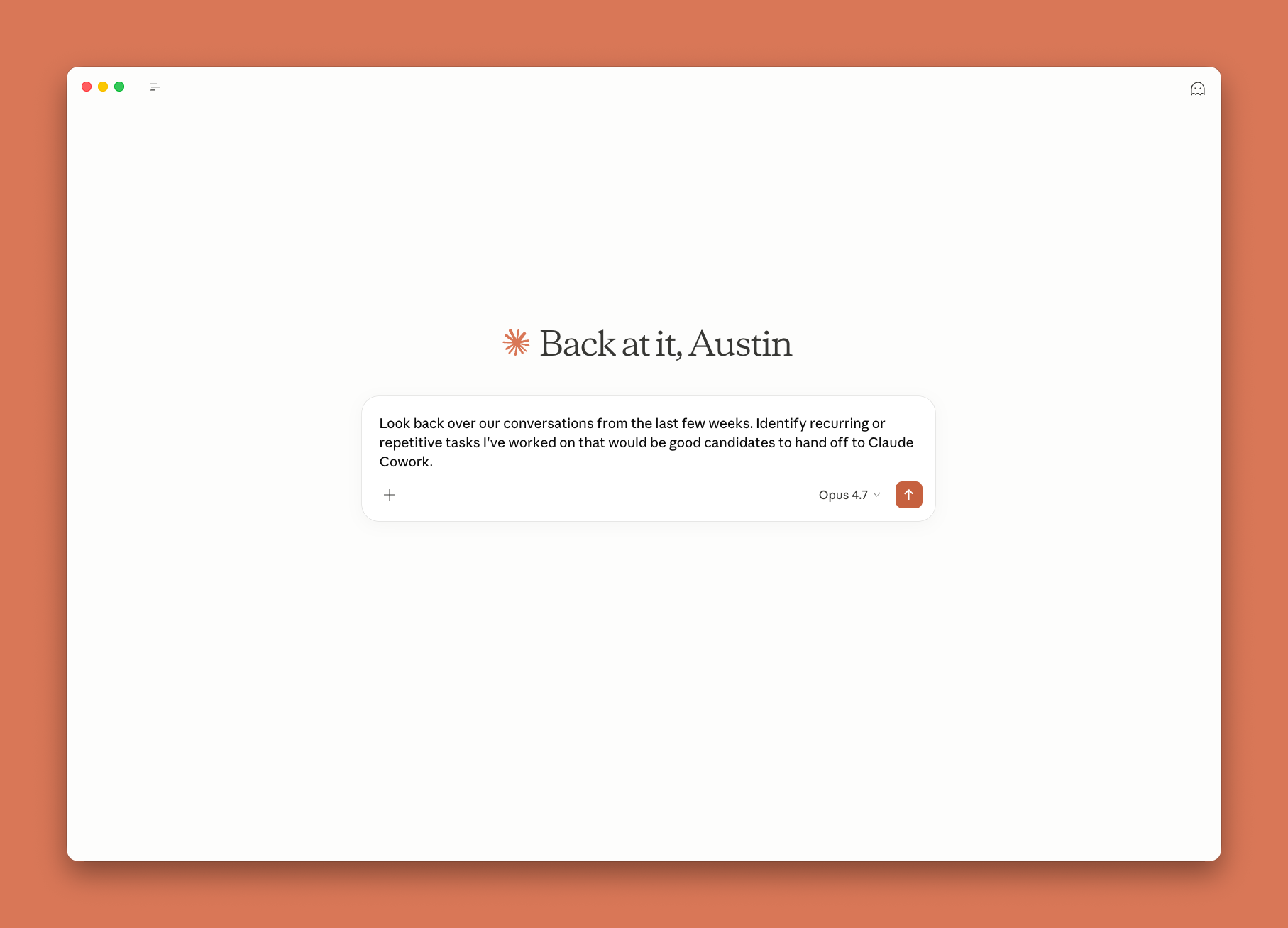
まだ何を任せるべきか迷っていますか?Claude に聞いてみましょう。Claude は記憶を持ち、過去の会話も検索できるため、自分が最も頻繁に行うタスクや Claude Cowork で試すべきタスクを尋ねることができます。
まだチャットを使ってしまう場合
私は依然として、ポジショニングの問題について議論したり、コミットする前にアイデアを圧力テストしたり、なぜ犬がベッドを舐め続けるのかといったランダムな質問をしたりするために、チャットを幅広く使用しています。
重要なのは、チャットが「古い」ものだからではないということです。チャットは出力が頭の中の思考である場合に用いられ、Claude Cowork は出力を誰かに引き継ぐ必要がある場合に用いられます。
何かを作ってみよう
毎週繰り返しているタスクを一つ選び、それに対して Claude Cowork を試して、どのような結果が返ってくるか確認してください。最初の数回のタスクでは少しぎこちなく感じるかもしれませんが、数回試すうちに、「どうやって使うのか」から「次に何を任せるべきか」という思考にすぐに切り替わるでしょう。
*この記事は、Anthropic の成長チームに所属する Austin Lau によって書かれたものであり、Claude Cowork に関する彼の意見、使用パターン、およびアドバイス expresses しています。*
原文を表示
In 2024, we had Claude in a chat window. You asked a question and you got an answer, but it was up to you to turn that answer into something useful. In 2025, Claude Code let engineers ship at a pace that made the rest of us a little jealous.
This year, we can all catch up with Claude Cowork.
I started using Claude Code last year for long, multi-step tasks that chat wasn’t equipped to handle. Within a week, I went from not knowing what a terminal was to building out Claude Code workflows that completed 30-minute tasks in 30 seconds. I was using Claude Code for non-technical work because Claude Cowork didn’t exist yet.
Now, 90% of my work happens in Claude Cowork. In this post, I'll show you how to tell which of your tasks belong there, walk through real examples from my own work, and get you to your first finished deliverable in about ten minutes.
Using Chat vs Claude Cowork vs Claude Code
If your job is non-technical knowledge work–emails, decks, spreadsheets, docs, meetings, and "can you pull together a summary of this”–then Claude Cowork is for you. You don't need to know how to code. You don't need to know what an "agent" is or how to build one.
If you've spent the last two years with an AI chat tab open among 100 other tabs and files, copy-pasting prompts or questions into it and copy-pasting the answers back out, you already know how to use Claude Cowork. It's that, minus the copy-pasting.
The same Claude models power chat, Claude Cowork, Claude Code, Claude Design, and every other place Claude appears. These are separate workspaces that you use for different types of work, but the same models run inside all. Here’s a framework for how to think about when to use which one:
- Chat is often how knowledge workers get introduced to Claude. You bring what you have to Claude: upload a file, paste some text, describe what's going on, and get an answer. Chat is for answers, brainstorming, and thinking out loud.
- Claude Cowork in the Claude desktop app flips that around. Instead of bringing your work to Claude, you bring Claude to your work. You point it at a folder on your computer, connect it to the apps you already use, and tell it what you want done. With Claude Cowork, you describe an outcome, step away, and come back to finished work.
- Claude Code is made for developers building and shipping software. If your work lives in code, start there.
Many people don't know that Claude Cowork and Claude Code run on the same engine under the hood.
When should you use Claude Cowork?
Understanding when to use Claude Cowork vs chat is the spot where most people get stuck, so here's my rule of thumb:
- Use chat if what you want fits in a few exchanges, like a question, an explanation, a brainstorm, or a gut check.
- Use Claude Cowork if what you need is a deliverable, for example, a file someone will open, a deck someone will present, or a spreadsheet to be sorted. Use it for anything that’s multi-step or touches more than one file/file type or more than one app, or that you'd describe as a task rather than a question. With Claude Cowork, you are delegating work to Claude.
A few examples of where the line falls:
The most common mistake is reaching for chat for everything and never feeling the difference Claude Cowork can make. The opposite mistake is handling Claude Cowork one-off questions, then waiting around for something chat would've answered in five seconds.
The five ingredients of a Claude Cowork-shaped task
If you’re not sure what projects to delegate to Claude Cowork when you’re first getting started, run them through this checklist. You don't need all five criteria, but a good candidate hits a few:
- More than one thing goes in. Multiple files, a whole folder, or a file plus some connectors. If there's only one input, chat probably handles it fine for the most part (you should still experiment).
- A file comes out. You need a deliverable that you can attach, present, share, or repurpose: a doc, a deck, a spreadsheet, or a CSV.
- You'll do it again. One-offs are fine, but recurring tasks are the sweet spot. You can schedule them to run before you're even at your desk.
- You already know what good looks like. You're familiar with the shape of the output, so you can tell in 15 seconds whether the output is right, wrong, or 70% there.
- The middle is the boring part. The thinking lives at the start (deciding what you want) and the end (deciding if it's right). Everything in between (extract, compile, reconcile, and reformat) is what you hand off.
How I use Claude Cowork at Anthropic
I manage growth marketing at Anthropic, so my examples are marketing-flavored. Don't read these looking for a workflow to copy—that's not going to be helpful in the long run. Watch how each one hits a few items from the checklist above, because that's the pattern you'll be looking for in your own Claude Cowork workflows.
Daily briefing
The number of Slack channels and emails a marketer receives every day can be overwhelming. I have a "daily briefing" task that runs every morning at 6am. Claude Cowork is connected to my Slack and Gmail, and my prompt tells it to review my unread emails and the channels I care about, sort them into buckets, and produce a short report.
The report gives me a TLDR of what to look into, flagged emails grouped by type, channel summaries, and any overnight product-related incidents that could have impacted marketing. Anyone drowning in Slack and email can run some version of this workflow.
Budget pacing
Part of my job includes budget pacing for performance marketing. It's the kind of work nobody wants because it's boring and tedious. Many performance marketing teams track daily spend and run rate in Google Sheets to estimate pacing to goal. Either you're manually exporting daily spend from each channel and pasting it into the sheet, or you're paying for a third-party tool to extract, transform, and load data for you.
With Claude Cowork, I connect to Google Ads and Meta Ads and create a live artifact (basically an HTML dashboard) in the desktop app that automatically pulls in my daily spend and calculates pacing for me. I can also just tell Claude in plain English how to filter my campaigns and what to look out for.
Run that against the checklist above: multiple sources in (every channel's spend), a file out (in this case it's the dashboard), I rerun it constantly, and the middle is the mindless soul-sucking download-copy-paste grind I absolutely do not want to do myself. Since the ad platforms are integrated through my connectors, I can update this dashboard at any time.
Reporting
Instead of exporting a pile of CSVs and building pivot tables or combining files manually, I have Claude Cowork connected to Google Search Console. It pulls what I care about (queries, countries, pages) and reconciles it into a single sheet, instead of Google's default of one CSV per dimension when you export data manually.
I also give Claude the context on what to focus on, like looking at the last seven days vs the prior seven, filtering to only specific countries, flagging anything that moved meaningfully, and writing up the report in the template that I want. From there I can go ahead and tweak anything or ask Claude follow up questions.
With scheduling in Claude Cowork, this runs automatically every week. Reporting used to take me ~30 minutes a week; now it takes five and I spend them on the part that needs my judgement: filling in missing context and workshopping the callouts.
These are just some examples of how I use Claude Cowork, but they barely scratch the surface. Check out another article I wrote that highlights a more detailed walkthrough of another complex use case that spans plugins, skills, local MCPs, and Dispatch for more best practices.
Your first 10 minutes with Claude Cowork
First time opening the app? Here’s how to get started:
- Open the Claude desktop app and switch to the Claude Cowork tab.
- Give Claude something to work with. Drop in a few files, point it at a folder on your computer, or connect an app you frequently use (Slack, Gmail, Notion, CRM, etc). The difference between a mediocre Claude Cowork output and a great one is almost never your prompt, but whether you're providing enough rich context for Claude to work with.
- Tell Claude the outcome you want. Describe the deliverable you want at the end and provide any necessary context.
- Start with a real task you know well. You'll see immediately where it's strong, where it needs context from you, and you already know what "good" looks like for it.
- Make Claude ask you questions before it starts. This is the single most useful habit I’ve built. Include this as part of your prompt: Before we begin, repeat my ask back to me so we're aligned, then ask me as many clarifying questions as you have.
This surfaces things you didn't think to specify, like which time period are we looking at, what does "good" mean here, or what edge cases do you know that Claude doesn't. The trap is assuming Claude already knows what's obvious to you. Answering five questions up front costs you 30 seconds. Finding those same gaps afterwards costs you time and tokens, and it's a pain to fix.
Still not sure what to hand off? Ask Claude. Claude has memory and can search your past conversations, so you can ask it which tasks you do most often and which ones to try in Claude Cowork.
When I still reach for chat
I still use chat extensively to talk through a positioning problem, pressure-test an idea before I commit to it, or to ask random questions like why my dog keeps licking the bed.
The point isn't that chat is the "old" thing. Chat is for when the output is a thought in your head, and Claude Cowork is for when the output is something you’ll hand to someone else.
Go build something
Pick one repetitive task you do every week, try usingClaude Cowork for it, and see what comes back. The first few tasks might feel a little awkward, but after a few tries you'll quickly go from "how do I use this" to "what do I hand it next."
*This article was written by Austin Lau, on the growth team at Anthropic, and expresses his opinions, usage patterns, and advice on Claude Cowork.*
関連記事
今日のまとめ
AIデイリーブリーフで今日の重要ニュースをまとめ読み