AgentWatch:環境型エージェントによるAWSの予防的監視
AWS は、従来の受動的な監視から脱却し、インフラの状態を常時観察して必要な時のみ人間に介入を求める「環境型エージェント(Ambient Agents)」である AgentWatch の実装と活用パターンを紹介した。
キーポイント
従来監視の課題と環境型アプローチ
CloudWatch アラームの遅延やアラート疲労による対応遅れを解消するため、システムを常時観察し、人間の判断が必要な時のみ通知する「Ambient Agents」の概念が提案されている。
AgentWatch の実装機能
15 分ごとにインフラチェックを実行し、CloudWatch メトリクスやログを要約して Slack に報告したり、自然言語での質問に回答する機能を備えている。
人間と機械の協調パターン
完全な自動化ではなく、適切な監視を保ちつつ自動化を最大化するための「人間-in-the-loop」の 3 つのパターンが紹介されている。
自動展開スクリプトによるセットアップ
デプロイスクリプトにより、AgentCore Runtime への展開やインフラ構築を含む一連のセットアッププロセスが自動化されます。
Slack インテグレーションの設定
デプロイ出力から得た API Gateway エンドポイントを Slack アプリに設定することで、監視アラートを連携させることができます。
重要な引用
CloudWatch alarms trigger too late, AWS Lambda errors accumulate unnoticed, and Amazon Elastic Compute Cloud (Amazon EC2) performance degradation goes undetected until customers report problems.
The agent works continuously alongside your team to observe your infrastructure, analyze patterns, and surface insights without requiring constant human intervention.
The deployment script automates the entire setup process
影響分析・編集コメントを表示
影響分析
この記事は、AI エージェント技術を実際のクラウド運用(DevOps)に組み込む具体的な事例を示しており、監視ツールのパラダイムを「アラート待ち」から「能動的な洞察提供」へとシフトさせる可能性を示唆しています。しかし、これは既存の AWS 製品群(CloudWatch など)を補完するツールとしての導入であり、業界全体を根底から変えるような画期的な新技術発表というよりは、運用改善のための実用的なアプローチ提案です。
編集コメント
「Ambient Agents」という概念は、AI が人間に代わって常に監視し、必要な時だけ介入する新しい運用モデルを提示しており、DevOps チームのバーンアウト解消への期待が高まります。ただし、これはあくまで AWS 環境内での実装事例であり、他クラウドやオンプレミス環境への汎用性については今後の展開が注目されます。
AgentWatch は、DevOps チームのための環境型 AWS リソース監視を提供し、複数のアカウントにまたがる Amazon CloudWatch アラームの管理という反応的なサイクルを超えた価値をもたらします。CloudWatch のアラームは発令が遅すぎ、AWS Lambda のエラーが unnoticed に蓄積し、Amazon Elastic Compute Cloud (Amazon EC2) のパフォーマンス劣化は顧客から問題報告があるまで検出されません。その結果、チームは常に火消しに追われ、問題の予防には手が回らなくなります。毎日、手動でダッシュボードを確認し、CloudWatch アラームをトリアージし、すでにユーザーに影響を与えてしまった事象の調査を行っています。メトリクスがストリーミングされ、ログが数十のサービスに蓄積し、アラームが絶えず発令されていますが、何が重要なのか、いつ重要になるのか、そしてそれに対して何をすべきかを知ることは、依然として真の課題です。
このリアクティブな監視アプローチは、チームに運用上の課題を生み出します。ツール間でコンテキストを切り替えながら、断片的なデータソースからインシデントの全体像を組み立てる必要があり、予防できた問題について事後分析に何時間も費やしてしまいます。何が起きたのかを理解した頃には、顧客はすでにパフォーマンスの低下や障害を経験しています。オンコール担当エンジニアはアラート疲労により疲弊し、チームの生産性も、イノベーションに充てるべき時間をルーチンの監視タスクが奪うことで損なわれます。これらの課題は、サービスレベルアグリーメント(SLA)目標の未達成、顧客からのエスカレーション、そして予防策の実装よりも火消し対応に注力することで蓄積する技術的負債の増加へとつながります。
現在の監視ツールでは、常にクエリを実行し、分析を行い、何が注目すべき対象かを判断する必要があります。異なるアプローチが必要です。ここで登場するのが、AgentWatch です。これは環境に溶け込む AWS リソース監視エージェントであり、インフラストラクチャの監督に対する新たなアプローチを提供します。このエージェントはチームと共に継続的に動作し、インフラストラクチャを観察し、パターンを分析し、常時人間の介入を必要とせずに洞察を提示します。システムを監視し、判断やアクションが本当に必要な場合にのみ、あなたをそのプロセスに巻き込みます。
本稿では、AgentWatch の機能を実際の導入を通じて実証します。このソリューションが 15 分ごとにインフラチェックを実行し、複数の AWS アカウントにわたる CloudWatch メトリクス、ログ、アラームを要約する様子をご覧いただきます。エージェントは実行可能なレポートを直接 Slack に配信し、インフラの状態に関する自然言語による問い合わせにも応答します。全体を通じて、適切な監視を維持しつつ自動化を最大化する 3 つの人間が関与するループパターンを探求していきます。
エンバシエント・エージェントとは何か?
Ambient agents は、イベント駆動型で自律的な AI システムへの転換を象徴しています。これらのエージェントはイベントストリームを監視し、動的に反応しながら複数のイベントを同時に処理することで、人間の運用負荷を軽減します。常時人間の介入なしに継続的なモニタリングを提供しつつも、重要な意思決定の局面において人間を関与させることで、適切な監督体制を維持します。
エンバシエント・エージェントはイベント駆動型で動的にトリガーされ、並列して複数のタスクを処理できるため、状況が急速に変化し継続的な注意を要するモニタリングシナリオに適しています。エンバシエント・エージェントが最も効果を発揮するのは特定のシナリオです。これらをワークフローに組み込むには、これらのエージェントが人間とどのように相互作用するか、またエージェントの実行とエンドユーザーへの通知において人間がワークフローに対してどの程度の制御権を持つのかについて、慎重な検討が必要です。
この仕組みはあなたの AWS インフラストラクチャにどう適用されるのか?
あなたの AWS インフラストラクチャにおいて、これは AgentWatch が手動でダッシュボードを照会したりログを検索したりする必要なく、リソースを継続的に監視し、傾向を特定し、実行可能なインテリジェンスを提供できることを意味します。アームビエント・エージェントの概念を理解したところで、AgentWatch が AWS インフラストラクチャの監視においてこれらの原則をどのように実装しているかを探っていきましょう。
AgentWatch の紹介
私たちは AgentWatch を Amazon Bedrock の大規模言語モデル(LLM)を用いたアームビエントな AWS 監視エージェントとして構築し、Amazon Bedrock AgentCore Runtime—AI エージェントをスケールして実行するために特別に設計された安全でサーバーレスのホスティング環境—を使用してデプロイしています。AgentCore Runtime を用いれば、エージェントをプログラム呼び出し可能な HTTP エンドポイントとしてデプロイできます。AgentCore Runtime は認証、スケーリング、インフラストラクチャ管理を自動的に処理するため、運用上の懸念ではなくエージェントの機能に注力することができます。
AgentWatch は、自動化と人間の制御のバランスを保ちつつ、インテリジェントなインフラ監視を実装する方法を示しています。私たちはハイブリッド型アンビエントエージェントを構築しており、その実行タスクの一部は完全に自律的(リソース利用率の監視や情報提供など低リスクの活動)ですが、他のアクションにはユーザーによる設定と承認が必要です。具体的には、アラームの原因分析や修正の実行などが該当します。
組織によっては、コラボレーションに異なるコミュニケーションツールを使用しているかもしれません。AI 機能が進展するにつれ、Slack などのさまざまな通信サービス上で自律型ワーカー(またはエージェント)との協働方法も変化していきます。これらのエージェントは、エンドユーザーとのフィードバックループをより緊密に維持しながら、タスクをより迅速かつ効率的に完了します。本ソリューションでは、アンビエントエージェントがメッセージを投稿し、ユーザーが必要な時にエージェントと対話するためのエンドユーザーインターフェースとして Slack を使用しています。
この基盤を整えた上で、AgentWatch がどのようにして 3 つのコアパターンを通じて適切な人間の監督を維持するかを見ていきましょう。
ループ内人間(Human-in-the-loop)パターン
ループ内人間(HITL: Human-in-the-loop)は、信頼性の高いアンビエントエージェントを構築する上で不可欠な要素です。アンビエントエージェントは自律的に動作しますが、意思決定プロセスに人間を関与させるべきタイミングを理解している必要があります。AgentWatch は、自律性と適切な人間の監督のバランスを保つ 3 つのコア HITL パターンを実装しています。
- Notify Pattern(通知パターン):このパターンは、重要なイベントについて警告を発しますが、アクションは実行しません。これは、エージェントが行動する権限を持たないものの、認識しておくべきイベントをフラグ付けするのに役立ちます。
実装:AgentWatch は 15 分ごとに(パラメータ化されており、MonitoringSchedule パラメータでレートが制御されます;他のオプションとして 5 分、10 分、30 分、60 分の間隔で実行することも可能)モニタリングレポートを生成します。このレポートには、CloudWatch アラーム(アラート)、クリティカルな問題、および AWS サービス全体のリソースヘルスが含まれます。エージェントはこれらのレポートを Slack チャンネルに投稿し、チームを最新の状態に保ちますが、即時のアクションや承認を必要としません。15 分間隔を選んだのは、問題の迅速な検出と、適切な API 使用量および通知頻度のバランスを取るためです。これは問題を素早く捉えるのに十分短い間隔ですが、アラート疲労を引き起こさないように十分な長さもあります。
- Question Pattern(質問パターン):このパターンでは、エージェントが進行方法について不確実性に直面した際に、あなたに確認を求めます。これにより、曖昧な状況に直面した際のエージェントによる誤った推測や不適切なアクションを防ぐことができます。
実装:AgentWatch がクリティカルなアラームを検出しても、自動化された修復を実行するかオンコールエンジニアへのエスカレーションを行うか不明確な場合、Slack に質問を投稿してガイダンスを求めます。これは、本番システムに重大な変更を加える前にシニア管理者と相談するサイト信頼性エンジニア(SRE)の行動を模倣したものです。
- Review Pattern(レビューパターン):このパターンでは、エージェントがアクションを実行する前に、承認、拒否、または編集を行うことができます。これは、人間の判断が必要な機密性の高いオペレーションにおいて特に重要です。
実装:AgentWatch が AWS リソースの修正、スケーリングポリシーの調整、アラーム閾値の変更など、潜在的に大きな影響を与えるアクションを実行しようとする場合、Slack を通じて提案されたアクションを関連する文脈と理由とともに提示します。その後、あなたはアクションを承認して実行するか、完全に拒否するか、または実行前にパラメータを編集することができます。これらの HITL(Human-in-the-Loop:人間がループ内にある)パターンは、チームにとって複数のメリットをもたらします。重要な瞬間に適切な人間の監督が行われることを保証することで実装リスクを低減し、エンジニアリングチームに見られる自然な人間コミュニケーションを模倣するため、導入が直感的になります。時間とともにエージェントはあなたのフィードバックから学習し、意思決定を継続的に改善していきます。
次に、これらの機能を可能にする技術アーキテクチャについて探っていきましょう。
アーキテクチャと実装
AgentWatch は、15 分ごとに AWS インフラストラクチャのデータを自律的に収集して要約するスケジュール監視システムを実装しています。この監視アプローチでは、AI を活用したエージェントが現在のシステム情報を収集し、Slack 通知を通じて構造化されたステータスレポートを配信します。
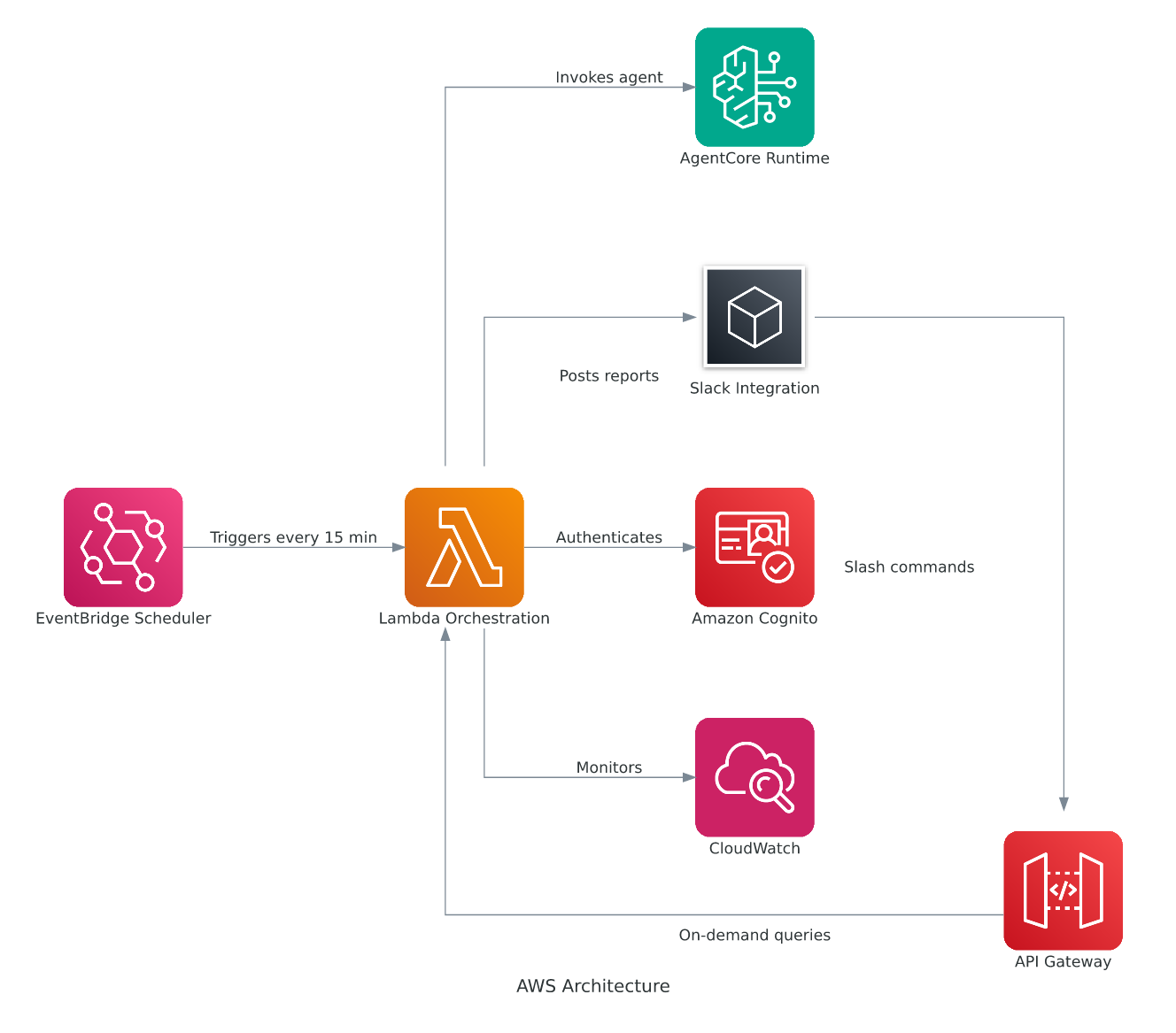
図 1: AgentWatch アーキテクチャダイアグラム
AgentWatch の監視サイクルは、Amazon EventBridge が cron ベースのルールを通じて 15 分ごとに AWS Lambda 関数をトリガーすることから始まります。この Lambda 関数は、Open Authorization 2.0 (OAuth 2.0) クライアント認証情報を使用して Amazon Cognito と認証し、ベアラートークンを取得した後、監視プロンプトと共に AgentCore Runtime を呼び出します。AgentCore は、言語モデルによって駆動されるアプリケーションを構築するためのフレームワークである LangChain エージェントをインスタンス化し、AWS インフラストラクチャ用の 7 つの専門的な監視ツールにアクセスできるようにします。これらには、ダッシュボード、ロググループ、サービスログ、エラーパターン、アラームステータス、およびクロスアカウントメトリクスを含むインフラストラクチャデータを体系的に収集する専用の CloudWatch 監視ツールが備わっており、AWS 環境全体にわたる包括的な可視性を提供します。
データ収集完了後、LangChain エージェントは集約された CloudWatch データを Amazon Bedrock の Claude Sonnet モデル に送信し、生監視情報を文脈に即した人間が読みやすいインサイトに変換します。この知的要約はエージェントを通じて AgentCore Runtime を経由して Lambda 関数に戻され、ログ分析とアラームステータス用の整理されたセクションを持つ構造化された Slack ブロックとして分析結果をフォーマットします。その後、AgentWatch は Webhook を介して指定された Slack チャンネルにフォーマット済みの監視レポートを送信し、手動介入なしで発生するこれらの監視タスクにより、チームはコラボレーションワークスペース内で AWS インフラストラクチャに関する定期的かつ自動的な健康状態の更新を直接受け取ることができます。
AgentWatch は、AWS インフラ向けの 7 つの専門的な監視ツールにアクセスできる LangChain エージェントとして構築されました。このエージェントは、自然言語理解のために Amazon Bedrock の Claude モデルを使用し、CloudWatch ダッシュボードの分析、ログの取得、アラームの確認、およびクロスアカウント監視を実行できます。アーキテクチャは、スケジュールされた監視とオンデマンドでの対話機能の両方を備えたハイブリッド型アンビエントモデルに従っています。
LLM の自然言語理解を活用し、AgentWatch は複雑な AWS 監視シナリオを分析します。どのツール組み合わせが監視カバレッジを提供するかを特定した後、実行可能なインサイトを含む人間が読みやすいレポートを生成します。エージェントは対話間で会話の文脈を維持するため、フォローアップ質問や監視戦略の段階的な洗練をサポートします。
AgentCore Runtime にエージェントをデプロイすると、大規模な AI エージェントの実行に特化した安全でサーバーレスかつ目的に合わせたホスティング環境が提供されます。AgentCore Runtime は複数のエージェントフレームワークとモデルプロバイダーをサポートしています。エージェントをデプロイした後、それはプログラムから呼び出せる HTTP エンドポイントとして利用可能になります。認証は AgentCore Identity が OAuth 2 を使用して行い、ID プロバイダーには Cognito が用いられますが、他の OpenID Connect (OIDC) 準拠の ID プロバイダー (IdPs) も利用可能です。
デプロイメントインフラストラクチャは、連携して動作する3つの主要コンポーネントで構成されています。まず、Lambda 関数がオーケストレーション層として機能します。これは Cognito と認証を行いベアラートークンを取得し、適切なプロンプトとともに AgentCore Runtime エンドポイントを呼び出し、レスポンスを Slack の形式に整形します。
@app.entrypoint
def agent_handler(payload: Dict[str, Any]) -> str:
	# Extract prompt and session context
	user_prompt = payload.get("prompt")
	thread_id = payload.get("session_id", "default-session")
   # Invoke agent with conversation memory
   result = monitoring_agent.invoke(
		{"messages": [{"role": "user", "content": user_prompt}]},
		{"configurable": {"thread_id": thread_id}}
)
return result['messages'][-1].content
次に、EventBridge は 15 分ごとにトリガーされるように設定されたルールを通じて、スケジュール実行機能を提供します。このルールが発火すると、Lambda は CloudWatch アラームのサマリー、クリティカルな問題、リソースの健全性に関する要約を要求する事前設定済みモニタリングプロンプトを使用します。
第三に、Amazon API Gateway が Lambda 関数を HTTP エンドポイントとして公開し、スラッシュコマンドを通じて Slack アプリと統合しています。Slack で入力された質問は API Gateway にルーティングされ、そこが Lambda をトリガーして、その質問をプロンプトとして渡します。
この二重トリガーアーキテクチャにより、AgentWatch は2つのモードで動作します。*スケジュールモード*では、エージェントは15分ごとに自律的に実行され、AWS インフラストラクチャをプロアクティブに監視し、手動介入なしにチームを情報提供するためにレポートを投稿します。一方、*オンデマンドモード*では、Slack を通じて特定の質問を行い、即時の回答を受け取ることができます。これにより、必要な際にインタラクティブなトラブルシューティングや調査が可能になります。
次に、これらの機能が実際の事例でどのように機能するかを見てみましょう。
AgentWatch の実働
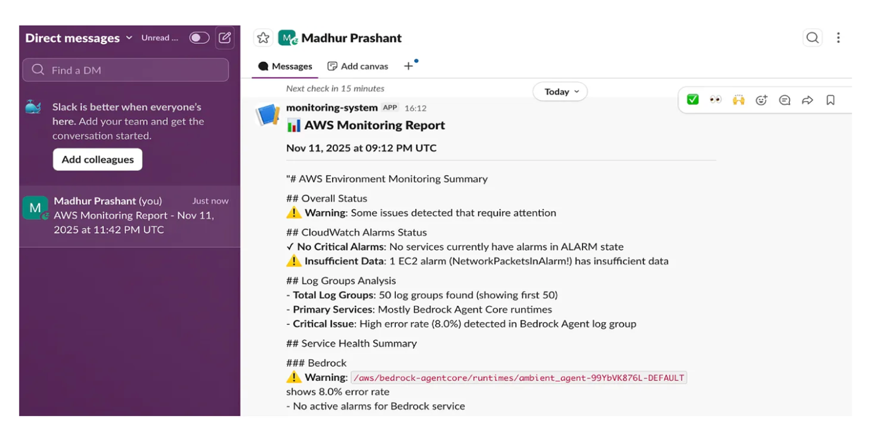
以下のスクリーンショットは、AgentWatch の両方の運用モードを示しています。
スケジュール監視レポート: 15分ごとに、AgentWatch は自動的に監視レポートを生成し、Slack に投稿します。これにより、チームは AWS インフラストラクチャの健全性について継続的な可視性を得ることができます。
 image
image
図2: CloudWatch アラーム、リソースの健全性、および重要な問題を示す Slack 上のスケジュール監視レポート
オンデマンドインタラクション: スラッシュコマンドを通じて特定の質問を行い、問題の調査やリアルタイム情報の取得が可能です。エージェントはあなたの質問を処理し、現在の AWS インフラストラクチャの状態に基づいて詳細で文脈に応じた回答を提供します。
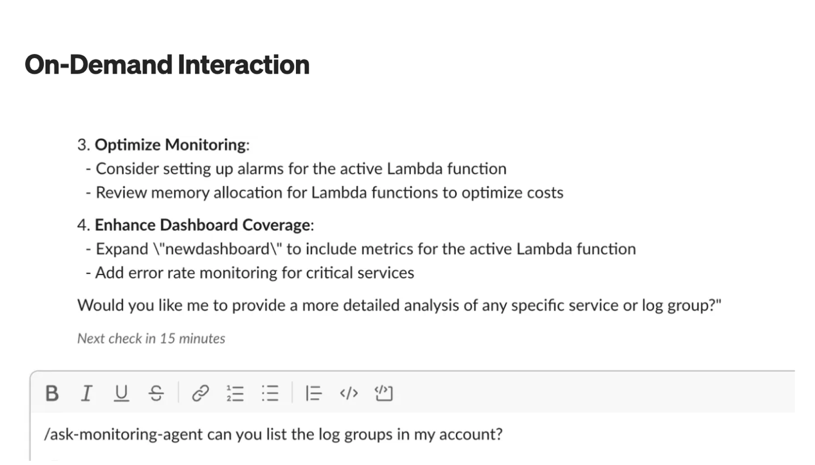
Figure 3: User asking a specific question via Slack slash command and receiving a detailed response
これらの運用事例を超えて、AgentWatch は組織全体に広範な価値をもたらします。
ユースケースとメリット
AgentWatch は複数の運用シナリオにわたって価値を提供します。本ソリューションは、AWS インフラストラクチャ全体の CloudWatch メトリクス、ログ、アラームを継続的に分析することで、ユーザーに影響を与える前に潜在的な問題を特定します。この予防的なアプローチにより運用オーバーヘッドが削減され、チームはルーチンな監視タスクに費やす時間を減らしつつ、自動化されたレポートとインテリジェントなアラートを通じてシステム健全性への可視性を維持できます。
Slack 統合により、自然言語による問い合わせやインフラストラクチャの問題に関する議論をサポートすることで、チーム間の協働が強化され、開発チームと運用チームのコミュニケーションが改善されます。エンタープライズ環境では、クロスアカウントサポートにより、大規模組織は中央集権型のインテリジェントエージェントから分散した AWS インフラストラクチャを監視することが可能になります。
始め方
AgentWatch の利用を開始するには、完全なデプロイ手順と実装の詳細については GitHub リポジトリ をご覧ください。
事前準備
AgentWatch を展開する前に、CloudWatch、Lambda、EventBridge の権限を持つ AWS アカウントを持っていることを確認してください。OAuth 2.0 認証用に設定された Cognito User Pool と、アプリ作成権限を持つ Slack Workspace が必要です。ローカル開発やカスタマイズには、Python 3.11 以降が必須です。
クイックセットアップ
クイックセットアップには以下のコマンドを使用してください。
- ID プロバイダーの設定
python idp_setup/setup_cognito.py
- エージェントを AgentCore Runtime に展開
# 最新の AgentCore CLI をインストール
npm install -g @aws/agentcore
AgentCore プロジェクトを作成し、既存のエージェントコードを読み込む
agentcore create --name AgentWatch --no-agent
agentcore add agent \
--name AgentWatch \
--type byo \
--code-location . \
--entrypoint ambient_agent.py \
--language Python
AgentCore Runtime に展開
agentcore deploy
- インフラストラクチャの展開
cd deployment
./deploy.sh
- Slack 統合の設定 – 展開出力から取得した API Gateway エンドポイントを使用して、Slack アプリを更新してください。
展開スクリプトはセットアッププロセス全体を自動化します
原文を表示
AgentWatch delivers ambient AWS resource monitoring for your DevOps team, moving beyond the reactive cycle of managing Amazon CloudWatch alarms across multiple accounts. CloudWatch alarms trigger too late, AWS Lambda errors accumulate unnoticed, and Amazon Elastic Compute Cloud (Amazon EC2) performance degradation goes undetected until customers report problems. This leaves your team constantly firefighting rather than preventing issues. Every day, you manually check dashboards, triage CloudWatch alarms and investigate issues that have already impacted your users. You have metrics streaming in, logs accumulating across dozens of services, and alarms firing constantly but knowing what matters, when it matters, and what to do about it remains the real challenge.
This reactive monitoring approach creates operational challenges for your team. You’re context-switching between tools, piecing together incident stories from fragmented data sources, and spending hours on post-mortems for problems you could have prevented. By the time you understand what went wrong, your customers have already experienced degraded performance or outages. Your on-call engineers are burned out from alert fatigue, and your team’s productivity suffers as routine monitoring tasks consume time that should be spent on innovation. These challenges lead to missed service level agreement (SLA) targets, customer escalations, and a growing backlog of technical debt as your team focuses on firefighting rather than implementing preventive measures. Current monitoring tools require you to constantly query, analyze, and decide what deserves attention. You need a different approach. This is where AgentWatch, an ambient AWS resource monitoring agent, offers a different approach to infrastructure oversight. The agent works continuously alongside your team to observe your infrastructure, analyze patterns, and surface insights without requiring constant human intervention. It monitors your systems and brings you into the loop only when your judgment or action is truly needed.
In this post, we demonstrate the capabilities of AgentWatch through practical implementation. You will see how the solution performs infrastructure checks every 15 minutes, summarizing CloudWatch metrics, logs, and alarms across multiple AWS accounts. The agent delivers actionable reports directly to Slack and responds to natural language queries about your infrastructure state. Throughout, we explore three human-in-the-loop patterns that maintain appropriate oversight while maximizing automation.
What are ambient agents?
Ambient agents represent a shift toward event-driven, autonomous AI systems. These agents listen to event streams and respond dynamically, processing multiple events simultaneously while reducing human operational burden. They provide continuous monitoring without constant human intervention yet maintain appropriate oversight by involving humans at critical decision points.
Ambient agents can be triggered dynamically in an event-driven way and process multiple tasks in parallel, making them well suited for monitoring scenarios where conditions change rapidly and require continuous attention.Ambient agents work best for specific scenarios. Bringing them into your workflow involves thoughtful consideration of when and how these agents interact with humans and the control that humans have over the workflow as agents execute and notify end-users.
How does this apply to your AWS infrastructure?
For your AWS infrastructure, this means AgentWatch can continuously monitor your resources, identify trends, and deliver actionable intelligence without requiring you to manually query dashboards or sift through logs. Now that you understand the ambient agent concept, let’s explore how AgentWatch implements these principles for AWS infrastructure monitoring.
Introducing AgentWatch
We built AgentWatch as an ambient AWS monitoring agent on Amazon Bedrock’s large language model (LLM) and deploy it using Amazon Bedrock AgentCore Runtime—a secure, serverless hosting environment purpose-built for running AI agents at scale. With AgentCore Runtime, you can deploy agents as HTTP endpoints that you call programmatically. AgentCore Runtime handles authentication, scaling, and infrastructure management automatically so you can focus on agent capabilities rather than operational concerns.
AgentWatch demonstrates how you can implement intelligent infrastructure monitoring that balances automation with human control. We’re building a hybrid ambient agent some tasks it performs are fully autonomous (low-risk activities like monitoring resource utilization and providing information), while other actions require user configuration and approval, such as analyzing alarm causes and implementing fixes.
Your organization might use different communication tools for collaboration. As AI capabilities advance, you will work differently with autonomous workers (or agents) across various communication services like Slack. These agents accomplish tasks faster and more efficiently while maintaining a tighter feedback loop with end users. For this solution, we use Slack as the end-user interface where the ambient agent posts messages and where you interact with the agent on demand.
With this foundation in place, let’s examine how AgentWatch maintains appropriate human oversight through three core patterns.
Human-in-the-loop patterns
Human-in-the-loop (HITL) is fundamental for building trustworthy ambient agents. While ambient agents operate autonomously, they must know when to involve humans in their decision-making process. AgentWatch implements three core HITL patterns that balance autonomy with appropriate human oversight:
- Notify Pattern: The notify pattern alerts you about important events without taking action. This is useful for flagging events you should be aware of, but where the agent is not empowered to act.
Implementation: Every 15 minutes (parameterized, MonitoringSchedule rate controls the rate; other options are to run it at 5, 10, 30, 60 mins intervals), AgentWatch generates a monitoring report covering CloudWatch alarms, critical issues, and resource health across AWS services. The agent posts these reports to a Slack channel, keeping your team informed without requiring immediate action or approval. We chose 15-minute intervals to balance timely detection of issues with reasonable API usage and notification frequency. This is short enough to catch problems quickly but long enough to avoid alert fatigue.
- Question Pattern: The question pattern allows the agent to ask you for clarification when it encounters uncertainty about how to proceed. This helps prevent the agent from making incorrect assumptions or taking inappropriate actions when faced with ambiguous situations.
Implementation: If AgentWatch detects a critical alarm but is unclear whether to proceed with automated remediation or escalation to an on-call engineer, it posts a question to Slack asking for guidance. This mimics how a site reliability engineer (SRE) would consult with a senior administrator before making significant changes to production systems.
- Review Pattern: With the review pattern, you can approve, reject, or edit actions before the agent executes them. This is particularly important for sensitive operations where human judgment is required.
Implementation: When AgentWatch wants to perform potentially impactful actions such as modifying AWS resources, adjusting scaling policies, or changing alarm thresholds, it presents its proposed action to you through Slack, along with relevant context and reasoning. You can then approve the action to proceed, reject it entirely, or edit the parameters before execution.These HITL patterns provide multiple benefits for your team. They lower implementation risks by making sure appropriate human oversight at critical moments. The patterns mimic natural human communication found in engineering teams, making adoption intuitive. Over time, the agent learns from your feedback, continuously improving its decision-making.
Now let’s explore the technical architecture that brings these capabilities to life.
Architecture and implementation
AgentWatch implements a scheduled monitoring system that autonomously collects and summarizes AWS infrastructure data every 15 minutes. This monitoring approach uses AI-powered agents to gather current system information and deliver structured status reports through Slack notifications.
Figure 1: AgentWatch Architecture Diagram
The AgentWatch monitoring cycle begins with Amazon EventBridge triggering an AWS Lambda function every 15 minutes through a cron-based rule. This Lambda function authenticates with Amazon Cognito using Open Authorization 2.0 (OAuth 2.0) client credentials to obtain a bearer token, then calls AgentCore Runtime with the monitoring prompt. AgentCore instantiates a LangChain agent a framework for building applications powered by language models that can use tools and maintain conversation context with access to seven specialized monitoring tools for AWS infrastructure equipped with specialized CloudWatch monitoring tools that systematically collect infrastructure data, including dashboards, log groups, service logs, error patterns, alarm statuses, and cross-account metrics, providing comprehensive visibility across your AWS environment.
After data collection completes, the LangChain agent sends the aggregated CloudWatch data to Amazon Bedrock’s Claude Sonnet model, which processes and transforms raw monitoring information into contextual, human-readable insights. The intelligent summary flows back through the agent to AgentCore Runtime and returns to the Lambda function, which formats the analysis into structured Slack blocks with organized sections for log analysis and alarm status. AgentWatch then delivers the formatted monitoring report to your designated Slack channel via webhook, providing your team with regular, automated health updates about your AWS infrastructure directly in your collaboration workspace these monitoring tasks occur without manual intervention.
We built AgentWatch as a LangChain agent with access to seven specialized monitoring tools for AWS infrastructure. The agent uses the Amazon Bedrock Claude model for natural language understanding and can analyze CloudWatch dashboards, fetch logs, examine alarms, and perform cross-account monitoring. The architecture follows a hybrid ambient model with both scheduled monitoring and on-demand interaction capabilities.Using the LLM’s natural language understanding, AgentWatch analyzes complex AWS monitoring scenarios. It determines which tool combinations provide monitoring coverage, then generates human-readable reports with actionable insights. The agent maintains conversation context across interactions, which supports follow-up questions and progressive refinement of monitoring strategies.
Deploy the agent on AgentCore Runtime, provides a secure, serverless, and purpose-built hosting environment for running AI agents at scale. AgentCore Runtime supports multiple agent frameworks and model providers. After you deploy the agent, it becomes available as an HTTP endpoint that you can call programmatically. AgentCore Identity handles authentication using OAuth 2 with Cognito as the identity provider, though you can use other OpenID Connect (OIDC)-compliant identity providers (IdPs).
The deployment infrastructure consists of three main components working together. First, a Lambda function serves as the orchestration layer. It authenticates with Cognito to obtain bearer tokens, calls the AgentCore Runtime endpoint with appropriate prompts, and formats responses for Slack.
@app.entrypoint
def agent_handler(payload: Dict[str, Any]) -> str:
# Extract prompt and session context
user_prompt = payload.get("prompt")
thread_id = payload.get("session_id", "default-session")
# Invoke agent with conversation memory
result = monitoring_agent.invoke(
{"messages": [{"role": "user", "content": user_prompt}]},
{"configurable": {"thread_id": thread_id}}
)
return result['messages'][-1].contentSecond, EventBridge provides scheduled invocation capability through a rule configured to trigger every 15 minutes. When the rule fires, Lambda uses a pre-configured monitoring prompt requesting summaries of CloudWatch alarms, critical issues, and resource health.
Third, an Amazon API Gateway exposes the Lambda function as an HTTP endpoint that integrates with a Slack app through slash commands. Your questions typed in Slack route to API Gateway, which triggers Lambda with your question as the prompt.
This dual-trigger architecture allows AgentWatch to operate in two modes. In *scheduled mode*, the agent runs autonomously every 15 minutes, proactively monitoring AWS infrastructure and posting reports to keep your team informed without manual intervention. In *on-demand mode*, you can ask specific questions through Slack and receive immediate responses, allowing for interactive troubleshooting and investigation when needed.
Now let’s see how these capabilities work in practice with real-world examples.
AgentWatch in action
The following screenshots demonstrate both operational modes of AgentWatch.
Scheduled Monitoring Reports: Every 15 minutes, AgentWatch automatically generates and posts monitoring reports to Slack, providing your team with continuous visibility into AWS infrastructure health.
Figure 2: Scheduled monitoring report in Slack showing CloudWatch alarms, resource health, and critical issues
On-demand Interaction: You can ask specific questions through Slack slash commands to investigate issues or get real-time information. The agent processes your question and provides detailed, context-aware responses based on current AWS infrastructure state.
Figure 3: User asking a specific question via Slack slash command and receiving a detailed response
Beyond these operational examples, AgentWatch delivers broader value across your organization.
Use cases and benefits
AgentWatch delivers value across multiple operational scenarios. The solution identifies potential issues before they impact your users by continuously analyzing CloudWatch metrics, logs, and alarms across your AWS infrastructure. This proactive approach reduces operational overhead, so your team spends less time on routine monitoring tasks while maintaining visibility into system health through automated reports and intelligent alerting.
The Slack integration enhances team collaboration by supporting natural language queries and discussions about infrastructure issues, improving communication between your development and operations teams. For enterprise environments, cross-account support allows large organizations to monitor distributed AWS infrastructures from a centralized intelligent agent
Getting started
To get started with AgentWatch, visit the GitHub repository for complete deployment instructions and implementation details.
Prerequisites
Before deploying AgentWatch, verify that you have an AWS account with CloudWatch, Lambda, and EventBridge permissions. You will need a Cognito User Pool configured for OAuth 2.0 authentication and a Slack Workspace where you have app creation permissions. For local development and customization, Python 3.11 or later is required.
Quick setup
Use the following commands for quick steup.
- Configure Identity Provider
python idp_setup/setup_cognito.py- Deploy Agent to AgentCore Runtime
# Install the latest AgentCore CLI
npm install -g @aws/agentcore
# Create an AgentCore project and bring your existing agent code
agentcore create --name AgentWatch --no-agent
agentcore add agent \
  --name AgentWatch \
  --type byo \
  --code-location . \
  --entrypoint ambient_agent.py \
  --language Python

# Deploy to AgentCore Runtime
agentcore deploy- Deploy Infrastructure.
cd deployment
./deploy.sh- Configure Slack Integration – Update your Slack app with the API Gateway endpoint from deployment output.
The deployment script automates the entire setup process
関連記事
今日のまとめ
AI日報で今日の重要ニュースをまとめ読み