ToolSimulator:AIエージェントのためのスケーラブルなツールテスト
AWSが提供するStrands Evals SDK内のLLM駆動型ツールシミュレーションフレームワーク「ToolSimulator」により、外部API呼び出しに伴うリスクや制限を回避し、AIエージェントのツール連携テストを安全かつ大規模に実行可能になる。
キーポイント
生API利用の課題とリスク
外部ツールへの直接依存はレート制限やダウンタイムを招き、本番環境操作やPII漏洩といった重大な副作用リスクを引き起こすため、大規模テストには不向きである。
LLM駆動型シミュレーションによる解決
ToolSimulatorはLLMを活用して外部ツールの応答を動的にシミュレートし、マルチターンワークフローや状態保持が必要なエージェントの動作を安全に検証できる。
開発パイプラインへの統合手順
Python環境とStrands Evals SDKの導入に加え、Pydanticスキーマでレスポンス形式を定義することで、エージェント開発フローに組み込みやすい設計となっている。
ツールの登録とモック化の仕組み
@tool_simulator.tool()でツールを登録する際、実装コードは呼び出されず、エージェントの呼び出しがインターセプトされて動的レスポンス生成にルーティングされる。
オプション設定「Steer」による制御
`share_state_id`で関連ツール間の状態を共有し、`initial_state_description`で事前コンテキストを提供し、`output_schema`でPydanticモデルに基づく厳格なレスポンス構造を定義できる。
一貫性のあるシミュレーションフロー
パラメータ検証、スキーマ準拠のレスポンス生成、状態レジストリの更新を順次実行し、複数のツール呼び出し間でも整合性のある世界観を維持する。
独立したシミュレータインスタンスの並列実行
各インスタンスが独自のツールレジストリと状態を保持するため、同じコードベース内で並列のテスト実験やエージェント比較を安全に実行可能。
重要な引用
Instead of risking live API calls that expose personally identifiable information (PII), trigger unintended actions, or settling for static mocks that break with multi-turn workflows, you can use ToolSimulator’s large language model (LLM)-powered simulations to validate your agents.
Live APIs impose rate limits, experience downtime, and require network connectivity. When you’re running hundreds of test cases, these constraints make comprehensive testing impractical.
Your agent’s behavior depends not only on its reasoning, but on what those tools return.
By default, ToolSimulator automatically infers how each tool should behave from its schema and docstring. No additional configuration is needed to get started.
The generator validates the agent’s parameters against the tool schema, produces a response that matches the output_schema, and updates the state registry so subsequent tool calls see a consistent world.
Each instance maintains its own tool registry and state, so you can run parallel experiment configurations in the same codebase
影響分析・編集コメントを表示
影響分析
エージェント開発において外部ツール連携のテストは従来、環境構築や副作用リスクから避けてきた課題だったが、LLM駆動シミュレーションの標準化により開発サイクルが加速する。特にマルチターンワークフローや状態管理に対応したツールは、実運用前の品質保証コストを大幅に削減し、エージェントの生産性向上に寄与する。
編集コメント
AWSの公式ブログであり自社SDKの紹介色は強いものの、エージェント開発現場が直面する「テスト環境構築のコスト」と「副作用リスク」を具体的に解決する実用的なアプローチを示している。今後は他のクラウドベンダーやオープンソースコミュニティでも同様のシミュレーションツールが標準化される可能性が高い。
ToolSimulator:AIエージェントのためのスケーラブルなツールテスト
Strands Evals内のLLM駆動型ツールシミュレーションフレームワークであるToolSimulatorを使用することで、外部ツールに依存するAIエージェントを大規模かつ徹底的に、安全にテストできます。個人情報(PII)が漏洩するリスクがある本番API呼び出しを行ったり、意図しないアクションを引き起こしたりするのを避けたり、マルチターンワークフローで破綻する静的モックに妥協したりする代わりに、ToolSimulatorの大型言語モデル(LLM)駆動型シミュレーションを使用してエージェントを検証できます。現在、Strands Evals Software Development Kit (SDK)の一部として提供されているToolSimulatorは、統合バグの早期発見、包括的なエッジケースのテスト、そして自信を持って本番環境向けのエージェントをリリースすることを支援します。
本記事で学ぶ内容:
- ToolSimulatorのセットアップとシミュレーション用ツールの登録
- マルチターンエージェントワークフロー向けのステートフルツールシミュレーションの設定
- Pydanticモデルによるレスポンススキーマの適用
- ToolSimulatorを完全なStrands Evals評価パイプラインへの統合
- シミュレーションベースのエージェント評価におけるベストプラクティスの適用
前提条件
作業を開始する前に、以下の準備が整っていることを確認してください:
- 環境にPython 3.10以降がインストールされていること
- Strands Evals SDKのインストール:pip install strands-evals
- デコレータや型ヒントを含むPythonの基本知識があること
- AIエージェントおよびツール呼び出しの概念(API呼び出し、関数スキーマ)に精通していること
- 高度なスキーマの例にはPydanticの知識が役立ちますが、始めるために必須ではありません
- ToolSimulatorをローカルで実行するためにAWSアカウントは不要です
なぜツールテストが開発ワークフローを困難にするのか
現代のAIエージェントは推論するだけでなく、APIを呼び出し、データベースを検索し、Model Context Protocol (MCP) サービスを呼び出し、外部システムと連携してタスクを完了します。エージェントの動作は推論結果だけでなく、それらのツールが返す値にも依存します。これらのエージェントを実際のAPIに対してテストする場合、開発を遅らせ、システムにリスクをもたらす3つの課題に直面します。
実際のAPIがもたらす3つの課題:
- 外部依存関係による開発の遅延。実際のAPIはレート制限を課し、ダウンタイムが発生し、ネットワーク接続が必要です。数百のテストケースを実行する際、これらの制約は包括的なテストを現実的に不可能にします。
- テスト分離のリスク化。実際のツール呼び出しは本物の副作用を引き起こします。テスト中に実際にメールを送信したり、本番データベースを変更したり、実際のフライトを予約したりするリスクがあります。エージェントのテストは、テスト対象となるシステムと相互作用してはいけません。
- プライバシーとセキュリティの障壁。多くのツールは、ユーザーレコード、金融情報、個人情報(PII)などの機密データを扱います。実際のシステムに対してテストを実行すると、不必要にデータが露出し、コンプライアンスリスクが生じます。
なぜ静的モックでは不十分なのか
代替案として静的モック(Static Mocks)を検討するかもしれません。静的モックは単純で予測可能なシナリオでは機能しますが、APIが更新されるにつれて継続的なメンテナンスが必要になります。さらに重要なのは、実際のエージェントが行うマルチターンワークフロー(Multi-turn Workflow)かつステートフルなワークフロー(Stateful Workflow)では機能しなくなることです。
飛行機予約エージェントを想定してください。このエージェントは1つのツール呼び出しでフライトを検索し、別のツール呼び出しで予約状況を確認します。2回目の応答は、1回目の呼び出しが何を行ったかに依存すべきです。ハードコードされた応答では、呼び出しの間に状態が変化するデータベースを反映できません。静的モック(Static Mocks)ではこれを捉えることができません。
ToolSimulatorが異なる理由
ToolSimulatorは、安全性とスケーラビリティを損なうことなく、リアルなエージェントテストを提供する3つの必須機能を連携させることで、これらの課題を解決します。
- アダプティブレスポンス生成(Adaptive Response Generation)。ツール出力は、固定テンプレートではなくエージェントが実際に要求した内容を反映します。エージェントがシアトルからニューヨークへのフライトを検索する呼び出しを行うと、ToolSimulatorは汎用のプレースホルダーではなく、現実的な価格と時刻を備えた妥当なオプションを返します。
- ステートフルワークフローサポート(Stateful Workflow Support)。多くの実世界ツールは、呼び出しを跨いで状態を保持します。書き込み操作は後続の読み取り操作に影響すべきです。ToolSimulatorはツール呼び出し全体で一貫した共有状態を維持するため、本番システムに触れることなく、データベース操作、予約ワークフロー、マルチステッププロセスを安全にテストできます。
- スキーマ強制(Schema Enforcement)。開発者は通常、生のツール出力を構造化形式にパースする後処理レイヤー(Post-processing Layer)を追加します。ツールが不正な応答を返すと、このレイヤーは破綻します。ToolSimulatorは定義したPydanticスキーマ(Pydantic Schemas)に対して応答を検証し、エージェントに到達する前に不正な応答を捕捉します。
ToolSimulatorの動作原理
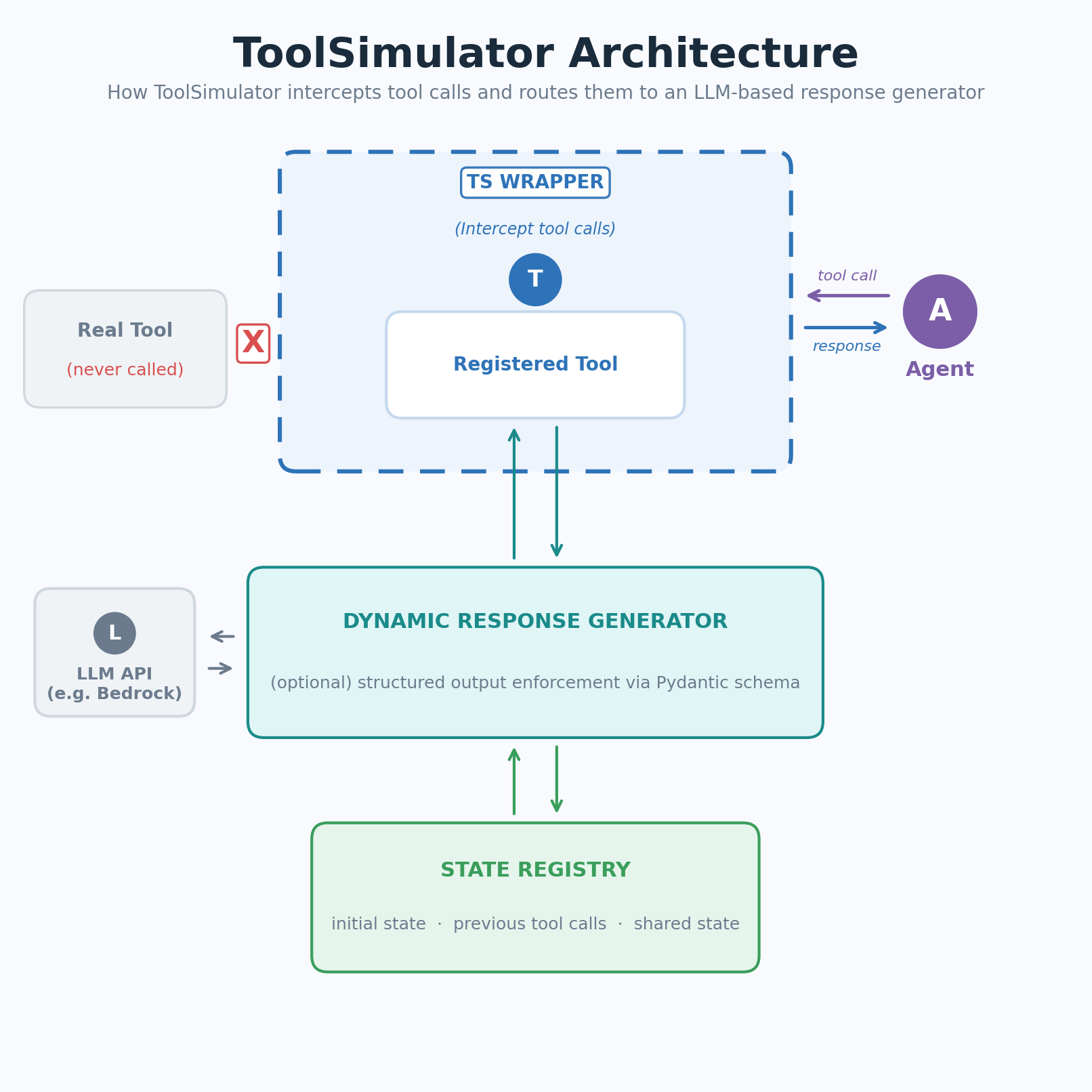 image図1: ToolSimulator(TS)はツール呼び出しをインターセプトし、LLMベースのレスポンスジェネレーター(LLM-based Response Generator)へルーティングします
ToolSimulatorは登録されたツールへの呼び出しをインターセプトし、LLMベースのレスポンスジェネレーター(LLM-based Response Generator)へルーティングします。ジェネレーターはツールスキーマ、エージェントの入力、および現在のシミュレーション状態を使用して、現実的で文脈に適合した応答を生成します。手書きのフィクスチャは不要です。
ワークフローは3つのステップに従います。ツールのデコレーションと登録、必要に応じてコンテキストでシミュレーションをステア(Steer)、そしてエージェント実行時にToolSimulatorにツール応答のモックを任せることです。
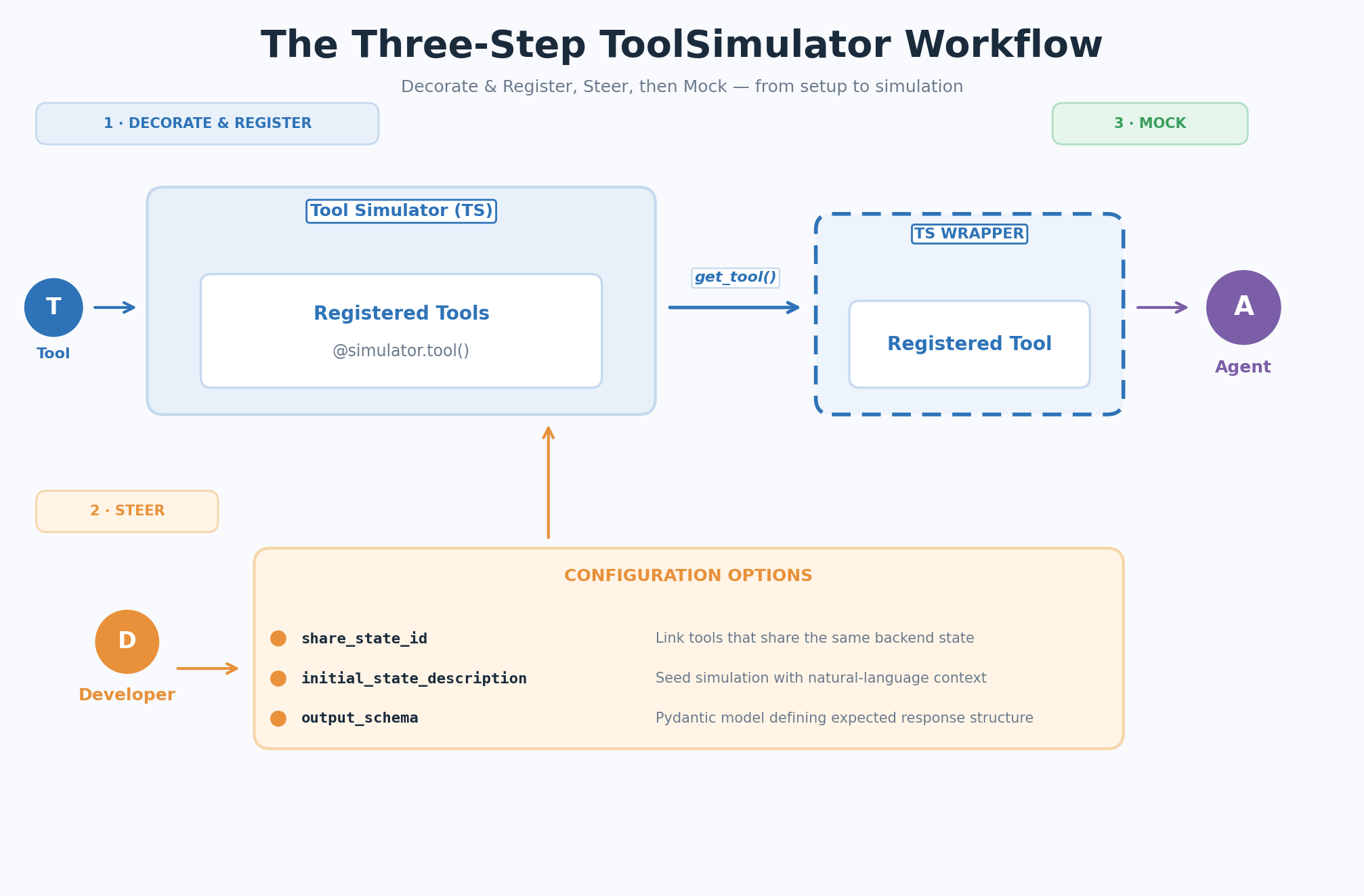 image図2: 3ステップのToolSimulator(TS)ワークフロー — デコレーション&登録、ステア、モック
ToolSimulatorの始め方
以下のセクションでは、初期セットアップから最初のシミュレーションの実行まで、ToolSimulatorワークフローの各ステップを順を追って説明します。
Step 1: Decorate and register
ToolSimulatorのインスタンスを作成し、ツール関数を@simulator.tool()デコレータでラップしてシミュレーション用に登録します。実際の関数本体は空のままでも構いません。ToolSimulatorは実装に到達する前に呼び出しをインターセプトします:
from strands_evals.simulation.tool_simulator import ToolSimulator

tool_simulator = ToolSimulator()

@tool_simulator.tool()
def search_flights(origin: str, destination: str, date: str) -> dict:
    """Search for available flights between two airports on a given date."""
    pass # シミュレーション中は実際の処理は呼び出されない
Step 2: Steer (optional configuration)
デフォルトでは、ToolSimulatorはスキーマ (schema) とdocstring(ドキュメント文字列)から各ツールの動作を自動的に推論します。開始するために追加の設定は必要ありません。より詳細な制御が必要な場合、以下の3つのオプションパラメータを使用してシミュレーションの動作をカスタマイズできます:
- share_state_id: 同一のバックエンドを共有するツールを、共通の状態キーでリンクします。あるツール(例えばsetter)による状態変更は、別のツール(例えばgetter)の後の呼び出しですぐに反映されます。
- initial_state_description: 既存の状態の自然言語記述でシミュレーションを初期化(シーディング)します。文脈が豊かであれば、より現実的で一貫性のあるレスポンスが生成されます。
- output_schema: 期待されるレスポンスの構造を定義するPydantic model (Pydanticモデル)。ToolSimulatorは、このスキーマに厳密に従うレスポンスを生成します。
Step 3: Mock
エージェントが登録されたツールを呼び出すと、ToolSimulatorのラッパーがその呼び出しをインターセプトし、dynamic response generator(動的応答生成器)にルーティングします。ジェネレータはエージェントのパラメータをツールスキーマに対して検証し、output_schemaに一致するレスポンスを生成し、state registry(状態レジストリ)を更新して、その後のツール呼び出しが一貫した世界観を参照できるようにします。
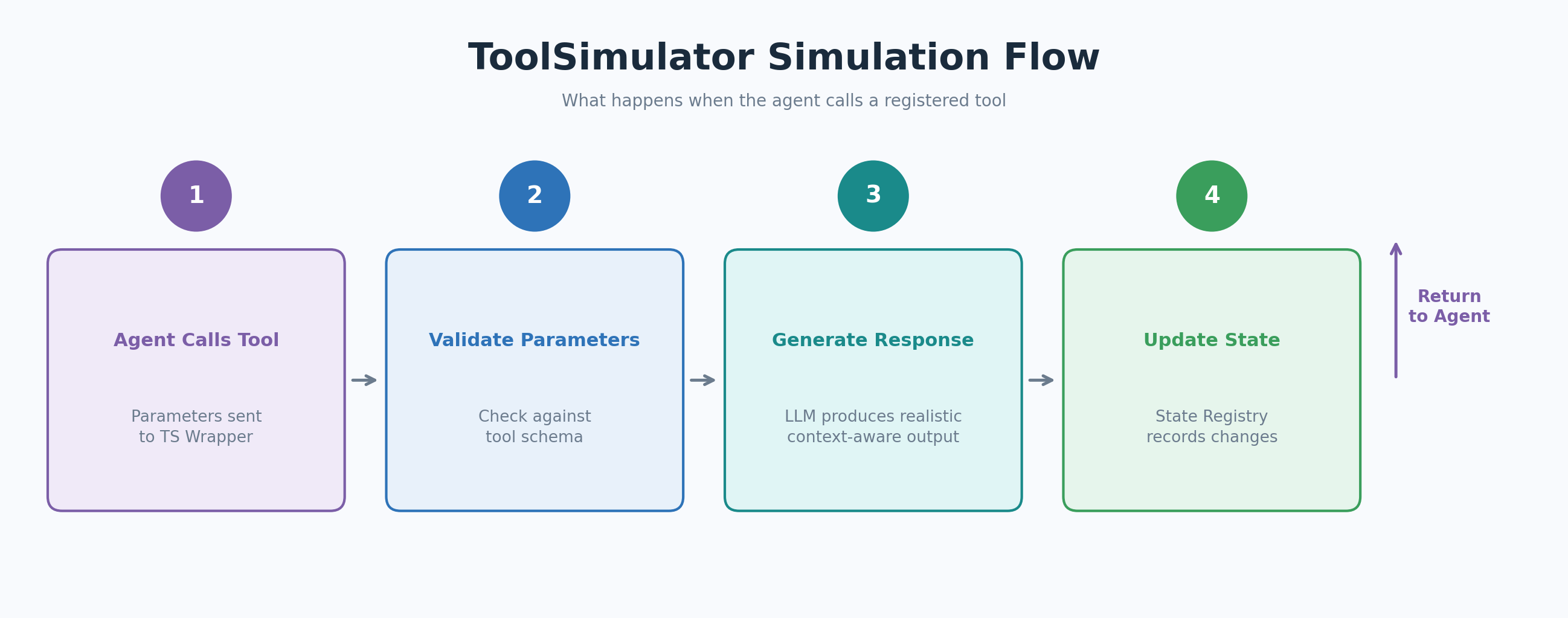 image図3: エージェントが登録されたツールを呼び出した際のToolSimulator (TS)のシミュレーションフロー
以下の例は、フライト検索アシスタントに紐付けられたフライト検索ツールをシミュレートするものです:
from strands import Agent
from strands_evals.simulation.tool_simulator import ToolSimulator

# 1. シミュレータインスタンスの作成
tool_simulator = ToolSimulator()

# 2. 初期状態のコンテキスト付きでシミュレーション用ツールを登録
@tool_simulator.tool(
    initial_state_description="Flight database: SEA->JFK flights available at 8am, 12pm, and 6pm. Prices range from $180 to $420.",
)
def search_flights(origin: str, destination: str, date: str) -> dict:
    """Search for available flights between two airports on a given date."""
    pass

# 3. シミュレートされたツール付きでエージェントを作成し、実行
flight_tool = tool_simulator.get_tool("search_flights")
agent = Agent(
    system_prompt="You are a flight search assistant.",
    tools=[flight_tool],
)
response = agent("Find me flights from Seattle to New York on March 15.")
print(response)
期待される出力: あなたが提供したinitial_state_descriptionと一致する、時刻と価格の一貫性のあるシミュレートされたSEA->JFKフライトの構造化リスト。
ToolSimulatorの高度な使用方法
以下のセクションでは、シミュレーション動作に対するより細かな制御を可能にする3つの高度な機能について解説します。並列テスト(parallel testing)用の独立したインスタンスの実行、マルチターンワークフロー(multi-turn workflows)向けの共有状態(state)の設定、カスタムレスポンススキーマ(response schemas)の適用です。
独立したシミュレータインスタンスの実行
複数のToolSimulatorインスタンスを並行して作成できます。各インスタンスは独自のツールレジストリ(tool registry)と状態を保持するため、同じコードベース内で並列の实验設定を実行できます:
simulator_a = ToolSimulator()
simulator_b = ToolSimulator()
各インスタンスは独立したツールレジストリと状態を持つため、
異なるツール設定間でのエージェント動作の比較に最適です。
マルチターンワークフロー向けの共有状態の設定
データベースのgetterおよびsetter(database getters and setters)のような状態保持ツール(stateful tools)の場合、ToolSimulatorはツール呼び出し全体で一貫した共有状態を維持します。share_state_idを使用して同じバックエンド(backend)で動作するツールをリンクし、initial_state_descriptionを使用して既存のコンテキストでシミュレーションを初期化(シーディング)します:
@tool_simulator.tool(
share_state_id="flight_booking",
initial_state_description="フライト予約システム: 8時、12時、18時にSEA->JFK便が利用可能。現在アクティブな予約はありません。",
)
def search_flights(origin: str, destination: str, date: str) -> dict:
"""指定された日付に2つの空港間の利用可能なフライトを検索します。"""
pass
@tool_simulator.tool(
share_state_id="flight_booking",
)
def get_booking_status(booking_id: str) -> dict:
"""予約IDに基づいてフライト予約の現在のステータスを取得します。"""
pass
両方のツールは"flight_booking"状態を共有します。
search_flightsが呼び出されると、get_booking_statusは後続の呼び出しにおいて
同じフライト利用可能データを確認できます。
エージェント実行前後の状態を確認し、ツール相互作用が期待された変更を生み出したことを検証します:
initial_state = tool_simulator.get_state("flight_booking")
... エージェントを実行 ...
final_state = tool_simulator.get_state("flight_booking")
最終出力だけでなく、ツールの相互作用の全シーケンスを検証します。
Tip: Seeding state from real data
initial_state_descriptionは自然言語を受け付けるため、コンテキストを初期化する手法で工夫することができます。表形式のデータと相互作用するツールの場合、DataFrame.describe()呼び出しを使用して統計的要約を生成し、その統計値を直接状態の説明として渡してください。ToolSimulatorは実際のデータにアクセスすることなく、現実的なデータ分布を反映したレスポンスを生成します。
Enforce a custom response schema
デフォルトでは、ToolSimulatorはツールのdocstring(ドキュメント文字列)と型ヒントからレスポンス構造を推論します。OpenAPIやMCPスキーマ(Model Context Protocolスキーマ)などの厳格な仕様に準拠するツールの場合、期待されるレスポンスをPydanticモデルとして定義し、output_schema(出力スキーマ)パラメータで渡してください:
from pydantic import BaseModel, Field

class FlightSearchResponse(BaseModel):
    flights: list[dict] = Field( ..., description="利用可能なフライトのリスト(フライト番号、出発時刻、価格を含む)" )
    origin: str = Field(..., description="発着空港コード")
    destination: str = Field(..., description="到着空港コード")
    status: str = Field(default="success", description="検索操作のステータス")
    message: str = Field(default="", description="追加のステータスメッセージ")

@tool_simulator.tool(output_schema=FlightSearchResponse)
def search_flights(origin: str, destination: str, date: str) -> dict:
    """指定された日付に2つの空港間の利用可能なフライトを検索します。"""
    pass

# ToolSimulatorはパラメータを厳密に検証し、FlightSearchResponseスキーマに準拠する有効なJSONレスポンスのみを返します。
Integration with Strands Evaluation pipelines
ToolSimulatorはStrands Evals評価フレームワークに自然に組み込むことができます。以下の例は、ツール呼び出しタスクにおけるエージェントのパフォーマンスをGoalSuccessRateEvaluator(目標達成率評価器)でスコアリングする、シミュレーション設定から実験レポートまでの完全なパイプラインを示しています:
from typing import Any
from pydantic import BaseModel, Field
from strands import Agent
from strands_evals import Case, Experiment
from strands_evals.evaluators import GoalSuccessRateEvaluator
from strands_evals.simulation.tool_simulator import ToolSimulator
from strands_evals.mappers import StrandsInMemorySessionMapper
from strands_evals.telemetry import StrandsEvalsTelemetry

# テレメトリーとツールシミュレータを設定
telemetry = StrandsEvalsTelemetry().setup_in_memory_exporter()
memory_exporter = telemetry.in_memory_exporter
tool_simulator = ToolSimulator()

# レスポンススキーマを定義
class FlightSearchResponse(BaseModel):
    flights: list[dict] = Field( ..., description="フライト番号、出発時刻、価格を含む利用可能なフライト" )
    origin: str = Field(..., description="発着空港コード")
    destination: str = Field(..., description="到着空港コード")
    status: str = Field(default="success", description="検索操作のステータス")
    message: str = Field(default="", description="追加のステータスメッセージ")

# シミュレーション用のツールを登録
@tool_simulator.tool(
    share_state_id="flight_booking",
    initial_state_description="フライト予約システム:SEA->JFK行きのフライトは午前8時、正午、午後6時。現在アクティブな予約はありません。",
    output_schema=FlightSearchResponse,
)
def search_flights(origin: str, destination: str, date: str) -> dict[str, Any]:
    """指定された日付に2つの空港間の利用可能なフライトを検索します。"""
    pass
@tool_simulator.tool(share_state_id="flight_booking")
def get_booking_status(booking_id: str) -> dict[str, Any]:
"""予約IDに基づいてフライト予約の現在のステータスを取得します。"""
pass
評価タスクの定義
def user_task_function(case: Case) -> dict:
initial_state = tool_simulator.get_state("flight_booking")
print(f"[State before]: {initial_state.get('initial_state')}")
search_tool = tool_simulator.get_tool("search_flights")
status_tool = tool_simulator.get_tool("get_booking_status")
agent = Agent(
trace_attributes={ "gen_ai.conversation.id": case.session_id, "session.id": case.session_id },
system_prompt="フライト予約アシスタントです。",
tools=[search_tool, status_tool],
callback_handler=None,
)
agent_response = agent(case.input)
print(f"[User]: {case.input}")
print(f"[Agent]: {agent_response}")
final_state = tool_simulator.get_state("flight_booking")
print(f"[State after]: {final_state.get('previous_calls', [])}")
finished_spans = memory_exporter.get_finished_spans()
mapper = StrandsInMemorySessionMapper()
session = mapper.map_to_session(finished_spans, session_id=case.session_id)
return {"output": str(agent_response), "trajectory": session}
テストケースの定義、実験の実行、レポートの表示
test_cases = [
Case( name="flight_search", input="Find me flights from Seattle to New York on March 15.", metadata={"category": "flight_booking"}, ),
]
experiment = Experiment[str, str](
cases=test_cases,
evaluators=[GoalSuccessRateEvaluator()]
)
reports = experiment.run_evaluations(user_task_function)
reports[0].run_display()
タスク関数はシミュレートされたツールを取得し、エージェントを作成し、対話を実行し、エージェントの出力と完全なテレメトリー(telemetry)軌道(trajectory)の両方を返します。この軌道により、GoalSuccessRateEvaluator などの評価者は最終応答だけでなく、ツール呼び出しとモデル実行の完全なシーケンスにアクセスできます。
シミュレーションベースの評価のためのベストプラクティス
以下のプラクティスにより、開発および評価のワークフロー全体で ToolSimulator の効果を最大限に引き出すことができます:
- 広範なカバレッジを得るため、デフォルト設定から開始してください。正確に制御したい特定のツール環境に対してのみ、設定の上書きを追加します。ToolSimulatorのデフォルトは、セットアップを必要とせずに現実的な動作を生成するように設計されています。
- 状態保持ツール(stateful tools)には、豊富な初期状態記述(initial_state_description)の値を提供してください。シードするコンテキストが豊富であるほど、シミュレートされた応答はより現実的で一貫性のあるものになります。データ範囲、エンティティ数、関係性のコンテキストを含めてください。
- 同一のバックエンドとやり取りするツールには共有状態ID(share_state_id)を使用し、書き込み操作が後続の読み取り操作から見えるようにしてください。これは、予約、カート管理、データベース更新などのマルチターンワークフロー(multi-turn workflows)をテストする上で不可欠です。
- OpenAPIやMCPスキーマ(MCP schemas)など、厳格な仕様に準拠するツールには出力スキーマ(output_schema)を適用してください。スキーマの強制により、エージェントに到達して後処理レイヤー(post-processing layer)を破損する前に、不正な形式の応答を検出できます。
最終出力だけでなく、ツールの相互作用シーケンスを検証してください。 エージェント実行前後の状態変化を確認し、
原文を表示
You can use ToolSimulator, an LLM-powered tool simulation framework within Strands Evals, to thoroughly and safely test AI agents that rely on external tools, at scale. Instead of risking live API calls that expose personally identifiable information (PII), trigger unintended actions, or settling for static mocks that break with multi-turn workflows, you can use ToolSimulator’s large language model (LLM)-powered simulations to validate your agents. Available today as part of the Strands Evals Software Development Kit (SDK), ToolSimulator helps you catch integration bugs early, test edge cases comprehensively, and ship production-ready agents with confidence.
In this post, you will learn how to:
- Set up ToolSimulator and register tools for simulation
- Configure stateful tool simulations for multi-turn agent workflows
- Enforce response schemas with Pydantic models
- Integrate ToolSimulator into a complete Strands Evals evaluation pipeline
- Apply best practices for simulation-based agent evaluation
Prerequisites
Before you begin, make sure that you have the following:
- Python 3.10 or later installed in your environment
- Strands Evals SDK installed: pip install strands-evals
- Basic familiarity with Python, including decorators and type hints
- Familiarity with AI agents and tool-calling concepts (API calls, function schemas)
- Pydantic knowledge is helpful for the advanced schema examples, but is not required to get started
- An AWS account is not required to run ToolSimulator locally
Why tool testing challenges your development workflow
Modern AI agents don’t just reason. They call APIs, query databases, invoke Model Context Protocol (MCP) services, and interact with external systems to complete tasks. Your agent’s behavior depends not only on its reasoning, but on what those tools return. When you test these agents against live APIs, you run into three challenges that slow you down and put your systems at risk.
Three challenges that live APIs create:
- External dependencies slow you down. Live APIs impose rate limits, experience downtime, and require network connectivity. When you’re running hundreds of test cases, these constraints make comprehensive testing impractical.
- Test isolation becomes risky. Real tool calls trigger real side effects. You risk sending actual emails, modifying production databases, or booking actual flights during testing. Your agent tests shouldn’t interact with the systems that they’re testing against.
- Privacy and security create barriers. Many tools handle sensitive data, including user records, financial information, and PII. Running tests against live systems unnecessarily exposes that data and creates compliance risks.
Why static mocks fall short
You might consider static mocks as an alternative. Static mocks work for straightfoward, predictable scenarios, but they require constant maintenance as your APIs evolve. More importantly, they break down in the multi-turn, stateful workflows that real agents perform.
Consider a flight booking agent. It searches for flights with one tool call, then checks booking status with another. The second response should depend on what the first call did. A hardcoded response can’t reflect a database that changes state between calls. Static mocks can’t capture this.
What makes ToolSimulator different
ToolSimulator solves these challenges with three essential capabilities that work together to give you safe, scalable agent testing without sacrificing realism.
- Adaptive response generation. Tool outputs reflect what your agent actually requested, not a fixed template. When your agent calls to search for Seattle-to-New York flights, ToolSimulator returns plausible options with realistic prices and times, not a generic placeholder.
- Stateful workflow support. Many real-world tools maintain state across calls. A write operation should affect subsequent reads. ToolSimulator maintains consistent shared state across tool calls, making it safe to test database interactions, booking workflows, and multi-step processes without touching production systems.
- Schema enforcement. Developers typically add a post-processing layer that parses raw tool output into a structured format. When a tool returns a malformed response, this layer breaks. ToolSimulator validates responses against Pydantic schemas that you define, catching malformed responses before they reach your agent.
How ToolSimulator works
Figure 1: ToolSimulator (TS) intercepts tool calls and routes them to an LLM-based response generator
ToolSimulator intercepts calls to your registered tools and routes them to an LLM-based response generator. The generator uses the tool schema, your agent’s input, and the current simulation state to produce a realistic, context-appropriate response. No handwritten fixtures required.
Your workflow follows three steps: decorate and register your tools, optionally steer the simulation with context, then let ToolSimulator mock the tool responses when your agent runs.
Figure 2: The three-step ToolSimulator (TS) workflow — Decorate & Register, Steer, Mock
Getting started with ToolSimulator
The following sections walk you through each step of the ToolSimulator workflow, from initial setup to running your first simulation.
Step 1: Decorate and register
Create a ToolSimulator instance, then wrap your tool function with the @simulator.tool() decorator to register it for simulation. The real function body can remain empty. ToolSimulator intercepts calls before they reach the implementation:
from strands_evals.simulation.tool_simulator import ToolSimulator

tool_simulator = ToolSimulator()

@tool_simulator.tool()
def search_flights(origin: str, destination: str, date: str) -> dict:
    """Search for available flights between two airports on a given date."""
    pass # The real implementation is never called during simulation
Step 2: Steer (optional configuration)
By default, ToolSimulator automatically infers how each tool should behave from its schema and docstring. No additional configuration is needed to get started. When you need more control, you can use these three optional parameters to customize simulation behavior:
- share_state_id: Links tools that share the same backend under a common state key. State changes made by one tool (for example, a setter) are immediately visible to subsequent calls by another (for example, a getter).
- initial_state_description: Seeds the simulation with a natural language description of pre-existing state. Richer context produces more realistic and consistent responses.
- output_schema: A Pydantic model defining the expected response structure. ToolSimulator generates responses that conform strictly to this schema.
Step 3: Mock
When your agent calls a registered tool, the ToolSimulator wrapper intercepts the call and routes it to the dynamic response generator. The generator validates the agent’s parameters against the tool schema, produces a response that matches the output_schema, and updates the state registry so subsequent tool calls see a consistent world.
Figure 3: The ToolSimulator (TS) simulation flow when the agent calls a registered tool
The following example simulates a flight search tool attached to a flight search assistant:
from strands import Agent
from strands_evals.simulation.tool_simulator import ToolSimulator

# 1. Create a simulator instance
tool_simulator = ToolSimulator()

# 2. Register a tool for simulation with initial state context
@tool_simulator.tool(
    initial_state_description="Flight database: SEA->JFK flights available at 8am, 12pm, and 6pm. Prices range from $180 to $420.",
)
def search_flights(origin: str, destination: str, date: str) -> dict:
    """Search for available flights between two airports on a given date."""
    pass

# 3. Create an agent with the simulated tool and run it
flight_tool = tool_simulator.get_tool("search_flights")
agent = Agent(
    system_prompt="You are a flight search assistant.",
    tools=[flight_tool],
)

response = agent("Find me flights from Seattle to New York on March 15.")
print(response)
# Expected output: A structured list of simulated SEA->JFK flights with times
# and prices consistent with the initial_state_description you provided.
Advanced ToolSimulator usage
The following sections cover three advanced capabilities that give you more control over simulation behavior: running independent instances for parallel testing, configuring shared state for multi-turn workflows, and enforcing custom response schemas.
Run independent simulator instances
You can create multiple ToolSimulator instances side by side. Each instance maintains its own tool registry and state, so you can run parallel experiment configurations in the same codebase:
simulator_a = ToolSimulator()
simulator_b = ToolSimulator()
# Each instance has an independent tool registry and state --
# ideal for comparing agent behavior across different tool setups.
Configure shared state for multi-turn workflows
For stateful tools such as database getters and setters, ToolSimulator maintains consistent shared state across tool calls. Use share_state_id to link tools that operate on the same backend, and initial_state_description to seed the simulation with pre-existing context:
@tool_simulator.tool(
    share_state_id="flight_booking",
    initial_state_description="Flight booking system: SEA->JFK flights available at 8am, 12pm, and 6pm. No bookings currently active.",
)
def search_flights(origin: str, destination: str, date: str) -> dict:
    """Search for available flights between two airports on a given date."""
    pass

@tool_simulator.tool(
share_state_id="flight_booking",
)
def get_booking_status(booking_id: str) -> dict:
    """Retrieve the current status of a flight booking by booking ID."""
    pass

# Both tools share "flight_booking" state.
# When search_flights is called, get_booking_status sees the same
# flight availability data in subsequent calls.
Inspect the state before and after agent execution to validate that tool interactions produced the expected changes:
initial_state = tool_simulator.get_state("flight_booking")
# ... run the agent ...
final_state = tool_simulator.get_state("flight_booking")
# Verify not just the final output, but the full sequence of tool interactions.
Tip: Seeding state from real data
Because initial_state_description accepts natural language, you can get creative with how you seed context. For tools that interact with tabular data, use a DataFrame.describe() call to generate statistical summaries and pass those statistics directly as the state description. ToolSimulator will generate responses that reflect realistic data distributions, without ever accessing the actual data.
Enforce a custom response schema
By default, ToolSimulator infers a response structure from the tool’s docstring and type hints. For tools that follow strict specifications such as OpenAPI or MCP schemas, define the expected response as a Pydantic model and pass it using output_schema:
from pydantic import BaseModel, Field

class FlightSearchResponse(BaseModel):
    flights: list[dict] = Field( ..., description="List of available flights with flight number, departure time, and price" )
    origin: str = Field(..., description="Origin airport code")
    destination: str = Field(..., description="Destination airport code")
    status: str = Field(default="success", description="Search operation status")
    message: str = Field(default="", description="Additional status message")

@tool_simulator.tool(output_schema=FlightSearchResponse)
def search_flights(origin: str, destination: str, date: str) -> dict:
    """Search for available flights between two airports on a given date."""
    pass

# ToolSimulator validates parameters strictly and returns only valid JSON
# responses that conform to the FlightSearchResponse schema.
Integration with Strands Evaluation pipelines
ToolSimulator fits naturally into the Strands Evals evaluation framework. The following example shows a complete pipeline, from simulation setup to experiment report, using the GoalSuccessRateEvaluator to score agent performance on tool-calling tasks:
from typing import Any
from pydantic import BaseModel, Field
from strands import Agent
from strands_evals import Case, Experiment
from strands_evals.evaluators import GoalSuccessRateEvaluator
from strands_evals.simulation.tool_simulator import ToolSimulator
from strands_evals.mappers import StrandsInMemorySessionMapper
from strands_evals.telemetry import StrandsEvalsTelemetry

# Set up telemetry and tool simulator
telemetry = StrandsEvalsTelemetry().setup_in_memory_exporter()
memory_exporter = telemetry.in_memory_exporter
tool_simulator = ToolSimulator()

# Define the response schema
class FlightSearchResponse(BaseModel):
    flights: list[dict] = Field( ..., description="Available flights with number, departure time, and price" )
    origin: str = Field(..., description="Origin airport code")
    destination: str = Field(..., description="Destination airport code")
    status: str = Field(default="success", description="Search operation status")
    message: str = Field(default="", description="Additional status message")

# Register tools for simulation
@tool_simulator.tool(
    share_state_id="flight_booking",
    initial_state_description="Flight booking system: SEA->JFK flights at 8am, 12pm, and 6pm. No bookings currently active.",
    output_schema=FlightSearchResponse,
)
def search_flights(origin: str, destination: str, date: str) -> dict[str, Any]:
    """Search for available flights between two airports on a given date."""
    pass

@tool_simulator.tool(share_state_id="flight_booking")
def get_booking_status(booking_id: str) -> dict[str, Any]:
    """Retrieve the current status of a flight booking by booking ID."""
    pass

# Define the evaluation task
def user_task_function(case: Case) -> dict:
    initial_state = tool_simulator.get_state("flight_booking")
    print(f"[State before]: {initial_state.get('initial_state')}")

    search_tool = tool_simulator.get_tool("search_flights")
    status_tool = tool_simulator.get_tool("get_booking_status")
    agent = Agent(
        trace_attributes={ "gen_ai.conversation.id": case.session_id, "session.id": case.session_id },
        system_prompt="You are a flight booking assistant.",
        tools=[search_tool, status_tool],
        callback_handler=None,
    )

    agent_response = agent(case.input)
    print(f"[User]: {case.input}")
    print(f"[Agent]: {agent_response}")

    final_state = tool_simulator.get_state("flight_booking")
    print(f"[State after]: {final_state.get('previous_calls', [])}")

    finished_spans = memory_exporter.get_finished_spans()
    mapper = StrandsInMemorySessionMapper()
    session = mapper.map_to_session(finished_spans, session_id=case.session_id)
    return {"output": str(agent_response), "trajectory": session}

# Define test cases, run the experiment, and display the report
test_cases = [
    Case( name="flight_search", input="Find me flights from Seattle to New York on March 15.", metadata={"category": "flight_booking"}, ),
]
experiment = Experiment[str, str](
    cases=test_cases,
    evaluators=[GoalSuccessRateEvaluator()]
)

reports = experiment.run_evaluations(user_task_function)
reports[0].run_display()
The task function retrieves the simulated tools, creates an agent, runs the interaction, and returns both the agent’s output and the full telemetry trajectory. The trajectory gives evaluators like GoalSuccessRateEvaluator access to the complete sequence of tool calls and model invocations, not just the final response.
Best practices for simulation-based evaluation
The following practices help you get the most out of ToolSimulator across development and evaluation workflows:
- Start with the default configuration for broad coverage. Add configuration overrides only for the specific tool environments that you want to control precisely. ToolSimulator’s defaults are designed to produce realistic behavior without requiring setup.
- Provide rich initial_state_description values for stateful tools. The more context that you seed, the more realistic and consistent the simulated responses will be. Include data ranges, entity counts, and relationship context.
- Use share_state_id for tools that interact with the same backend, so write operations are visible to subsequent reads. This is essential for testing multi-turn workflows like booking, cart management, or database updates.
- Apply output_schema for tools that follow strict specifications, such as OpenAPI or MCP schemas. Schema enforcement catches malformed responses before they reach your agent and break your post-processing layer.
Validate tool interaction sequences, not just final outputs. Inspect state changes before and after agent execution to
関連記事
今日のまとめ
AI日報で今日の重要ニュースをまとめ読み