Amazon Bedrock AgentCore のアイデンティティ設定で AWS Secrets Manager のシークレットを参照可能に
AWS は Amazon Bedrock AgentCore の新機能として、既存の AWS Secrets Manager シークレットを参照可能にし、暗号化キーや回転ポリシーなどの管理権限をユーザーが完全に保持できるようにした。
キーポイント
シークレットの外部参照機能の実装
AgentCore Identity が自動的に生成するのではなく、既存の AWS Secrets Manager シークレットを直接参照できるようになり、組織のガバナンスプロセスを拡張可能になった。
管理権限と柔軟性の向上
ユーザーは暗号化キー(KMS)、回転ポリシー、タグ付け、リソースポリシーなど、シークレットの全設定を従来通り自由に制御できる。
クロスアカウントおよび外部連携対応
同じリージョン内の他 AWS アカウントからのシークレット参照や、AWS Secrets Manager 外部コネクタを介したサードパーティ製秘密管理ツールとの統合がサポートされる。
重要な引用
AgentCore Identity meets this challenge through credential providers and a token vault that automatically create and manage a secret in AWS Secrets Manager
customers couldn't configure custom tags, rotation policies, or customer managed AWS Key Management Service (AWS KMS) key encryption at creation time.
retain full control over how it is managed. With this ability, you can extend your organization's existing secrets governance processes to AgentCore.
影響分析・編集コメントを表示
影響分析
この発表は、生成 AI エージェントの実装におけるセキュリティとコンプライアンスの壁を大幅に下げる重要な進展です。特に大規模組織や厳格な規制環境では、自動化されたリソース作成よりも既存のガバナンスフレームワークとの整合性を保つことが優先されるため、今回の機能強化は実運用への導入障壁を劇的に低減させます。
編集コメント
生成 AI エージェントの実用化において、セキュリティ管理の柔軟性を確保する決定的な一手です。特に大規模企業向けに、既存の秘密管理ポリシーをそのまま適用できる点は導入の鍵となります。
AI エージェントの能力は、アクセスできるツールの範囲によって決まります。CRM から顧客データを取得したり、Slack に更新を投稿したり、GitHub リポジトリを照会したりする場合でも、エージェントは外部 API を呼び出す必要があり、そのためにはランタイム時に資格情報を安全に渡す必要があります。コードにシークレットをハードコーディングしたり、エージェントのプロンプトで露出させたりすることなく、これを正しく行うことは、本番環境対応型のエージェントシステムを構築する際の決定的な課題の一つです。
Amazon Bedrock AgentCore Identity は、資格情報プロバイダーとトークン vault を通じてこの課題に対処します。これにより、アカウント内の各アウトバウンド資格情報プロバイダーリソースに対して、AWS Secrets Manager にシークレットが自動的に作成・管理されます。このシークレットには、外部アイデンティティプロバイダーの他のメタデータとともに、API キーまたはクライアントシークレットが含まれます。AgentCore Identity はこれらのシークレットを完全に作成・管理しますが、顧客は作成時にカスタムタグや回転ポリシー、顧客管理型 AWS Key Management Service (AWS KMS) キー暗号化を設定できませんでした。
本日、AgentCore Identity で AWS Secrets Manager のシークレットを参照する機能を発表できることを嬉しく思います。これにより、事前に設定済みの Secrets Manager からのシークレットを参照し、その管理方法について完全な制御権を保持することができます。この機能により、組織の既存のシークレットガバナンスプロセスを AgentCore に拡張できます。資格情報プロバイダー リソースと併用するために、既存の事前設定済み AWS Secrets Manager シークレットを提供できます。暗号化構成、ローテーション、レプリケーション、タグ、リソースポリシーについては、Secrets Manager 内の他のシークレットを管理する場合と同様に、完全な制御権を保持します。また、同じ AWS リージョン内にある別の AWS アカウントからシークレットを選択することも可能ですが、リージョン間でのシークレット共有はサポートされていません。これにより、AWS Secrets Manager の外部コネクタを通じて取り込まれたシークレットもサポートされ、サードパーティのシークレットマネージャーとの統合が可能になります。
本稿では、具体的なユースケースをレビューし、既存のシークレットを使用して資格情報プロバイダーリソースの設定を開始する方法について順を追って説明します。
使用例
以下に使用例を示します:
- あなたのエージェントが、チームですでにシークレットを保持している外部 API にアクセスする場合:AgentCore Identity が新しいシークレットを作成する代わりに、既存のシークレットの ARN を資格情報プロバイダーリソースに対して提供してください。同じリージョン内の別の AWS アカウントからシークレットを参照することも可能であり、AWS Secrets Manager 外部コネクタを通じて取り込まれたシークレットもサポートされているため、サードパーティ製のシークレットマネージャーとの統合が可能になります。
- セキュリティのベストプラクティスとしてシークレットのローテーションを行い、ローテーション中もエージェントが継続して動作することを望む場合:シークレット値をローテーションすると、AgentCore Identity は次の読み取り時に更新された値を取得します。資格情報プロバイダーリソースを更新したり再作成したりする必要はありません。
- シークレットへのアクセスを意図したエージェントの使用範囲に限定する場合:AWS Secrets Manager 内で直接、シークレットのリソースポリシーを設定してください。どの AWS Identity and Access Management (IAM) プリンシパルがシークレットにアクセスできるか、およびアクセス条件をスコープ指定するかを制御できます。
- すべての資格情報が顧客管理キーで暗号化される必要がある規制環境でエージェントが動作する場合:AgentCore Identity に提供する前に、顧客管理暗号化キーを使用してシークレットを作成してください。これは、組織が SCP (Service Control Policies) や RCP (Resource Control Policies) を適用してすべてのデータが顧客管理 CMK で暗号化されていることを確認することを強制している場合に特に有用です。既存のシークレットを参照することで、暗号化設定は完全に保持されます。
- 組織がコスト配分、コンプライアンス追跡、ガバナンス監査のためにシークレットにリソースタグを要求する場合:AgentCore Identity に提供する前に、あなたの基準に従ってシークレットを作成し、タグ付けしてください。
利用可能なシークレット設定オプションの詳細については、AWS Secrets Manager ユーザーガイド を参照してください。
前提条件
追従して行うには、以下のものが必要です:
- API キーまたは OAuth クライアントシークレットを含む既存の AWS Secrets Manager シークレット。
- AgentCore Identity サービスプリンシパルがそのシークレットに対して secretsmanager:GetSecretValue アクセス権限を持つようにするための IAM 権限。
- カスタマー管理型の AWS KMS キーを使用している場合、サービスプリンシパルに対するそのキーでの kms:Decrypt 権限。
- Amazon Bedrock AgentCore Identity コンソールまたは AWS Command Line Interface (AWS CLI) へのアクセス権。
はじめに
AWS Secrets Manager のシークレットを参照するには、AgentCore Identity API を通じて資格情報プロバイダーリソースを作成する際に、シークレット ARN と JSON キーを提供してください。AgentCore Identity は、ランタイム時に指定されたシークレット内の JSON キーから資格情報の値を取得します。
以下のセクションでは、AWS Management Console、AWS CLI、または AI エージェントを使用して、参照されるシークレットを持つ資格情報プロバイダーリソースを作成する方法を示します。
コンソールの使用
Amazon Bedrock AgentCore Identity コンソールから直接、新しい資格情報プロバイダーリソースを作成する際に、参照されるシークレットを設定できます。この機能は、API キーと OAuth クライアント資格情報の両方のタイプをサポートしています。
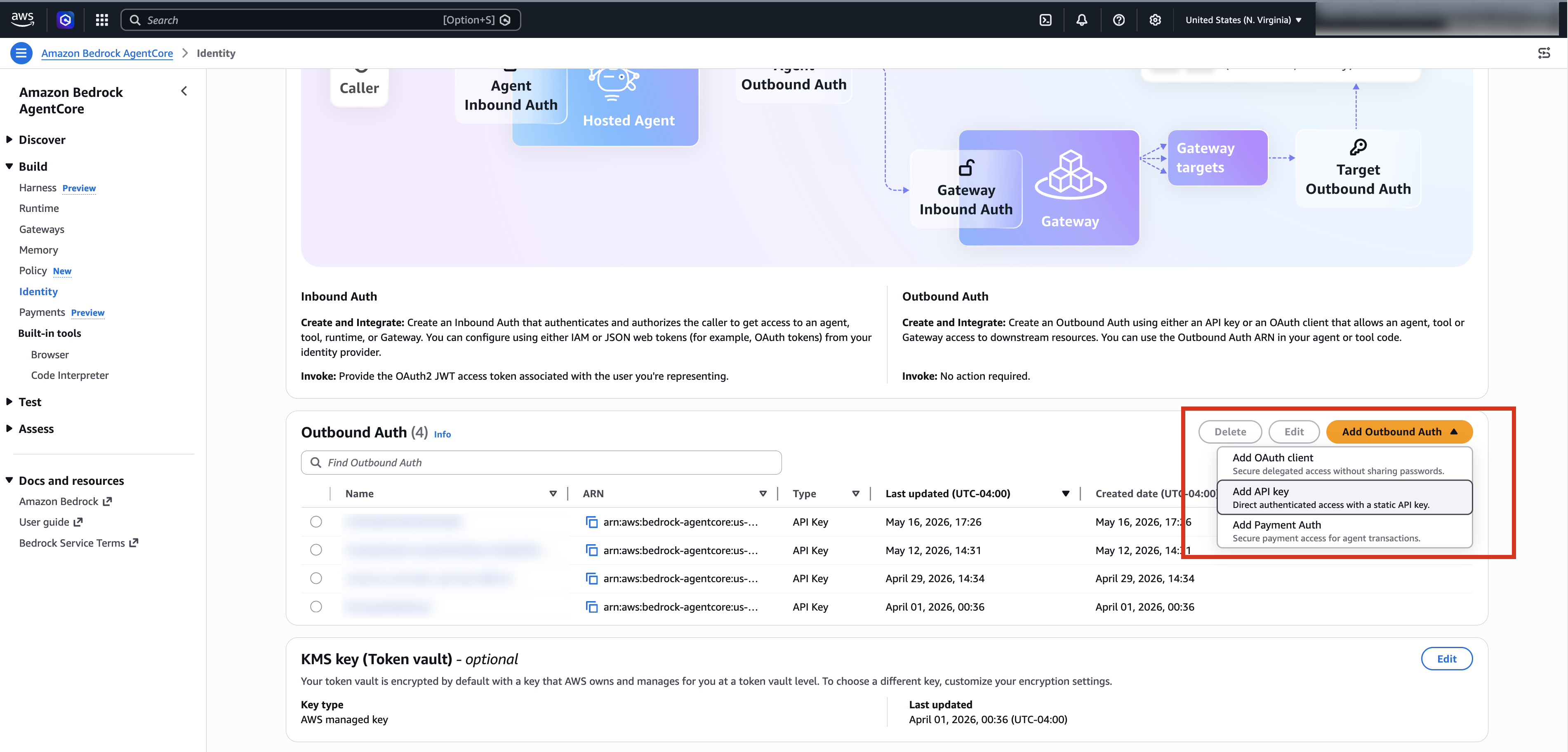
*図 1: シークレットを参照して Outbound Auth リソースを作成する AgentCore Identity コンソール。*
A. 参照されたシークレットを使用した API キーの追加
参照されたシークレットを使用して API キーを追加するには、以下の手順を実行してください:
- Amazon Bedrock AgentCore コンソールを開きます。
- 左側のナビゲーションペインで「Identity」を選択します。
- 「Outbound Auth」セクションで「Add Outbound Auth」を選択します。
- 「Add API key」を選択します。
- 外部認証リソースの名前を入力します。
- API キー選択方法の下で、「Secrets Manager を介して API キーを提供する」を選択します。
- Secrets Manager ARN フィールドに、既存のシークレットの ARN を入力するか選択します。リストにはアカウント内で利用可能なシークレットが表示されます。例:arn:aws:secretsmanager:us-east-1:123456789012:secret:myApiKeySecret-AbCdEf。
- JSON キーフィールドに、API キーの値を含む Secrets Manager シークレット内のキーを指定します。
- 「Add」を選択します。
- 外部認証リストに表示されることを確認し、資格情報プロバイダーが作成されたことを検証します。
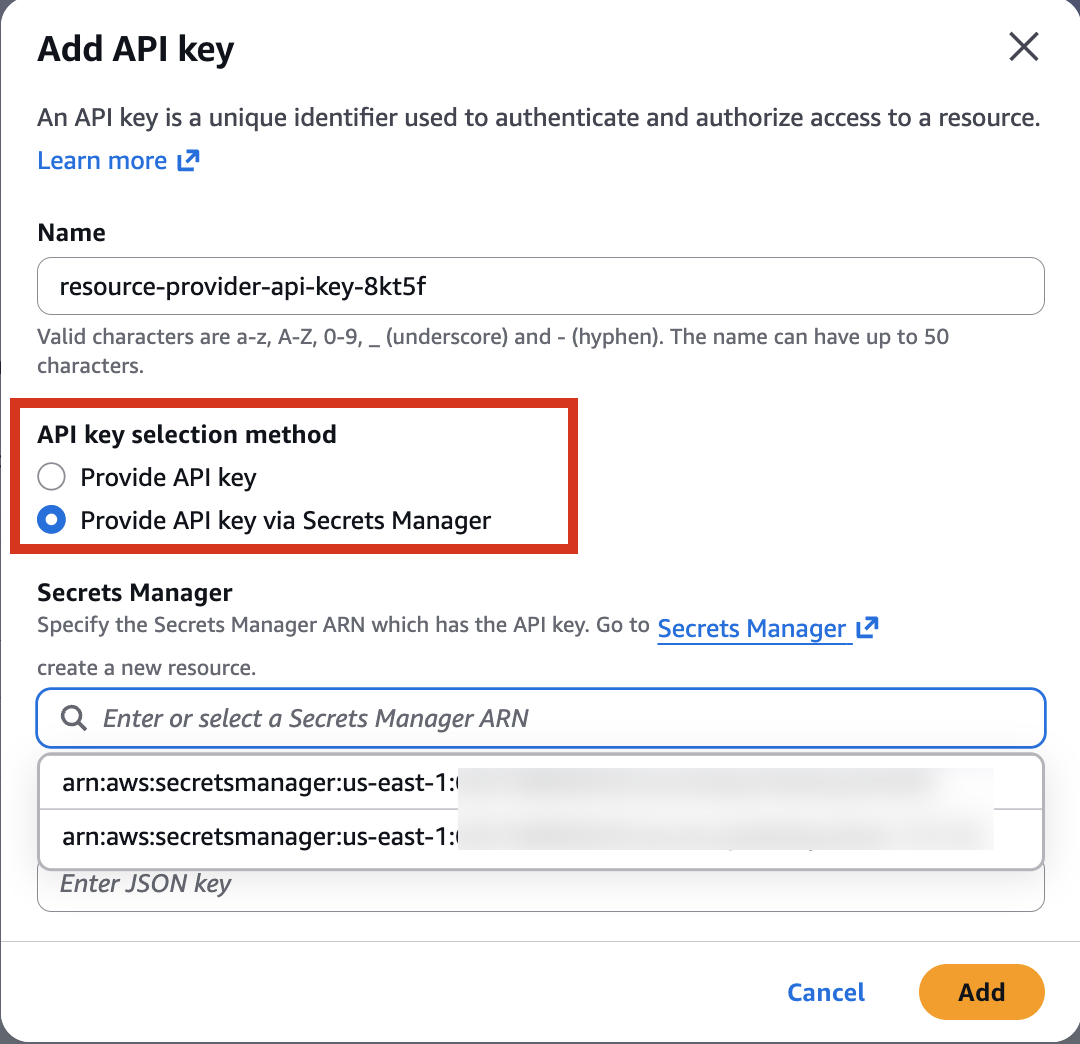
*図 2: AgentCore Identity コンソール、Secrets Manager から API キーを追加中。*
B. 参照されたシークレットを使用した OAuth クライアントシークレットの追加
参照されたシークレットを使用して OAuth クライアントシークレットを追加するには、以下の手順を実行してください:
- Identity ページから、[Add Outbound Auth] を選択します。
- [Add OAuth client] を選択します。
- OAuth クライアントの名前を入力します(例:google-oauth-client-v5fz5)。
- [Provider] の下で、対象とする組み込みプロバイダーまたはカスタムプロバイダーを選択します。
- 認証プロバイダーから割り当てられた Client ID を入力します。
- [Client secret] の下で、[Provide Client secret via Secrets Manager] を選択します。
- [Secrets Manager ARN] フィールドに、OAuth クライアントシークレットを含むシークレットの ARN(Amazon Resource Name)を入力します。
- [JSON key] フィールドに、クライアントシークレット値を含むシークレット内のキーを指定します。
- [Add OAuth Client] を選択します。
- 作成された資格情報プロバイダーが Outbound Auth リストに表示されているか確認し、正常に作成されたことを検証します。
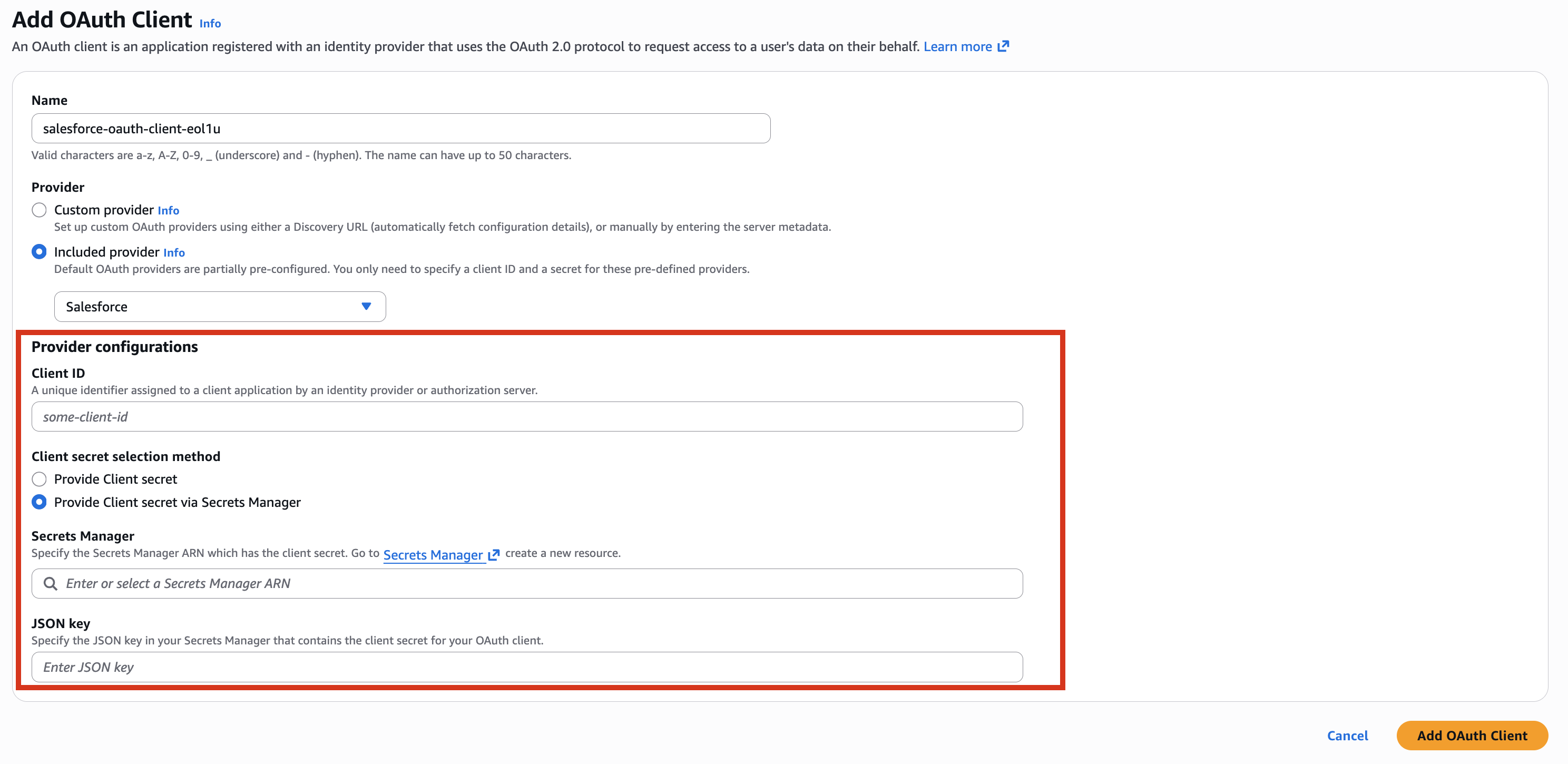
*Figure 3: AgentCore Identity コンソール、Secrets Manager から OAuth クライアントシークレットを追加中。
AWS CLI の使用
以下のコードに示すように、AWS CLI を使用して、OAuth クライアントシークレットに対して新しい Outbound Auth リソースを作成する際に参照されるシークレットを直接構成できます。
aws bedrock-agentcore-control create-oauth2-credential-provider \
    --name "google-oauth-client-v5fz5" \
    --credential-provider-vendor "GoogleOauth2" \
    --oauth2-provider-config-input '{
        "googleOauth2ProviderConfig": {
            "clientId": "",
            "clientSecretSource": "EXTERNAL",
            "clientSecretConfig": {
                "secretId": "arn:aws:secretsmanager:us-east-1:123456789012:secret:myGoogleKeySecret-AbCdEf",
                "jsonKey": "key"
            }
        }
    }'
デスクトップで AI エージェントを使用する
Kiro などの AI コーディングエージェント(AI coding agent)を使用している場合、参照されるシークレットを直接設定するようにプロンプトを入力できます:
**
*「AWS Secrets Manager に ARN arn:aws:secretsmanager:us-east-1:123456789012:secret:my-api-key で既存のシークレットがあります。Amazon Bedrock AgentCore Identity に OAuth2 資格情報プロバイダ(OAuth2 credential provider)を作成してください。名前は、ベンダーは GoogleOauth2 とします。クライアント ID は、クライアントシークレットソースは EXTERNAL、シークレット JSON キーは key です。」*
注: と をあなたの値に置き換えてください。
重要:AgentCore Identity がシークレットを読み取れるようにするには、サービスプリンシパルが secretsmanager:GetSecretValue を呼び出せるようにするリソースポリシーをシークレットに追加してください。シークレットがカスタマー管理 KMS キー(customer managed KMS key)で暗号化されている場合は、そのキーに対して service principal に kms:Decrypt 権限も付与する必要があります。
結論
AWS Secrets Manager のシークレットを参照する機能が追加されたことで、AgentCore Identity を使用すれば、AI エージェントのアウトバウンド認証設定時に、既存のシークレットやシークレット管理プラクティスをそのまま活用できます。認証情報の暗号化、ローテーション、アクセス制御に関する完全なコントロールを維持しつつ、実行時の取得処理は AgentCore Identity が担当します。
始め方については、Amazon Bedrock AgentCore Identity のドキュメントをご覧ください。シークレット管理の詳細については、AWS Secrets Manager ユーザーガイドを参照してください。
著者について

Swara Gandhi
Swara Gandhi は、AWS Identity Solutions チームに所属するシニア ソリューション アーキテクトです。安全でスケーラブルなエンドツーエンドのアイデンティティソリューション構築に取り組んでいます。アイデンティティ、セキュリティ、クラウドに関するあらゆる分野に情熱を注いでいます。

Satveer Khurpa
Satveer Khurpa は、Amazon Web Services の Amazon Bedrock AgentCore に所属するシニア WW スペシャリスト ソリューションアーキテクトであり、AgentCore Identity およびセキュリティに焦点を当てたエージェント型 AI セキュリティの専門家です。この役割において、彼はクラウドベースのアーキテクチャに関する専門知識を活かし、多様な業界で安全なエージェント型 AI システムの設計と展開をクライアント支援しています。Satveer は、エージェント型 AI パターン、アイデンティティおよびアクセス管理、そしてディフェンス・イン・デプス(多層防御)セキュリティ原則に対する深い理解を応用し、組織が自律的な AI ワークロードに対して堅牢なセキュリティ体制を維持しつつ新たなビジネス機会を開拓できるよう、スケーラブルで安全かつ責任あるエージェントベースのアプリケーションをアーキテクトしています。
原文を表示
AI agents are only as powerful as the tools they can access. Whether retrieving customer data from a CRM, posting updates to Slack, or querying a GitHub repository, agents need to call external APIs, and that means securely passing credentials at runtime. Getting that right, without hardcoding secrets in code or exposing them in agent prompts, is one of the defining challenges of building production-ready agentic systems.
Amazon Bedrock AgentCore Identity meets this challenge through credential providers and a token vault that automatically create and manage a secret in AWS Secrets Manager in your account for each Outbound credential provider resource. This secret contains either the API key or client secret along with the other metadata for the external identity provider. While AgentCore Identity fully creates and manages these secrets, customers couldn’t configure custom tags, rotation policies, or customer managed AWS Key Management Service (AWS KMS) key encryption at creation time.
Today, we’re excited to announce the ability to reference a secret in AWS Secrets Manager for AgentCore Identity, so you can reference your own preconfigured secret from Secrets Manager and retain full control over how it is managed. With this ability, you can extend your organization’s existing secrets governance processes to AgentCore. You can provide an existing, preconfigured AWS Secrets Manager secret to use with your credential provider resources. You retain full control over its encryption configuration, rotation, replication, tags, and resource policies, just as you would manage other secrets in Secrets Manager. You can also choose a secret from another AWS account within the same AWS Region, though cross-Region secret sharing isn’t supported. This also supports secrets brought in through AWS Secrets Manager external connectors, enabling integration with third-party secret managers.
In this post, we will review example use cases, and walk through how to get started configuring your credential provider resources with an existing secret.
Example use cases
The following are example use cases:
- Your agent accesses an external API your team already has a secret for: Provide the ARN of that existing secret to your credential provider resources instead of having AgentCore Identity create a new one. You can also reference a secret from another AWS account within the same Region, and secrets brought in through AWS Secrets Manager external connectors are supported, enabling integration with third-party secret managers.
- You would like to rotate your secret for security best practices and want your agent to continue working as you rotate: When you rotate the secret value, AgentCore Identity retrieves the updated value on its next read. You don’t need to update or recreate the credential provider resources.
- You scope secret access to the intended agent use: Configure the resource policy on your secret directly in AWS Secrets Manager. You control which AWS Identity and Access Management (IAM) principals can access the secret and scope access conditions.
- Your agent operates in a regulated environment where every credential must be encrypted with your customer managed key: Create the secret with your customer managed encryption key before providing it to AgentCore Identity. This is especially useful if your organization enforces SCPs and RCPs to help verify that all data is encrypted using customer managed CMKs. By referencing an existing secret, your encryption configuration is fully preserved.
- Your organization requires resource tags on secrets for cost allocation, compliance tracking, or governance auditing: Create and tag the secret according to your standards before providing it to AgentCore Identity.
To learn more about the secret configuration options available, see the AWS Secrets Manager User Guide.
Prerequisites
To follow along, you need the following:
- An existing AWS Secrets Manager secret with the API key or OAuth client secret.
- IAM permissions to give the AgentCore Identity service principal secretsmanager:GetSecretValue access to the secret.
- If you’re using a customer managed AWS KMS key, kms:Decrypt permission on that key for the service principal.
- Access to the Amazon Bedrock AgentCore Identity console or AWS Command Line Interface (AWS CLI).
Getting started
To reference a secret in AWS Secrets Manager, provide the secret ARN and JSON key when creating your credential provider resources through the AgentCore Identity API. AgentCore Identity retrieves the credential value from the specified JSON key in your secret at runtime.
The following sections show how to create a credential provider resource with a referenced secret using the AWS Management Console, the AWS CLI, or an AI agent.
Using the console
You can configure a referenced secret when creating new credential provider resources directly from the Amazon Bedrock AgentCore Identity console. The feature supports both API key and OAuth client credential types.
*Figure 1: AgentCore Identity console, creating an Outbound Auth resource with a referenced secret.*
A. Add an API key with a referenced secret
To add an API key with a referenced secret, complete the following steps:
- Open the Amazon Bedrock AgentCore console.
- In the left navigation pane, choose Identity.
- In the Outbound Auth section, choose Add Outbound Auth.
- Choose Add API key.
- Enter a Name for your Outbound Auth resource.
- Under API key selection method, choose Provide API key via Secrets Manager.
- In the Secrets Manager ARN field, enter or choose the ARN of your existing secret. The list displays secrets available in your account. For example: arn:aws:secretsmanager:us-east-1:123456789012:secret:myApiKeySecret-AbCdEf.
- In the JSON key field, specify the key within your Secrets Manager secret that contains the API key value.
- Choose Add.
- Verify that the credential provider was created by checking that it appears in the Outbound Auth list.
*Figure 2: AgentCore Identity console, adding an API key from Secrets Manager.*
B. Add an OAuth client secret with a referenced secret
To add an OAuth client secret with a referenced secret, complete the following steps:
- From the Identity page, choose Add Outbound Auth.
- Choose Add OAuth client.
- Enter a Name for your OAuth client (for example, google-oauth-client-v5fz5).
- Under Provider, choose your intended included or custom provider.
- Enter your Client ID as assigned by the identity provider.
- Under Client secret, choose Provide Client secret via Secrets Manager.
- In the Secrets Manager ARN field, enter the ARN of the secret that contains your OAuth client secret.
- In the JSON key field, specify the key within the secret that contains the client secret value.
- Choose Add OAuth Client.
- Verify that the credential provider was created by checking that it appears in the Outbound Auth list.
*Figure 3: AgentCore Identity console, adding an OAuth client secret from Secrets Manager.*
Using the AWS CLI
You can configure a referenced secret when creating a new Outbound Auth resource directly for an OAuth client secret from the AWS CLI as shown in the following code:
aws bedrock-agentcore-control create-oauth2-credential-provider \
--name "google-oauth-client-v5fz5" \
--credential-provider-vendor "GoogleOauth2" \
--oauth2-provider-config-input '{
"googleOauth2ProviderConfig": {
"clientId": "",
"clientSecretSource": "EXTERNAL",
"clientSecretConfig": {
"secretId": "arn:aws:secretsmanager:us-east-1:123456789012:secret:myGoogleKeySecret-AbCdEf",
"jsonKey": "key"
}
}
}'Using an AI agent on your desktop
If you’re using an AI coding agent (like Kiro or similar), you can prompt it to configure a referenced secret directly:
“I have an existing secret in AWS Secrets Manager at ARN arn:aws:secretsmanager:us-east-1:123456789012:secret:my-api-key. Create an OAuth2 credential provider in Amazon Bedrock AgentCore Identity named , using GoogleOauth2 as the vendor. The client ID is , the client secret source is EXTERNAL, and the secret JSON key is key.”
Note: Replace and with your values.
Important: Give AgentCore Identity permission to read your secret by adding a resource policy to the secret that allows the service principal to call secretsmanager:GetSecretValue. If your secret is encrypted with a customer managed KMS key, also give the service principal kms:Decrypt permission on that key.
Conclusion
With the ability to reference a secret in AWS Secrets Manager, AgentCore Identity gives you the flexibility to use your existing secrets and secret management practices when configuring outbound auth for your AI agents. You can retain full control over how your credentials are encrypted, rotated, and accessed, while AgentCore Identity handles retrieving them at runtime.
To get started, see the Amazon Bedrock AgentCore Identity documentation. For more on secret management, see the AWS Secrets Manager User Guide.
About the authors
Swara Gandhi
Swara Gandhi is a Senior Solutions Architect on the AWS Identity Solutions team. She works on building secure and scalable end-to-end identity solutions. She is passionate about everything identity, security, and cloud.
Satveer Khurpa
Satveer Khurpa is a Sr. WW Specialist Solutions Architect, Amazon Bedrock AgentCore at Amazon Web Services, specializing in agentic AI security with a focus on AgentCore Identity and Security. In this role, he uses his expertise in cloud-based architectures to help clients design and deploy secure agentic AI systems across diverse industries. Satveer applies his deep understanding of agentic AI patterns, identity and access management, and defense-in-depth security principles to architect scalable, secure, and responsible agent-based applications, enabling organizations to unlock new business opportunities while maintaining robust security postures for autonomous AI workloads.
関連記事
今日のまとめ
AI日報で今日の重要ニュースをまとめ読み