Amazon SageMaker AI のサーバーレスモデルカスタマイズ機能で NVIDIA Nemotron 3 モデルのファインチューニングが可能に
Amazon SageMaker AI が NVIDIA Nemotron 3 モデルのサーバーレスモデルカスタマイズ機能を導入し、インフラ管理不要で専門領域に特化した高性能 LLM の構築を可能にした。
キーポイント
NVIDIA Nemotron 3 の新機能追加
Amazon SageMaker AI にて、Nemotron 3 Nano(30B)および Super(120B)モデルのサーバーレスカスタマイズが開始された。
ハイブリッドアーキテクチャの特徴
Mamba-2 と Transformer アテンションを組み合わせ、LatentMoE 層でトークンを圧縮する独自のアーキテクチャにより、100 万トークンのコンテキスト長と高スループットを実現している。
インフラ管理不要な学習手法
SFT(教師あり微調整)、RLVR(検証可能報酬による強化学習)、RLAIF(AI フィードバックによる強化学習)に対応し、サーバーレスで専門モデルを構築できる。
企業への競争優位性
独自データでの微調整により、ブランドボイスの維持やハルシネーションの低減を図り、競合他社が模倣困難な知的財産を形成できる。
影響分析・編集コメントを表示
影響分析
この発表は、大規模なインフラ運用コストや複雑さを排除しつつ、企業固有のデータで高性能 LLM をカスタマイズする道を開いた点で重要です。特に NVIDIA の最新アーキテクチャを AWS のサーバーレス環境で利用可能にしたことで、中小企業から大企業までが迅速に独自 AI 資産を構築・展開できる基盤が強化されました。
編集コメント
インフラ管理の負担をゼロにしつつ、NVIDIA の最先端アーキテクチャを活用できる点は、実務現場における AI 導入のスピードを劇的に加速させる可能性を秘めています。
モデルカスタマイズは、汎用 AI モデルを専門的な企業資産へと変換します。ドメイン固有のデータに基づいてファウンデーションモデル(FMs)をファインチューニングすることで、企業は AI に独自のワークフロー、用語、深いドメイン特化性を教え込みます。同時に、ブランドボイスへの厳格な準拠とハルシネーション(幻覚現象)の削減も実現します。企業にとってこれは単なる最適化以上の意味を持ちます。それは独自知的財産の創出です。ファインチューニングされたモデルは、組織固有の知見とベストプラクティスをそのアーキテクチャに埋め込みます。これにより、市販の最先端公開モデルでは模倣が困難な競争優位性が構築されます。同時に、特定のタスクに対して小規模でオープンウェイト(重み公開)のモデルをファインチューニングすることは、はるかに大規模な独自モデルのパフォーマンスに匹敵し、あるいは凌駕することさえあります。このアプローチにより、機密データを安全かつプライベートなインフラ内に保持したまま、大幅なコスト削減を実現できます。
Amazon SageMaker AI は、組織が基盤モデルを独自のニーズに合わせて調整できるよう支援する、幅広いオープンソースモデルとファインチューニング手法を提供しています。現在、SageMaker AI では NVIDIA Nemotron 3 モデルに対する サーバーレスモデルカスタマイズ を導入しました。対象となるのは、まず Nemotron 3 Nano(総パラメータ数 30B、アクティブ 3B)と Nemotron 3 Super(総パラメータ数 120B、アクティブ 12B)です。教師ありファインチューニング (SFT)、検証可能な報酬を用いた強化学習 (RLVR)、および AI フィードバックを用いた強化学習 (RLAIF) を活用することで、インフラの用意や管理を行わずに、これらの高性能なオープンウェイトモデルを特定のドメインやワークフローに適応させることができます。サーバーレスモデルカスタマイズで利用可能なオープンモデルの完全なリストについては、Amazon SageMaker AI におけるオープンウェイトモデルのカスタマイズ のドキュメントをご覧ください。
本記事では、Nemotron 3 アーキテクチャがなぜユニークなのかを解説し、利用可能なファインチューニング手法を紹介するとともに、SageMaker Studio を用いたサーバーレスカスタマイズの開始方法をステップバイステップで説明します。
Amazon SageMaker AI 上の NVIDIA Nemotron 3 モデルの概要
NVIDIA Nemotron 3 は、最大 100 万トークンのコンテキスト長をネイティブでサポートするハイブリッド Mamba-Transformer Mixture-of-Experts (MoE) アーキテクチャに基づいて構築されたオープンウェイト大規模言語モデル (LLM: Large Language Model) のファミリーです。このアーキテクチャは、効率的な線形時間シーケンス処理のための Mamba-2 レイヤー、正確な連想記憶のための Transformer アテンションレイヤー、および専門的なエキスパートへルーティングする前にトークンを圧縮するための潜在 Mixture-of-Experts (LatentMoE) レイヤーという 3 つの補完的なレイヤ種を交互に配置しています。この設計により、順伝播ごとに全パラメータの一部のみが活性化されます(例えば、Super バリアントでは 120B のうち 12B)。これにより、計算コストを大幅に削減しながらも、高いスループットと強力な精度を実現します。これらのモデルは NeMo Gym を通じてマルチ環境強化学習を活用しており、コーディング、推論、長文コンテキスト分析などのドメインにおける現実世界の多段階エージェントタスクに対してアライメントされています。
Nemotron 3 Nano 30B
Nemotron 3 Nano は、専門的なタスクにおいて高い精度を維持しつつ、計算効率に最適化された小規模言語モデルです。このサイズクラスにおけるオープンソースの言語モデルの中で、コーディングおよび推論タスクにおいて強力なパフォーマンスを発揮します。NeMo Gym を通じた多環境強化学習(multi-environment reinforcement learning)を用いてトレーニングされた本モデルは、先行する Nemotron 2 Nano と比較してスループットが 4 倍向上しています。効率的な 3B のアクティブパラメータ規模は、コストとレイテンシが重要な高ボリュームかつマルチエージェントのワークロードに理想的です。アーキテクチャやトレーニング手法の詳細については、NVIDIA developer blog をご覧ください。
Nemotron 3 Super 120B
Nemotron 3 Super は、Nano よりも高い容量を必要とする高効率なマルチエージェント AI や複雑な推論タスク向けに設計された大規模モデルでありながら、コスト効率も維持しています。このモデルは、ソフトウェア開発やサイバーセキュリティのトリアージなど、複雑なマルチエージェントアプリケーションに対して、高い計算効率、スループット、精度を提供します。推論、コーディング、長文コンテキスト分析において優れたパフォーマンスを発揮し、かつ大規模で継続的な実行にも十分な効率性を保っています。これにより、持続的な多段階推論を必要とする IT チケットの自動化、エンタープライズワークフローのオーケストレーション、自律型エージェントシステムに最適な選択肢となります。詳細については、NVIDIA 開発者ブログの Nemotron 3 Super に関する記事をご覧ください。
SageMaker AI serverless model customization
Amazon SageMaker AI のサーバーレスモデルカスタマイズ機能は、微調整(fine-tuning)に伴う差別化の難しい重労働を排除します。GPU クラスターのプロビジョニングや分散学習フレームワークの設定、チェックポイントおよびフォールトトレランスの管理は不要です。SageMaker AI がインフラストラクチャのプロビジョニングとトレーニングのオーケストレーションを担当するため、データ、ビジネスユースケース、評価に集中でき、使用した分だけ課金されます。AWS ドキュメント内の SageMaker AI サーバーレスモデルカスタマイズに関する詳細をご覧ください。
Nemotron 3 モデルにおいて、SageMaker AI サーバーレスモデルカスタマイズは、教師あり微調整(Supervised Fine-Tuning: SFT)、検証可能な報酬を用いた強化学習(Reinforcement Learning with Verifiable Rewards: RLVR)、および AI フィードバックからの強化学習(Reinforcement Learning from AI Feedback: RLAIF)の各微調整手法をサポートしています。
技術 説明 最適な用途
教師あり微調整 (SFT)
ラベル付きの入力-出力ペアを提供し、モデルに新しい行動を学習させます。
目指す行動の高品質な例:ドメイン固有の Q&A ペア、フォーマットされたツール呼び出し、スタイルに合わせた応答、またはタスク固有の指示完了
強化学習微調整 (RFT / RLVR)
検証可能な報酬を用いた強化学習(RLVR)を使用して、報酬信号に対してモデルの行動を最適化します。モデルは各プロンプトに対して複数の候補応答を生成し、報酬関数がそれらを評価して、機能するものを優先するようにポリシーを更新します。
ツール呼び出しの精度、コードの正しさ、フォーマット準拠など、本質的に検証可能な目標を持つタスク
AI フィードバックからの強化学習 (RLAIF)
別の AI モデルを使用してモデル最適化を導きます。AI モデルがモデルの出力を評価しフィードバック信号を提供することで、人間によるラベル付けされた報酬データなしで反復的なポリシー改善を実現します。
モデルのトーン、有用性、安全性の調整;人間の評価が高価または主観的である場合の応答品質の向上;自由形式の生成タスクの洗練
Nemotron 3 モデルのサーバーレスモデルカスタマイズを開始する方法を見ていきましょう。ベースとなる Nemotron 3 モデルは汎用的な性能に優れていますが、エンタープライズユースケースでは、ベースモデル単体では達成できないドメイン固有の動作が必要です。モデルカスタマイズにより、これらのモデルを業界特有の用語や意思決定パターンに適応させ、組織の API を用いた信頼性の高いツール呼び出しをトレーニングし、出力をブランドボイスに整合させ、アーキテクチャ向けの多段階エージェント推論を洗練させ、さらにターゲットタスクにおいて大規模モデルのパフォーマンスに匹敵するよう小型 Nano モデルを専門化することでコスト最適化を図ることができます。
SageMaker AI サーバーレスモデルカスタマイズの始め方
サーバーレスモデルカスタマイズは、Amazon SageMaker Studio コンソールを通じて開始するか、SageMaker Python SDK を使用してプログラム的に実行できます。コンソールでは、Models ページに移動し、Nemotron 3 モデルを選択して、トレーニングデータの構成とカスタマイズジョブの起動をガイド付きワークフローに従って行います。あるいは、すでに SageMaker AI の環境内で作業している場合は、エージェント機能とエージェントスキル を利用して、モデルカスタマイズのワークフローを加速させることもできます。以下のセクションでは、前提条件、データ準備、および SageMaker Studio コンソールを使用した手順について順を追って説明します。オープンソースモデルのカスタマイズに関する SageMaker Python SDK を用いた詳細なプログラム例については、AWS samples GitHub リポジトリ を参照してください。
前提条件
開始する前に、以下の項目が揃っていることを確認してください:
- Amazon SageMaker AI 用の AWS Identity and Access Management (IAM) 権限を持つ AWS アカウント。
- Studio アクセス権を持つ SageMaker AI ドメイン。
- 必要な構造と形式で用意されたトレーニングデータ。
SageMaker AI サーバーレスモデルカスタマイズ用のトレーニングデータの準備
高品質なトレーニングデータは、あらゆる成功するファインチューニングジョブの基盤です。SageMaker AI におけるサーバーレスモデルカスタマイズでは、データを JSONL(JSON Lines)形式でフォーマットする必要があります。これは各行が単一のトレーニング例を表す形式です。具体的なスキーマは選択した技術に依存します:SFT(Supervised Fine-Tuning: 教師あり微調整)には、ラベル付きの入力-出力ペアを持つ会話形式の例が必要であり、RFT(RLVR: Reinforcement Learning from Verifiable Rewards: 検証可能な報酬からの強化学習)には、リワード関数のための正解値と対になったプロンプトが必要です。適切に構造化されたデータは、ノイズやフォーマットエラーを導入することなく、意図した動作をモデルが学習することを保証します。トレーニングデータの準備に関するハンズオンウォークスルーについては、SageMaker AI サーバーレスモデルカスタマイズワークショップの「データ準備」モジュールを参照してください。あるいは、SageMaker AI を使用している場合は、エージェントスキルを備えた組み込みのコーディングエージェントを使用して、データフォーマットを自動的に準備および検証し、手作業による負担を軽減してトレーニングへの移行を迅速化することもできます。
SageMaker AI Studio におけるモデルカスタマイズ
SageMaker AI Studio コンソールを使用して Nemotron 3 モデルをカスタマイズするには、以下の手順に従ってください。
- Open Amazon SageMaker AI Studio and in the left navigation pane, choose Models.
- Navigate to the model you want to customize in the UI. Search for "NVIDIA" to find the Nemotron 3 family of models, and select the NVIDIA model that you want (NVIDIA-Nemotron-3-Nano-30B-* or NVIDIA-Nemotron-3-Super-120B-*) for the next step.
- Select your model customization technique from the supported Supervised Fine-Tuning (SFT), Reinforcement Learning with Verifiable Rewards (RLVR) and Reinforcement Learning from AI Feedback (RLAIF) fine-tuning techniques. When choosing a reward function type for RLVR, consider your task requirements. The built-in reward function (Exact Match, Code Execution, Math Answers) works well for tasks with single, objectively correct answers, requiring no additional code. Choose a custom reward function when your task needs richer scoring logic, such as partial credit, format checks, reasoning quality evaluation, or domain-specific rules. With custom reward functions, you can score on multiple signals, shape rewards to avoid all-zero gradients on early rollouts, emit observability metrics, and encode the Python verification logic your task requires. For detailed guidance on authoring and registering a custom reward function, see the RLVR workshop documentation.
- Configure your training data by selecting an existing dataset (if available) or creating a new dataset (see the preceding section for information about preparing your dataset).
- Set the customization hyperparameters or use recommended defaults.
- Choose Submit to launch the model customization job.
SageMaker AI automatically provisions the required compute, executes the training job, and captures continuous logs. The training metrics are automatically logged to the SageMaker MLflow App by default for training tracking.
トレーニングの進捗状況を確認する
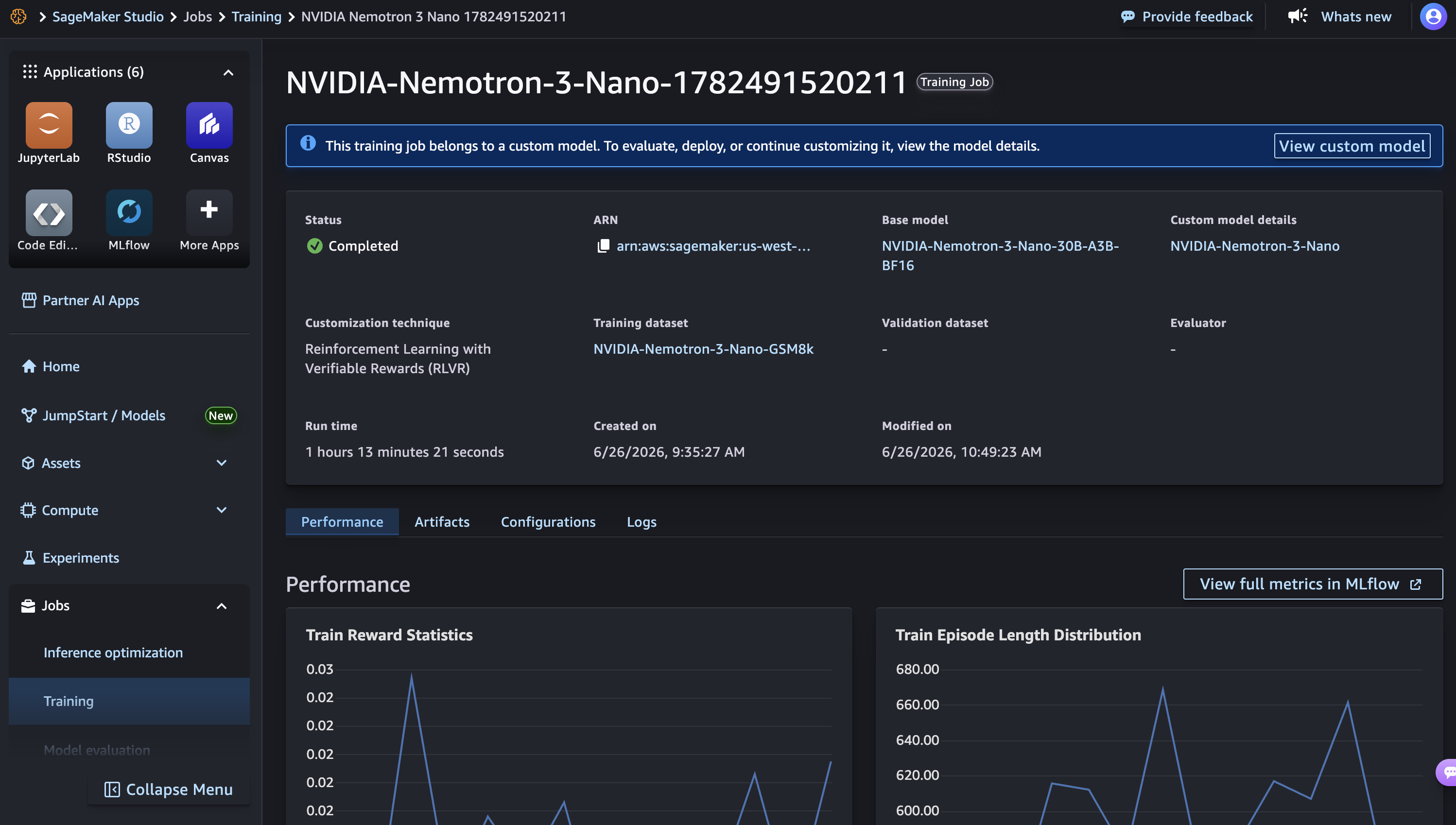
モデルのホームページでステータスを監視でき、以下にスクリーンショットを示すようにトレーニングのパフォーマンスが表示されます。監視すべき主要な指標はいくつかあります。Train Reward(RLVR の場合)は着実に増加する必要があります。Training Loss と Validation Loss はそれぞれ減少し、一般化を追跡します。Policy Entropy(RLVR の場合)はモデルが自信を得るにつれて低下します。Gradient Norm は収束を示すために安定化する必要があります。
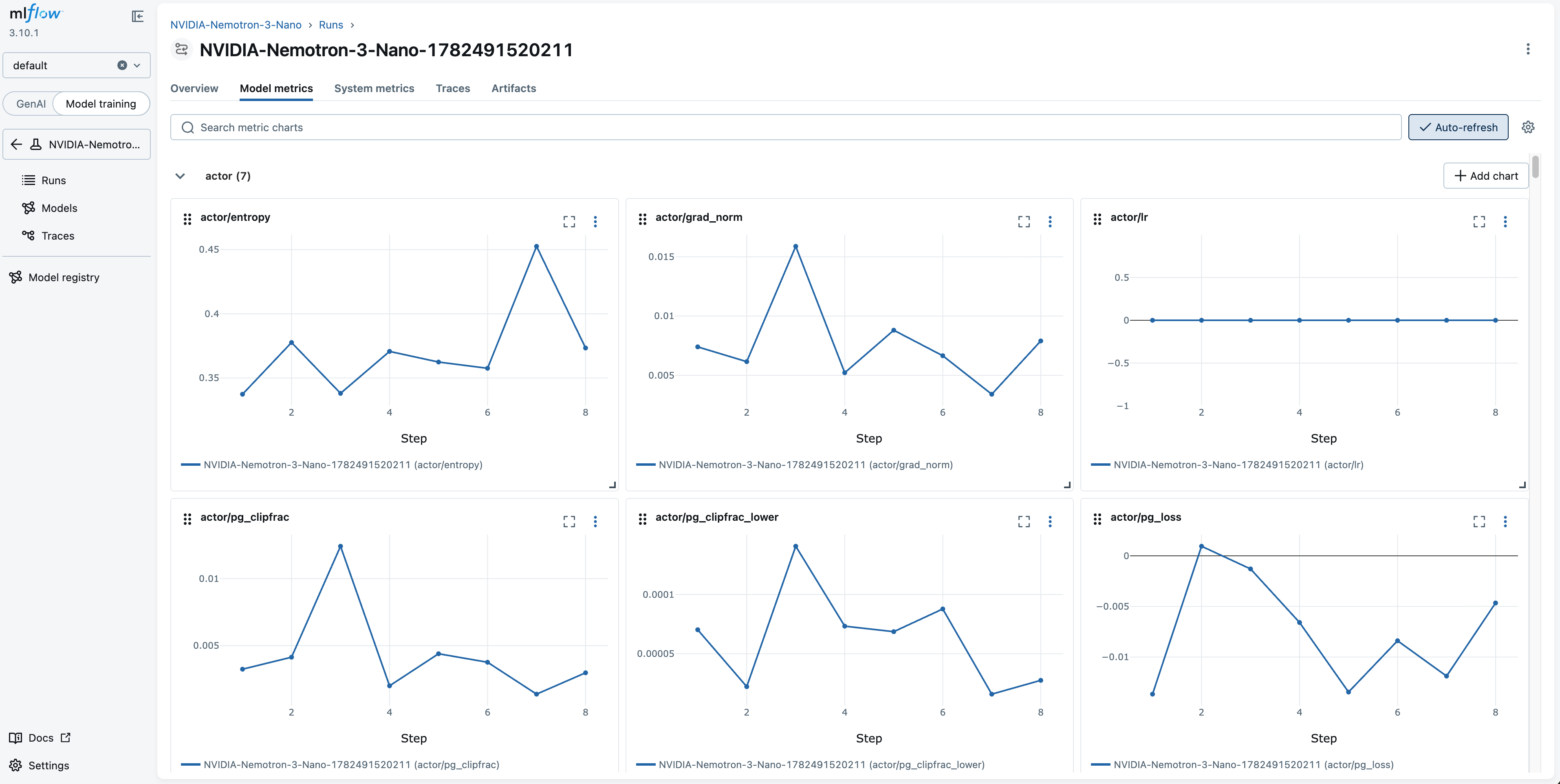
詳細なトレーニングおよび検証メトリクスは、関連する SageMaker AI MLflow App にもログ記録されます(以下にスクリーンショットを示す)。これには、トレーニングの進捗とモデルの挙動を追跡するための包括的なメトリクスセットとパラメータが含まれています。MLflow 追跡 UI では、これらのメトリクスは測定対象コンポーネント(actor, critic, rollout, performance)別に整理されているため、トレーニングの健全性を一目で診断できます。
微調整済みモデルの評価
トレーニング完了後、SageMaker AI サーバーレスモデルカスタマイズの組み込み評価機能を使用して、微調整済みモデルを評価できます。これには、カスタムモデルの品質を評価するための3つの方法が用意されており、以下のスクリーンショットに示されています。LLM-as-a-Judge は、Amazon Bedrock の最先端モデルを使用し、正解ラベル(ground-truth labels)を必要とせずに、回答を品質指標に対して採点します。Custom Scorer では、独自の報酬関数または組み込みスコアラーを適用して、F1、ROUGE、BLEU などの標準的な自然言語処理(NLP)指標を生成できます。Benchmarks は、推論、知識、指示従順性における広範な能力評価のために、モデルを標準化された学術ベンチマーク(MMLU、BBH、GPQA、MATH、IFEval)でスコアリングします。
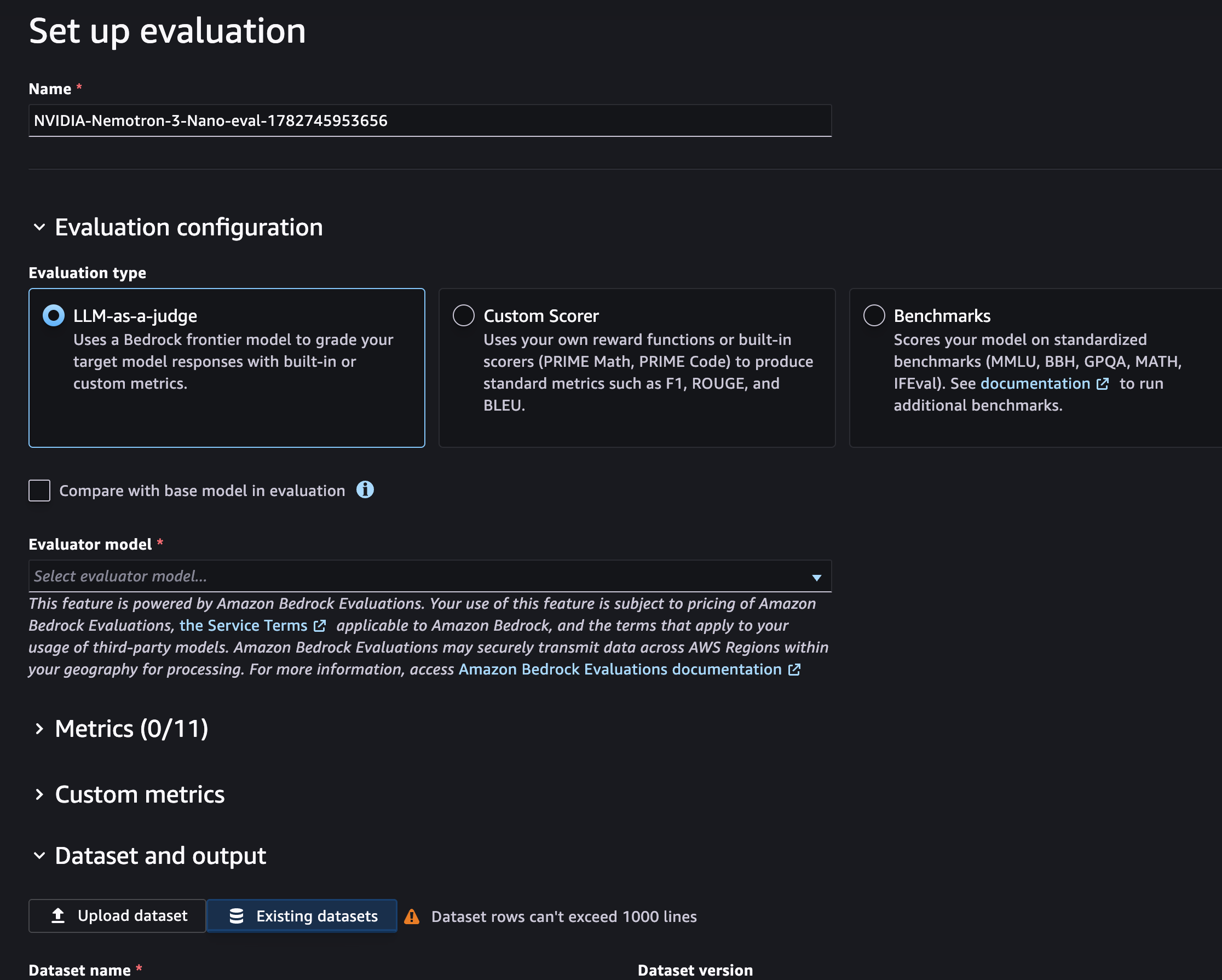
また、評価時にベースモデルとの比較をオンにすることで、トレーニング後のモデルがベースモデルに対してどのようにパフォーマンスを発揮するかを直接測定できます。前述のトレーニング指標と併せて、MLflow はトレーニングダイナミクス(報酬、KL 発散、損失)を追跡します。評価はエンドユーザーの視点から出力品質を測定し、モデル微調整の有効性に関する包括的な像を提供します。
微調整済みモデルのデプロイ
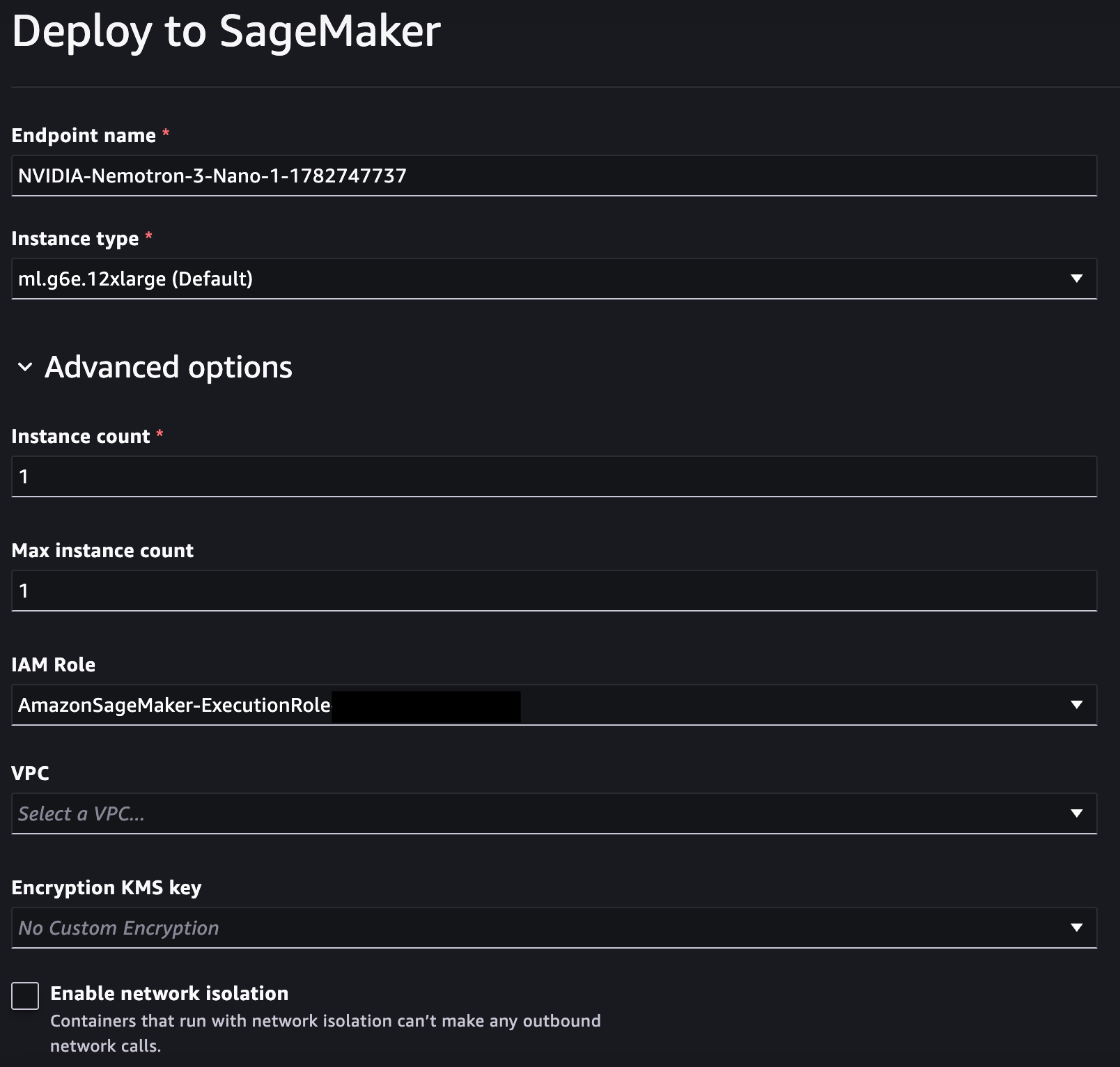
コンソールのモデル詳細ページから、カスタマイズしたモデルを直接デプロイできます。また、SageMaker Inference エンドポイント へのデプロイも可能であり、Amazon Simple Storage Service (Amazon S3) バケットからモデルの重み(ウェイト)をダウンロードして自己管理型のデプロイを行うこともできます。デプロイオプションはデフォルト値を自動入力し、トラフィックやスループット要件に基づいて計算リソースとスケーリングの柔軟性を完全に提供します。以下のスクリーンショットは、NVIDIA L40S Tensor Core GPU を搭載した ml.g6e インスタンスを使用して、微調整済み NVIDIA Nemotron Nano 30B モデルをデプロイしている様子を示しています。このデプロイでは SageMaker Inference コンポーネントが使用され、デフォルトでは統合されたモデルの重みが提供されます。ここでいう「統合」とは、ベースモデルと LoRA アダプター が最適化された推論のために単一の重みセットに結合されることを意味します。これは LoRA による微調整であるため、S3 バケット内でベースの重みとアダプターの重みの両方にアクセスできる場合、統合されていない LoRA アダプターを別々に自己ホストして提供することも可能です。デプロイ後、AWS Command Line Interface (AWS CLI) または SDK を使用して invoke メソッドによりエンドポイントを呼び出します。
クリーンアップ
不要な課金を避けるために、SageMaker AI Studio ドメイン と <a href="https://docs.aws.amazon.com/sagemaker/latest/dg/realtime-endpoints-delete-r
原文を表示
Model customization transforms general-purpose AI models into specialized enterprise assets. By fine-tuning foundation models (FMs) on domain-specific data, businesses teach AI their unique workflows, terminology, and deep domain specialization, along with strict adherence to brand voice and fewer hallucinations. For enterprises, this is more than an optimization. It’s the creation of proprietary intellectual property. A fine-tuned model encodes an organization’s unique intelligence and best practices into its architecture. This builds a competitive advantage that is difficult to replicate with off-the-shelf public frontier models. At the same time, fine-tuning smaller, open-weight models on targeted tasks often matches or exceeds the performance of much larger proprietary models. This approach delivers significant cost savings while keeping sensitive data within secure, private infrastructure.
Amazon SageMaker AI offers a wide selection of open source models and fine-tuning techniques to help organizations tailor foundation models to their unique needs. Now, SageMaker AI introduces serverless model customization for NVIDIA Nemotron 3 models, starting with Nemotron 3 Nano (30B total parameters, 3B active) and Nemotron 3 Super (120B total parameters, 12B active). With supervised fine-tuning (SFT), reinforcement learning with verifiable rewards (RLVR), and reinforcement learning with AI feedback (RLAIF), you can adapt these high-performance open-weight models to your specific domains and workflows without provisioning or managing any infrastructure. For a complete list of open models available for serverless model customization, see Customize open weight models in the Amazon SageMaker AI documentation.
In this post, we explore what makes the Nemotron 3 architecture unique, walk through the fine-tuning techniques available, and show you step-by-step how to get started with serverless customization using SageMaker Studio.
Overview of NVIDIA Nemotron 3 models on Amazon SageMaker AI
NVIDIA Nemotron 3 is a family of open-weight large language models (LLMs) built on a hybrid Mamba-Transformer Mixture-of-Experts (MoE) architecture with native support for up to 1M-token context lengths. The architecture interleaves three complementary layer types: Mamba-2 layers for efficient linear-time sequence processing, Transformer attention layers for precise associative recall, and Latent Mixture-of-Experts (LatentMoE) layers that compress tokens before routing to specialized experts. This design activates only a fraction of total parameters per forward pass (for example, 12B of 120B in the Super variant), delivering high throughput and strong accuracy at significantly lower compute cost. The models use multi-environment reinforcement learning through NeMo Gym, which aligns them to real-world, multi-step agentic tasks across domains such as coding, reasoning, and long-context analysis.
Nemotron 3 Nano 30B
Nemotron 3 Nano is a small language model optimized for high compute efficiency while maintaining strong accuracy on specialized tasks. Nemotron 3 Nano performs strongly on coding and reasoning tasks among open language models in its size class. Trained using multi-environment reinforcement learning through NeMo Gym, the model achieves 4x higher throughput than its predecessor Nemotron 2 Nano. Its efficient 3B active parameter footprint makes it ideal for high-volume, multi-agent workloads where cost and latency matter. For a deeper look at the architecture and training techniques, see the NVIDIA developer blog.
Nemotron 3 Super 120B
Nemotron 3 Super is a larger model designed for high-efficiency multi-agent AI and complex reasoning tasks that require more capacity than Nano while maintaining cost efficiency. Nemotron 3 Super delivers high compute efficiency, throughput, and accuracy for complex multi-agent applications such as software development and cybersecurity triaging. The model performs well at reasoning, coding, and long-context analysis, while remaining efficient enough to run continuously at scale. This makes it a good fit for IT ticket automation, enterprise workflow orchestration, and autonomous agent systems that require sustained multi-step reasoning. For more details, see the NVIDIA developer blog on Nemotron 3 Super.
SageMaker AI serverless model customization
Amazon SageMaker AI serverless model customization removes the undifferentiated heavy lifting of fine-tuning. You don’t need to provision GPU clusters, configure distributed training frameworks, or manage checkpointing and fault tolerance. SageMaker AI handles infrastructure provisioning and training orchestration, so you can focus on your data, business use case, and evaluation, and pay only for what you use. You can learn more about SageMaker AI serverless model customization in the AWS documentation.
For Nemotron 3 models, SageMaker AI serverless model customization supports the Supervised Fine-Tuning (SFT), Reinforcement Learning with Verifiable Rewards (RLVR) and Reinforcement Learning from AI Feedback (RLAIF) fine-tuning techniques.
Technique
Description
Best For
Supervised Fine-Tuning (SFT)
Provide labeled input-output pairs to teach the model new behaviors.
High-quality examples of the behavior you want: domain Q&A pairs, formatted tool calls, style-aligned responses, or task-specific instruction completions
Reinforcement Fine-Tuning (RFT / RLVR)
Use Reinforcement Learning with Verifiable Rewards (RLVR) to optimize model behavior against a reward signal. The model generates multiple candidate responses per prompt, a reward function scores them, and the model updates its policy to favor what works.
Tasks with naturally verifiable objectives like tool calling accuracy, code correctness, or format compliance
Reinforcement Learning from AI Feedback (RLAIF)
Use a separate AI model to guide the model optimization. An AI model evaluates model outputs and provides feedback signals, which supports iterative policy improvement without human-labeled reward data.
Aligning model tone, helpfulness, and safety; improving response quality when human evaluation is expensive or subjective; refining open-ended generation tasks
Let’s walk through how to get started with serverless model customization for Nemotron 3 models. While the base Nemotron 3 models deliver strong general-purpose performance, enterprise use cases need domain-specific behavior that base models alone cannot achieve. With model customization, you can adapt these models for industry-specific terminology and decision patterns, train reliable tool calling with your organization’s APIs, align outputs with your brand voice, refine multi-step agentic reasoning for your architectures, and optimize cost by specializing the smaller Nano model to match larger model performance on targeted tasks.
Getting started with SageMaker AI serverless model customization
You can get started with serverless model customization through the Amazon SageMaker Studio console or programmatically using the SageMaker Python SDK. On the console, navigate to the Models page, select your Nemotron 3 model, and follow the guided workflow to configure your training data and launch a customization job. Alternatively, if you’re already working within SageMaker AI, you can use the agentic functionality with agent skills to accelerate your model customization workflow. The following sections walk you through the prerequisites, data preparation, and step-by-step instructions using the SageMaker Studio console. For a detailed programmatic example with the SageMaker Python SDK for customizing an open-source model, see the AWS samples GitHub repository.
Prerequisites
Before you begin, verify that you have:
- An AWS account with AWS Identity and Access Management (IAM) permissions for Amazon SageMaker AI.
- A SageMaker AI domain with Studio access.
- Your training data in the required structure and format.
Prepare your training data for SageMaker AI serverless model customization
High-quality training data is the foundation of any successful fine-tuning job. For serverless model customization on SageMaker AI, your data must be formatted as JSONL (JSON Lines), where each line represents a single training example. The specific schema depends on the technique you choose: SFT requires conversation-format examples with labeled input-output pairs, while RFT (RLVR) requires prompts paired with ground truth values for your reward function. Properly structured data ensures the model learns the behaviors you intend without introducing noise or formatting errors. For a hands-on walkthrough of preparing your training data, see the Data Preparation module in the SageMaker AI serverless model customization workshop. Alternatively, if you are working with SageMaker AI, you can use the built-in coding agent with agent skills to automatically prepare and validate your data formatting, reducing manual effort and helping you get to training faster.
Model customization in SageMaker AI Studio
Follow these steps to customize a Nemotron 3 model using the SageMaker AI Studio console.
- Open Amazon SageMaker AI Studio and in the left navigation pane, choose Models.
- Navigate to the model you want to customize in the UI. Search for “NVIDIA” to find the Nemotron 3 family of models, and select the NVIDIA model that you want (NVIDIA-Nemotron-3-Nano-30B-* or NVIDIA-Nemotron-3-Super-120B-*) for the next step.
- Select your model customization technique from the supported Supervised Fine-Tuning (SFT), Reinforcement Learning with Verifiable Rewards (RLVR) and Reinforcement Learning from AI Feedback (RLAIF) fine-tuning techniques. When choosing a reward function type for RLVR, consider your task requirements. The built-in reward function (Exact Match, Code Execution, Math Answers) works well for tasks with single, objectively correct answers, requiring no additional code. Choose a custom reward function when your task needs richer scoring logic, such as partial credit, format checks, reasoning quality evaluation, or domain-specific rules. With custom reward functions, you can score on multiple signals, shape rewards to avoid all-zero gradients on early rollouts, emit observability metrics, and encode the Python verification logic your task requires. For detailed guidance on authoring and registering a custom reward function, see the RLVR workshop documentation.
- Configure your training data by selecting an existing dataset (if available) or creating a new dataset (see the preceding section for information about preparing your dataset).
- Set the customization hyperparameters or use recommended defaults.
- Choose Submit to launch the model customization job.
SageMaker AI automatically provisions the required compute, executes the training job, and captures continuous logs. The training metrics are automatically logged to the SageMaker MLflow App by default for training tracking.
Monitor training progress
You can monitor the status on the model home page, which displays training performance, as shown in the following screenshot. Several high-level metrics are worth monitoring. Train Reward (for RLVR) should increase steadily. Training Loss and Validation Loss should decrease and track generalization, respectively. Policy Entropy (for RLVR) decreases as the model gains confidence. Gradient Norm should stabilize to indicate convergence.
The detailed training and validation metrics are also logged to the associated SageMaker AI MLflow App, as shown in the following screenshot. This captures a comprehensive set of metrics and parameters that track training progress, and model behavior. In the MLflow tracking UI, these metrics are organized by the component they measure (actor, critic, rollout, performance), so you can diagnose training health at a glance.
Evaluate your fine-tuned model
After training completes, you can evaluate the fine-tuned model using the built-in evaluation features of SageMaker AI serverless model customization. It provides three methods to assess the quality of your customized model, as shown in the following screenshot. LLM-as-a-Judge uses an Amazon Bedrock frontier model to grade responses against quality metrics without requiring ground-truth labels. Custom Scorer applies your own reward functions or built-in scorers to produce standard natural language processing (NLP) metrics such as F1, ROUGE, and BLEU. Benchmarks scores your model on standardized academic benchmarks (MMLU, BBH, GPQA, MATH, IFEval) for broad capability assessment across reasoning, knowledge, and instruction-following.
You can also turn on Compare with base model in evaluation to directly measure how your post-trained model performs relative to the base model. Together with the previous training metrics, MLflow tracks the training dynamics (rewards, KL divergence, loss). The evaluation measures output quality from an end-user perspective, giving you a complete picture of the model fine-tuning effectiveness.
Deploy the fine-tuned model
Deploy your customized model directly from the model details page on the console. You can also deploy to SageMaker Inference endpoints, or you can download model weights from an Amazon Simple Storage Service (Amazon S3) bucket for self-managed deployment. The deployment options auto-populate defaults, giving you full flexibility over compute and scaling based on your traffic and throughput requirements. The following screenshot shows the deployment of the fine-tuned NVIDIA Nemotron Nano 30B using an ml.g6e instance powered by NVIDIA L40S Tensor Core GPUs. The deployment uses SageMaker inference components and, by default, serves the merged model weights, where the base model and LoRA adapter are combined into a single set of weights for optimized inference. Because this is a LoRA fine-tune, you can also self-host and serve the unmerged LoRA adapter separately, because you have access to both the base weights and the adapter weights in your S3 bucket. After deployment, you invoke the endpoint using the invoke method with the AWS Command Line Interface (AWS CLI) or SDK.
Clean up
To avoid incurring unnecessary charges, we recommend deleting your SageMaker AI Studio domain, <a href="https://docs.aws.amazon.com/sagemaker/latest/dg/realtime-endpoints-delete-r
関連記事
今日のまとめ
AI日報で今日の重要ニュースをまとめ読み