Claude の PDF トークンコストを最大99%削減するオープンソース拡張「Token Saver」
MarkTechPost AI チームは、ローカルハイブリッド RAG を活用し、Claude での大規模 PDF 分析時のトークンコストを最大99%削減できるオープンソース MCP 拡張「Token Saver」を発表した。
AI深層分析を開く2026年7月30日 17:16
AI深層分析
キーポイント
トークンコストの劇的削減
会話履歴が再送信される従来の方式に対し、このツールは文書本体をアップロードせず関連箇所のみを送ることで、トークン消費を 92% から 99% まで削減する。
ローカル動作によるプライバシー保護
MCP サーバーとしてローカル環境で稼働するため、PDF ファイルがユーザーのハードディスクから外部サーバーへ転送されることはなく、データプライバシーを完全に担保する。
ハイブリッド RAG 技術の採用
キーワード検索(BM25)と意味論的検索(Cosine Similarity)を組み合わせるローカルなハイブリッド RAG を実装し、文脈に即した高精度な情報抽出を実現している。
導入の容易さ
Python 環境の構築やターミナル設定が不要で、ゼロ構成でのセットアップが可能であり、MIT ライセンスで提供されている。
ハイブリッド RAG パイプラインによるコスト削減
抽出、チャンキング、スコアリング、フィルタリングなどの8段階の処理を経て、文脈を損なわずに必要な部分のみを抽出し、トークン使用量を最大99%削減する。
重要な引用
Token consumption is slashed by 92% to 99%, privacy is guaranteed, and setup requires exactly zero Python environments or terminal configurations.
The PDF never leaves your hard drive.
Hybrid RAG is the gold standard for document retrieval because it combines two powerful search methods
Zero Uploads: The document never leaves your machine.
編集コメントを表示
編集コメント
このツールは、LLM の利用コストが文書サイズと会話の長さによって増大する構造的な課題に対し、ローカル処理というアプローチで効果的な解決策を提供している。開発者にとって、プライバシーを損なわずに大規模データを扱うための実用的な手段として即座に価値を発揮するだろう。
Source Article
元記事を日本語で読む
本文に関係しない購読案内、埋め込み通知、サイト内プロモーションは除いています。
AI 開発者や研究者、そしてプロフェッショナルが LLM を使って大規模なドキュメントを分析する際によく直面するのが、コンテキストウィンドウの隠れたコストです。200 ページもの PDF をチャットに貼り付けるのは一度きりの作業ではありません。会話履歴は毎回モデルへ再送信されるため、追跡質問をするたびにその巨大な文書に対する支払いが繰り返されてしまうのです。
Marktechpost AI チームは、Claude Desktop 向けのオープンソース Model Context Protocol (MCP) 拡張機能「Token Saver」をリリースしました(MIT ライセンス、現在 v1.0)。これは、ロチェスター工科大学の CS 学生である Arnav Rai が Marktechpost でのインターンシップ中に開発し、Jean-marc Mommessin と Asif Razzaq の指導のもとに完成させたものです。Token Saver は、Claude がローカルドキュメントと対話する方法を根本から変えます。マシン上で直接動作するローカルハイブリッド RAG(Retrieval-Augmented Generation)を実装することで、実際のファイルをモデルにアップロードすることなく、巨大な PDF に関する質問が可能になります。
トークン消費量は 92% から 99% 削減され、プライバシーも保証されます。さらに、セットアップには Python 環境やターミナル設定が一切不要です。
どんな見た目か?
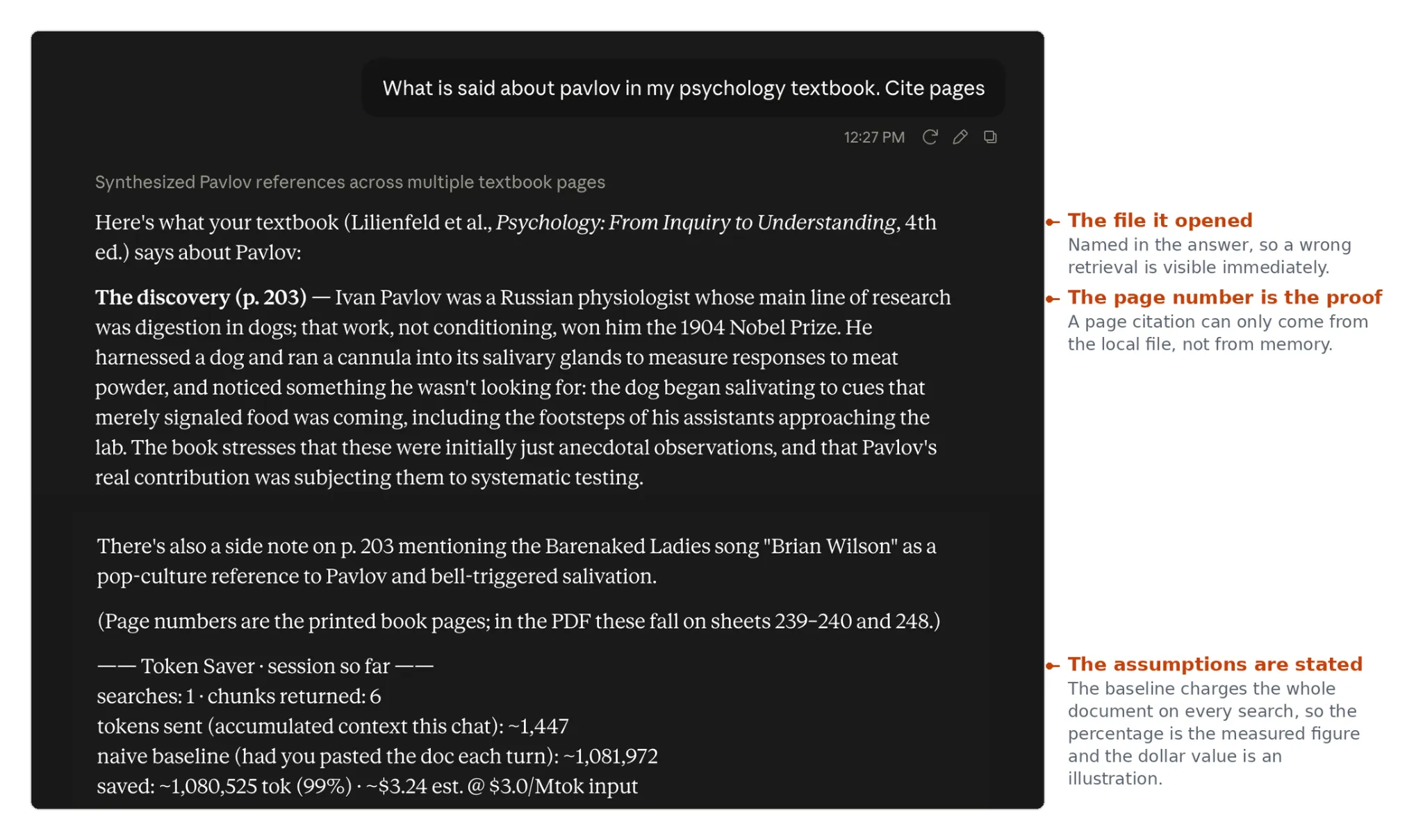
大規模 PDF が引き起こす隠れたトークンの流出
PDF を Claude に読み込ませると、多くのユーザーは単にテキストが抽出されるだけだと考えています。しかし実際には、Claude のデフォルト動作では、チャートやレイアウトを維持するために各ページを画像に変換し、同時にテキストも別々に抽出します。画像トークンがカウントされる前に、テキストだけで 1 ページあたり 1,500〜3,000 トークンを消費してしまいます。
プロンプトキャッシュや Claude Projects を活用すれば負担は軽減されますが、根本的な課題を解決するわけではありません。文書全体が依然としてプロバイダーのサーバーに送信されるからです。また、1,000 ページある教科書から関連する 2 つのパラグラフだけが必要なのに、LLM に全ページを検索させるのは非効率であり、幻覚(ハルシネーション)を招きやすいです。
ローカルハイブリッド RAG が解決する課題
Marktechpost の Token Saver は、Claude がツールとして呼び出せる軽量なバックグラウンドプログラムであるローカル MCP サーバーとして機能します。PDF ファイルはハードディスクから一度も離れることはありません。
質問をすると、Token Saver はローカルハイブリッド RAG を活用して回答を検索します。ハイブリッド RAG は文書検索のゴールドスタンダードです。2 つのパワフルな検索手法を組み合わせることで実現されています。
キーワードマッチング (BM25):SQLite の組み込み FTS5 検索(重み付け 0.4)を実行し、正確な用語を検索します。
セマンティック検索(コサイン類似度):ローカルの all-MiniLM-L6-v2 埋め込みモデル(重み付け 0.6)を使用して、単語の一致だけでなく質問の意味を理解します。
この2つの手法をローカルで組み合わせることで、サーバーがファイル内を検索し、Claude に送るのは極めて関連性の高い部分だけになります。Claude はその情報を基に回答を合成し、正確なページ番号を引用するとともに、あなたが節約したトークンの総数をリアルタイムで表示します。
8段階の処理パイプライン
Token Saver は、単一の長時間稼働するローカルプロセス内で完結して動作します。テキストが Claude に到達する前に、ローカルのハイブリッド RAG パイプラインが以下の8つの高速ステップを実行します。
抽出:pypdfium2 を使用し(フォールバックとして pypdf)、テキストを抽出します。
チャンク化:テキストを180語の段落に分割し、40語ずつ重なるように設定して、文脈が不用意に切断されないようにします。
スコアリング(ハイブリッド RAG):抽出された BM25 とローカル埋め込みモデルを組み合わせて、各チャンクを評価します。
ゲート:品質閾値を設定。完全なキーワードの一致がない場合は、意味的な類似度が 0.25 を超える必要があります。
重複排除:ほぼ同一の段落は削除されます。
トリミング:ユーザーの質問に答える文のみを残し、他の部分を厳密に削ぎ落とします。
予算管理:Claude に送信するペイロードの総文字数を 8,000 字に制限します。
エンベロープ:取得したテキストを、ソースファイルと正確なページ番号を含む「document-chunk」要素で包みます。
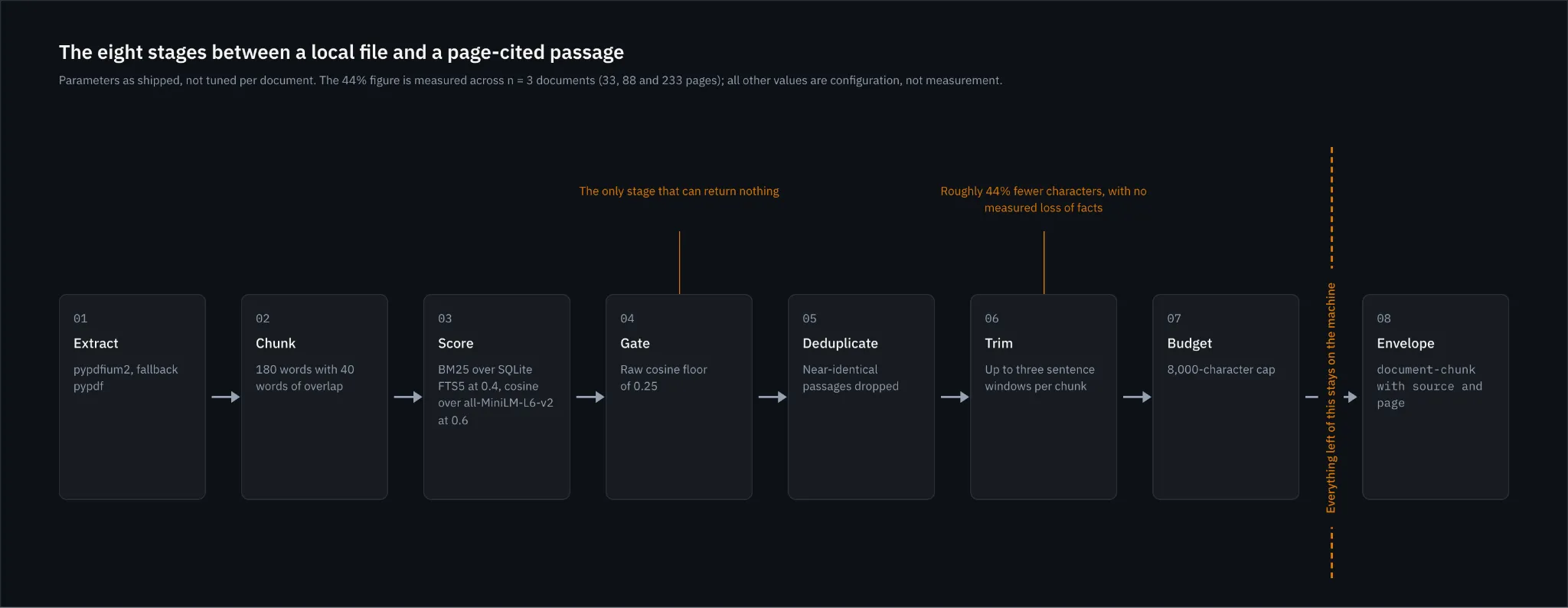
(注:埋め込みモデルは必須ではありませんが推奨されます。読み込みに失敗した場合、システムは自動的にキーワードマッチングのみへのフォールバックを安全に行います)
数値による効果:スケール時の 99% コスト削減
ハイブリッド RAG パイプラインが返されるテキストスライスのサイズを制限しているため、ドキュメントが大きくなるほどトークン削減効果は指数関数的に高まります。以下は、Token Saver のベンチマーク結果です(tiktoken を使用して測定し、1 ドキュメントあたり 1 つの質問があると仮定)。
| ドキュメント | ページ数 | 全文トークン数 | 返されたトークン数 | トークン削減率 |
|---|---|---|---|---|
| FDA 薬物ラベル | 33 | 23,959 | 1,021 | 95.7% |
| GDPR (EU 2016/679) | 88 | 70,260 | 996 | 98.6% |
| SFFA v. Harvard | 233 | 133,349 | 740 | 99.4% |
※注:トークン数は cl100k_base を代用として使用しており、ベースラインでは検索時にドキュメント全体が常に課金されると仮定しています。
裁判所の判決、技術基準、財務報告書、あるいは密度の高い教科書を頻繁に扱う専門家にとって、Token Saver は繰り返されるトークン税を解消します。
セキュリティとローカルプライバシー
企業ユーザーや法律専門家の場合、データプライバシーは妥協できません。Token Saver のセキュリティモデルは、以下の 3 つの柱の上に成り立っています。
- アップロードゼロ:ドキュメントは一切アップロードされず、お客様のマシン内に留まります。
- フォルダの許可リスト化:Token Saver に使用するフォルダを特定して設定します。サーバーはこの指定ディレクトリ外のファイルを読み取ることを積極的に拒否します。
- ネットワーク分離:サーバーは Claude Desktop と標準入出力(stdio)のみを通じて通信します。リスニングするネットワークポートはなく、攻撃対象領域が劇的に縮小されます。
モデル性能:Sonnet vs. Opus
Marktechpost の Token Saver は Claude 3.5 のすべての 3 つのティアで動作しますが、テストにより明確な違いが確認されました:
Claude 3.5 Sonnet(推奨):これが最もバランスの取れた選択肢です。ファイルへの参照が曖昧な場合でも適切に処理し、類似した名前のファイルがある場合は確認質問を投げかけ、取得したページ番号も正確に反映します。
Claude 3 Opus:複数の声が含まれる複雑な文書(例えば、多数意見と反対意見が混在する法廷判決など)の処理に優れています。文脈から推測して帰属先を特定した場合でも、明示的な記述がないことを指摘できるほど賢明です。
数分で始められる使い方
多くのオープンソース AI ツールが複雑な Python 環境や JSON 設定を必要とするのに対し、「Token Saver」は単一の .mcpb バンドルとしてパッケージ化されています。
プロジェクトの GitHub リリースページから「token-saver-ccr.mcpb」をダウンロードしてください。
Claude Desktop を開き、[設定] > [拡張機能] > [拡張機能をインストール] の順に進みます。
拡張機能を有効化し、「構成」をクリックして、参照用 PDF ファイルを保存する専用のフォルダを選択します。
最初のプロンプトでは「常に許可」を選んでください。
この拡張機能が動作するのは、フォルダが選択された後です。これは単一の選択で三つの役割を果たすためです。
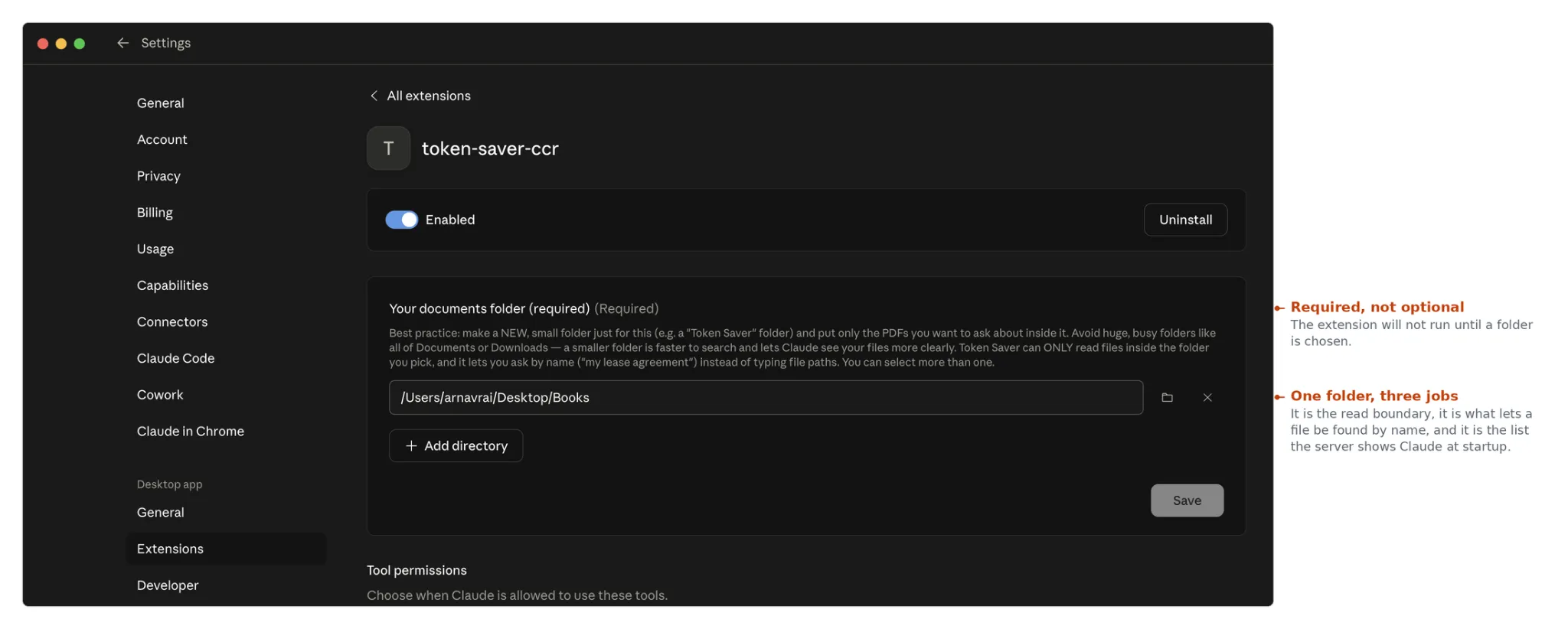
このフォルダには少し注意を払う価値があります。ここは読み込み可能な範囲の境界を設定し、ファイルパスを入力する代わりにファイル名だけで指定できるようにする機能を持ち、会話開始時にサーバーが Claude に提示するリストでもあります。意図した質問にのみ関連するファイルを収めた小さなフォルダを使用すれば、すべてのドキュメントフォルダを指すよりもはるかに効率的に動作します。
主なポイント
トークンコストを最大 99% 削減:ローカルハイブリッド RAG を活用し、LLM に必要な段落のみを渡すことで大幅なコストダウンを実現。チャットが長くなるほど、その効果は高まります。
検証可能な精度:Token Saver は取得した各チャンクに正確なページ番号を付与するため、Claude の主張を確認する際、ローカルの PDF を開くだけで即座に裏付けが可能です。
完全なプライバシー保護:境界線はあなたのローカルマシンです。機密データが AI プロバイダーのサーバーへアップロードされることはありません。
手間のかからないセットアップ:Python は不要です。シンプルな .mcpb ファイルをインストールするだけで、Claude Desktop 上で即座に動作を開始できます。
GitHub リポジトリはこちら。
参考文献:MCP Bundle format | all-MiniLM-L6-v2 | pdfkb-mcp | wesleygriffin/pdfrag | コーパス:Dobbs v. Jackson Women's Health Organization; Berkshire Hathaway 2023 Annual Report
原文を表示
AI developers, researchers, and professionals frequently hit a frustrating wall when analyzing large documents with LLMs: the hidden, compounding cost of context windows. Pasting a 200-page PDF into a chat isn’t a one-time charge. Because the conversation history is re-sent to the model on every single turn, that massive document is paid for again with every follow-up question.
Marktechpost AI team just released Token Saver, an open-source Model Context Protocol (MCP) extension for Claude Desktop (MIT licensed, currently at v1.0). It was developed at Marktechpost AI Media Inc by Arnav Rai (CS student at Rochester Institute of Technology) during his internship at Marktechpost, supervised by Jean-marc Mommessin and Asif Razzaq. Token Saver fundamentally changes how Claude interacts with local documents. By implementing a Local Hybrid RAG (system directly on your machine, it allows you to ask questions about massive PDFs without ever uploading the actual file to the model.
Token consumption is slashed by 92% to 99%, privacy is guaranteed, and setup requires exactly zero Python environments or terminal configurations.
How it looks!
The Hidden Token Drain of Large PDFs
Most users assume that when they drop a PDF into Claude, it simply extracts the text. In reality, Claude’s default behavior converts each page into an image to preserve charts and layouts, while separately extracting text. Before a single image token is even counted, the text alone can run 1,500 to 3,000 tokens per page.
While Prompt Caching and Claude Projects help soften this blow, they don’t solve the core issue: the entire document still crosses the boundary to the provider’s servers. Furthermore, if you only need two relevant paragraphs from a 1,000-page textbook, forcing the LLM to search the entire 1,000 pages itself is both inefficient and prone to hallucination.
How Local Hybrid RAG Solves the Problem
Marktechpost’s Token Saver acts as a local MCP server : a lightweight background program on your machine that Claude can call as a tool. The PDF never leaves your hard drive.
When you ask a question, Token Saver utilizes Local Hybrid RAG to find the answer. Hybrid RAG is the gold standard for document retrieval because it combines two powerful search methods:
Keyword Matching (BM25): Runs over SQLite’s built-in FTS5 search (weighted at 0.4) to find exact terminology.
Semantic Search (Cosine Similarity): Uses a local all-MiniLM-L6-v2 embedding model (weighted at 0.6) to understand the meaning of your question, rather than just matching exact words.
By blending these two approaches locally, the server searches the file and hands Claude only the highly relevant passages. Claude then synthesizes the answer, citing the exact page numbers and providing a running tally of the tokens you just saved.
The 8-Stage Processing Pipeline
Token Saver runs entirely inside a single, long-running local process. Before any text reaches Claude, the local Hybrid RAG pipeline executes eight rapid steps:
Extract: Uses pypdfium2 (with pypdf as a fallback) to pull text.
Chunk: Splits text into 180-word passages, overlapping by 40 words so context is never blindly cut.
Score (Hybrid RAG): Evaluates chunks using the blended BM25 and local embedding model.
Gate: Enforces a quality threshold. Passages sharing no exact keywords must pass a semantic similarity floor of 0.25 to qualify.
Deduplicate: Drops near-identical passages.
Trim: Narrows the passage down strictly to the sentences that answer the user’s prompt.
Budget: Caps the total payload sent to Claude at 8,000 characters.
Envelope: Wraps the retrieved text in a document-chunk element containing the source file and precise page number.
(Note: The embedding model is optional but recommended. If it fails to load, the system gracefully falls back to keyword-only matching).
The Numbers: 99% Savings at Scale
Because the Hybrid RAG pipeline caps the returned text slice, the token savings grow exponentially with the size of the document. Here is how Token Saver performed in benchmarking (measured via tiktoken, assuming one question per document):
DocumentPagesWhole Doc TokensReturned TokensTokens Saved
FDA drug label3323,9591,02195.7%
GDPR (EU 2016/679)8870,26099698.6%
SFFA v. Harvard233133,34974099.4%
Disclaimer: Token counts use cl100k_base as a stand-in, and baselines assume the whole document is charged on every search.
For professionals working repeatedly with court opinions, technical standards, financial reports, or dense textbooks, Token Saver eliminates the repetitive token tax.
Security and Local Privacy
For enterprise users and legal professionals, data privacy is non-negotiable. Token Saver’s security model rests on three pillars:
Zero Uploads: The document never leaves your machine.
Folder Allowlisting: You configure a specific folder for Token Saver. The server will actively refuse to read files outside of this designated directory.
Network Isolation: The server communicates with Claude Desktop over standard I/O (stdio) only. There are no listening network ports, drastically reducing the attack surface.
Model Performance: Sonnet vs. Opus
Marktechpost’s Token Saver works across all three Claude 3.5 tiers, but testing revealed distinct behaviors:
Claude 3.5 Sonnet (Recommended): The sensible default. It handles loose file references perfectly, asks clarifying questions if two files have similar names, and correctly applies the retrieved page numbers.
Claude 3 Opus: Excels at complex documents with multiple voices (e.g., legal rulings with majority opinions and dissents). Opus is smart enough to flag when it infers an attribution based on context rather than explicit text.
Getting Started in Minutes
Unlike many open-source AI tools that require complex Python environments and JSON configurations, Token Saver is packaged as a single .mcpb bundle.
Download token-saver-ccr.mcpb from the project’s GitHub Releases page.
Open Claude Desktop -> Settings -> Extensions -> Install extension.
Enable the extension, click Configure, and select a dedicated folder where you keep your reference PDFs.
At the first prompt, choose Always allow.
The extension will not run until a folder is chosen, because that single choice serves three purposes at once.
That folder is worth a moment’s thought. It sets the boundary of what can be read, it is what lets you ask for a file by name instead of typing a path, and it is the list the server shows Claude when a conversation starts. A small folder holding only what you intend to ask about works considerably better than pointing it at all of Documents.
Key Takeaways
Massive Cost Reduction: By using Local Hybrid RAG to pass only relevant paragraphs to the LLM, token costs drop by up to 99%. The longer the chat, the more you save.
Verifiable Accuracy: Because Token Saver attaches exact page numbers to every retrieved chunk, you can instantly verify Claude’s claims by opening your local PDF.
Absolute Privacy: The boundary is your local machine. Your proprietary data is never uploaded to an AI provider’s server.
Frictionless Setup: No Python required. A simple .mcpb file install gets you running in Claude Desktop instantly.
Check out the GitHub Repo.
References: MCP Bundle format | all-MiniLM-L6-v2 | pdfkb-mcp | wesleygriffin/pdfrag | Corpora: Dobbs v. Jackson Women’s Health Organization; Berkshire Hathaway 2023 Annual Report
The post Meet Token Saver: An Open-Source MCP Extension Using Local Hybrid RAG to Cut Claude PDF Token Costs 90-99% appeared first on MarkTechPost.
AI算出
主要ニュースainew評価標準
AI トークンコスト削減のための具体的なオープンソースツールの発表であり、技術的な仕組み(BM25 と埋め込みモデルの組み合わせ)が明確に記述されているため新規性と関連性は高い。ただし、日本固有の導入事例や規制情報は含まれていないため、日本の文脈での関連性は限定的である。
6つの評価軸を見る
- AI関連度
- 100
- 情報源の信頼性
- 25
- 新規性
- 75
- 調べる価値
- 100
- 重複の少なさ
- 100
- 日本での有用性
- 25
関連記事
今日のまとめ
AIデイリーブリーフで今日の重要ニュースをまとめ読み