Amazon SageMaker HyperPodで推論を実行するためのベストプラクティス
AWSはAmazon SageMaker HyperPodが生成AI推論の課題を解決し、動的スケーリング、簡素化されたデプロイ、インテリジェントなリソース管理により、総所有コストを最大40%削減し、生成AIデプロイを加速できると説明している。
キーポイント
生成AI推論の課題解決
組織が直面する複雑なインフラ設定、予測不可能なトラフィックパターン、GPUリソース管理のオーバーヘッドといった課題を、Amazon SageMaker HyperPodが包括的に解決する。
ワンクリッククラスター作成
Amazon EKSオーケストレーションによるHyperPodクラスターを、クイックセットアップまたはカスタムセットアップオプションで簡単に作成できる。
コスト最適化とパフォーマンス向上
動的スケーリング、自動化されたインフラ、コスト最適化機能により、総所有コストを最大40%削減しながら、生成AIデプロイを概念から本番環境まで加速できる。
Kubernetesコントローラーとアドオンの柔軟性
Kubernetesコントローラーとアドオンを有効または無効にでき、既存リソースとの統合や特定のニーズに合わせたカスタマイズが可能である。
重要な引用
Deploying and scaling foundation models for generative AI inference presents challenges for organizations.
Teams often struggle with complex infrastructure setup, unpredictable traffic patterns that lead to over-provisioning or performance bottlenecks, and the operational overhead of managing GPU resources efficiently.
By the end of this post, you’ll understand how to use the HyperPod automated infrastructure, cost optimization features, and performance enhancements to reduce your total cost of ownership by up to 40% while accelerating your generative AI deployments from concept to production.
影響分析・編集コメントを表示
影響分析
この記事はAWSの製品紹介であり、生成AI推論の運用課題に対する具体的なソリューションを提供している。企業が生成AIをスケールさせる際の障壁を低減し、コスト効率を向上させる実用的なガイドとしての価値があるが、技術的な革新性は限定的である。
編集コメント
AWS製品の機能紹介記事であり、実用的なデプロイガイドとして価値があるが、技術的なブレークスルーではなく既存サービスの拡張という位置付け。生成AIの本番運用を検討する企業向けの参考資料として有用。
生成AIの推論における基盤モデルのデプロイとスケーリングは、組織にとって課題となります。チームはしばしば、複雑なインフラストラクチャのセットアップ、過剰なプロビジョニングやパフォーマンスのボトルネックを引き起こす予測不可能なトラフィックパターン、GPUリソースを効率的に管理する運用上のオーバーヘッドに苦戦します。これらの課題は、市場投入までの時間の遅延、最適でないモデルパフォーマンス、そして大規模なAIイニシアチブを持続不可能にするような膨張したコストをもたらします。
この投稿では、Amazon SageMaker HyperPodが推論ワークロードに対する包括的なソリューションを提供することで、これらの課題にどのように対処するかを探ります。プラットフォームの動的スケーリング、デプロイの簡素化、インテリジェントなリソース管理のための主要な機能について順を追って説明します。この投稿の終わりまでに、HyperPodの自動インフラストラクチャ、コスト最適化機能、パフォーマンス強化を活用して、総所有コスト(TCO: Total Cost of Ownership)を最大40%削減しながら、概念から本番環境への生成AIデプロイメントを加速する方法を理解していただけるでしょう。
クラスターの作成 – ワンクリックデプロイメント
Amazon Elastic Kubernetes Service (Amazon EKS) オーケストレーションを使用してHyperPodクラスターを作成するには、Amazon SageMaker AIコンソールのSageMaker HyperPod Clustersページに移動します。
ステップ1:
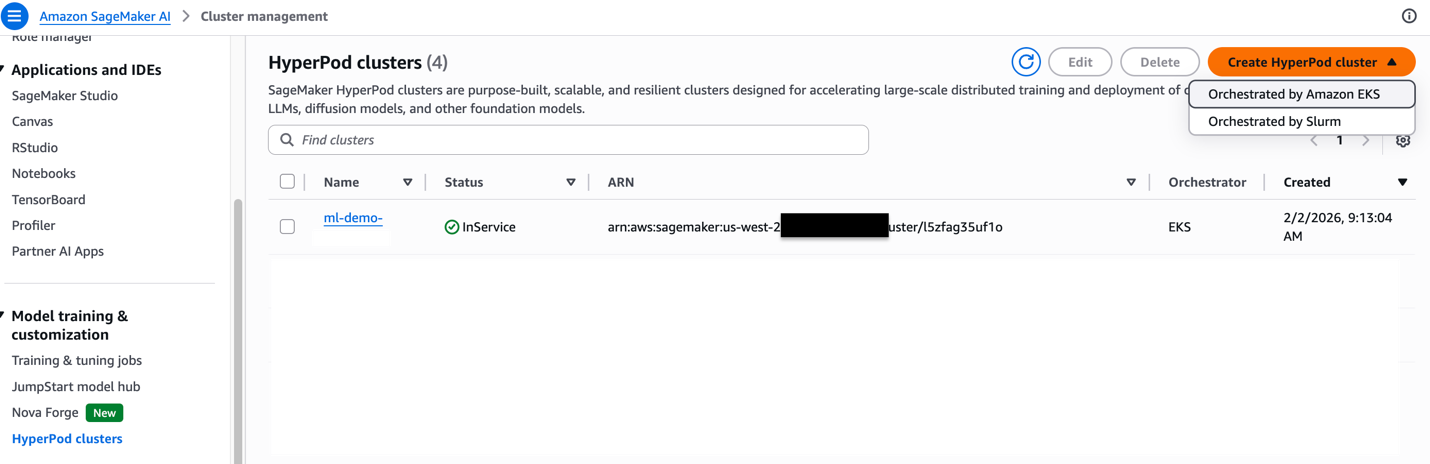
Create HyperPod clusterを選択し、Orchestrated by Amazon EKSオプションを選択します。
Step 2
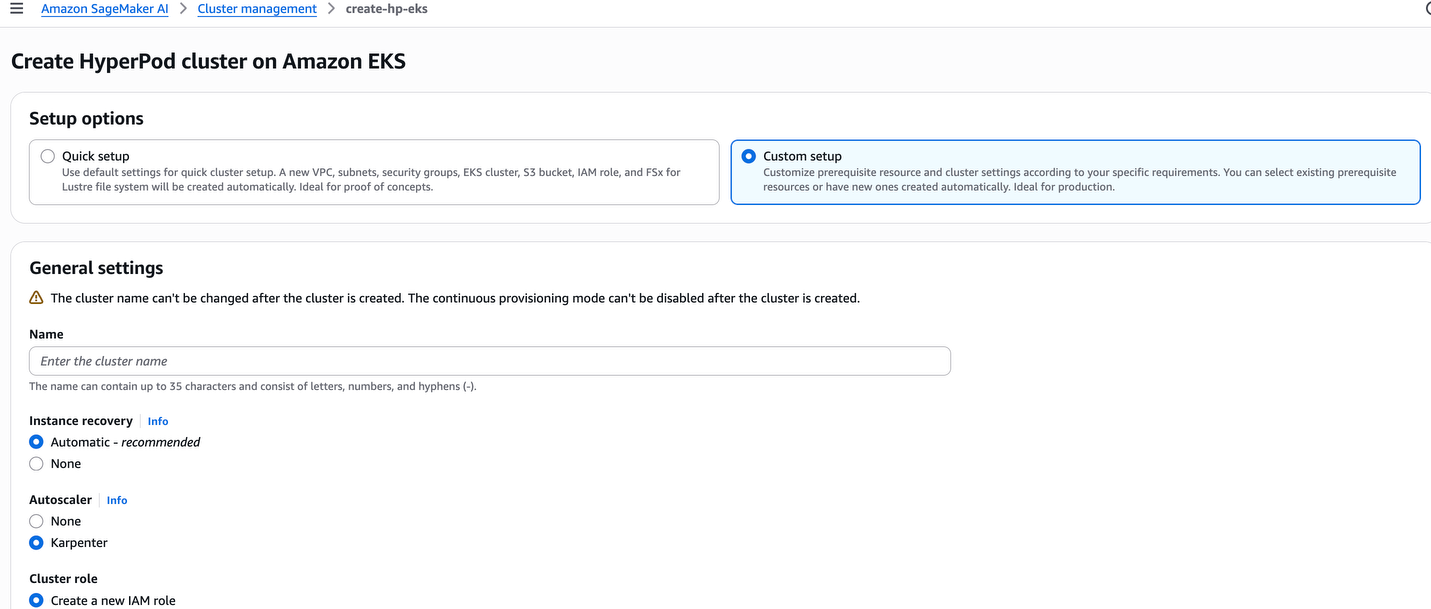
クイックセットアップまたはカスタムセットアップのオプションから選択します。クイックセットアップはデフォルトのリソースを作成し、カスタムセットアップでは既存のリソースとの統合や、特定のニーズに応じた設定のカスタマイズが可能です。
Step 3
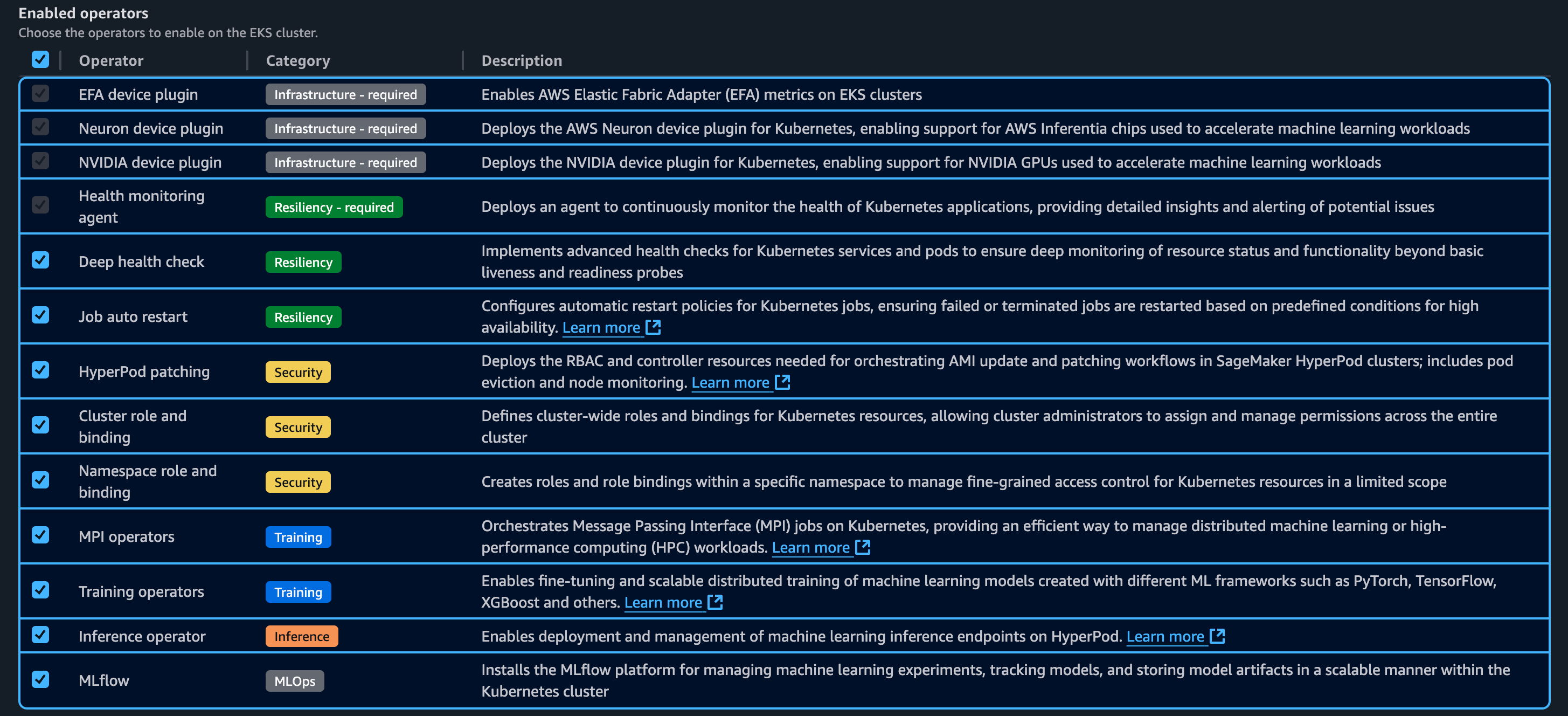
以下は、Kubernetes コントローラーおよびアドオンの一覧です。これらのコントローラーとアドオンは有効化または無効化することができます。
Step 4
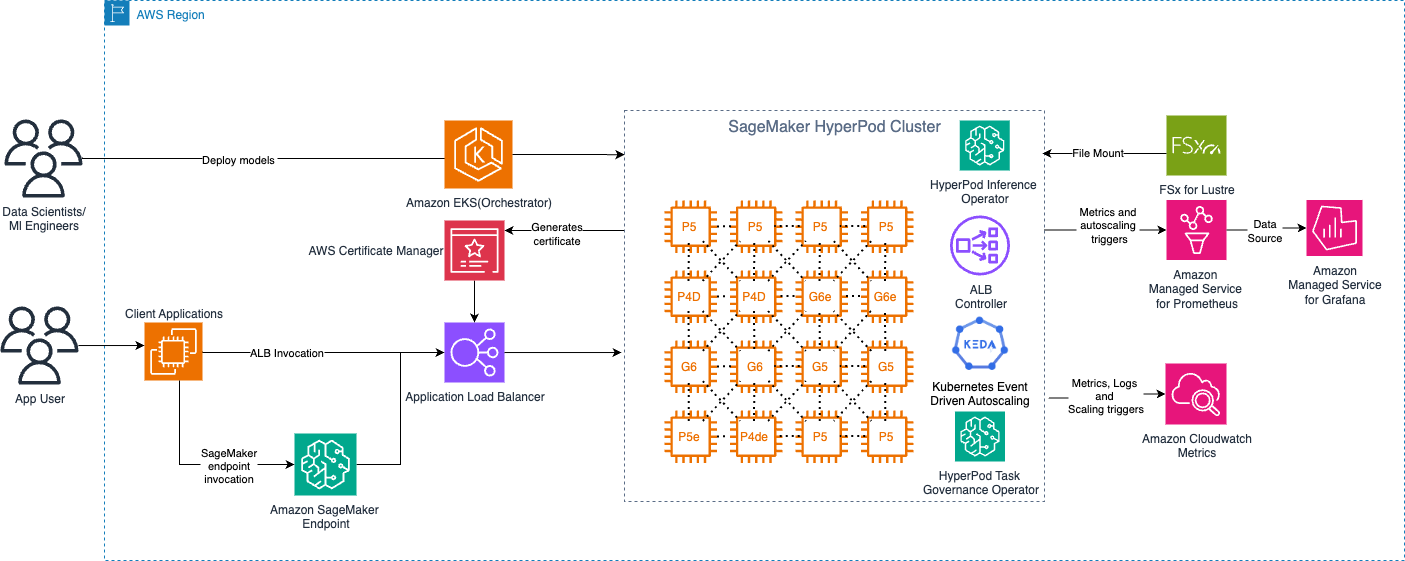
以下の図は、Amazon EKS オーケストレーター制御プレーン(control plane)を備えた SageMaker HyperPod の高レベルアーキテクチャを示しています。
デプロイメントオプション
Amazon SageMaker HyperPod は、Kubernetes の柔軟性と AWS 管理型サービスを組み合わせた包括的な推論プラットフォームを提供しています。このプラットフォームでは、モデルのライフサイクル全体を通じて本番環境レベルの信頼性を保ちながら、機械学習モデルのデプロイ、スケーリング、最適化を行うことができます。プラットフォームは柔軟なデプロイメントインターフェース、高度な自動スケーリング機能、包括的なモニタリング機能を備えています。Inference deployment operator を使用すれば、コードを記述することなく、S3 バケット、FSx for Lustre、JumpStart からモデルをデプロイできます。
- SageMaker JumpStart からのデプロイ(コードサンプルノートブック)
- InferenceEndpointConfig モデルのデプロイ
S3 からのカスタムまたはファインチューニング済みモデルのデプロイ(コードサンプルノートブック)
- FSX Lustre からのカスタムまたはファインチューニング済みモデルのデプロイ(コードサンプルノートブック)
Karpenter による自動スケーリング
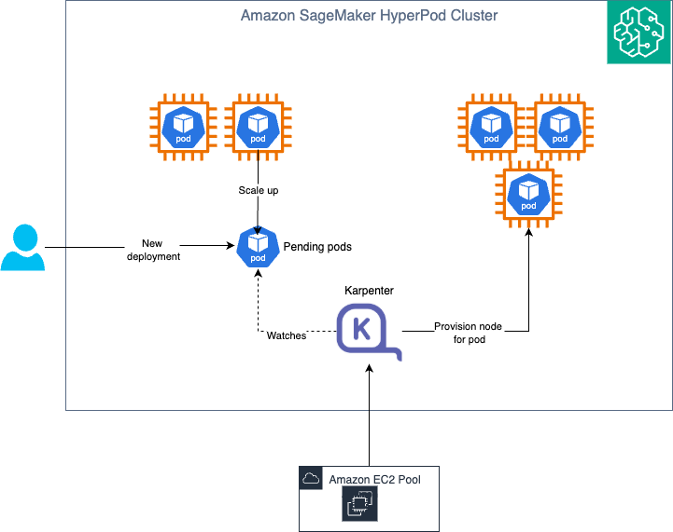
Amazon SageMaker HyperPod は、ポッドレベルのスケーリングには KEDA(Kubernetes Event-Driven Autoscaling)を、ノードレベルのスケーリングには Karpenter を組み合わせた自動スケーリングアーキテクチャを提供しています。この二層アプローチにより、リアルタイムの需要に基づいてゼロから本番ワークロードまでスケーリングする、動的でコスト効率の高いインフラストラクチャを実現します。
* image*
*KEDA と Karpenter による高度な自動スケーリング*
Auto Scaling アーキテクチャの理解
Pod スケーリング (KEDA): KEDA(Kubernetes Event-Driven Autoscaling)は、イベント駆動型の自動スケーリング機能を Kubernetes に追加するオープンソースの Cloud Native Computing Foundation (CNCF) プロジェクトです。KEDA は HyperPod Inference Operator の一部として自動的にインストールされ、個別のインストールや設定を必要とせずに、すぐに利用可能な Pod 自動スケーリングを提供します。KEDA は、リクエストキューの長さ、Amazon CloudWatch メトリクス(SageMaker エンドポイント呼び出しなど)、レイテンシ、またはカスタム Prometheus メトリクスなどのメトリクスに基づいて、推論用 Pod の数をスケーリングします。トラフィックがない場合、デプロイメントを 0 Pod にまでスケールダウンでき、アイドル期間のコストを削減します。
ノード スケーリング (Karpenter): Karpenter は、保留中の Pod の要件に基づいてコンピューティングノードのプロビジョニングまたは削除を行う Kubernetes クラスター自動スケーラーです。Karpenter は Amazon EKS コントロールプレーンで実行されるため、自動スケーラー自体の実行に伴う追加のコンピューティングコストは発生しません。このコントロールプレーンでのデプロイにより、真の意味でのゼロへのスケーリングが可能になります。KEDA がトラフィックがないために Pod を 0 にスケールダウンした際、Karpenter はすべてのワーカーノードを削除できるため、アイドル期間中にインフラストラクチャコストが発生しないように保証します。
KEDA と Karpenter の連携
KEDA と Karpenter の統合により、効率的な自動スケーリング環境が構築されます。ADOT(AWS Distro for OpenTelemetry)コレクターは、推論ポッドからメトリクスを取得し、Amazon Managed Service for Prometheus または CloudWatch に送信します。KEDA オペレーター(Inference Operator とともにインストールされます)は、これらのメトリクスを定期的にポーリングし、JumpStartModel または InferenceEndpointConfig の YAML で定義されたトリガー閾値に対して評価を行います。メトリクスが閾値を超えると、KEDA は Horizontal Pod Autoscaler(HPA)をトリガーして新しい推論ポッドを作成します。これらのポッドがノード容量の不足によりPending状態になる場合、管理プレーンで実行されている Karpenter がこれを検知し、適切なインスタンスタイプと GPU 構成を持つ新しいノードをプロビジョニングします。その後、Kubernetes スケジューラーは保留中のポッドを新しくプロビジョニングされたノードにデプロイし、スケーリングされたインフラストラクチャ全体に推論トラフィックを分散させます。需要が減少すると、KEDA は同じメトリクスに基づいてポッドをスケールダウンします。Karpenter はワークロードを統合し、未使用のノードを削除してインフラストラクチャコストを削減します。トラフィックがない期間中、KEDA はポッド数をゼロにスケールダウンでき、Karpenter はすべてのワーカーノードを削除します。これにより、トラフィックが再開した際に迅速にスケールアップする能力を維持しつつ、計算コストはゼロになります。このアーキテクチャにより、推論リクエストを実際に処理している場合にのみ計算リソースに対して課金され、Karpenter が管理された制御プレーンで実行されるため、自動スケーリングインフラストラクチャ自体に追加コストは発生しません。
クラスター実行ロールに以下のポリシーが含まれていることを確認してください
"sagemaker:BatchAddClusterNodes", "sagemaker:BatchDeleteClusterNodes", "sagemaker:BatchPutMetrics"
以下のリソースに対して:
"arn:aws:sagemaker:us-east-1:actxxxxxxxx:cluster/*", "arn:aws:sagemaker:us-east-1:actxxxxxxx:cluster/sagemaker-ml-cluster-e3cb1e31-eks"
Karpenterを有効にするには、以下のコマンドを実行します
aws sagemaker update-cluster
--cluster-name 'ml-cluster'
--auto-scaling '{ "Mode": "Enable", "AutoScalerType": "Karpenter" }'
--cluster-role 'arn:aws:iam::XXXXXXXXXXXX:role/sagemaker-ml-cluster-e3cb1e31ExecRole'
--region us-east-1
以下は成功時の出力です。** {
"ClusterArn": "arn:aws:sagemaker:us-east-1:XXXXXXXXXXXX:cluster/4dehnrxxettz"
}
このコマンドを実行してクラスターを更新した後、DescribeCluster APIを実行することで、Karpenterが有効になっていることを確認できます。
aws sagemaker describe-cluster
--cluster-name ml-cluster
--query AutoScaling
--region us-east-1
{
	"Mode": "Enable",
	"AutoScalerType": "Karpenter",
	"Status": "InService",
	"FailureMessage": ""
}
KVキャッシュとインテリジェントルーティング
Amazon SageMaker HyperPodは、大規模言語モデル(LLM: Large Language Model)の推論パフォーマンスを最適化するために、管理された階層型KVキャッシュとインテリジェントルーティングをサポートしています。これは特に、ロングコンテキストプロンプトやマルチターン会話において効果的です。
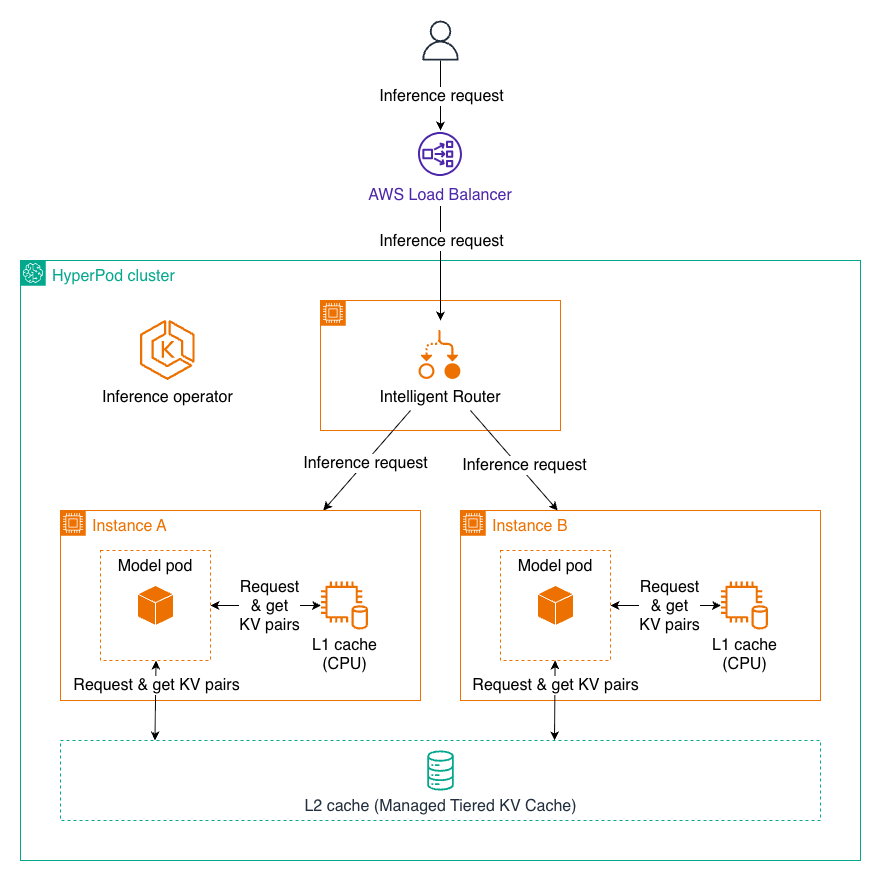
L1およびL2のKVキャッシングを使用した推論リクエスト
マネージドティアードKVキャッシュ
マネージドティアードKVキャッシュ機能は、マルチティアキャッシング戦略を実装することで、推論時のメモリ制約に対処します。キーバリュー(KV)キャッシングは、大規模言語モデル(LLM: Large Language Model)の推論効率において不可欠な要素です。これは、以前のトークンからの中間アテンション計算を保存し、冗長な再計算を回避してレイテンシを大幅に削減します。
HyperPodは複数のストレージティアにわたってキャッシュを管理することで、以下のことを可能にします:
- GPUリソースへのメモリ負荷の軽減
- パフォーマンス低下なしでより長いコンテキストウィンドウをサポート
- 手動介入なしでの自動キャッシュ管理
インテリジェントルーティング
インテリジェントルーティングは、共通のプロンプトプレフィックスを持つリクエストを同じ推論インスタンスに振り分けることで、KVキャッシュの再利用を最大化し、推論を最適化します。このアプローチは:
- すでに類似したプレフィックスを処理済みのインスタンスに対して戦略的にリクエストをルーティングする
- キャッシュされたKVデータを再利用することで処理を加速する
- 共通のコンテキストを持つマルチターン会話やバッチリクエストのレイテンシを削減する
パフォーマンス上の利点
これらの機能を組み合わせることで、以下のような大幅な改善がもたらされます:
- 推論リクエストのレイテンシーを最大40%削減
- リクエスト処理のスループットを25%向上
- これらの最適化を行わないベースライン構成と比較して、コストを25%削減
これらの機能はHyperPod Inference Operatorを通じて提供され、本番環境での大規模言語モデル(LLM)デプロイメントに対してすぐに利用可能な管理機能を提供します。この機能の詳細については、Amazon SageMaker HyperPod向けのManaged Tiered KV Cacheおよびインテリジェントルーティングをご覧ください。
マルチインスタンスGPU(MIG)プロファイルのサポート
SageMaker HyperPod Inferenceでは、NVIDIA MIG(Multi Instance GPU)技術を使用してパーティション分割されたアクセラレーター上でのモデルデプロイメントをサポートしています。大規模なGPU上で小規模なモデルをデプロイすると、GPUリソースが浪費される可能性があります。これを解決するため、SageMaker HyperPodでは、互いに独立して動作するGPUの一部を使用することができます。GPUがすでにパーティション分割されている場合、SageMaker HyperPod Inferenceソリューションを使用してJumpStart ModelまたはInferenceEndpointConfigを直接デプロイできます。JumpStartModelsの場合、spec.server.acceleratorPartitionTypeを使用して希望のMIGプロファイルを設定できます。以下の例は設定を示しています:
apiVersion: inference.sagemaker.aws.amazon.com/v1
kind: JumpStartModel
metadata:
  name: deepseek
spec:
  sageMakerEndpoint:
    name: deepseek
  model:
    modelHubName: SageMakerPublicHub
    modelId: deepseek-llm-r1-distill-qwen-1-5b
  server:
    acceleratorPartitionType: mig-7g.40gb
    instanceType: ml.p4d.24xlarge
The JumpStartModel also conducts an internal validation before model deployment. You can switch that validation off using spec.server.validations.acceleratorPartitionValidation field in YAML and setting it to false. For InferenceEndpointConfig, you can deploy the model on the MIG profile of your choice using fields spec.worker.resources.requests and spec.worker.resources.limits to the MIG profile of your choice. The following example shows the configuration:
apiVersion: inference.sagemaker.aws.amazon.com/v1kind: InferenceEndpointConfig….spec: worker: resources: requests: cpu: 5600m memory: 10Gi nvidia.com/mig-4g.71gb: 1 limits: nvidia.com/mig-4g.71gb: 1
With these configurations, you can use other technologies supported by SageMaker HyperPod Inference along with MIG deployment of the model. For any additional information, see HyperPod now supports Multi-Instance GPU to maximize GPU utilization for generative AI tasks.
観測可能性
SageMaker HyperPod の観測機能を通じて、HyperPod Inference のメトリクスを監視できます。
SageMaker HyperPod の観測機能を有効にするには、Amazon SageMaker HyperPod でワンクリックの観測機能により基盤モデルの開発を加速 の手順に従ってください。
HyperPod 観測機能には、Grafana 内のビルトイン ダッシュボードが含まれています。例えば、「Inference」ダッシュボードでは、Incoming Requests(着信リクエスト)、Latency(レイテンシ)、Time to First Byte (TTFB) などの推論関連メトリクスへの可視性を提供します。
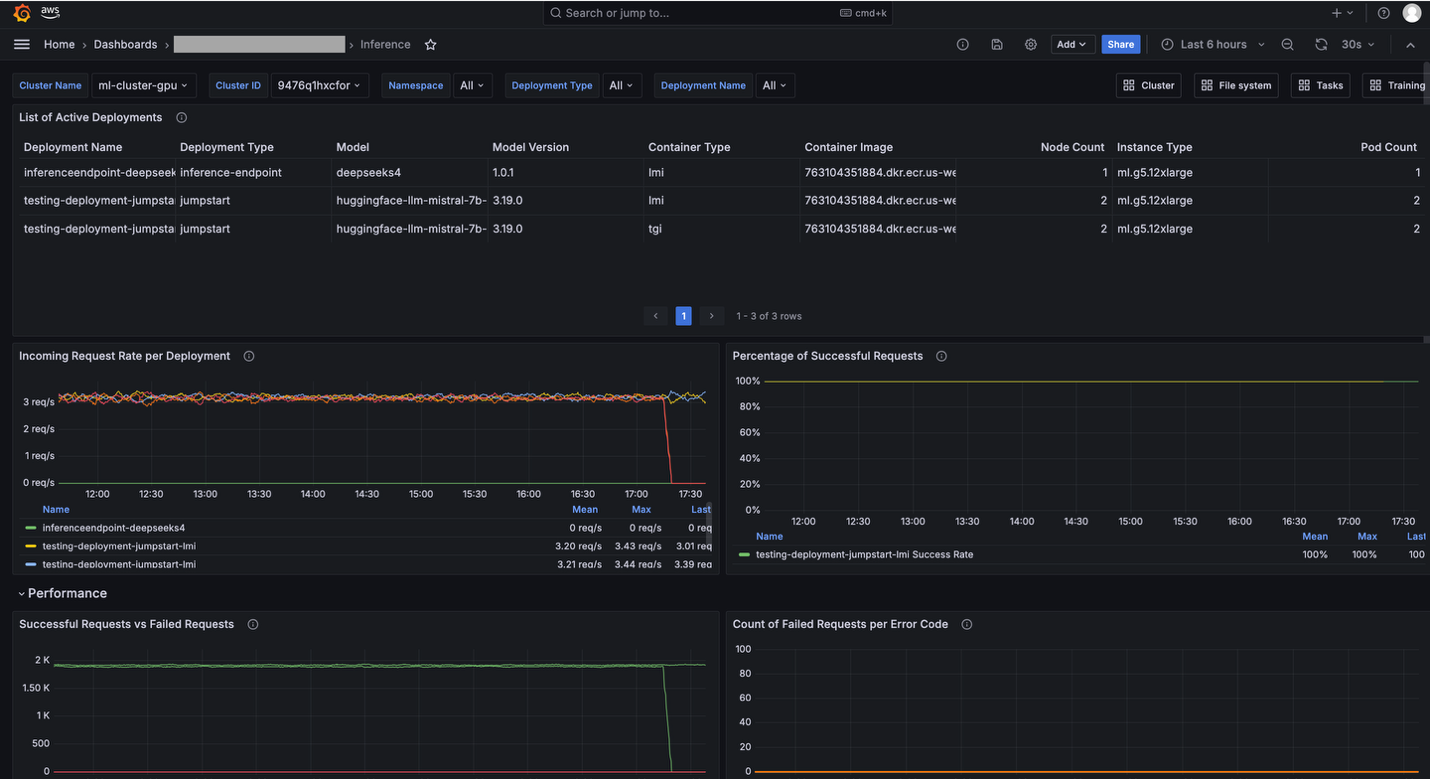
Grafana ダッシュボード
ノートブックの実行
Amazon EKS オーケストレーションを備えた HyperPod クラスターは、JupyterLab やオープンソースの Visual Studio Code などのインタラクティブな開発環境の作成と管理をサポートしており、データサイエンティストにとってなじみのあるツールのマネージド環境を提供することで、ML 開発ライフサイクルを簡素化しています。この機能では、ノートブックの実行用に独立した環境を作成および管理できる「Amazon SageMaker Spaces」という新しいアドオンが導入されます。これにより、インタラクティブなワークロードとトレーニングジョブの両方を同じインフラストラクチャ上で実行し、GPU の分割割り当てをサポートすることでコスト効率を向上させながら、GPU 投資効果を最大化できるようになります。HyperPod コンソールから IDE およびノートブックアドオンのデプロイ
Amazon SageMaker AI は、SageMaker HyperPod EKS クラスター向けの新しい機能を発表しました。これにより、AI 開発者は HyperPod EKS クラスター 上でインタラクティブな機械学習ワークロードを直接実行できます。この機能では、ノートブックの実行用に独立した環境を作成および管理できる「Amazon SageMaker Spaces」という新しいアドオンが導入されます。

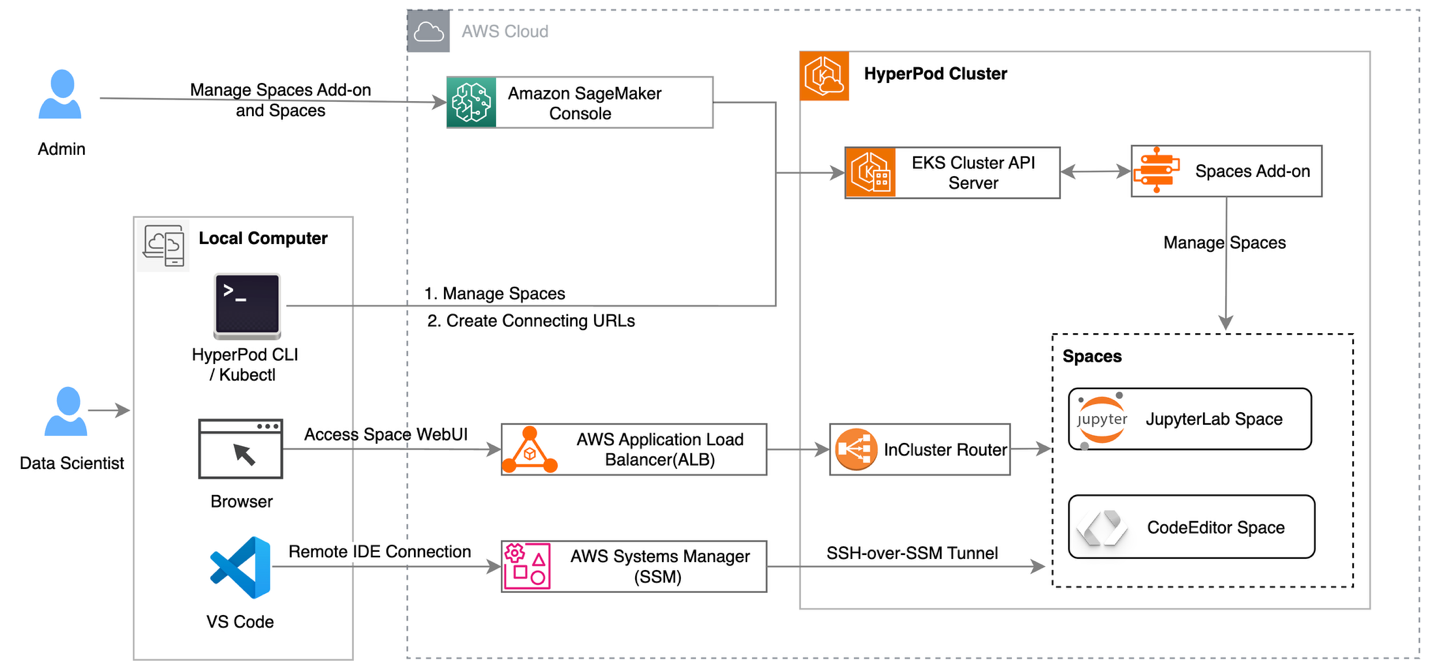
HyperPodクラスター上でJupyter Notebookを実行する際の上位レベルのアーキテクチャ
結論
本稿では、Amazon SageMaker HyperPod が推論ワークロードを実行するためのスケーラブルでコスト効率の高いインフラストラクチャを提供する方法について探りました。本稿で概説されたベストプラクティスに従うことで、HyperPod の機能を活用し、ワンクリックの JumpStart、S3 および FSx for Lustre の統合、管理された Karpenter 自動スケーリング、ゼロから本番環境まで動的にスケールする統一インフラストラクチャを使用して 基盤モデルのデプロイ を行うことができます。KV キャッシング、インテリジェントルーティング、および Multi-Instance GPU サポートといった機能により、推論ワークロードを最適化し、スポットインスタンス を使用してレイテンシを削減し、スループットを増加させ、コストを低減することができます。これらのベストプラクティスを採用することで、機械学習ワークフローを加速し、モデルパフォーマンスを向上させ、総所有コスト(TCO)の大幅な削減を実現できるため、本番環境において生成 AI を責任を持って効率的にスケールさせることができます。
著者について
原文を表示
Deploying and scaling foundation models for generative AI inference presents challenges for organizations. Teams often struggle with complex infrastructure setup, unpredictable traffic patterns that lead to over-provisioning or performance bottlenecks, and the operational overhead of managing GPU resources efficiently. These pain points result in delayed time-to-market, suboptimal model performance, and inflated costs that can make AI initiatives unsustainable at scale.
This post explores how Amazon SageMaker HyperPod addresses these challenges by providing a comprehensive solution for inference workloads. We walk you through the platform’s key capabilities for dynamic scaling, simplified deployment, and intelligent resource management. By the end of this post, you’ll understand how to use the HyperPod automated infrastructure, cost optimization features, and performance enhancements to reduce your total cost of ownership by up to 40% while accelerating your generative AI deployments from concept to production.
Cluster creation – one click deployment
To create a HyperPod cluster with Amazon Elastic Kubernetes Service (Amazon EKS) orchestration, navigate to the SageMaker HyperPod Clusters page in the Amazon SageMaker AI console.
Step 1:
Choose Create HyperPod cluster. Then, choose the Orchestrated by Amazon EKS option.
Step 2
Choose either the quick setup or custom setup option. The quick setup option creates default resources, while the custom setup option allows you to integrate with existing resources or customize the configuration to meet your specific needs.
Step 3
The following are Kubernetes controllers and add-ons. These controllers and add-ons can be enabled or disabled.
Step 4
The following diagram shows the high-level architecture of SageMaker HyperPod with the Amazon EKS orchestrator control plane.
Deployment options
Amazon SageMaker HyperPod now offers a comprehensive inference platform, combining Kubernetes flexibility with AWS managed services. You can deploy, scale, and optimize machine learning models with production reliability throughout their lifecycle. The platform provides flexible deployment interfaces, advanced autoscaling, and comprehensive monitoring features. With the Inference deployment operator, you can deploy models from S3 buckets, FSx for Lustre, and JumpStart without writing code.
- Deploy from SageMaker JumpStart (Code Sample Notebook)
- Deploying InferenceEndpointConfig models
Deploying custom or fine-tuned models from S3 (Code Sample Notebook)
- Deploying custom or fine-tuned models from FSX Lustre (Code Sample Notebook)
Auto Scaling with Karpenter
Amazon SageMaker HyperPod provides an Auto Scaling architecture that combines KEDA (Kubernetes Event-Driven Autoscaling) for pod-level scaling and Karpenter for node-level scaling. This dual-layer approach enables dynamic, cost-efficient infrastructure that scales from zero to production workloads based on real-time demand.
*
*
*Elaborate Auto Scaling with KEDA and Karpenter*
Understanding the Auto Scaling architecture
Pod Scaling (KEDA): KEDA (Kubernetes Event-Driven Autoscaling) is an open-source Cloud Native Computing Foundation (CNCF) project that extends Kubernetes with event-driven autoscaling capabilities. KEDA is automatically installed as part of the HyperPod Inference Operator, providing out-of-the-box pod autoscaling without requiring separate installation or configuration. KEDA scales the number of inference pods based on metrics like request queue length, Amazon CloudWatch metrics (such as SageMaker endpoint invocations), latency, or custom Prometheus metrics. It can scale deployments down to zero pods when there is no traffic, eliminating costs during idle periods.
Node Scaling (Karpenter): Karpenter is a Kubernetes cluster autoscaler that provisions or removes compute nodes based on pending pod requirements. Karpenter runs in the Amazon EKS control plane, which means there are no additional compute costs for running the autoscaler itself. This control plane deployment enables true scale-to-zero capabilities. When KEDA scales pods down to zero because of no traffic, Karpenter can remove all worker nodes, ensuring you incur no infrastructure costs during idle periods.
How KEDA and Karpenter work together
The integration between KEDA and Karpenter creates an efficient Auto Scaling experience. The ADOT (AWS Distro for OpenTelemetry) Collector scrapes metrics from inference pods and pushes them to Amazon Managed Service for Prometheus or CloudWatch, which the KEDA Operator (installed with the Inference Operator) periodically polls and evaluates against configured trigger thresholds defined in your JumpStartModel or InferenceEndpointConfig YAML. When metrics exceed thresholds, KEDA triggers the Horizontal Pod Autoscaler (HPA) to create new inference pods, and if these pods remain pending because of insufficient node capacity, Karpenter (running in the control plane) detects this and provisions new nodes with the appropriate instance types and GPU configurations. The Kubernetes scheduler then deploys pending pods to the newly provisioned nodes, distributing inference traffic across the scaled infrastructure. When demand decreases, KEDA scales down pods based on the same metrics. Karpenter consolidates workloads and removes underutilized nodes to reduce infrastructure costs. During periods of no traffic, KEDA can scale to zero pods, and Karpenter removes all worker nodes. This results in zero compute costs while maintaining the ability to rapidly scale back up when traffic resumes. This architecture ensures that you only pay for compute resources when they’re actively serving inference requests, with no additional costs for the autoscaling infrastructure itself since Karpenter runs in the managed control plane.
Verify that the cluster execution role has the following policies
"sagemaker:BatchAddClusterNodes", "sagemaker:BatchDeleteClusterNodes", "sagemaker:BatchPutMetrics" on the following resources "arn:aws:sagemaker:us-east-1:actxxxxxxxx:cluster/*", "arn:aws:sagemaker:us-east-1:actxxxxxxx:cluster/sagemaker-ml-cluster-e3cb1e31-eks"
To enable Karpenter – Run the following command
aws sagemaker update-cluster
--cluster-name 'ml-cluster'
--auto-scaling '{ "Mode": "Enable", "AutoScalerType": "Karpenter" }'
--cluster-role 'arn:aws:iam::XXXXXXXXXXXX:role/sagemaker-ml-cluster-e3cb1e31ExecRole'
--region us-east-1The following is the success output.** `{
"ClusterArn": "arn:aws:sagemaker:us-east-1:XXXXXXXXXXXX:cluster/4dehnrxxettz"
}`
After you run this command and update the cluster, you can verify that Karpenter has been enabled by running the DescribeCluster API.
aws sagemaker describe-cluster
--cluster-name ml-cluster
--query AutoScaling
--region us-east-1
{
"Mode": "Enable",
"AutoScalerType": "Karpenter",
"Status": "InService",
"FailureMessage": ""
}KV caching and intelligent routing
Amazon SageMaker HyperPod now supports managed tiered KV cache and intelligent routing** to optimize large language model (LLM) inference performance, particularly for long-context prompts and multi-turn conversations.
Inference request using L1 and L2 KV caching
Managed tiered KV cache
The managed tiered KV cache feature addresses memory constraints during inference by implementing a multi-tier caching strategy. Key-value (KV) caching is essential for LLM inference efficiency. It stores intermediate attention computations from previous tokens, avoiding redundant recalculations and significantly reducing latency.
By managing cache across multiple storage tiers, HyperPod enables:
- Reduced memory pressure on GPU resources
- Support for longer context windows without performance degradation
- Automatic cache management without manual intervention
Intelligent routing
Intelligent routing optimizes inference by directing requests with shared prompt prefixes to the same inference instance, maximizing KV cache reuse. This approach:
- Routes requests strategically to instances that have already processed similar prefixes
- Accelerates processing by reusing cached KV data
- Reduces latency for multi-turn conversations and batch requests with common contexts
Performance benefits
Together, these capabilities deliver substantial improvements:
- Up to 40% reduction in latency for inference requests
- 25% improvement in throughput for processing requests
- 25% cost savings compared to baseline configurations without these optimizations
These features are available through the HyperPod Inference Operator, providing out-of-the-box managed capabilities for production LLM deployments. For more details about this feature, see Managed Tiered KV Cache and Intelligent Routing for Amazon SageMaker HyperPod.
Multi-instance GPU support (MIG) profile
SageMaker HyperPod Inference now supports model deployments on accelerators that have been partitioned using NVIDIA MIG (Multi Instance GPU) technology. Deploying small models on large GPUs can waste GPU resources. To address this, SageMaker HyperPod allows you to use a fraction of GPUs that work in isolation with each other. If the GPU has already been partitioned, you can directly deploy the JumpStart Model or InferenceEndpointConfig using the SageMaker HyperPod Inference solution. For JumpStartModels, you can use spec.server.acceleratorPartitionType to set the MIG profile of your choice. The following example shows the configuration:
apiVersion: inference.sagemaker.aws.amazon.com/v1
kind: JumpStartModel
metadata:
name: deepseek
spec:
sageMakerEndpoint:
name: deepseek
model:
modelHubName: SageMakerPublicHub
modelId: deepseek-llm-r1-distill-qwen-1-5b
server:
acceleratorPartitionType: mig-7g.40gb
instanceType: ml.p4d.24xlargeThe JumpStartModel also conducts an internal validation before model deployment. You can switch that validation off using spec.server.validations.acceleratorPartitionValidation field in YAML and setting it to false. For InferenceEndpointConfig, you can deploy the model on the MIG profile of your choice using fields spec.worker.resources.requests and spec.worker.resources.limits to the MIG profile of your choice. The following example shows the configuration:
apiVersion: inference.sagemaker.aws.amazon.com/v1kind: InferenceEndpointConfig….spec: worker: resources: requests: cpu: 5600m memory: 10Gi nvidia.com/mig-4g.71gb: 1 limits: nvidia.com/mig-4g.71gb: 1
With these configurations, you can use other technologies supported by SageMaker HyperPod Inference along with MIG deployment of the model. For any additional information, see HyperPod now supports Multi-Instance GPU to maximize GPU utilization for generative AI tasks.
Observability
You can monitor HyperPod Inference metrics through SageMaker HyperPod observability features.
To enable SageMaker HyperPod observability features, follow the instructions in Accelerate foundation model development with one-click observability in Amazon SageMaker HyperPod.
HyperPod observability provides built-in dashboards in Grafana. For example, the Inference dashboard provides visibility into inference-related metrics like Incoming Requests, Latency, and Time to First Byte (TTFB).
Grafana dashboard
Running notebook
HyperPod clusters with Amazon EKS orchestration now support creating and managing interactive development environments such as JupyterLab and open-source Visual Studio Code, streamlining the ML development lifecycle by providing managed environments for familiar tools to data scientists. This feature introduces a new add-on called Amazon SageMaker Spaces for AI developers to create and manage self-contained environments for running notebooks. You can now maximize your GPU investments by running both interactive workloads and their training jobs on the same infrastructure, with support for fractional GPU allocations to improve cost efficiency. Deploy IDE and notebooks add-on from the HyperPod console
Amazon SageMaker AI is introducing a new capability for SageMaker HyperPod EKS clusters, which allows AI developers to run their interactive machine learning workloads directly on the HyperPod EKS cluster. This feature introduces a new add-on called Amazon SageMaker Spaces, that enables AI developers to create and manage self-contained environments for running notebooks.
High-level architecture of running Jupyter Notebook on HyperPod cluster
Conclusion
In this post, we explored how Amazon SageMaker HyperPod provides a scalable and cost-efficient infrastructure for running inference workloads. By following the best practices outlined in this post, you can use HyperPod’s capabilities to deploy foundation models by using one-click JumpStart, S3, and FSx for Lustre integration, managed Karpenter autoscaling, and unified infrastructure that dynamically scales from zero to production. With features such as KV caching, intelligent routing, and Multi-Instance GPU support, you can optimize your inference workloads, reducing latency, increasing throughput, and lowering costs by using Spot Instances. By adopting these best practices, you can accelerate your machine learning workflows, improve model performance, and achieve significant total cost of ownership reductions, so that you can scale generative AI responsibly and efficiently in production environments.
About the authors
関連記事
今日のまとめ
AI日報で今日の重要ニュースをまとめ読み