Anthropic の Claude スキル構築完全ガイド
Anthropic は、Claude の一貫した出力とドメイン特化型能力を可能にする「Skills」機能の構築ガイドを公開し、GitHub リポジトリで 14 万件以上のスターを集める業界標準的なツールとして確立している。
キーポイント
Claude Skills の定義と目的
会話ごとにリセットされる文脈やスタイルを保存するフォルダ形式の機能で、プロフェッショナルな反復作業におけるコンテキスト再構築の手間(コスト)を解消する。
技術的な実装構造
必須ファイルの SKILL.md と、スクリプト、参照資料、アセットを格納するディレクトリ構成から成り立ち、プラグインや有料機能ではなくオープンソースの Markdown 指令集として設計されている。
公式リポジトリと採用状況
2025 年 10 月にローンチされ、2026 年 5 月時点で GitHub の anthropics/skills リポジトリが 14.1 万スター以上を記録し、Claude Code や API におけるドメイン特化機能のデファクトスタンダードとなっている。
包括的な構築ガイド
設計からファイル命名規則、信頼性の高い指示文の作成方法、テスト手法、配布、トラブルシューティングに至るまで、初心者でも一度で実用的なスキルを構築できる完全な手順を提供している。
スキル構成と階層型開示
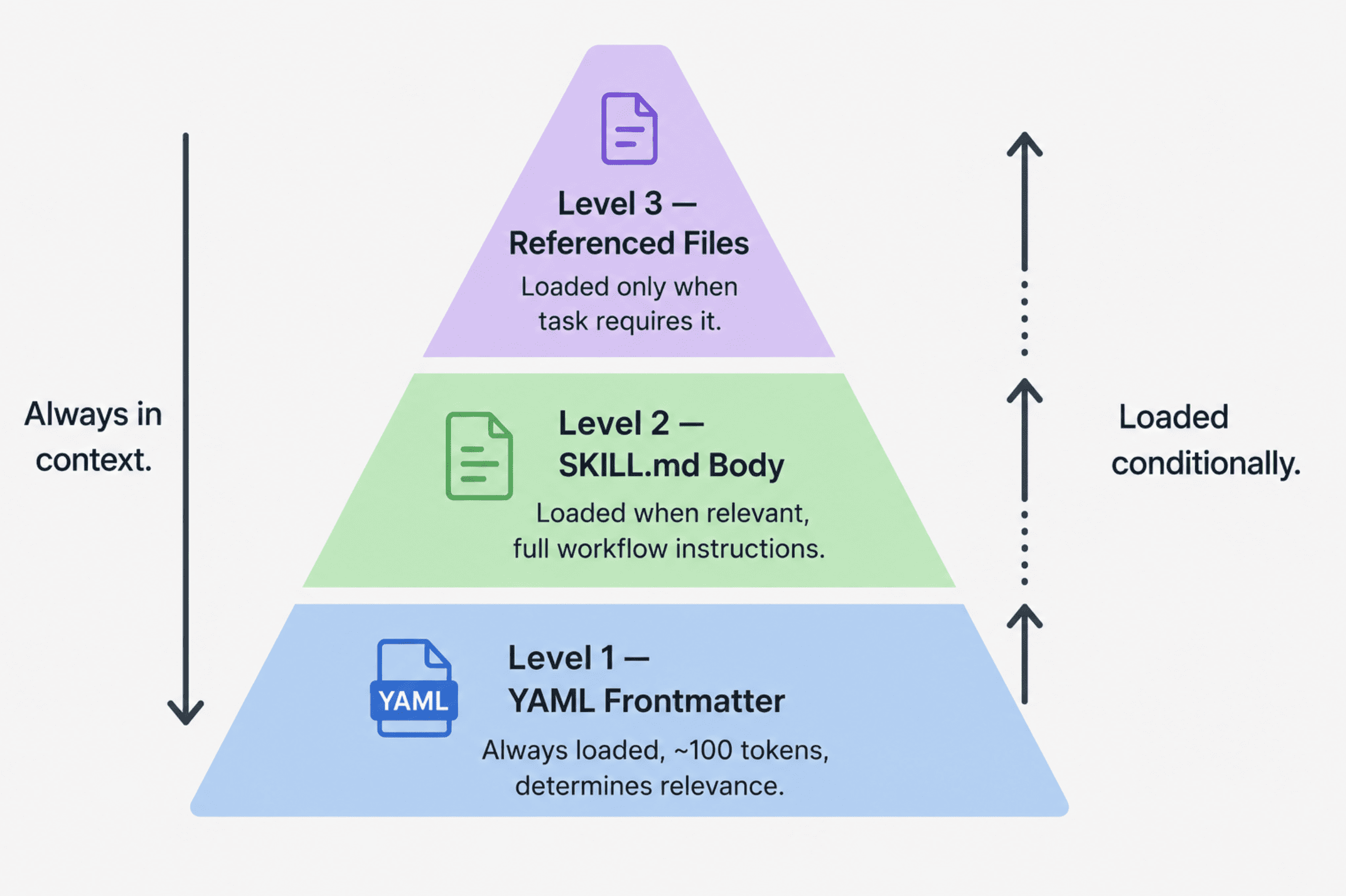
スキルはフォルダ構造を持ち、YAMLフロントマター、SKILL.md本文、参照ファイルの3段階で情報を開示し、トークン使用量を最小化しながら専門性を維持します。
設計原則と相互運用性
スキルは「進化的開示」「構成可能性」「移植性」の3原則に基づき構築され、複数のスキルを同時に動作させつつ、Claude.aiやAPIなど環境を選ばず再利用可能です。
MCPサーバーとの関係
MCPがツールやリソースへのアクセス(プロフェッショナルなキッチン)を提供する一方、スキルはそれらを活用して価値ある成果物を作るためのレシピと手順を定義します。
重要な引用
Your preferred output format, your team's writing style, your domain vocabulary, and your quality standards are gone.
A skill is a folder of instructions you build once that Claude loads automatically when the task calls for it.
Skills launched in October 2025 and quickly became the dominant way to give Claude domain-specific capabilities.
MCP provides the professional kitchen — access to tools, ingredients, and equipment. Skills provide the recipes and step-by-step instructions for creating something valuable.
Skills are not models, plugins in the WordPress sense, or paid add-ons. They are open-source markdown instructions plus supporting files.
The most common mistake when building a skill is starting with the file structure rather than the use case.
影響分析・編集コメントを表示
影響分析
この記事は、LLM の実務利用における「コンテキスト管理」の課題を解決する具体的なアーキテクチャ(Skills)を提示しており、開発者がドメイン特化型エージェントを容易に構築できる基盤を提供しています。これにより、企業内での Claude の定着率が高まり、標準的なワークフロー統合が加速すると予想されます。
編集コメント
単なる機能紹介に留まらず、実装のベストプラクティスからコミュニティの動向まで網羅した、開発者にとって極めて価値の高い実践ガイドです。
 image**
# Introduction
Claude での新しい会話を開始するたびに、あなたはゼロから始めなければなりません。好みの出力形式、チームの執筆スタイル、ドメイン固有の用語、そして品質基準はすべて失われます。最初の数回のやり取りで、前回のセッションやその前のセッションですでに確立した文脈を再構築することに時間を費やすことになります。単発的な質問であればそれで構いませんが、反復可能な専門業務においては、これは会話ごとの負担となります。
Claude Skills がその解決策です。スキルとは、一度作成すればタスクの要求に応じて Claude によって自動的に読み込まれる、指示のフォルダのことです。あなたの好み、ワークフロー、ドメイン固有の専門知識は、各チャットに毎回貼り付けるのではなく、スキル自体に埋め込まれます。2025 年 10 月にローンチされた Skills は、Claude Code、Claude Desktop、および Claude API において、Claude にドメイン固有の機能を与えるための支配的な方法として急速に定着しました。Anthropic は、Skills がどのように構造化されるべきかを示す作業用リファレンスとして、公式なスキルリポジトリを github.com/anthropics/skills** に公開しています。2026 年 5 月現在、このリポジトリはスター数 141,000 以上、フォーク数 16,000 以上を記録しており、GitHub 上で最も注目されている AI ツールリングリポジトリの一つとなっています。
このガイドでは、スキルとは技術的に何であるか、それらを計画・設計する方法、正確なファイル構造と命名規則、Claude が確実に従う指示の書き方、ゼロから構築した完全動作するスキルの例、テストと配布の方法、そして問題が発生した場合の対処法について網羅的に解説します。このガイドを正しく追っていただければ、最終的には一度の作業で動作するスキルを構築できるようになります。これは、Anthropic の公式ガイド が、構造に従うすべての人に対して約束している内容そのものです。
# スキルとは実際には何か
**
スキルとはフォルダのことです。その中には必須の SKILL.md ファイルが含まれ、必要に応じて実行可能なコード用の scripts/ ディレクトリ、Claude が必要に応じて読み込むドキュメント用の references/ ディレクトリ、およびテンプレートやサポートファイル用の assets/ ディレクトリが配置されます。これがスキルの完全な技術的定義です。スキルはモデルでも、WordPress のプラグインのようなものでも、有料のアドオンでもありません。オープンソースの Markdown 形式の指示文と、それを補完するファイル群のことです。インストールする前に GitHub でそれらすべてを読むことができます。
これらが強力である理由は、その背後にあるアーキテクチャにあります。Anthropic の公式ガイドによると、スキルはトークン使用量を最小限に抑えつつ専門的な知識を維持するために設計された、3 段階の段階的開示システムを使用しています。これらのレベルは以下の通りです:
- YAML frontmatter: Claude のシステムプロンプトに常に読み込まれ、インストールされているスキルの数に関わらず、スキルごとに約 100 トークンのコストがかかります。このメタデータ層は、Claude が現在のタスクに対してそのスキルが関連するかどうかを判断するのに十分な情報だけを提供し、完全なコンテンツを読み込む必要はありません。
- SKILL.md body: Claude がそのスキルが関連すると判断したときに読み込まれます。ここには完全な指示、ステップバイステップのワークフロー、例、トラブルシューティングのガイダンスが含まれています。
- 参照ファイル:references/ および assets/ ディレクトリ内の追加ファイルで、タスクが必要とした場合にのみ Claude がナビゲートします。長い API リファレンスガイド、詳細なスタイル仕様、または拡張されたトラブルシューティングセクションは、メインファイルではなくここに配置されます。このシステムにより、Claude のコンテキストを肥大化させることなく、複数のスキルを同時にインストールできます。デフォルトでは各スキルの frontmatter だけが読み込まれます。
3 つの設計原則がこの全体システムを支配しています。前述した段階的開示(progressive disclosure)です。合成性(composability)— これは Claude が複数のスキルを同時に読み込めることを意味し、あなたのスキルは他のスキルと共存してうまく機能するものであり、利用可能な唯一の機能であると仮定しないように設計する必要があります。移植性(portability)— スキルは Claude.ai、Claude Code、および API 上で同一に動作します。依存関係をサポートする環境であれば、一度スキルを構築すれば、修正することなくすべてのプラットフォームで実行されます。
Three design principles govern the entire system. Progressive disclosure, as described above. Composability — this means Claude can load multiple skills simultaneously, so your skill should work well alongside others rather than assuming it is the only capability available. Portability** — skills work identically across Claude.ai, Claude Code, and the API. Build a skill once, and it runs across all surfaces without modification, as long as the environment supports any dependencies the skill requires.
MCP サーバー上で構築を行うチームにとって、スキルは接続機能の上に知識層を追加するものです。Anthropic が公式ガイドで示す表現では、MCP はプロのキッチン(ツール、材料、機器へのアクセス)を提供し、スキルはその価値ある何かを創造するためのレシピとステップバイステップの手順を提供します。MCP は Claude に「何ができるか」を伝え、スキルは Claude に「どのようにうまく行うか」を伝えます。
 image**
進化的開示を示す 3 段ピラミッド図
# 1 行もコードを書く前にスキルを計画する
スキル構築において最も一般的な過ちは、ユースケースではなくファイル構造から始めようとしてしまうことです。Anthropic のガイドは明確に述べています:いかなるファイルにも手を付ける前に、2 つまたは 3 つの具体的なユースケースを特定してください。
よく定義されたユースケースは、以下の 4 つの質問に答えるものです:
- ユーザーは何を達成したいと考えているのか?
- これにはどのような多段階ワークフローが必要か?
- 必要なツールは何か — Claude の組み込み機能か、MCP に接続されたツールか?
- ユーザーが毎回セッションで説明する必要のあるドメイン知識やベストプラクティスのうち、どの部分を埋め込むべきか?
具体的なユースケースの定義例は以下のようになります:
ユースケース:ブログ記事のドラフト作成
トリガー:ユーザーが「ブログ記事を書いて」「ブログ用のコンテンツをドラフトして」「スタイルガイドに従って投稿を作成して」と発言した場合
手順:
- references/style-guide.md からスタイルガイドを読み込む
- ユーザーとトピックおよびターゲットオーディエンスを確認する
- ヘッダー構造とトーンに関するガイドラインに従ってドラフトを作成する
- ドラフトを提出する前に品質チェックリストを実行する
結果:ユーザーがチャットにガイドラインを貼り付ける必要なく、会社のスタイルガイドに完全に一致した完全なドラフトが完成する
Anthropic のチームは、ほとんどのスキルユースケースをカバーする 3 つのカテゴリーを観察しています。
- ドキュメントおよびアセットの作成:一貫性があり高品質な出力ドキュメント、プレゼンテーション、フロントエンドデザイン、コードを作成すること。決定的な特徴は埋め込まれたスタイルガイドと品質チェックリストです。Claude の組み込みコード実行機能とドキュメント作成機能により、外部ツールを必要とせずに出力が処理されます。公式の Anthropic スキルリポジトリには、docx、pdf、pptx、xlsx 操作用のドキュメントスキルなど、本番環境で利用可能なレベルのスキルが含まれています。ここで典型的な例となるのがフロントエンドデザインスキルです。このスキルはデザインシステムトークンとコンベンションを埋め込んでおり、生成されるすべての UI が同じ基準に従うようになっています。
- ワークフロー自動化:一貫した手法に基づく多段階プロセス、研究パイプライン、コンテンツワークフロー、オンボーディングシーケンス。主要な技術は、各ステージ間に検証ゲートを設けたステップバイステップのワークフロー、反復構造用のテンプレート、そして反復的な改善ループです。スキル作成者スキル(公式 Anthropic リポジトリに同梱され、他のスキル構築を支援するもの)が参照例となります。これは、ユースケースの定義、フロントマターの生成、検証をガイド付きワークフローとしてユーザーに案内します。
- MCP 強化:動作中の MCP サーバーの上にレイヤーされたワークフローガイダンスです。ユーザーが Notion、Linear、Sentry を MCP を経由して接続しているものの、どのワークフローを実行すべきか分からない場合、MCP 強化スキルは知識層を提供します。ツール呼び出しのシーケンス化、ドメイン専門知識の埋め込み、エラー処理を行います。Sentry のコードレビュースキル(Sentry の MCP データを使用して GitHub プルリクエスト内のバグを自動的に分析・修正するもの)が、Anthropic の公式ガイドからの参照例です。
SKILL.md の内容を記述する前に、成功基準を定義してください。Anthropic は 2 つのタイプの基準を推奨しています。定量的基準:関連するクエリの少なくとも 90% でスキルがトリガーされ、定義された数のツール呼び出しでワークフローが完了し、実行ごとに API 呼び出しの失敗がゼロであること。定性的基準:ユーザーはワークフロー中に Claude をリダイレクトする必要がなく、出力は反復実行Acrossして構造的に整合性があり、新規ユーザーがガイダンスなしで初回トライでタスクを達成できること。これらは厳密な閾値というよりは概算のベンチマークですが、事前に定義しておくことで、テスト対象となる具体的な指標を得ることができます。
# 技術要件
ここが多くのスキルが静かに失敗する場所です。ルールは厳格であり、生成されるエラーも混乱を招きます。なぜなら、これらのルールに違反するスキルは Claude が読み込まないからです — なぜそうなるのかを説明するエラーメッセージさえありません。
// ファイル構造
your-skill-name/
├── SKILL.md # 必須 -- メインのスキルファイル
├── scripts/ # オプション -- 実行可能コード
│ ├── process_data.py
│ └── validate.sh
├── references/ # オプション -- 必要に応じて読み込まれるドキュメント
│ ├── api-guide.md
│ └── examples/
└── assets/ # オプション -- テンプレート、フォント、アイコン
└── report-template.md
// 重要な命名ルール
- SKILL.md は大文字小文字を区別します。ファイル名は正確に「SKILL.md」である必要があります。「skill.md」、「SKILL.MD」、「Skill.md」といった変種は認識されません。Claude はスキルを読み込まず、エラーも警告も表示しません。
- フォルダ名は kebab-case(ハイフン区切り)を使用してください。小文字とハイフンのみ許可され、スペース(Notion Project Setup)、アンダーバー(notion_project_setup)、大文字(NotionProjectSetup)は使用できません。フォルダ名は frontmatter 内の name フィールドと完全に一致させる必要があります。
- スキルフォルダ内に README.md を配置しないでください。Claude 向けのドキュメントはすべて SKILL.md または references/ ディレクトリに記述してください。GitHub で配布する場合は、人間が読みやすい README ファイルをスキルフォルダ内部ではなく、リポジトリのルートディレクトリに配置してください。
- 予約済み名称:スキル名には「claude」または「anthropic」を含めることはできません。これらは Anthropic によって予約されており、拒否されます。
- frontmatter に XML の角括弧(< >)を使用しないでください。frontmatter は Claude のシステムプロンプトに直接表示されるため、XML 形式のコンテンツが意図しない指示を注入するリスクがあります。これはプラットフォームレベルで強制されるセキュリティ制限です。
// YAML Frontmatter
frontmatter は、Claude があなたのスキルを読み込むかどうかを決定する方法です。トリガー条件が弱かったり欠落していたりすると、スキルは確実に起動しません。これが最も一般的な失敗モードです。
最低限必要な形式:
name: your-skill-name
description: What it does. Use when user asks to [specific phrases].
- name フィールドは kebab-case であり、フォルダ名と完全に一致している必要があります。
- スキルの説明フィールドには、そのスキルが何を行うか、およびいつ使用するべきかの両方を記載する必要があります。文字数制限は 1024 文字です。Anthropic のエンジニアリングガイドラインによると、このフィールドは、すべての内容をコンテキストに読み込ませずに、Claude が各スキルをいつ使用すべきかを判断するのに十分な情報を提供するためのものであるとされています。トリガー条件が含まれていない説明は、必要な時にスキルがロードされない主な原因となっています。
すべてのオプションフィールドを含む完全なフォーマット:
name: your-skill-name
description: What it does and when to use it. (Under 1024 characters, no XML tags.)
license: MIT
compatibility: Requires Claude Code with Python 3.9+ in the environment.
metadata:
author: Your Name
version: 1.0.0
mcp-server: your-service-name
- スキルをオープンソース化する場合は、ライセンス(license)が重要になります。
- 互換性(compatibility)は環境要件を記述するフィールドです(文字数 1–500)。スキルに特定のシステムパッケージ、ネットワークアクセス、または特定の製品サーフェスが必要である場合、ここに文書化してください。
- メタデータ(metadata)には任意のカスタムキー・バリューペアを受け付けることができます。一般的に使用されるのは、著者(author)、バージョン(version)、および mcp-server です。
実際に機能するスキルを書く方法
// 説明フィールドの公式
一貫して信頼性の高いトリガーを生み出す構造は以下の通りです:[何を行うか] + [いつ使用するべきか] + [主要な機能]。Anthropic のガイドでは、良い記述と悪い記述の両方の明確な例が提供されています:
良い例 -- 特定のタスク、特定のトリガーフレーズ、ファイルタイプ言及
description: Figma デザインファイルを解析し、開発者への引き継ぎドキュメントを生成します。ユーザーが .fig ファイルをアップロードした場合、「デザイン仕様」、「コンポーネントドキュメント」、または「デザインからコードへ引き継ぐ」ことを要求した際に使用してください。
良い例 -- 名前付きサービス、具体的なトリガー言語
description: Linear のプロジェクトワークフローを管理します。スプリント計画、タスク作成、ステータス追跡を含みます。ユーザーが「スプリント」、「Linear タスク」、「プロジェクト計画」に言及した場合や、「チケットを作成する」と要求した際に使用してください。
Good -- end-to-end workflow, specific trigger phrases
description: PayFlow のエンドツーエンドの顧客オンボーディングワークフロー。アカウント作成、支払い設定、サブスクリプション管理を処理します。「新しい顧客をオンボーディングする」「サブスクリプションを設定する」「PayFlow アカウントを作成する」とユーザーが言った場合に使用してください。
Bad descriptions fail on specificity or omit triggers entirely:
Bad -- too vague, no trigger conditions
description: デザインファイルのサポートを行います。
Bad -- no trigger phrases, no specific task
description: ワークフロー自動化スキルです。
Bad -- describes the domain, not the task or when to activate
description: PayFlow ユーザー向けです。
// Writing the Main Instructions Body
フロントマター(frontmatter)の後に、Markdown 形式で指示文を記述します。Anthropic が推奨する構造は以下の通りです:
Skill Name
Instructions
ステップ 1:[最初の主要ステップ]
何が起き、なぜそうなるのかを明確に説明します。
python scripts/fetch_data.py --project-id PROJECT_ID期待される出力:[成功の姿を記述]
例
必ず JSON 形式で返してください。translation フィールドのみ。他のフィールド (technical_terms など) は一切追加しないこと — 余計なフィールドを書こうとして本文翻訳がトークン上限で打ち切られる事故を防ぐため:
{"translation": "翻訳全文"}
例 1:[一般的なシナリオ]
ユーザーの発言: "新しいマーケティングキャンペーンを設定してください"
実行アクション:
MCP を経由して既存のキャンペーンを取得
提供されたパラメータで新規キャンペーンを作成
結果: キャンペーン作成完了の確認リンクを表示
トラブルシューティング
エラー:[一般的なエラーメッセージ]
原因: [発生する理由]
解決策: [段階ごとの修正手順]
4 つのプラクティスを実践することで、指示を確実なものにできます:
- 具体的かつ実行可能にする — 曖昧な指示ではなく、期待される出力を含む正確なコマンドとする。
- 予測可能なすべての失敗モードに対してエラーハンドリングを含める。
- バンドルされたファイルは、Claude がどこを確認すべきか明確になるよう、正確なパスで参照する。
- 段階的開示(プログレッシブ・ディスクロージャー)を活用する — SKILL.md はコアとなる指示に絞り込み、詳細なドキュメントは references/ ディレクトリへ移動させリンクを貼ることで、タスクが必要になった際にのみ追加の詳細を読み込ませるようにする。
完全な動作中のスキル
これは、コンテンツライターの会社で、Claude が各セッションでチャットにガイドラインを貼り付けなくても自動的に同社の記事スタイルガイドに従うことを望む場合のための、フル機能かつ本番環境品質のスキルです。
フォルダ構造:
blog-content-writer/
├── SKILL.md
├── references/
│ └── style-guide.md
└── assets/
└── post-template.md
// SKILL.md 完全ファイル
name: blog-content-writer
description: 会社の確立されたスタイルガイドに従ってブログ投稿の草案を作成します。
ユーザーが「ブログ記事を書いてください」、「ブログ用のコンテンツをドラフトしてください」,
「投稿を作成してください」、「エンジニアリングブログのために何か書いてください」、
または公開向けの長文コンテンツ作成を依頼するあらゆるリクエストに対して使用します。一貫した声、トーン、ヘッダー構造、フォーマットを自動的に適用します。B2B SaaS のトピック、技術チュートリアル、リーダーシップコンテンツを扱います。
license: MIT
compatibility: 外部依存なしで Claude.ai および Claude Code で動作します。
metadata:
author: コンテンツチーム
version: 1.1.0
ブログコンテンツライター
作家が各セッションにガイドラインを貼り付ける必要なく、会社のスタイルガイドに合致したブログ投稿の草案を作成します。スタイルガイドは references/ から読み込まれ、すべてのドラフトに一貫して適用されます。
指示
ステップ 1: スタイルガイドの読み込み
何らかのドラフト作成を行う前に、references/style-guide.md を読んで、現在の声、トーン、フォーマット、および構造的な要件を読み込んでください。過去のセッションの記憶に頼らず、常に新鮮な状態でロードして、ガイドラインへの更新を必ずキャッチしてください。
ステップ 2: ブリーフの確認
ユーザーのリクエストに以下のすべてが含まれていない場合は、ドラフト作成を開始する前にそれらを求めてください — 一度に一つのメッセージではなく、すべての項目を一つのメッセージで要求します:
必ず JSON 形式で返してください。translation フィールドのみ。他のフィールド (technical_terms 等) は一切追加しないこと — 余計なフィールドを書こうとして本文翻訳がトークン上限で打ち切られる事故を防ぐため:
{"translation": "翻訳全文"}
- トピック: この投稿は何についてですか?
- ターゲット読者: 開発者、経営層、それとも一般のビジネス読者ですか?
- 文字数目標: 短編(500〜800語)、中編(1,000〜1,500語)、長編(2,000 語以上)のいずれか?
- 主要な目的: 情報提供、説得、登録促進、あるいは権威確立のどれですか?
ステップ 3: 投稿の下書き作成
ブリーフが整ったら、references/style-guide.md に記載されたガイドラインを適用して投稿の下書きを作成します。
- イントロダクションの構成:フック → コンテキスト → プロミス(例はスタイルガイド参照)
- ヘッダー階層:メインセクションには H2 を使用し、サブセクションのみ H3 を使用
- 文の長さ:短い文(12 語未満)と中程度の文(12〜22 語)を混ぜる
- パラグラフの長さ:2〜4 文。単一文のパラグラフは絶対に避ける
- トーン:直接的で能動的な文体。対象読者が技術者であると確認されている場合を除き、専門用語は使用しない
納品前にステップ 4 の品質チェックリストを実行してください。
ステップ 4: 品質チェックリスト
下書きを返す前に、各項目を確認してください。既知のチェックリスト違反がある下書きを返さず、問題点を修正してから提出してください。
□ イントロダクションは「フック → コンテキスト → プロミス」の構成に従っていますか?
□ すべての H2 は曖昧なラベルではなく、具体的な主張または質問ですか?
□ すべてのパラグラフは 2〜4 文で構成されていますか?
□ 受動態の使用は排除されている、あるいは極めて少ないですか?
□ 結論は具体的で行動を促す内容ですか(読者に次のアクションを明確に伝えていますか)?
□ 投稿はブリーフで定義された単一のトピックから逸脱していませんか?
□ 文字数は目標値の±10% の範囲内ですか?
ステップ 5: サマリー付きでの納品
下書きに続いて、簡潔なサマリーブロックを付加して納品してください。
必ず JSON 形式で返してください。translation フィールドのみ。他のフィールド (technical_terms 等) は一切追加しないこと — 余計なフィールドを書こうとして本文翻訳がトークン上限で打ち切られる事故を防ぐため:
{"translation": "翻訳全文"}
ドラフト要約:
- 文字数:[実際の件数]
- ターゲット:[ターゲット件数]
- 対象読者:[ブリーフで確認済み]
- チェックリスト:全 7 項目合格 / [例外がある場合はその一覧と説明を記載]
例示
例 1: 完全なブリーフ -- 直ちにドラフト作成へ進む
ユーザーの発言: 「開発者向けに、B2B チームが非同期ドキュメンテーションプラクティスを採用すべき理由について、1,200 語のブログ記事を書いてください。」
アクション:
references/style-guide.mdを読み込む- ブリーフは完全であるため、確認質問をせずにドラフト作成へ進む
- 開発者向けトーンを適用:正確で能動的な文体とし、コード例も歓迎する
- 品質チェックリストを実行 -- 提出前に不備があれば修正する
- サマリーブロック付きでドラフトを提出
結果: 約 1,200 語のドラフトに続き、全チェック項目が合格したことを示すサマリーが表示される
例 2: 不完全なブリーフ -- ドラフト作成前に確認質問
ユーザーの発言: 「新しい価格プランについてブログ記事を書いてください。」
アクション:
references/style-guide.mdを読み込む- ブリーフが不完全であるため、対象読者、文字数、目的が欠落している
- 確認質問:「作成は喜んで承ります。始める前に -- 主な対象読者は誰ですか(既存顧客、見込み客、それとも両方)?目標とする文字数はどれくらいですか?また、記事读完後に読者にどのような行動をしてほしいですか?」
- 回答を待つまでドラフトの一文も書かない
結果: 確認質問を 1 つのメッセージで送信
トラブルシューティング
問題:ドラフトが期待される文体やトーンと一致しない
原因: スキルを最後にテストした以降にスタイルガイドの参照が更新されたか、またはブリーフでターゲットオーディエンスが十分に明確に指定されていなかった可能性があります。
解決策:
references/style-guide.mdを開き、現在のガイドラインを反映していることを確認してください。- スタイルガイドが正しい場合、ガイドラインに違反している具体的な文または段落を特定し、どのルールに違反しているかを明記してください。これにより、曖昧な修正依頼ではなく、具体的な修正対象を提示できます。
問題: スキルが自動的にトリガーされない
原因: リクエストの表現が、説明に記載されたトリガー条件と一致していなかったためです。
解決策: 明示的なトリガー言語を使用してください。「スタイルガイドに従って X についてのブログ記事を書く」または直接呼び出します。「blog-content-writer スキルを使用して下書きを作成する」といった指示を出します。正しくトリガーされることを確認した後、明示的な呼び出しはオプションとなります。
問題: 修正後も品質チェックリストの失敗が継続している
原因: ブリーフとスタイルガイドの間で矛盾した指示が出されているためです。
解決策: 他の修正を依頼する前に、具体的な矛盾点を明確に特定してください。例:「ブリーフではカジュアルなトーンを求めているが、スタイルガイドではフォーマルな形式を指定している——この投稿ではどちらを優先すべきか?」まずその矛盾を解消してください。
// references/style-guide.md
このファイルは、段階的開示(progressive disclosure)が実際にどのように機能するかを示しています。スキル本体が Claude にこれを読むよう指示した場合のみ読み込まれ、主要なコンテキストを簡潔に保ちつつ、実際に必要になった際に詳細なガイドラインを利用可能にします。
企業ブログスタイルガイド
バージョン 1.1 -- 2026 年 5 月更新
このファイルは、ブログ記事が下書き作成されるたびに blog-content-writer スキルによって読み込まれます。スタイル基準を変更する場合は、このファイルをアップデートしてください。SKILL.md への修正は不要です。
ボイスとトーン
ボイス: 直接的で自信に満ちた、具体的な表現。教科書やプレスリリースではなく、知識豊富な同僚が同等の立場の人に説明しているかのように執筆してください。
対象読者別のトーン:
- 開発者向け: 技術的な正確さ、能動態動詞の使用、コード例の歓迎
- エグゼクティブ(経営層)向け: 成果重視、実装の詳細は最小限に、インパクトを先に提示
- 一般ビジネス向け: 平易な言語、専門用語は初出時に必ず定義する
絶対に使用しない表現: 受動態、曖昧な表現("it could be argued that" など)、企業特有の隠語("leverage", "synergize", "operationalize" など)、曖昧な最高級表現("best-in-class", "cutting-edge" など)。
構成
導入部の公式: ハック、文脈、約束
- ハック: 問題または驚くべき事実を名指しする一文
- 文脈: なぜ今これが重要なのかを説明する二〜三文
- 約束: 読者が記事から何を得ていくのかを明確に示す一文
ヘッダールール:
- H2: 具体的な主張または質問 -- 曖昧なラベルは絶対に避ける
- 良い例:「非同期ドキュメンテーションがオンボーディング時間を40%短縮する理由」
- 悪い例:「非同期ドキュメンテーションのメリット」
- H3: セクションに3つ以上の明確なサブポイントがある場合のみ使用
- H4 以降は禁止 -- これほど多くの階層が必要になる場合は構造を見直すこと
結論: 読者が翌日24時間以内に実行できる具体的で実践的な次のステップを含めること。「ご意見をお聞かせください」のような表現は不可。
フォーマット
- 段落の長さ:2〜4文。1文だけで終わることはなく、5文になることも稀である。
- 文の長さ:意図的に変化をつける。短い文(12語未満)と中程度の文(12〜22語)を混ぜる。単一の文で30語を超えることは絶対にないこと。
- 重要な用語やフレーズには太字を使用 -- 装飾目的ではない
- コード、コマンド、設定値はすべてコードブロック内に記述 -- 短くても同様
- リストは、項目が真に並列かつ独立している場合のみ使用 -- アイデアを繋ぐ文章の代わりとしてリストを使うことは禁止
これで準備ができたら、インストールと実行を行います。
Claude.ai での手順:
- blog-content-writer/ フォルダを ZIP ファイルに圧縮する
- Settings > Capabilities > Skills に移動
- ZIP ファイルをアップロード
- テスト用プロンプト:「一般ビジネス層向けのリモートワーク文化に関するブログ記事を書いてください」
Claude Code のグローバルインストール手順:
グローバルスキルディレクトリを作成
mkdir -p ~/.claude/skills
スキルをコピー
cp -r blog-content-writer/ ~/.claude/skills/
確認
ls ~/.claude/skills/
Claude Code のローカルインストール手順:
プロジェクトレベルのスキルディレクトリを作成
mkdir -p ./.claude/skills
スキルをコピーする
cp -r blog-content-writer/ ./.claude/skills/
確認する
ls ./.claude/skills/
インストール後、初回実行時に明示的な呼び出しでテストしてください:
"blog-content-writer スキルを使用して、開発者向けに非同期ドキュメンテーションプラクティスに関する 1,000 語の投稿の下書きを作成してください。"
これが正しくトリガーされることを確認したら、明示的な呼び出しはオプションとなり、Claude がタスクを認識した際にスキルが自動的に読み込まれるようになります。
スキルのテスト
Anthropic の公式ガイドでは、スキルの可視性に応じてスケーリングされた 3 つのテストアプローチを推奨しています。すなわち、セットアップ不要で迅速な反復処理を行うための Claude.ai 上での手動テスト、変更Across で再現可能な検証を行うための Claude Code 上でのスクリプト化されたテスト、そして体系的な評価スイートのための Skills API を介したプログラムによるテストです。小規模な内部チームで使用されるスキルと、数千名のユーザーに展開されるスキルでは要件が異なりますので、状況に応じて選択してください。
公式ガイドから得られる最も有用なヒントは以下の通りです。Claude が成功するまで単一の難易度の高いタスクに対して反復処理を行い、その勝利したアプローチをスキルに抽出することです。広範なカバレッジから始めないでください。まず 1 つの難しいケースを完璧に動作させ、その後テストマトリックスを展開してください。
テストすべき 3 つの領域:
1. トリガーテスト: スキルは必要な時に読み込まれるか?不要な時には沈黙しているか?リリース前にテストマトリックスを構築してください。
トリガーすべき例:
"製品発表に関するブログ記事を書いてください"
"エンジニアリングブログ用のコンテンツをドラフトしてください"
"スタイルガイドに従った投稿を作成してください"
"開発者向けの非同期コミュニケーションについて 1,500 字の文章が必要です"
トリガーしないべき例:
"この記事を要約してください"
"この Python 関数の修正を手伝ってください"
"営業チーム宛てのメールを書いてください"
"第 4 四半期の結果に関するプレゼンテーションを作成してください"
10〜20 のトリガーすべきクエリを実行し、どの程度が自動的にスキルを起動するか、明示的な呼び出しが必要かを追跡します。関連するリクエストに対しては、90% 以上が自動でトリガーされることを目指してください。
2. 出力品質テスト: 同じリクエストを 3〜5 回実行し、構造的な一貫性について出力を比較します。エッジケースもテストしてください:明確な結論がないトピック、矛盾する指示を含むブリーフ、非現実的に短いまたは長い文字数目標など。SKILL.md または references/style-guide.md のいずれかを編集した後には、配布前に完全なテストマトリクスを再実行してください。
3. 回帰テスト: 最も一般的な回帰現象は、トリガー範囲が過度に狭まるような記述の編集により、以前動作していたクエリが壊れることです。フロントマターに変更を加えた後は、更新されたスキルを共有する前に、should-trigger スイートを完全に実行してください。
# スキルの配布
個別ユーザーは、スキルフォルダをダウンロードし、必要に応じて zip ファイル化して、Claude.ai の Settings > Capabilities > Skills からアップロードするか、上記のコマンドを使用して適切な Claude Code スキルディレクトリにコピーします。
組織レベルでの配布は、スキルをワークスペース全体にデプロイし、自動更新と一元管理を行う管理者によって行われます。この機能は 2025 年 12 月 18 日に提供開始されました。組織レベルでデプロイされると、すべてのメンバーの Claude インスタンスが個別のインストール手順を経ずにスキルをロードします。
GitHub を介した配布は、コミュニティ共有における標準的なアプローチです。重要な構造的ルールとして、人間が読みやすい README.md ファイルはスキルのフォルダ内ではなく、リポジトリのルートに配置する必要があります。インストール手順では、Claude Code プラグインのコマンドを参照してください:
Register the repository as a marketplace
/plugin marketplace add your-org/your-repo
Install a specific skill from it
/plugin install your-skill-name@your-marketplace-name
Anthropic は Agent Skills をオープンスタンダードとして agentskills.io で公開しました。この標準は明示的にポータブルであり、同じ SKILL.md 形式は、Claude およびこれを採用する他の AI プラットフォームで動作するように設計されています。Anthropic の公式リポジトリ は、構造、命名規則、品質基準に関する標準的な参照源です。
# Common Patterns and Troubleshooting
**
一般的な問題に対するクイックリファレンス:
問題 | 考えられる原因 | 対処法
---|---|---
スキルが決してトリガーされない | 説明が曖昧、トリガーフレーズが不足している | ユーザー向けの具体的な言語を用いて説明を再作成する
スキルが常にトリガーされる | 説明が広すぎる | 明示的な「使用しない場合」の条件を追加する
指示が無視される
曖昧または矛盾する指示
具体的にする:正確なコマンド、期待される出力
MCP コールが失敗する
サーバーが実行されていないか認証が期限切れ
トラブルシューティングセクションに再接続手順を追加
Claude.ai では動作するが Code 環境では失敗する
環境依存関係の欠如
互換性フィールドに要件を文書化
セッション間で出力が不一致
指示が曖昧すぎる
品質チェックリストを追加し、自己検証を必須とする
まとめ
スキルは、ドメイン専門知識やワークフローの知見を、各セッションで再貼り付けされたコンテキストとしてではなく、関連する際に活性化されるロードされた能力として Claude が引き継ぐためのメカニズムです。アーキテクチャは意図的にシンプルに設計されています:フォルダ 1 つ、Markdown ファイル、そしてオプションのサポートディレクトリです。複雑さはツール自体にあるのではなく、Claude に何をさせたいかをいかに精密に定義するかにかかっています。
公式の Anthropic ガイド(https://resources.anthropic.com/hubfs/The-Complete-Guide-to-Building-Skill-for-Claude.pdf)は、スキル作成者メタスキル(skill-creator meta-skill)を使用して 15〜30 分で作動するスキルを構築できることを約束しており、これは公式リポジトリ(https://github.com/anthropics/skills)に同梱されており、対話形式でプロセスを案内します。まずは具体的なユースケースから始めましょう。指示を書く前にトリガー条件を定義してください。出力の品質を検証する前に、トリガー動作を検証してください。その後、ユースケースの中で最も困難な単一のタスクに対して反復処理を行い、それが機能するようになるまで改善し、そのアプローチをスキルとして抽出します。残りの部分はそこから拡張されます。
Shittu Olumide はソフトウェアエンジニアであり技術ライターで、最先端の技術を駆使して説得力のある物語を構築することに情熱を注いでおり、細部への鋭い眼と複雑な概念を簡素化する才能を持っています。Shittu はまた Twitter でも活動しています。
原文を表示
**
# Introduction
Every time you begin a new Claude conversation, you start from zero. Your preferred output format, your team's writing style, your domain vocabulary, and your quality standards are gone. You spend the first few exchanges re-establishing context you already established in the last session and the session before that. For a one-off question, that is fine. For repeatable professional work, it is a tax on every conversation.
Claude Skills are the fix. A skill is a folder of instructions you build once that Claude loads automatically when the task calls for it. Your preferences, workflows, and domain expertise are embedded in the skill, not re-pasted into every chat. Skills launched in October 2025 and quickly became the dominant way to give Claude domain-specific capabilities in Claude Code, Claude Desktop, and the Claude API. Anthropic published the official skills repository at github.com/anthropics/skills** as a working reference for how skills should be structured. As of May 2026, the repo has 141,000+ stars and 16,000+ forks, making it one of the most-watched AI tooling repositories on GitHub.
This guide covers the complete picture: what skills are technically, how to plan and design them, the exact file structure and naming rules, how to write instructions that Claude follows reliably, a complete working skill built from scratch, how to test and distribute, and what to do when things go wrong. By the end, you will be able to build a working skill in one sitting, which is exactly what Anthropic's official guide promises for anyone who follows the structure correctly.
# What a Skill Actually Is
**
A skill is a folder. Inside it lives a SKILL.md file (required) and optionally a scripts/ directory for executable code, a references/ directory for documentation Claude loads as needed, and an assets/ directory for templates and supporting files. That is the entire technical definition. Skills are not models, plugins in the WordPress sense, or paid add-ons. They are open-source markdown instructions plus supporting files. You can read every one of them on GitHub before you install anything.
What makes them powerful is the architecture underneath. According to Anthropic's official guide, skills use a three-level progressive disclosure system designed to minimize token usage while maintaining specialized expertise. These levels are:
- YAML frontmatter: Always loaded in Claude's system prompt, costing around 100 tokens per skill regardless of how many skills are installed. This metadata layer gives Claude just enough information to decide whether the skill is relevant to the current task without loading the full content.
- SKILL.md body: Loaded when Claude determines the skill is relevant. This contains the full instructions, step-by-step workflows, examples, and troubleshooting guidance.
- Referenced files: Additional files in references/ and assets/ that Claude navigates only when the task requires it. Long API reference guides, detailed style specs, or extended troubleshooting sections live here rather than in the main file. This system means you can have many skills installed simultaneously without bloating Claude's context; only the frontmatter of each skill loads by default.
Three design principles govern the entire system. Progressive disclosure, as described above. Composability — this means Claude can load multiple skills simultaneously, so your skill should work well alongside others rather than assuming it is the only capability available. Portability** — skills work identically across Claude.ai, Claude Code, and the API. Build a skill once, and it runs across all surfaces without modification, as long as the environment supports any dependencies the skill requires.
For teams building on Model Context Protocol (MCP) servers, skills add a knowledge layer on top of connectivity. The way Anthropic frames it in the official guide: MCP provides the professional kitchen — access to tools, ingredients, and equipment. Skills provide the recipes and step-by-step instructions for creating something valuable. MCP tells Claude what it can do. Skills tell Claude how to do it well.
**
A three-tier pyramid diagram showing progressive disclosure
# Planning Your Skill Before You Write a Line
The most common mistake when building a skill is starting with the file structure rather than the use case. Anthropic's guide is explicit: identify two or three concrete use cases before touching any files.
A well-defined use case answers four questions:
- What does a user want to accomplish?
- What multi-step workflow does this require?
- Which tools are needed — Claude's built-in capabilities, or MCP-connected tools?
- What domain knowledge or best practices should be embedded that the user would otherwise need to explain every session?
A concrete use case definition looks like this:
Use Case: Blog Post Drafting
Trigger: User says "write a blog post", "draft content for our blog",
         or "create a post following our style guide"
Steps:
  1. Read the style guide from references/style-guide.md
  2. Confirm the topic and target audience with the user
  3. Draft following the header structure and tone guidelines
  4. Run the quality checklist before delivering the draft
Result: A complete draft that matches the company style guide without
        the user needing to paste guidelines into the chat
Anthropic's team has observed three categories that cover most skill use cases:
- Document and Asset Creation: Creating consistent, high-quality output documents, presentations, frontend designs, and code. The defining characteristic is embedded style guides and quality checklists. Claude's built-in code execution and document creation handle the output with no external tools required. The official Anthropic skills repository contains production-grade skills, including document skills for docx, pdf, pptx, and xlsx manipulation. The frontend-design skill is the canonical example here; it embeds design system tokens and component conventions so every generated UI follows the same standards.
- Workflow Automation: Multi-step processes with consistent methodology, research pipelines, content workflows, and onboarding sequences. The key techniques are step-by-step workflows with validation gates between stages, templates for repeating structures, and iterative refinement loops. The skill-creator skill (which ships in the official Anthropic repo and helps you build other skills) is the reference example; it walks users through use case definition, frontmatter generation, and validation as a guided workflow.
- MCP Enhancement: Workflow guidance layered on top of a working MCP server. If your users have connected Notion, Linear, or Sentry via MCP but do not know which workflows to run, an MCP enhancement skill provides the knowledge layer — sequencing tool calls, embedding domain expertise, and handling errors. Sentry's code review skill, which automatically analyzes and fixes bugs in GitHub pull requests using Sentry's MCP data, is the reference example from Anthropic's official guide.
Before writing any SKILL.md content, define your success criteria. Anthropic recommends two types. Quantitative: the skill triggers on at least 90% of relevant queries, completes the workflow in a defined number of tool calls, and produces zero failed API calls per run. Qualitative: users do not need to redirect Claude mid-workflow, outputs are structurally consistent across repeated runs, and a new user can accomplish the task on the first try without guidance. These are rough benchmarks rather than hard thresholds, but defining them upfront gives you something concrete to test against.
# The Technical Requirements
This is where most skills fail silently. The rules are strict, and the errors they produce are confusing because Claude simply will not load a skill that violates them — with no error message to explain why.
// File Structure
your-skill-name/
├── SKILL.md              # Required -- main skill file
├── scripts/              # Optional -- executable code
│   ├── process_data.py
│   └── validate.sh
├── references/           # Optional -- documentation loaded as needed
│   ├── api-guide.md
│   └── examples/
└── assets/               # Optional -- templates, fonts, icons
    └── report-template.md
// Critical Naming Rules
- SKILL.md is case-sensitive. The file must be named exactly SKILL.md. Variations like skill.md, SKILL.MD, or Skill.md will not be recognized. Claude simply will not load the skill — no error, no warning.
- Folder names must use kebab-case. Lowercase letters and hyphens only. No spaces (Notion Project Setup), no underscores (notion_project_setup), no capitals (NotionProjectSetup). The folder name should match the name field in your frontmatter exactly.
- No README.md inside the skill folder. All documentation for Claude goes in SKILL.md or references/. If you are distributing on GitHub, put your human-readable README at the repository root, not inside the skill folder itself.
- Reserved names: skill names cannot contain "claude" or "anthropic"; these are reserved by Anthropic and will be rejected.
- No XML angle brackets in frontmatter. Frontmatter appears directly in Claude's system prompt. XML-like content could inject unintended instructions, so this is a security restriction enforced at the platform level.
// YAML Frontmatter
The frontmatter is how Claude decides whether to load your skill. If it is weak or missing trigger conditions, the skill will not activate reliably. This is the single most common failure mode.
Minimal required format:
---
name: your-skill-name
description: What it does. Use when user asks to [specific phrases].
---- The name field must be kebab-case and match the folder name exactly.
- The description field must include both what the skill does and when to use it. The character limit is 1024. According to Anthropic's engineering guidance, this field provides just enough information for Claude to know when each skill should be used without loading all of it into context. Descriptions without trigger conditions are the primary reason skills fail to load when they should.
Full format with all optional fields:
---
name: your-skill-name
description: What it does and when to use it. (Under 1024 characters, no XML tags.)
license: MIT
compatibility: Requires Claude Code with Python 3.9+ in the environment.
metadata:
  author: Your Name
  version: 1.0.0
  mcp-server: your-service-name
---- license matters if you are making the skill open source.
- compatibility (1–500 characters) describes environment requirements; if the skill needs specific system packages, network access, or a particular product surface, document it here.
- metadata accepts any custom key-value pairs; author, version, and mcp-server are the most commonly used.
# Writing Skills That Actually Work
// The Description Field Formula
The structure that consistently produces reliable triggering: [What it does] + [When to use it] + [Key capabilities]**. Anthropic's guide provides clear examples of both good and bad descriptions:
# Good -- specific task, specific trigger phrases, file type mentioned
description: Analyzes Figma design files and generates developer handoff
  documentation. Use when user uploads .fig files, asks for "design specs",
  "component documentation", or "design-to-code handoff".

# Good -- named service, concrete trigger language
description: Manages Linear project workflows including sprint planning,
  task creation, and status tracking. Use when user mentions "sprint",
  "Linear tasks", "project planning", or asks to "create tickets".

# Good -- end-to-end workflow, specific trigger phrases
description: End-to-end customer onboarding workflow for PayFlow. Handles
  account creation, payment setup, and subscription management. Use when
  user says "onboard new customer", "set up subscription", or
  "create PayFlow account".
Bad descriptions fail on specificity or omit triggers entirely:
# Bad -- too vague, no trigger conditions
description: Helps with design files.

# Bad -- no trigger phrases, no specific task
description: A workflow automation skill.

# Bad -- describes the domain, not the task or when to activate
description: For PayFlow users.
// Writing the Main Instructions Body
After the frontmatter, write the instructions in Markdown. The structure Anthropic recommends:
# Skill Name

## Instructions

### Step 1: [First Major Step]
Clear explanation of what happens and why.

```bash
python scripts/fetch_data.py --project-id PROJECT_ID
Expected output: [describe what success looks like]
Examples
Example 1: [Common scenario]
User says: "Set up a new marketing campaign"
Actions:
Fetch existing campaigns via MCP
Create new campaign with provided parameters
Result: Campaign created with confirmation link
Troubleshooting
Error: [Common error message]
Cause: [Why it happens]
Solution: [How to fix it step by step]
Four practices make instructions reliable in practice:

- Be specific and actionable — exact commands with expected outputs, not vague directives.

- Include error handling for every foreseeable failure mode.

- Reference bundled files clearly with the exact path so Claude knows where to look.

- Use progressive disclosure — keep SKILL.md focused on core instructions and move detailed documentation to references/ with a link, so Claude loads the extra detail only when the task needs it.

## # A Complete Working Skill

**
This is a full, production-quality skill for a content writer who wants Claude to follow their company's article style guide automatically — in every session, without pasting the guidelines into the chat each time.

Folder structure:
blog-content-writer/
├── SKILL.md
├── references/
│ └── style-guide.md
└── assets/
└── post-template.md
### // SKILL.md Complete File
name: blog-content-writer
description: Drafts blog posts following the company's established style guide.
Use when the user asks to "write a blog post", "draft content for the blog",
"create a post", "write something for our engineering blog", or any request
to produce long-form content for publication. Applies consistent voice, tone,
header structure, and formatting automatically. Handles B2B SaaS topics,
technical tutorials, and thought leadership content.
license: MIT
compatibility: Works in Claude.ai and Claude Code without external dependencies.
metadata:
author: Content Team
version: 1.1.0
Blog Content Writer
Drafts blog posts that match the company style guide without requiring the
writer to paste guidelines into each session. Loads the style guide from
references/ and applies it consistently across every draft.
Instructions
Step 1: Load the Style Guide
Before drafting anything, read references/style-guide.md to load the current
voice, tone, formatting, and structural requirements. Do not rely on memory of
prior sessions -- always load fresh to catch any updates to the guidelines.
Step 2: Clarify the Brief
If the user's request does not include all of the following, ask for them before
starting the draft -- all in one message, not one at a time:
- Topic: What is the post about?
- Target audience: Developers, executives, or general business readers?
- Word count target: Short (500-800 words), medium (1,000-1,500 words), or long (2,000+)?
- Primary goal: Inform, persuade, drive signups, or establish authority?
Step 3: Draft the Post
Once you have the brief, draft the post applying the guidelines from
references/style-guide.md:
- Intro formula: hook → context → promise (see style guide for examples)
- Header hierarchy: H2 for main sections, H3 for subsections only
- Sentence length: mix short (under 12 words) and medium (12-22 words)
- Paragraph length: 2-4 sentences, never a single-sentence paragraph
- Voice: direct, active, no jargon unless audience is confirmed technical
Run the quality checklist in Step 4 before delivering.
Step 4: Quality Checklist
Before returning the draft, verify each item. Fix failures before delivering --
do not return a draft with known checklist failures.
□ Does the intro follow the hook → context → promise formula?
□ Is every H2 a specific claim or question, not a vague label?
□ Are all paragraphs 2-4 sentences?
□ Is passive voice absent or near-absent?
□ Is the conclusion actionable -- does it tell the reader what to do next?
□ Does the post stay on the single topic defined in the brief?
□ Is the word count within 10% of the target?
Step 5: Deliver with a Summary
Deliver the draft followed by a brief summary block:
Draft summary:
- Word count: [actual count]
- Target: [target count]
- Audience: [audience confirmed in brief]
- Checklist: All 7 items passed / [list any exceptions with explanation]
Examples
Example 1: Complete brief -- proceed directly to draft
User says: "Write a 1,200-word blog post about why B2B teams should adopt
async documentation practices, for a developer audience."
Actions:
- Load
references/style-guide.md - Brief is complete -- proceed to draft without asking clarifying questions
- Apply developer-audience voice: precise, active, code examples welcome
- Run quality checklist -- fix any failures before delivering
- Deliver draft with summary block
Result: ~1,200-word draft followed by summary showing all checklist items passed
Example 2: Incomplete brief -- ask before drafting
User says: "Write a blog post about our new pricing tiers."
Actions:
- Load
references/style-guide.md - Brief is incomplete -- target audience, word count, and goal are missing
- Ask: "Happy to draft this. Before I start -- who is the primary audience
(existing customers, prospects, or both)? What word count are you targeting?
And what should a reader do after finishing the post?"
- Wait for the answers before writing a single word of the draft
Result: Clarification questions delivered in one message
Troubleshooting
Problem: Draft does not match expected voice or tone
Cause: The style guide reference may have been updated since the skill was last tested,
or the brief did not specify a target audience clearly enough.
Solution:
- Open
references/style-guide.mdand confirm it reflects the current guidelines - If the style guide is correct, identify the specific sentence or paragraph
that violates a guideline and name which rule it breaks -- this gives a
concrete correction target rather than a vague revision request
Problem: Skill does not trigger automatically
Cause: The request phrasing did not match trigger conditions in the description.
Solution: Use explicit trigger language -- "Write a blog post about X following
our style guide." Or invoke directly: "Use the blog-content-writer skill to draft..."
After confirming it triggers correctly, explicit invocation becomes optional.
Problem: Quality checklist failures persist after revision
Cause: Conflicting instructions between the brief and the style guide.
Solution: Identify the specific conflict explicitly before requesting another
revision. Example: "The brief asks for casual tone but the style guide specifies
formal -- which takes priority for this post?" Resolve the conflict first.
### // references/style-guide.md

This file demonstrates how progressive disclosure works in practice. It is only loaded when the skill body instructs Claude to read it, keeping the main context lean while making detailed guidelines available when actually needed.
Company Blog Style Guide
Version 1.1 -- Updated May 2026
This file is loaded by the blog-content-writer skill whenever a blog post
is drafted. To change style standards, update this file. No changes to
SKILL.md are required.
Voice and Tone
Voice: Direct, confident, concrete. Write like a knowledgeable colleague
explaining something to a peer -- not a textbook, not a press release.
Tone by audience:
- Developers: technical precision, active verbs, code examples welcome
- Executives: outcome-focused, minimal implementation detail, lead with impact
- General business: plain language, every piece of jargon defined on first use
Never use: Passive voice, hedging phrases ("it could be argued that"),
corporate jargon ("leverage", "synergize", "operationalize"), or vague
superlatives ("best-in-class", "cutting-edge").
Structure
Intro formula -- hook, context, promise:
- Hook: One sentence naming the problem or a surprising fact
- Context: Two to three sentences explaining why this matters now
- Promise: One sentence stating exactly what the reader will leave with
Header rules:
- H2: specific claim or question -- never a vague label
- Good: "Why async documentation cuts onboarding time by 40%"
- Bad: "Benefits of async documentation"
- H3: only when a section has three or more distinct sub-points
- No H4 or deeper -- restructure if you need that many nesting levels
Conclusion: Must include a specific, actionable next step the reader
can take in the next 24 hours. Not "let us know your thoughts."
Formatting
- Paragraph length: 2-4 sentences. Never one sentence, rarely five.
- Sentence length: vary deliberately. Short (under 12 words) mixed with
medium (12-22 words). Never exceed 30 words in a single sentence.
- Bold for key terms and important phrases -- not for decoration
- Code blocks for any code, command, or config value, even short ones
- Lists only when items are genuinely parallel and discrete -- not as a
substitute for prose that actually connects ideas
Now that we have this, let's install and run:

In Claude.ai:

- Zip the blog-content-writer/ folder
- Go to Settings > Capabilities > Skills
- Upload the zip file
- Test with: "Write a blog post about remote work culture for a general business audience"

Claude Code global installation:
Create the global skills directory
mkdir -p ~/.claude/skills
Copy the skill
cp -r blog-content-writer/ ~/.claude/skills/
Confirm
ls ~/.claude/skills/
Claude Code local installation:
Create the project-level skills directory
mkdir -p ./.claude/skills
Copy the skill
cp -r blog-content-writer/ ./.claude/skills/
Confirm
ls ./.claude/skills/
After installing, test with explicit invocation on the first run:
"Use the blog-content-writer skill to draft a 1,000-word post about async
documentation practices for a developer audience."
Once you confirm it triggers correctly, the explicit invocation becomes optional, and the skill loads automatically when Claude recognizes the task.

## # Testing Your Skill

Anthropic's official guide recommends three testing approaches scaled to the skill's visibility: manual testing in Claude.ai for fast iteration with no setup, scripted testing in Claude Code for repeatable validation across changes, and programmatic testing via the [Skills API](https://docs.anthropic.com/en/docs/build-with-claude/skills)** for systematic evaluation suites. A skill used by a small internal team has different requirements than one deployed to thousands of users; choose accordingly.

The single most useful tip from the official guide: **iterate on a single challenging task until Claude succeeds, then extract the winning approach into the skill**. Do not start with broad coverage. Get one hard case working perfectly, then expand your test matrix.

Three areas to test:

**1. Triggering tests:** Does the skill load when it should? Does it stay quiet when it should not? Build a test matrix before you ship:
Should trigger:
"Write a blog post about our product launch"
"Draft content for the engineering blog"
"Create a post following our style guide"
"I need a 1,500-word piece on async communication for developers"
Should NOT trigger:
"Summarize this article for me"
"Help me fix this Python function"
"Write an email to the sales team"
"Create a presentation about Q4 results"
Run 10–20 should-trigger queries and track how many activate the skill automatically versus requiring explicit invocation. Aim for 90%+ automatic triggering on relevant requests.

**2. Output quality tests:** Run the same request three to five times and compare outputs for structural consistency. Test edge cases: a topic with no clear conclusion, a brief with conflicting instructions, a word count target that is impractically short or long. After any edit to `SKILL.md` or `references/style-guide.md`, rerun the full test matrix before distributing.

**3. Regression tests:** The most common regression is a description edit that narrows triggers too aggressively and breaks previously working queries. After any frontmatter change, run your should-trigger suite in full before sharing the updated skill.

## # Distributing Your Skill

**
Individual users download the skill folder, zip it if needed, and upload via Settings > Capabilities > Skills** in Claude.ai, or copy it to the appropriate Claude Code skills directory using the commands above.

Organization-level distribution is handled by admins who can deploy skills workspace-wide, with automatic updates and centralized management — a capability that shipped December 18, 2025. Once deployed at the organization level, every member's Claude instance loads the skill without individual installation steps.

GitHub distribution is the standard approach for community sharing. The key structural rule: your human-readable `README.md` goes at the repository root, not inside the skill folder. Install instructions should reference the Claude Code plugin command:
Register the repository as a marketplace
/plugin marketplace add your-org/your-repo
Install a specific skill from it
/plugin install your-skill-name@your-marketplace-name
Anthropic published Agent Skills as an open standard at **[agentskills.io](https://agentskills.io/)**. The standard is explicitly portable — the same `SKILL.md` format is designed to work in Claude and other AI platforms that adopt it. **[Anthropic's official repository](https://github.com/anthropics/skills)** is the canonical reference for structure, naming conventions, and quality standards.

## # Common Patterns and Troubleshooting

**
A quick reference for the most common issues:

Problem
Likely Cause
Fix

Skill never triggers
Vague description, missing trigger phrases
Rewrite description with specific user-facing language

Skill triggers constantly
Description too broad
Add explicit "Do NOT use when" conditions

Instructions ignored
Vague or conflicting directives
Make specific: exact commands, expected outputs

MCP calls fail
Server not running or auth expired
Add reconnection steps to the troubleshooting section

Works in Claude.ai, fails in Code
Missing environment dependencies
Document requirements in compatibility field

Inconsistent output across sessions
Instructions too flexible
Add a quality checklist and require self-verification

## # Wrapping Up

Skills are the mechanism for turning domain expertise and workflow knowledge into something Claude carries forward — not as re-pasted context in every session, but as loaded capability that activates when it is relevant. The architecture is intentionally simple: a folder, a markdown file, and optional supporting directories. The complexity lies in how precisely you define what you want Claude to do, not in the tooling.

The [official Anthropic guide](https://resources.anthropic.com/hubfs/The-Complete-Guide-to-Building-Skill-for-Claude.pdf)** promises a working skill in 15–30 minutes using the `skill-creator` meta-skill, which ships in the **[official repository](https://github.com/anthropics/skills)** and walks you through the process interactively. Start with one concrete use case. Define your trigger conditions before you write instructions. Test triggering behavior before you test output quality. Then iterate on the single hardest task in your use case until it works and extract that approach into the skill. The rest scales from there.

**[Shittu Olumide](https://www.linkedin.com/in/olumide-shittu/)** is a software engineer and technical writer passionate about leveraging cutting-edge technologies to craft compelling narratives, with a keen eye for detail and a knack for simplifying complex concepts. You can also find Shittu on [Twitter](https://twitter.com/Shittu_Olumide_).関連記事
今日のまとめ
AI日報で今日の重要ニュースをまとめ読み