サーバーレスパイプラインにおけるAmazon Bedrock AgentCoreエージェントの非同期呼び出しパターン
本文の状態
日本語全文を表示中
詳細モードで約17分の本文を読めます。
同じ出来事の情報源
この情報源を基点に整理
AWS Machine Learning Blog
AWS はサーバーレスパイプラインで Amazon Bedrock AgentCore を利用する際の非同期呼び出しパターンを解説し、アイドル状態の計算コスト削減と遅延への対応策を提示した。
AI深層分析を開く2026年8月20日 07:47
AI深層分析
キーポイント
同期呼び出しのコスト課題
Lambda 関数などがエージェントに同期で呼び出すと、処理待ちの間もリソースが占有され、アイドル状態でも課金される非効率が生じる。
AgentCore の課金モデル特性
Amazon Bedrock AgentCore はアイドル時に CPU 課金を行わずメモリのみを課金するため、呼び出し元の待機コストが全体の浪費の主要因となる。
非同期パターンの導入
タスクトークンコールバック、直接サービス統合、永続関数の 3 つのパターンを提示し、処理待ち中のリソース解放と結果到着後の再開を実現する。
シンプル化されたパイプラインの設計
比較のために実在するドキュメント検証シナリオではなく、オーケストレーションを明確にするために意図的に単純な架空のシナリオが採用されている。
パターン変更のための柔軟なアーキテクチャ
パイプライン全体は不変であり、AgentCore エージェントとの呼び出しパターン(Validate ブランチ)のみを差し替えることで各パターンの比較が可能になる。
重要な引用
While that function waits, it does nothing, but it is still running, and you are billed for every second of it.
The waste is not on the agent side. It's the caller, idling on an open connection.
A Lambda function, container, or Amazon Elastic Compute Cloud (Amazon EC2) instance that issues a synchronous call sits blocked.
The pipeline is a deliberately simple, made-up scenario (validating documents for real-estate financing) chosen to keep the orchestration clear.
編集コメントを表示
編集コメント
AI エージェントの導入において、機能の実装だけでなくコスト構造の理解が不可欠であることを示唆する実用的な記事である。同期処理の罠を回避し、非同期アーキテクチャを採用することで運用効率を最大化できる具体的な指針となっている。
Source Article
元記事を日本語で読む
本文に関係しない購読案内、埋め込み通知、サイト内プロモーションは除いています。
サーバーレスパイプラインで Amazon Bedrock AgentCore エージェントを非同期呼び出しするパターンは、AI エージェントがリクエスト処理を行っている間にアイドル状態の計算コストを削減できます。よくある例として文書検証があります。不動産融資のバックオフィスでは、エージェントが物件記録やローン契約を読み込み、情報の完全性と整合性について推論し、下流のステップで活用できる判断を下すことができます。
Amazon Bedrock AgentCore は、あらゆるフレームワークやモデルに対応して、大規模なエージェントの構築・接続・最適化を可能にするプラットフォームです。
これらのエージェントには、従来のパイプラインステップにはない特徴があります。それは、回答する前に思考に時間を要することです。所要時間はプロンプト、モデル、およびドキュメントの内容によって異なりますが、即座に完了することは稀であり、このレイテンシは呼び出し方をどのように変えるべきかを意味します。
最も一般的な初期の実装では、エージェントを呼び出してレスポンスを待つ AWS Lambda 関数などの計算サービスを使用します。しかし、その関数が待機している間は処理を行わないにもかかわらず稼働し続けており、1 秒ごとに課金が発生してしまいます。
コストが実際にどこに発生するかを理解することが重要です。呼び出しの両側で課金方法が異なるためです。
Amazon Bedrock AgentCore のランタイム機能(Amazon Bedrock AgentCore runtime)は、エージェントがアイドル状態にある間は CPU 使用料を請求しない従量課金モデルを採用しています。具体的には、大規模言語モデル (LLM) が応答を生成するのを待っている間や、ツール呼び出し、または Model Context Protocol (MCP) のレスポンスを待っている間、その時間はメモリに対してのみ課金され、CPU に対する課金は発生しません。
一方、エージェントを呼び出した計算サービスにはこのような仕組みはありません。同期呼び出しを実行する Lambda 関数、コンテナ、または Amazon Elastic Compute Cloud (Amazon EC2) インスタンスは、応答が返ってくるまでブロックされた状態になります。つまり、エージェントからのレスポンスを待つ間、計算リソースの全量を保持し(そしてその分も支払い)、アイドル状態のままになるのです。
したがって、無駄が発生するのはエージェント側ではなく、呼び出し元側です。オープンな接続上でアイドル状態になっているのが問題となります。
このため、呼び出し元のコストはエージェントのランタイム時間と連動してしまいます。エージェントでブロックされる関数は処理時間のほぼ全時間にわたって課金されますが、エージェントを起動して即座に返却する関数は、短いディスパッチ時間のみに対して課金されます。
解決策は、待ちの間は呼び出し元の計算リソースを解放し、エージェントから結果が得られた際にのみパイプラインを再開することです。本稿では、この課題に対応する 3 つのパターン(タスクトークンコールバック、直接サービス統合、永続関数)を紹介し、ブロックされるアンチパターンとの違いを対比します。
具体的なパイプラインの例
各パターンを公平に比較するため、すべてのケースで同一のパイプラインを使用し、エージェントを呼び出すステップのみを変更します。このパイプラインは、オーケストレーションの構造を明確にするためにあえて単純化された架空のシナリオ(不動産融資のための文書検証)です。記事の本題ではありませんが、エージェント(または他の低速サービス)を呼び出し、その結果に基づいて処理を行うあらゆるワークフローの代表例として機能します。
このパイプラインは以下の 5 つのステージで構成されています。
- 抽出: AWS Lambda 関数が文書に対して光学式文字認識 (OCR) とテキスト抽出を行います(シミュレーションのため、実際の文書なしでも実行可能です)。
- 識別: Lambda 関数が文書を分類し、ルーティングフラグ (
shouldOrganize、shouldValidate) を設定します。 - 経路選択: Choice ステートがこれらのフラグに基づいてフローを分岐させます。
- 整理と検証: Parallel ステートで文書の整理を行いながら、並列ブランチで Amazon Bedrock AgentCore エージェントが検証を行います。この「検証」ブランチこそが、各パターン間で唯一変更される部分です。
- 結果: Lambda 関数がエージェントの判断を処理し、次のアクション(承認または修正依頼)を決定します。
以下の図はパイプラインを示しています。どのケースでもこの構成は同じで、各呼び出しパターンの違いを見せるために「検証」ブランチのみが差し替えられます。
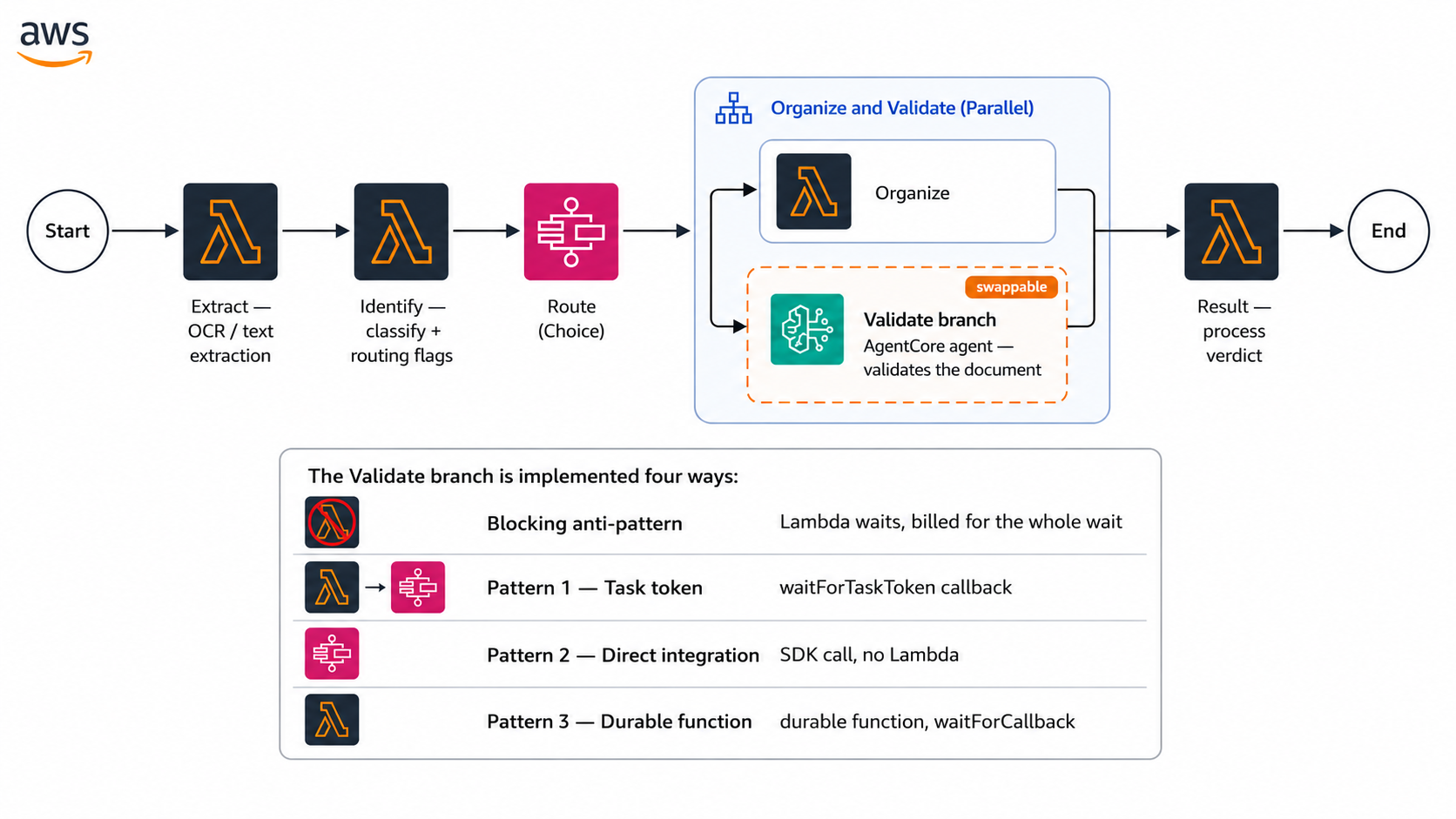
Figure 1: The example pipeline. Only the highlighted Validate branch changes between patterns
単一の Amazon Bedrock AgentCore エージェントが、すべてのケースに対応します。エージェントは各呼び出しを検証し、どのように応答するかを判断します。AWS Step Functions の *タスクトークン* を受け取った場合は処理完了時にその実行を再開し、永続関数の *コールバック ID* を受け取った場合は永続関数を起動します。どちらでもない場合は、結果をレスポンス内に直接返却します。つまり、エージェントの変更や再デプロイを行わずに、オーケストレーションのパターンだけを切り替えることが可能です。
ブロッキングせずに呼び出し元に制御を戻す仕組み
このメカニズムは、エージェントのアクショングループにおける「制御の返還」アクションです。推論が完了すると、エージェントは Lambda を呼び出して結果とタスクトークンを Step Functions に投稿します。(後述するパターン 2 では、Step Functions が AgentCore と直接統合されるため、この Lambda は不要になります。)
以下のコードは、Lambda の中核部分を示しています。
# The tool the agent calls once it reaches a verdict
@tool
def conclude_validation(approved: bool, issues: list, summary: str) -> str:
    verdict = {"approved": approved, "issues": issues,
               "summary": summary, "source": "agentcore"}

    # A Step Functions task token was passed: resume that execution
    if task_token:
        sfn.send_task_success(taskToken=task_token, output=json.dumps(verdict))
        return "Step Functions resumed."

    # A durable-function callback ID was passed: resume the durable function
    if callback_id:
        lambda_client.send_durable_execution_callback_success(
            CallbackId=callback_id, Result=json.dumps(verdict).encode("utf-8"))
        return "Durable function resumed."

    # Neither was passed: this is a synchronous call, return the verdict inline
    return "Verdict recorded."
エントリーポイントでは、同じシグナルに基づいてバックグラウンド処理か同期処理のどちらを実行するかを決定します。
@app.async_task
async def validate_document_async(prompt, document, extracted_text):
    # Background work; conclude_validation fires the right callback when done
    agent = build_agent()
    await agent.invoke_async(message(prompt, document, extracted_text))

@app.entrypoint
async def handler(event):
    task_token  = event.get("taskToken")    # passed by the task-token pattern
    callback_id = event.get("callbackId")   # passed by the durable-function pattern

    # Asynchronous: start the work and return "accepted" right away
    if task_token or callback_id:
        asyncio.create_task(validate_document_async(...))
        return {"status": "accepted"}

    # Synchronous: run now and return the verdict in the response
    agent = build_agent()
    await agent.invoke_async(message(...))
    return verdict
エージェントの設定が整ったところで、本稿の本題である 4 つの呼び出しパターンについて解説していきます。
エージェントの呼び出し:4 つのアプローチ
まずはコストの基準となるブロッキング(同期)のアンチパターンから始め、それを回避する 3 つのパターンを紹介していきます。各パターンを説明するために、サンプルコードやインフラ定義の一部を抜粋して掲載しています。
ブロッキングのアンチパターン
最も直接的な実装では、エージェントを呼び出してレスポンスが返ってくるまで同じ Lambda 関数内で待機します。動作は確かで実装も簡単であるため非常に一般的ですが、この方式ではエージェントが処理を行っている間、Lambda 関数が稼働し続けます。
// The Lambda function blocks here until the agent responds
const response = await agentcore.send(
  new InvokeAgentRuntimeCommand({
    agentRuntimeArn: AGENT_RUNTIME_ARN,
    payload: new TextEncoder().encode(JSON.stringify(payload)),
    runtimeSessionId: sessionId,
  })
);
// The function stays alive and billed for the entire time the agent is thinking.
結果として、請求対象となる関数の実行時間は、ほぼエージェントの処理時間と同等になってしまいます。次の 3 つのパターンはこのアイドル状態によるコストを排除するものであり、それぞれ異なるトレードオフを採用しています。特にパターン 2 では、AgentCore Harness (InvokeHarness) の Step Functions 最適化統合を利用し、Lambda を完全に不要にしています。
パターン 1:タスクトークンコールバックとディスパッチャ関数
このパターンでは、カスタムロジックのために Lambda 関数を呼び出しパスに含めつつも、アイドル状態によるコストを排除します。Step Functions は waitForTaskToken インテグレーションを使って関数を起動し、タスクトークンを渡した上で実行を一時停止します。その後、Lambda 関数はそのトークンを使ってエージェントを開始し、数秒で終了します。実行は一時停止されたままになり、エージェントがそのトークンを使って SendTaskSuccess を呼び出すまで、計算リソースに対する課金は発生しません。
// Start the agent, pass the task token, and return without waiting
const response = await agentcore.send(
  new InvokeAgentRuntimeCommand({
    agentRuntimeArn: AGENT_RUNTIME_ARN,
    payload: new TextEncoder().encode(JSON.stringify({ ...payload, taskToken })),
    runtimeSessionId: sessionId,
  })
);
// Returning here does not complete the step. Step Functions stays paused until
// the agent calls SendTaskSuccess with this task token.
return { dispatched: true };
対応するステートでは、コンテキストからトークンを引き渡し、タイムアウトとハートビートを設定して安全網を敷きます。これにより、エージェントが応答しなくなった場合でも、実行が無限に停止したままになるのではなく、きれいに失敗処理が行われます。
"ValidateDispatch": {
  "Type": "Task",
  "Resource": "arn:aws:states:::lambda:invoke.waitForTaskToken",
  "Parameters": {
    "FunctionName": "${ValidateDispatcherFunctionArn}",
    "Payload": {
      "taskToken.$": "$$.Task.Token",
      "document.$": "$.document",
      "extractedText.$": "$.extract.extractedText",
      "executionId.$": "$$.Execution.Id"
    }
  },
  "TimeoutSeconds": 120,
  "HeartbeatSeconds": 60,
  "Next": "AgentCoreValidation"
}
コストについて。** Lambda 関数は起動しますが、エージェントを開始して戻ってくるまでの数秒間のみです。その後、エージェントがどれほど長時間動作しても関係ありません。支払うのはその短い実行時間だけで、待機中は課金されません。なぜなら、エージェントが処理を行っている間に Lambda 関数はすでにシャットダウンしているからです。待機時間は一時停止された Step Functions の実行によって管理されており、アイドル状態の計算リソースに対する課金は行われません。これが、ブロック型のバージョンとの決定的な違いです。ブロック型では、Lambda 関数の課金時間がエージェントの処理時間と連動してしまいます。
パターン 2: サービスへの直接統合
エージェント呼び出しにカスタムコードが不要な場合、ディスパッチャー関数を削除し、Lambda を処理パスから完全に外すことができます。Step Functions は AWS SDK のサービス統合を通じて Amazon Bedrock AgentCore に直接呼び出すことができるため、エージェントからのレスポンスは次のステートへそのまま流れます。この結果、Validate ブランチは単一の Task ステートとして実装されます。
"ValidateDirect": {
  "Type": "Task",
  "Resource": "arn:aws:states:::aws-sdk:bedrockagentcore:invokeAgentRuntime",
  "Parameters": {
    "AgentRuntimeArn": "${AgentRuntimeArn}",
    "RuntimeSessionId.$": "States.Hash($$.Execution.Id, 'SHA-256')",
    "Payload.$": "States.JsonToString($.prep.agentInput)"
  },
  "ResultSelector": { "raw.$": "$.Response" },
  "TimeoutSeconds": 120,
  "Next": "ParseVerdict"
}コスト面。Lambda 関数が処理パスに含まれないため、アイドル状態の Lambda コンピュートを支払う必要もありません。待機中は Step Functions が管理し、Standard ワークフローは待機時間ではなくステート遷移ごとに課金されるため、処理中の実質的なコストはエージェント自体の利用料のみとなります。
Pattern 3: Lambda durable function
状態マシンではなく、オーケストレーションをコードとして一箇所で記述したい場合は、Lambda の永続関数(durable function)が同様のコスト特性を提供します。@aws/durable-execution-sdk-js SDK を使用すると、パイプラインの各ステージは context.step 呼び出しとして実装され、並列処理も可能になります。
処理は context.parallel となり、エージェントの待機は context.waitForCallback として扱われます。この待機中、関数は一時停止し、計算リソースに対する課金は行われません。
エージェントは SendDurableExecutionCallbackSuccess を呼び出して再開します。
// Suspend the function until the agent calls back
const result = await ctx.waitForCallback(
  "validate-agentcore",
  async (callbackId) =>
    dispatchAgentCore(callbackId, document, extractedText, executionId),
  { timeout: { seconds: 120 } }
);コスト。単一の関数がパイプライン全体を保持しますが、待機中は計算リソースに対して課金されません。エージェントの応答を待つ間も、実行が一時停止されているため、その間は費用が発生しません。課金されるのは、一時停止と再開の間で発生する短い実行バーストのみです。これはタスクトークンパターンと同じ経済モデルであり、待機時間自体には課金されません。
差の測定
特定の数値自体が重要なのではありません。エージェントのランタイムは、プロンプトやモデル、ドキュメントの内容によって変動します。重要なのは、タスクトークンパターンにおける 2 つの値の関係性です。具体的には、「Validate」ステートがアクティブだった時間と、ディスパッチャー関数が実際に課金された時間の比較です。
テストで得られた単一の実行結果から、この関係性が明確になります:
Step Functions, ValidateDispatch state
   Returned (TaskSubmitted): 14:08:19   <- the function returned and shut down
   Resumed  (TaskSucceeded): 14:08:34   <- the agent woke the execution
   State active ........ 19.6s

Lambda, dispatcher function (CloudWatch REPORT)
   Billed duration ..... 4.8s

Result: the state was active for 19.6s, but the function was billed for 4.8s.
The ~14.8s in between is wait time with no Lambda function running.
Step Functions のイベント履歴を見ても同様のことが確認できます。タスクトークンパターンでは、TaskSubmitted イベント(関数の返却)と TaskSucceeded イベント(エージェントがフローを再開)の間に、エージェントの処理時間が挟まります。一方、同期呼び出しにはそのようなギャップは存在しません。
以下の表は、前述の図でハイライトされた「Validate」ブランチが各パターンでどのように実装されているかを要約したものです:
| ブロッキング(アンチパターン) | パターン 1:タスクトークン | パターン 2:直接統合 | パターン 3:永続関数 | |
|---|---|---|---|---|
| オーケストレーター | Step Functions | Step Functions | Step Functions | Lambda (コード) |
| パス内の Lambda 関数 | あり、稼働中かつ課金対象 | あり(ただし早期リターン) | なし | 永続関数(サスペンド状態) |
| 待機中のアイドル Lambda 計算リソース | 待機時間の全額を課金される | なし | なし | なし |
| エージェント呼び出し周りのカスタムコード | あり | あり | 限定的(状態変換のみ) | あり |
| 呼び出し元とエージェントの分離 | なし | あり | なし | あり |
| 相対的な複雑さ | 最小限 | 高い(トークンとコールバックの IAM) | 最小限 | 中程度(チェックポイント/再生) |
この記事を読む際の注意点として、パイプライン全体の所要時間を比較指標として使うのは適切ではありません。なぜなら、その時間はエージェント自身の推論時間に支配されており、実行ごとに変動する上、あらゆるシナリオでほぼ同じ値になるからです。真に意味のある違いは、待機中に発生する計算リソースのコストです。これは表と課金された所要時間のデータから読み取ることができます。ディスパッチャーの課金時間は一定のままですが、エージェントの実行時間が伸びていきます。前述の数値は単一の試行からの結果であり、ベンチマークとして扱うのではなく、関係性を示す例として捉え、実際のワークロードで測定を行う必要があります。
パターンの選択
以下の表は、各パターンのトレードオフを要約しており、適切なパターンを選ぶ際の参考となります。
| ブロッキング(アンチパターン) | パターン 1:タスクトークン | パターン 2:直接統合 | パターン 3:永続関数 | |
|---|---|---|---|---|
| 呼び出し元のコスト | エージェントの完全な処理時間 | 秒(ディスパッチのみ) | ゼロ(Lambda なし) | 秒(ディスパッチのみ) |
| 統合の労力 | 低 | 中〜高(IAM、ハートビート、タイムアウト) | 低(単一のタスク状態のみ) | 中(チェックポイント&リプレイモデル) |
| ビジネスロジックの場所 | Lambda 内(前後とも) | Lambda 内(前後とも) | Amazon States Language (ASL) のみ(組み込み関数) | Lambda 内(逐次コード) |
| 推奨される用途 | プロトタイプ、短時間のエージェント | カスタム前処理・後処理ロジック | 純粋なオーケストレーション、カスタムコードなし | 1 つの関数内での複雑な非同期ワークフロー |
ベストプラクティス
応答しないエージェントへの対策を講じる。 すべての waitForTaskToken ステートに TimeoutSeconds を設定し、無限待機するのではなく、States.Timeout エラーで実行が失敗するようにしてください。
エージェントがハートビートを送信する場合は、死んだエージェントの検出を高速化するために HeartbeatSeconds も設定してください。エラーをキャッチし、失敗処理や人間によるレビューが必要なパスへルーティングします。
リトライ時に安定したセッション ID を使用してください。 sessionId には、実行コンテキスト(Step Functions の実行名など)から派生した値を設定し、リトライ時にエージェントのセッションが新規作成されるのではなく、同じセッションを継続できるようにします。タスクトークンパターンではディスパッチャーで設定し、直接統合パターンでも同様に設定してください。
原文を表示
Asynchronous invocation patterns for Amazon Bedrock AgentCore agents in serverless pipelines remove idle compute costs while your AI agent processes requests. A common example is document validation: in a real-estate financing back office, an agent can read a property record or loan contract, reason about whether the information is complete and consistent, and return a verdict that downstream steps act on. Amazon Bedrock AgentCore provides a platform to build, connect, and optimize agents at scale, with any framework or model.
These agents introduce a characteristic that traditional pipeline steps do not have: they think for a while before they answer. How long depends on the prompt, the model, and the document, but it’s rarely instant, and that latency changes how you should call it. The most common first implementation is a compute service, such as an AWS Lambda function, that invokes the agent and waits for the response. While that function waits, it does nothing, but it is still running, and you are billed for every second of it.
It helps to see where the cost actually lands, because the two sides of the call are billed differently. Amazon Bedrock AgentCore runtime, a capability of Amazon Bedrock AgentCore, has a consumption-based model that doesn’t charge for CPU while the agent is idle. For instance, while it waits on a large language model to generate a response, or on a tool or Model Context Protocol (MCP) call to return, you are billed for memory during that time, but not for CPU. The compute service that called the agent has no such behavior. A Lambda function, container, or Amazon Elastic Compute Cloud (Amazon EC2) instance that issues a synchronous call sits blocked. It holds (and pays for) its full compute allocation until the agent responds. So the waste is not on the agent side. It’s the caller, idling on an open connection.
That makes the caller’s cost track the agent’s runtime. A function that blocks on the agent is billed for essentially the entire processing time, whereas a function that starts the agent and returns is billed only for the brief dispatch. The fix is to release the caller’s compute during the wait and resume the pipeline only when the agent has a result. In this post, we show three patterns that do this (task-token callback, direct service integration, and durable function) and contrast them with the blocking anti-pattern.
An example pipeline
To compare the patterns on equal footing, we run each one through the same pipeline and change only the step that calls the agent. The pipeline is a deliberately simple, made-up scenario (validating documents for real-estate financing) chosen to keep the orchestration clear. It’s not the point of the post. It stands in for any workflow that calls an agent (or another slow service) and then acts on the result, so picture your own use case in its place.
The pipeline has five stages:
- Extract: An AWS Lambda function performs optical character recognition (OCR) and text extraction on the document. (Extraction is simulated, so the scenario runs without real documents.)
- Identify: A Lambda function classifies the document and sets routing flags (shouldOrganize, shouldValidate).
- Route: A Choice state directs the flow based on those flags.
- Organize and Validate: A Parallel state organizes the document while, in a separate branch, the Amazon Bedrock AgentCore agent validates it. This Validate branch is the only part that changes between patterns.
- Result: A Lambda function processes the agent’s verdict and decides the next action (approve, or return for correction).
The following diagram shows the pipeline. It stays the same in every case. Only the Validate branch is swapped to demonstrate each invocation pattern.
**Figure 1: The example pipeline. Only the highlighted Validate branch changes between patterns
A single Amazon Bedrock AgentCore agent serves all four cases. The agent inspects each invocation and chooses how to respond: if it receives an AWS Step Functions *task token*, it wakes that execution when done. If it receives a durable-function *callback ID*, it wakes the durable function. If it receives neither, it returns the verdict directly in the response. This means you can change the orchestration pattern without changing or redeploying the agent.
How the agent returns control without blocking the caller
The mechanism is a return-of-control action in the agent’s action group. When the agent finishes reasoning, it calls a Lambda that posts the result and the task token back to Step Functions. (Pattern 2, described later, eliminates this Lambda entirely by having Step Functions integrate directly with AgentCore.)
The following code shows the core of that Lambda:
# The tool the agent calls once it reaches a verdict
@tool
def conclude_validation(approved: bool, issues: list, summary: str) -> str:
    verdict = {"approved": approved, "issues": issues,
               "summary": summary, "source": "agentcore"}

    # A Step Functions task token was passed: resume that execution
    if task_token:
        sfn.send_task_success(taskToken=task_token, output=json.dumps(verdict))
        return "Step Functions resumed."

    # A durable-function callback ID was passed: resume the durable function
    if callback_id:
        lambda_client.send_durable_execution_callback_success(
            CallbackId=callback_id, Result=json.dumps(verdict).encode("utf-8"))
        return "Durable function resumed."

    # Neither was passed: this is a synchronous call, return the verdict inline
    return "Verdict recorded."
The entrypoint decides whether to run in the background or synchronously based on the same signals:
@app.async_task
async def validate_document_async(prompt, document, extracted_text):
    # Background work; conclude_validation fires the right callback when done
    agent = build_agent()
    await agent.invoke_async(message(prompt, document, extracted_text))

@app.entrypoint
async def handler(event):
    task_token  = event.get("taskToken")    # passed by the task-token pattern
    callback_id = event.get("callbackId")   # passed by the durable-function pattern

    # Asynchronous: start the work and return "accepted" right away
    if task_token or callback_id:
        asyncio.create_task(validate_document_async(...))
        return {"status": "accepted"}

    # Synchronous: run now and return the verdict in the response
    agent = build_agent()
    await agent.invoke_async(message(...))
    return verdict
With the agent in place, the rest of the post focuses on the four ways to call it.
Calling the agent: Four approaches
We start with the blocking anti-pattern to establish the baseline cost, then show the three patterns that avoid it. The code and infrastructure definitions throughout are excerpts from the sample, included to illustrate each pattern.
The blocking anti-pattern
The most direct implementation calls the agent and waits for the answer in the same Lambda function. It works, and it is straightforward to implement, which is why it’s so common, but the function stays alive for the entire time the agent is thinking.
// The Lambda function blocks here until the agent responds
const response = await agentcore.send(
  new InvokeAgentRuntimeCommand({
    agentRuntimeArn: AGENT_RUNTIME_ARN,
    payload: new TextEncoder().encode(JSON.stringify(payload)),
    runtimeSessionId: sessionId,
  })
);
// The function stays alive and billed for the entire time the agent is thinking.
The function’s billed duration ends up approximately equal to the agent’s processing time. The next three patterns eliminate this idle cost, each making a different trade-off. In particular, Pattern 2 uses the Step Functions optimized integration for AgentCore Harness (InvokeHarness), removing the Lambda entirely.
Pattern 1: Task-token callback with a dispatcher function
This pattern keeps a Lambda function in the path for custom logic but removes the idle cost. Step Functions invokes the function with the waitForTaskToken integration, which passes a task token and then pauses the execution. The function uses the token to start the agent, then returns in a few seconds. The execution stays paused, billing nothing for compute, until the agent calls SendTaskSuccess with that token to resume it.
// Start the agent, pass the task token, and return without waiting
const response = await agentcore.send(
  new InvokeAgentRuntimeCommand({
    agentRuntimeArn: AGENT_RUNTIME_ARN,
    payload: new TextEncoder().encode(JSON.stringify({ ...payload, taskToken })),
    runtimeSessionId: sessionId,
  })
);
// Returning here does not complete the step. Step Functions stays paused until
// the agent calls SendTaskSuccess with this task token.
return { dispatched: true };
The corresponding state passes the token from context and sets a timeout and heartbeat as a safety net, so a silent agent fails the execution cleanly rather than leaving it paused indefinitely:
"ValidateDispatch": {
  "Type": "Task",
  "Resource": "arn:aws:states:::lambda:invoke.waitForTaskToken",
  "Parameters": {
    "FunctionName": "${ValidateDispatcherFunctionArn}",
    "Payload": {
      "taskToken.$": "$$.Task.Token",
      "document.$": "$.document",
      "extractedText.$": "$.extract.extractedText",
      "executionId.$": "$$.Execution.Id"
    }
  },
  "TimeoutSeconds": 120,
  "HeartbeatSeconds": 60,
  "Next": "AgentCoreValidation"
}
Cost.** A Lambda function runs, but only long enough to start the agent and return: a few seconds, regardless of how long the agent then takes. You pay for that brief dispatch, not for the wait, because the function has already shut down while the agent works. The wait is held by the paused Step Functions execution, which doesn’t bill for idle compute. This is the key difference from the blocking version, where the function’s billed time tracks the agent’s processing time.
Pattern 2: Direct service integration
When you don’t need custom code around the agent call, you can remove the dispatcher function and take Lambda out of the path entirely. Step Functions can call Amazon Bedrock AgentCore directly through its AWS SDK service integration, so the agent’s response flows straight into the next state. The Validate branch then becomes a single Task state:
"ValidateDirect": {
  "Type": "Task",
  "Resource": "arn:aws:states:::aws-sdk:bedrockagentcore:invokeAgentRuntime",
  "Parameters": {
    "AgentRuntimeArn": "${AgentRuntimeArn}",
    "RuntimeSessionId.$": "States.Hash($$.Execution.Id, 'SHA-256')",
    "Payload.$": "States.JsonToString($.prep.agentInput)"
  },
  "ResultSelector": { "raw.$": "$.Response" },
  "TimeoutSeconds": 120,
  "Next": "ParseVerdict"
}
Cost. There’s no Lambda function in the path, so there is no idle Lambda compute to pay for. Step Functions holds the wait, and a Standard workflow bills per state transition rather than for the duration of the wait, so the meaningful cost during processing is the agent itself.
Pattern 3: Lambda durable function
If you would rather express the orchestration as code in one place instead of a state machine, a Lambda durable function gives you the same cost behavior. With the @aws/durable-execution-sdk-js SDK, the pipeline stages become context.step calls, the parallel work becomes context.parallel, and the wait for the agent becomes context.waitForCallback. During that wait the function suspends and is not billed for compute. The agent resumes it with SendDurableExecutionCallbackSuccess.
// Suspend the function until the agent calls back
const result = await ctx.waitForCallback(
  "validate-agentcore",
  async (callbackId) =>
    dispatchAgentCore(callbackId, document, extractedText, executionId),
  { timeout: { seconds: 120 } }
);
Cost. A single function holds the whole pipeline, but it doesn’t bill for compute while it is suspended waiting for the agent. You pay for the short bursts of execution between suspensions, the same economics as the task-token pattern, rather than for the wait.
Measuring the difference
The point isn’t any particular number. The agent’s runtime varies with the prompt, the model, and the document. What matters is the *relationship* between two values in the task-token pattern: how long the Validate state was active, versus how long the dispatcher function was actually billed. A single run from our testing makes the relationship visible:
Step Functions, ValidateDispatch state
   Returned (TaskSubmitted): 14:08:19   <- the function returned and shut down
   Resumed  (TaskSucceeded): 14:08:34   <- the agent woke the execution
   State active ........ 19.6s

Lambda, dispatcher function (CloudWatch REPORT)
   Billed duration ..... 4.8s

Result: the state was active for 19.6s, but the function was billed for 4.8s.
The ~14.8s in between is wait time with no Lambda function running.
You can see the same thing in the Step Functions event history: with the task-token pattern, a TaskSubmitted event (the function returned) is separated from TaskSucceeded (the agent resumed the flow) by the agent’s processing time. A synchronous invocation has no such gap.
The following table summarizes how the Validate branch (highlighted in the preceding diagram) is implemented in each pattern:
| Blocking (anti-pattern) | Pattern 1: Task token | Pattern 2: Direct integration | Pattern 3: Durable function | |
|---|---|---|---|---|
| Orchestrator | Step Functions | Step Functions | Step Functions | Lambda (code) |
| Lambda function in the path | yes, alive and billed | yes, but it returns early | none | the durable function (suspends) |
| Idle Lambda compute during the wait | pays the full wait | none | none | none |
| Custom code around the agent call | yes | yes | limited (state transformations) | yes |
| Decouples the caller from the agent | no | yes | no | yes |
| Relative complexity | lowest | higher (token and callback IAM) | lowest | medium (checkpoint/replay) |
One caveat on reading this: the *total* pipeline duration isn’t a useful comparison metric, because it’s dominated by the agent’s own reasoning time, which varies from run to run and is essentially the same in every scenario. The meaningful difference is how much compute you pay for during that wait, captured by the table and the billed-duration reading. The dispatcher’s billed time stays flat while the agent’s runtime grows. The preceding numbers come from a single run. Treat them as an illustration of the relationship, not a benchmark, and measure your own workload.
Choosing a pattern
The following table summarizes the trade-offs to help you choose a pattern:
| Blocking (anti-pattern) | Pattern 1: Task-token | Pattern 2: Direct integration | Pattern 3: Durable function | |
|---|---|---|---|---|
| Caller cost | Full agent processing time | Seconds (dispatch only) | Zero (no Lambda) | Seconds (dispatch only) |
| Integration effort | Low | Medium-high (IAM, heartbeat, timeout) | Low (single Task state) | Medium (checkpoint-and-replay model) |
| Business logic location | In Lambda (before + after) | In Lambda (before + after) | In Amazon States Language (ASL) only (intrinsic functions) | In Lambda (sequential code) |
| Best for | Prototypes, short agents | Custom pre/post-processing logic | Pure orchestration, no custom code | Complex async workflows in one function |
Best practices
Guard against an agent that never answers. Set TimeoutSeconds on every waitForTaskToken state so the execution fails with States.Timeout instead of hanging indefinitely. If your agent sends heartbeats, also set HeartbeatSeconds for faster dead-agent detection. Catch the error and route to a failure or human-review path.
Use a stable session ID across retries. Set sessionId to a value derived from the execution context (such as the Step Functions execution name) so that retries resume the same agent session rather than starting fresh. In the task-token pattern, set it in the dispatcher. In the direct-integration patte
関連記事
今日のまとめ
AIデイリーブリーフで今日の重要ニュースをまとめ読み