シニアアナリスト並みの思考を持つ AI データ分析ツールの構築方法
本文の状態
日本語全文を表示中
詳細モードで約17分の本文を読めます。
同じ出来事の情報源
この情報源を基点に整理
KDnuggets
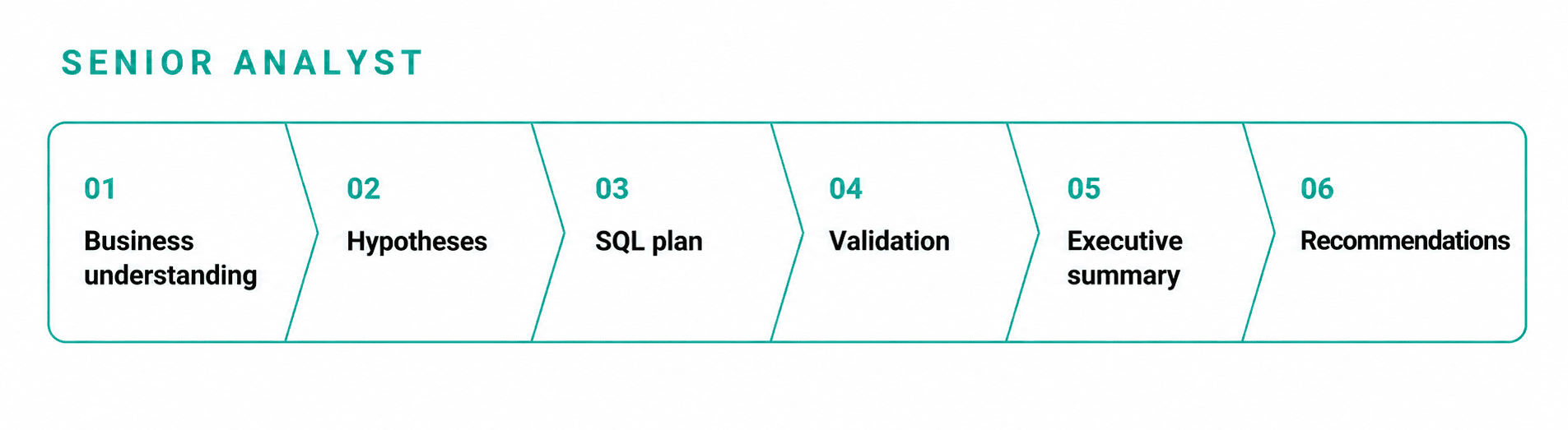
この記事は、単一のプロンプトで即答するチャットボットの限界を克服し、ビジネス理解から推奨まで六段階の思考プロセスを実装したPythonツールの構築方法を解説している。
AI深層分析を開く2026年9月9日 23:45
AI深層分析
キーポイント
シニアアナリストの思考プロセスのコード化
単に数字を選ぶのではなく、仮説形成やデータ量の検証など、熟練したアナリストが行う遅延と反復を六段階のワークフローとして実装する手法を示す。
六段階の実行フレームワーク
ビジネス理解、仮説生成、SQL計画、検証、エグゼクティブ要約、推奨という六つの明確なステージを通過させる仕組みを提供する。
API 非依存の柔軟な実装
Anthropic または OpenAI の API を利用可能とし、ユーザーが自身のキーを持って任意のデータテーブルに対してこのフレームワークを適用できる設計である。
実践的なデータセットの使用例
StrataScratch 提供のオンライン注文データ(online_orders.csv)を用いて、CSV の読み込みから最終推奨までの一連のプロセスを実行するコード例を示す。
小規模データセットの特性理解
29件の注文という小規模なデータでは、グループ化処理における各グループが重要であり、迅速な回答を得ようとする手法は誤りを招きやすい。
重要な引用
Ask a chatbot "which promotion should we run more of," and it answers in one breath.
A senior analyst works slower on purpose. They restate the question, form a hypothesis, write the query, then check whether the result has enough data behind it before they say anything to an executive.
We can build that discipline into code.
That is small enough that every group in a groupby matters, which is exactly the kind of dataset a fast answer gets wrong.
編集コメントを表示
編集コメント
LLM の能力向上に伴い、単なるプロンプトの出力ではなく、思考プロセスそのものを設計するアプローチが注目されている。本記事は、その具体的な実装例として非常に参考になる内容である。
Source Article
元記事を日本語で読む
本文に関係しない購読案内、埋め込み通知、サイト内プロモーションは除いています。

「どのプロモーションをもっと実施すべきか」とチャットボットに尋ねると、その答えは即座に出てきます。確信を持って数字を提示し、最も魅力的な数字を示すプロモーションを選び、それを自信たっぷりに伝えるのです。しかし、その数字がどれだけのデータに基づいているのかを確認しないまま終わってしまう可能性があります。
10 件の注文で素晴らしい結果を出したプロモーションよりも、1,000 件の注文で一貫して好調だったプロモーションの方が、はるかに説得力があります。
一方、シニアアナリストはあえて時間をかけます。質問を再確認し、仮説を立て、クエリを作成します。そして、経営陣に報告する前に、その結果が十分なデータに基づいているかどうかを確認するのです。
この厳格なプロセスをコードとして実装することは可能です。
今回のチュートリアルでは、単一のプロンプトではなく「ビジネス理解」「仮説生成」「SQL プランニング」「検証」「エグゼクティブサマリー」「推奨事項」という 6 つの段階を経て質問を処理する、小さな Python ツールキット を構築します。
このツールキットは Anthropic または OpenAI の API と連携するため、利用者は各自でキーを用意する必要があります。対象となるテーブルを指定すれば、同じ 6 つの段階が自動的に実行されます。
以下のコードは、CSV ファイルの読み込みから最終的な推奨事項まで、順に実行される構成になっています。ご自身のデータを使ってノートブック上で追いかけていただくことも可能です。

データについて
本記事では、online_orders.csv というデータテーブルを用いて解説を行います。このデータセットは、StrataScratch の面接問題 で確認できます。全 29 行の注文レベルデータが含まれており、販売された商品や適用されたプロモーション、単価、顧客情報、日付、販売数量などが記録されています。
| product_id | promotion_id | cost_in_dollars | customer_id | date_sold | units_sold |
|---|---|---|---|---|---|
| 1 | 1 | 2 | 1 | 2022-04-01 | 4 |
| 3 | 3 | 6 | 3 | 2022-05-24 | 6 |
| 1 | 2 | 2 | 10 | 2022-05-01 | 3 |
| 1 | 2 | 3 | 2 | 2022-05-01 | 9 |
| … | … | … | … | … | … |
| 5 | 2 | 8 | 15 | 2022-05-01 | 2 |
まずは、Pandas を読み込みます。
import pandas as pd
from IPython.display import display
orders = pd.read_csv("online_orders.csv")
print(f"Loaded {len(orders):,} rows and {len(orders.columns)} columns.")
display(orders.head())
出力結果
Loaded 29 rows and 6 columns.3 ヶ月間にわたる 29 件の注文、4 つのプロモーション、そして 11 種類の製品です。データセットは非常に小規模なため、groupby を実行する際にもグループ分けの細部がすべて重要になります。これは、高速な回答では見落としがちな、まさに分析に時間をかけるべきデータの典型例です。
スキーマの確認
大規模言語モデル(LLM)を扱う前に、まずはテーブル内に実際に何が格納されているかを確認しましょう。
schema_preview = pd.DataFrame({
    "column": orders.columns,
    "dtype": orders.dtypes.astype(str).values,
    "missing_values": orders.isna().sum().values,
})
display(schema_preview)
出力結果
| 列名 | データ型 | 欠損値数 |
|---|---|---|
| product_id | int64 | 0 |
| promotion_id | int64 | 0 |
| cost_in_dollars | int64 | 0 |
| customer_id | int64 | 0 |
| date_sold | object | 0 |
| units_sold | int64 | 0 |
欠損値はなく、date_sold は日付型ではなくテキストとして保存されています。
決定論的な妥当性チェック
LLM を呼び出す前に、単純な SQL でもいくつかのことがわかります。データフレームを DuckDB に登録し、データベースサーバーを設定することなく、直接 SQL を実行できるようにします。
import duckdb
con = duckdb.connect()
con.register("online_orders", orders)
preview = con.execute("""
    SELECT
        promotion_id,
        COUNT(*) AS n_orders,
        SUM(units_sold) AS total_units,
        SUM(cost_in_dollars * units_sold) AS total_revenue,
        ROUND(AVG(units_sold), 2) AS avg_units_per_order
    FROM online_orders
    GROUP BY promotion_id
    ORDER BY avg_units_per_order DESC
""").df()
display(preview)
出力
| promotion_id | n_orders | total_units | total_revenue | avg_units_per_order |
|---|---|---|---|---|
| 4 | 1 | 8.0 | 64.0 | 8.00 |
| 1 | 12 | 77.0 | 407.0 | 6.42 |
| 2 | 10 | 55.0 | 199.0 | 5.50 |
| 3 | 6 | 31.0 | 185.0 | 5.17 |
注文あたりの平均単価でソートすると、プロモーション 4 が 8.00 でトップに立ちます。
しかし、背後にあるのはたった 1 つの注文だけです。「どのプロモーションが最も平均値が高いか」という問いに対して、この 1 件のデータだけで「プロモーション 4」を推奨するのは罠です。このパイプラインはまさにその罠を検知するために設計されています。
LLM ラッパー
このパイプラインは、Anthropic クライアントを渡そうが OpenAI クライアントを渡そうが気にする必要はありません。薄いラッパーがプロバイダーを明示的に受け取り、対応するメソッドを呼び出します。Anthropic の場合、レスポンスが複数のコンテンツブロックとして返ってくることがあるため、最初に来るとは限らず、タイプが text である最初のブロックを検索して取得します。
class LLMClient:
    def __init__(self, client, model, provider):
        self.client = client
        self.model = model
        self.provider = provider

    def complete(self, prompt):
        if self.provider == "anthropic":
            response = self.client.messages.create(
                model=self.model,
                max_tokens=1024,
                messages=[{"role": "user", "content": prompt}],
            )

            for block in response.content:
                if block.type == "text":
                    return block.text

            raise ValueError("No text block found in Claude's response.")

        if self.provider == "openai":
            response = self.client.chat.completions.create(
                model=self.model,
                messages=[{"role": "user", "content": prompt}],
            )
            return response.choices[0].message.content

        raise ValueError(f"Unsupported provider: {self.provider}")
これにより、パイプラインの残りの部分は単一の complete() メソッドのみを扱えばよくなります。プロバイダー固有のレスポンス形式はラッパー内部に隠されるため、後続のステージで Anthropic 用と OpenAI 用の別々のコードパスを用意する必要はありません。サポートされていないプロバイダーや、Claude から利用可能なテキストブロックが返ってこない場合でも、無効なレスポンスを後続に渡して黙殺するのではなく、ラッパー側で明示的にエラーを発生させます。
以下のすべてのステージではモデルに対して JSON の返却を要求するため、テキストレスポンスから JSON を抽出するためのヘルパー関数がもう一つ必要です。一部のレスポンスは三重バッククォートで囲まれたコードブロックとして返されるため、このヘルパーはまずそれを除去し、その後、テキスト内から最初の有効な JSON オブジェクトまたは配列を検索して取得します。
import json
import re
def parse_json(text):
    text = text.strip()

    if text.startswith("```

"): text = re.sub(r"^ ```(?:json)?\s*", "", text, flags=re.IGNORECASE)
        text = re.sub(r"\s*```$", "", text)

try:
        return json.loads(text)
    except json.JSONDecodeError:
        pass
    candidates = []
    object_match = re.search(r"\{.*\}", text, re.DOTALL)
    array_match = re.search(r"\[.*\]", text, re.DOTALL)
    if object_match:
        candidates.append(object_match)
    if array_match:
        candidates.append(array_match)
    candidates.sort(key=lambda match: match.start())
    for match in candidates:
        try:
            return json.loads(match.group(0))
        except json.JSONDecodeError:
            continue
    raise ValueError(f"No valid JSON found in model output:\n{text}")
The parser starts with the simplest case: if the entire reply is valid JSON, it returns it immediately. If that fails, it looks for an object or array embedded in surrounding prose and tries the candidates in the order they appear. This makes the pipeline a little more tolerant of common model formatting mistakes while still raising an error when there is no valid JSON to work with.
Stage 1: Business Understanding
The first stage restates the question in terms the table can actually answer, names the grain of the data, and lists limitations before any analysis starts.
class SeniorAnalyst:
    MIN_SUPPORT = 3  # minimum orders behind a group before we trust it

def __init__(self, llm, table_name, dataframe):
        self.llm = llm
        self.table_name = table_name
        self.con = duckdb.connect()
        self.con.register(table_name, dataframe)
        self.schema = self.con.execute(f"DESCRIBE {table_name}").df()

def understand_business_context(self, question):
        row_count = self.con.execute(
            f"SELECT COUNT(*) FROM {self.table_name}"
        ).fetchone()[0]

columns = self.schema[
            ["column_name", "column_type"]
        ].to_dict("records")
        prompt = f"""You are a senior data analyst. A stakeholder asked: "{question}"
Table: {self.table_name}
Columns: {columns}
Row count: {row_count}

Restate the stakeholder question in terms this table can actually answer.

また、テーブルの粒度(1 行が何を表すか)を明記し、すでに把握できる制約事項も列挙してください。具体的には、サンプルサイズ、日付のカバレッジ範囲、欠落している次元や文脈などです。

リファインされた質問、粒度、制限事項を返す JSON 形式の出力が必要です。

```python
context = parse_json(self.llm.complete(prompt))
self.context = context
return context
We ran this with claude-sonnet-5 on the question "which promotion should we run more of." Here is what came back.
## Output
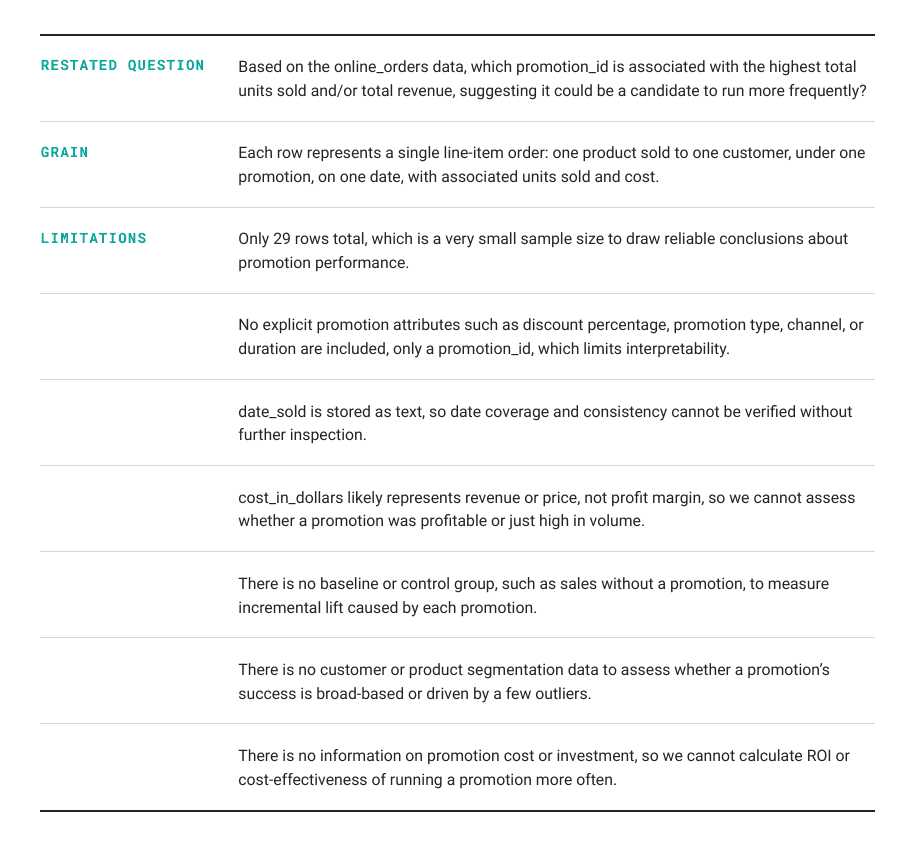
It flagged the small sample size before running a single query — the same trap the plain SQL `groupby` above already showed us. That flag is a hint, not a check. The pipeline still needs to enforce it in code, which is what the validation stage below does.
## Stage 2: Hypothesis Generation
The second stage proposes specific, testable hypotheses using only the columns that exist in the table.
仮説生成関数では、まずスキーマから列名を取得し、ビジネスコンテキストとリファインされた質問を元に、検証可能な仮説を n 個提案するプロンプトを作成します。ここで重要なのは、SQL でテスト可能な仮説のみを指定された列に基づいて作成することです。結果は JSON 形式で返却されます。
def generate_hypotheses(self, n=2):
    columns = list(self.schema["column_name"])
    prompt = f"""Business context: {self.context}
Propose {n} specific, testable hypotheses that would help answer the
restated question, using only columns in: {columns}.
Each hypothesis should be something we can test using SQL.
Return JSON only: [{{"hypothesis": "...", "why": "..."}}, ...]"""
    hypotheses = parse_json(self.llm.complete(prompt))
    self.hypotheses = hypotheses
    return hypotheses
## Output
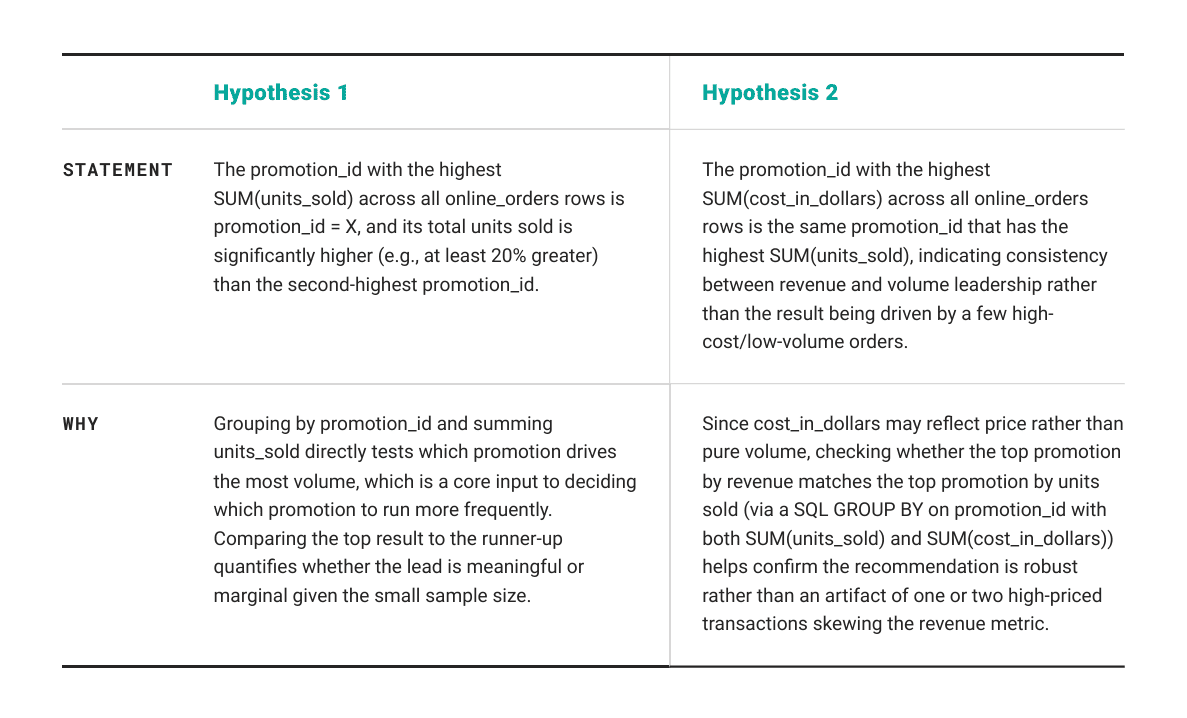
The pipeline tests the first hypothesis. Notice it is not a raw average: it asks whether the volume leader beats the runner-up by a real margin, which already reads differently from the "highest average" query above that put a 1-order promotion on top.
## Stage 3: SQL Planning
The third stage turns the top hypothesis into an actual query. We ask for a row count alongside any grouped metric, since a group's size is what the validation stage checks next.
SQL プラン作成関数では、テーブル名と利用可能な列、そしてテスト対象の仮説をプロンプトに含めます。この際、DuckDB 用の SQL クエリを一つだけ記述し、既存の列のみを使用し、新たな列を作成しないように指示します。また、集計を行う場合は結果の信頼性を確保するため、n_orders という名前で COUNT(*) カラムを含める必要があります。出力は JSON 形式で、SQL とその目的を返却します。
def plan_sql(self, hypothesis):
    columns = list(self.schema["column_name"])
    prompt = f"""Table: {self.table_name}
Columns: {columns}
Hypothesis to test: {hypothesis['hypothesis']}
Write one DuckDB SQL query that tests this hypothesis.
Use only the available columns, do not invent columns, and if the query
groups rows, include a COUNT(*) column named n_orders so the result can
be checked for sample size before anyone trusts it.
Return JSON only: {{"sql": "...", "purpose": "..."}}"""
    plan = parse_json(self.llm.complete(prompt))
    return plan
## Output
生成された SQL クエリは以下の通りです。
Generated SQL:
    WITH promo_sums AS (
        SELECT promotion_id, SUM(units_sold) AS total_units, COUNT(*) AS n_orders
        FROM online_orders
        GROUP BY promotion_id
    ),
    ranked AS (
上位プロモーションと次点のプロモーションを比較し、その差異率を算出する SQL クエリです。
まず、promo_sums テーブルから promotion_id、total_units、n_orders を取得し、total_units の降順でランク付け(RANK())を行います。この結果を一時テーブル ranked として扱います。
次に、この ranked テーブルから上位 1 位(rnk = 1)と 2 位(rnk = 2)のレコードを結合します。上位プロモーションの ID、総販売数、注文数をそれぞれ top_ プレフィックス付きで出力し、2 位のデータも同様に second_ プレフィックス付きで出力します。
最後に、上位と 2 位の総販売数の差を 2 位の値で割ることで、パーセンテージでの差異(pct_difference)を計算しています。これにより、最優秀プロモーションが次点に対してどれほど優れているかを数値化できます。
目的:販売単位数が最も多いプロモーション ID を特定し、2 位との比較を通じて、その差が少なくとも 20% 以上あるかどうかを検証する。また、統計的な信頼性を評価するために注文数も併せて確認する。
Rather than a simple `groupby`, the model reached for a common table expression (CTE) with a window function, ranking promotions by total units and pulling the top two into the same row for comparison.

## Stage 4: Validation

The fourth stage runs the query and checks `n_orders` against a minimum support threshold. This is the one stage that is plain code, not a model call, because the check has to be enforced, not suggested.
この検証関数は、渡された SQL プランを実行して結果を取得します。結果データフレームに「注文数 (n_orders)」の列が含まれている場合、その値が最小サポート閾値を下回る行に対して「低信頼度 (low_confidence)」フラグを立てます。もし該当する列が存在しない場合は、すべての行を信頼できるものとして扱います。
## Output

| top_promotion_id | top_total_units | top_n_orders | second_promotion_id | second_total_units | second_n_orders | pct_difference | low_confidence |
| --- | --- | --- | --- | --- | --- | --- | --- |
| 1 | 77.0 | 12 | 2 | 55.0 | 10 | 0.4 | False |

This query only produces one row, and it is not flagged. Promotion 1 leads on total units with 12 orders behind it, promotion 2 is the runner-up with 10, and both clear the minimum of 3 we set. The check still ran here — it just had nothing to catch, because this hypothesis compares two well-supported groups instead of resting on promotion 4's single order.

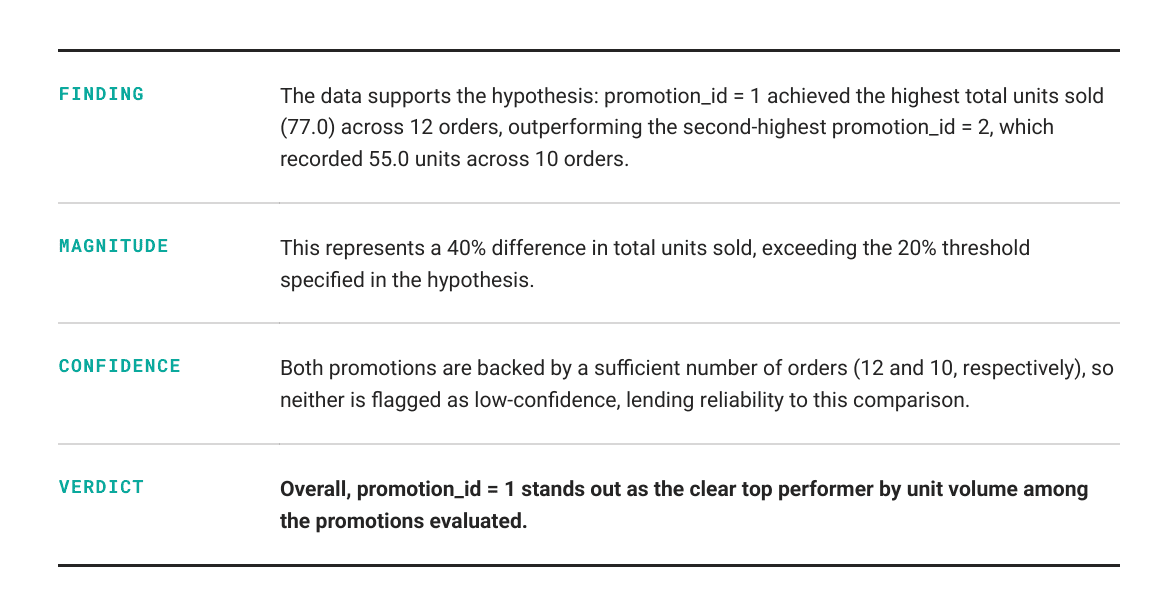
## Stage 5: Executive Summary

The fifth stage writes the summary, and it is told explicitly to leave any flagged row out of the headline claim.
要約機能では、仮説と検証済みの結果を受け取り、ビジネスリーダー向けの簡潔なサマリーを作成します。まず、低信頼度のフラグが立った行を抽出し、それらの行には背後にある注文数が閾値未満であるため結論の根拠として使用すべきではない旨を注記します。その上で、提示されたデータに基づき、低信頼度の行を見出しに据えることなく、データに裏付けのない説明を加えずに、3〜4 文で構成される経営層向けの要約を生成するよう指示を出します。
## Output
## Stage 6: Recommendations
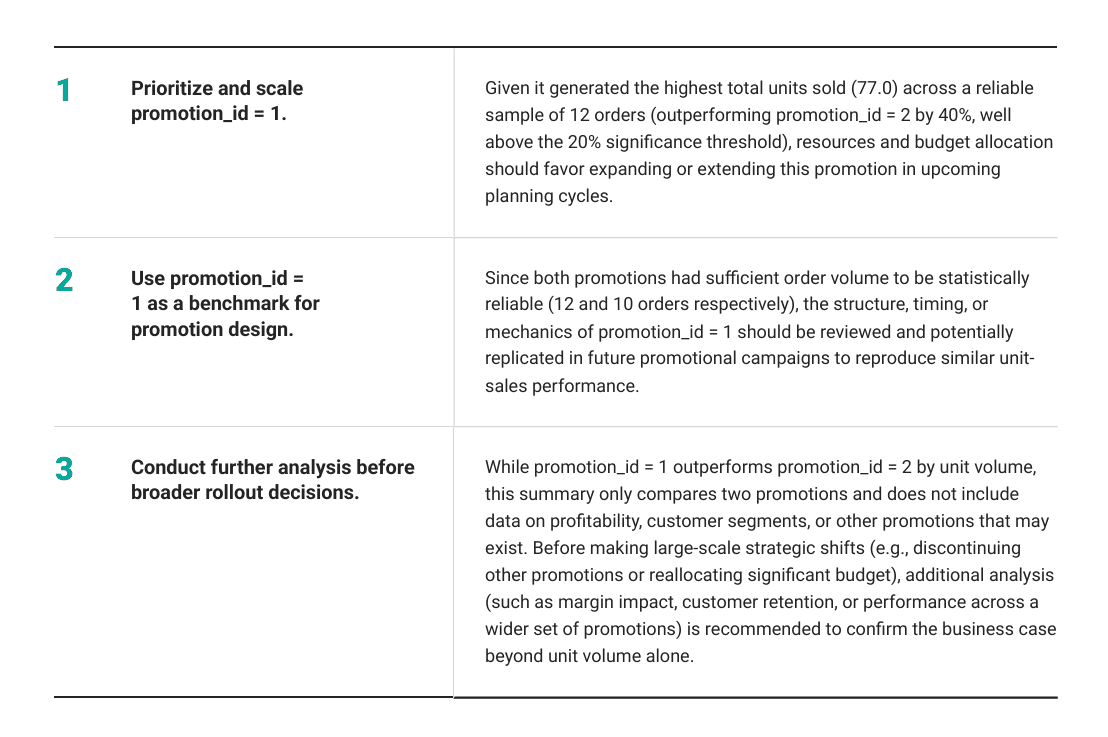
The sixth stage proposes actions, and it is told the same rule applies: no recommendation may rest on low-confidence data or facts the summary did not support.
推奨機能では、作成されたサマリーに基づき、2〜3 の具体的なビジネス推奨事項を提案します。これらの推奨事項は、サマリーが示すエビデンスにのみ基づいており、証拠から論理的に導かれるものでなければなりません。
信頼性の低いデータや捏造された事実に基づいて判断せず、証拠が不十分な場合は、確定的な答えを提示するのではなく、さらなる分析を推奨すべきです。
## Output
## Putting It Together
A `run` method chains the six stages. One call takes a question in and returns every intermediate result: the context, the hypotheses, the SQL plan, the validated table, the summary, and the recommendation.
def run(self, question):
context = self.understand_business_context(question)
hypotheses = self.generate_hypotheses()
top_hypothesis = hypotheses[0]
plan = self.plan_sql(top_hypothesis)
validated = self.validate(plan)
summary = self.summarize(top_hypothesis, validated)
recommendation = self.recommend(summary)
return {
"context": context,
"hypotheses": hypotheses,
"sql_plan": plan,
"validated_result": validated,
"summary": summary,
"recommendation": recommendation,
}
## Calling It

Calling it looks the same regardless of which provider you bring. The provider is set explicitly rather than guessed from the client object, and the pipeline refuses to run if you forget to paste in a real key.
PROVIDER = "anthropic"
API_KEY = "YOUR_API_KEY_HERE"
ANTHROPIC_MODEL = "claude-sonnet-5"
OPENAI_MODEL = "gpt-4o"
if API_KEY == "YOUR_API_KEY_HERE":
raise ValueError(
"Paste your real API key into API_KEY before running the LLM section."
)
if PROVIDER.lower() == "anthropic":
from anthropic import Anthropic
client = Anthropic(api_key=API_KEY)
llm = LLMClient(client=client, model=ANTHROPIC_MODEL, provider="anthropic")
elif PROVIDER.lower() == "openai":
from openai import OpenAI
client = OpenAI(api_key=API_KEY)
llm = LLMClient(client=client, model=OPENAI_MODEL, provider="openai")
else:
raise ValueError("PROVIDER must be either 'openai' or 'anthropic'.")
analyst = SeniorAnalyst(llm, "online_orders", orders)
result = analyst.run("Which promotion should we run more of?")
print(result["summary"])
print(result["recommendation"])
プロバイダーを `openai` に設定し、OpenAI のキーを追加すれば、同じ 6 つのステージが `gpt-4o` で変更なく実行されます。 (原文の技術表記: `PROVIDER`)

`LLMClient` は、自分がどの API と通信しているかを知る唯一のコンポーネントです。

## 結論

ここで紹介する 6 つの工程は、それぞれ単独で見れば決して複雑ではありません。質問を言い換える、SQL を記述する、表を要約するといった作業は、すでに一つのプロンプトでも十分にこなせるレベルです。

真に価値を生むのは、クエリと要約の間に挟まれる検証工程です。例えば、`n_orders` の値を確認してから、初めてそれを「答え」として扱うという手順が重要です。

このデータセットでは、LLM が呼び出される前ですでにチェックが機能していました。上記の単純な SQL の `groupby` 処理では、1 件しかない注文に基づいて平均注文単価が最も高い「プロモーション 4」が 1 位にランクインしています。しかし、モデルがこの実行をテストするために選択した仮説は、より根拠のある 2 つのグループ(12 件対 10 件の注文)を比較するものであり、`validate()` 関数には警告を出す要素がありませんでした。

このパイプラインでは、モデルが提示する比較内容に関わらず、常に同じ `n_orders` チェックを実行します。そのため、将来のテーブルや、合計値ではなく平均値を検証する実行においても、同様のコード行によって問題が発見されることになります。

このパイプラインには 1 つのクラスに 6 つのメソッドが定義されており、対象とする次のテーブルに対しても同じ 6 つのメソッドが再度実行されます。関連記事
今日のまとめ
AIデイリーブリーフで今日の重要ニュースをまとめ読み