2026 年に構築すべき実世界向け AI プロジェクト 7 つ(ガイド付き)
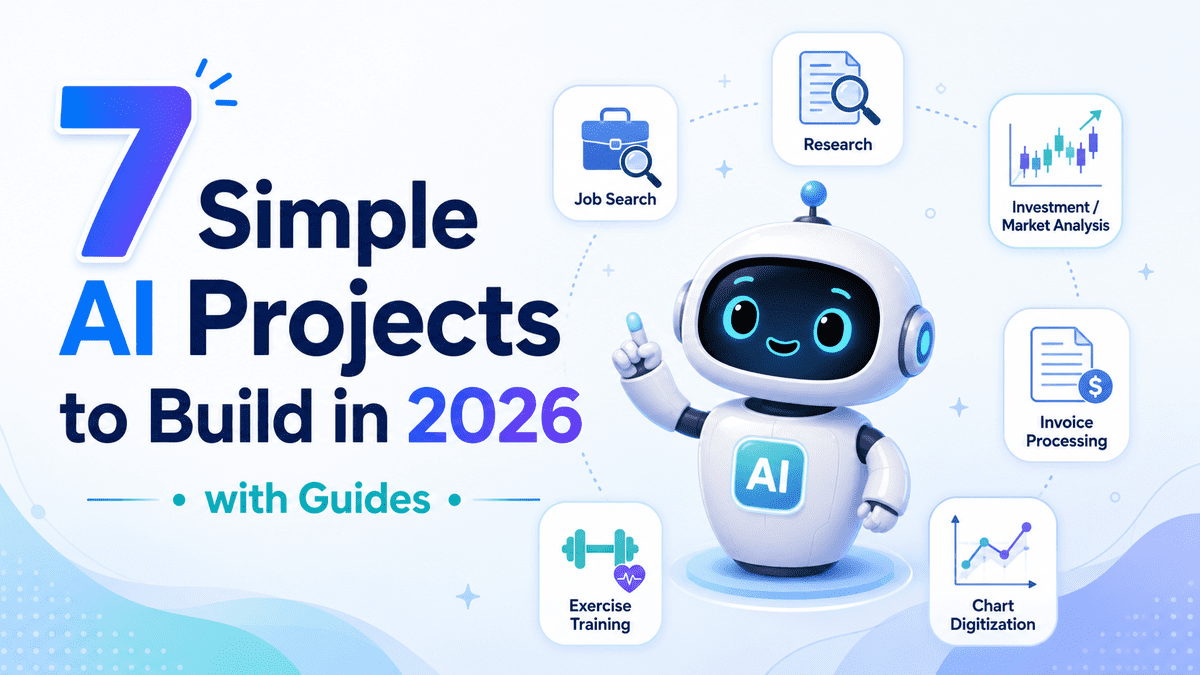
KDnuggets は、2026 年の実践的な学習のために、具体的なガイド付きで 7 つの AI プロジェクトを提案している。
Source Article
元記事を日本語で読む
本文に関係しない購読案内、埋め込み通知、サイト内プロモーションは除いています。
**
# イントロダクション
AI プロジェクトは、新しいモデルやツールをデモンストレーションするだけでなく、実際のワークフローの問題を解決したときに最も有用です。
この記事のプロジェクトは、求人検索、リサーチ、請求書処理、市場分析、チャートのデジタル化、パーソナライズされたアシスタントなど、実用的な自動化に焦点を当てています。情報を手動で検索し、読み込み、比較し、コピーして要約する代わりに、これらのプロジェクトは AI がどのように反復作業の多くをあなたのために処理できるかを示しています。各プロジェクトには完全なガイド、コード、ステップバイステップの説明が付属しているため、ゼロから構築する方法を学び、自分のワークフローに適応させることができます。
# 1. AI 求人検索アシスタントの構築
求人の検索は反復作業です。求人ボードを開き、説明を読み、それらを自分の履歴書と比較し、どの職務に応募する価値があるかを考えようとします。
**
このプロジェクトは、そのワークフローを自動化するものです。あなたは JobFit AI を構築します。これは候補者の履歴書を読み込み、ライブの求人 postings を検索し、選択した求人情報ページを確認し、ランク付けされた適合度レポートを生成するアシスタントです。本チュートリアルでは、Kimi K2.6、Olostep、OpenAI Agents SDK、および Gradio を使用します。
あなたが学ぶこと:
- 求人検索エージェントの構築方法
- ライブウェブ検索と履歴書分析を組み合わせる方法
- 候補者の適合度に基づいて求人をランク付けする方法
- シンプルな Gradio インターフェースの構築方法
ガイド: Kimi K2.6 API チュートリアル: AI 求人検索アシスタントの構築
GitHub リポジトリ: kingabzpro/JobFit-AI
# 2. マルチエージェント研究アシスタントの構築
**
ほとんどの研究ワークフローには、ウェブ検索、ソースのフィルタリング、主要情報の抽出、レポート作成という複数のステップが含まれます。単一のプロンプトで対応できる場合もありますが、マルチエージェントシステムを使用すれば、より多くの制御が可能になります。
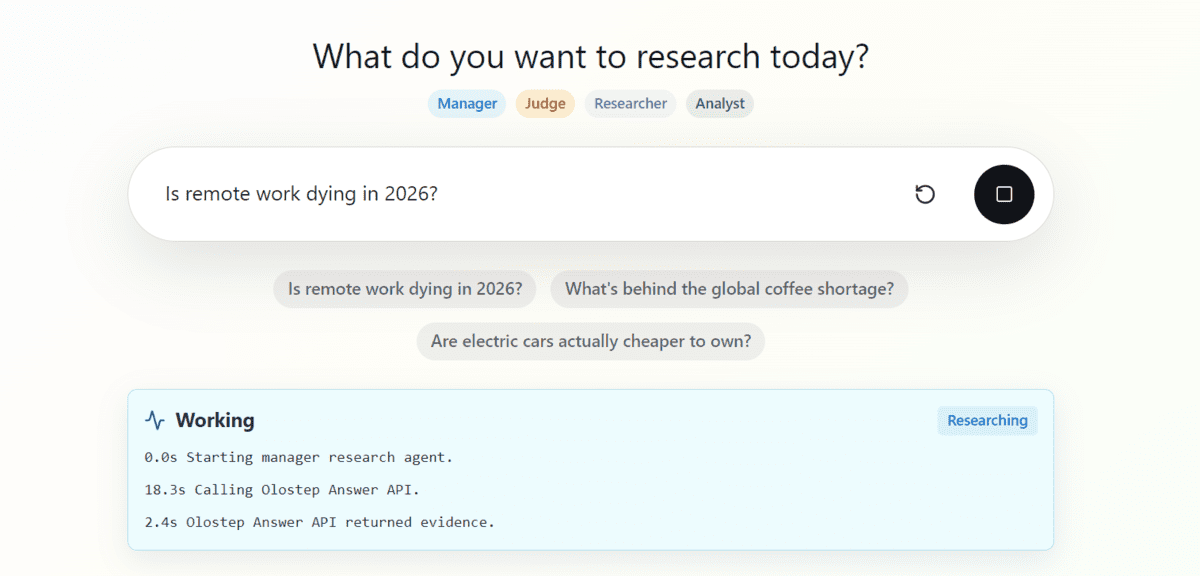
このプロジェクトでは、OpenAI Agents SDK と Olostep を使用してマルチエージェント研究アシスタントを構築する方法を示します。このアシスタントは、出典付きの Markdown 形式の研究レポートを生成し、オープンソースの GitHub プロジェクトとして公開されています。
あなたが学ぶこと:
- マルチエージェントワークフローの構築方法
- ウェブ調査におけるエージェントの活用方法
- 出典付きレポートの生成方法
- AI リサーチアシスタントプロジェクトの組織化方法
ガイド: Python でマルチエージェントリサーチアシスタントを構築する方法
GitHub: Multi-Agent-Research-Assistant
# 3. Olostep と n8n を活用した投資調査の自動化
**
投資調査とは、企業のニュース、財務更新情報、市場解説、および公開ソースの確認を意味することが多いです。このプロジェクトは、そのプロセスを自動化されたワークフローに変換します。
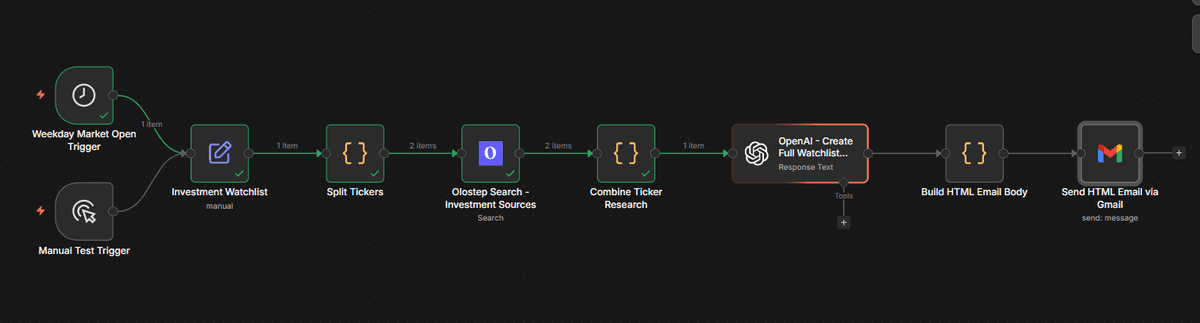
このガイドでは、Olostep と n8n を使用して公開ソースを収集し、株式ティッカー(株価記号)を分析し、AI 生成レポートを送信する方法を示しています。これは AI がどのように調査の自動化をサポートできるかを学ぶのに役立ちますが、金融アドバイスとして扱うのではなく、教育目的のプロジェクトとして捉えるべきです。
ここで学べること:
- n8n の自動化ワークフローの構築方法
- 公開財務情報の収集方法
- 投資関連ソースの要約方法
- 自動研究レポートの送信方法
ガイド: Olostep と n8n を使用した投資調査の自動化方法
GitHub: kingabzpro/olostep-n8n-investment-agent
# 4. エージェント型市場調査およびトレンド分析アプリの構築
**
市場調査は、自動化によって恩恵を受けるタスクの一つです。競合他社の更新情報、業界シグナル、トレンドレポートを手動で収集する代わりに、重労働を担うエージェントワークフローを構築することができます。
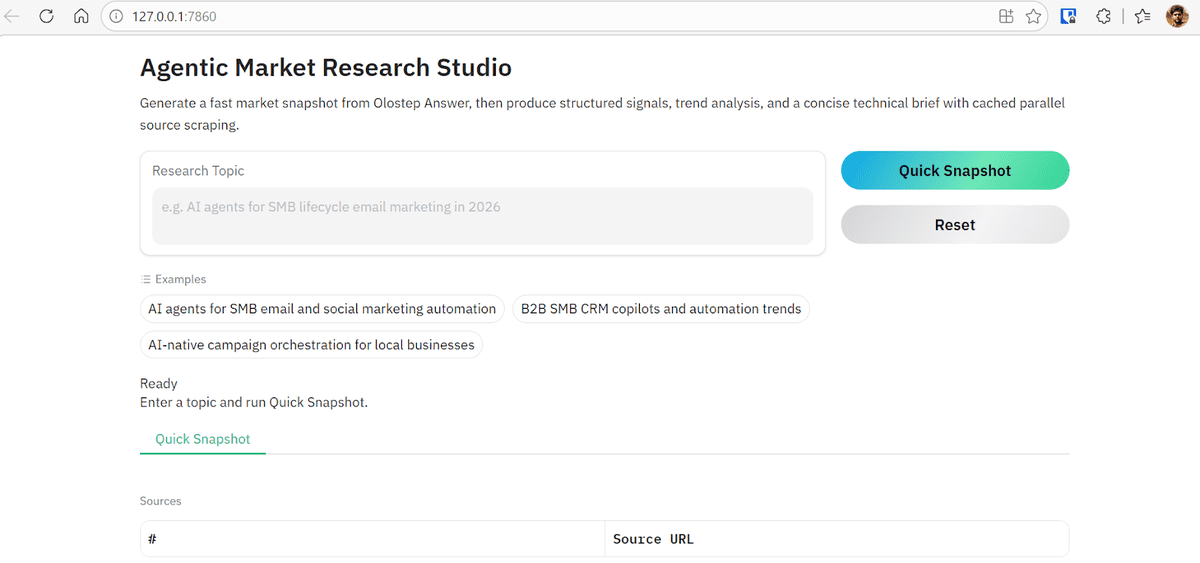
このプロジェクトでは、OpenAI Agents SDK と Olostep を使用して、エンドツーエンドの市場調査システムを構築します。ワークフローには、研究、抽出、トレンド分析、および要約作成のための専門エージェントが含まれています。
ここで学ぶこと:**
- エージェント型研究パイプラインの設計方法
- 専門エージェント間でタスクを分割する方法
- ウェブソースから有用な情報を抽出する方法
- 構造化された市場要約書を生成する方法
ガイド: Olostep を用いたエージェント型市場調査とトレンド分析
GitHub: kingabzpro/agentic-market-research-olostep
# 5. AI を活用した請求書処理パイプラインの構築
**
請求書処理は、ドキュメント理解、構造化された抽出、およびビジネス自動化を組み合わせるため、強力な実世界における AI のユースケースです。
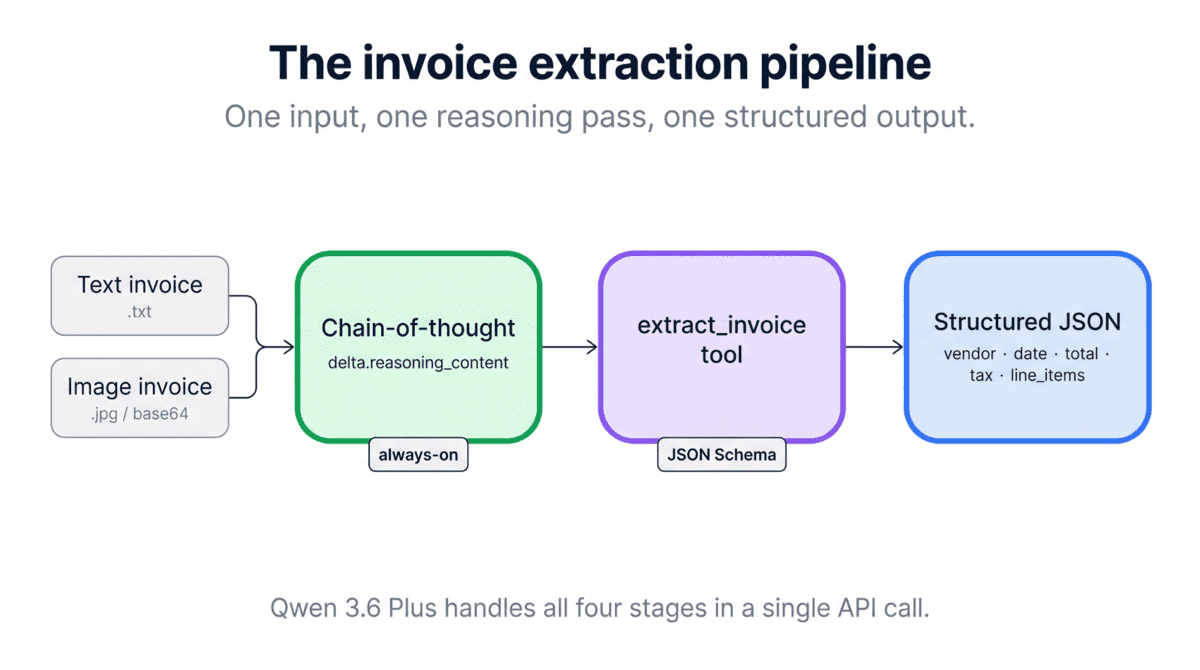
このチュートリアルでは、Qwen 3.6 Plus、Python、および OpenAI SDK を使用して、ネイティブのビジョン機能とツール呼び出しを備えた自動請求書処理パイプラインを構築します。目標は、請求書から有用な項目を抽出し、構造化された出力に変換することです。
ここで学ぶこと:
- ビジョン対応 AI モデルの使用方法
- 請求書ドキュメントの処理方法
- 構造化データの抽出方法
- 実用的なビジネス自動化パイプラインの構築方法
ガイド: Qwen 3.6 Plus API チュートリアル:Python で請求書処理パイプラインを構築する
GitHub: BexTuychiev/qwen-invoice-pipeline-tutorial
# 6. Claude Opus 4.7 を使用したチャートデジタル化ツールの構築
**
視覚データは、静的なチャート、スクリーンショット、PDF の内部に閉じ込められていることがよくあります。このプロジェクトでは、Claude Opus 4.7**の高解像度ビジョン機能を活用して、チャートの画像を構造化データに変換する方法を示します。
**

この DataCamp のチュートリアルでは、チャート画像を読み取り、軸を特定し、データポイントを抽出して、結果をクリーンな Pandas** DataFrame または CSV ファイルに保存する Python ベースのチャートディジタイザーを作成します。また、このガイドでは Claude Opus 4.7 の適応的思考、高努力レベル、構造化されたツールベースの出力についても紹介します。
ここで学ぶこと:
- Claude Opus 4.7 API の使用方法
- 高解像度のマルチモーダル入力との連携方法
- チャート画像からのデータ抽出方法
- ツールを用いたモデル出力の構造化方法
- Pandas を使用した抽出データの保存方法
ガイド: Claude Opus 4.7 API チュートリアル: チャートディジタイザーの構築.
# 7. 永続的メモリを備えたエクササイズトレーナーの構築
**
多くの AI エージェントは、セッションが終了するとすべての情報を忘却してしまいます。永続的メモリ(Persistent memory)は、ユーザーの好み、履歴、過去の対話を記憶できるようにすることで、この課題を解決します。
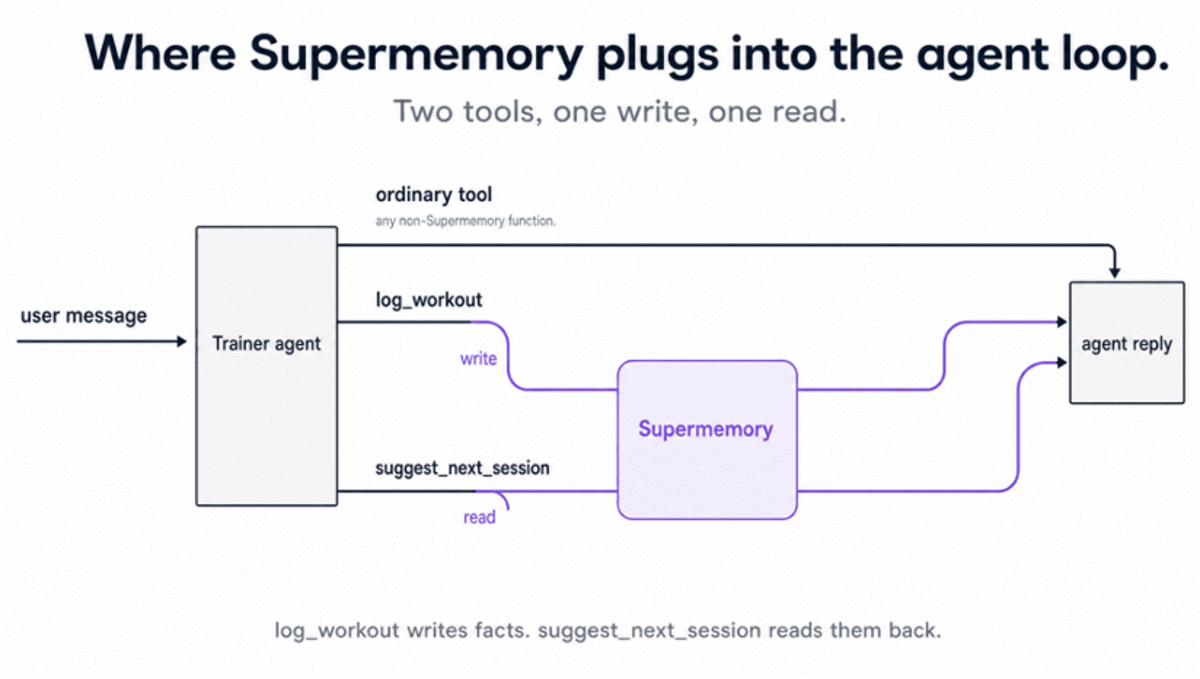
本プロジェクトでは Supermemory** を使用して、ワークアウトをログ記録し、ユーザーの履歴を記憶し、スクリプトの実行が分かれていてもパーソナライズされたセッションを提案する Python ベースのエクササイズトレーナーを構築します。
ここで学ぶこと:
- AI エージェントにおいて永続的メモリ(Persistent Memory)がどのように動作するか
- ユーザー固有の事実を保存・検索する方法
- セッションを超えて改善するエージェントを構築する方法
- 毎回コンテキストを入力し直すことなく出力をパーソナライズする方法
ガイド: Supermemory Tutorial: Add Persistent Memory to AI Agents.
# まとめ
**
このリストにあるプロジェクトのほとんどは私が構築したもので、再現可能でセットアップが容易であり、あなたのワークフローに適応できるほど実用的であることを確認しました。
私が選んだ他のプロジェクトも、有用であり、構築が簡単で、現実的な問題を解決するものとして含まれています。これらは単なるデモではありません。AI がリサーチ、ドキュメント処理、求人検索、市場分析、そして個人の生産性においてどのように役立つかを示しています。
新しいモデル API、メモリツール、Web 自動化 API にアクセスできる環境であれば、ガイドを適切に follow することで、これらのプロジェクトの多くを 5 ドル未満で、1 時間以内に構築できます。
さらに重要なのは、これらのプロジェクトを通じて AI エージェントが実際にどのように動作するかを学べる点です。すべての手順を手動でコーディングするのではなく、エージェントにツール、コンテキスト、目標を与える方法を学び、それらが最適な経路を決定し、あなたのワークフローをより知的にするように導くことができます。
原文を表示
**
# Introduction
AI projects are most useful when they solve real workflow problems, not just when they demonstrate a new model or tool.
The projects in this article focus on practical automation, including job searching, research, invoice processing, market analysis, chart digitization, and personalized assistants. Instead of manually searching, reading, comparing, copying, and summarizing information, these projects show how AI can handle much of the repetitive work for you. Each project comes with a complete guide, code, and step-by-step explanation, so you can learn how to build it from scratch and adapt it to your own workflow.
# 1. Build an AI Job Search Assistant
Searching for jobs is repetitive. You open job boards, read descriptions, compare them with your CV, and try to figure out which roles are worth applying to.
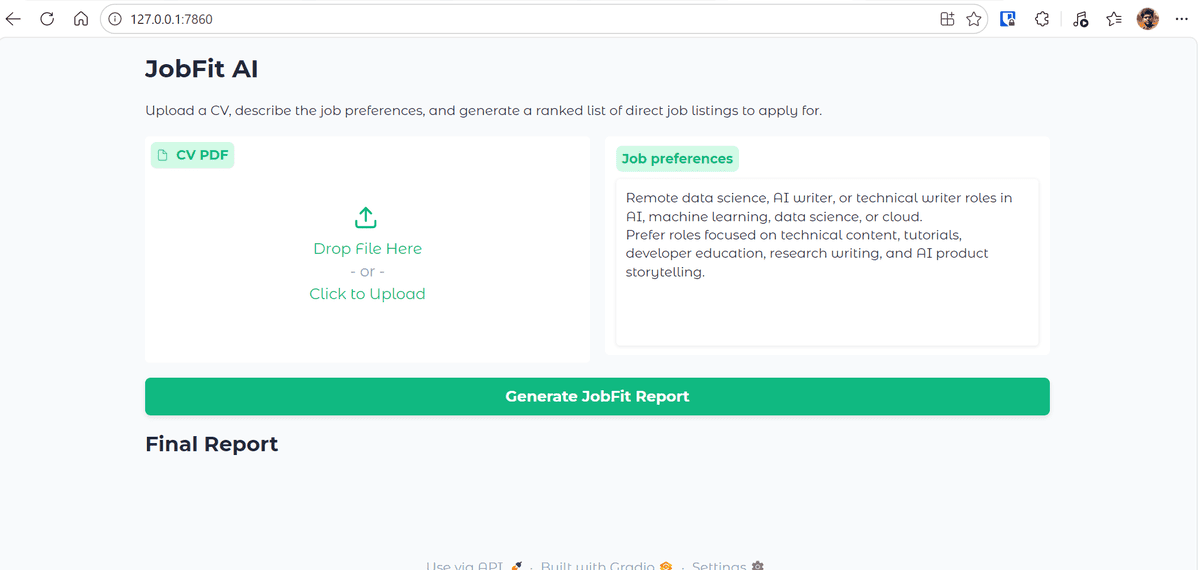
This project automates that workflow. You build JobFit AI, an assistant that reads a candidate's CV, searches for live job postings, checks selected job pages, and generates a ranked job-fit report. The tutorial uses Kimi K2.6, Olostep, OpenAI Agents SDK, and Gradio**.
What you will learn:
- How to build a job search agent
- How to combine live web search with CV analysis
- How to rank jobs based on candidate fit
- How to build a simple Gradio interface
Guide: Kimi K2.6 API Tutorial: Building an AI Job Search Assistant.
GitHub Repo: kingabzpro/JobFit-AI
# 2. Build a Multi-Agent Research Assistant
**
Most research workflows involve several steps: searching the web, filtering sources, extracting key information, and writing a report. A single prompt can help, but a multi-agent system gives you more control.
This project shows how to build a multi-agent research assistant** using the OpenAI Agents SDK and Olostep. The assistant produces sourced Markdown research reports and is available as an open-source GitHub project.
What you will learn:
- How to structure a multi-agent workflow
- How to use agents for web research
- How to generate sourced reports
- How to organize an AI research assistant project
Guide: How to Build a Multi-Agent Research Assistant in Python.
GitHub: Multi-Agent-Research-Assistant
# 3. Automate Investment Research with Olostep and n8n
**
Investment research often means checking company news, financial updates, market commentary, and public sources. This project turns that process into an automated workflow.
The guide shows how to use Olostep and n8n** to collect public sources, analyze stock tickers, and send AI-generated reports. It is useful for learning how AI can support research automation, but it should be treated as an educational project rather than financial advice.
What you will learn:
- How to build an n8n automation workflow
- How to collect public financial information
- How to summarize investment-related sources
- How to send automated research reports
Guide: How to Automate Investment Research Using Olostep and n8n.
GitHub: kingabzpro/olostep-n8n-investment-agent
# 4. Build an Agentic Market Research and Trend Analysis App
**
Market research is another task that benefits from automation. Instead of manually collecting competitor updates, industry signals, and trend reports, you can build an agentic workflow that does the heavy lifting.
This project uses the OpenAI Agents SDK and Olostep to build an end-to-end market research system. The workflow includes specialist agents for research, extraction, trend analysis, and brief writing.
What you will learn:**
- How to design an agentic research pipeline
- How to split tasks across specialist agents
- How to extract useful information from web sources
- How to generate structured market briefs
Guide: Agentic Market Research & Trend Analysis with Olostep.
GitHub: kingabzpro/agentic-market-research-olostep
# 5. Build an AI Invoice Processing Pipeline
**
Invoice processing is a strong real-world AI use case because it combines document understanding, structured extraction, and business automation.
This tutorial uses Qwen 3.6 Plus**, Python, and the OpenAI SDK to build an automated invoice processing pipeline with native vision and tool calling. The goal is to extract useful fields from invoices and turn them into structured outputs.
What you will learn:
- How to use a vision-capable AI model
- How to process invoice documents
- How to extract structured data
- How to build a practical business automation pipeline
Guide: Qwen 3.6 Plus API Tutorial: Building an Invoice Processing Pipeline in Python.
GitHub: BexTuychiev/qwen-invoice-pipeline-tutorial
# 6. Build a Chart Digitizer with Claude Opus 4.7
**
Visual data often gets trapped inside static charts, screenshots, and PDFs. This project shows how to use Claude Opus 4.7**'s high-resolution vision capabilities to turn chart images into structured data.
**
In this DataCamp tutorial, you build a Python-based chart digitizer that reads a chart image, identifies the axes, extracts the data points, and saves the results into a clean Pandas** DataFrame or CSV file. The guide also introduces Claude Opus 4.7's adaptive thinking, high effort level, and structured tool-based outputs.
What you will learn:
- How to use the Claude Opus 4.7 API
- How to work with high-resolution multimodal inputs
- How to extract data from chart images
- How to structure model outputs with tools
- How to save extracted data using Pandas
Guide: Claude Opus 4.7 API Tutorial: Building a Chart Digitizer.
# 7. Build an Exercise Trainer with Persistent Memory
**
Most AI agents forget everything once the session ends. Persistent memory solves this by allowing agents to remember user preferences, history, and previous interactions.
This project uses Supermemory** to build a Python exercise trainer that logs workouts, remembers user history, and suggests personalized sessions across separate runs of the script.
What you will learn:
- How to persistent memory works in AI agents
- How to store and retrieve user-specific facts
- How to build agents that improve across sessions
- How to personalize outputs without re-entering context every time
Guide: Supermemory Tutorial: Add Persistent Memory to AI Agents.
# Final Thoughts
**
Most of the projects in this list were built by me, and I made sure they are reproducible, easy to set up, and practical enough to adapt to your own workflow.
The other projects I selected are included because they are useful, simple to build, and solve real problems. They are not just demos. They show how AI can help with research, document processing, job search, market analysis, and personal productivity.
With access to new model APIs, memory tools, and web automation APIs, you can build many of these projects for less than $5 and in under an hour if you follow the guides properly.
More importantly, these projects teach you how AI agents actually work. Instead of coding every step manually, you learn how to give agents tools, context, and goals so they can decide the best path and make your workflow more intelligent.
Abid Ali Awan** (@1abidaliawan) is a certified data scientist professional who loves building machine learning models. Currently, he is focusing on content creation and writing technical blogs on machine learning and data science technologies. Abid holds a Master's degree in technology management and a bachelor's degree in telecommunication engineering. His vision is to build an AI product using a graph neural network for students struggling with mental illness.
関連記事
今日のまとめ
AIデイリーブリーフで今日の重要ニュースをまとめ読み