ChatGPT、米国成人向け健康機能「Health」発表
OpenAI は米国ユーザー向けに ChatGPT Health を正式にローンチし、Apple Health や医療記録との連携を通じて健康データの文脈理解と分析機能を強化した。
AI深層分析を開く2026年7月27日 02:06
キーポイント
ChatGPT Health の機能拡張
ユーザーの許可を得て Apple Health や医療記録を安全に接続し、検査結果の比較や生活習慣との関連性を分析する機能を追加した。
モデル性能の向上
GPT-5.6 Sol を導入することで複雑な健康質問への対応能力が強化され、専門家のケアを代替せず支援する役割を果たすよう設計された。
プライバシーとセキュリティ対策
接続された医療情報や会話履歴は基盤モデルの学習や広告ターゲティングに使用されないという厳格な保護措置が講じられている。
重要な引用
Health is built with layered privacy and security safeguards.
Connected medical records and Apple Health information, and conversations that use it, are not used to train our foundation models or target ads.
編集コメントを表示
編集コメント
医療データの扱いにおける厳格なプライバシー保護を明言した点は、業界全体が直面する信頼構築の課題に対する OpenAI の明確な姿勢を示している。GPT-5.6 Sol の導入により、複雑な健康情報の推論能力が実用レベルに達しつつあることが確認できる。
ChatGPT のヘルスケア機能が、米国ユーザー向けに正式に開始されました。Apple Health や対応する医療記録を安全に連携させることで、ChatGPT はあなたの情報を文脈に合わせて理解し、変化の経過を追跡し、より根拠に基づいたパーソナライズされた対話をサポートします。
この機能は初期テスターからのフィードバックを反映して構築されており、ユーザーが何を連携するか、また ChatGPT がいつそれを利用できるかを自分でコントロールできます。
毎週、3 億人以上のユーザーが ChatGPT に健康に関する質問を投げかけています。検査結果の解釈や診察への準備、医師の説明の理解、そしてより健康的な生活習慣の構築などです。しかし、これらの質問に関連する背景情報は、患者ポータル、医療記録、アプリ、ウェアラブル端末などに散在しており、全体像を把握して行動に移すことが難しいのが実情でした。
ユーザーの許可を得た上で、ChatGPT は Health で連携した関連情報を参照できるようになりました。これにより、新しい検査結果と過去のデータを比較したり、前回受診以降の変化を要約したり、睡眠や活動量、トレーニングが日々の生活にどう影響しているかを探索することが可能になります。同じ詳細を繰り返し収集・アップロード・説明する必要が減り、より情報に基づいた判断ができ、良い質問ができるようになり、医療専門家によるケアをサポートしつつも代替するものではなく、ユーザー自身が健康に対して主体的に関わる姿勢を後押しします。
私たちは、ChatGPT が複雑な医療情報を慎重に推論し、明確に説明し、不足している文脈を尋ね、専門的なケアが必要な場面を認識できるよう、健康関連の会話を支えるモデルの改善を続けています。GPT-5.5 Instant は、最先端の健康知能をすべての無料ユーザーに提供しました。一方、GPT-5.6 Sol はその成果をさらに発展させ、より複雑な質問にも高い性能で対応します。
健康機能は、多層化されたプライバシーとセキュリティ対策によって守られています。連携した医療記録や Apple Health の情報、そしてそれらを利用した会話内容は、基盤モデルの学習や広告ターゲティングには一切使用されません。本日、米国在住の 18 歳以上のログインユーザー向けに、Web および iOS 版の ChatGPT(Free、Go、Plus、Pro の各プラン)で「Health」機能を順次展開を開始しました。ChatGPT のサイドバーから「Health」を開くことで利用可能です。なお、Codex ではまだ提供されていません。
初期ユーザーの声
「最も役立ったのは、散らばった医療履歴を私が実際に理解し、説明できる形に整理してくれた点です。複数の問題が重なっている中で、ChatGPT はそれらを明確なタイムラインとして結びつけ、専門用語を平易な英語で解説してくれました。また、理学療法士やトレーナーと共有するための要約も作成してくれます。
この機能のおかげで、自分の健康履歴の中で迷子になることが減りました。バラバラの診断名や画像検査の結果、手術の記録を単に眺めるだけでなく、全体のパターンを理解できるようになったからです。情報がより使いやすくなり、医療従事者やトレーナーに対して自分を主張するための言葉も得られました。
— ブレイク(技術プログラムマネージャー)
自身の情報に基づいた健康に関する対話
今年初め、私たちは限られたユーザー向けに 専用の健康体験 を導入しました。当初は、その恩恵を十分に受けるために ChatGPT 内の別エリアへ移動する必要がありました。初期テストでは、健康に関する質問は会話の流れの中で自然に発生することがわかりました。例えば、食事の計画やレシピを検索している際に、食品アレルギーや食事制限を考慮してほしいと求めるケースです。
アクセス権を持つユーザーの間では、健康関連の対話の 70% 以上が専用エリア外で行われていました。別エリアへ移動する手順は、不要な手間だったのです。
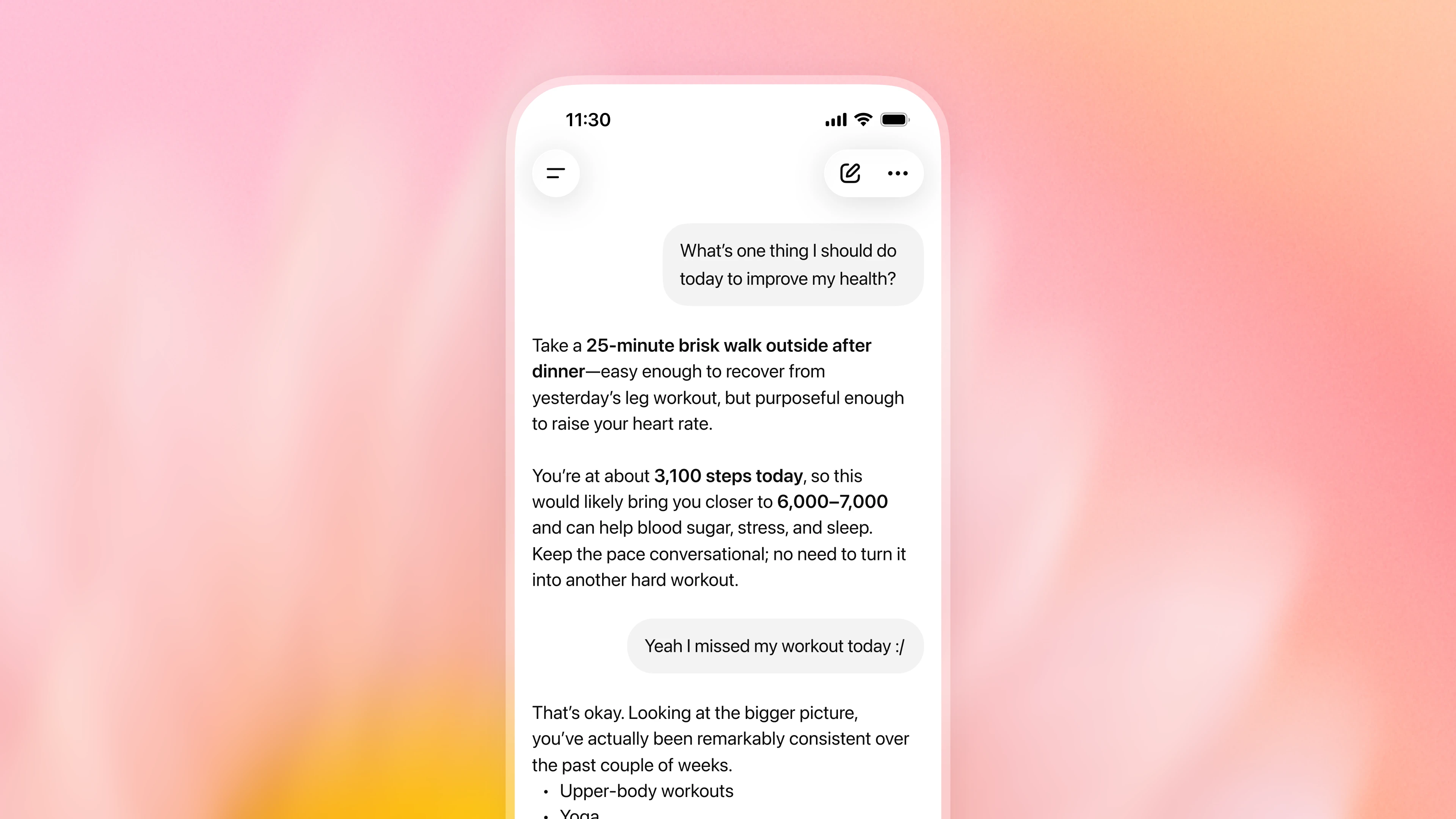
そのフィードバックを踏まえて、ChatGPT は Health アプリ内で関連付けられた情報を会話全体から参照できるようになりました。Health 内での会話を最初から始める必要はありません。ユーザーの許可があれば、薬物療法や検査結果、最近の受診歴、睡眠、活動量といったデータと、あなたが共有する目標や文脈を組み合わせることも可能です。この追加された背景情報により、日常会話の有用性がさらに高まります。
例えば、レストランを選ぶ際に食事制限を考慮したり、家族で週末に低負荷なアクティビティを計画する際に最近の怪我を考慮したりできます。不完全または古くなった情報を補足・訂正したり、追加の文脈を提供したりすることも可能です。
左側のサイドバーにある「Health」は、情報の連携や管理、最新のデータと傾向の確認、提案されたプロンプトの探索、同期された記録の閲覧、過去の健康関連会話への復帰などを行うためのホームベースとして引き続き機能します。
医師との連携による健康インテリジェンスの向上
ChatGPT の健康関連会話におけるモデルの性能向上には、専用のトレーニングを施しています。無料プランのユーザーに提供されている「GPT-5.5 Instant」は、緊急性の高い医療対応が必要な場面を認識したり、必要な背景情報を適切に質問したり、不確実性を説明したり、複雑な情報をわかりやすく伝えたりする点で、明確な進歩を遂げました。最も難易度の高い健康評価タスクにおいては、当時の最先端の「Thinking」モデルと同等のレベルで動作しました。
詳細な結果や医師との連携に関する取り組みについては、こちらをご覧ください。
有料プランのユーザー向けに提供されている「GPT-5.6 Sol」は、現時点で最も強力な健康対応モデルです。複雑な詳細を推論し、明確にコミュニケーションを取り、慎重な判断を下す必要があるタスクにおいて、これまでの成果をさらに強化しています。このモデルは、受診時のメモを平易な言葉で説明したり、検査結果の経時的な変化を理解したり、医師が検討した選択肢に関する要因を考慮したり、次の予約に向けた質問を用意したりするのを支援します。
進捗を測るために、私たちは世界中の数百人の医師と協力し、現実的な健康シナリオや、優れた回答が満たすべき基準となる詳細な評価ルールの策定に取り組んでいます。これらの評価では、正確性、安全性、コミュニケーション能力、文脈の理解度、完全性、そして適切なエスカレーション対応といった品質を審査します。すべての GPT‑5.6 モデルは、困難な医療タスクにおける AI の性能を検証する「HealthBench Professional」において、GPT‑5.5 を上回る結果を示しました。
リリースに先立ち、医師たちは ChatGPT 内の Health 機能を徹底的にテストし、接続された健康データを用いて、実世界でのモデルの性能と安全性を測定・向上させることに貢献しました。これらの結果は着実な進歩を示すものですが、私たちはモデルの改善を継続しています。それでもなお、ChatGPT は誤りを犯す可能性があり、有資格の医療従事者のケアや判断に代わるものではありません。重要な情報は必ず確認し、医療に関する決定については担当医と相談することをお勧めします。
プライバシー、セキュリティ、そしてコントロールを考慮して設計
Health は、多層化されたプライバシー保護およびセキュリティ対策を備えて構築されています。すべての ChatGPT での会話は保存時および転送時に暗号化されており、Health で連携される情報には追加の暗号化保護が適用されます。
Health に接続された情報は、基盤モデルの学習や広告ターゲティングには使用されません。
医療記録や Apple Health の情報を接続し、それらを活用した会話が行われた場合でも、ChatGPT のモデル学習設定をどのように選択しても、その情報は基盤モデルの学習や広告ターゲティングに利用されることはありません。
一方、このデータを利用しない会話は、標準的な ChatGPT のモデル学習設定に従います。この設定は「設定」>「データコントロール」からいつでも変更可能です。
ChatGPT が Health に接続された情報を利用するタイミングは、あなたが決定します。
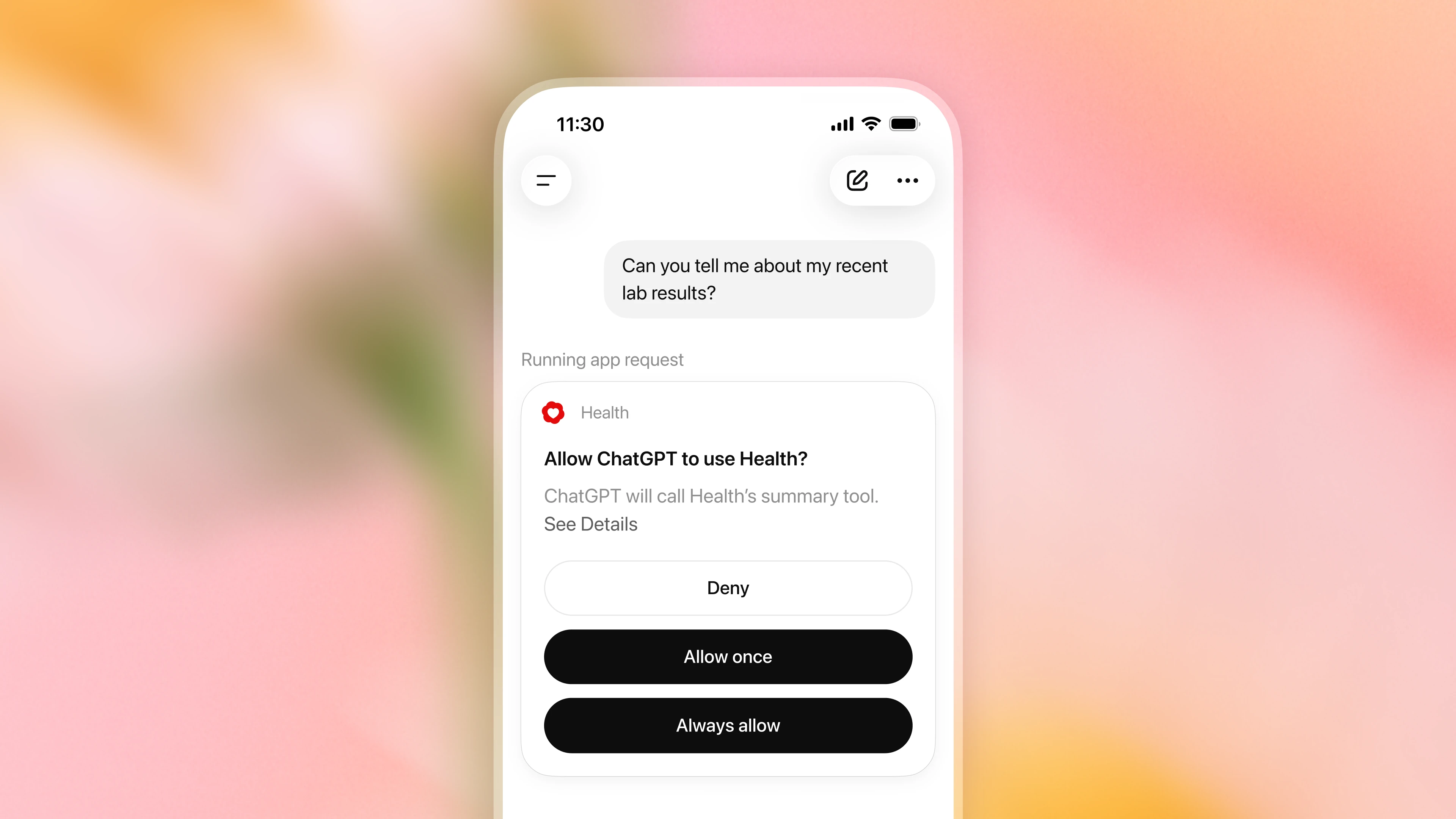
デフォルトでは、ChatGPT は医療記録や Apple Health の情報を活用して回答をパーソナライズする前に、利用許可を求めます。各リクエストに対して承認するか、またはアクセスを常に許可するように設定すれば、これらの確認プロンプトは表示されなくなります。この設定は「設定」>「プラグイン」>「Health」からいつでも変更できます。
Health に接続された情報は、いつでも切断できます。
「Health」>「アカウント」からいつでもアカウントの接続を解除できます。接続を解除すると、そのソースから同期されていたデータは 30 日以内に OpenAI のシステムから削除されます。ただし、すでに ChatGPT の会話履歴に含まれている情報は、あなたがその会話を削除するまで残存します。
記憶はあなたが管理します。 今後のチャットをパーソナライズするために、健康に関する会話から「メモリー」を作成できます。ただし、メモリーは直接医療記録や Apple Health の情報から作成されるわけではありません。メモリーを作成せずに会話をしたい場合は、「一時的なチャット」を使用するか、設定 > メモリでメモリー機能をオフにしてください。
機密情報の共有を保護するための追加の安全対策があります。 ChatGPT が Apple Health データに基づいてランニングパートナーにトレーニングプランを送信するなど、健康情報を開示する可能性のある他の接続済みプラグインでアクションを実行する前に、追加の安全対策が働き、あなたの要求と共有内容が一致しているかを確認します。一部の機密性の高い操作では、ChatGPT が実行前に確認を求めてきます。私たちは、Health の接続情報に焦点を当てた専用レッドチーム演習を通じてこれらの安全対策を継続的にテストし、その結果を保護の強化に活用しています。
健康情報の接続と使用方法について
ChatGPT では、何も接続せずに健康に関する質問をすることができます。Health や自分の情報を根拠とした回答を受け取るには、Apple Health、米国病院システムからのサポート対象医療記録、One Medical、Function Health のいずれかを接続してください。
健康情報の接続方法
サイドバーまたは「More」メニューから「Open Health」を選択し、「Get started(始める)」をクリックしてください。ChatGPT が安全に健康情報を連携するための手順を案内します。
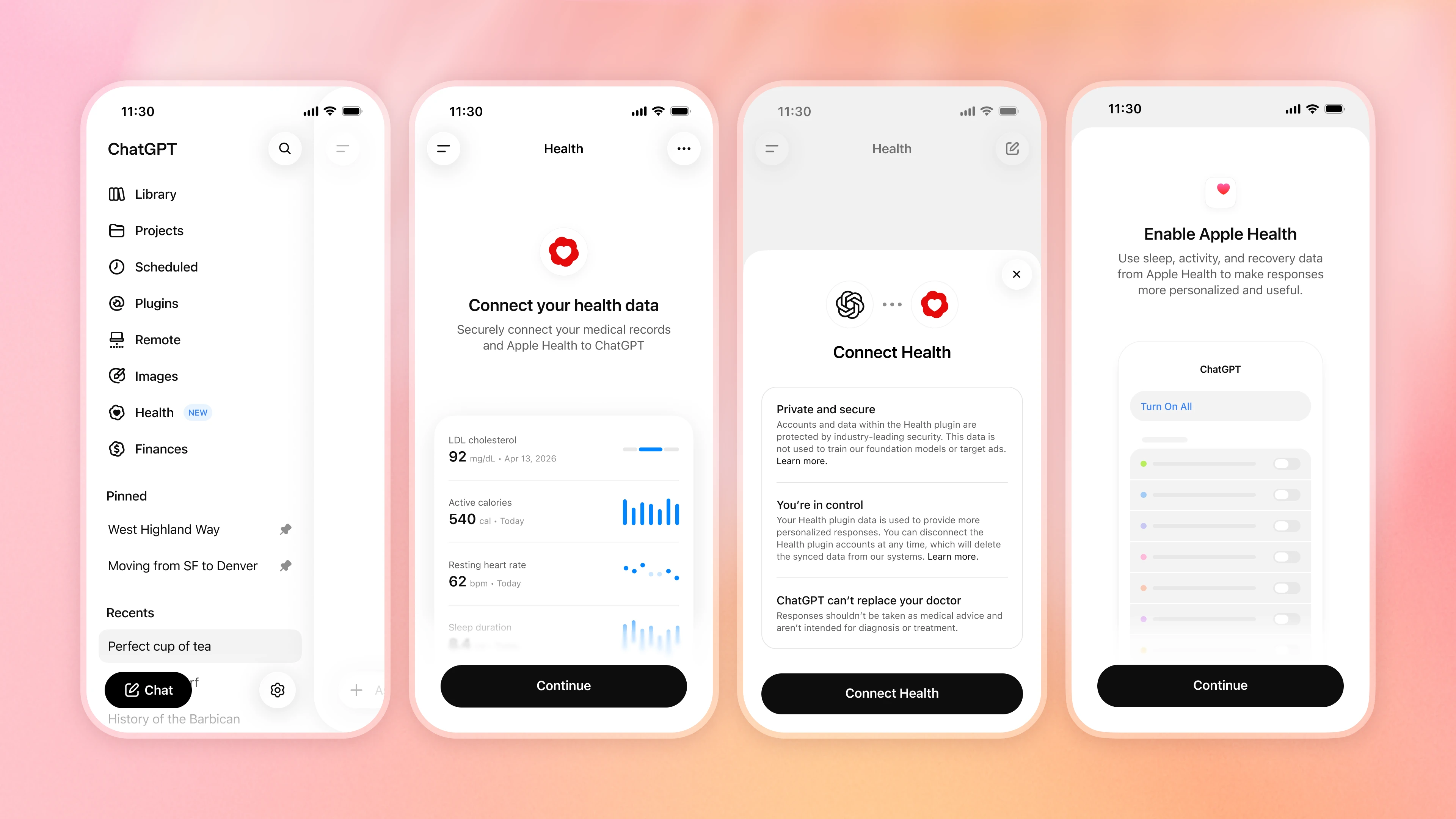
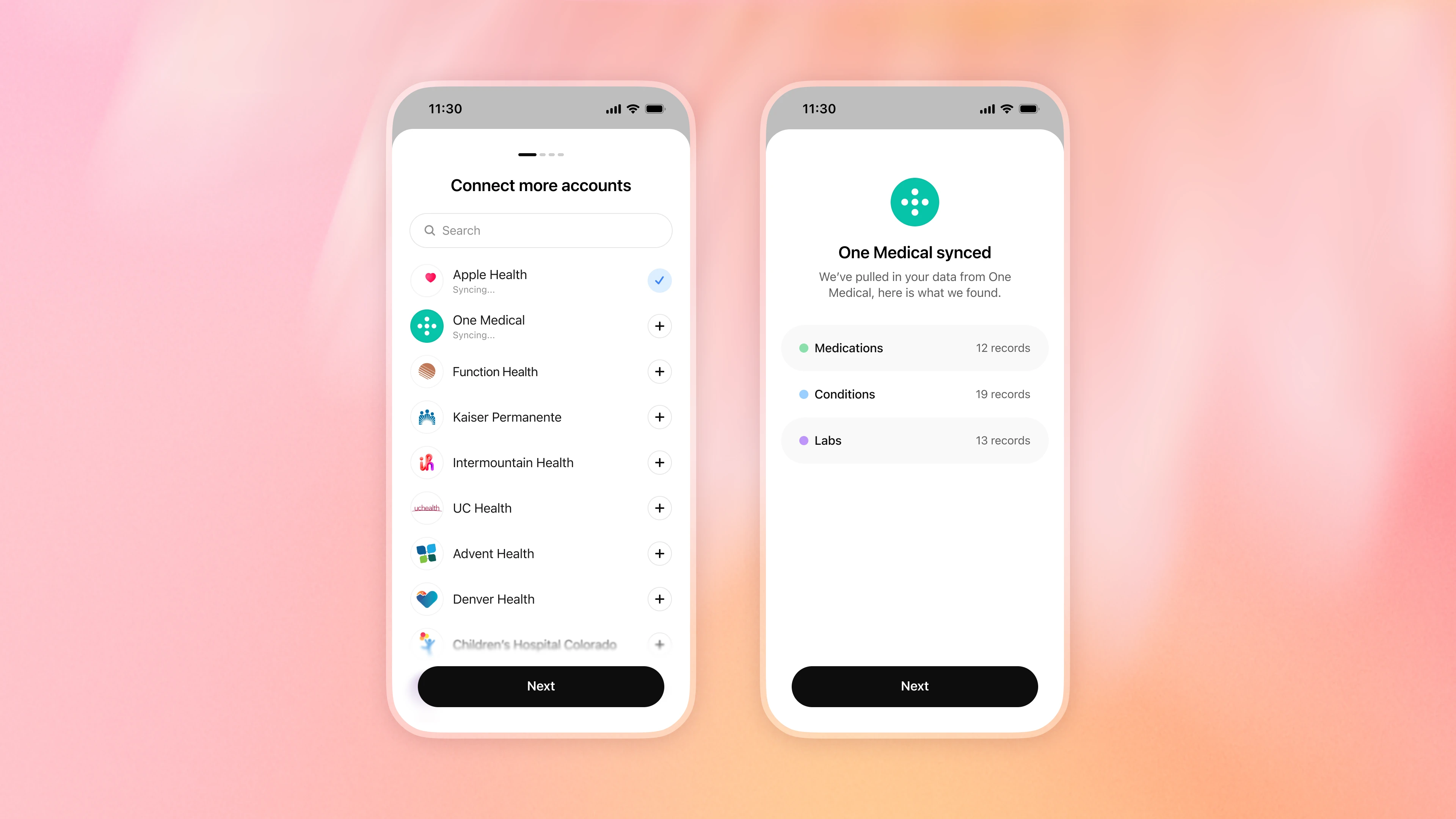
連携が完了すると、情報の同期が始まります。数分かかる場合がありますが、その間は他のアカウントを追加したり、後で再度作業を続けることも可能です。
ウェアラブル端末や他の健康アプリを使っている場合は?
ウェアラブルデバイスやフィットネス、栄養管理アプリを Apple Health と連携して利用している場合は、データ共有機能がオンになっているか確認してください。Apple Health を ChatGPT に接続し、ユーザーが許可した場合に限り、ChatGPT はそのアプリを通じて Apple Health が提供する情報を活用できるようになります。
ただし、提供される情報の種類はアプリや計測項目によって異なり、一部の独自スコアなどは転送されない場合があります。
関連する健康情報の確認と更新
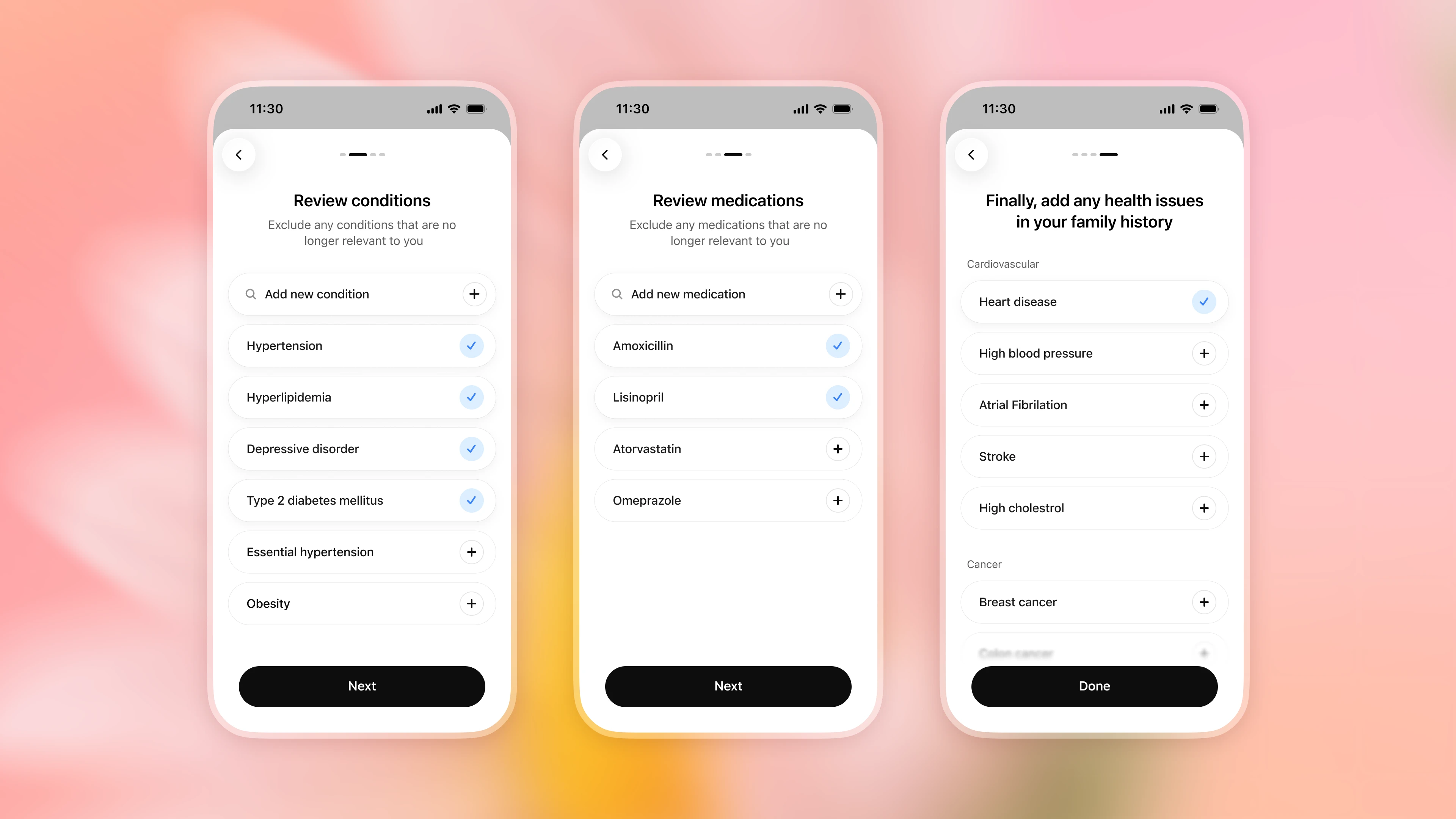
接続後、現在の状態や服用中の薬を見直し、不要になった項目を削除したり、家族の健康歴など不足している情報を追加したりできます。ただし、連携された情報が常に完全で最新とは限りません。例えば、薬の服用を中止してもリストに残っている場合があります。何か変更があったら ChatGPT に伝え、重要な詳細は必ず元の情報源と照合してください。
健康情報を会話に組み込む
情報同期が完了すれば、ChatGPT のどこからでも質問できます。関連する話題では、設定した許可に基づいて ChatGPT が健康情報を活用します。デフォルトでは、この情報を使う前に必ず確認のメッセージが表示されます。一度だけ許可を出すか、常に許可するかを選べます。また、「設定」>「プラグイン」>「Health」からいつでも設定を変更可能です。さらに、メッセージに @Health を追加して明示的に健康情報の参照を依頼することもできます。
健康情報の確認と管理
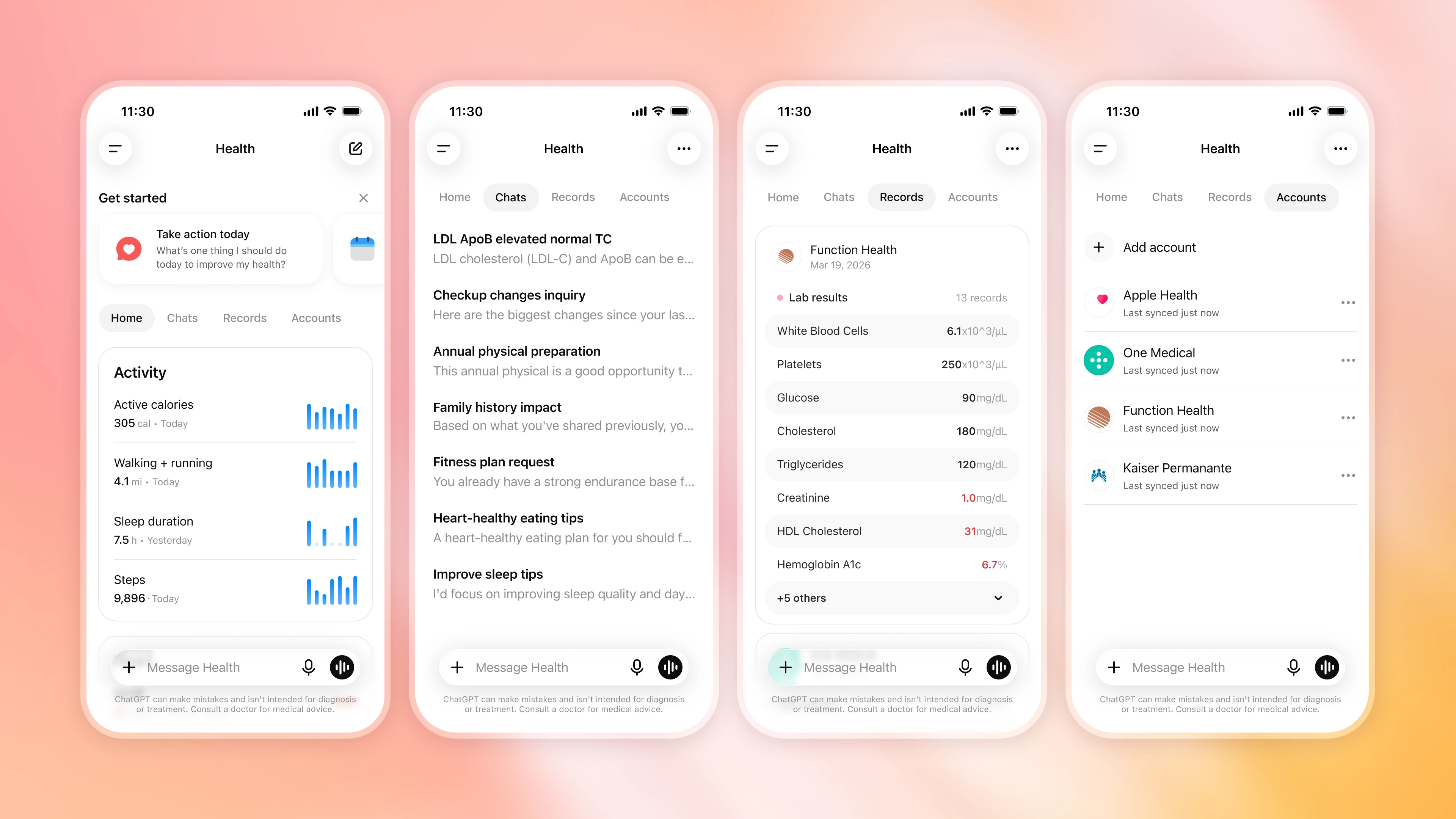
いつでも「Health」画面に戻れば、直近のデータや傾向を確認できます。おすすめの質問文も表示され、同期された記録を閲覧したり、過去の会話を見直したり、連携したアカウントを管理することも可能です。
原文を表示
Health in ChatGPT is launching to U.S. users. You can choose to securely connect Apple Health and supported medical records so ChatGPT can help you understand your information in context, keep track of what has changed, and have more informed, personalized conversations. The experience builds on feedback from early testers and gives you control over what you connect and when ChatGPT can use it.
Every week, more than 300 million people turn to ChatGPT with health-related questions—from understanding a lab result and preparing for an appointment to making sense of what a doctor said and building a healthier routine. But the context behind those questions is often scattered across patient portals, medical records, apps, and wearables, making it difficult to see and act on the complete picture.
With your permission, ChatGPT can now draw on relevant information you’ve connected in Health to help you compare a new result with prior tests, summarize changes since your last appointment, or explore how sleep, activity, and workouts relate to your routine. This can reduce the need to repeatedly gather, upload, or explain the same details, helping you feel more informed, ask better questions, and take a more active role in your health while supporting, not replacing, the care you receive from medical professionals.
We’re continuing to improve the models behind health conversations so ChatGPT can reason more carefully across complex details, explain health information clearly, ask for missing context, and recognize when professional care may be needed. GPT‑5.5 Instant brought frontier health intelligence to all free users. GPT‑5.6 Sol builds on that progress with even stronger performance on more complex questions.
Health is built with layered privacy and security safeguards. Connected medical records and Apple Health information, and conversations that use it, are not used to train our foundation models or target ads. We’re beginning to roll out Health to logged-in ChatGPT users 18 and older in the U.S. on web and iOS across Free, Go, Plus, and Pro plans today. Open Health from the sidebar in ChatGPT to get started. Health is not yet available in Codex.
What early users are saying
“The most useful part has been turning scattered medical history into something I can actually understand and explain. I have multiple overlapping issues and ChatGPT helped connect those pieces into a clear timeline, explain the medical terms in plain English, and create summaries I could share with a physical therapist or trainer.
This has helped me feel less lost in my own health history. Instead of just seeing disconnected diagnoses, imaging results, and surgery notes, I could understand the bigger pattern. It made the information more usable and gave me better language to advocate for myself with providers and trainers.”
—Blake, technical program manager
Health conversations grounded in your information
Earlier this year, we introduced a dedicated health experience to a limited group of users that required visiting a separate space in ChatGPT to get the full benefit. Early testing showed that health questions often arose naturally in the course of conversations. For example, while planning meals or looking for recipes, someone might want ChatGPT to take a food allergy or dietary restriction into account. Among people with access, more than 70% of health-related conversations took place outside the dedicated health experience. Moving to a separate space added an unnecessary step.
Based on that feedback, you can now choose to let ChatGPT draw on relevant information you’ve connected in Health across your conversations, without needing to start within Health. With your permission, ChatGPT can consider relevant information you have connected, such as medications, lab results, recent visits, sleep, and activity, alongside the goals and context you share. This added context can make everyday conversations more useful. For example, ChatGPT can consider a dietary restriction when helping you choose a restaurant, or a recent injury when planning lower-impact weekend activities with your family. You can ask follow-up questions, add context, or correct information that is incomplete or out of date.
Health, in the left sidebar, remains your home base for connecting and managing your information, seeing recent data and trends, exploring suggested prompts, browsing synced records, and returning to past health conversations.

Improving health intelligence with physicians
We use dedicated training to improve the models behind health conversations in ChatGPT. GPT‑5.5 Instant, available to users on the Free plan, has made meaningful gains in recognizing when urgent care may be needed, asking for relevant context, explaining uncertainty, and making complex information easier to understand. On our most challenging health evaluations, it performed at a level comparable to our frontier Thinking models at the time of evaluation. Learn more about those results and our work with physicians.
GPT‑5.6 Sol, available to paid users, is our strongest model yet for health. It builds on our progress with stronger performance on tasks that require reasoning across complex details, clear communication, and careful judgment. It can help explain a visit note in plain language, understand how lab results have changed over time, consider the factors across options a doctor discussed, or prepare questions for a follow-up appointment.
To measure progress, we work with hundreds of physicians around the world to develop realistic health scenarios and detailed rubrics that define what a strong response should do. These evaluations assess qualities including accuracy, safety, communication, context awareness, completeness, and appropriate escalation. Every GPT‑5.6 model outperformed GPT‑5.5 on HealthBench Professional(opens in a new window), an evaluation of AI performance on challenging health tasks.
Finally, physicians extensively tested Health in ChatGPT before release, helping us measure and improve real-world model performance and safety with connected health data. While these results represent meaningful progress and we are continuously improving our models, ChatGPT can still make mistakes and does not replace the care and judgment of qualified medical professionals. We encourage people to verify important information and discuss medical decisions with their healthcare provider.
Built with privacy, security, and control
Health is built with layered privacy and security safeguards. All ChatGPT conversations are encrypted at rest and in transit, and information connected in Health receives additional encryption protections.
The information connected in Health is not used to train our foundation models or target ads. Connected medical records and Apple Health information, and conversations that use it, are not used to train our foundation models or target ads, regardless of the model-training setting you choose for ChatGPT. Conversations that do not use this data follow your standard ChatGPT model-training setting choices, which you can change at any time in Settings > Data Controls.
You decide when ChatGPT can use the information connected in Health. By default, ChatGPT asks for permission before using connected medical records and Apple Health information to personalize a response. You can approve each request or choose to always allow access, which turns off these permission prompts. You can change this setting anytime in Settings > Plugins > Health.
You can disconnect your Health information at any time. Disconnect accounts at any time in Health > Accounts. When you do, data synced from that source is deleted from OpenAI’s systems within 30 days. Information already included in your ChatGPT conversation history remains until you delete those conversations.
Memory remains in your control. To personalize future chats, memories can be created from your Health conversations. Memories are not created directly from connected medical records and Apple Health information. If you’d like to have a conversation without creating memories, you can use Temporary Chat(opens in a new window) or turn memory off in Settings > Memory.
Additional safeguards help protect sensitive sharing. Before ChatGPT takes an action in another connected plugin that could disclose Health information, like sending your running partner a training plan based on your Apple Health data, additional safeguards help check that the sharing matches your request. For some sensitive actions, ChatGPT may ask you to confirm before proceeding. We continue to test these safeguards through dedicated red-team exercises focused on connected information in Health and use the findings to strengthen our protections.
How to connect and use your health information
You can ask health questions in ChatGPT without connecting anything. To use Health and get responses grounded in your own information, you can choose to connect Apple Health, supported medical records from U.S. hospital systems, One Medical, or Function Health.
Connect your health information
Open Health from the sidebar or More menu in ChatGPT and select “Get started.” ChatGPT will guide you through securely connecting your health information.

Once connected, your information will begin syncing, which may take a few minutes. While it syncs, you can connect additional accounts or return later.

Using a wearable or another health app?
If you use a wearable, fitness, or nutrition app that shares data with Apple Health, make sure sharing is turned on. Once you connect Apple Health to ChatGPT, ChatGPT can use the information that app makes available through Apple Health, when you allow it. Available information varies by app and metric, and some proprietary scores may not transfer.
Review and update relevant health details
After connecting, you can review conditions and medications, remove anything that is no longer relevant, and add details that may be missing, including family health history. Connected information may not always be complete or current, for example, a medication may remain listed after you stop taking it, so tell ChatGPT when something changes and check important details against the original source.

Bring your health context into conversations
Once your information is synced, you can ask questions anywhere in ChatGPT. When relevant, ChatGPT may use Health information based on your permissions. By default, ChatGPT asks before using this information. You can allow access once or choose to always allow it, and can change this setting anytime in Settings > Plugins > Health. You can also add @Health to your message to explicitly ask ChatGPT to include health context.

Explore and manage your health information
Return to Health anytime to see recent data and trends, find suggested prompts, browse synced records, revisit past conversations, and manage your connected accounts.

AI算出
主要ニュースainew評価高い
ChatGPT の新機能として Health が正式に発表され、Apple Health や医療記録との連携という具体的な実装内容が含まれているため、新規性と AI 関連性は高い。ただし対象が米国成人限定であり、日本固有の導入情報や規制情報が含まれていないため、日本の関連性は低めとなる。
6つの評価軸を見る
- AI関連度
- 100
- 情報源の信頼性
- 50
- 新規性
- 75
- 調べる価値
- 75
- 重複の少なさ
- 100
- 日本での有用性
- 25
関連記事
News to Guide
ニュースの次に確認する
発表内容を、現在の料金や仕様と照らし合わせられる関連ガイドです。
今日のまとめ
AIデイリーブリーフで今日の重要ニュースをまとめ読み