エージェント時代向け軽量 PDF ツール「UPDF」が発表
本文の状態
日本語全文を表示中
詳細モードで約11分の本文を読めます。
同じ出来事の情報源
この情報源を基点に整理
MarkTechPost
Superace Software Technologies は、LLM の解釈能力とドキュメント編集の確定的実行を統合した「UPDF」を発表し、レイアウト維持しながら PDF を直接編集・変換する新ツールを提供する。
AI深層分析を開く2026年8月21日 10:52
AI深層分析
キーポイント
解釈と実行の統合アプローチ
LLM が得意とする文書の意味解釈と、従来の編集ソフトが担う確定的な数値変更やレイアウト操作を、単一のアプリケーション内で統合して処理する。
レイアウト維持型直接編集機能
元のソースファイルから再構築せず、既存の PDF 内のテキスト、フォント、画像、テーブル、フォームフィールドなどを直接編集可能にする機能を搭載している。
多様な形式間の変換能力
PDF を Word、Excel、PowerPoint など 14 種類へ変換する機能や、逆に PDF を作成する 10 以上の方法をサポートし、レイアウト崩れを防ぐ。
クロスプラットフォーム対応
Windows、macOS、iOS、Android に対応したオールインワンツールとして開発され、AI アシスタントや OCR、圧縮機能も統合されている。
スキャン文書のOCRとレイアウト制御
UPDFは38言語に対応したOCRでスキャンPDFを検索可能・編集可能なテキストに変換し、監査用途に最適な「画像上にテキストを重ねる」レイアウトオプションを提供する。
重要な引用
UPDF's premise is that both belong in the same window.
A plausible-looking approximation is a failure.
UPDF keeps the original layout, fonts, tables, and formatting intact while the edit lands.
"Scanned PDFs are the most common failure point in document automation."
編集コメントを表示
編集コメント
UPDF は、LLM の普及によって浮き彫りになった「読み取り」と「編集」のギャップを埋める実用的なアプローチを示している。同社の自己申告によると、このツールはレイアウト維持に特化しており、現場での実用性を高める可能性がある。
Source Article
元記事を日本語で読む
本文に関係しない購読案内、埋め込み通知、サイト内プロモーションは除いています。
PDF はほぼすべての業務フローの最終段階に位置しています。契約書、請求書、研究論文、スキャンされた申込書、マニュアル、コンプライアンス提出書類など、あらゆる資料が PDF 形式で届きます。このフォーマットはレイアウトを固定する点では非常に優れていますが、その中で数値を一つ変更しようとする際には、むしろ足かせとなることがあります。
言語モデルが文書の読み取り能力を向上させたことで、このギャップはより明確になりました。AI モデルなら 90 ページにわたるマスターサービス契約書を数秒で要約できます。しかし、元のファイルを確実に書き換えることはできません。表の配置も維持できず、きれいに署名可能なコピーとして返すこともできないのです。
UPDF は、この問題の後半部分、つまり「編集」に焦点を当てて開発されました。Superace Software Technologies によって作られた UPDF は、Windows、macOS、iOS、Android に対応したオールインワンの PDF エディタです。編集、注釈付け、変換、圧縮、OCR(光学文字認識)、ページ整理、そして統合された AI アシスタントを一つのアプリケーションにまとめています。
同じ文書の中に存在する二つの異なる課題
文書作業は大きく分けて二つのカテゴリに分けるのが有効です。
第一は「解釈」です。この条項の意味は何だろうか?4 節の主張は何か?3 つの引用の中で最も安価なものはどれか?こうした問いに対する答えを見つけることは、言語モデルが現在非常に得意とする分野です。
2 つ目は実行です。価格を 4,200 ドルから 3,850 ドルに変更する、300 ページあるレポートの 7 ページ目から 12 ページ目を抽出する、スキャンした請求書を列構造を保ったままスプレッドシートに変換する、ファイルを扁平化して証明書を追加する。これらの操作はすべて決定論的であり、正しい出力がただ一つだけ存在します。見た目が似ているだけの近似値では失敗となります。
多くのチームはこの課題に対し、2 つのツールを並行して動かすことで対応しています。チャットボットが解釈を担当し、別のエディタが実行を担当するのです。しかし UPDF の前提は、これら 2 つの機能を同じウィンドウ内で完結させるべきだという点にあります。
Word ドキュメントのように PDF を編集可能に
UPDFを使えば、元のソースファイルから作り直すことなく、既存の PDF を直接編集できます。編集可能な要素には、テキストやフォントスタイル、画像、リンク、表が含まれます。また、ウォーターマーク、背景、ヘッダーとフッター、フォームフィールド、ページ自体もその場で編集可能です。
実用上の制約として重要なのが「レイアウトの維持」です。価格が古くなったパンフレットを編集した結果、デザイン変更プロジェクトにまで発展してしまっては困ります。同様に、日付が一つ間違っている契約書を編集する際にも、レイアウトが崩れてはいけません。UPDF は、編集を加えた後も元のレイアウト、フォント、表、書式をすべて維持します。
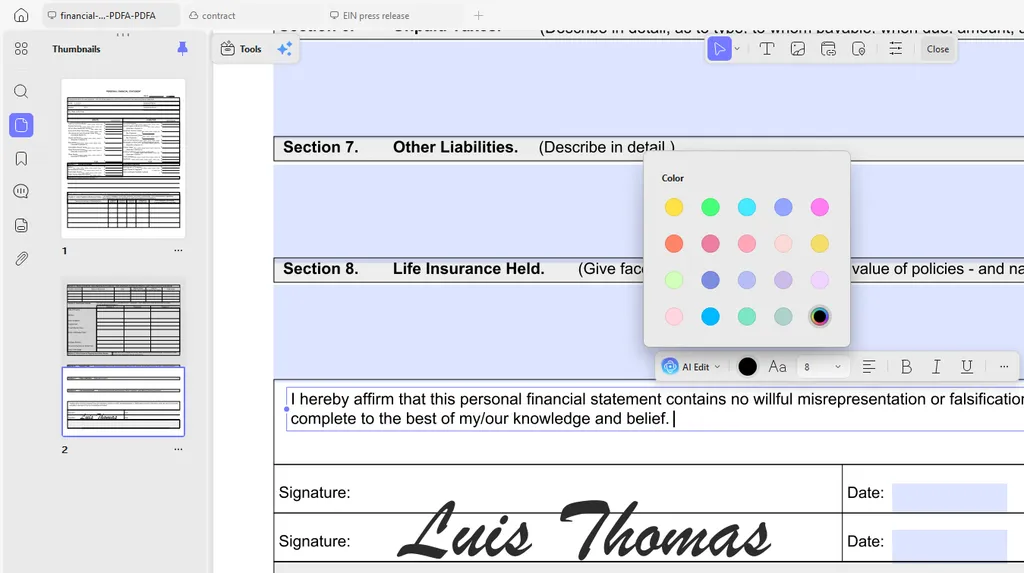
フォーム作業も同じ場所で行えます。フィールドへの入力やインタラクティブなフォームの作成が可能です。手書き署名や画像ベースの署名にも対応しており、保存した署名はデバイス間で同期されます。
レイアウトを崩さずに変換
PDF は単なる出発点に過ぎないことがよくあります。財務諸表はスプレッドシートへ、プレゼン資料は PowerPoint へ戻し、サプライヤー契約書は Word を使うチームへ届ける必要があるのです。
UPDF は PDF を Word、Excel、PowerPoint、PNG、JPEG、HTML、PDF/A など 14 の形式に変換できます。逆方向の変換も可能です。UPDF では最大 10 種類の方法で PDF を作成でき、ソースには Word、Excel、PowerPoint、画像、空のページ、クリップボードが含まれます。
大量処理を行う際に重要なのは 2 つのポイントです。「ページ範囲指定」を使えば必要なセクションだけをエクスポートできます。バッチ変換にはファイル数の上限が設定されておらず、スキャンされた文書フォルダを一度に処理することも可能です。
数値は自分で確認しよう
機能リストは書きやすく検証しにくいものです。以下のコンソールには、UPDF が製品ページで公表している仕様が記載されています。各回答は必ずソースへリンクしています。コマンドをクリックするか、直接入力してください。
スキャン画像を実際に使えるテキストに変換
スキャンされた PDF はドキュメント自動化における最大の失敗ポイントです。読めるように見えるため検索可能だと誤解されがちですが、実際にはそうではありません。その結果、後続のすべてのステップ——検索、抽出、取得、差分比較——が静かに機能しなくなります。
UPDF の OCR 機能は、スキャン文書や画像ベースの PDF を検索可能で編集可能なテキストに変換します。38 か国語に対応し、複数の言語が混在するページも処理可能です。UPDF は精度を最大 99% と発表しています。

出力レイアウトの選択肢は、ぜひ知っておきたいポイントです。UPDF では 3 つのオプションが用意されています。
- テキストと画像のみ
- ページ画像の上にテキストを重ねる
- ページ画像の下にテキストを配置する
このうち「画像の下にテキスト」が最も重要です。監査作業などでは、ページ自体は元のスキャン画像のまま保ちつつ、その下に検索可能なテキスト層を持たせることができます。
逆の操作も可能です。検索可能な PDF を、画像のみを含む PDF に扁平化(フラット化)することもできます。MRC ベースの圧縮技術により、ファイルサイズを小さく保ちながらページの見やすさも維持されます。これは、配布後に編集を禁止したい文書にとって特に有用です。
認識されたテキストは、Word、Excel、PowerPoint、TXT 形式に直接エクスポート可能です。また iPhone や iPad では、カメラを使ったライブキャプチャ機能により、端末そのものをスキャナーとして活用できます。
AI レイヤー:読み込み・調査・10 エージェント
UPDF の AI 機能は、ファイルと同じウィンドウ内で動作します。UPDF によると、現在の UPDF AI は GPT-5.6 をベースに稼働しています。

UPDF は、開かれたファイルに対して複数のタスクを処理します。
1 つの PDF ファイルとチャットするだけでなく、1 つのプロジェクト内で複数のファイルを横断した対話も可能です。また、文書全体や特定のページ範囲、ハイライトされたテキストの要約も作成できます。
元のレイアウトを保ったまま文書全体の翻訳も実行可能で、見知らぬ用語の説明や、埋め込まれた画像・チャートに関する議論にも対応しています。
さらに、PDF をマインドマップに変換する機能も備えています。生成されたマインドマップは、リンクでの共有、ダウンロード、あるいはドキュメントへの再挿入が可能です。
2 つの機能は特に特化しています。"Paper Search" はトピック別で学術論文を検索し、個人ライブラリに保存します。また "Scholar Research" は広範な質問を細分化したサブ質問へと分解し、関連する論文を集約して PDF としてエクスポート可能な文献レビューを生成します。
2026 年 3 月 31 日にリリースされたバージョン 2.5 では、10 種類の AI エージェントが追加されました。
- ブックマークの生成と要約:多段階のブックマークツリーを作成し、各章を要約します
- セマンティック検索:文字列マッチングではなく、類義語や下位概念、関連する概念を解決して検索します
- ウォーターマーク、スタンプ、ステッカー、背景の生成:プロンプトから自動生成されます
- AI 編集スイート:校閲、拡張、要約、トーン変更に対応しています
- ページ管理:空白ページや無効なページを検出し、向きとサイズを標準化します
- UPDF Copilot:自然言語でのリクエストを適切なツールにマッピングします
Copilot は意図的に範囲が限定されています。Copilot がツールを特定するだけで、実際の承認と実行はユーザーが行います。契約書や規制対象の記録を取り扱う人にとって、この境界線は適切です。
データ処理については、UPDF は文書を第三者と共有しないと明言しています。また、ドキュメントの内容がモデルの学習に使用されることもないと述べています。
無料 AI タイアでは、1 ファイルあたり 10 MB、最大 100 ページまでのファイルで 5 回のアップロードが可能で、質問数は 100 件までです。この利用枠はアプリ版と Web 版を合わせて 1 つのアカウント内で共有されます。
数分で散らかったファイルを整理
文書整理は、誰も予算に組み込みたがらない税金のようなものです。UPDF の「Organize」ツールでは、ページの追加・削除・回転・置換・抽出・分割・切り抜き・順序変更に加え、複数のファイルを1つに結合する機能も提供しています。
これらの操作は個別には小さな作業ですが、組み合わせることで、単なるスキャンフォルダからクライアントへ提出できる完成された文書へと変えることができます。
プラットフォーム対応、ライセンス、コスト
UPDF は Windows、macOS、iOS、Android に対応しており、AI アシスタントもブラウザ版で利用可能です。1 つのアカウントで最大4台まで登録でき、インターフェースは12か国語にローカライズされています。サポートは週6日対応で、定期的なアップデートも提供されます。
機能面では基本操作を超えており、デジタル署名や証明書検証、PDF/A 規格への準拠、機密情報の抹消・クリーニング機能も備えています。さらに、パスワード保護、圧縮、バッチ処理、企業向けの監査・アカウント管理機能も含まれています。
Adobe Acrobat の代替製品としての位置づけが最も強く現れるのが価格設定です。UPDF は Adobe の約5分の1の価格で提供されています。AI アシスタントは別料金項目となっています。現在の料金は公式の価格ページでご確認いただけます。また、30日間の返金保証制度も用意されています。
無料版も利用可能ですが制限があります。保存されたファイルには透かしが入り、変換は1日2回までです。OCR 機能は動作しますが、その結果を保存したりコピーしたりすることはできません。バッチ処理も1回に2ファイルまでとなっています。
UPDF を無料でお試しください
PDF を日常的に扱うチームにとって、重要なのは「AI アシスタントが文書を説明できるか」ではありません。すでにその能力は備わっています。真の問いは、その先にあるべきです。「編集が正しい場所に反映されるか」「表形式のデータがエクスポート後も保たれるか」「スキャン画像が単なる画像ではなく、検索可能なテキストとして扱われるか」。
UPDF は、まさにこの「次のステップ」に焦点を当てています。AI 機能は別アプリではなく、編集ソフトの中に直接統合されています。
無料で試すこともできますし、今すぐ限定割引を適用することも可能です。さらに、30 日間の返金保証も付いています。
本記事の詳細データやリソースを提供いただいた UPDF チームに感謝いたします。なお、本記事は UPDF チームの協賛により掲載されています。
(※「Meet UPDF: A Lightweight Adobe Alternative Built for the Agentic Era」というタイトルで、MarkTechPost に掲載された記事です。)
原文を表示
PDFs sit at the end of almost every workflow. Contracts, invoices, research papers, scanned intake forms, manuals, and compliance filings all arrive as PDFs. The format is very good at freezing a layout. It is much worse at letting you change one number inside that layout.
That gap has become more visible as language models have gotten better at reading documents. A model can summarize a 90-page master services agreement in seconds. It will not reliably rewrite the source file. It will not hold the table alignment. It will not hand back a clean, signable copy.
UPDF is built for the second half of that problem. It is an all-in-one PDF editor for Windows, macOS, iOS, and Android, developed by Superace Software Technologies. It combines editing, annotation, conversion, compression, OCR, page organization, and an integrated AI assistant in one application.
Two Different Problems Living in the Same Document
It helps to separate document work into two categories:
The first is interpretation. What does this clause mean? What is the argument in section four? Which of these three quotes is cheapest? Language models are now genuinely good at this class of work.
The second is execution. Change this price from $4,200 to $3,850. Pull pages 7 through 12 out of a 300-page report. Convert this scanned invoice into a spreadsheet with the columns intact. Flatten the file and apply a certificate. These operations are deterministic. There is exactly one correct output, and a plausible-looking approximation is a failure.
Most teams solve this by running two tools in parallel. A chatbot handles interpretation. A separate editor handles execution. UPDF’s premise is that both belong in the same window.
Edit PDFs Like a Word Document
With UPDF you can Edit an existing PDF directly, rather than rebuilding it from the original source file. Editable objects include text and font styling, images, links, and tables. Watermarks, backgrounds, headers and footers, form fields, and pages are also editable in place.
The practical constraint is layout preservation. A brochure with an outdated price should not turn into a redesign project. Neither should a contract with one wrong date. UPDF keeps the original layout, fonts, tables, and formatting intact while the edit lands.
Form work sits in the same place. You can fill fields and build interactive forms. Handwritten and image-based signatures are supported, and saved signatures sync across devices.
Convert Without Losing the Layout
Sometimes the PDF is only a starting point. A financial statement needs to become a spreadsheet. A deck needs to go back into PowerPoint. A supplier contract needs to reach a team that works in Word.
UPDF can convert PDFs into 14 formats, including Word, Excel, PowerPoint, PNG, JPEG, HTML, and PDF/A. Conversion runs the other direction too. UPDF lists up to ten methods for creating a PDF. Sources include Word, Excel, PowerPoint, images, a blank page, and the clipboard.
Two details matter for anyone doing this at volume. Page-range selection means you can export only the section you need. Batch conversion has no stated file-count ceiling. A folder of scanned statements can go through in one run.
Check the Numbers Yourself
Feature lists are easy to write and hard to verify. The console below carries the specifications UPDF publishes on its own product pages. Every answer links back to its source. Click a command, or type one.
Turn Scans Into Text You Can Actually Use
Scanned PDFs are the most common failure point in document automation. They look readable, so people assume they are searchable. They are not. Every downstream step — search, extraction, retrieval, diffing — silently breaks.
UPDF's OCR converts scanned documents and image-based PDFs into searchable, editable text. It recognizes 38 languages and handles pages that mix more than one language. UPDF states accuracy of up to 99%.
The output layout options are the part worth knowing about. UPDF offers three: text and pictures only, text over the page image, and text under the page image. The third option matters most for audit work. The page still looks like the original scan, but the text underneath is searchable.
There is also a reverse path. A searchable PDF can be flattened back into an image-only PDF. MRC-based compression keeps the file small and the page legible. That helps when a document goes out for distribution and should not be edited further.
Recognized output exports straight to Word, Excel, PowerPoint, or TXT. On iPhone and iPad, live camera capture turns the device into a scanner.
The AI Layer: Reading, Research, and Ten Agents
UPDF's AI feature sits inside the same window as the file. UPDF states that UPDF AI now runs on GPT-5.6.
The assistant handles several jobs against an open file:
Chat with a single PDF, or across multiple files in one project
Summarize a whole document, a selected page range, or highlighted text
Translate the full document with the original layout preserved
Explain unfamiliar terms, and discuss embedded images and charts
Convert the PDF into a mind map
Mind maps can be shared by link, downloaded, or inserted back into the document.
Two features are more specific. Paper Search finds academic papers by topic and saves them to a personal library. Scholar Research breaks a broad question into sub-questions. It then gathers papers and produces a literature review you can export as a PDF.
Version 2.5 shipped on March 31, 2026 and added ten AI agents:
Bookmark generation and summary — builds a multi-level bookmark tree, then digests each chapter
Semantic search — resolves synonyms, hyponyms, and related concepts instead of matching strings
Watermark, stamp, sticker, and background generation — produced from a prompt
AI editing suite — proofreads, expands, condenses, and changes tone
Page management — flags blank and invalid pages, standardizes orientation and size
UPDF Copilot — maps a natural-language request to the right tool
Copilot is deliberately scoped. It identifies the tool; the user still authorizes and performs the action. For anyone handling contracts or regulated records, that boundary is the right one.
On data handling, UPDF states that documents are not shared with third parties. It also states that document content is not used to train the models.
The free AI tier allows five uploads, 10 MB per file, 100 pages per file, and 100 questions. That allowance is shared across the app and the web version, on one account.
Organize Messy Files in Minutes
Document cleanup is the tax nobody budgets for. UPDF's Organize tools cover adding, deleting, rotating, replacing, extracting, splitting, cropping, and reordering pages, plus merging separate files into one.
These are small operations individually. Together they stand between a folder of scans and a document you can send to a client.
Platform Support, Licensing, and Cost
UPDF runs on Windows, macOS, iOS, and Android, with the AI assistant also available in a browser. One account covers four devices, and the interface is localized in 12 languages. Support runs six days a week, and the product ships regular updates.
The feature set extends past the basics. It covers digital signatures and certificate validation, PDF/A compliance, and redaction and sanitization. Password protection, compression, batch processing, and enterprise auditing and account management are also included.
Pricing is where the Adobe Acrobat Alternative framing does most of its work. UPDF is priced at one-fifth the cost of Adobe. The AI assistant is a separate line item. Current figures are on the pricing page, and the refund policy covers a 30-day money-back guarantee.
The free tier is usable but constrained. Saved files carry a watermark, and conversions are capped at two per day. OCR runs, but it cannot save or copy its output. Batch jobs are limited to two files.
Try UPDF for Free
For teams that handle PDFs every day, the useful question is not whether an AI assistant can explain a document. It increasingly can. The question is what happens next. Does the edit land in the right place? Does the table survive the export? Does the scan become searchable text, rather than a picture of text?
UPDF aims at that second question. The AI layer sits inside the editor, rather than in a separate app.
You can try it for free or claim an Exclusive discount today. UPDF offers a 30-day money-back guarantee.
Thanks to the UPDF team for the details, data and resources for this article. UPDF team has sponsored this article.
The post Meet UPDF: A Lightweight Adobe Alternative Built for the Agentic Era appeared first on MarkTechPost.
関連記事
今日のまとめ
AIデイリーブリーフで今日の重要ニュースをまとめ読み