ChatGPT、Mac で Apple Messages と連携する機能を追加
本文の状態
日本語全文を表示中
詳細モードで約6分の本文を読めます。
同じ出来事の情報源
この情報源を基点に整理
TLDR AI
OpenAI は ChatGPT の macOS デスクトップアプリに Apple Messages プラグインを追加し、iMessage や SMS などの対話を参照・検索・送信する機能をすべてのプランで提供した。
AI深層分析を開く2026年8月22日 22:10
AI深層分析
キーポイント
Apple Messages プラグインの機能追加
ChatGPT for Mac が新プラグインにより、Mac 上の iMessage、SMS、RCS の対話を直接読み込み、検索し、準備して送信する機能を備えた。
プライバシーと承認プロセスの仕組み
OpenAI はデータが Mac 上でローカルに処理され、Siri AI のようなコンテンツインデックスに依存しないことを強調し、送信にはユーザーの承認が必要だと明言した。
技術的実装とシステム連携
この機能は AppleScript やアクセシビリティなどの macOS システム技術を利用しており、Android 向けのようなサーバー側のハックとは異なるローカル実行型である。
Apple Messages プラグインの機能と利用範囲
ChatGPT の Mac デスクトップアプリおよび Codex、ChatGPT Work で、iMessage、SMS、RCS チャットの閲覧・検索やメッセージ送信が可能になる。ただし、この機能は Apple シリコン搭載の Mac でのみ動作し、Intel マシンでは利用できない。
セキュリティと承認プロセス
デフォルトでは ChatGPT はユーザーの承認がない限りメッセージを送信せず、送信前に確認を促す。ただし、個別の会話ごとにこの確認をスキップするオプションも用意されている。
重要な引用
The new Apple Messages plugin lets ChatGPT read and search chats on a Mac, and prepare and send messages.
OpenAI stresses that sending remains gated by user approval under the default settings.
It’s simply using files on your Mac with your permission when prompted.
Use the Apple Messages plugin to read and search Messages chats on your Mac and prepare or send messages. It's available on all plans in the ChatGPT desktop app for macOS.
編集コメントを表示
編集コメント
ChatGPT が macOS のネイティブ機能と直接連携することで、ユーザーはアプリを切り替えることなく対話履歴を活用できるようになる。ただし、永続的なアクセス権限の付与には慎重な判断が求められるため、利用者は設定画面での詳細確認が推奨される。
Source Article
元記事を日本語で読む
本文に関係しない購読案内、埋め込み通知、サイト内プロモーションは除いています。
これは興味深い更新です。ChatGPT の最新アップデートにより、Mac 上で Apple Messages アプリの会話と連携する機能が追加されました。この機能は iMessage、SMS、RCS に対応しています。
ChatGPT for Mac に Apple Messages プラグインが搭載
新しい Apple Messages プラグインにより、ChatGPT は Mac 上のチャットを読み込み検索したり、メッセージを準備して送信したりできるようになります。
OpenAI によると、この機能は macOS 用の ChatGPT デスクトップアプリのすべてのプランで利用可能で、ChatGPT Work と Codex の両方でサポートされています。
このアクセス権限にはプライバシーや制御に関する懸念が生じるため、OpenAI はデフォルト設定では送信にユーザーの承認が必要であることを強調しています。
永続的な承認を与える前に注意が必要です。OpenAI のプラグインガイドには、そのリスクとアクセス権を撤回する方法が詳しく記載されています。
また、承認プロンプトを無効化するタスクに関する既知の問題もリストアップされています。「タスクがフルアクセスに設定されている場合や、承認プロンプトが無効になっている場合は、Apple Messages が送信に必要な確認を表示できない可能性があります。『承認を求める』または『私に任せる』に変更して再試行してください」とあります。
Mac における OpenAI の Messages プラグインの仕組み
OpenAI によると、このオプションの Messages プラグインは Mac 上でローカルで実行されます。Computer Use を含む他の ChatGPT/Codex 機能と同様、AppleScript やアクセシビリティといった macOS システム技術に依存しています。
オプションの「Messages」プラグインは、Android に iMessage 機能を追加しようとする怪しいサーバー関連のハックとは異なります。これは、ユーザーに許可を求めた際に、Mac 上のファイルを利用するだけのシンプルな仕組みです。
Siri AI のように、メッセージの内容をインデックス化して依存しているわけでもありません。Mac 版 ChatGPT は、指示があった場合や許可を得た場合にのみデータを使用します。
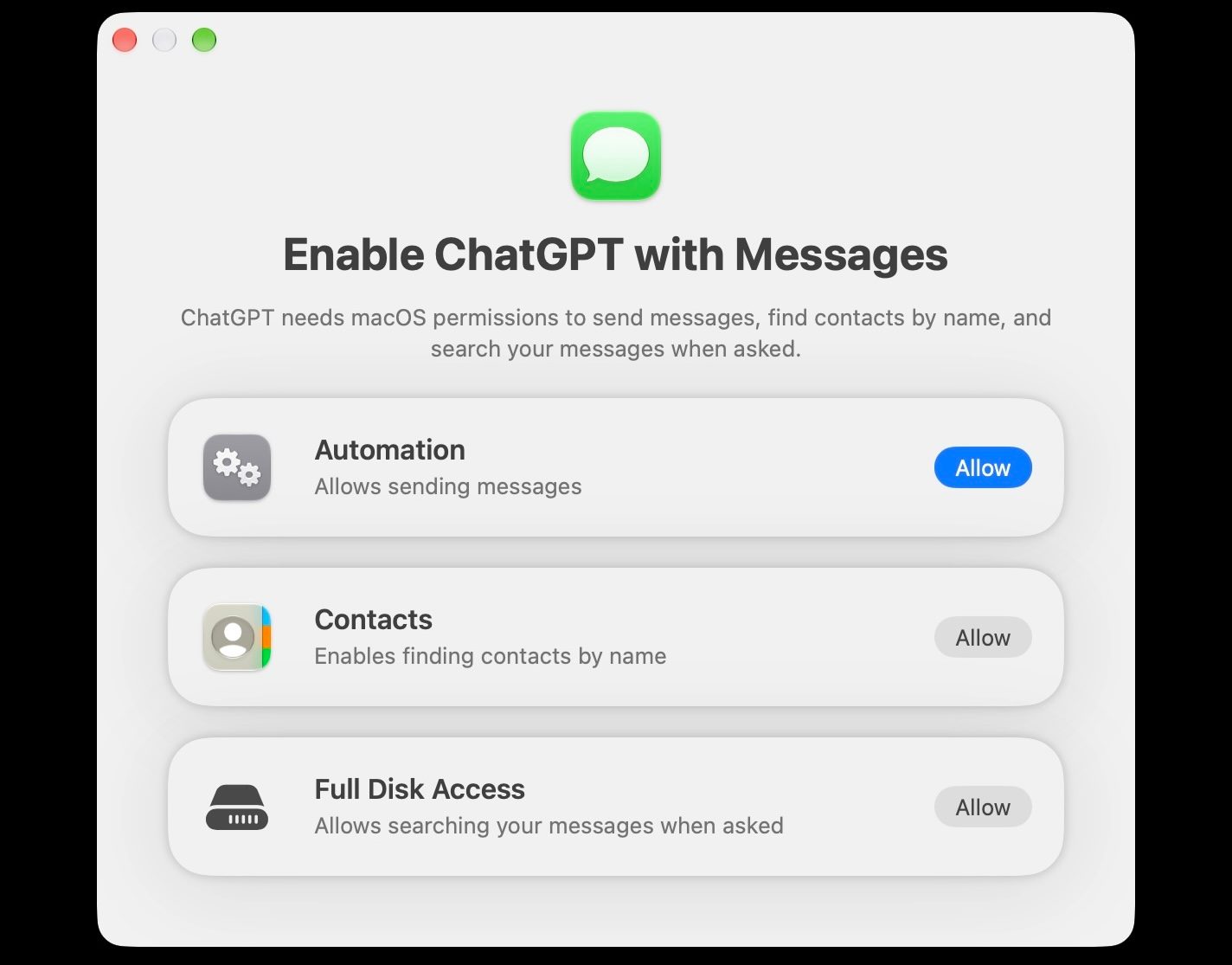
以下のように、ユーザーが有効化した後、ChatGPT がメッセージに対してどのように処理するかは非常に明確です。特に、依頼に応じて代わりに送信する際などはその挙動がはっきりと示されます。
これらの理由から、Apple にとってプライバシー上の懸念となるべきではありません。データは Mac 上のファイルとして存在しており、ChatGPT がそれらを取り扱うにはユーザーの許可が必要です。また、OpenAI だけが同様のツールを開発しているわけではありません。これは、モバイルプラットフォームよりも機能豊かな OS である Mac の利点の一つと言えます。
リリースノートからの詳細は以下の通りです:
Apple Messages プラグインを使用すると、Mac 上のメッセージチャットを読み込んで検索したり、メッセージの作成や送信を行ったりできます。このプラグインは、macOS 版 ChatGPT デスクトップアプリのすべてのプランで利用可能です。ChatGPT Work や Codex でも使用できます。デフォルトでは、ChatGPT はメッセージとその宛先をユーザーが承認した後にのみ送信します。永続的な承認に関するリスクや取り消し手順、また承認プロンプトを無効化するタスクに関連する既知の問題については、プラグインガイドをご覧ください。
なお、OpenAI は「Messages」機能の仕組みについて、専用のプラグインサイトでも詳しく解説しています。
ChatGPT のデスクトップアプリ(macOS 版)では、すべてのプランで「Apple Messages プラグイン」を利用できます。Codex や ChatGPT Work では、Mac 上の iMessage、SMS、RCS のチャット内容を読み取り検索したり、Messages アプリを介して代わりにメッセージを送信したりすることが可能です。
ただし、このプラグインは、ChatGPT と Messages を経由して遠隔でやり取りする機能は提供せず、通常の ChatGPT チャット内での動作もサポートされていません。
現時点では、この機能は Apple シリコン搭載の Mac 上の ChatGPT のみで利用可能であり、Intel プロセッサ搭載機では動作しません。
スクリーンショット
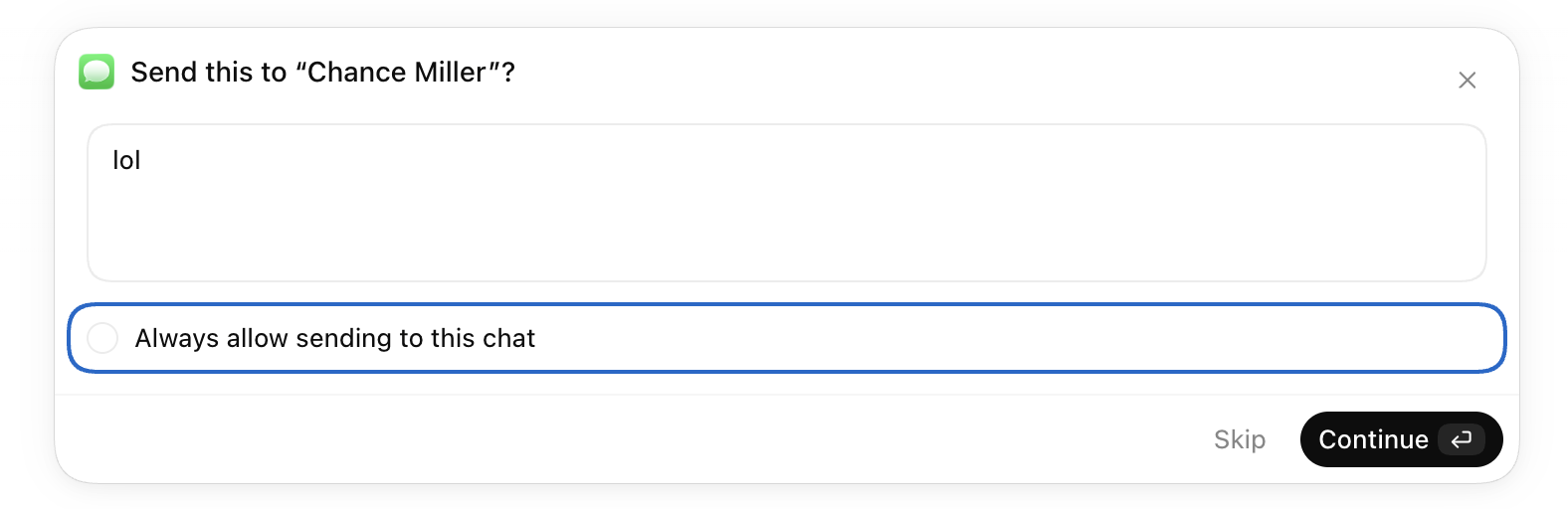
ChatGPT にメッセージ送信を依頼した場合、送信前に確認プロンプトが表示されます。必要に応じて、個別の会話ごとにこの確認をスキップすることも可能です。
ChatGPT の新機能をお探しですか?この リンク をクリックすると、Mac 版 ChatGPT の「Messages」プラグインに直接アクセスできます。
「Messages」プラグインは Apple ユーザーにとって目玉の新機能ですが、今回のリリースには他にもいくつかの改善点が盛り込まれています。例えば、ピン留めしたチャットが、ChatGPT のデスクトップアプリと iOS アプリ間で同期されるようになりました。これにより、Mac と iPhone を使い分ける際にも、重要な会話をいつでも簡単に開けるようになります。
また、ChatGPT では現在、ローカルの Codex スレッドの読み取り専用スナップショットを共有できるようになりました。このスナップショットは、元のスレッドがその後も進化し続けることとは無関係に、作成された時点の内容を固定します。
個人アカウントから作成されたリンクは URL を持つ誰でもアクセス可能ですが、ワークスペースリンクはそのワークスペースのメンバーに限定されます。OpenAI は Codex が既知の機密パターンを自動で隠蔽すると説明していますが、念のためスナップショットを確認するよう警告しています。機密情報が残っている可能性もあるためです。
また、サイトオーナーは同じワークスペース内のアクティブなメンバーを招待して、共同編集が可能なサイトで協働できるようになります。編集者はコンテンツやデータベースデータを更新し、バージョンを保存できます。オーナーが最初の公開を完了した後、変更点を公開することが可能です。アクセス権限、設定、分析機能、バージョンの復元については、オーナーが引き続き管理権限を持ちます。
一部のサイトオーナーは、再デプロイすることなく ChatGPT でホストされている URL を変更することもできます。古いアドレスは自動的に新しいアドレスへリダイレクトされます。
最後に、先週の「Computer History」機能(こちら)が、EEA(欧州経済領域)、スイス、英国の Pro、Business、Enterprise ユーザー向けに拡大されます。このオプション機能は「Memories」機能を必要とし、デフォルトではオフになっています。
本日のアップデートに関する完全なリリースノートはこちらでご確認ください。
*FTC: 当サイトには収益化のための自動アフィリエイトリンクが含まれています。 詳細はこちら*
原文を表示
Well, this seems interesting. ChatGPT’s latest update adds a new Mac integration: the ability to work with conversations from Apple’s Messages app. The feature works with iMessage, SMS, and RCS.
ChatGPT for Mac now includes an Apple Messages plugin
The new Apple Messages plugin lets ChatGPT read and search chats on a Mac, and prepare and send messages.
OpenAI says it is available across all plans in the ChatGPT desktop app for macOS, with support in both ChatGPT Work and Codex.
That access raises privacy and control questions, so OpenAI stresses that sending remains gated by user approval under the default settings.
Users should take care before granting persistent approval. OpenAI’s plugin guide details the risks and how to revoke access.
It also lists a known issue involving tasks that disable approval prompts: “If your task is set to Full access or otherwise disables approval prompts, Apple Messages may be unable to show the confirmation needed to send. Switch to Ask for approval or Approve for me and try again.”
How OpenAI’s Messages plugin works on the Mac
OpenAI explains that the optional Messages plugin runs locally on the Mac. Like other ChatGPT/Codex features including Computer Use, it relies on macOS system technologies like AppleScript and Accessibility.
The optional Messages plugin is not like the sketchy server-related hacks that try to bring iMessage functionality to Android. It’s simply using files on your Mac with your permission when prompted.
And unlike Siri AI, it doesn’t rely on an index of content from Messages. ChatGPT for Mac only uses the data when directed and with permission.
As you can see below, once enabled by the user, ChatGPT is super clear in what it does with messages, especially sending on your behalf when asked.
For these reasons, it shouldn’t be a privacy concern for Apple. The data exists as files on your Mac, and you need to give ChatGPT permission to work with the files. OpenAI also isn’t the only AI company to develop similar tools. It’s just a benefit of the Mac being a more capable operating system than mobile platforms.
Here’s more from the release notes:
Use the Apple Messages plugin to read and search Messages chats on your Mac and prepare or send messages. It’s available on all plans in the ChatGPT desktop app for macOS. You can use the plugin in ChatGPT Work and Codex. By default, ChatGPT sends messages only after you approve the message and its recipients. See the plugin guide for persistent-approval risks, revocation steps, and the known issue with tasks that disable approval prompts.
Separately, OpenAI details how the Messages feature works on its dedicated plugin site:
The Apple Messages plugin is available on all plans in the ChatGPT desktop app for macOS. In Codex and ChatGPT Work, it can read and search iMessage, SMS, and RCS chats on your Mac and send messages on your behalf through the Messages app. It doesn’t let you interact with ChatGPT remotely through Messages, and it doesn’t work in regular ChatGPT chats.
For now, the feature only works with ChatGPT on Apple silicon Macs and not Intel machines.
If you do ask ChatGPT to send a message on your behalf, it prompts for confirmation before anything is sent. Optionally, you can choose to skip the confirmation on a per-conversation basis.
Looking for the new feature inside ChatGPT? This link should go directly to the Messages plugin for ChatGPT on the Mac.
While the Messages plugin is the standout addition for Apple users, the release includes several other improvements. For example, pinned chats now stay in sync across the ChatGPT desktop app and iOS, so users can keep important conversations accessible between a Mac and iPhone.
ChatGPT also now lets users share a read-only snapshot of a local Codex thread. These snapshots do not change as the original thread evolves.
Links created from personal accounts are accessible to anyone who has the URL, while workspace links remain limited to members of that workspace. OpenAI says Codex redacts known secret patterns, but warns users to review snapshots because sensitive information could remain.
Elsewhere, Site owners can invite active members of the same workspace to co-edit a Site where collaboration is available. Editors can update content and database data, save versions, and publish changes after the owner completes the first publication. Owners retain control over access, settings, analytics, and version restoration.
Some Site owners can also change a ChatGPT-hosted URL without redeploying, with the old address redirecting to the new one.
Finally,last week’s Computer History feature is expanding to Pro, Business, and Enterprise users in the EEA, Switzerland, and the UK. The optional feature requires Memories and remains off by default.
You can read the full release notes for today’s update here.
*FTC: We use income earning auto affiliate links.* More.
関連記事
News to Guide
ニュースの次に確認する
発表内容を、現在の料金や仕様と照らし合わせられる関連ガイドです。
今日のまとめ
AIデイリーブリーフで今日の重要ニュースをまとめ読み