2種類のエージェント認証方式
本文の状態
日本語全文を表示中
詳細モードで約6分の本文を読めます。
LangSmith Fleetが2種類のエージェント認証方式を導入した。エージェントがSlackツールを呼び出す際の認証方法を明確化し、エージェントの権限管理を改善する。
Source Article
元記事を日本語で読む
本文に関係しない購読案内、埋め込み通知、サイト内プロモーションは除いています。
 image先週、エージェントを構築、使用、管理する方法としてLangSmith Fleetをリリースしました。このリリースの重要な部分は、2種類の異なるエージェント認可の導入でした。
エージェント認可とは、エージェントが何を行うことを許可されているかを指します。エージェントがSlackツールを呼び出すとき、データを取得する前に誰として認証するのでしょうか?
代理(On-behalf-of)
最近までほとんどの人が想定していたエージェントの標準的な形態は、ユーザーの「代理(On-behalf-of)」として動作するというものです。
NotionとRipplingにアクセスできるオンボーディングエージェントを想像してみてください。アリスがそれと対話するとき、エージェントはRipplingでアリスに関する情報を参照し、アリスがアクセス権を持つすべてのNotionページを閲覧できるべきです。アリスがこのオンボーディングエージェントを使って、Ripplingでボブの個人情報を参照したり、ボブが持つ可能性のある非公開のNotionページを見たりすることはできません。ボブがオンボーディングエージェントを使うとき、彼はRippling内の自分のすべての情報とNotion内の自分の非公開ページにアクセスできますが、アリスのものにはアクセスできません。
これを実装するには、いくつかの要素が必要です。誰がエージェントを使っているのか(アリスかボブか)を知る方法が必要です。次に、それらのユーザーIDを、実行時にツールへ渡される認証情報にマッピングする必要があります。
そしてOpenClawが登場
OpenClawが登場するまで、「代理(On-behalf-of)」はエージェントを考える上での主要な方法でした。OpenClawでは、アリスがエージェントを作成します。おそらく彼女だけがそのエージェントを使うでしょう(その場合、この認可の区別はあまり重要ではありません)。しかし、彼女は異なるチャネル(テキスト、メール、Twitterなど)を通じて他の人にそのエージェントを公開するかもしれません。
他の人がそのエージェントと対話するとき、エンドユーザーの認証情報は使わず、アリスが与えた認可を使用します。
これはアリス自身の認証情報である場合もありますが、それは望ましくないかもしれません。エージェントがアリスの認証情報を持っている場合、アリスがアクセスできるNotion内のあらゆる情報を参照できてしまいます。そこには、他の人にエージェント経由で問い合わせられることを望まない、アリスの非公開文書が含まれている可能性があります。
このため、人々はそのエージェント専用にNotionやRipplingなどに専用アカウントを作成し、エージェントがアクセスできる範囲を制御するようになりました。そのエージェントと対話するすべての人は、実質的に同じ認証情報セットを使用することになります。
LangSmith Fleet
LangSmith Fleetをリリースする際、私たちはユーザーが両方のタイプのエージェントを求めていることを認識しました。エージェントを作成して他の人に各自の認証情報で使わせたい場合もあれば、エージェントに独自の固定された認証情報セットを持たせたい場合もあります。私たちはこれら2種類の認可に対応する、2種類の異なるエージェントを追加しました:
- アシスタント(Assistants): エンドユーザーの「代理(On-behalf-of)」として動作
- クロー(Claws): 独自の固定された認証情報を持つ
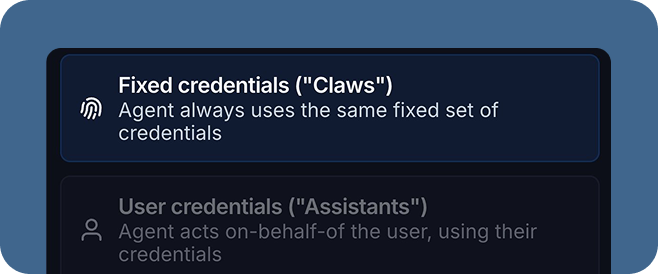 imageまた、チャネル(まずはSlack、Gmail、Outlook、Teams)とエージェントの共有という概念も追加しました。アシスタントとクローは異なるチャネルをサポートします。アシスタントを共有するためには、そのチャネル内のエンドユーザー(例:SlackユーザーID)をLangSmith IDにマッピングする必要があります。そのため、現在アシスタントは、このマッピングをサポートしている一部のチャネルでのみ利用可能です。
チャネルとこれらの異なる認可タイプは、人間の介入(human in the loop) の必要性も浮き彫りにします。固定された認証情報セットを持つエージェントを作成し、チャネルを通じて公開する場合、それは様々な形で使用される可能性があります。そのエージェントが潜在的に危険または機密性の高いアクションを実行できるのであれば、それらのアクションにゲートを設けるために、何らかの「人間の介入(human-in-the-loop)」ガードレールを使用したいと考えるでしょう。
例
具体的に理解するため、私たちが作成した実際のエージェントのいくつかとその認可タイプを見てみましょう。
- オンボーディングエージェント: アシスタント。SlackとNotionにアクセスでき、Slackで公開されています。エンドユーザーのSlackとNotionの認証情報を使用します。
- メールエージェント: クロー。このエージェントは受信メールに応答します。誰がメールを送ってきても、このエージェントは私のカレンダーを確認して会議の空き状況を判断し、私の代理で応答を試みます。メール送信とカレンダー招待状の送信は、人間の介入(human-in-the-loop) ガードレールによって制御されています。
- 製品エージェント: クロー。このエージェントは競合他社を監視し、製品に関する質問やロードマップの策定を支援します。独自のNotionアカウントを持ち、カスタムSlackボットを通じて公開されています。
今後の取り組み
LangSmith Fleetでこれら2種類のエージェントを提供できることを嬉しく思います。しかし、これはエージェント認可の始まりに過ぎないと考えています。今後の潜在的な方向性については、WorkOSのこのブログ記事をご覧ください。
また、より細かいメモリ権限でこの機能を発展させることにも期待しています。エージェントのタイプ(アシスタントかクローか)によって、メモリの扱い方を変えたい場合があるでしょう。例えば、アシスタントがアリスに関する機密事項を記憶し、それをボブとのチャットで使用できるようにしたくはないはずです。現在は、アクセス権限でこれを管理しています。エージェントを共有する際、他のユーザーがそのメモリを含めて編集できるかどうかを選択します。将来的には、ユーザー固有のメモリを導入する予定です。
ぜひ今日からLangSmith Fleetをお試しください。
原文を表示
imageWe launched LangSmith Fleet last week as a way to build, use, and manage agents. A key part of this launch was the introduction of two different types of agent authorization.
Agent authorization refers to what the agent is authorized to do. When an agent calls a Slack tool - who does it authenticate as before pulling the data?
On-behalf-of
The standard way that most people thought of agents until recently is that they operate “on-behalf-of” a user.
Let’s imagine an onboarding agent with access to Notion and Rippling. When Alice interacts with it, it should be able to look up information about Alice in Rippling and see all pages in Notion that Alice has access to. Alice should not be able to use this onboarding agent to look up any private information about Bob in Rippling, or see any private Notion pages Bob might have. When Bob uses the onboarding agent, he should be able to access all his information in Rippling and all his private pages in Notion, but not Alice’s.
In order to implement this, you need a few things. You need a way to know who is using the agent - is it Alice or is it Bob? You then need to map those user IDs to some auth credentials that are passed into tools at runtime.
Then came OpenClaw
On-behalf-of was the primary way that people thought of agents until OpenClaw came around. With OpenClaw, Alice would create an agent. Maybe she would be the only one to use that agent (in which case this auth distinction would not matter much). But maybe she would expose to others, through different channels (like text or email or Twitter).
When others interacted with that agent, it didn’t use the credentials of the end user - it used the authorization that Alice had given it.
Sometimes this could be Alice’s own credentials, but that might not be that desirable. If the agent had Alice’s credentials, it could look up anything in Notion that Alice had access to. That might include private documents that he may not want others to be able to ask the agent about.
This lead to people creating dedicated accounts in Notion, Rippling, etc specifically for that agent, so they could control what that agent had access to. Everyone interacting with that agent would then effectively be using the same set of credentials.
LangSmith Fleet
When launching LangSmith Fleet, we saw that people wanted both types of agents. Sometimes they wanted to create an agent and let others use it with their own credentials, other times they would want that agent to have its own fixed set of credentials. We added two different types of agents, which mapped to these two types of authorization:
Assistants: act “on-behalf-of” their end user
Claws: have their own fixed credentials
imageWe also added the concept of channels (Slack, Gmail, Outlook, and Teams to start) and sharing of agents. Assistants and Claws support different channels. In order for Assistants to be shared, we have to have a mapping of an end user in that channel (e.g. their Slack user ID) to their LangSmith ID. So right now Assistants are only available in a subset of channels where we support that mapping.
Channels and these different authorization types also highlight the need for human in the loop. If you are creating an agent with a fixed set of credentials, and exposing it via a channel. You are opening it up to be used in a variety of ways. If that agent can take actions that may potentially be dangerous or sensitive, you might want to use some “human-in-the-loop” guardrails to ensure that those actions are gated.
Examples
To make this concrete, let’s take a look at a few of the real agents we’ve created and their authorization types.
Onboarding Agent: Assistant. Has access to Slack and Notion, and is exposed in Slack. Uses the end user’s Slack and Notion credentials.
Email Agent: Claw. This agent responds to incoming emails. Regardless of who is emailing, this agent will look at my calendar to determine meeting availability and attempt to respond on my behalf. Sending emails and calendar invites is gated behind a human-in-the-loop guardrail.
Product agent: Claw. This agent monitors competitors and help with product questions and roadmap. It has it’s own Notion account and is exposed via a custom Slack bot.
Future work
We’re excited to rollout these two different agent types in LangSmith Fleet. We think this is just the start, however, of agent authorization. Read this blog from WorkOS on some potential future directions.
We’re also excited to follow up this work with more granular memory permissions. Depending on which agent type (Assistants or Claws) you may want memory to be handled differently. For example, you probably don’t want an assistant remembering sensitive things about Alice that it can use in a chat with Bob. Right now, we manage this with access permissions. When you share an agent, you choose whether other users can edit it, including its memory. In the future, we will introduce user specific memory.
Try out LangSmith Fleet today.
同じ出来事を2媒体で確認
同じ出来事を扱う別媒体の記事です。見出しと公開時刻を比較できます。
今日のまとめ
AIデイリーブリーフで今日の重要ニュースをまとめ読み