エージェント向けライブ検索ベンチマーク:エンジン・深さ・モデルの選択基準を公開
本文の状態
日本語全文を表示中
詳細モードで約12分の本文を読めます。
同じ出来事の情報源
この情報源を基点に整理
OpenRouter Blog
OpenRouter は LLM の検索設定を最適化するため、モデル、エンジン、検索手法、予算の組み合わせを評価するライブベンチマークリーダーボードを公開した。
Continue in AI NEW LAB
このニュースを、実務の判断につなげる
AI NEW LABで、試したことや先に確認したい条件を共有できます。まずはログインなしで読めます。
AI NEW LABで論点を見るAI深層分析を開く2026年8月13日 01:13
AI深層分析
キーポイント
検索設定の4つの決定要因
Web 検索の実装には、クエリ作成と結果処理を行うモデル、エンジン選択、事前検索かツール呼び出しかの手法、および実行回数を制限する予算という4つの重要な判断要素が存在する。
包括的なベンチマークの公開
OpenRouter は BrowseComp、DeepSearchQA、WideSearch、HLE の4種類の異なるタスクに対して、複数のモデルと検索エンジン構成を定期的に評価し、その結果をリアルタイムで公開している。
検索予算の重要性
ベンチマークデータは、モデルが複数回の検索ターン(1回、5回、25回)を行うことで品質が向上する傾向を示しており、検索回数の制限(予算)が性能に最も大きな影響を与える要因であることを示唆している。
動的なリーダーボードの特性
公開されているリーダーボードは新モデルやエンジンの追加に伴って数値が変動するため、特定の一時点での首位が将来も維持される保証はないと明記されている。
検索予算の増加が品質向上に最も効果的
1ターンから25ターンへ検索深度を増やすことで、スコアは約2倍になるがコストは2.5〜7倍程度で済む。これは他の単一の変更よりも品質を高める最安な方法である。
重要な引用
Web search is table stakes for most LLM requests in order to overcome knowledge cutoffs.
We built live leaderboards to help you decide the best search configuration with data.
Search budget matters more than any other factor.
Increasing search depth is the cheapest way we've found to increase quality.
編集コメントを表示
編集コメント
検索機能の性能評価において、単にエンジンを選ぶだけでなく、検索回数の制限というパラメータが結果に与える影響を定量的に示した点は実務的に極めて有益である。開発者はこのデータを用いて、コスト対効果を最大化するエージェント設計が可能になるだろう。
Source Article
元記事を日本語で読む
本文に関係しない購読案内、埋め込み通知、サイト内プロモーションは除いています。
LLM へのリクエストの多くにおいて、知識の陳腐化(knowledge cutoff)を克服するために Web 検索は必須となっています。各研究機関や検索プロバイダーは、より効果的で効率的な検索を実現するために急速に進化しており、結果として私たちは複雑な決断を迫られています。
自社で開発したネイティブ検索機能を採用するか、それとも Exa、Parallel、Perplexity といったサードパーティのエンジンに接続するか。また、1 回の検索だけで十分なのか、そうでない場合、エージェントはどれくらい長く検索を続けるべきか。さらに、追加の検索ターンによって得られる品質向上が、そのコストに見合うものかどうか。
最適な検索設定を選ぶお手伝いをするため、私たちはライブリーダーボードを構築しました。詳細なデータについては、新しいベンチマークページをご覧ください。
すべての組み合わせをベンチマークして強みと弱みを明らかにする
検索リクエストを設定する際、あなたは 4 つの決断を下す必要があります:
- モデル(Model)。 検索エンジンに送信されるクエリを正確に記述し、その結果を処理します。
- エンジン(Engine)。 特定のエンジンを選択するか、一部の研究機関が提供するバンドルされたエンジンに頼るかのどちらかです。OpenRouter では、Exa、Parallel、Perplexity を提供しており、これらは OpenAI、Anthropic、Google などの研究機関から提供されるネイティブエンジンと共に利用可能です。
- 検索方法(Search method)。 モデルを呼び出す前に検索を実行し、その結果をコンテキストとして渡すか、あるいはモデルに Web 検索ツールを搭載して、必要に応じてモデルが自律的に呼び出させるかのいずれかです。
検索バジェット(予算)の設定も重要です。検索ツールを利用する場合は、モデルが実行できる検索回数の上限を指定できます。これにより、結果に満足できない場合にクエリを調整したり、追加の検索を行ったりすることが可能になります。今回の評価では、1 回、5 回、25 回のターン(対話回数)を設定してテストを行いました。
ウェブ検索のパフォーマンスを包括的に理解するために、複数のモデルやエンジン、設定条件において、以下の 4 つのベンチマークを定期的に実行しています:
- BrowseComp:実際のブラウジングが必要な難易度の高い事実確認タスク
- DeepSearchQA:複数のステップを要する調査系質問への回答
- WideSearch:表全体を埋めるような広範な情報収集タスク
- HLE:検索機能を組み込んだ専門家の試験問題
各ページでは、品質・コストパフォーマンス・速度の観点から設定をランキング形式で提示しています。これにより、ご自身のワークロードにおいて最も重視する要素に基づいて判断を下すことができます。リーダーボードはリアルタイムで更新されており、新しい実行結果やモデル・エンジンの追加に伴い順位も変動します。今日の首位が明日も維持される保証はありません。本記事では最新の首位について詳しく解説するよりも、データから読み取れる「自社のワークロードに最適な選択をするための指針」に焦点を当てていきます。
検索バジェットは他のどの要因よりも重要
エンジンへの予算を 1 トーンから増やすことは、他の単一の変更よりも品質向上に大きく寄与します。その一例として、Perplexity で BrowseComp を実行した初期の試行結果を、異なる予算設定で比較してみましょう。
| Perplexity を使用したモデル | 1 ターン | 5 ターン | 25 ターン |
|---|---|---|---|
| Claude Opus 5, high | 35.8% ($0.14) | 66.5% ($0.51) | 89.0% ($0.99) |
| GPT-5.6 Sol, high | 46.3% ($0.20) | 65.2% ($0.29) | 82.4% ($0.50) |
| GPT-5.6 Luna, extra-high | 33.7% ($0.02) | 57.0% ($0.04) | 74.0% ($0.10) |
測定したすべてのプロバイダーで、この傾向は共通しています。
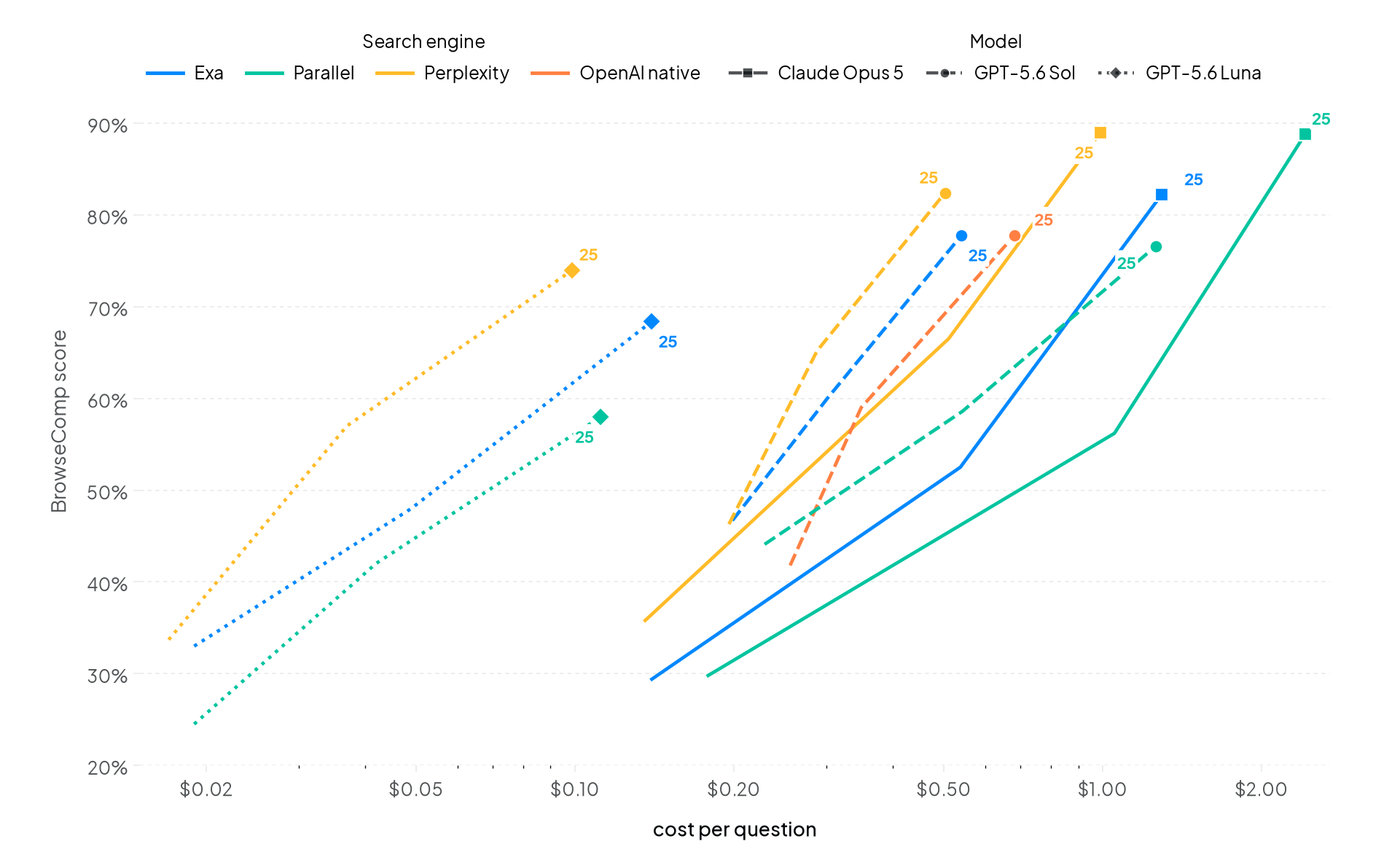
今回の評価は BrowseComp のみ対象とし、サーバーツールを使用して各検索で 10 件ずつ結果を取得しました。ページ取得やコード実行は行わず、各設定における最新の実行結果を採用しています。
検索深度を高めることは、品質向上のために最もコスト効率の良い方法です。1 ターンから 25 ターンに増やすとスコアが約 2 倍になりますが、質問あたりのコストは 2.5〜7 倍程度で済みます。
「検索深度を増やせば応答時間が必ず遅くなる」と思いがちですが、必ずしもそうとは限りません。例えば Luna は、1 ターンでは質問あたり 140 秒かかっていましたが、25 ターンにすると 111 秒に短縮されました。1 ターンと 5 ターンの両方で評価した 35 の構成のうち、3 つに満たないもの(約 1/3)が、ターン数を減らしても応答時間が遅くなる結果でした。これらはすべて OpenAI モデルです。これらのモデルは、制約された検索予算に対して追加の推論処理を行っています。
一方、簡単なタスクでは検索深度を深くしすぎるとコスト増に直結します。例えば HLE において、GPT-5.6 Sol を Perplexity で実行した場合、1 ターンと 25 ターンでスコアはほぼ同じでしたが、コストは 3 倍になりました。検索が単純なケースが多いのであれば、予算を制限したまま運用する方が賢明かもしれません。
最悪のコストシナリオは失敗率によって決まる
予算を拡大することが逆に悪影響を及ぼすケースとして、モデルが回答を見つけられない状況があります。我々の調査では、最終的に失敗することが分かっているにもかかわらず、モデルは回答を見つけるために予算を使い果たしてしまうことが確認されました。
| スイート (25ターン予算) | 正解時の平均検索数 | 不正解時の平均検索数 |
|---|---|---|
| BrowseComp | 10.3 | 19.7 |
| DeepSearchQA | 11.7 | 20.1 |
| HLE | 5.2 | 7.5 |
| WideSearch | 17.6 | 23.4 |
記録された最も深い試行では、WideSearch テーブルで 81 回の検索を行いましたが、それでも正解と判定されませんでした。もしあなたの業務で失敗率が高い場合、検索深度を減らすことがコスト削減の効率的な手段となる可能性があります。
エンジンよりもモデルが重要
予算が決まったら、次に最も重要な質問は「どのモデルを使うか」です。
| モデル | Perplexity | Exa | 並列 |
|---|---|---|---|
| Claude Opus 5, high | 89.0% ($0.99) | 82.2% ($1.29) | 88.8% ($2.42) |
| GPT-5.6 Sol, high | 82.4% ($0.50) | 77.8% ($0.54) | 76.6% ($1.26) |
| DeepSeek V4 Flash, high | 77.0% ($0.08) | 67.4% ($0.12) | 64.6% ($0.10) |
| GPT-5.6 Luna, extra-high | 74.0% ($0.10) | 68.4% ($0.14) | 58.0% ($0.11) |
上記の表は、25ターン時点での BrowseComp の結果を示しており、検索エンジンごとの最上位モデルと低コストモデルを比較しています。
モデルを固定して検索エンジンを変えると、スコアは平均で 10 ポイント変動しました。一方、最上位モデルとコスト効率の高いモデルの間の差は平均 15 ポイントでした。エンジン全体で見ると、コストの変動幅が最も大きかったのは最上位モデルで、最も高価なエンジンは最も安価なものより 2.5 倍のコストがかかりました。これに対し、コスト効率の高いモデルでは 1.5 倍でした。
このような比較が可能なのは、サーバーツールがプロバイダーの上に位置しているからです。リクエスト内のモデルを変更しても、検索動作は一定に保たれます。これは、自社で検索機能を提供していないモデルであっても同様です。
もちろん、ベンチマークはあくまで参考値であり、実際の性能を示すものではありません。どの設定を試すべきか、そして概算コストがどれくらいかを教えてくれるものです。ご自身の実際のタスクにおけるコストと品質はこれらとは異なる可能性があります。したがって、これらのページで最も価値のある活用方法は、候補リストとして扱い、上位の数項目について実際に質問を実行してみることです。
ご自身のワークロードで試す
上記のすべては、今日から OpenRouter で設定可能なリクエストパラメータです。
- Web プラグイン web plugin は、モデルが書き込みを開始する前に単一の検索を実行します。これは、新鮮な事実が必要な質問に対しては、高速で安価な選択肢となります。
サーバーツール
サーバーツール を使用すると、モデルが検索ツールを受け取り、次に何を調べるべきかを自ら判断できます。これは、回答を得るまでに複数の手順が必要な場合に特に有効です。
エンジン。OpenRouter では、engine に exa、parallel、perplexity、または native を設定します。auto を指定すると、まずネイティブエンジンが試され、失敗した場合にサードパーティ製エンジンへフォールバックされます。
検索予算。トップレベルの max_tool_calls リクエストフィールドは、エージェントが回答するまでに許容されるターン数(=検索ラウンドの数)を制限します。一方、max_results は1回の検索で返却される結果数を設定します。
まずは、ご自身のタスクに最も近いベンチマークスイートを選ぶことから始めましょう。その中から、トップスコアの数ポイント以内で最もコストの低い構成を選び、上位 2〜3 行のデータに対して独自の評価セットを再実行し、追加のコストが実際の結果に反映されるかを確認するのが現実的なアプローチです。
ベンチマーク手法
すべてのテストは、公開されている OpenRouter API を通じて本番環境のエンドポイントに対し、当社の オープンソースベンチマークハネス を使用して実行されます。
- 検索パフォーマンスに特化。検索設定のみを公平に比較するために、1 回の検索あたり結果を 10 件に統一し、ページ取得やコードの実行は行いません。推論能力については、各モデルごとに固定値として扱っており、これは表の通りです。
スコアは厳格に評価されます。各回答は公式の正解キーに対して正誤が判定され、意味的な比較が必要な場合は LLM によるジャッジが用いられます。また WideSearch では、回答項目ごとの精度も別途報告されています。
コストと速度は質問単位で算出されます。コストは採点費用を含めた総支出を評価対象の質問数で割った値です。速度は、1 問あたりの候補生成に要する時間を指します。
各ページには、すべての設定において最新の合格ランが掲載されています。一定数の質問を完了したランは「合格」とみなされ、新しいランは古いランを差し替えます。
FAQ
これらのスコアは、公開されているベンダーのエージェントリーダーボードと比較できるのでしょうか?
直接比較はできません。これらのベンチマークに関する多くの公開表では、検索、全ページ取得、コードツールを組み合わせた完全なエージェント製品が測定対象となっています。一方、このリーダーボードは検索設定に特化しており、モデルは検索結果の抜粋のみを読み取り、ページ取得やコードツールは無効になっています。これにより設定間の直接比較が可能になりますが、ベンチマークスコアの最大化を目的としたものではありません。
どの検索エンジンを選ぶべきでしょうか?
モデルとタスク次第です。そのため、各ページが存在しています。エンジン間の差は、あるモデルでは顕著ですが、他のモデルでは無視できるほど小さい場合もあります。また、プロバイダーが提供するネイティブ検索が自動的に最良の選択肢とは限りません。ご自身のワークロードに最も近いセットのライブリーダーボードを確認し、スコアだけでなくコストとレイテンシも併せて読み、時間経過とともに再確認してください。新しいランが追加されるたびに順位は変動するためです。
数値はどの程度最新のものか
リーダーボードには、各構成の最新の合格ランが常に表示されます。これは OpenRouter のベンチマークハッチで実行され、本番環境のエンドポイントに対して評価されたものです。ページ上では、新しいランが古いランを差し替えます。
Discord の #feedback チャンネルで、次にどのエンジンやモデルのベンチマークを行うべきかご意見をお聞かせください。
原文を表示
Web search is table stakes for most LLM requests in order to overcome knowledge cutoffs. Labs and search providers are evolving fast to make search more effective and efficient, leaving all of us with a set of tricky decisions: take the native search some labs build in, or wire up a third-party engine like Exa, Parallel, or Perplexity? Is one search enough, and if not how long do I let the agent keep searching? Are more search turns worth the quality they buy?
We built live leaderboards to help you decide the best search configuration with data. See the data on our new Benchmarks page.
We benchmark all the combinations to find strengths and weaknesses
When setting up a search request, you have four decisions:
- Model. Writes the exact query that gets submitted to the search engine and processes the results.
- Engine. You can choose a specific engine or rely on the bundled engines offered by some labs. On OpenRouter, we offer Exa, Parallel, and Perplexity, alongside the native engines from labs like OpenAI, Anthropic, and Google.
- Search method. Either you can perform the search before calling the model and pass the results in as context, or you can equip the model with a web search tool that it calls at its discretion.
- Search budget. If you choose the search tool method, you can also give the model a budget for how many searches it’s allowed to do. This enables models to adjust the query if it doesn’t like the results or to do follow-up searches. Our runs use 1, 5, or 25 turns.
To comprehensively understand web search performance, we regularly run four benchmarks across multiple models, engines, and search configurations:
- BrowseComp: hard fact-finding that takes real browsing
- DeepSearchQA: multi-hop research questions
- WideSearch: broad “fill in the whole table” collection
- HLE: expert exam questions with search
Each page ranks configurations by quality, value, and speed, so you can make decisions on the factor most important to your workload. The leaderboards are live, so the numbers move as new runs land and new models and engines are added. Today’s leader is not guaranteed to be tomorrow’s. We won’t spend much time on today’s leaders in this post as we expect that to change over time. Instead, let’s look into what the data tells us about how to make a decision for your workload.
Search budget matters more than any other factor
Increasing the engine budget up from one turn improves quality more than any other single change you can make. To illustrate, here was our initial run of BrowseComp on Perplexity across three different budgets:
| Model, with Perplexity | 1 turn | 5 turns | 25 turns |
|---|---|---|---|
| Claude Opus 5, high | 35.8% ($0.14) | 66.5% ($0.51) | 89.0% ($0.99) |
| GPT-5.6 Sol, high | 46.3% ($0.20) | 65.2% ($0.29) | 82.4% ($0.50) |
| GPT-5.6 Luna, extra-high | 33.7% ($0.02) | 57.0% ($0.04) | 74.0% ($0.10) |
This pattern holds up across all providers we measured:
These runs cover BrowseComp only, using the server tool with ten results per search, no page fetching or code execution, and the latest qualifying run per configuration.
Increasing search depth is the cheapest way we’ve found to increase quality. Increasing from 1 turn to 25 roughly doubles the score while costing only 2.5-7 times more per question.
You may assume this universally slows down response time, but that’s not always the case. For example, Luna took 140 seconds per question at 1 turn and 111 seconds at 25. Of the 35 configurations we ran at both 1 and 5 turns, over a third were slower with fewer turns. All were OpenAI models. These models deal with the constrained search budgets with extra reasoning.
On the other hand, search depth can be detrimental to costs on easier tasks. For example, on HLE, GPT-5.6 Sol with Perplexity scored similarly between 1 turn and 25 turns, for triple the cost. If your searches tend to be simple, it may still be worth keeping your budget limited.
Your worst-case cost scenario is driven by your failure rate
The other situation where an expanded budget is detrimental is when the model is failing to find an answer. We found that models would exhaust their budget attempting to find an answer even though they would eventually fail.
| Suite (25-turn budget) | Avg searches when correct | Avg searches when incorrect |
|---|---|---|
| BrowseComp | 10.3 | 19.7 |
| DeepSearchQA | 11.7 | 20.1 |
| HLE | 5.2 | 7.5 |
| WideSearch | 17.6 | 23.4 |
The deepest attempt we recorded, 81 searches on a WideSearch table, was still graded incorrect. If your workload has a high failure rate, then reducing search depth is likely an efficient path for reducing costs.
While the engine matters, the model matters more
Once the budget is set, the next most important question is which model to use.
| Model | Perplexity | Exa | Parallel |
|---|---|---|---|
| Claude Opus 5, high | 89.0% ($0.99) | 82.2% ($1.29) | 88.8% ($2.42) |
| GPT-5.6 Sol, high | 82.4% ($0.50) | 77.8% ($0.54) | 76.6% ($1.26) |
| DeepSeek V4 Flash, high | 77.0% ($0.08) | 67.4% ($0.12) | 64.6% ($0.10) |
| GPT-5.6 Luna, extra-high | 74.0% ($0.10) | 68.4% ($0.14) | 58.0% ($0.11) |
The table above shows the BrowseComp results at 25 turns, comparing frontier models versus budget models across search engines.
Varying the engine while holding the model constant changed the score by an average of 10 points while the average gap between frontier and cost-efficient models was larger at 15 points. Across engines, cost varied most for frontier models, where the priciest engine cost 2.5x the cheapest, versus 1.5x for cost-efficient models.
The reason a comparison like this is possible at all is that the server tool sits above the provider. Change the model in your request and the search behavior stays consistent, including for models whose provider ships no search of its own.
Of course, benchmarks are only a reference for possible performance. They tell you which configurations are worth trying and roughly what they cost. The cost and quality of these choices for your own real tasks will differ, so the highest-value thing you can do with these pages is treat them as a shortlist and then run your own questions through the top few.
Try it on your own workload
Everything above is a request parameter you can set today on OpenRouter.
- Web plugin. The web plugin runs a single search before the model starts writing, which is the fast, cheap option for questions that just need fresh facts.
- Server tool. The server tool hands the model the search tool and lets it decide what to look up next, which is what you want when the answer takes several steps to find.
- Engine. On OpenRouter, you set engine to exa, parallel, perplexity, or native; auto tries native first before falling back to a third party.
- Search budget. The top-level max_tool_calls request field caps how many agent turns it gets, meaning how many rounds of searching it may take before it has to answer, and max_results sets how many results come back each time.
A reasonable starting point: pick the suite closest to your task, take the cheapest configuration within a few points of the top score, then re-run your own evaluation set against the two or three rows above it to see whether the extra spend shows up in your results.
Benchmarking methodology
Every run goes through the public OpenRouter API against production endpoints, using our open source benchmark harness.
- Isolated to search performance. To ensure we are comparing only the search configuration, we standardized on ten results per search, no page fetching, and no code execution. Reasoning is fixed per model, as reflected in the tables.
- Scores are strict. Each evaluated answer is right or wrong against the official answer key, using an LLM judge where semantic comparison is needed. WideSearch also reports answer-item accuracy separately.
- Cost and speed are per question. Cost is total spend, including grading, divided by evaluated questions. Speed is candidate generation time per evaluated question.
- Each page shows the latest qualifying run for every configuration. A run qualifies once it completes a minimum number of questions, and new runs supersede old ones.
FAQ
How do these scores compare with published vendor agent leaderboards?
They are not directly comparable. Most published tables for these benchmarks are measuring full agent products that combine search, full page fetching, and code tools. These leaderboards isolate search configurations: the model reads search result excerpts only, with page fetching and code tools off. This allows direct comparisons between configurations, but won’t maximize benchmark scores.
Which search engine should I pick?
It depends on the model and the task, which is why the pages exist. The gap between engines is large for some models and negligible for others, and a provider’s own native search is not automatically its best option. Check the live leaderboard for the suite closest to your workload, read cost and latency alongside the score, and re-check it over time, because the ordering changes as new runs land.
How current are the numbers?
The leaderboards always show the latest qualifying run for each configuration, executed on OpenRouter’s benchmark harness against production endpoints. New runs supersede old ones on the page.
Tell us which engines or models we should benchmark next in #feedback on Discord.
関連記事
News to Guide
ニュースの次に確認する
発表内容を、現在の料金や仕様と照らし合わせられる関連ガイドです。
今日のまとめ
AIデイリーブリーフで今日の重要ニュースをまとめ読み