Amazon Bedrock でプロンプトの移行と最適化を支援する新機能
Amazon は「Advanced Prompt Optimization」という新ツールを導入し、最大 5 つのモデルに対してプロンプトを同時に最適化・比較できる機能を Amazon Bedrock に追加した。
AI深層分析を開く2026年7月31日 01:14
AI深層分析
キーポイント
スケーラブルな最適化ツールの導入
Amazon は「Advanced Prompt Optimization」という新ツールを導入し、最大 5 つのモデルに対してプロンプトを同時に最適化・比較できる機能を Amazon Bedrock に追加した。
開発ライフサイクルのボトルネック解消
従来の手動反復によるプロンプト調整が引き起こすモデルロックイン、性能不足、回帰盲点、低速なイテレーションという 4 つの課題をこのツールで解決する。
メトリクス駆動型のワークフロー
開発者は数日かかる手作業を置き換えるため、ガイド付きかつメトリクスに基づくワークフローを通じて、プロンプトとレスポンスの変化を実用例やデータに基づいて制御できる。
評価指標駆動のフィードバックループ
システムは評価指標に基づいて逆方向に動作し、ヒューリスティックな書き換えではなく強化学習スタイルのフィードバックループでプロンプトを最適化する。このプロセスはモデルの重みを変更せず、評価・再書き換え・再評価を繰り返して最終的なスコアとコスト情報を出力する。
マルチモデル対応と包括的比較
アーキテクチャはモデル非依存であり、1回のジョブで最大5つのモデルに同時にターゲットを設定できる。これにより、各候補に対して最適化されたプロンプトが生成され、品質・レイテンシ・コストを直接比較することが可能になる。
重要な引用
Migrating prompts to new models on Amazon Bedrock, or optimizing them for your current model, is still one of the most manual parts of building a generative AI application.
Customers spend days to weeks optimizing prompts and re-evaluating responses when they migrate to a new model.
This approach replaces days of manual iteration with a guided, metrics-driven workflow.
Instead of rewriting prompts heuristically, the system operates in a reinforcement learning-style feedback loop, without changing model weights
編集コメントを表示
編集コメント
生成 AI の実装において、プロンプトの微調整は常にボトルネックとなってきたが、この新機能はそれを体系的に解決する重要な一歩である。AWS は開発者の負担を減らし、より多くの企業が高性能なモデルを安全かつ効率的に活用できる環境を整えつつある。
Source Article
元記事を日本語で読む
本文に関係しない購読案内、埋め込み通知、サイト内プロモーションは除いています。
課題:大規模なプロンプトエンジニアリングの難しさ
Amazon Bedrock で新しいモデルへプロンプトを移行したり、現在のモデル向けに最適化したりするのは、生成 AI アプリケーション構築において依然として最も手作業が多い工程の一つです。例えば、すでにデプロイされた生成 AI アプリケーションを構築し、動作させているとします。プロンプトは調整済みで出力も安定しており、ユーザーも満足している状態です。しかし、Amazon Bedrock でより高速・低コスト・高性能な新モデルが利用可能になった場合、移行するかどうかの判断を迫られます。
この決定は一見単純そうに見えますが、実際にはそう簡単ではありません。
顧客は、新しいモデルへ移行する際や、現在のモデルのパフォーマンス向上を試みる際に、プロンプトの最適化と回答の評価に数日から数週間を費やすことがよくあります。このサイクルは毎回同じです。プロンプトを書き直し、テストケースで実行し、結果を比較し、微調整して繰り返す。これを、本番環境にあるすべてのプロンプトテンプレートや、評価対象となるすべての候補モデルに対して行うと考えると、その作業量は膨大になります。つまり、この課題はあなたの野望の規模に比例して拡大していくのです。
本日、Amazon Bedrock は「Advanced Prompt Optimization(高度なプロンプト最適化)」を発表しました。このツールは、Bedrock 上の最大 5 つのモデルに対してプロンプムの最適化を行い、元のプロンプムと最適化後のパフォーマンスを比較できます。
本稿では、単一のジョブで複数のモデルにまたがってプロンプムを移行・最適化する手順をご紹介します。このアプローチにより、数日にわたる手動での試行錯誤を置き換え、ガイド付きかつ指標駆動型のワークフローを実現します。
課題:生成 AI ソフトウェア開発ライフサイクルにおけるボトルネック
プロンプムの移行と最適化は、生成 AI の開発ライフサイクルにおいて極めて重要なボトルネックとなっています。この工程が遅かったり手作業に頼っていたりすると、以下の 4 つの領域でその影響が顕著に現れます。
モデルロックイン。より新しいモデルに移行すればレイテンシや推論コストを削減できるにもかかわらず、再チューニングに要する時間と労力が大きすぎるため、チームは移行を避けています。
性能不足。あるモデル向けにプロンプトを作成しても、別のモデルの能力を十分に引き出せません。
回帰の盲点。正解データに対する体系的な評価がない場合、「異なる」出力と「劣化した」出力を見分けることができません。チームは気づかないうちに品質が低下した出力をリリースしてしまいます。
反復サイクルの遅さ。プロンプトの変更ごとに手動での A/B テストが必要となり、エンジニアが機能開発ではなく評価ループに縛られてしまいます。
そこで必要なのは、複数のモデルを同時にテストできる組み込みの評価機能を備えたプロンプト最適化ツールです。また、プロンプトとレスポンスの変化をガイドし、実際のユースケースやデータに基づいて最適化を行うことも可能です。
アーキテクチャ:指標駆動のフィードバックループ
Amazon Bedrock の高度なプロンプト最適化 は、評価指標から逆算して動作します。ヒューリスティックにプロンプトを書き換えるのではなく、このシステムはモデルの重みを変更することなく、強化学習のようなフィードバックループで稼働します。
プロンプトテンプレート、例となるユーザー入力(テキストまたはマルチモーダル)、オプションの正解データ、そして評価指標を提供します。
オプティマイザーは、これらのテンプレートと入力を選択した推論モデルに送信し、指定された指標に基づいて回答を評価した上で、プロンプトを再作成します。
この「評価→再作成→評価」というループが繰り返され、評価指標に沿ってプロンプトが段階的に最適化されていきます。
最終的な出力には、元のプロンプトと最適化されたプロンプトの両方が含まれます。それぞれについて、評価スコア、サンプルごとの TTFT(最初のトークン到達までの時間)、オンデマンド価格に基づく推論コストの見積もりを取得できます。
このアーキテクチャはモデルに依存しないため、Amazon Bedrock 上で任意のモデルを選択して利用可能です。1 つのジョブで最大 5 モデルを同時にターゲットにでき、各候補モデルに対して最適化されたプロンプトが得られるだけでなく、品質・レイテンシ・コストを直接比較することもできます。
以下の図は、これらの要素がどのように連携するかを示しています。

TTFT とは? TTFT(Time-to-First-Token)は、モデルが応答を開始するまでの速さを測定する指標です。リクエストを送信してから最初のトークンを受け取るまでの時間を計測し、チャットボットがタイピングを始めるまでの感覚的な待ち時間のような、ユーザーが体感するレイテンシの目安として役立ちます。
TTFT は応答開始のタイミングを示すため、完全なレイテンシ像を把握するには出力トークン数と組み合わせて使用するのが効果的です。また、これはリアルタイムのインフラ状況も反映しているため、単発の実行結果は方向性を示す指標として捉えるのが適切です。
高度なプロンプト最適化は、品質指標(スコア)に基づいてプロンプトを最適化し、結果ごとに TTFT(Time To First Token)とコストも併せて報告します。これにより、品質・レイテンシ・コストの全体像が把握でき、確信を持って最適なプロンプトを選定できます。
解決策:Amazon Bedrock の高度なプロンプト最適化
Amazon Bedrock は 高度なプロンプト最適化 を導入しました。これは、Bedrock 上の最大 5 つのモデルに対してプロンプトを最適化し、元のプロンプトと最適化後のパフォーマンスを比較できるツールです。利用方法は主に 2 つあります。
- モデル移行:現在のモデルをベースラインとして選択し、最大 4 つの候補モデルを追加します。各モデルごとに最適化されたプロンプトが生成され、横並びで比較できます。
- 同一モデルでの改善:現在のモデルのみを選択します。他の設定を変更せずに、より良いプロンプトを取得できます。
3 つの評価モード
各プロンプトテンプレートに対して評価方法を 1 つ選択します。各方法は異なるユースケースに対応しています。以下に、それぞれの利用場面をまとめます。
モード 主な用途 必要な入力
AWS Lambda 関数
具体的な指標(精度、F1 スコア、ROUGE、JSON の一致など)
compute_score ロジックを含む AWS Lambda 関数
LLM-as-a-Judge
自由記述タスク(要約、推論、生成など)
評価基準となるプロンプトと、判定に用いるモデルの選択
ステアリング基準
ブランドボイス、フォーマット要件、安全性制約など
最大 5 つの自然言語による基準
評価項目をすべて省略すると、システムは精度、回答の完全性、文章スタイルのスコアリングを組み合わせたデフォルトの評価基準が自動的に適用されます。より良い結果を得るためには、独自の評価指標を定義することをお勧めします。
複数の最適化目標がある場合は、各基準に重み付けを加えた複合的な評価指標を作成できます。ただし、評価指標の出力値は必ず単一の数値である必要があります。
多モーダル対応
高度なプロンプト最適化では、Amazon S3 URI を経由して参照される PNG、JPG、JPEG、GIF、WebP、PDF ファイルといった多様な入力形式に対応しています。これにより、文書分析や画像分類、視覚的な質問応答など、テキストと画像を組み合わせたタスクのプロンプト最適化が可能になります。
コンソールでの始め方
ここでは、コンソールの操作フローを順を追って解説します。ジョブの作成、モデルの選択、入力データのアップロード、最適化の実行、そして結果の確認までを行います。高度なプロンプト最適化のランディングページには、実行中のジョブとそのステータスが一覧表示され、新しいジョブを開始するためのボタンも用意されています(以下のスクリーンショット参照)。
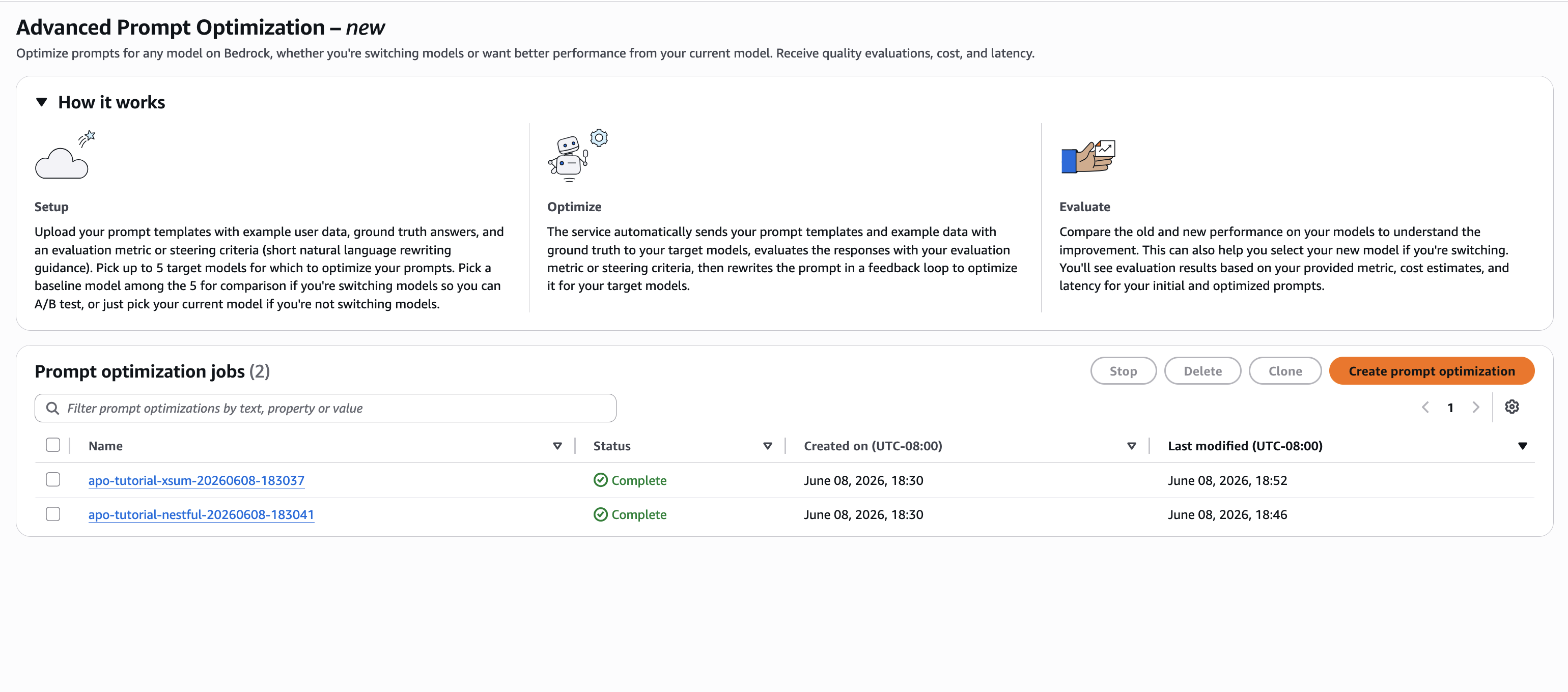
高度なプロンプト最適化のランディングページ
ステップ 1: プロンプト最適化ジョブの作成
Amazon Bedrock コンソールの左側ナビゲーションペインで、Advanced Prompt Optimization(高度なプロンプト最適化)を選択します。ランディングページが表示されたら、Create prompt optimization(プロンプト最適化の作成)をクリックしてください。次のスクリーンショットは、作成画面を示しています。
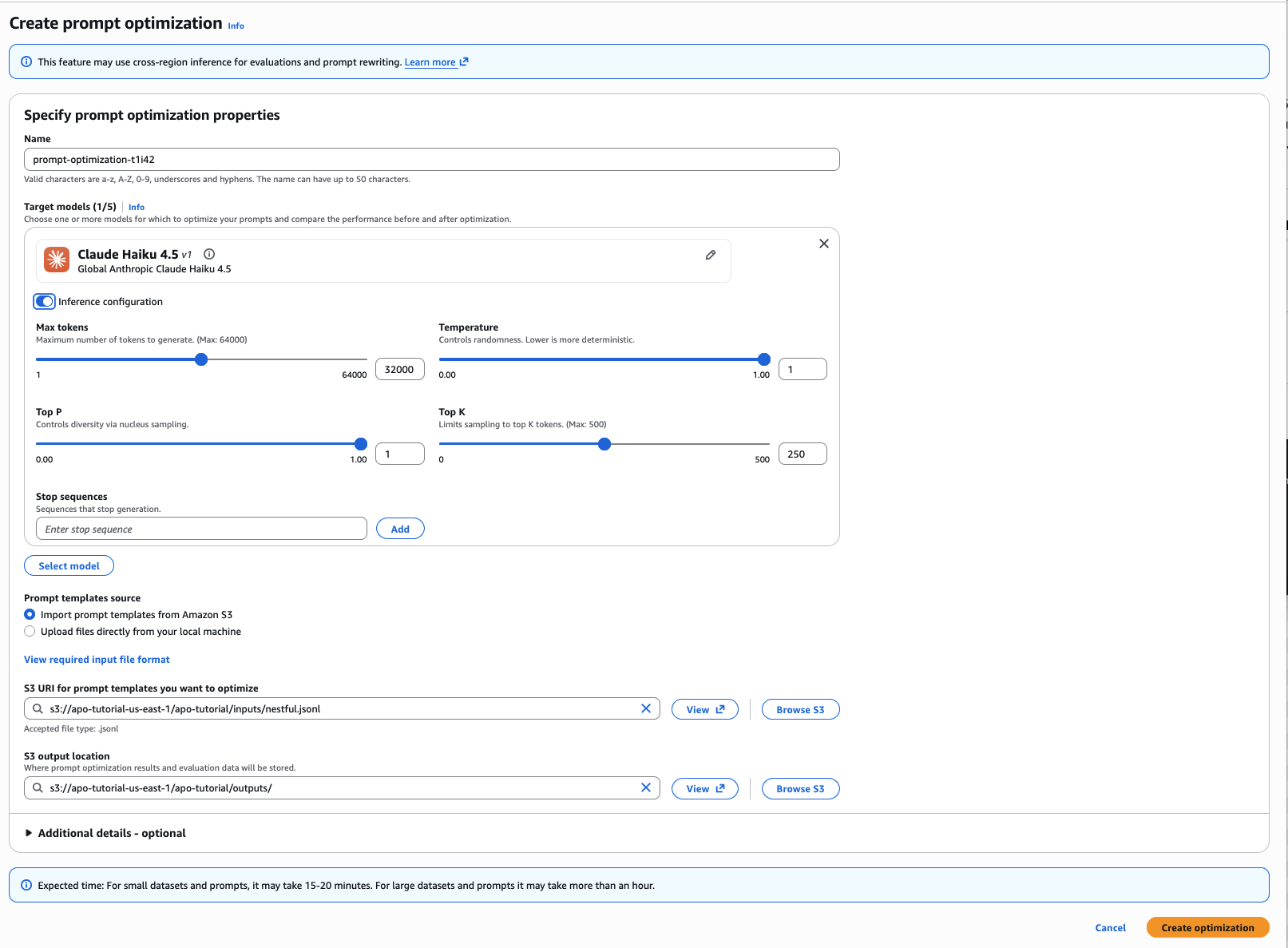
ステップ 1: プロンプト最適化ジョブの作成
ステップ 2: 推論モデルの選択
Model selection(モデル選択)セクションで、Add model(モデルを追加)をクリックします。現在のモデルをベースラインとして選択してください。候補となるモデルを追加する場合は、再度 Add model をクリックし、最大 4 つの追加モデルを選択できます。移行を行わない場合は、現在のモデルのみを選択してください。
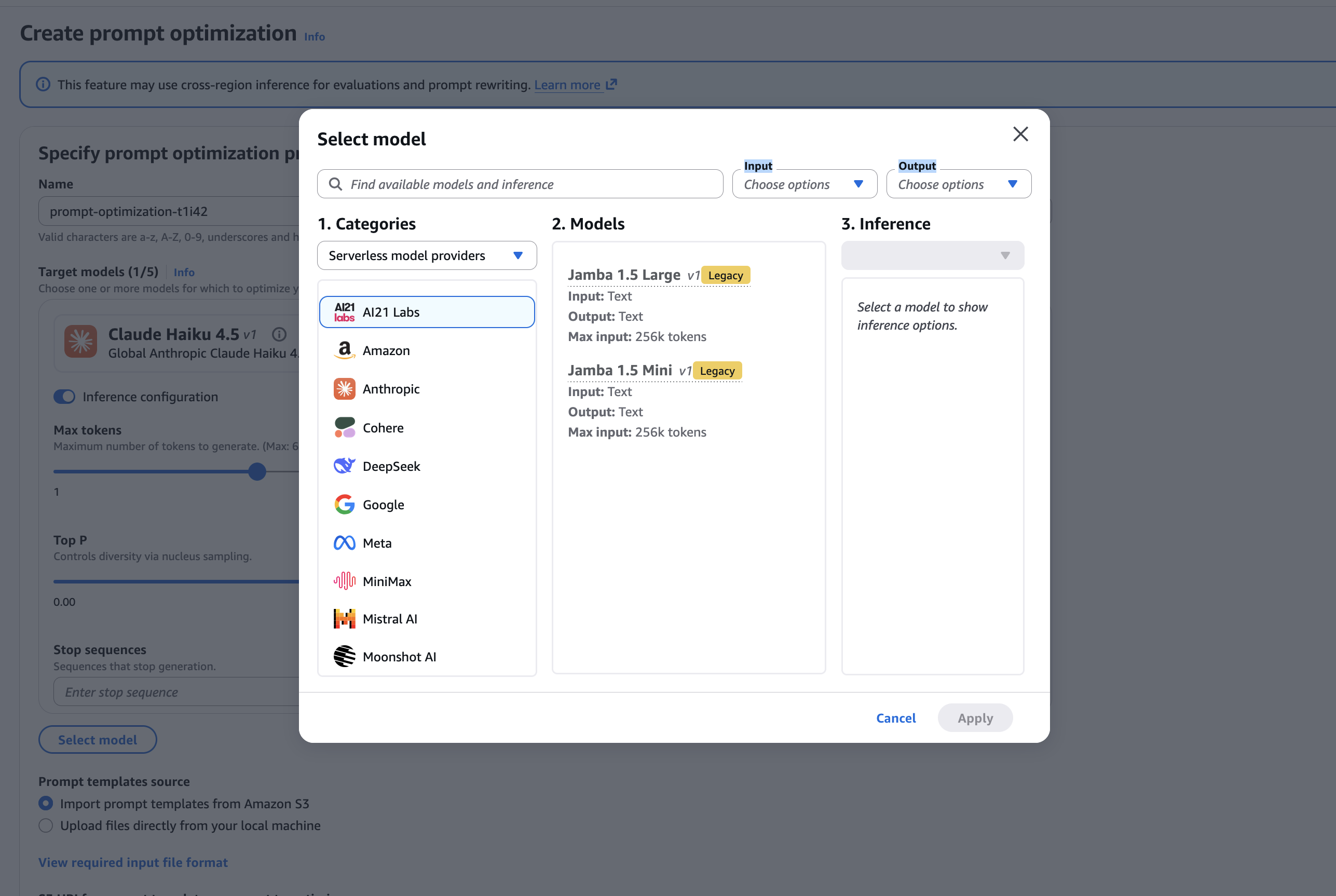
ステップ 2: 推論モデルの選択
ステップ 3: 入力データの準備(JSONL 形式)
入力ファイルは JSONL 形式を使用します。1 行ごとに 1 つの JSON オブジェクトが含まれており、各行が最適化する対象のプロンプトテンプレートとなります。詳細については、技術ドキュメント をご覧ください。以下のスニペットは、コアとなるスキーマの例です。
Amazon Bedrock でプロンプトを新しいモデルへ移行し、最適化するには、まず JSON 形式のプロンプトテンプレートを作成します。このテンプレートには、{{variableName}} というプレースホルダーを含め、変数を動的に置換できるようにしておきます。
次に、評価サンプルを設定します。これには入力変数と、期待される出力(リファレンスレスポンス)を定義します。リファレンスレスポンスは必須ではありませんが、評価精度を高めるために推奨されます。
さらに、評価方法として AWS Lambda を使用する場合や、LLM-as-a-Judge 方式を採用する場合があります。AWS Lambda の場合、Lambda 関数の ARN と評価指標のラベルを指定します。一方、LLM-as-a-Judge では、評価基準(ルブリック)を含むプロンプトと、使用するモデル ID を設定し、独自の評価指標名を付与します。
詳細な手順や全体像については、AWS の技術ドキュメントをご参照ください。
評価基準の作成
カスタム LLM プロンプト(customLLMJPrompt)では、3 つのプレースホルダーを二重中括弧で指定します。{{prompt}} は完全にレンダリングされたプロンプト(プロンプトテンプレートと評価サンプルを組み合わせたもの)、{{response}} はモデルの出力、{{referenceResponse}} は正解データです。
高度なプロンプト最適化では、これらの値を各候補とサンプルに対して置換した上で、評価用モデル(judge model)に送信します。詳細は LLM を評価者として使用する をご覧ください。
以下のスニペットは、ステアリング基準(steering criteria)のオプション例です。
{
"steeringCriteria": [
"be concise",
"use professional tone",
"avoid speculation"
]
}
ステップ 4: アップロードと提出
プロンプトテンプレートのソース セクションで、ローカルマシンから直接ファイルをアップロードを選択して JSONL ファイルをアップロードします。あるいは、Amazon S3 からプロンプトテンプレートをインポートを選択し、S3 URI を入力してください。S3 出力先 セクションには、S3 の出力パスを入力します。最後に 最適化の作成 を選択してジョブを提出します。
ステップ 5: 結果の解釈
結果ページでは、以下の 4 つの情報を確認できます。
- 最適化前後の評価スコア(モデル別)
- コピーしてデプロイ可能な最適化済みプロンプト
- モデルごとのサンプルごとの TTFT(Time to First Token)
- オンデマンド推論価格に基づくコスト見積もり
この記事で取り上げた例(NESTFUL と XSum)の実際の結果を、以下のスクリーンショットから確認できます。これらは、チュートリアル用 GitHub リポジトリ のデータセットを用いて、API および SDK(次節で解説)経由で実行したものです。
各ジョブには評価サンプルを 5 件ずつ使用しました。コンソールから作成した場合も API から作成した場合も、表示される結果は同じです。このリポジトリは期待される出力形式の参考資料として活用でき、ご自身のアカウントでも同様の画面を再現可能です。ただし、実際の数値はデータセットの内容やプロンプトの複雑さ、選択したモデルによって異なります。
サマリービューでは、最適化前後のスコアが要約されて表示されます。以下のスクリーンショットは NESTFUL の実行結果(関数呼び出し機能を使用し、Amazon Nova 2 Lite モデル)を示しており、精度が 0.267 から 0.647 に向上したことがわかります。
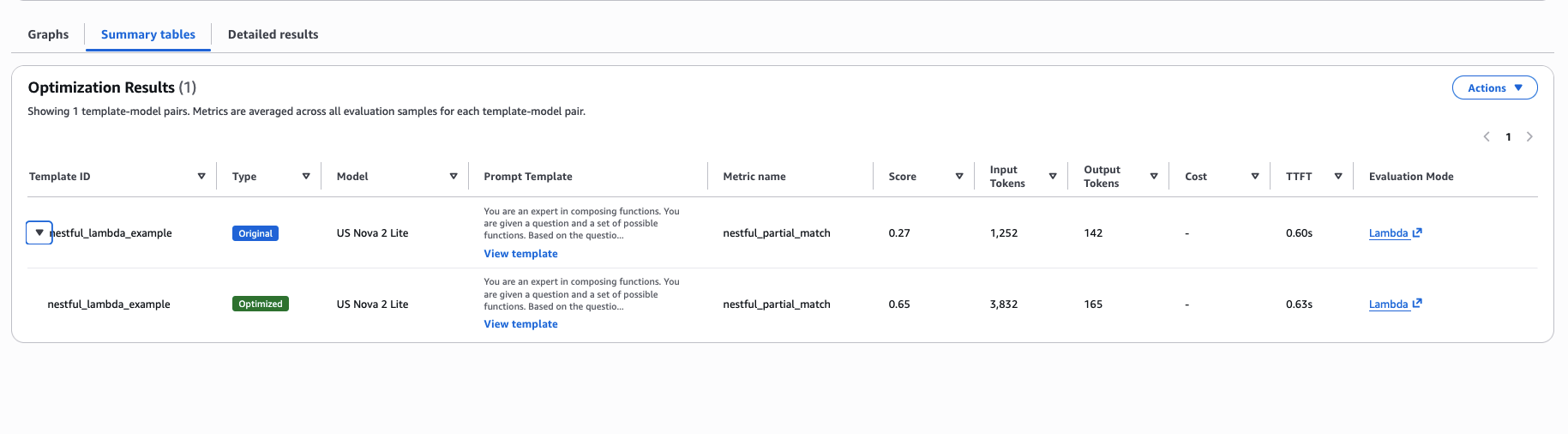
NESTFUL: サマリーテーブル(最適化結果)
詳細ビューでは、元のプロンプトと最適化後のプロンプトを並列表示し、サンプルごとのメトリクスやトークン数・レイテンシの詳細な内訳を確認できます。以下のスクリーンショットがその様子です。
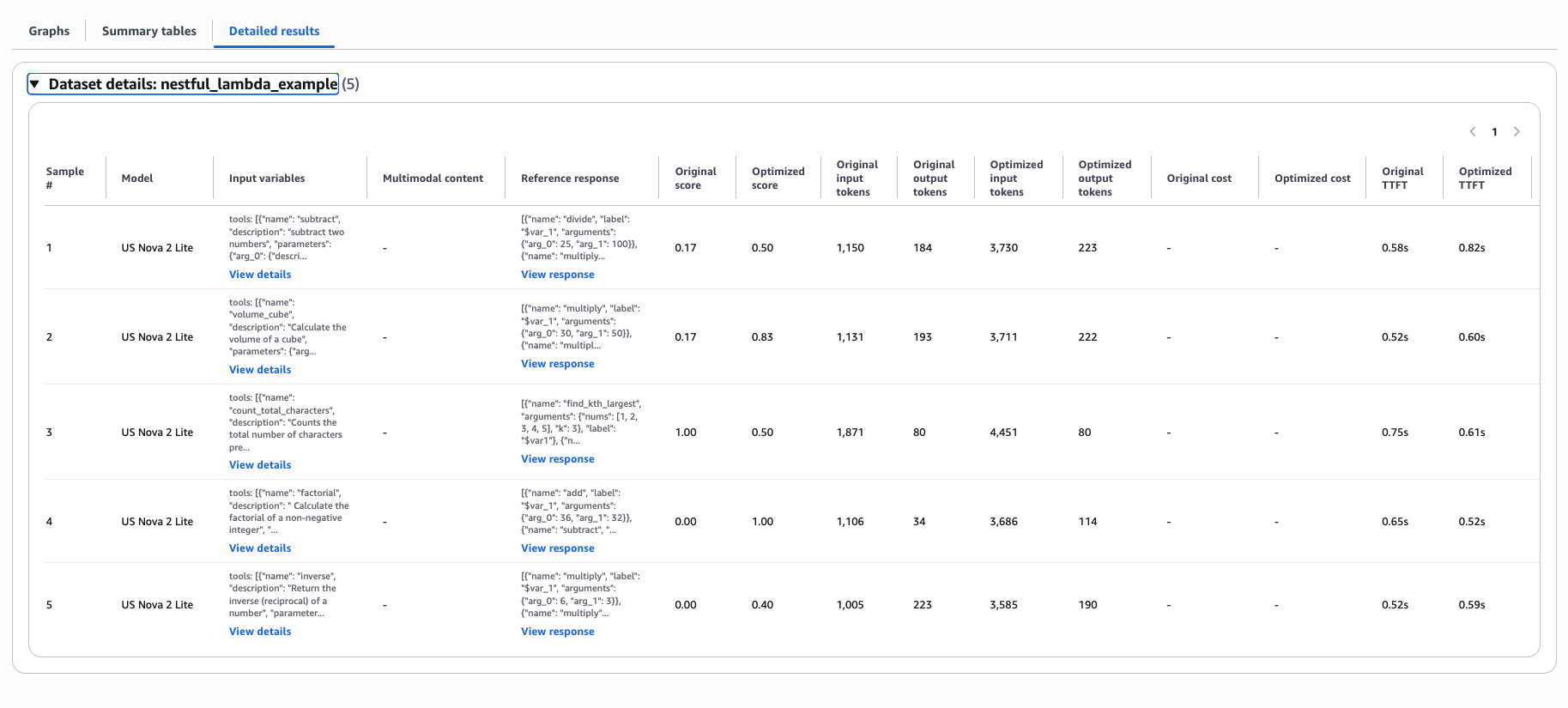
NESTFUL: 詳細結果ビュー
以下のスクリーンショットは、XSum ラン(要約タスク、Claude Haiku 4.5 モデル使用)のサマリー表示を示しています。品質スコアが 0.550 から 0.743 に向上し、同時に生成されたトークン数は 51 から 28 に削減されました。
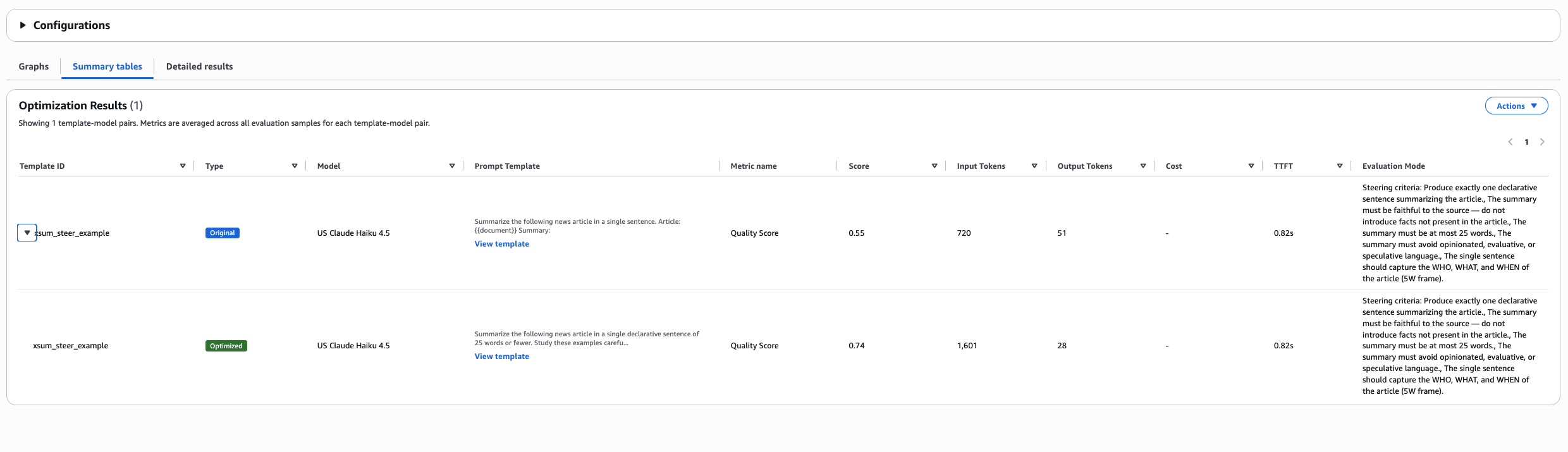
XSum: 要約テーブルの最適化結果
次に、XSum の詳細表示を示すスクリーンショットです。
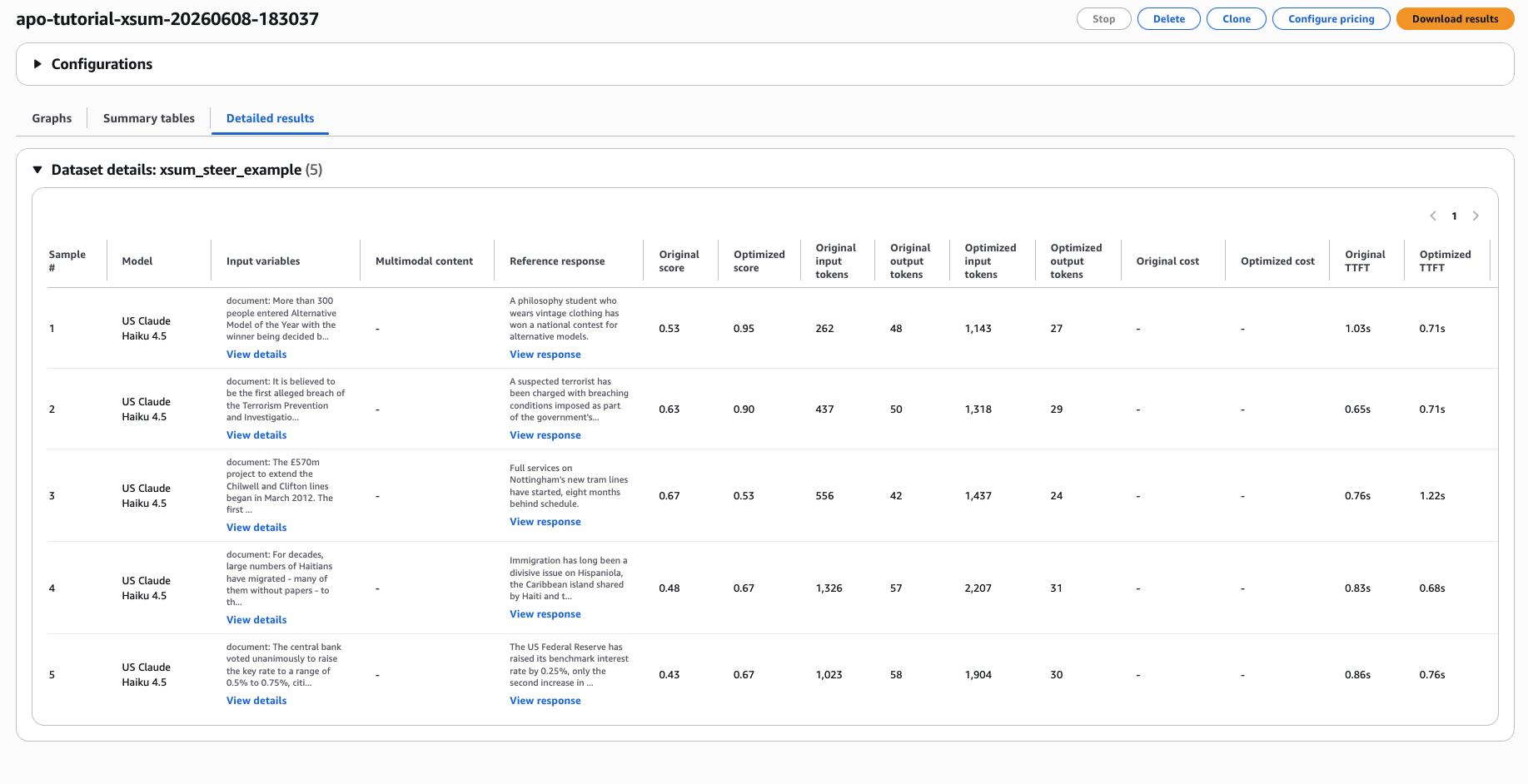
XSum: 詳細結果ビュー
はじめに:API / SDK (boto3)
ワークフロー全体を boto3 で実行することも可能です。以下のコードは、2 つの候補モデルを対象としたジョブを作成する例です。
import boto3
bedrock = boto3.client("bedrock", region_name="us-west-2")
response = bedrock.create_advanced_prompt_optimization_job(
jobName="my-migration-job",
modelConfigurations=[
{"modelId": "us.amazon.nova-2-lite-v1:0"}, # candidate 1
{"modelId": "us.anthropic.claude-haiku-4-5-20251001-v1:0"}, # candidate 2
],
inputConfig={
"s3Uri": "s3://amzn-s3-demo-bucket/inputs/prompts.jsonl"
},
outputConfig={
"s3Uri": "s3://amzn-s3-demo-bucket/outputs/migration-job/"
},
)
job_arn = response["jobArn"]
print(f"Job submitted: {job_arn}")
完了待ちのポーリング
ジョブは非同期で実行されるため、終了状態になるまでステータスを定期的に確認する必要があります。以下のコードでは、60 秒ごとにチェックを行います。
import time
while True:
info = bedrock.get_advanced_prompt_optimization_job(jobIdentifier=job_arn)
status = info["jobStatus"]
print(f"Status: {status}")
if status in ("Completed", "Failed", "Stopped"):
break
time.sleep(60)
結果のダウンロード
ジョブが完了すると、開始時に指定した Amazon S3 の出力先へ自動的に JSONL 形式の結果ファイルが書き込まれます。以下のコードは、boto3 を使用してそのファイルをダウンロードする例です。
結果の保存先: s3://output-uri/job-id/advanced_prompt_optimization_results.jsonl
s3 = boto3.client("s3")
job_id = job_arn.rsplit("/", 1)[-1]
result_key = f"outputs/migration-job/{job_id}/advanced_prompt_optimization_results.jsonl"
s3.download_file("amzn-s3-demo-bucket", result_key, "results.jsonl")
マルチモーダル入力を用いたステアリング基準の完全な例
以下の例では、質問と PDF ドキュメントをペアにしたステアリング基準用のデータセットを作成し、JSONL 形式で保存して Amazon S3 にアップロードします。
import json
入力データの構築
record = {
"version": "bedrock-2026-05-14",
"templateId": "document-qa-v1",
"promptTemplate": "文書に基づいて質問に答えてください。\n\n質問: {{question}}",
"steeringCriteria": [
"State the answer first, then provide supporting evi
原文を表示
The problem: Prompt engineering at scale is still painful
Migrating prompts to new models on Amazon Bedrock, or optimizing them for your current model, is still one of the most manual parts of building a generative AI application. Say you have built a deployed generative AI application. It works. Your prompts are tuned, your outputs are consistent, and your users are happy. Then a new model becomes available on Amazon Bedrock that is faster, cheaper, and more capable, and you must decide whether to migrate.
The decision should be straightforward, but it rarely is.
Customers spend days to weeks optimizing prompts and re-evaluating responses when they migrate to a new model. The same effort applies when they try to improve performance on their current model. The cycle looks the same every time. Rewrite the prompt, run it against test cases, compare results, tweak, and repeat. Now multiply that work by every prompt template in production and every model candidate worth evaluating. The result is a problem that scales with your ambition.
Today, Amazon Bedrock introduces Advanced Prompt Optimization, a tool that optimizes prompts for up to 5 models on Bedrock while comparing original and optimized performance. In this post, we show you how to use Amazon Bedrock Advanced Prompt Optimization to migrate and optimize prompts across multiple models in a single job. This approach replaces days of manual iteration with a guided, metrics-driven workflow.
The challenge: How this breaks the generative AI software development lifecycle
Prompt migration and optimization sit at a critical chokepoint in the generative AI development lifecycle. When this step is slow or manual, you feel it in 4 areas:
- Model lock-in. Teams avoid migration because the time and effort of re-tuning is too high, even when newer models would reduce latency and inference cost.
- Underperformance. When you write prompts for one model, you don’t use the full capability of another.
- Regression blindness. Without systematic evaluation against ground truth, you can’t distinguish “different” from “worse.” Teams ship degraded outputs without knowing it.
- Slow iteration cycles. Every prompt change requires manual A/B testing, which keeps engineers in evaluation loops instead of building features.
You need a prompt optimizer with built-in evaluations that test multiple models at once. It should also let you guide how prompts and responses change, grounding the optimization in real use cases and data.
The architecture: Metric-driven feedback loop
Amazon Bedrock Advanced Prompt Optimization works backward from your evaluation metric. Instead of rewriting prompts heuristically, the system operates in a reinforcement learning-style feedback loop, without changing model weights:
- You provide a prompt template, example user inputs (text or multimodal), optional ground truth answers, and an evaluation metric.
- The optimizer sends your template and inputs to your chosen inference models. It evaluates responses against your metric and then rewrites the prompt.
- The loop repeats (evaluate, rewrite, evaluate), iteratively optimizing your prompt against your evaluation metric.
- The output is the original and optimized prompts. For each, you get evaluation scores, time to first token (TTFT) per sample, and inference cost estimates at on-demand pricing.
This architecture is model-agnostic. You can use your choice of model on Amazon Bedrock. A single job can target up to 5 models at once. You get an optimized prompt for each candidate and a direct comparison of quality, latency, and cost, all from one submission.
The following diagram shows how these pieces fit together.
What is TTFT? TTFT (time-to-first-token) measures how quickly the model starts responding: the time from sending a request to receiving the first token. It’s a useful proxy for perceived latency, like a chatbot beginning to type.
TTFT captures when the response starts, so pair it with output-token counts for the full latency picture. Since it also reflects real-time infrastructure conditions, read single-run values as a directional signal.
Advanced Prompt Optimization optimizes for your quality metric (the score) and reports TTFT and cost alongside every result. This gives you a complete view of quality, latency, and cost to choose the right prompt with confidence.
Solution: Amazon Bedrock Advanced Prompt Optimization
Amazon Bedrock introduces Advanced Prompt Optimization, a tool that optimizes prompts for up to 5 models on Bedrock while comparing original and optimized performance. You can use it in two ways:
- Model migration. Select your current model as a baseline plus up to 4 candidates. You get optimized prompts for each and a side-by-side comparison.
- Same-model improvement. Select only your current model. You get a better prompt without changing anything else.
Three evaluation modes
You choose one evaluation method per prompt template, and each method serves a different use case. The following table summarizes when to use each one.
Mode
Best for
What you provide
AWS Lambda function
Concrete metrics (accuracy, F1, ROUGE, JSON match, and so on)
An AWS Lambda function with compute_score logic
LLM-as-a-Judge
Open-ended tasks (summarization, reasoning, generation)
A rubric prompt and a judge model selection
Steering criteria
Brand voice, format, safety constraints
Up to 5 natural language criteria
If you omit all evaluation fields, the system uses a built-in default that combines accuracy, answer completeness, and writing style scoring. We recommend you define your own evaluation metric for the best results. If you have more than one objective to optimize for, you can create a composite metric with weights for each of your criteria in the scoring algorithm. Your metric output must be a single number.
Multimodal support
Advanced Prompt Optimization supports multimodal inputs: PNG, JPG, JPEG, GIF, WebP, and PDF files referenced through Amazon Simple Storage Service (Amazon S3) URIs. You can optimize prompts for document analysis, image classification, visual question answering, and other tasks that combine text with visual input.
Getting started: Console
This section walks you through the console flow step by step: you create a job, select models, upload your input dataset, submit the optimization, and read the results. The Advanced Prompt Optimization landing page lists your jobs and their status and provides a button to start a new one, as shown in the following screenshot.
Advanced Prompt Optimization landing page
Step 1: Create a prompt optimization job
In the Amazon Bedrock console, in the left navigation pane, choose Advanced Prompt Optimization. On the landing page, choose Create prompt optimization. The next screenshot shows the creation page.
Step 1: Create a prompt optimization job
Step 2: Select inference models
In the Model selection section, choose Add model. Select your current model as a baseline. To add candidates, choose Add model again and select up to 4 additional models. If you are not migrating, select only your current model.
Step 2 Select Inference Models
Step 3: Prepare your input dataset (JSONL)
Your input file uses JSONL format, with one JSON object per line, and each line is one prompt template to optimize. For full details, see the technical documentation. The following snippet shows the core schema.
{
    "version": "bedrock-2026-05-14",
    "templateId": "unique-id-for-this-template",
    "promptTemplate": "Your prompt with {{variableName}} placeholders",
    "evaluationSamples": [
        {
            "inputVariables": [
                {"variableName": "value"}
            ],
            "referenceResponse": "Expected output (optional but recommended)"
        }
    ]
}
Then add one of the evaluation method fields. For more details and overall guidance, see the technical documentation. The following snippet shows the AWS Lambda metric option.
{
    "evaluationMetricLambdaArn": "arn:aws:lambda:us-west-2:111122223333:function:my-metric",
    "customEvaluationMetricLabel": "my_score_name"
}
The following snippet shows the LLM-as-a-Judge option.
{
    "customLLMJConfig": {
        "customLLMJPrompt": "Your rubric. Use {{prompt}}, {{response}}, {{referenceResponse}} as placeholders.",
        "customLLMJModelId": "us.anthropic.claude-opus-4-6-v1"
    },
    "customEvaluationMetricLabel": "my_judge_metric"
}
Authoring your judge rubric. In your customLLMJPrompt, reference 3 placeholders with double curly braces: {{prompt}} (the fully rendered prompt, which is the prompt template combined with the evaluation sample), {{response}} (the model output), and {{referenceResponse}} (the ground truth). Advanced Prompt Optimization substitutes these values for each candidate and sample before sending the rubric to the judge model. For details, see Use an LLM as a judge.
The following snippet shows the steering criteria option.
{
    "steeringCriteria": [
        "be concise",
        "use professional tone",
        "avoid speculation"
    ]
}
Step 4: Upload and submit
In the Prompt templates source section, choose Upload files directly from your local machine to upload your JSONL file. Alternatively, choose Import prompt templates from Amazon S3 and enter the S3 URI. In the S3 Output location section, enter your S3 output path. Choose Create optimization to submit the job.
Step 5: Interpret results
The results page shows 4 things: evaluation scores before and after optimization (per model), the optimized prompts ready to copy and deploy, TTFT per sample across models, and cost estimates based on on-demand inference pricing.
The following screenshots show the actual results of the examples we ran for this post: NESTFUL and XSum. We submitted them through the API and SDK (see the next section) using the datasets from the tutorial GitHub repo. Each job used 5 evaluation samples. The console renders the same results whether the job was created from the console or the API. You can use the repo as a reference for the expected output format and reproduce these views in your own account. Your results will vary based on your dataset, prompt complexity, and model choice. The summary view gives you the headline before and after scores. The following screenshot shows the NESTFUL run (function calling, Amazon Nova 2 Lite), where accuracy increased from 0.267 to 0.647.
NESTFUL: Summary Table Optimization Results
The details view shows the original and optimized prompt side by side, along with per-sample metrics and the full token and latency breakdown, as shown in the following screenshot.
NESTFUL: Detailed Results view
The following screenshot shows the summary view for the XSum run (summarization, Claude Haiku 4.5). The Quality Score increased from 0.550 to 0.743 while output tokens dropped from 51 to 28.
XSum: Summary Table Optimization Results
The following screenshot shows the corresponding details view for XSum.
XSum: Detailed Results view
Getting started: API / SDK (boto3)
You can also drive the whole workflow with boto3. The following code creates a job that targets two candidate models.
import boto3

bedrock = boto3.client("bedrock", region_name="us-west-2")

response = bedrock.create_advanced_prompt_optimization_job(
    jobName="my-migration-job",
    modelConfigurations=[
        {"modelId": "us.amazon.nova-2-lite-v1:0"},              # candidate 1
        {"modelId": "us.anthropic.claude-haiku-4-5-20251001-v1:0"}, # candidate 2
    ],
    inputConfig={
        "s3Uri": "s3://amzn-s3-demo-bucket/inputs/prompts.jsonl"
    },
    outputConfig={
        "s3Uri": "s3://amzn-s3-demo-bucket/outputs/migration-job/"
    },
)

job_arn = response["jobArn"]
print(f"Job submitted: {job_arn}")
Poll for completion
A job runs asynchronously, so poll its status until it reaches a terminal state. The following code checks every 60 seconds.
import time

while True:
    info = bedrock.get_advanced_prompt_optimization_job(jobIdentifier=job_arn)
    status = info["jobStatus"]
    print(f"Status: {status}")

    if status in ("Completed", "Failed", "Stopped"):
        break
    time.sleep(60)
Download results
When the job completes, it automatically writes a JSONL results file to the Amazon S3 output location that you selected when you started the job. The following code uses boto3 to download it.
# Results land at: s3://output-uri/job-id/advanced_prompt_optimization_results.jsonl
s3 = boto3.client("s3")
job_id = job_arn.rsplit("/", 1)[-1]
result_key = f"outputs/migration-job/{job_id}/advanced_prompt_optimization_results.jsonl"
s3.download_file("amzn-s3-demo-bucket", result_key, "results.jsonl")
Full example: Steering criteria with multimodal input
The following example builds a steering-criteria dataset that pairs a question with a PDF document, writes it to JSONL, and uploads it to Amazon S3.
import json
Build your input dataset
record = {
"version": "bedrock-2026-05-14",
"templateId": "document-qa-v1",
"promptTemplate": "Answer the question based on the document.\n\nQuestion: {{question}}",
"steeringCriteria": [
"State the answer first, then provide supporting evi
関連記事
今日のまとめ
AIデイリーブリーフで今日の重要ニュースをまとめ読み