GitHub、エージェント型ワークフローの可視化・制御・コスト削減を目的とした「Canvases」機能を紹介
本文の状態
日本語全文を表示中
詳細モードで約8分の本文を読めます。
同じ出来事の情報源
この情報源を基点に整理
GitHub Blog
GitHub は、チャットベースの AI アシスタントにおける文脈の断絶や監査の難しさを解消するため、ワークフローを可視化・制御可能にする「Canvases」機能を GitHub Copilot アプリに導入したと発表した。
AI深層分析を開く2026年8月18日 02:00
AI深層分析
キーポイント
チャットベース開発の課題
現在の AI ツールでは、エージェントによる作業がチャットの長いスクリプトに埋もれ、計画や決定点などの重要な文脈が失われやすく、人間によるレビューが追いつかない状態にある。
Canvases の機能と目的
Canvases は開発者とエージェントが対話する永続的な共有表面を提供し、作業の進行状況を可視化・制御可能にし、承認プロセスを明確にする役割を果たす。
Java 近代化スタジオの実例
GitHub は Java 近代化のような複雑なワークフローにおいて、各フェーズを明示的に監視可能な「Java Modernization Studio」を構築し、監査と信頼性の向上を図っている。
協調コストの削減
チャット履歴から状態を再構築する手間(調整コスト)を排除し、人間とエージェントが文脈を失わずに同期して作業を進めることを可能にする。
可視性と制御性の向上
各フェーズを明示化し、作業者はナラティブ履歴の解析ではなく直接運用状態を確認できる。人間のレビューは高シグナルの判断に集中でき、エージェントがチェックポイント間で実行を継続する。
重要な引用
Chat is great for intent, but weak for durable execution
Canvases solve that by giving workflows a home. They make state explicit and persistent.
Instead of parsing narrative history, teams could see operational state directly.
This shifts the model from prompt-by-prompt interaction to durable collaborative workflows.
編集コメントを表示
編集コメント
チャット中心の AI 開発から、構造化されたワークフロー管理への移行を示す重要な一歩である。特に大規模なシステム変更や複数人での協業において、Canvases が監査可能性をどう高めるかが今後の注目点となる。
Source Article
元記事を日本語で読む
本文に関係しない購読案内、埋め込み通知、サイト内プロモーションは除いています。
私が大学時代、VS Code の初期バージョンの一つで AI インライン補完のベータ版に参加したことがあります。その時感じたのは、まさにゲームチェンジャーでした。それからというもの、生成 AI はソフトウェア開発を根本から変えました。現在は、エージェントと人間が連携するハイブリッドなチームが中心となり、開発者がビジョナリーかつオーケストレーターとしてその中心に立つ時代です。私たちは今まさに、その過渡期を生きています。
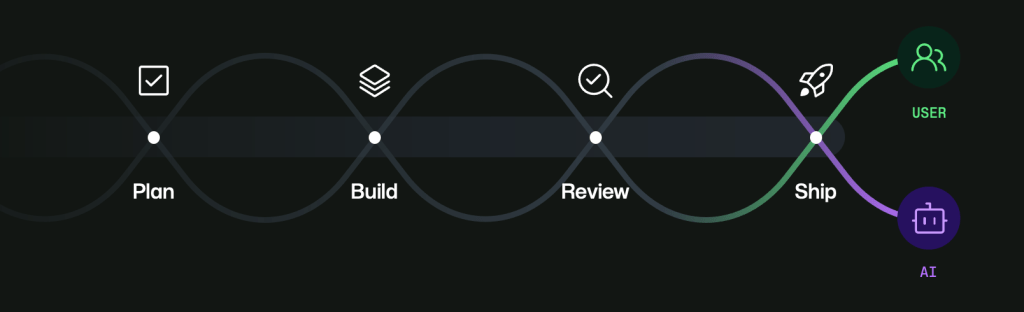
生成 AI の革新があまりにも急速に進んだ結果、コードの計画、構築、レビュー、リリースを支援するツールは数多く生まれました。しかし現状では、多くのワークフローはまだ断片的に感じられます。スレッドや画面間をまたぐと文脈が失われ、エージェントが生成した成果物のレビューに時間を取りすぎているケースも少なくありません。エージェントの生成速度は人間のレビュー能力を超えており、マルチエージェントのオーケストレーションを前提として設計された開発ツールはまだ十分ではありません。そのため、「何が実行され」「何が変更され」「何が検証済みで」「どこに人間の判断が必要か」という管理が難しくなりがちです。
GitHub Copilot アプリはこの課題への大きな一歩です。私が特に愛用し、ほぼ毎日利用している機能の一つが「Canvases(キャンバス)」です。これにより、開発者とエージェントは永続的で共有された作業面上で対話できるようになります。チャットを唯一の作業場所と捉えるのではなく、Canvases は作業が進む過程を可視化し、制御可能にし、承認可能な形へと変えます。
チャットは意図の伝達には優れていますが、永続的な実行には弱みがあります
私は依然として、チャットが意図を伝えるための最も優れたインターフェースの一つだと信じています。ここで思考し、洗練させ、方向性を示すことができます。特に問題がまだ曖昧な段階では、その速さと柔軟性は際立っています。
しかし、エージェントが実際に作業を開始すると、チャットは指示の羅列、ログ、方針転換、修正の長いスクロールに変わってしまいます。計画や意思決定のポイント、検証、承認の瞬間といった重要な要素も技術的には存在しますが、埋もれてしまっているのです。履歴からそれらを再構築しなければならないなら、すでに調整コストを払わされていることになります。
キャンバスはこの課題を解決します。ワークフローに居場所を与えることで、状態を明示的かつ永続的なものにするからです。人間はそれを検査し、導くことができます。エージェントは更新し、進捗させることができます。両者は文脈を常に再生する必要なく、互いに整合性を保つことが可能になります。
最初の構築例:Java 現代化スタジオ
私が最初に構築したキャンバスの一つが「Java Modernization Studio」です。Java の現代化というワークフローは、可視性とガバナンスが極めて重要な領域です。評価、計画、移行タスク、検証ゲート、そして出荷の準備といった要素が含まれます。
チャットだけの体験では、これらのステップは混同してしまいます。確かに進めることはできますが、大規模な運用や複数の貢献者が関わる場合、監査しにくくなり、信頼性が低下します。チームは常に同じ高コストな質問を繰り返しています。「現在の段階はどこか?」「どのような決定が下されたのか?」「何がブロックされているのか?」「まだ人間の承認が必要なものは何か?」
スタジオでは各フェーズを明確化し、検証可能にしました。ナラティブな履歴を解析する代わりに、チームは運用状態を直接確認できます。何が起きたかを推測するのではなく、事実を検証できるのです。人間のレビュー担当者は高信号の判断に集中でき、エージェントはチェックポイント間で実行を継続します。
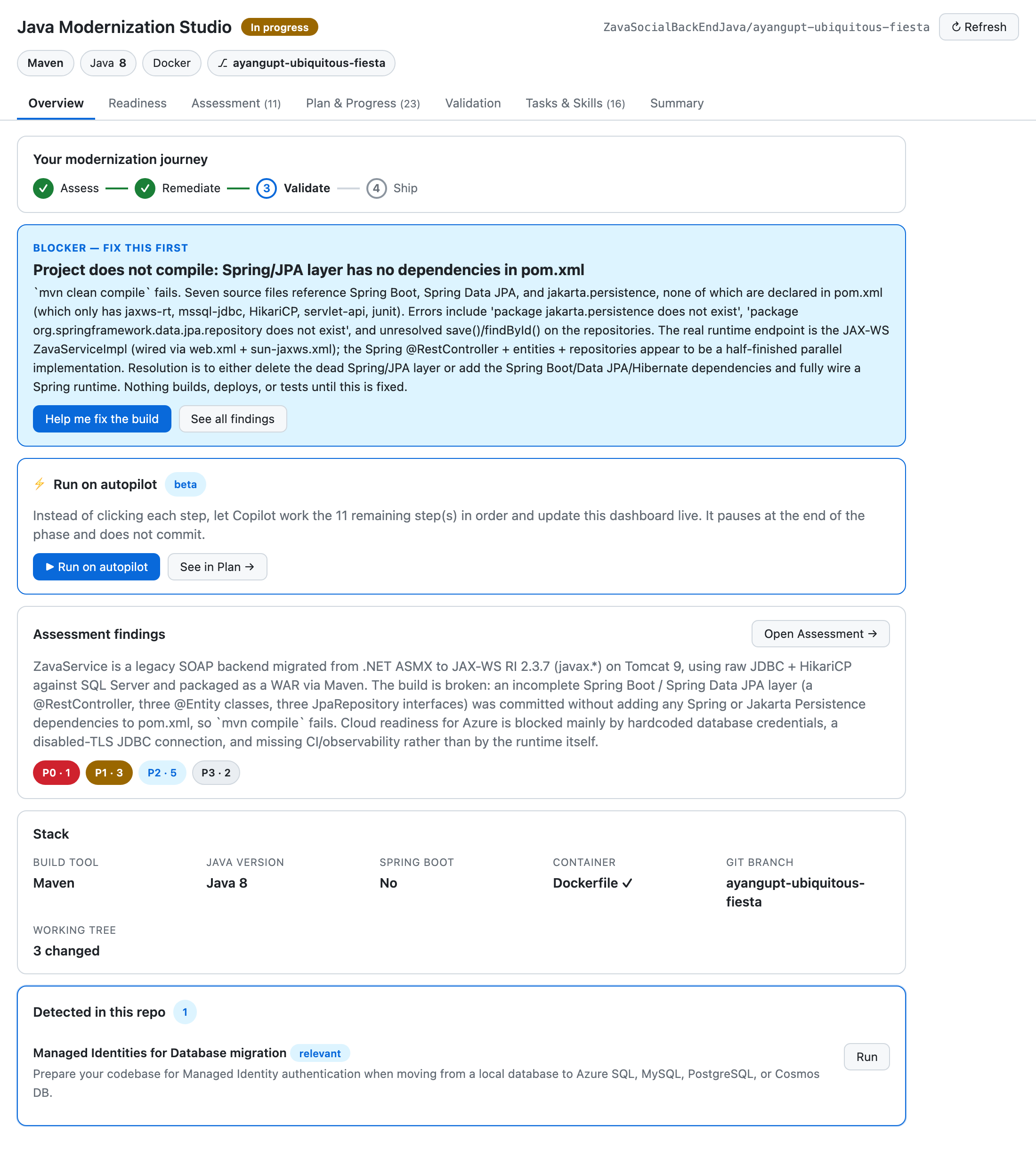
Java 現代化スタジオのキャンバスを探索する >
2 つ目のビルド:Site Studio
その後、私は全く異なるワークフローのために Site Studio を構築しました。それは個人サイトのコンテンツ作成と管理のためのものです。移行よりもコンテンツに重点が置かれていますが、オーケストレーションにおける課題は似ています。セクションの進捗、反復的な編集、レビューループ、ステータスの遷移です。
チャットだけのフローでは、コンテンツがすぐに drifting(逸脱)してしまいます。あるセクションが修正され、さらに修正されるうちに、現在の状態に対する信頼性が低下します。フィードバックは散漫になり、ドラフトが重複し、各反復で文脈の再構築から始めなければならないため、勢いが失われます。
Site Studio はその状態を永続的に保ちます。セクションの状態は可視化され、作業中はドラフト値も保存されます。人間のレビューポイントは明確に定義されています。エージェントは動き続けながら、人間はスレッド(文脈)を失うことなく、誘導や承認、方向転換を行うことができます。
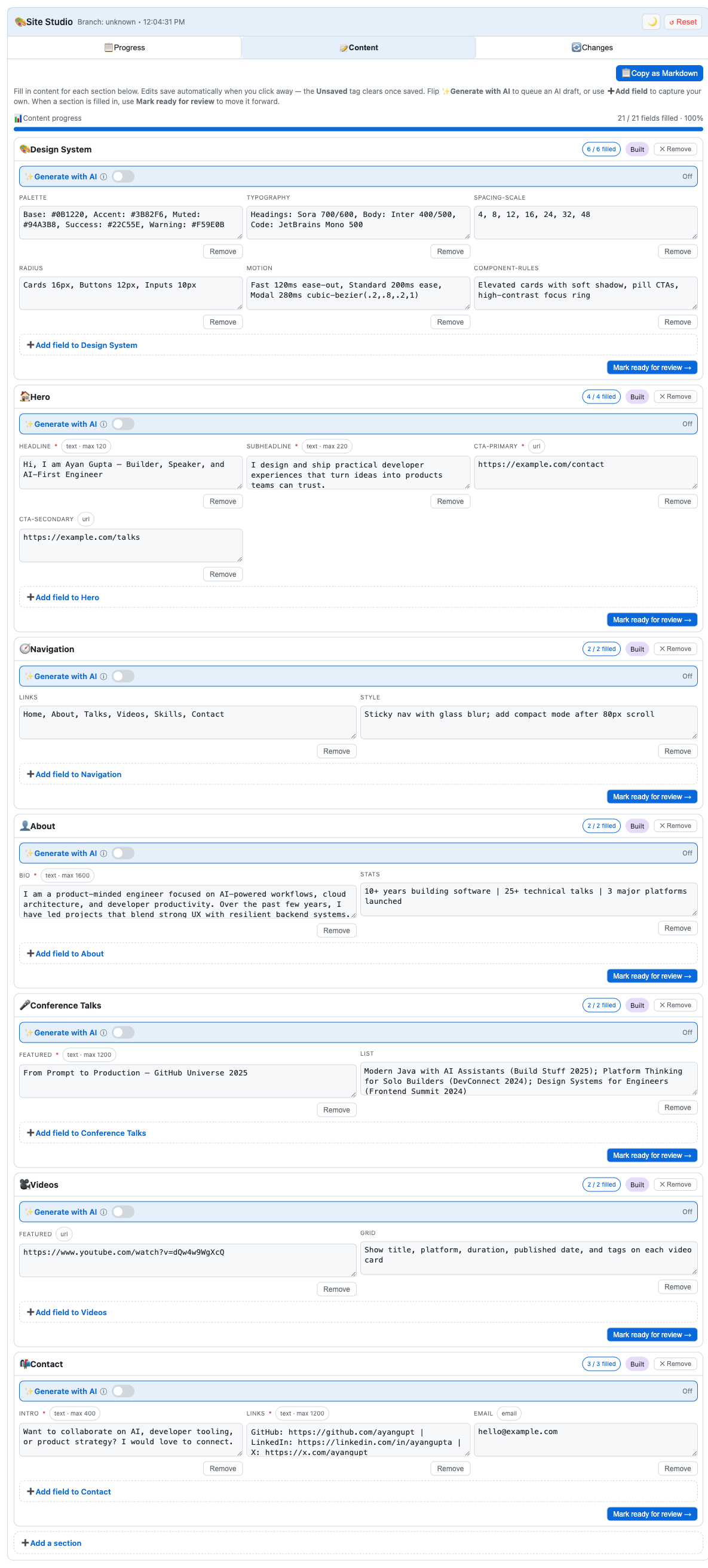
Site Studio のキャンバスを探索する >
反復可能なパターン
両方のキャンバスで共通して見られたのは、以下の反復可能な設計図です。
ワークフローの状態を明確に定義する。
重要な意思決定を可視化する。
進捗とドラフトを即座に保存する。
明示的な人間の承認ポイントを設ける。
これにより、プロンプトごとの対話モデルから、永続的な共同作業ワークフローへと転換されます。各ターンを最初からやり直すものとして扱うのではなく、記憶・構造・制御を備えたシステムとしてのワークフローを扱うようになります。
コストと効率性:キャンバスは投資である
コストについても明確にしておきますが、キャンバスは投資です。例えば、Site Studio では約 2,000 AI クレジット、モダナイゼーション用キャンバスでは約 3,000 AI クレジットを消費しました。これらを適切に設計し形作るには手間がかかります。
しかし長期的に見れば、特に反復的なワークフローにおいては、その投資は回収されます。永続的なインターフェースは、プロンプトの繰り返しを減らし、文脈の喪失を防ぎ、無駄な往復通信を削減し、手戻りを減らします。時間が経つにつれ、これらは時間とコストの節約につながりつつ、信頼性とスループットも向上させます。
つまり私にとってこれは、「より良い UX のためにトークンを多く使う」ことではありません。「再発する作業をより効率的で予測可能かつ管理可能なものにするため、ワークフローアーキテクチャに投資する」ことです。
awesome-copilot で利用可能
私が構築したキャンバス(Java Modernization Studio と Site Studio)は、awesome-copilot で誰でも利用・改変・学習できるよう公開されています。
すでに Copilot エージェントを活用している場合、次の実践的なステップとして、頻繁に発生するワークフローを 1 つ選び、/create-canvas コマンドを使ってその周りに最小限のキャンバスを作成してみましょう。まずは小さく始め、実際の業務で運用し、現場での利用状況に基づいて改善を重ねていきます。チームにとって有益であれば、awesome-copilot に投稿して他の人も活用できるように貢献しましょう。
この移行期はまだ序盤ですが、目指す方向性は明確です。エージェントが実行の加速を実現します。一方、人間はビジョン、判断力、責任という役割を担います。キャンバスはこのパートナーシップを実践的なものにし、持続可能でスケーラブルなものにするための手段の一つです。
/create-canvas で自分だけのキャンバスを作成し、awesome-copilot に投稿して共有しましょう >
この記事「How canvases make agentic workflows visible, steerable, and cost-efficient」は、The GitHub Blog の最初の記事として掲載されました。
原文を表示
When I was in college, I joined the beta for one of the first versions of AI inline completions in VS Code. It felt like a game changer. Since then, GenAI has fundamentally changed software development: hybrid teams where agents and humans work in tandem, with the developer at the center as visionary and orchestrator. We are living in that transition right now.
As a natural byproduct of how fast innovation in GenAI has moved, we now have tools to help us plan, build, review, and ship code. But in the current state, many workflows still feel disjointed. Context gets lost across threads and surfaces, and too much time gets spent reviewing agent-generated work. Agents can produce changes faster than any human can review them, and most developer tools were not originally designed for multi-agent orchestration. It becomes easy to lose track of what ran, what changed, what was validated, and what still needs human judgment.
The GitHub Copilot app is a major step toward addressing this. One feature in particular that I’ve learned to love and use almost every day is canvases. Canvases let developers and agents interact on a durable, shared surface. Instead of treating chat as the only place where work happens, canvases make work visible, steerable, and approvable as it unfolds.
Chat is great for intent, but weak for durable execution
I still believe chat is one of the best interfaces we have for intent. It’s where you can think, refine, and direct. It’s fast and flexible, especially when the problem is still ambiguous.
But once an agent starts doing real work, chat becomes a long scroll of instructions, logs, pivots, and corrections. The important parts are technically there, but buried: the plan, decision points, validations, and approval moments. If you have to reconstruct all of that from history, you’re already paying a coordination tax.
Canvases solve that by giving workflows a home. They make state explicit and persistent. Humans can inspect and guide. Agents can update and progress. Both can stay aligned without constantly replaying context.
The first build: Java Modernization Studio
One of the first canvases I built was Java Modernization Studio. Java modernization is exactly the kind of workflow where visibility and governance matter: assessment, planning, migration tasks, validation gates, and readiness to ship.
In a chat-only experience, those steps blur together. You can still move forward, but it gets harder to audit and harder to trust at scale, especially with multiple contributors. Teams keep asking the same expensive questions: What stage are we in? What decisions were made? What is blocked? What still needs human approval?
The studio made each phase explicit and inspectable. Instead of parsing narrative history, teams could see operational state directly. Instead of guessing what happened, they could verify it. Human reviewers could focus on high-signal judgments while agents kept execution moving between checkpoints.
Explore the Java Modernization Studio canvas >
The second build: Site Studio
After that, I built Site Studio for a very different workflow: creating and managing personal site content. It’s content-heavy rather than migration-heavy, but the orchestration challenge is similar: section progress, iterative edits, review loops, and status transitions.
In a chat-only flow, content can drift quickly. A section gets revised, then revised again, and confidence drops in what is current. Feedback gets scattered, drafts repeat, and momentum slows because each iteration starts by rebuilding context.
Site Studio keeps that state durable. Section status is visible. Draft values are persisted as work happens. Human review points are explicit. The agent can keep moving while the human can steer, approve, or redirect without losing the thread.
Explore the Site Studio canvas >
The repeatable pattern
Across both canvases, I found the same repeatable blueprint:
Define workflow states clearly.
Surface the decisions that matter.
Persist progress and drafts immediately.
Keep explicit human approval points.
This shifts the model from prompt-by-prompt interaction to durable collaborative workflows. You stop treating each turn like a fresh start and start treating each workflow like a system with memory, structure, and control.
Cost and efficiency: yes, canvases are an investment
I also want to be explicit about cost: canvases can be an investment. For instance, Site Studio cost me about 2,000 AI credits, and the modernization canvas cost me about 3,000 AI credits. They take effort to design and shape well.
But in the long run, especially for repeated workflows, that investment pays back. Durable surfaces reduce repeated prompting, reduce context loss, reduce unnecessary back-and-forth, and reduce rework. Over time, that can save both time and money while improving trust and throughput.
So for me, this is not “spend more tokens for nicer UX.” It’s “invest in better workflow architecture so recurring work becomes more efficient, predictable, and governable.”
Available now in awesome-copilot
The canvases I built—Java Modernization Studio and Site Studio—are available in awesome-copilot for anyone who wants to use them, adapt them, or learn from them.
If you are already using Copilot agents, a practical next step is to pick one repeated workflow and build a minimal canvas around it with /create-canvas. Start small, run real work, and iterate from actual usage. If it helps your team, contribute it back to awesome-copilot so others can benefit too.
We’re still early in this transition, but the direction is clear. Agents can accelerate execution. Humans provide vision, judgment, and accountability. Canvases are one way to make that partnership real, durable, and scalable.
Build your own canvas with /create-canvas and contribute it back to awesome-copilot >
The post How canvases make agentic workflows visible, steerable, and cost-efficient appeared first on The GitHub Blog.
関連記事
News to Guide
ニュースの次に確認する
発表内容を、現在の料金や仕様と照らし合わせられる関連ガイドです。
今日のまとめ
AIデイリーブリーフで今日の重要ニュースをまとめ読み