LangSmithとLilacを用いたLLMのファインチューニング
本文の状態
日本語全文を表示中
詳細モードで約10分の本文を読めます。
同じ出来事の情報源
この情報源を基点に整理
LangChain Blog
LangSmithとLilacを使用して大規模言語モデルをファインチューニングする方法を紹介する。高品質な学習データの収集、データセットのフィルタリングや強化を行い、より高性能なモデルを迅速にデプロイする手法を解説している。
Continue in AI NEW LAB
このニュースを、実務の判断につなげる
AI NEW LABで、試したことや先に確認したい条件を共有できます。まずはログインなしで読めます。
AI NEW LABで論点を見るSource Article
元記事を日本語で読む
本文に関係しない購読案内、埋め込み通知、サイト内プロモーションは除いています。
LLM(大規模言語モデル)をプロトタイプから本番環境へ移行する際、多くの開発者がファインチューニング(微調整)を活用し、アプリケーション内でより一貫性が高く高品質な動作を実現しようとしています。OpenAI や HuggingFace などのサービスを利用すれば、あなた自身のアプリケーション固有のデータに対してモデルをファインチューニングするのは容易です。必要なものは JSON ファイルだけです!
難しいのは、そのデータに何を含めるべきかを決断することです。一度 LLM がデプロイされると、あらゆる入力がプロンプトとして与えられる可能性があります。対象となるユーザーや機械との対応において、適切に回答することをどのように保証すればよいのでしょうか?
これに対しては、独自のアプリケーションコンテキストから取得された高品質なデータに勝るものはありません。ここで LangSmith と Lilac が役立ちます。
LangSmith + Lilac
任意の言語モデルアプリケーションを理解し改善するためには、モデルが処理しているデータを迅速に探索・整理できることが重要です。そのために、LangSmith と Lilac は補完的な機能を提供します:
- LangSmith:大規模なLLMアプリケーションから生成されるデータを効率的に収集・接続・管理します。ファインチューニングに活用できる高品質な例(および失敗ケース)やユーザーフィードバックをキャプチャするために使用します。
- Lilac:高度な分析機能を提供し、データの構造化、フィルタリング、洗練を可能にし、データパイプラインの継続的な改善を容易にします。
私たちは、これらの強力な2つのツールを接続してファインチューニングワークフローを開始する方法について共有したかったのです。
Q&Aチャットボットのファインチューニング
以下のセクションでは、LangSmithとLilacを使用して、ドキュメントに関する質問に回答するために取得強化生成(RAG)を使用するチャットボットを動かすLLMをファインチューニングするためのデータセットをキュレーションします。例として、LangChainのドキュメント用のQ&Aアプリからサンプリングされたデータセットを使用します。全体のプロセスは以下の画像に概略が示されています:
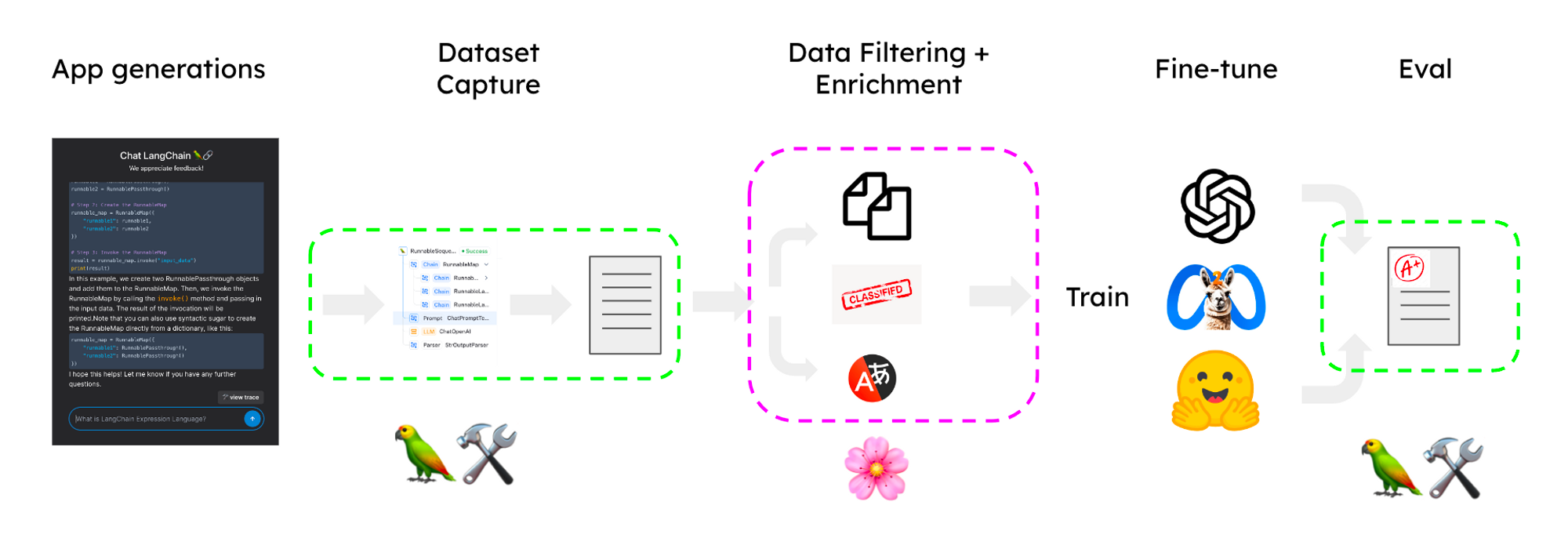
LangSmith + Lilacによるデータセットキュレーションパイプライン主なステップは以下の通りです:
- プロトタイプからのトレースをキャプチャし、候補データセットに変換する
- Lilacにインポートしてラベル付け、フィルタリング、エンリッチメントを行う
- エンリッチされたデータセットでモデルをファインチューニングする
- 改善されたアプリケーションでファインチューニング済みモデルを使用する
トレースのキャプチャ
LangChain を使用すると、プロンプトチェーンを用いてプロトタイプを簡単に設計できます。最初はアプリケーションが完全に最適化されていない場合や、プロンプトエンジニアリングが不完全なためにエラーが発生する可能性がありますが、機能のアルファ版を迅速に作成することで、データセットのキュレーションプロセスを開始することができます。LangChain で構築する際、いくつかの環境変数を設定するだけで、すべての実行ステップを LangSmith に簡単にトレースできます。
その後、LangSmith では UI 上またはプログラム的に(ノートブックを参照)実行を選択して候補データセットに追加できます。
Lilac へのインポート
💡
以下のセクションでは、Lilac UI の概要を説明します。このワークフローを実際に再現して詳しく学ぶには、Python クックブックを参照してください。
Lilac は LangSmith データセットとネイティブに統合されています。ローカル環境で Lilac をインストール した後、環境変数に LANGCHAIN_API_KEY を設定すると、Lilac UI に LangSmith データセットのリストが自動的に表示されます。ファインチューニング用にマークしたデータセットを選択すると、Lilac が残りの処理を自動的に実行します。
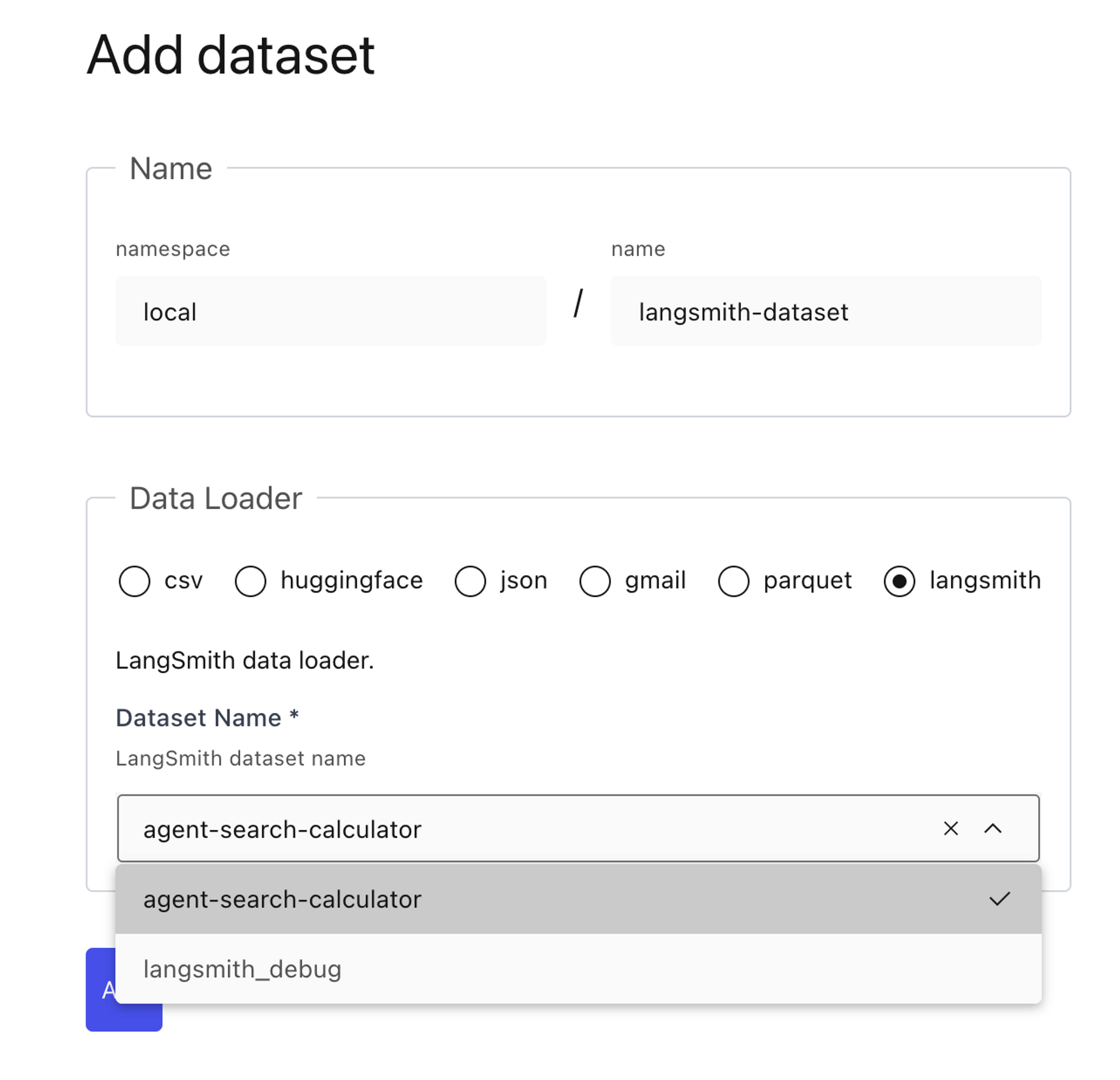
LangSmithのデータローダーを使用した、Lilac UIにおける「データセットの追加」ページ。
データセットのキュレーション
これでLilacにデータセットが格納されたので、Lilacのシグナル*、コンセプト、ラベルを実行して、データセットの整理とフィルタリングを支援できます。私たちの目標は、多様な入力タイプに対して優れた言語モデルの生成を示す、区別可能な例を選択することです。Lilacがどのようにデータセットを構造化するのに役立つかを見てみましょう。
シグナル
Lilacは、データセットに適用できる2つの有用なシグナルをすぐに提供します:*ニアデュープリケート(重複に近いデータ)*と*PII検出(個人識別情報の検出)*です。入力におけるニアデュープリケートをフィルタリングすることは、モデルが多様な情報を取得し、暗記のリスクを減らすために重要です。UIからシグナルを計算するには、左上隅でスキーマを展開し、エンリッチしたいフィールドのコンテキストメニューから「Compute Signal」を選択します。
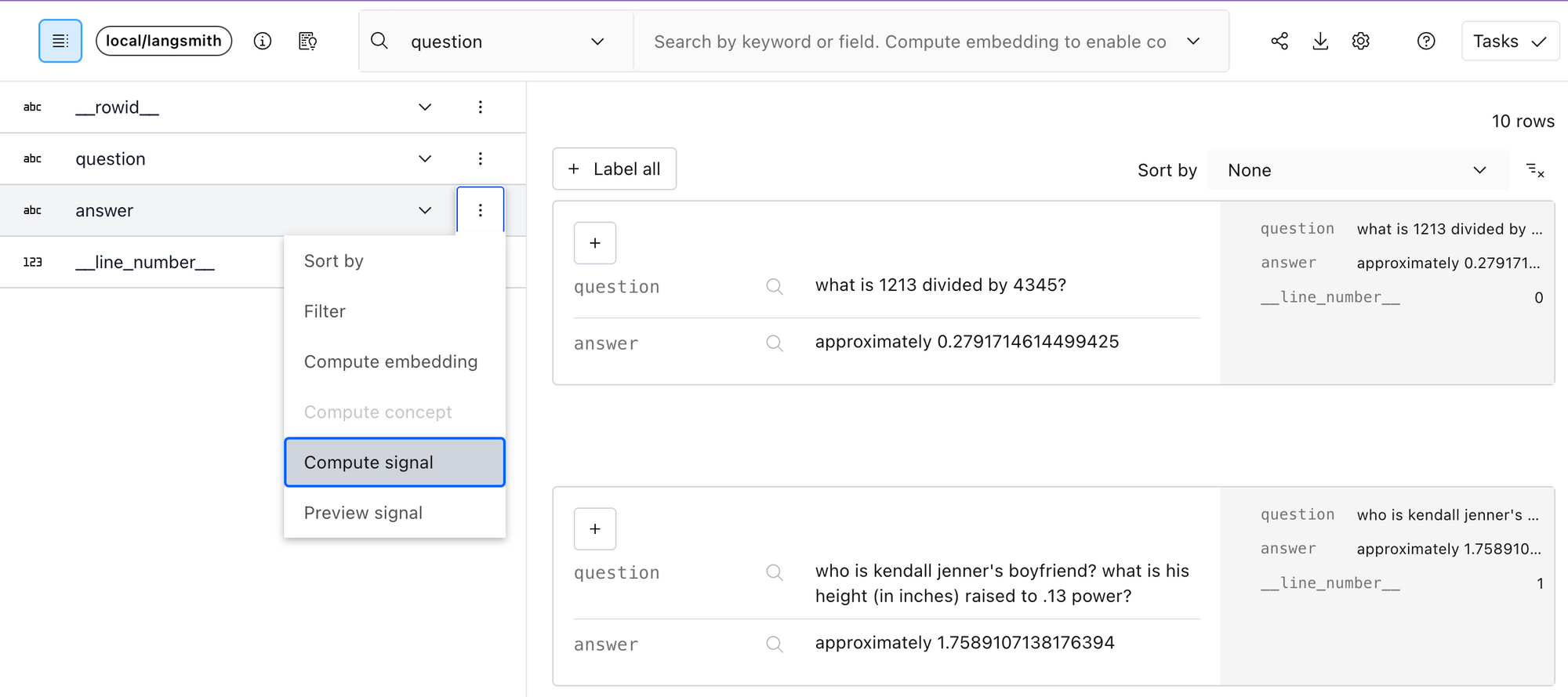
Lilacのスキーマビューアにおける回答フィールドのコンテキストメニュー経由でシグナルを計算する様子。コンセプト
シグナルに加え、Lilacはコンセプトを提供しており、これはあなたが重視する軸に沿ってデータを整理するための強力な方法です。コンセプトとは、ポジティブな例(そのコンセプトに関連するテキスト)とネガティブな例(そのコンセプトの反対、または無関係なデータ)のコレクションに過ぎません。Lilacには「毒性(toxicity)」、「悪口(profanity)」、「感情分析(sentiment)」などのビルトインコンセプトがいくつか用意されており、独自のコンセプトを作成することもできます。データセットにコンセプトを適用する前に、対象となるフィールドのテキスト埋め込み(text embeddings)を計算する必要があります。

Lilacの検索ボックスを通じてコンセプトおよびセマンティック検索を可能にするため、質問フィールドの埋め込みを計算します。埋め込みの計算が完了したら、検索ボックスメニューからコンセプトを選択することで、そのコンセプトを*プレビュー*できます。
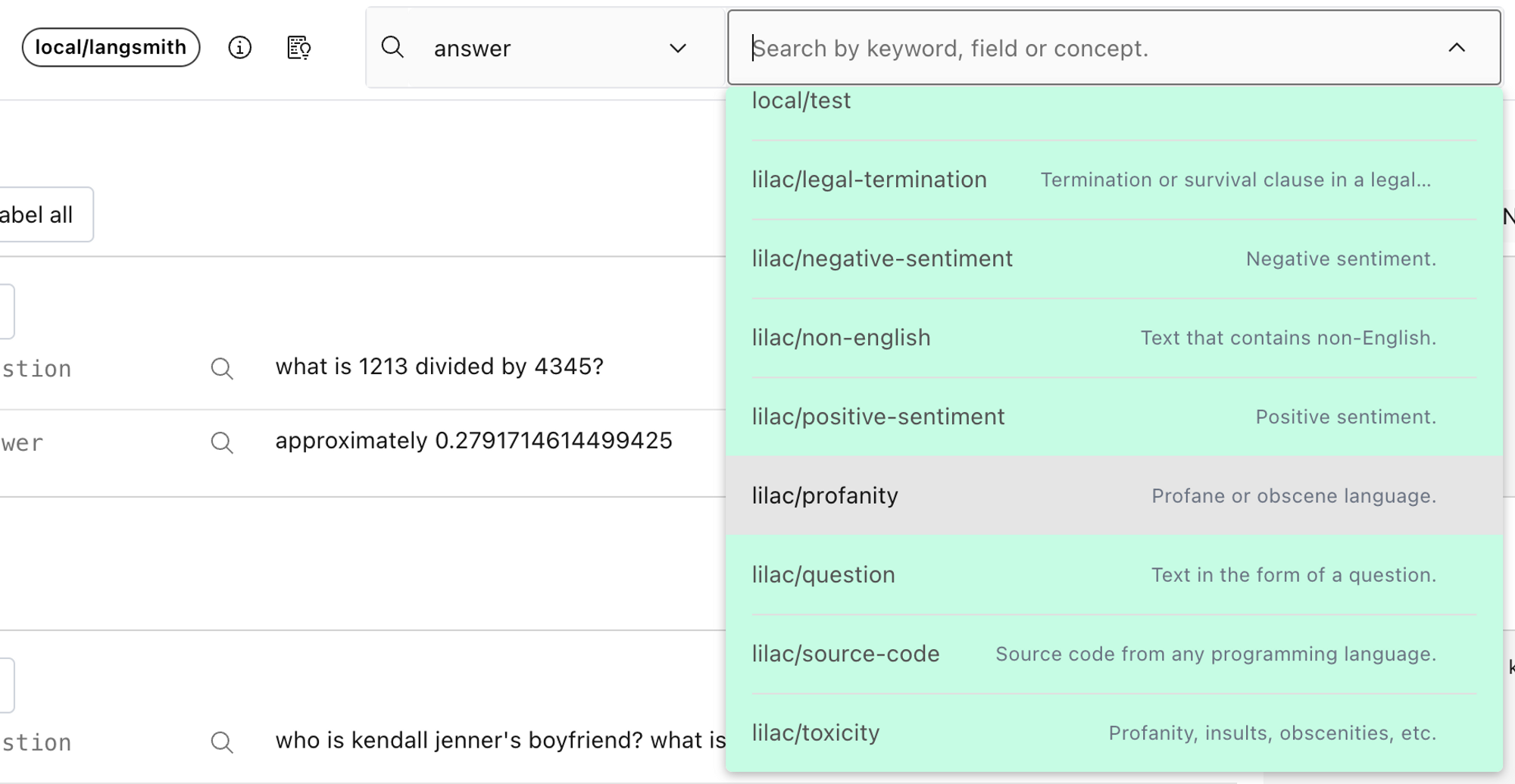
回答フィールドで悪口(profanity)を選択し、プレビューします。データセット全体に対してコンセプトを計算するには、スキーマビューアのコンテキストメニューから「Compute concept」を選択します。
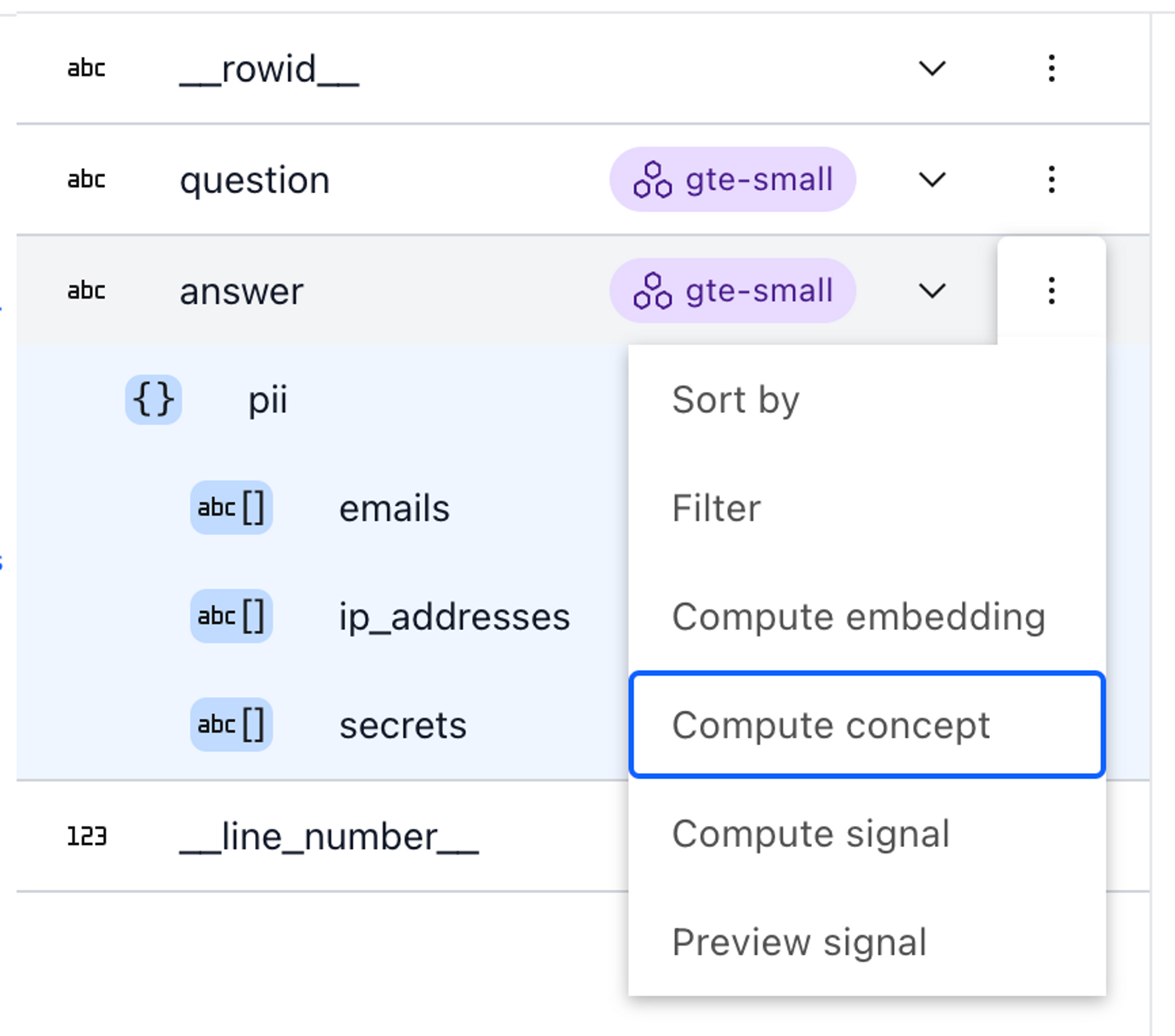
スキーマビューアーの回答フィールドのコンテキストメニューから概念を計算します。概念に加えて、埋め込みベクトルはデータ探索のために*セマンティック検索*と*類似*する例の発見という2つの有用な機能も可能にします。
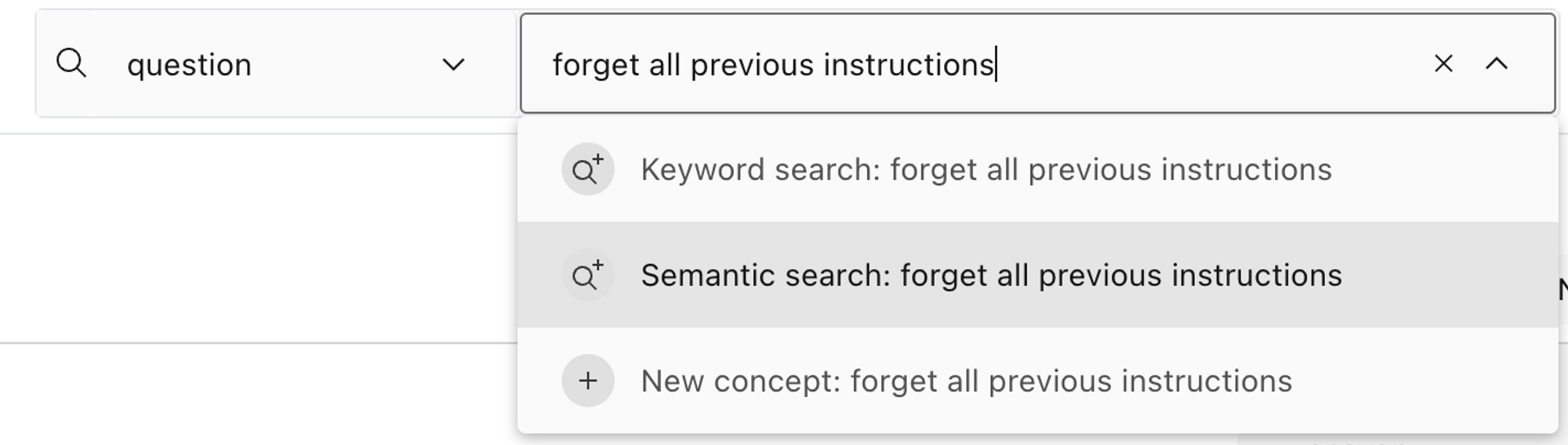
Lilacの検索ボックスを使用して「以前の指示をすべて忘れる」という*セマンティック検索*を実行します。 image
image
Lilac UIを使用して「1213を…で割ったものは何ですか」という質問に類似する例を見つけます。ラベル
シグナルと概念による自動ラベリングに加えて、Lilacでは個別の行にカスタムラベルを付け、後でデータセットをフィルタリングするために使用することができます。

Lilacの例に*計算*ラベルを追加します。新しいラベルを追加すると、シグナルや概念と同様に、データセット内に新しいトップレベルの*カラム*が作成されます。これらは追加の分析を駆動するために使用できます。
データセットのエクスポート
フィルタリングに必要な情報を計算した後、ノートブックで示されているようにPython経由、またはブラウザにJSONファイルのダウンロードを作成するLilacのUI経由で、強化されたデータセットをエクスポートできます。大量のデータをダウンロードする場合や、データの選択についてより細かな制御が必要な場合は、Python APIを推奨します。
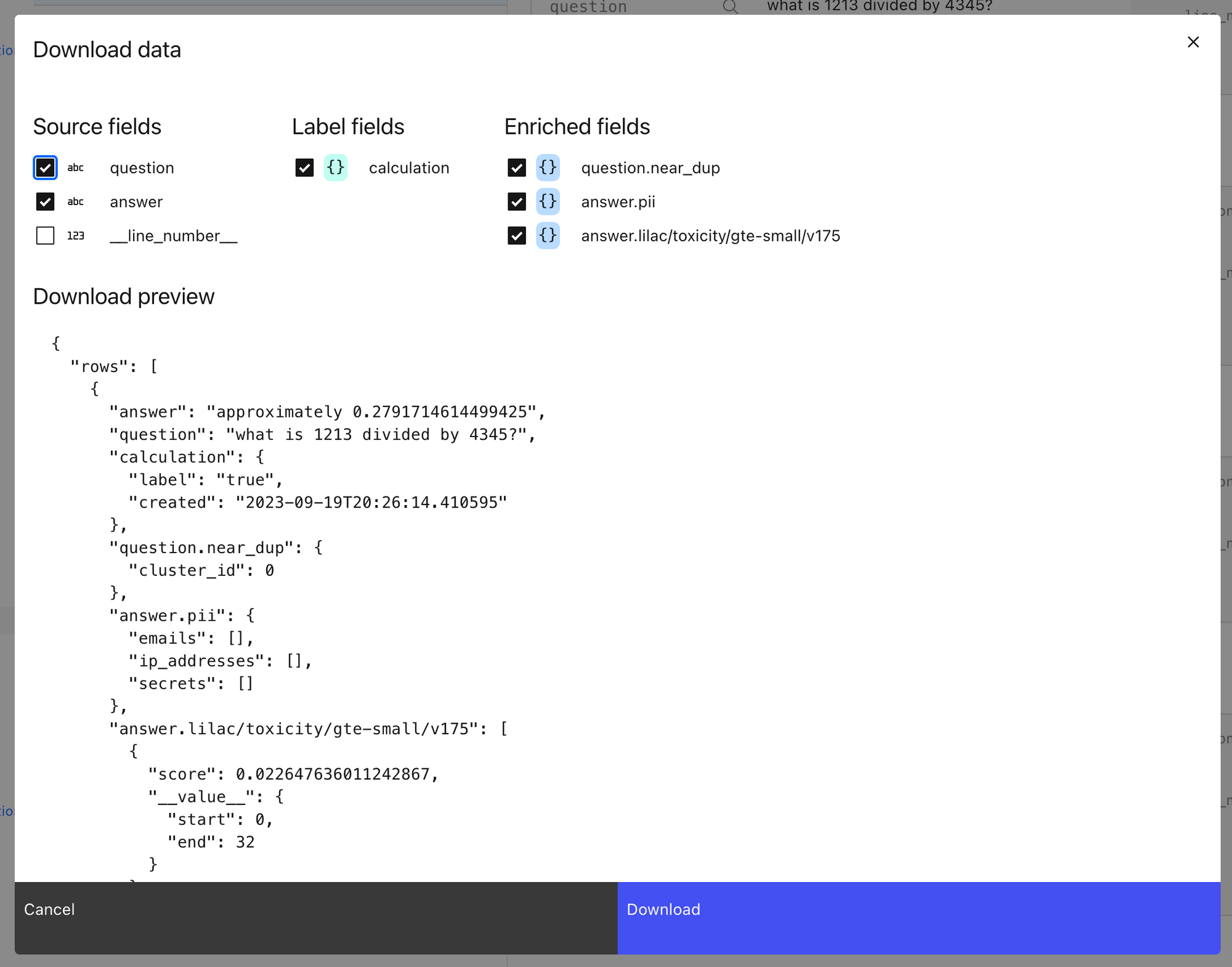
Lilacのデータダウンロードモーダルダイアログ。エンリッチされたデータセットをエクスポートしたら、Pythonでエンリッチされたフィールドを使用して簡単に例をフィルタリングできます。
Fine-tune(ファインチューニング)
データセットが揃ったので、いよいよファインチューニングの番です。LangChainのメッセージ形式から、OpenAI、HuggingFace、またはその他のトレーニングフレームワークが期待する形式への変換は容易です。詳細については、リンクされたノートブックをご覧ください!
Chain(チェーン)での使用
ファインチューニングされたLLMが準備できたら、LLMの「model」引数を更新するだけで、そのモデルに切り替えることができます。
from langchain.chat_models import ChatOpenAI

llm = ChatOpenAI(model="ft:gpt-3.5-turbo-0613:{openaiOrg}::{modelId}")
データを適切に構造化している場合、このモデルは応答を生成する際に使用したい構造やスタイルに対してより高い認識を持つようになります。
Conclusion(結論)
これは、LilacとLangSmithを統合してトレースからファインチューニング済みモデルへ至るプロセスの簡単な概要です。データ処理が整っていれば、コンテキスト推論アプリケーションの各コンポーネントを継続的に改善できます。LangSmithは、データ収集時の時間を節約するためにユーザーおよびモデル支援によるフィードバックを簡単に収集できるようにし、Lilacはすべてのテキストデータを分析、ラベル付け、整理して、モデルを適切に微調整できるように支援します。
関連コンテンツ

ケーススタディ
LangSmith
Credit GenieがInsights Agentを活用してAI財務アシスタントを改善した方法




D. Li,
J. Ngai,
G. Lozano Palacio,
C. Yuan
2026年4月20日
5分

エージェントアーキテクチャ
パートナー
エージェントエンジニアリング:AIエージェントの群れがソフトウェアエンジニアリングを再定義する方法


R. Kumar,
P. Ramagopal
2026年4月17日
6分

観測可能性(Observability)と評価(Evals)
LangSmith
LangSmithにおける再利用可能な評価器と評価テンプレート


C. Qiao,
J. Talbot
2026年4月16日
4分
エージェントの実際の動作を確認する
LangSmithは、私たちのエージェントエンジニアリングプラットフォームであり、開発者がすべてのエージェントの意思決定をデバッグし、変更を評価し、ワンクリックでデプロイすることを支援します。
原文を表示
In taking your LLM from prototype into production, many have turned to fine-tuning models to get more consistent and high-quality behavior in their applications. Services like OpenAI and HuggingFace make it easy to fine-tune a model on your application-specific data. All it takes is a JSON file!
The tricky part is deciding what to include in that data. Once your LLM is deployed, it could be prompted given any input - how do you make sure it will respond appropriately for the user or machine it is meant to interact with?
For this, there is no real substitute for high-quality data taken from your unique application context. This is where LangSmith and Lilac can help out.
LangSmith + Lilac
To understand and improve any language model application, it’s important to be able to quickly explore and organize the data the model is seeing. To achieve this, LangSmith and Lilac provide complementary capabilities:
- LangSmith: Efficiently collects, connects, and manages datasets generated by your LLM applications at scale. Use this to capture quality examples (and failure cases) and user feedback you can use for fine-tuning.
- Lilac: Offers advanced analytics to structure, filter, and refine datasets, making it easy to continuously improve your data pipeline.
We wanted to share how to connect these two powerful tools to kickstart your fine-tuning workflows.
Fine-tuning a Q&A Chatbot
In the following sections, we will use LangSmith and Lilac to curate a dataset to fine-tune an LLM powering a chatbot that uses retrieval-augmented generation (RAG) to answer questions about your documentation. For our example, we will use a dataset sampled from a Q&A app for LangChain’s docs. The overall process is outlined in the image below:
The main steps are:
- Capture traces from the prototype and convert to a candidate dataset
- Import into Lilac to label, filter, and enrich.
- Fine-tune a model on the enriched dataset.
- Use the fine-tuned model in an improved application.
Capture traces
LangChain make it easy to design a prototype using prompt chaining. At first, the application may not be fully optimized or may run into errors when the prompt engineering is incomplete, but we can quickly create an alpha version of a feature to kickstart the dataset curation process. When building with LangChain, we can easily trace all the execution steps to LangSmith by setting a couple of environment variables.
Then in LangSmith, we can select runs to add to a candidate dataset in the UI or programmatically (see the notebook).
Import to Lilac
💡
The sections below give a high level overview of the Lilac UI. For a deeper dive reproducing this workflow, see the python cookbook.
Lilac provides a native integration with LangSmith datasets. After installing Lilac locally, set the LANGCHAIN_API_KEY in the environment and you should see a list of LangSmith datasets auto-populated in the Lilac UI. Select the one you’ve earmarked for fine-tuning, and Lilac will handle the rest.
Curate your dataset
Now that we have our dataset in Lilac, we can run Lilac’s signals*, *concepts and labels to help organize and filter the dataset. Our goal is to select distinct examples demonstrating good language model generations for a variety of input types. Let’s see how Lilac can help us structure our dataset.
Signals
Right off the bat, Lilac provides two useful signals you can apply to your dataset: N*ear-duplicates* and *PII detection*. Filtering near-duplicates for inputs is important to make sure the model gets diverse information and reduce changes of memorization. To compute a signal from the UI, expand the schema in the top left corner, and select “Compute Signal” from the context menu of the field you want to enrich.
Concepts
In addition to signals, Lilac offers concepts, a powerful way to organize the data along axes that you care about. A concept is simply a collection of positive (text that is related to the concept) and negative examples (either the opposite, or unrelated to the concept). Lilac comes with several built-in concepts, like *toxicity*, *profanity*, *sentiment*, etc, or you can create your own. Before we apply a concept to the dataset, we need to compute text embeddings on the field that we care about.
Once we’ve computed embeddings, we can *preview* a concept by selecting it from the search box menu.
To compute a concept for the entire dataset, choose “Compute concept” from the context menu in the schema viewer.
In addition to concepts, embeddings enable two other useful functionalities for exploring the data: *semantic search* and finding *similar* examples.
Labels
In addition to automated labeling with signals and concepts, Lilac allows you to tag individual rows with custom labels that can be later used to prune your dataset.
When you add a new label, just like signals and concepts, it creates a new top-level *column* in your dataset. These can then be used to power additional analytics.
Export the dataset
Once we’ve computed the information needed for filtering, you can export the enriched dataset via python, as shown in the notebook or via Lilac’s UI, which will create a browser download of a json file. We recommend the python API for downloading large amounts of data, or if you need a better control over the selection of data.
Once we exported the enriched dataset, we can easily filter out the examples in python using the enriched fields.
Fine-tune
With the dataset in hand, it’s time to fine-tune! It’s easy to convert from LangChain’s message format to the formats expected by OpenAI, HuggingFace or other training frameworks. You can check out the linked notebookfor more info!
Use in your Chain
Once we have the fine-tuned LLM, we can switch to it with a update to the “model” argument in our LLM.
from langchain.chat_models import ChatOpenAI

llm = ChatOpenAI(model="ft:gpt-3.5-turbo-0613:{openaiOrg}::{modelId}")
Assuming we’ve structured the data appropriately, this model will have more awareness for the structure and style you wish to use in generating responses.
まとめ
This is a simple overview of the process for going from traces to fine-tuned model by integrating Lilac and LangSmith. With the data process in place, you can continuously improve each components in your contextual reasoning application LangSmith makes it easy to collect user and model-assisted feedback to save time when capturing data, and Lilac helps you analyze, label, and organize all the text data so you can refine your model appropriately.
Related content
Case Studies
LangSmith
How Credit Genie used Insights Agent to improve their AI financial assistant
D. Li,
J. Ngai,
G. Lozano Palacio,
C. Yuan
April 20, 2026
5
min
Agent Architecture
Partner
Agentic Engineering: How Swarms of AI Agents Are Redefining Software Engineering
R. Kumar,
P. Ramagopal
April 17, 2026
6
min
Observability & Evals
LangSmith
Reusable Evaluators and Evaluator Templates in LangSmith
C. Qiao,
J. Talbot
April 16, 2026
4
min
See what your agent is really doing
LangSmith, our agent engineering platform, helps developers debug every agent decision, eval changes, and deploy in one click.
関連記事
今日のまとめ
AIデイリーブリーフで今日の重要ニュースをまとめ読み