Factory Engineering、インシデント対応自動化ツール「Droid」を発表
本文の状態
日本語全文を表示中
詳細モードで約4分の本文を読めます。
同じ出来事の情報源
この情報源を基点に整理
Factory Engineering
Factory はオンコールアラート対応を自動化する「Incident Response」機能を公開し、Droid がアラートを調査・分類・修正準備を行い、永続的なナレッジベースを通じてエンジニアの負担を大幅に削減すると発表した。
AI深層分析を開く2026年8月4日 14:29
AI深層分析
キーポイント
自動インシデント対応機能の導入
Sentry や Datadog などの観測ツールからアラートを受け取ると、Droid が自動的にセッションを開始し、調査や分類、必要に応じた修正準備を行う。
永続的なナレッジベースの構築
各インシデント対応の経験が永続的なランブックに蓄積され、過去の根本原因やノイズの多いアラートを学習することで、将来的な対応精度が向上する。
設定と運用の柔軟性
特定の Slack チャンネルを監視対象とし、Droid コンピュータのリポジトリや環境アクセス権限を指定してセッションの可視性を管理できる。
学習と継続的改善
Droid はインシデントから学習し、情報を永続的なランブックに保存することで、自身の対応を改善する。これにより正確な診断、高速な対応、ノイズの無視が可能になる。
カスタマイズと統合
インシデント対応はチームのニーズに合わせて設定可能で、指示をカスタマイズしてプレイブックや追加コンテキストを埋め込める。MCP の接続やリポジトリのクローンなど、実行環境に任意のツールリングを追加できる。
重要な引用
Incident Response uses your observability tooling and adapts to your team's process.
It also builds long-term memory through a persistent runbook, so every investigation improves the next response.
If the software factory is the assembly line, Incident Response is the supervisor watching for breakage in the machine.
編集コメントを表示
編集コメント
Factory の Droid がアラート対応の初期調査から修正準備までを自律的に行う点は、AIOps の実用化に向けた重要な一歩である。ただし、実際の運用では Droid に与える権限範囲やセキュリティリスクを慎重に設定する必要があるだろう。
Source Article
元記事を日本語で読む
本文に関係しない購読案内、埋め込み通知、サイト内プロモーションは除いています。
オンコールアラートは、いつも胃が縮むような瞬間です。誰かの夕食や週末、あるいはリリースレビューが緊急対応のために奪われ、結局そのアラートはノイズだったと判明するケースも少なくありません。
Factory のインシデントレスポンスはこのパターンを変えます。Droid を Slack チャンネルに接続し、Sentry、Rootly、Axiom、Datadog、あるいは他の観測システムから届くアラートを取得します。アラートが着信すると、Droid は Droid 上のコンピューターでセッションを開始し、問題の調査を行い、アラートの優先順位を付け、必要に応じて修正策を準備します。
インシデントレスポンスは、既存の観測ツールを活用しながらチームのプロセスに適応します。また、永続的なランブックを通じて長期的な記憶を構築するため、毎回の調査が次の対応を改善していきます。
プレビュー版では、顧客環境や Factory 自身の本番システムにおいて、オンコールエンジニア数百人の時間を数百時間節約することに成功しています。
Examples
アラートでバックエンドへの重複リクエストを引き起こす利用量の急増が表示された場合、Droid はログを検証し、問題の原因となっているバックエンドロジックを特定して Slack に報告します。その後、同じスレッド内で Droid と対話を続け、冷たいセッションに文脈を持ち込む必要なく、数分が経過する前に重複リクエストの動作を停止させることができます。
多くの企業では、アラートチャンネルにノイズの多いアラートや重複したアラートが溢れています。Incident Response は、エンジニアが時間を浪費することなく、どのアラートが実際の事象を指しているかをフィルタリングするのを助けます。モデルの精度が向上すれば、チームは Droid に直接監視器を制御させ、不要なものを無効化し、カバレッジに穴がある場合は新しいものを生成させることも可能になります。
Setup
Incident Response を設定するには、まず Droid を本番環境のアラートチャンネルに招待してください。その後、Factory の「Software Factory」ページを開き、「Automations」タブから「Incident Response」テンプレートを選択します。
監視対象のチャンネルと、セッションを実行する Droid computer を選択してください。調査対象となるシステムに対して、適切なリポジトリ、環境、および観測性へのアクセス権限がそのコンピュータに付与されていることを確認しましょう。
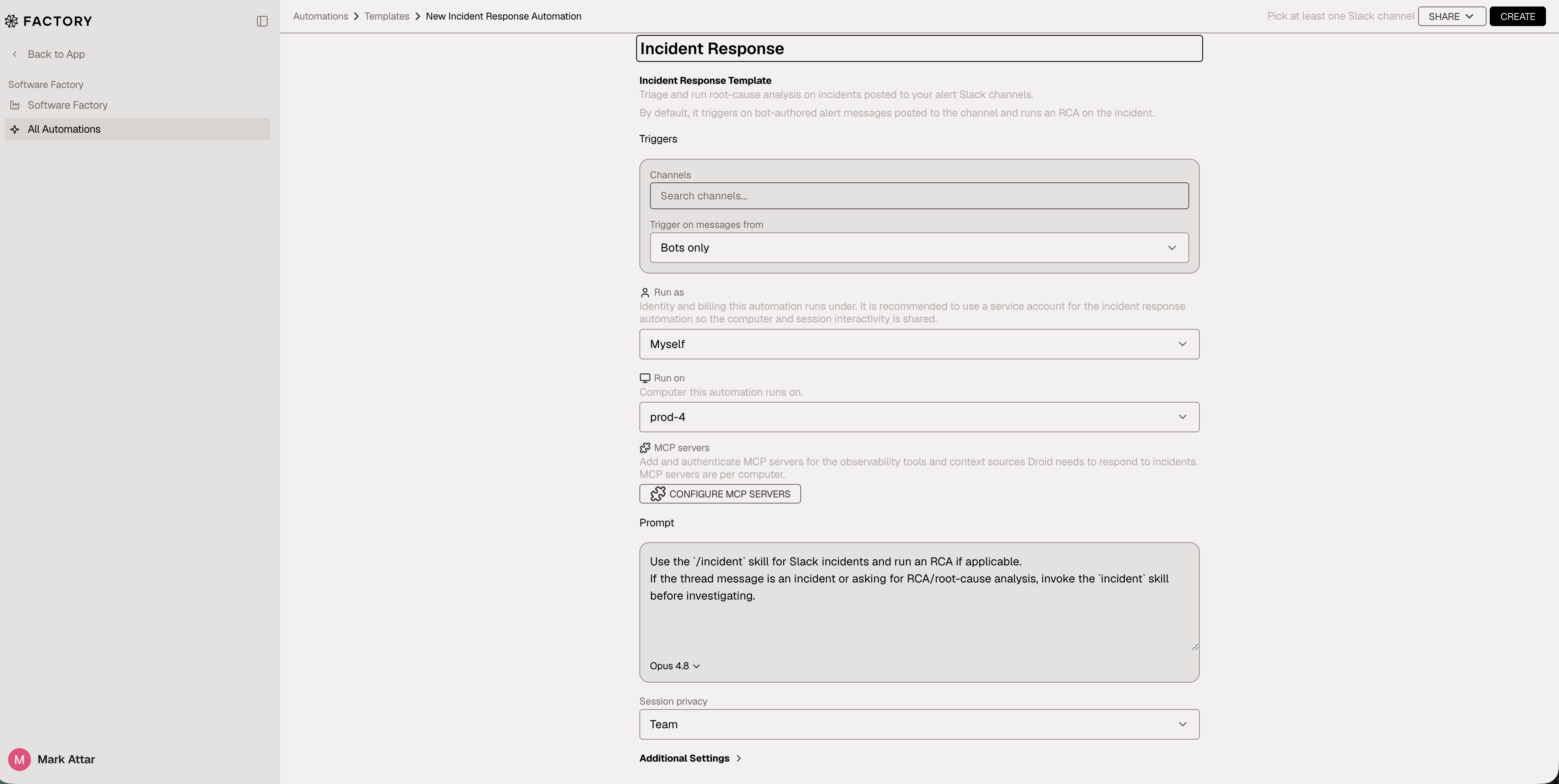
セッションの可視性を特定のユーザーまたは組織全体に設定できます。また、セッションはユーザーアカウントまたはサービスアカウントを通じて実行することも可能です。自動化が有効になると、Droid はそのチャンネルに届くアラートメッセージに対して自動的に応答します。
Long term memory
時間の経過とともに、Droid はインシデントから学習し、情報をコンピュータ上の永続的なランブックに保存することで、自身の対応能力を向上させていきます。優れたエンジニアリング組織は、ランブックを集約し、ノイズの多いアラートを特定し、過去の根本原因を記憶します。Droid も同じことを行います。
Droid はこれらの学習結果をファイルに保存し、正確な問題診断や迅速な対応、ノイズの排除を実現します。
カスタマイズ
インシデントレスポンスはチームのニーズに合わせて設定可能です。指示内容をカスタマイズして、自社のインシデント対応マニュアルを組み込み、Droid に追加の文脈を与えましょう。
Observability ツールやその他の情報源をインシデントレスポンスに接続すれば、本番環境内で機能させることができます。セットアップ時またはセッション中に、自動化が実行されるコンピュータへ MCP を接続してください。また、Droid は永続的なマシンであるため、リポジトリのクローン作成、CLI のインストール、必要なツール類の追加も自由に行えます。
詳細については、インシデントレスポンスドキュメント をご覧ください。
ソフトウェアファクトリーの監視
自律化によりコードのリリースは高速化されました。しかし同時に、システムを壊すスピードも加速しています。アラートやバグがボトルネックになる前に、エンジニアリングチームはその速度に追いつく必要があります。
ソフトウェアファクトリーが生産ラインだとすれば、インシデントレスポンスは機械の破損を見守る監督役です。
原文を表示
On-call alerts have always been stomach-dropping moments. Someone's dinner, weekend, or launch review gets hijacked for an emergency sprint, often only to find out the alert was noise.
Factory Incident Response changes that pattern. Connect Droid to a Slack channel that receives alerts from Sentry, Rootly, Axiom, Datadog, or another observability system. When an alert arrives, Droid starts a session on a Droid computer, investigates the issue, triages the alert, and prepares a fix if necessary.
Incident Response uses your observability tooling and adapts to your team's process. It also builds long-term memory through a persistent runbook, so every investigation improves the next response.
In preview, Incident Response has saved hundreds of hours for on-call engineers across customer environments and Factory's own production systems.
Examples
If an alert shows a usage spike causing duplicate requests to the backend, Droid can investigate logs, identify the backend logic causing the issue, and report back in Slack. From there, you can follow up with Droid in the same thread and stop the duplicate request behavior instead of pulling context into a cold session while minutes are ticking by.
Many companies also have alert channels with noisy or duplicate alerts. Incident Response can help filter which alerts point to a real issue without burdening engineers with wasted time. As models improve, teams will be able to give Droid access to control monitors directly, silence useless ones, and create new ones when coverage is missing.
Setup
To set up Incident Response, invite Droid to your production alerts channel. Then open Factory, go to the Software Factory page, open the Automations tab, and select the Incident Response template.
Choose the channels to monitor and the Droid computer that should run the sessions. Make sure that computer has the right repositories, environment, and observability access for the systems it will investigate.
You can set session visibility to a specific user or to the whole organization. Sessions can also run through a user account or a service account. Once the automation is active, Droid responds to alerting messages that arrive in the channel.
Long term memory
Over time, Droid learns from incidents and stores information in a persistent runbook on the computer so it can improve its own response. Great engineering organizations collect runbooks, identify noisy alerts, and remember past root causes. Droid does the same.
Droid collects these learnings in files so that it can diagnose issues accurately, respond faster, and ignore noise.
Customization
Incident Response is configurable to your team's needs. Customize the instructions to encode your incident response playbook and give Droid additional context.
You can connect observability tools and other sources of context to Incident Response so it works within your production environment. During setup, or later in a session, connect MCPs to the computer that the automation runs on. You can also clone repositories, install CLIs, and add any other tooling you want to the Droid computer because it is a persistent machine.
Read the Incident Response documentation for more details on the feature and MCP setup.
Monitoring the Software Factory
Autonomy made shipping code fast. It also made breaking it fast. Engineering teams need to keep pace, before alerts and bugs become the bottleneck.
If the software factory is the assembly line, Incident Response is the supervisor watching for breakage in the machine.
AI算出
主要ニュースainew評価高い
記事は Factory Engineering が発表した自律型 AI ツール「Droid」の詳細な動作原理(アラート受信、調査、修正準備)や既存システムとの連携方法を具体的に記述しており、AI エージェントの新たな実装例として新規性が高い。ただし、対象はグローバルな開発者向けツールであり、日本固有の規制や企業事例に言及がないため、日本関連性は低めとなる。
6つの評価軸を見る
- AI関連度
- 75
- 情報源の信頼性
- 100
- 新規性
- 75
- 調べる価値
- 75
- 重複の少なさ
- 100
- 日本での有用性
- 25
今日のまとめ
AIデイリーブリーフで今日の重要ニュースをまとめ読み