Anthropic、Slack で Claude Tag を活用した自己完結型データ分析の導入事例を公開
本文の状態
日本語全文を表示中
詳細モードで約18分の本文を読めます。
同じ出来事の情報源
この情報源を基点に整理
Claude Blog
Anthropic は Slack 上で非アナリストが利用可能なデータ分析エージェント「Claude Tag」を導入する際の、権限管理や鮮度維持など 5 つの重要な知見を報告した。
Continue in AI NEW LAB
このニュースを、実務の判断につなげる
AI NEW LABで、試したことや先に確認したい条件を共有できます。まずはログインなしで読めます。
AI NEW LABで論点を見るAI深層分析を開く2026年8月14日 03:36
AI深層分析
キーポイント
スキルファイルの動的更新アプローチ
データモデルの変更頻度に対応するため、スキルファイルを一度きりの設定ではなく、会話ごとに再読み込みされる常時更新コンテンツとして扱うアーキテクチャを採用した。
文脈喪失による誤答リスクの管理
Slack での単発回答ではユーザーが正確性を検証する文脈を欠くため、古いスキルファイルに基づく自信満々な誤答を防ぐためにランタイムでの即時読み込みが不可欠であると指摘した。
分析家視点の統合による洞察提供
単にデータを取得するだけでなく、「なぜ低下したか」や「予測」など曖昧な質問に対し、データコンシューマーが求める有用なインサイトを提供するために、分析家の思考プロセスを模倣するスキルが必要であると結論付けた。
分析スキルとルーンブックの統合
予測やコホート分析などの標準的な分析手法、チャートの種類選択、報告書の構成といった暗黙知をスキルとして定義し、一貫性のある回答を実現する。
データ倉庫を超えた文脈の接続
単なる数値モデルだけでなく、Slackのスレッドやドキュメントなど社内の非構造化情報にもアクセスさせ、質問の背景にある真因を特定する。
重要な引用
The single most important architectural decision we made was to treat skill files as served content, refreshed continuously
If Claude is reading last Tuesday's copy of the skill, it gives last Tuesday's wrong answer with full confidence.
We quickly determined that approach would provide correct numbers, but stop short of useful insights.
Answering those requires the agent to know not just where the data is but how an analyst would work with it.
編集コメントを表示
編集コメント
本記事は、AI エージェントを単なるツールとして導入するのではなく、組織のデータ構造と密接に連携させるための実務的な知見を提供している。特に「最新情報の鮮度」を技術的・運用面でどう担保するかという点は、多くの企業が直面する課題に対する明確な指針となる。
Source Article
元記事を日本語で読む
本文に関係しない購読案内、埋め込み通知、サイト内プロモーションは除いています。
Slack 内でデータ分析エージェントをデプロイするベストプラクティス
「正確なエージェントを作る」ことと、「非アナリストが使える環境にデプロイする」ことは、実は全く異なる課題です。精度に関する以前の投稿での推奨事項はそのまま有効なので、ここでは改めて詳しくは語りません。
代わりに、過去 1 年間で得た Slack 内でのデータ分析エージェントの導入における、最も重要な 5 つの教訓についてお話しします。特に「配布方法」「権限管理」「データの鮮度」「可観測性」をどう考えるべきかに焦点を当てます。
データモデルを更新するたびにスキルも更新しよう
Claude に、貴社のスタイルや要件に合わせたタスクを実行させるには、スキルを活用できます。これは自然言語で記述された指示と、必要に応じて Claude が参照できるファイル群を含む Markdown ファイルです。
私たちが行った最も重要なアーキテクチャ上の決断は、スキルファイルを「一度配布して忘れ去るもの」ではなく、「継続的に更新される生きたコンテンツ」として扱うことにしました。
データモデルは 1 日に何度も変更されることがあります。例えば、カラム名の変更やメトリック定義の修正、あるいはテーブルの廃止などが発生します。こうした変化はすべて、比較的短時間でスキルファイルに反映させる必要があります。もし Claude が先週の古いバージョンのスキルを参照してしまえば、自信満々で間違った回答をしてしまうことになるからです。
この傾向は特に危険です。データの利用者が、回答の正確性を判断するために必要な文脈から完全に切り離されてしまうためです。トレンドラインや関連する指標が表示されたダッシュボードを見て、「直感で正しさを確認する」ことができません。Slack には単一のデータポイントが数個届くだけの場合もあり、普段見慣れないデータであれば、その回答を自信を持って受け入れてしまう恐れがあります。
この常に変化する環境を制御するために、Claude Tag のランタイムはデータリポジトリの skills/ ディレクトリをマウントし、会話ごとに再読み込みします。スキルファイルはディスク上の単なる Markdown ファイルであり、エージェントはプロジェクトファイルを読むのと同じ要領でそれを読み取ります。
照会先を知る以上のスキルをエージェントに付与する
データ分析エージェントを Claude Tag で展開する際の最初の直感は、「知識スキル」を作成することでした。これにより Claude にどのテーブルを使用するかやセマンティックレイヤーの構成を教えておけば、それで十分だと考えていたのです。しかしすぐに、このアプローチでは「正しい数値」は得られるものの、「有用な洞察」には届かないと判断しました。
データの利用者は往々にして、「この急落の原因は何ですか?」「月末にこの数値はどうなるか予測できますか?」「このデータをファネル表示で示してください」といった、オープンエンドで曖昧な質問を投げかけます。これらに応えるには、エージェントが単に「データの場所」を知るだけでなく、「アナリストがどのようにデータと向き合うべきか」も理解している必要があります。
そこで、知識スキルに加えて、Claude Tag に追加の分析用スキルやランブックスキルをマウントしました。具体的には以下の通りです:
- 予測分析: 単純なトレンドや季節性の仮定を適用するべきタイミングと、時系列データが短すぎるかノイズが多すぎて判断できない場合の断り方。
- コホートおよびリテンション分析: 標準的なコホートの定義、経営層へ報告するためのリテンション曲線のテンプレート、そして素朴な実装で陥りがちな落とし穴(左側検閲や生存者バイアスなど)。
- ファネル分析: 主要な製品ファネルにおける標準的なステージ定義。これにより、「オンボーディングのどこでユーザーが離脱しているか」という問いに対する回答が一貫性を持つようになります。
- チャート作成: どの質問にどのグラフタイプを使うべきか、カラーパレットの選定基準、そしてプロットよりも表の方が明瞭になる場合の判断基準といった可視化の慣習。
- 分析レポートの記述: 発見を構成する方法(結論を先に、数値、メカニズム、注意点を順に)、および信頼度の度合いに応じた適切な留保表現のレベル。
データチームにはすでにこれらの慣習が存在しているケースがほとんどですが、それらは往々にして誰かの頭の中にあり、文書化されることは稀です。これらをスキルとして明文化することで、Claude がデータサイエンティストと同じように一貫性を持って適用できるようになります。
データウェアハウスだけでなく、ビジネスの文脈にも接続する
知識スキルとランブック(手順書)スキルの組み合わせであっても、質問に答えるには常に十分とは限りません。例えば「なぜ火曜日にサインアップ数が減少したのか?」という問いに対しては、答えがデータモデルの中にあるのではなく、Slack のスレッドやインシデントトラッカー、リリースノート、ドキュメントなど、あちこちに散在していることがよくあります。
これらのギャップを埋めるため、Claude Tag を社内ナレッジインデックスに連携させています。このインデックスには、社内のドキュメント、ディスカッション、イベントなどがカタログ化されています。エージェントが数値の変動を検知すると、そのインデックスを検索して「同時期の文脈」を探します。例えば、「その朝にインシデントが発生した」「機能フラグが切り替えられた」「誰かがチャンネルで共有した競合他社の発表」といった情報が該当します。
回答は以下のような形になります。「火曜日の新規登録数が 12% 減少しました:その朝の 9 時から 11 時に支払いサービスのインシデントが発生しており、減少が集中しているのは影響を受けた地域です」。
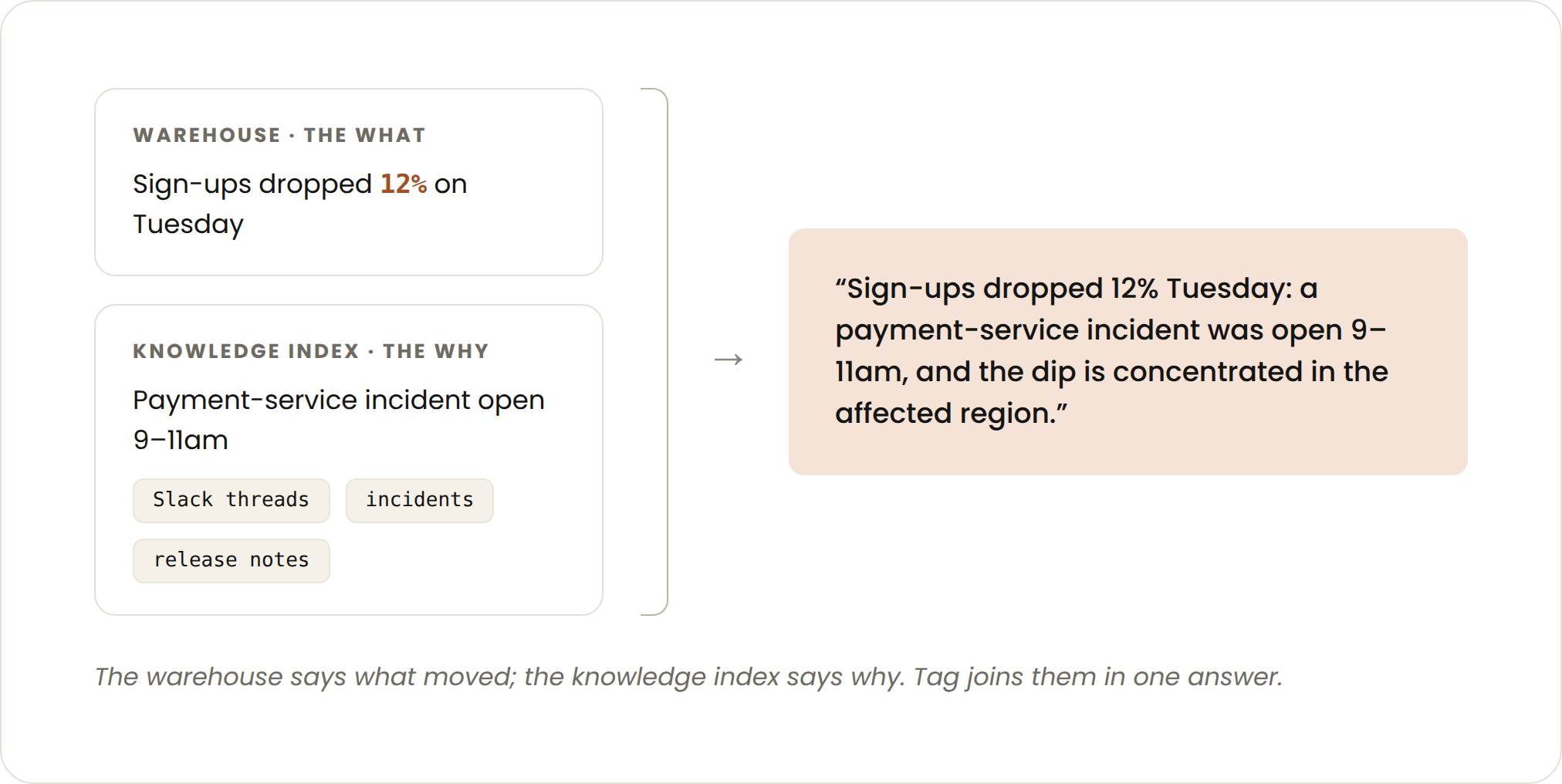
貴社にナレッジグラフや内部検索システム、あるいは整理されたインシデント・変更ログのフィードが存在する場合は、データウェアハウス自体への連携に加えて、Claude Tag をこれらと接続することが最も効果的な情報追加となります。また、Claude Tag を Slack の主要チャンネルに接続し、そこから情報を取得して文脈を把握させることも可能です。
サービスアカウントの権限は意図的に設定する
Claude Tag は、質問した人間ではなく、サービスアカウントとしてデータウェアハウスにクエリを実行します。これは正しい設計です(すべての Slack ユーザーが直接ウェアハウスの認証情報を取得する必要はないため)。しかし、ボットをメンションできる人は誰でも、そのボットのデータアクセス権限を有することになります。ユーザーごとの行レベルセキュリティは存在せず、サービスアカウントが読み取れるデータであれば、チャンネル内の誰でもそれを質問できます。
この課題には 5 つの対策を講じており、これらは軽視すべきではありません。設定を誤ると修正が難しくなるためです。
1. サービスアカウントの権限範囲を管理されたデータに限定する
Anthropic では、Claude Tag のサービスアカウントはセマンティックレイヤーの出力テーブルと、それらを供給するキュレーション済みマートのみを読み取る権限を持っています。生のイベントストリームやステージングスキーマ、個人用サンドボックス内のデータにはアクセスできません。もし質問がこれらの境界外にあるデータを必要とする場合、エージェントは推測せず、「そのデータにはアクセスできません」と回答します。これは適切なユーザーエクスペリエンスです。管理されたレイヤー外のデータはまだ検証されていないためです。
- 列レベルで個人識別情報(PII)を分類し、サービスアカウントのアクセス権限を拒否する
管理されたデータが自動的に PII セーフなデータであるとは限りません。例えば、キュレーション済みのテーブルでもメールアドレスが含まれている可能性があります。私たちは列レベルの系譜情報を保持したデータカタログを運用しており、各列の起源と下流への流れを把握しています。新しい列が追加されると、Claude がそれをスキャンして PII の候補としてフラグを立て、人間のレビューに回します。その後、人間がその分類を列のメタデータに適用し、系譜情報を通じてそのラベルは派生テーブルにも伝播されます。
Claude Tag のサービスアカウントには PII に関するアクセス権限が付与されていないため、ウェアハウスの列レベルでのアクセス制御により、PII が含まれる列はエージェントから見えなくなります。テーブル自体へのクエリは可能ですが、機密性の高い列は読み取り不可となります。
- スキル自体に接続経路を文書化する
当社のウェアハウス用スキルには、エージェントがどのように接続するか(CLI 経由か、直接 API か、MCP サーバー経由かなど)と、各経路における認証の仕組みについて専用のセクションを設けています。この一見地味な機能により、エージェントが「クリーンに失敗」したケース(例:「この表面からはウェアハウスに到達できません。理由は〜です」と明確に説明する)と、「混乱を招く形で失敗」したケース(例:誤ったプロジェクトに対してクエリが静かに実行される、あるいは不適切な場所で認証プロンプトが転送されるなど)を区別できるようになります。
接続の仕組みをスキル内に明記しておくことで、エージェント自身が自身の制約を説明できるようになります。
- クロードのチャンネル参加をアクセス権限付与とみなす
Claude Tag を Slack チャンネルに追加することは、実質的にそのチャンネルのメンバーに対して、エージェントが照会可能なデータへの読み取り権限を付与する行為と同じです。この点を明確にするため、Claude のチャンネルへの追加はデータチームのメンバーが行い、対象となるチャンネルの一覧管理もデータチームが担っています。
- すべてのクエリにラベルを付与する
すべてのウェアハウスクエリにおいて、Claude Tag は表面(surface)、会話、および要求者ユーザー(Slack が提供する場合)を識別するラベルを付帯します。これはクエリ実行時に何らかの制限を課すものではありませんが、コストの帰属管理や監査証跡の確保に役立ちます。例えば、「4 TB をスキャンした質問をしたのは誰か」を事後に特定することが可能です。
我々の基本的な姿勢は、Slack 内のデータ分析エージェントは「ガバナンスされたウェアハウスの共有読み取りレプリカ」とみなすことです。このように範囲を限定して運用しています。
すべての回答を計測する
エージェントが十分な回答を提供したかどうかを、目視で判断することはできません。
Claude Tag が処理するすべての質問に対して、構造化イベントとしてログを残します。記録される情報は以下の通りです。
- 読み込まれたスキルファイルとそのバージョン;
- ユーザーが 👍/ 👎 のリアクションを行ったか、または修正を返信したかの有無;
- 対象となったテーブルに関する未解決のデータ品質警告。また、回答のフッターにも同様のデータ品質警告を表示し、数値の隣に古いデータの警報が表示されるようにしています。
このテレメトリは 2 つのビューに活用されています。1 つ目は採用状況で、表面やドメイン別に、アドホックな SQL ではなく統制されたレイヤーを介してルーティングされるエージェントクエリの割合を追跡します。2 つ目は正しさで、ドメインごとの「👎」反応率と修正率によって測定されます。これは評価間隔における精度のオンライン指標です。
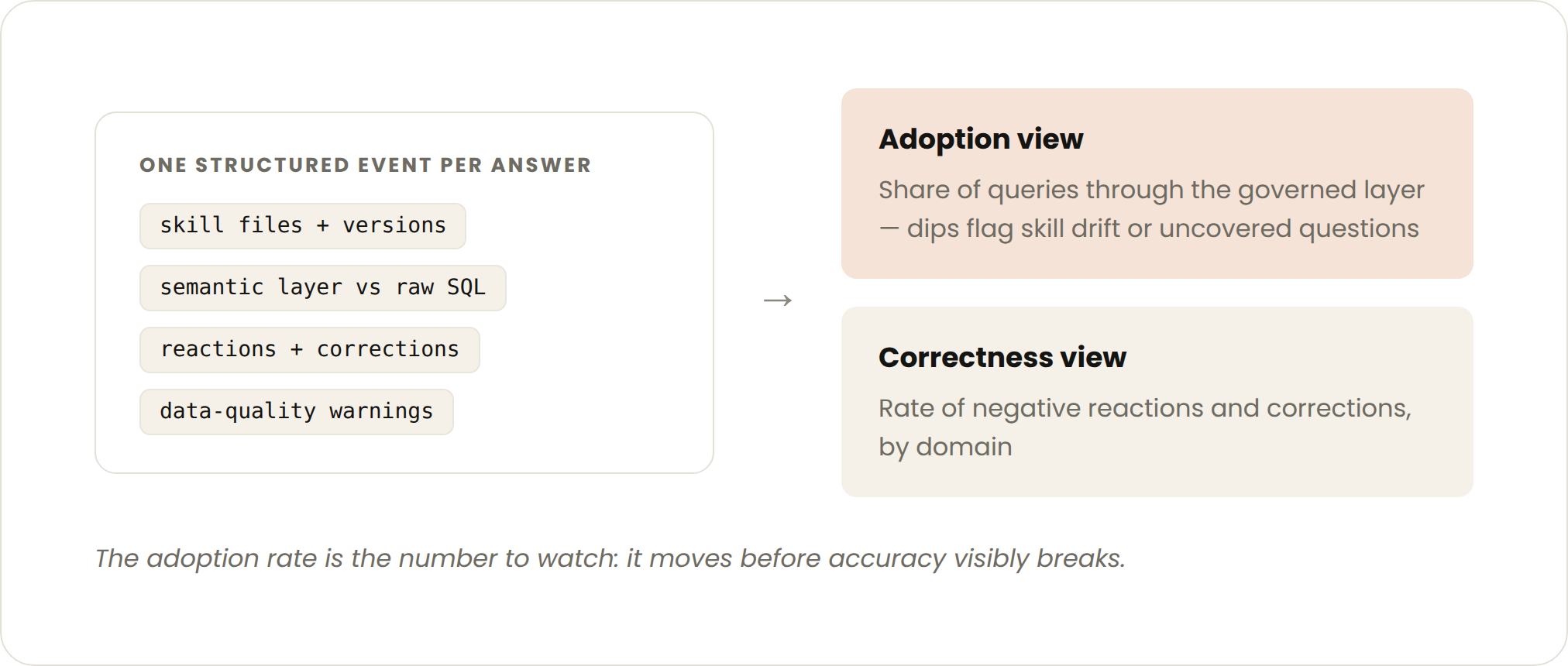
採用状況の指標が、私たちが追跡した中で最も実用的な数値であることがわかりました。あるドメインでこの数値が低下するとすれば、それはスキルファイルがずれたか、セマンティックレイヤーがカバーしていない新しい質問のクラスが現れたかのどちらかを意味します。
これがセルフサービス分析の採用を加速させる仕組み
クロードタグのスレッドが新たな会議になる
私たちの最も好ましく効果的な Claude Tag スレッドには、複数の人が参加しています。こうしたケースでは、人々がアイデアや文脈を提供し、Claude が下準備業務を担当します。
例えば、データチームのメンバーが Revenue ダッシュボードの読み込みに通常より数分長くかかっている理由を Claude に尋ねました。Claude はクエリ結果がキャッシュされていないこと、およびバグによってページへの結果到達が遅延していることを発見しました。
Claude はダッシュボードの所有者に通知し、所有者はバグの修正とは別にキャッシュの問題を即座に解決することを決定しました。
オーナーは、他にどのダッシュボードが遅延しているかを尋ねました。その結果、キャッシュエラーの影響を受けているダッシュボードが数十件あることが判明しました。Claude がキャッシュの修正コードを記述し、データチームのメンバーがそれをレビューしたところ、影響を受けたすべてのダッシュボードは 1 時間未満でフル稼働状態に戻りました。
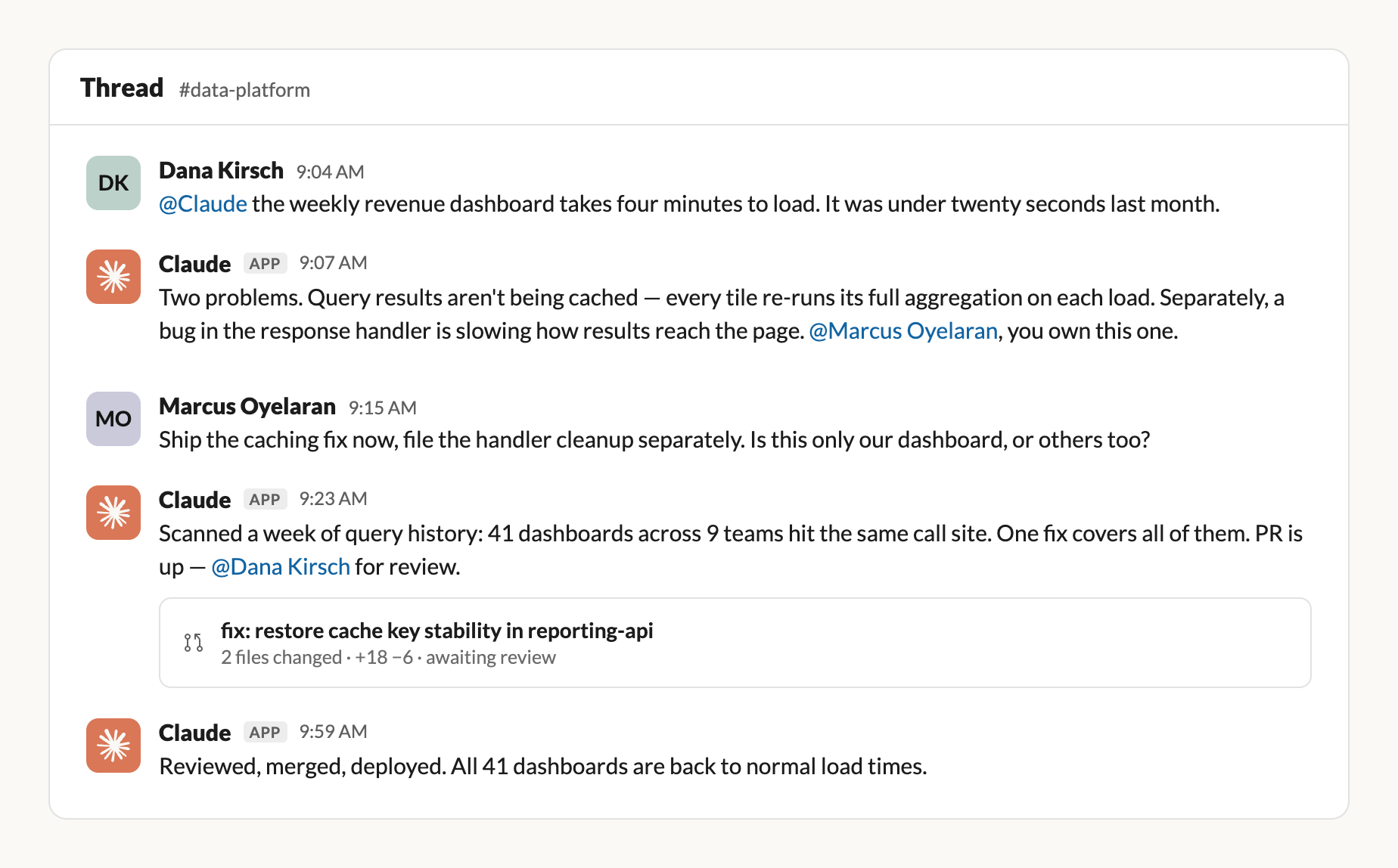
*これは Claude Tag の会話のフィクションによる再現です。インシデントの詳細、名前、ツールは実際のものでありません。
これらのスレッドは公開されており、複数の理由で役立ちます。傍聴している人々は、誰かが要約を書かなくても、「何が壊れ」「なぜそうなり」「どう直った」という文脈を自然に把握できます。さらに重要なのは、彼らが受け身の閲覧者にとどまらなくてよい点です。何か有益な情報を知っている人は誰でも、上記の例のようにチームメンバーが行ったように参加して貢献することができます。
したがって、エージェントは共有チャンネルに残し、作業は DM(ダイレクトメッセージ)ではなくスレッドで行うべきです。スレッドはレビュー可能な履歴記録として機能するからです。
Claude Tag は反復タスクを処理する
データ関連の業務には繰り返し作業が多くあります。パイプラインの健全性チェックや KPI モニタリングなどがその例です。Claude にループを作成させることで、スケジュール通りに循環的なタスクを処理したり、異常な変化に対応させたりすることが可能です。私たちが実際に実装したデータ固有の事例としては以下があります:
・プロアクティブなレポート:Claude は毎週の定例ミーティング前に要約を提供します。先週の変化、前週との比較、そして注目すべきポイントです。
・テストモニタリング:ローンチや実験の監視中も、Claude は1 日複数回でレポートを出します。最近の実験では、設定が途中で変更されたことに気づき、早期に発見して修正する手助けをしました。
・観測可能性(Observability):他のループはパイプラインとダッシュボードを監視しています。パイプラインが失敗すれば Claude が調査を開始し、修正案を作成してオンコール担当者に通知します。KPI に予期せぬ変動があれば、「祝日の影響か?」「上流のデータ変更か?」といった可能性のある説明を提示し、誰かがダッシュボードを開く前に検証を行います。
・トリアージ:別のループはデータ質問チャンネルを追跡しています。新しい質問ごとに判断を行い、直接回答するか、より深い調査を開始するか、人間を巻き込むかを決定します。データチームの担当者が確認する頃には、すでに多くの作業が完了しているのです。
Claude はループ設計自体にも貢献できます。@Claude に対して「自分のチャンネルでどのような反復業務を目撃したか」「どのように支援できるか」を問い合わせてみてください。
必要な時に介入する
任意のチャンネルで Claude によりプロアクティブな役割を持たせることも可能です。読み進め、必要に応じて介入してサポートします。先月のデータチャンネルの一つでは、呼び出しがなくても Claude Tag が投稿された質問の 75% 以上を回答し、通常は数分以内に解決していました。
例えば、Anthropic のチームメンバーが公開チャンネルで「ダッシュボードに新しい利用カテゴリが含まれているか」と質問しました。Claude はわずか 90 秒でデータの定義を説明し、新しいセグメントが存在しないことを確認するとともに修正案を提示し、プルリクエスト(PR)の草案を作成しました。データサイエンティストがレビューして承認した結果、Claude が PR をマージし、ダッシュボードを更新しました。
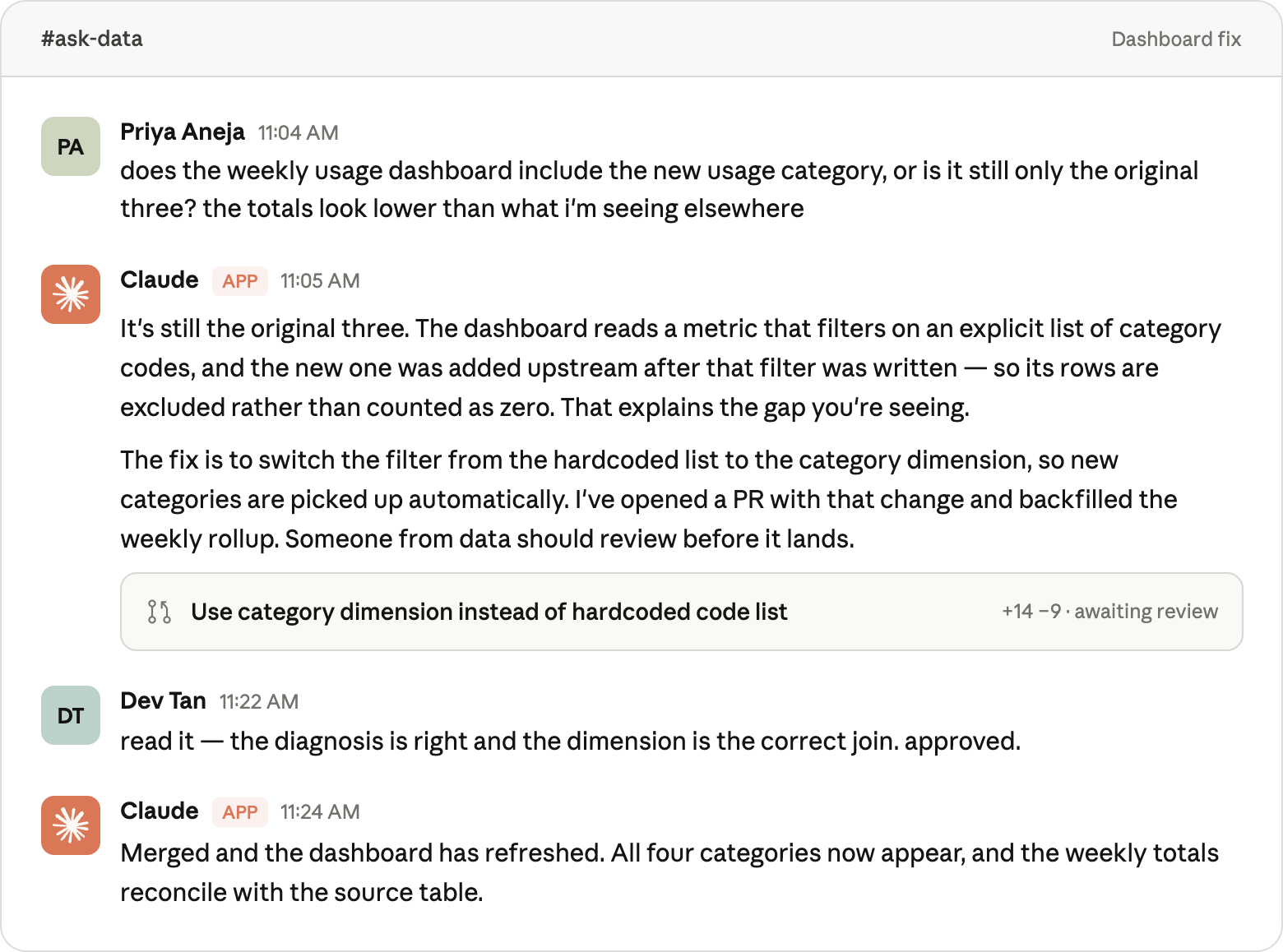
*これは Claude Tag の会話の架空の再現です。事例の詳細、人物名、および使用ツールは実際のものでありません。
始め方
最初の投稿で説明した作業をすでに完了している場合、Slack への導入は主に配管工事のようなものですが、手順の順序には注意が必要です。
まずPermissions(権限)を設計する。エージェントコードを書く前に、サービスアカウントが何を読み込めるかを明確に定義してください。後からアクセス範囲を広げるのは容易ですが、一度与えた権限を取り戻すのは大変です。
次にDistribution(配布方法)の選定です。mounted-repoかMCP経由でスキルを提供するかを選び、エンドツーエンドでの鮮度確認を徹底してください。スキルファイルを変更したら、SLA(サービスレベルアグリーメント)内でClaude Tagがそれを正しく読み取れることを必ず検証します。
Telemetry(テレメトリクス)は初日から導入してください。1ヶ月前の会話履歴を後から計測することは不可能です。最初の質問から構造化されたイベントログを記録する仕組みを構築しましょう。
可能な限りKnowledge index(知識インデックス)を活用します。データウェアハウスは「何が起きたか」を答え、社内ドキュメントやインシデントフィードは「なぜ起きたか」を説明します。データ経路が安定したら、これらをすぐに連携させてください。
Analytics skills(分析スキル)の構築は最後に回してください。まずはデータアクセス用のスキルを作成し、実際の質問を通じて、同僚たちが本当に必要とする分析スキル(予測、コホート分析、ファネル解析など)を特定しましょう。*本記事はAnthropicのデータサイエンスおよびデータエンジニアリングチームに所属するClement PengとLily Zhaoが執筆し、Josh CherryとMichael Segnerが寄稿しました。*
原文を表示
Best practices for deploying a data analytics agent in Slack
Getting an agent to be *accurate* and getting it *deployed where non-analysts can use it* turned out to be quite different motions. We won’t rehash our recommendations on accuracy from our prior post as they’re still applicable here.
Rather, we’ll cover our five most important learnings over the past year for how to deploy a data analytics agent in Slack and how you should think about distribution, permissions, freshness, and observability.
Refresh skills as often as you refresh your data models
You can teach Claude how to do a task aligned with your style and requirements using a skill, which is a markdown file with natural language instructions and files Claude can reference when needed.
The single most important architectural decision we made was to treat skill files as served content, refreshed continuously, rather than something shipped once and forgotten.
Data models can change several times a day. For example, a column gets renamed, a metric definition is corrected, or a table is deprecated. Every one of those changes needs to land in a skill file in relatively short order. If Claude is reading last Tuesday's copy of the skill, it gives last Tuesday's wrong answer with full confidence.
This tendency can be especially damaging since the data consumer is now completely separated from the context they need to judge the accuracy of the response. They aren’t looking at a dashboard with trend lines or associated metrics that can guide their “sniff test.” They may receive just a single data point or two in Slack, and if it's not data they look at regularly, they are likely to accept that confidently wrong answer.
To control this ever-changing environment, Claude Tag's runtime mounts our data repo's skills/ directory and re-reads it on every conversation. The skill files are just markdown on disk; the agent reads them the same way it would read any project file.
Give the agent skills beyond knowing what to query
Our initial instinct for deploying our data analytics agent using Claude Tag was to create a “knowledge skill,” which teaches Claude which tables to use and how our semantic layer is organized, and call it a day. We quickly determined that approach would provide *correct* *numbers*, but stop short of *useful* *insights*.
Most data consumers tend to ask open-ended and ambiguous questions like "what's driving this dip?" or "can you forecast where this lands at month-end?" or "show me this data as a funnel." Answering those requires the agent to know not just *where the data is* but *how an analyst would work with it*.
So alongside this knowledge skill, we mounted Claude Tag with additional analytics or runbook skills, including:
- Forecasting: when and how to fit a simple trend, seasonality assumptions, and when to refuse because a series is too short or too noisy.
- Cohort and retention analysis: standard cohort definitions, the retention curve template reported to leadership, and any gotchas (left-censoring, survivorship) that trip up naive implementations.
- Funnel analysis: the canonical stage definitions for key product funnels, so "where are users dropping off in onboarding?" is consistent across responses.
- Charting: visualization conventions like which chart type to use for which question, color palettes, and when a table is clearer than a plot.
- Analytical writing: how to structure a finding (TL;DR first, number, mechanism, caveat), and the level of hedging that’s appropriate given the degree of confidence.
Every data team likely already has these conventions; they just usually live in someone's head and are only occasionally documented. Writing them down as skills ensures Claude applies them as consistently as your data scientist would.
Connect to business context, not just the warehouse
Even this combination of knowledge skills and runbook skills is not always enough to answer a question. When someone asks "why did sign-ups drop on Tuesday?", the answer often isn’t in the data model, but rather is frequently spread across Slack threads, incident trackers, release notes, and docs.
To account for these gaps, we wire Claude Tag into our internal knowledge index, which catalogs documents, discussions, and events across the company. When the agent sees a metric move, it can search that index for *contemporaneous context*: an incident opened that morning, a feature flag flipped, a competitor announcement someone shared in a channel.
The answer now would look like "sign-ups dropped 12% Tuesday: there was a payment-service incident open 9-11am that morning, and the dip is concentrated in the affected region."
If your organization has a knowledge graph, internal search, or even just well-organized incident and changelog feeds, connecting Claude Tag to them is the highest-leverage information you can add after the warehouse itself. You can also connect Claude Tag so it can read and get context from key channels across Slack.
Permission the service account deliberately
Claude Tag queries your warehouse as a service account, not as the human who asked the question. While that's the right design (since you don't want every Slack user requiring direct warehouse credentials), everyone who can mention the bot has the bot's data access. There is no per-user row-level security: what the service account can read, anyone in the channel can ask about.
We approach this in five ways (and we recommend taking this seriously as it’s easy to get wrong and hard to undo):
1. Scope the service account to governed data only. At Anthropic, Claude Tag's service account can read the semantic layer's output tables and the curated marts that feed them. It cannot read raw event streams, staging schemas, or anything in a personal sandbox. If a question requires data outside that boundary, the agent says so rather than guessing. That is also the right user experience because data outside the governed layer hasn't been validated.
2. Classify PII at the column level and deny the service account clearance. Governed data isn’t automatically PII safe data (e.g., a curated table can still carry an email address). We maintain a data catalog with column-level lineage, so every column’s origin and downstream flow is known. When new columns land, Claude scans them and flags likely PII candidates for human review. A human then applies the classification in the column’s metadata, and lineage propagates that label to derived tables. Given Claude Tag’s service account holds no PII clearance, the warehouse’s column-level access controls make any PII columns invisible to the agent. It can query the table, but the sensitive columns simply aren’t readable.
3. Document the connection path in the skill itself. Our warehouse skill has a dedicated section on *how* the agent connects (whether via CLI, direct API, or an MCP server) and exactly how authentication works for each path. This prosaic feature allows us to differentiate between the agent failing cleanly ("I can't reach the warehouse from this surface; here's why") versus failing confusingly (a query that silently runs against the wrong project, or an auth prompt relayed somewhere it shouldn't be). When the connection mechanics are in the skill, the agent can explain its own constraints.
4. Treat Claude’s channel membership as an access grant. Adding Claude Tag to a Slack channel is, in effect, granting that channel's members read access to whatever the agent can query. We made this explicit: Claude is added to a channel by a data-team member, and the data team owns the list of channels.
5. Label every query. For every warehouse query, Claude Tag carries labels identifying the surface, the conversation, and the requesting user (where Slack provides it). This doesn't enforce anything at query time, but it provides cost attribution and audit trails (you can determine who asked the question that scanned 4 TB after the fact).
Our general posture is that a data analytics agent in Slack is a shared read replica of your governed warehouse, and we try to scope it as such.
Instrument every answer
Determining whether the agent gave a sufficient answer is not something you can eyeball.
We log a structured event for every question Claude Tag handles. This includes:
- Which skill files were loaded and at what version;
- Whether the user reacted with 👍/ 👎 or replied with a correction; and
- Any open data quality warnings on the tables it touched. We also surface any data quality warnings in the answer's footer, so a stale-data alert appears next to the number rather than being invisible.
This telemetry feeds two views. One tracks adoption or what fraction of agent queries route through the governed layer rather than ad hoc SQL by surface and domain. The other tracks correctness measured by the rate of 👎 reactions and corrections by domain. This is the online proxy for accuracy between eval runs.
The adoption metric turned out to be the single most actionable number we tracked. When it dips for a domain, it almost always means either a skill file has drifted or a new class of questions has appeared that the semantic layer doesn't cover.
How this accelerates self-service analytics adoption
Claude Tag threads become the new meeting
Our favorite, most effective Claude Tag threads usually have multiple people in them. In these cases we see people contributing ideas and context while Claude handles the legwork.
For example, a data team member asked Claude why a revenue dashboard was taking a few minutes longer than usual to load. Claude discovered query results weren't being cached and a bug was slowing down how results reached the page.
Claude notified the dashboard owner who decided to fix the cache immediately while handling the bug in a separate motion.
The owner then asked what other dashboards had slowed, and it turned out dozens were impacted by the same caching error. Claude wrote the caching fix, the data team member reviewed it, and all impacted dashboards were functioning at full capacity in less than an hour.
These threads are open which is helpful for multiple reasons. People reading along pick up context (what broke, why, how it got fixed) without anyone writing a summary for them. More importantly, they don't have to remain passive readers. Anyone who knows something useful can jump in and contribute, the way the team members did in the example above.
So keep the agent in shared channels and keep the work in threads instead of DMs, as the thread can function as a reviewable historical record.
Claude Tag handles repetitive tasks
A lot of data work is recurring: pipeline health checks, KPI monitoring, etc. You can ask Claude to create loops that can handle cyclical tasks on schedule or in response to unusual changes. Some data specific examples we’ve implemented include:
- Proactive Readouts: Claude provides a summary before a weekly standup: what moved last week, how it compares to the week prior, and what’s worth noting.
- Test Monitoring: When we’re monitoring a launch or an experiment, Claude provides readouts multiple times a day. During one recent experiment, it noticed the settings had changed partway through and helped us catch and fix it early.
- Observability: Other loops monitor our pipelines and dashboards. If a pipeline fails, Claude starts investigating, drafts a fix, and pings the person on call. If a KPI moves unexpectedly, Claude provides likely explanations: a holiday effect? an upstream data change? and checks them before anyone opens a dashboard.
- Triage: Another loop tracks our data questions channel. For each new question, it makes a call: answer it directly, start a deeper investigation, or bring in a human. By the time someone from the data team checks, most of the work is already done.
Claude can also help design the loop. Ask @Claude what repetitive jobs it’s seen in your channels and how it can help.
Stepping in when needed
You can allow Claude to be more proactive in any channel you choose, reading along and stepping in to help when needed. In one of our data channels over the last month, Claude Tag answered more than 75% of questions people posted, typically within a minute or two, even without being called.
For example, an Anthropic team member asked in a public channel whether a dashboard included a new usage category. Within 90 seconds Claude answered how the data was defined, confirmed the new segment was missing, proposed a fix, and drafted a PR. A data scientist reviewed and approved. Claude then merged the PR and refreshed the dashboard.
Getting started
If you've already done the work from our first post, the Slack deployment is mostly plumbing, though the order is important:
- Permissions first. Decide what the service account can read before you write a line of agent code. It's much easier to widen access later than to claw it back.
- Distribution second. Pick mounted-repo or skills-over-MCP and verify freshness end-to-end: change a skill file, and confirm Claude Tag picks it up within your SLA.
- Telemetry from day one. You will not retroactively instrument month-old conversations. Log the structured event on the very first question.
- Knowledge index when you can. The warehouse answers what; your internal docs and incident feeds answer why. Wire them in as soon as the data path is stable.
- Analytics skills last. Create the data-access skill first and then let real questions inform which analyst skills (forecasting, cohorts, funnels) your co-workers actually need.
*This article was written by Clement Peng and Lily Zhao, members of Anthropic's Data Science and Data Engineering team, with contributions from Josh Cherry and Michael Segner.*
関連記事
今日のまとめ
AIデイリーブリーフで今日の重要ニュースをまとめ読み