QA 自動化に AI エージェントを活用する方法
本文の状態
日本語全文を表示中
詳細モードで約6分の本文を読めます。
同じ出来事の情報源
この情報源を基点に整理
Browser Use Blog
Browser Use Blog は、コーディングエージェントが生成したアプリケーションの品質を検証する「QA スキル」を発表し、AI エージェントにブラウザ操作と評価基準に基づいた自動テストを可能にする手法を示した。
AI深層分析を開く2026年8月4日 12:11
AI深層分析
キーポイント
Vibe Coding の限界と QA の必要性
Claude Code などのツールでアプリは容易に生成できるが、その可用性や使いやすさを検証する作業は依然として人間の手が必要となる課題がある。
QA スキルによる自動化ループの実現
AI エージェントにブラウザ、評価基準(rubric)、指示を与え、アプリをユーザー視点で操作し、不具合や改善点を特定するプロセスを自動化するスキルの仕組みを紹介している。
GLM 5.2 と Browser Use v2 の連携事例
テキストのみでサイト構築を行う GLM 5.2 と、結果を検証・評価するマルチモーダル QA サブエージェントを組み合わせる実証実験の結果を示している。
OWASP Juice Shop を用いた実証テスト
架空の EC サイトにおいて、製品閲覧からカート追加、登録、ログイン、決済までの主要フローをエージェントが実際に実行し、改善点を報告するデモンストレーションを行った。
ユーザー視点でのシナリオテスト
エージェントは顧客のようにサイトを経由し、商品選択からカート追加、登録、ログインを経てチェックアウトまでを実行する。
重要な引用
The QA skill automates that loop with an AI agent. It gives the agent a browser, a rubric, and instructions to use the app, notice what is wrong, and say what should be improved.
QA this website. Move through it like a user would, test the main flow, and
tell me what works, what breaks, and what should be improved.
It returns a 1-5 score with evidence: what the agent tried, what succeeded, what failed, and what would make the app better.
Browser Use has a free tier, so you can run everything in this guide completely free.
編集コメントを表示
編集コメント
コーディングとテストを別々の工程として扱うのではなく、AI エージェント同士が連携して開発から検証までを完結させるアプローチは、今後の AI 開発ワークフローの標準化に向けた重要な一歩である。特にテキスト生成モデルと視覚評価モデルを組み合わせた構成は、実用性の高い QA パイプライン構築の参考となる。
Source Article
元記事を日本語で読む
本文に関係しない購読案内、埋め込み通知、サイト内プロモーションは除いています。
Vibe コーディングの登場により、ウェブサイトやアプリの作成が容易になりました。Claude Code を起動し、欲しいものを記述して数分待てば、一見すると洗練され機能的なアプリが完成します。
しかし、コーディングエージェントがまだ十分に自動化できていないのが、その後の作業です。つまり、「ウェブサイトが実際に使いやすいか」を判断する作業です。
ユーザーと同じようにサイト内を移動し、ボタンをクリックし、テキストを入力し、リンクを追跡しながら、どこをより明確に、親しみやすく、有用なものにできるかを理解する必要があります。
これが QA(品質保証)の役割ですが、多くの場合、このタスクは人間に委ねられています。コーディングエージェントを活用する開発者の場合、QA は自分でアプリをテストし、不具合や違和感を感じてエージェントに再指示を出し、そのプロセスを繰り返すことを意味します。
「QA スキル」は、AI エージェントを用いてこのループを自動化します。エージェントにはブラウザ、評価基準(ルブリック)、そしてアプリの使用方法と問題点の特定、改善提案を行うための指示が与えられます。
GLM 5.2 は Fable 5 をウェブデザインで上回りました。🌐
驚くべき点は、GLM がテキストのみであることです。
サイトは構築できますが、結果を検証することはできません。
そこで、Browser Use v2 のマルチモーダル QA サブエージェントと組み合わせました。
サイトをレビューしてバグを発見
美的評価を行う
GLM にターゲットを絞った もっと見る を送信
x.com/i/article/2067…
QA 能力の検証には、商品やアカウント、カート、登録、ログイン、決済機能を備えた架空の EC サイトを用意しました。このエージェントが顧客と同じようにサイトを移動できるか、そして改善点を指摘できるかを確かめたかったのです。
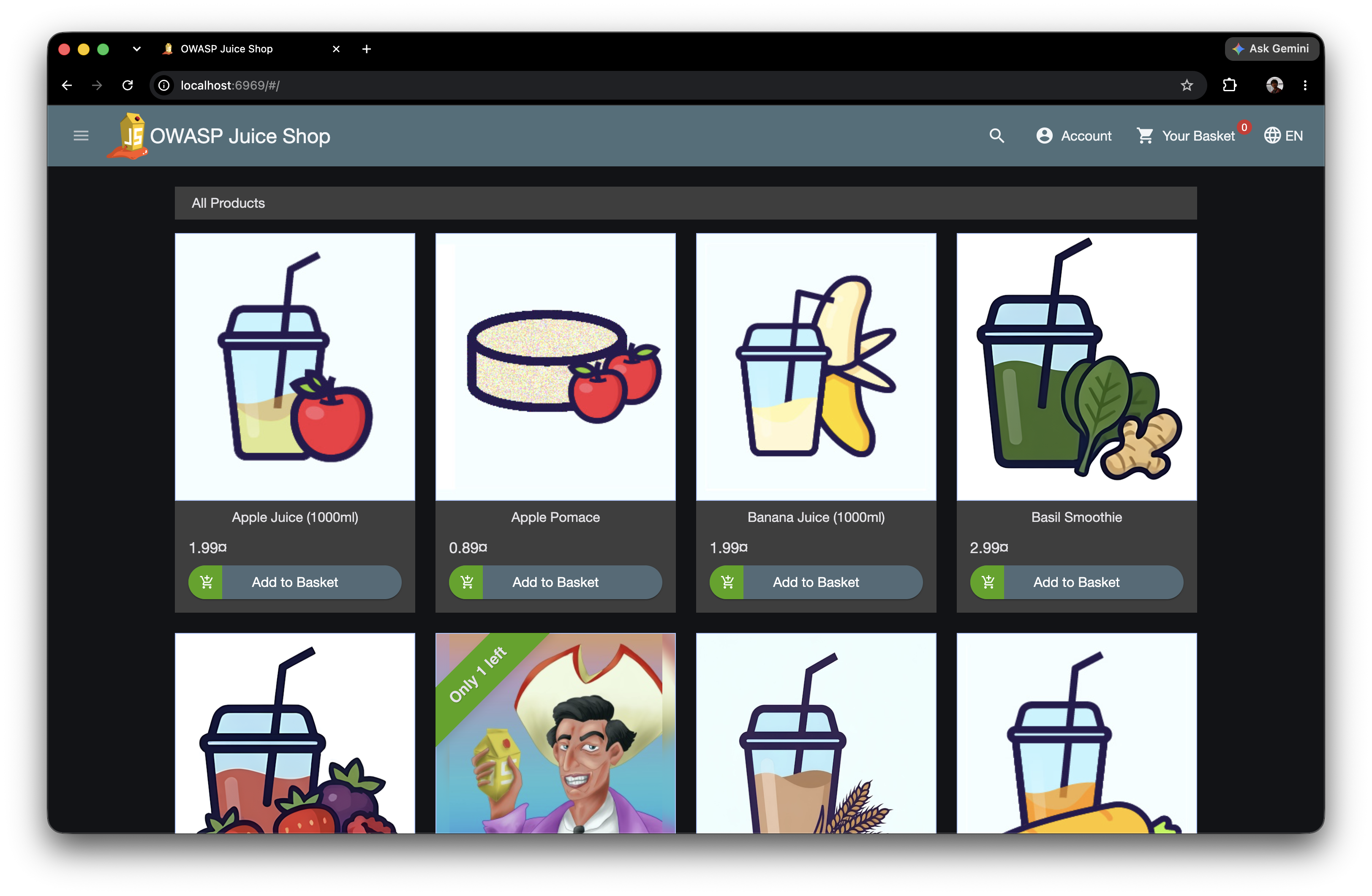
コーディングエージェントに与えたプロンプトは以下の通りです。
QA this website. Move through it like a user would, test the main flow, and
tell me what works, what breaks, and what should be improved.するとブラウザが起動し、エージェントはページを読み込んで商品を特定。アイテムをカゴに入れ、サイトがアカウント作成を強制するまでチェックアウトプロセスを進めました。
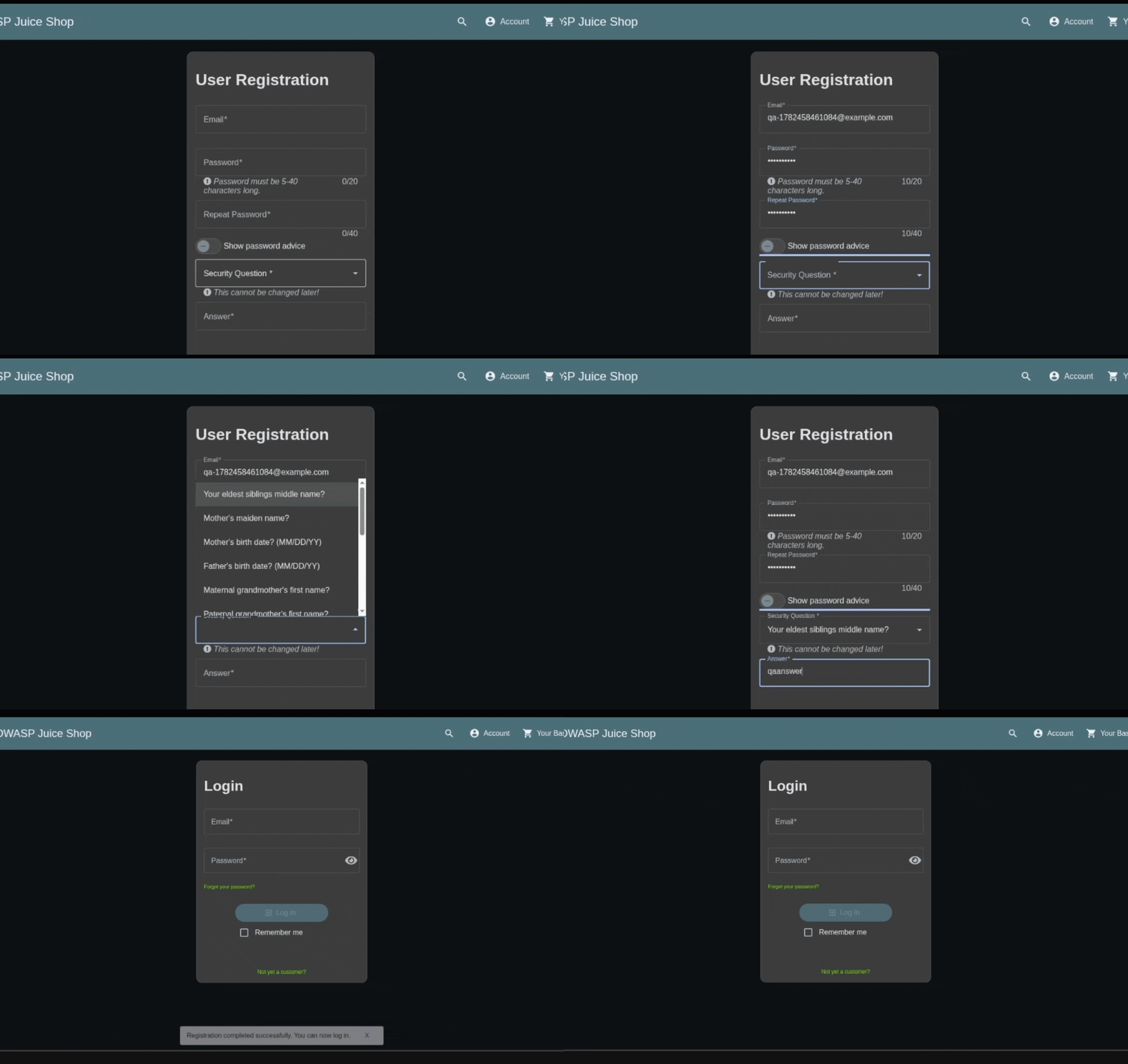
エージェントは各項目を入力し、セキュリティ質問を選択。フォームを送信して画面の変化を確認しました。
実際にサイトを利用する形でテストを行ったことで、論理的な整合性があるか、インターフェースが直感的か、ユーザーを有益な方向へ導いているかなどを検証できました。
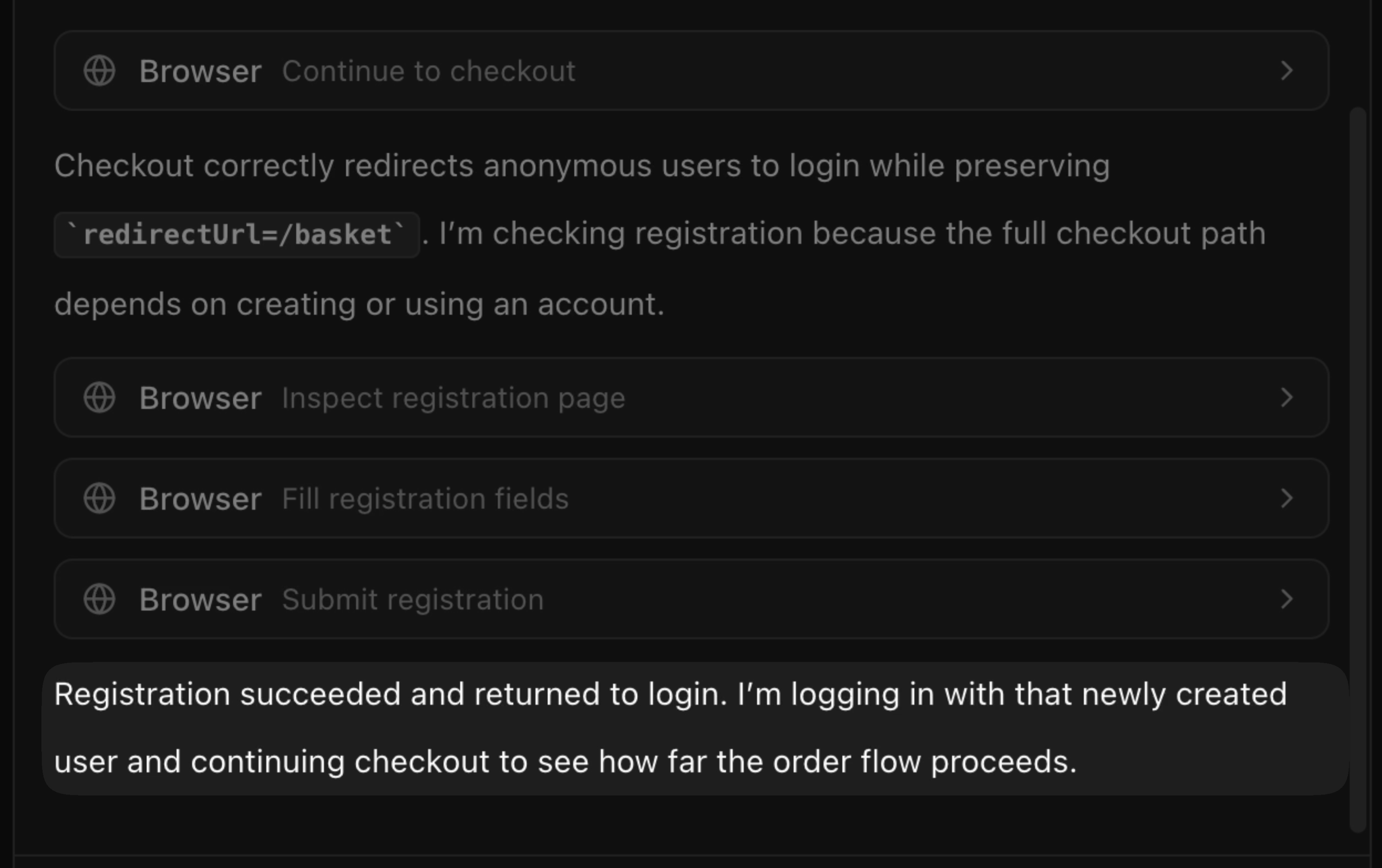
最終的な出力では、エージェントはチェックアウトの流れを説明。例えば、「匿名ユーザーはカゴ URL を保持したままログインページへリダイレクトされる」といった具体的な指摘を行いました。
QA スキルが果たす役割
QA スキルとは、コーディングエージェントが読み込む一連の指示です。Claude Code、Codex、Cursor、OpenCode などのエージェント内で動作し、URL とタスクを指定すると、Browser Use Cloud を介して実際のブラウザを操作してウェブサイトをテストします。
結果は 1〜5 点のスコアと根拠として返されます。具体的には、エージェントが何を試したか、何が成功し、何が失敗し、アプリをより良くするために何が必要かを明記します。この情報をコーディングエージェントにフィードバックすれば、ウェブサイト自体の改善も可能です。
Score: 4/5

The main signup flow works. The agent could find the call to action, enter
the required information, submit the form, and reach the next screen.

Issues found:
- The form did not explain one invalid input clearly.
- The next screen could make the user's progress more obvious.
- The primary action worked, but the surrounding copy left some uncertainty.
設定方法
まず Browser Use Cloud にログインするか、アカウントを作成してください。
こちら から Browser Use の API キーを取得します。Browser Use には無料枠があるため、本ガイドの手順はすべて無料で実行できます。
コーディングエージェントにスキルをインストールします:
npx skills add browser-use/browser-use --skill qaAPI キーを設定します:
export BROWSER_USE_API_KEY=bu_your_api_keyまたは、QA スキルがタスク処理に使用しているエージェントを こちらで試す こともできます。
テストの実行
エージェントに以下のように指示します:
QA the experience of adding paper towels to my cart on amazon.com.活用シーン
アプリ開発中、「動作が不安だ」「テスト作業を外部委託したい」という場合に QA スキルを活用できます。具体的には以下のようなケースです。
- コーディングエージェントが新しいページやアプリを作成した後
- 検証していない UI 変更をマージする前
- 現在進行中のプロジェクトに対するフィードバックが欲しいとき
- エラーのデバッグを行う際
実際に試す
まず、無料でBrowser Use API キーを取得してください。
次に、スキルをインストールします。コマンドは以下の通りです。
npx skills add browser-use/browser-use --skill qa
取得した AI エージェントにタスクを送信しましょう。「QA my app, and tell me what to fix.」と入力すれば、アプリのテスト結果と修正すべき箇所が報告されます。
また、QA スキルの背後にあるエージェントを利用するには、v4 エージェントを使用することも可能です。
原文を表示
Vibe coding has made it easy to create websites and apps. Open Claude Code, describe what you want, wait a few minutes, and there it is: an app that, at first glance, appears polished and functional.
What coding agents have automated to a lesser extent is the work that follows: determining whether the website is usable.
You still have to move through the website the way a user would, clicking buttons, entering text, following links, and understanding what could be made clearer, friendlier, and more useful.
This is the work of QA, and for many, this task falls back to a human. For those building with coding agents, QA involves testing the app yourself, noticing what feels wrong, re-prompting the agent, and repeating the process.
The QA skill automates that loop with an AI agent. It gives the agent a browser, a rubric, and instructions to use the app, notice what is wrong, and say what should be improved.
GLM 5.2 just beat Fable 5 at website design. 🌐
The crazy part: GLM is text-only.
It can build the site, but it can’t inspect the result.
So we paired it with Browser Use v2 multimodal QA subagents.
Reviews the site and finds bugs
Judges the aesthetics
Sends GLM targeted Show more
x.com/i/article/2067…
To demonstrate our QA skill, we used a fake e-commerce site with products, accounts, baskets, registration, login, and checkout. We wanted to see whether the agent could move through the website the way a customer would, and whether it could explain what could be made better.
This was the prompt we gave our coding agent:
QA this website. Move through it like a user would, test the main flow, and
tell me what works, what breaks, and what should be improved.
Then, the browser opened. The agent read the page, found the products, added an item to the basket, and continued to checkout until the site forced it to create an account.
The agent filled the fields, selected a security question, submitted the form, and watched what changed.
By trying the website itself, the agent was able to test if everything made sense, if the interface was intuitive, if the user was being led somewhere useful.
In its final output, the agent described the checkout, noting, for example, that anonymous users were redirected to login while preserving the basket URL.
What the QA skill does
The QA skill is a set of instructions that your coding agent loads. It works inside agents like Claude Code, Codex, Cursor, OpenCode, and others. You give it a URL and a task, and it uses Browser Use Cloud to control a real browser to test the website.
It returns a 1-5 score with evidence: what the agent tried, what succeeded, what failed, and what would make the app better. You can then pass this information back into your coding agent, so it can improve the website.
Score: 4/5

The main signup flow works. The agent could find the call to action, enter
the required information, submit the form, and reach the next screen.

Issues found:
- The form did not explain one invalid input clearly.
- The next screen could make the user's progress more obvious.
- The primary action worked, but the surrounding copy left some uncertainty.
Set it up
Log in or sign up for Browser Use Cloud.
Get your Browser Use API Key here
Browser Use has a free tier, so you can run everything in this guide completely free.
Install the skill in your coding agent:
npx skills add browser-use/browser-use --skill qaSet your key:
export BROWSER_USE_API_KEY=bu_your_api_keyOr try here the agent used by the QA skill for tasks online.
Run a test
Ask your agent:
QA the experience of adding paper towels to my cart on amazon.com.When to use it
You can use the QA skill when you're building an app, are unsure of whether it works, and would like to outsource the work of testing it. This could be:
- after a coding agent builds a new page or app
- before you merge a UI change you have not yet verified
- when you want feedback on a project you're working on
- to debug errors
Try it
- Get a free Browser Use API key.
- Install the skill: npx skills add browser-use/browser-use --skill qa
- Send the task to your coding agent: "QA my app, and tell me what to fix."
You can also use the agent behind the QA skill by using our v4 agent.
AI算出
技術分析ainew評価高い
記事は「QA スキル」という具体的な技術的アプローチと、GLM と Browser Use を組み合わせた実証実験(OWASP Juice Shop でのテスト)を報告しており、再現可能な手法としての価値が高い。ただし、日本企業や日本固有のコンテキストに関する言及はほぼないため、日本の関連性は低く評価される。
6つの評価軸を見る
- AI関連度
- 75
- 情報源の信頼性
- 100
- 新規性
- 75
- 調べる価値
- 75
- 重複の少なさ
- 100
- 日本での有用性
- 25
News to Guide
ニュースの次に確認する
発表内容を、現在の料金や仕様と照らし合わせられる関連ガイドです。
今日のまとめ
AIデイリーブリーフで今日の重要ニュースをまとめ読み