Anthropic および OpenAI 互換 API に最適化された Amazon Bedrock の新コンソールを試す(4 分読了)
Amazon は Anthropic と OpenAI の互換 API に最適化した新しい Bedrock コンソールを導入した。このコンソールは包括的なモデルカタログ、プロジェクトベースのワークフロー、自動コードスニペット付きのライブドキュメントを特徴とし、AI モデルの評価から本番環境への移行を簡素化する。
Source Article
元記事を日本語で読む
本文に関係しない購読案内、埋め込み通知、サイト内プロモーションは除いています。
AWS News Blog
今日、Amazon Bedrock の次世代推論エンジン(高パフォーマンス、信頼性、セキュリティを目的に構築)上で最新の AI モデルを実験し、反復し、スケールするための新しいコンソール体験を発表します。このコンソールは、最新の GPT、Claude、オープンウェイトモデルをサポートする bedrock-mantle エンドポイント向けに最適化された refreshed ワークフロー(刷新されたワークフロー)を備えており、OpenAI Responses API、OpenAI Chat Completions API、Anthropic Messages API に対応しています。
新しいコンソール体験により、適切なモデルの特定から評価から本番環境への移行までを迅速に行うことが容易になります。
- 新しいモデルカード – 単一のビューで、機能、モダリティサポート、コンテキストウィンドウ、適用可能なサービスクォータを横並びに比較しながら、フルモデルカタログを閲覧できます。これにより、ドキュメントや計算機を結合する手間が不要になり、制限の計算も不要になります。
- プロジェクトベースの作業 – 生成 AI アプリケーション構築のライフサイクルを反映した、評価の実行と利用状況のインサイトレビューを一つの streamlined ワークフロー(簡素化されたワークフロー)で実行できるプロジェクトを作成できます。
- ライブドキュメント – プロジェクト対応のライブドキュメントを使用できます。コードサンプル、SDK スニペット、API リファレンスが自動的にプロジェクト変数で事前入力されます。スニペットをコンソールから直接コピーしてアプリケーションに貼り付け、修正なしで実行できます。
はじめ方
**
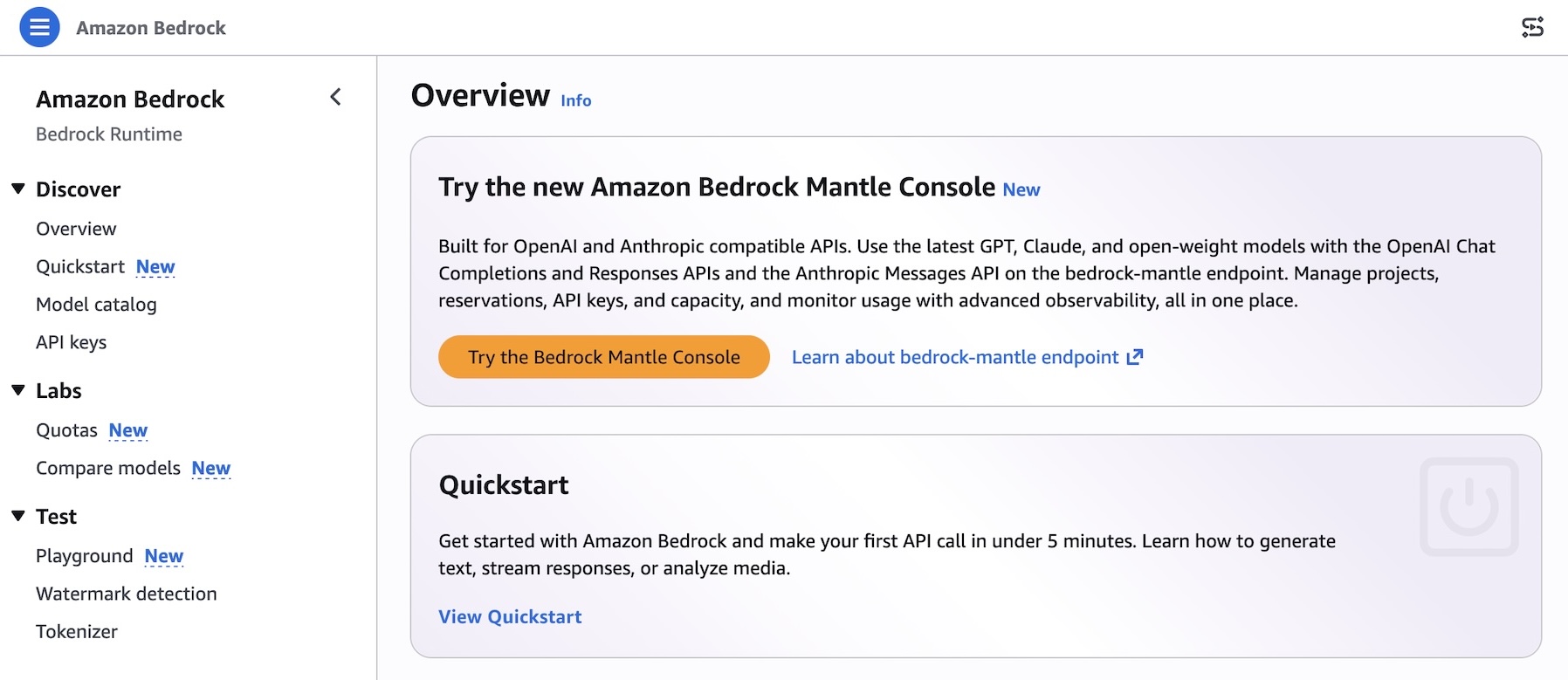
Amazon Bedrock コンソール内から「Bedrock Mantle コンソールを試す」を選択するか、新しいコンソールリンクを直接使用することで、新しい体験を試すことができます。
 image
image
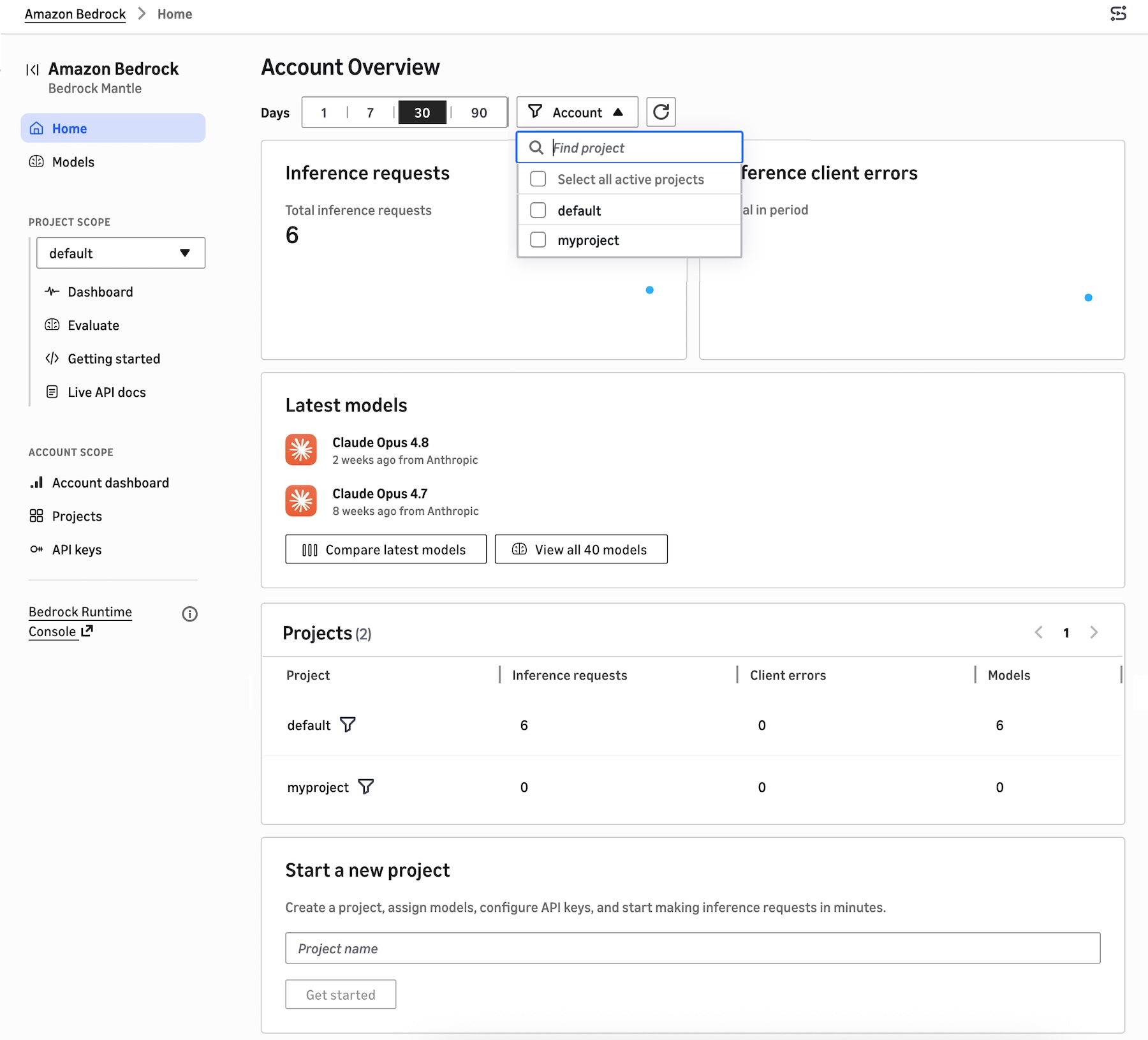
直近の日付範囲ごとの推論リクエストとエラー、最近使用されたモデル、プロジェクトリストを表示するプロジェクトベースのダッシュボードが見つかります。数分でプロジェクトを作成し、モデルを割り当て、API キーを設定して推論リクエストの実行を開始できます。
 image
image
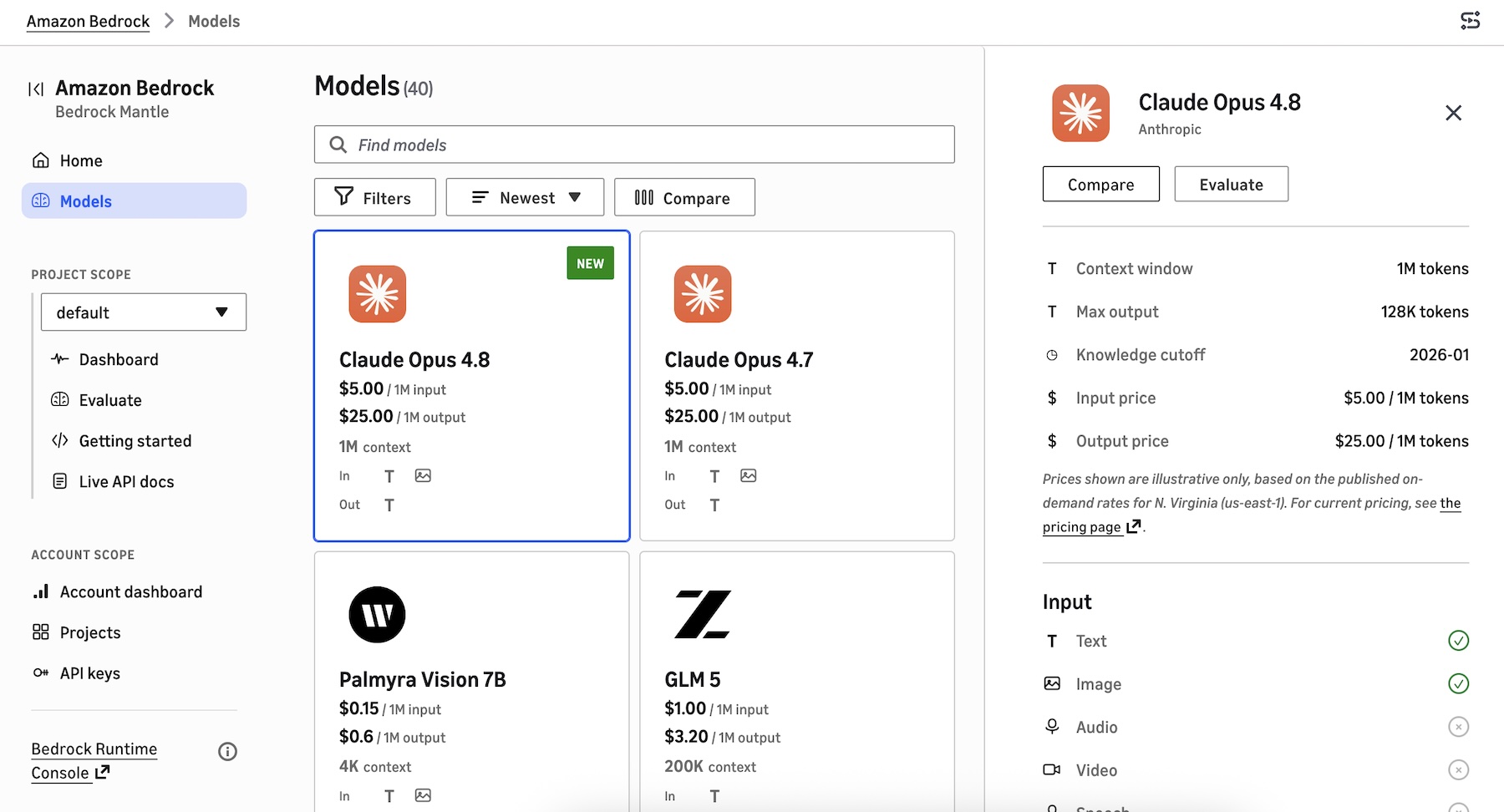
新しいモデルカタログには、Bedrock Mantle エンジンでサポートされている最新の GPT、Claude、およびオープンウェイトモデルが表示されます。機能の詳細、トークン数、価格、入力/出力情報、地域ごとの利用可否を確認できます。また、一度に最大 3 つのモデルを比較表示することも可能です。
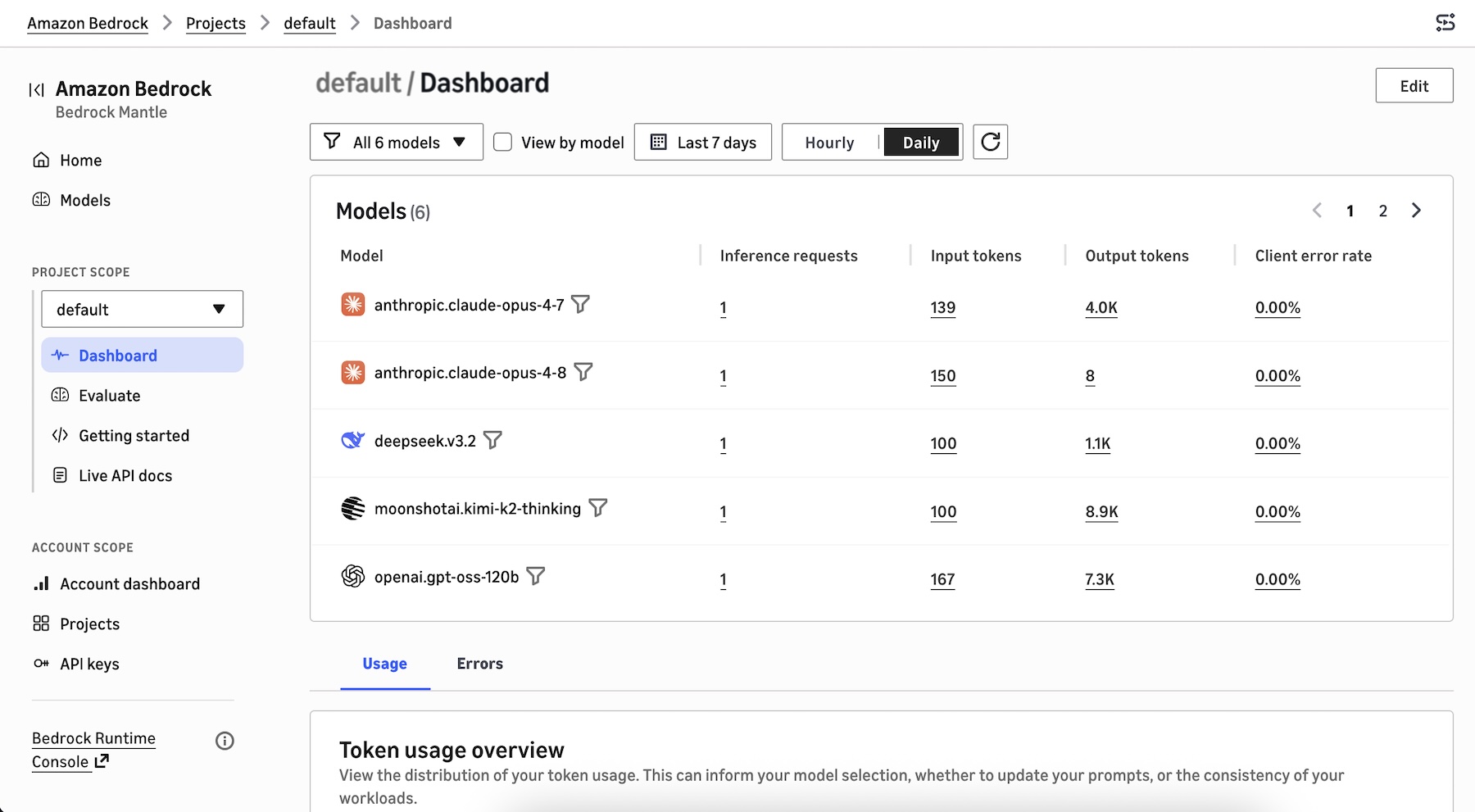
プロジェクトダッシュボードを選択すると、そのプロジェクトで使用されているモデルや、総トークン使用量、1 分あたりのトークン使用量、1 分あたりの推論リクエスト数、推論リクエストあたりのトークン数などのトークン使用量の分布を確認できます。これにより、モデルの選択、プロンプトの最適化、ワークロードの一貫性に関する意思決定を支援します。
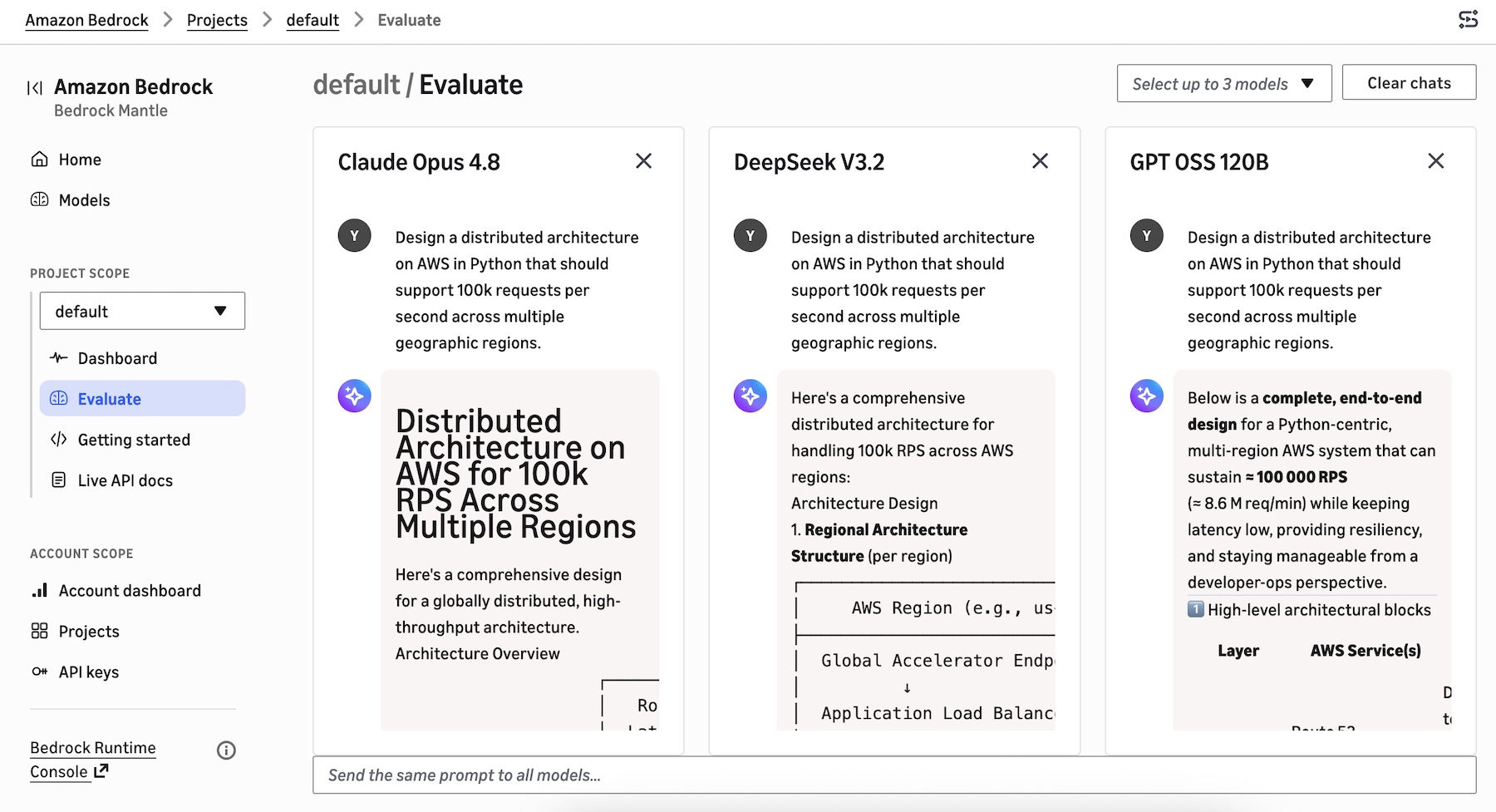
同じプロンプトで回答を並列比較するために、最大 3 つのモデルを選択して評価を開始できます。
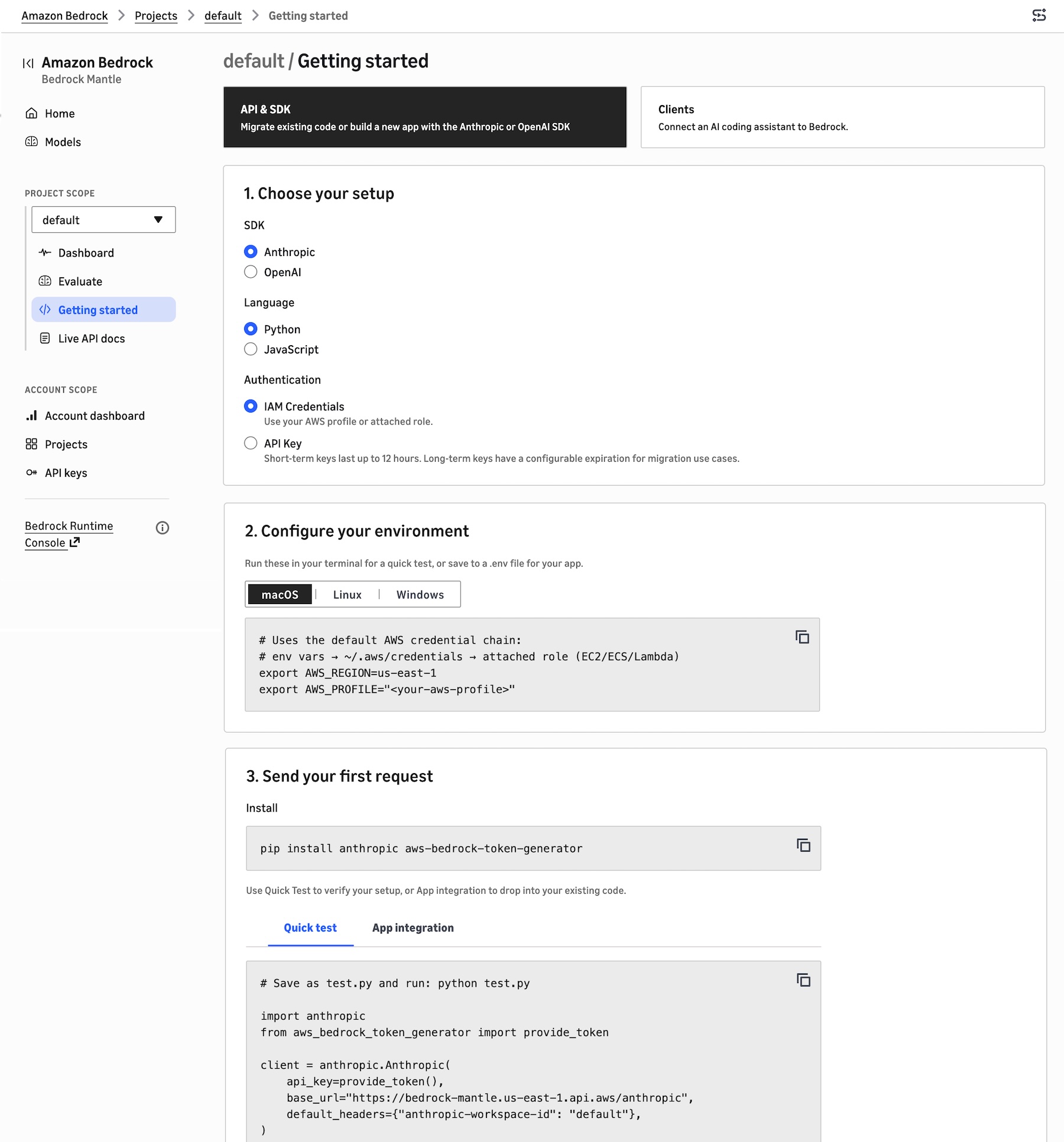
プロジェクト内でアプリケーションを構築するには、「はじめに」を選択してください。既存のコードを移行するか、Anthropic または OpenAI の SDK を使用して新しいアプリを構築したり、AI コーディングアシスタントを Bedrock に接続したりできます。
API & SDKを選択し、使用するSDK(AnthropicまたはOpenAI)、好みのプログラミング言語、および認証方法を選択します。これにより、ターミナルでクイックテストを実行するための環境コードが表示されたり、アプリケーション用に.envファイルに保存したりできます。また、サンプルコードスニペットを使用して最初のリクエストを送信し、セットアップを確認することも可能です。
Clientsを選択すると、bedrock-mantleエンジンに接続したいAIコーディングエージェントのソース(Claude Code、Cline、Codex、Cursor、またはOpenCodeなど)を選択できます。これにより、AIエージェントのインストール方法、AWS IAM認証情報の使用またはBedrock APIキーの使用、環境変数の設定、および各AIエージェントからのリクエストをBedrock経由でルーティングする方法に関する手順が提供されます。
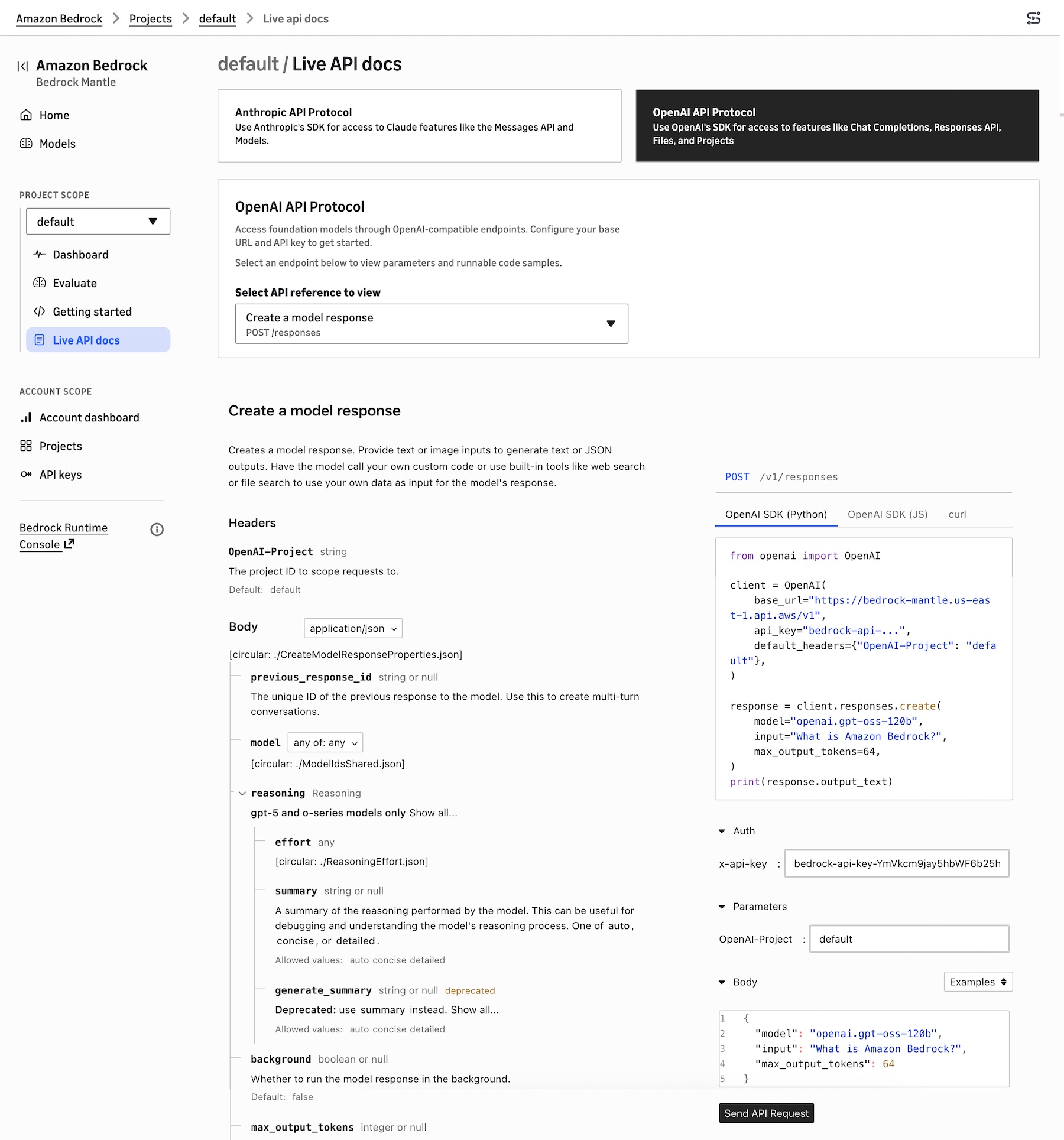
Anthropic互換APIおよびOpenAI互換APIについて学ぶには、Live API docsを選択してください。Anthropic API Protocolを選択すると、Claudeモデルの機能(Messages APIなど)にアクセスでき、OpenAI API Protocolを選択すると、Responses APIなどの機能にアクセスできます。
例えば、OpenAI Response APIを選択すると、指定されたモデルIDを使用してモデル応答が取得されます。これらのAPIリファレンスには、プロジェクトで選択されたモデルID、リージョン、bedrock-mantleエンドポイントURL、およびAPIキー参照が自動的に事前入力されており、モデルや設定を変更する際にその場で更新されます。
Agents、Knowledge Bases(ナレッジベース)、Guardrails(ガードレール)、ファインチューニング、または bedrock-runtime エンドポイントで実行するための InvokeModel および Converse API などの完全管理型機能を管理するには、既存の Bedrock コンソールを選択することもできます。
現在利用可能
新しいコンソール体験は、bedrock-mantle エンドポイントが提供されているすべての AWS リージョンで利用可能です:US East (N. Virginia, Ohio)、US West (Oregon)、Asia Pacific (Jakarta, Mumbai, Sydney, Tokyo)、Europe (Frankfurt, Ireland, London, Milan, Stockholm)、および South America (São Paulo)。今後の更新については、リージョンの完全リスト をご確認ください。
新しい Amazon Bedrock コンソール で新しいコンソール体験をお試しください。フィードバックは、AWS re:Post for Amazon Bedrock へ、または通常の AWS サポート窓口までお送りください。
— Channy
原文を表示
AWS News Blog
Today, we’re announcing a new console experience in Amazon Bedrock for you to experiment, iterate, and scale with the latest AI models on Amazon Bedrock’s next-generation inference engine built for high performance, reliability, and security. This console has a refreshed workflow optimized for bedrock-mantle endpoint, which supports the latest GPT, Claude, and open-weight models with the OpenAI Responses API, OpenAI Chat Completions API, and the Anthropic Messages API.
The new console experience makes it simple to find the right model and move quickly from evaluation to production.
- New model card – You can browse the full model catalog, compare them side by side on capabilities, modality support, context window, and applicable service quotas in a single view, removing the need to stitch together documentation, and limit calculators.
- Project-based work – You can make a project to run evaluations and review usage insights in one streamlined workflow that mirrors the lifecycle of building a generative AI application.
- Live documentation – You can use project-aware live documentation: code samples, SDK snippets, and API references are automatically prefilled with your project variables. You can copy a snippet straight from the console into your application and run it without modification.
How to get started
**
You can try a new experience by choosing Try the Bedrock Mantle Console** from within the Amazon Bedrock console, or by using the new console link directly.
You can find a project-based dashboard to show inference requests and error by range of recent dates, recently used models, and the project list. You can create a project, assign models, configure API keys, and start making inference requests in minutes.
A new model catalog shows the latest GPT, Claude, and open-weight models that are supported on the bedrock-mantle engine. You can see the details of features, tokens, pricing, input/output, pricing information, and Regional availability. You can also compare up to 3 models in a single view.
When you choose the project dashboard, you can see the models used in the project, the distribution of your token usage such as total token usage, token usage per minute, inference requests per minute, and tokens per inference request. This can inform your model selection, prompt optimization, and workload consistency decisions.
You can select up to 3 models to start evaluating to compare responses side by side with the same prompt.
To build your application in the project, choose Getting started. You can migrate existing code, build a new app with the Anthropic or OpenAI SDK, or connect an AI coding assistant to Bedrock.
Choose the API & SDK, your SDK (either Anthropic or OpenAI), your preferred programming language, and your authentication method. It shows your environment code to run these in your terminal for a quick test, or save to a .env file for your application. You can also send your first request with sample code snippets to verify your setup.
When you choose Clients, you can select the AI coding agent source such as Claude Code, Cline, Codex, Cursor, or OpenCode that you want to connect to the bedrock-mantle engine. It provides instructions on how to install the AI agent, use your AWS IAM credentials or use a Bedrock API key, set environment variables, and route requests from each AI agent through Bedrock.
To learn about Anthropic- and OpenAI-compatible APIs, choose Live API docs. You can choose Anthropic API Protocol for access to Claude model features like the Messages API or OpenAI API Protocol for access to features like Responses API.
For example, when you choose OpenAI Response API, it retrieves a model response with the given model ID. These API references are automatically prefilled with the project’s selected model ID, Region, bedrock-mantle endpoint URL, and API key reference, and they update in place as you change models or settings.
You can also choose the existing Bedrock console to manage fully-managed features such as Agents, Knowledge Bases, Guardrails, fine-tuning, or the InvokeModel and Converse APIs to run on the bedrock-runtime endpoint.
Now available
The new console experience is available in all AWS Regions where the bedrock-mantle endpoint is offered: US East (N. Virginia, Ohio), US West (Oregon), Asia Pacific (Jakarta, Mumbai, Sydney, Tokyo), Europe (Frankfurt, Ireland, London, Milan, Stockholm), and South America (São Paulo). Check the full list of Regions for future updates.
Give the new console experience a try in the new Amazon Bedrock console and send feedback to AWS re:Post for Amazon Bedrock or through your usual AWS Support contacts.
— Channy
関連記事
今日のまとめ
AIデイリーブリーフで今日の重要ニュースをまとめ読み