Microsoft、エージェント構築用フレームワーク「Harness」を正式リリース
本文の状態
日本語全文を表示中
詳細モードで約7分の本文を読めます。
同じ出来事の情報源
この情報源を基点に整理
Microsoft Agent Framework
Microsoft は Python と .NET で動作する「Agent Framework Harness」を正式にリリースし、モデルを自律的なエージェントに変換するための基盤機能を提供した。
AI深層分析を開く2026年8月4日 17:24
AI深層分析
キーポイント
エージェント構築の標準化
Microsoft は言語モデルを自律的なエージェントへ変換する「ハネス」を提供し、開発者が骨格から構築する必要をなくす。
包括的な機能セット
ループ処理、計画立案、メモリ管理、コンテキスト圧縮、ツール承認、テレメトリなど、実運用に必要な機能をデフォルトで備える。
柔軟なカスタマイズ性
開発者はチャットクライアントと指示、ツールのみを供給し、残りのパイプラインは標準のデフォルト設定を利用できる。
ハネスによるパイプラインの統合
単一の呼び出しで関数呼び出し、計画、履歴永続化、コンパクション、承認、ウェブ検索、テレメトリなどの機能を自動的に追加する。
.NET と Python の実装サポート
両言語とも環境変数から設定を読み取り、IChatClient をラップしてエージェントを構築する簡潔なコード例が提供される。
重要な引用
An agent harness is the scaffolding that turns a language model into an agent.
It's an opinionated, fully customizable, batteries-included agent that wraps a chat client with a complete agentic pipeline.
"The harness collapses the whole pipeline into a single call."
"One call gives you function invocation, planning, history persistence, compaction, approvals, web search, and telemetry."
編集コメントを表示
編集コメント
Microsoft はエージェント開発における「骨格」の構築負担を解消するツールを公開した。これにより、複雑な自律動作の実装が標準化され、実用レベルのエージェント開発が加速すると考えられる。
Source Article
元記事を日本語で読む
本文に関係しない購読案内、埋め込み通知、サイト内プロモーションは除いています。
エージェントは、安定した「ハネス」を基盤に構築できるようになりました。このハネスには、モデルを実際の仕事を行うエージェントへと変換するためのループ、プランニング、メモリ、コンテキスト管理、承認機能、テレメトリといった機能が標準装備されています。Python と .NET の両方で利用可能です。
では、エージェント・ハネスとは何でしょうか?
エージェント・ハネスは、言語モデルを実際のエージェントへと昇華させる足場のようなものです。単体のモデルはテキストを生成するだけですが、ツールを呼び出したり、多段階のタスクを処理したり、過去の行動を記憶したり、完了するまで作業を継続させたりするためには、モデルを囲むランタイムが必要です。このランタイムこそがハネスです。
Agent Framework は、その足場を自分で構築する必要がないよう、完成されたハネスを提供します。これは意見の強い(=設計思想が明確な)、完全にカスタマイズ可能な、標準機能満載のエージェントで、チャット・クライアントを包み込み、研究、データ分析、一般的なタスク自動化など、長時間実行される自律的な作業に最適化された完全なエージェント・パイプラインを実現します。
内部では、これはチャット・クライアント型エージェント(Python では Agent、.NET では ChatClientAgent)であり、厳選された Agent Framework の機能が追加されています。各機能はデフォルトで有効になっており、個別にカスタマイズしたり無効化したりできます:
- 関数呼び出し – 自動的なツール呼び出しループと、設定可能な反復回数制限。
- サービスごとの呼び出し履歴の永続化 – クラッシュからの回復や実行中の点検のために、モデル呼び出しごとにチャット履歴を保存します。
- コンパクション – 長いツール呼び出しループがオーバーフローしないようにするためのコンテキスト・ウィンドウ管理。
Todo & エージェントモードプロバイダー – 永続的な Todo リストと、プラン実行モードの追跡機能を備え、エージェントが作業を計画した後に実行できるようにします。
File memory(ファイルメモリ)– トーンを超えて持続するセッションノートやアーティファクトを保持します。
Skills(スキル)– パッケージ化されたドメイン専門知識を段階的に発見して読み込みます。
Web search(ウェブ検索)– 基盤となるサービスが提供する場合は、推論サービスの組み込みウェブ検索ツールを有効にし、エージェントが最新情報に基づいて回答できるようにします。
Tool approval(ツールの承認)– 「今後確認不要」の恒久ルールと、安全な呼び出しに対するヒューリスティックによる自動承認機能を提供します。
Telemetry(テレメトリ)– 組み込みの OpenTelemetry を利用可能です。
チャットクライアントはあなたが用意し、エージェントを自分だけのものにする設定(指示やツールのみ)を行います。それ以外はすべて合理的なデフォルト値が用意されています。
何ができるか
以下に、このフレームワークで構築できるエージェントの例を示します。
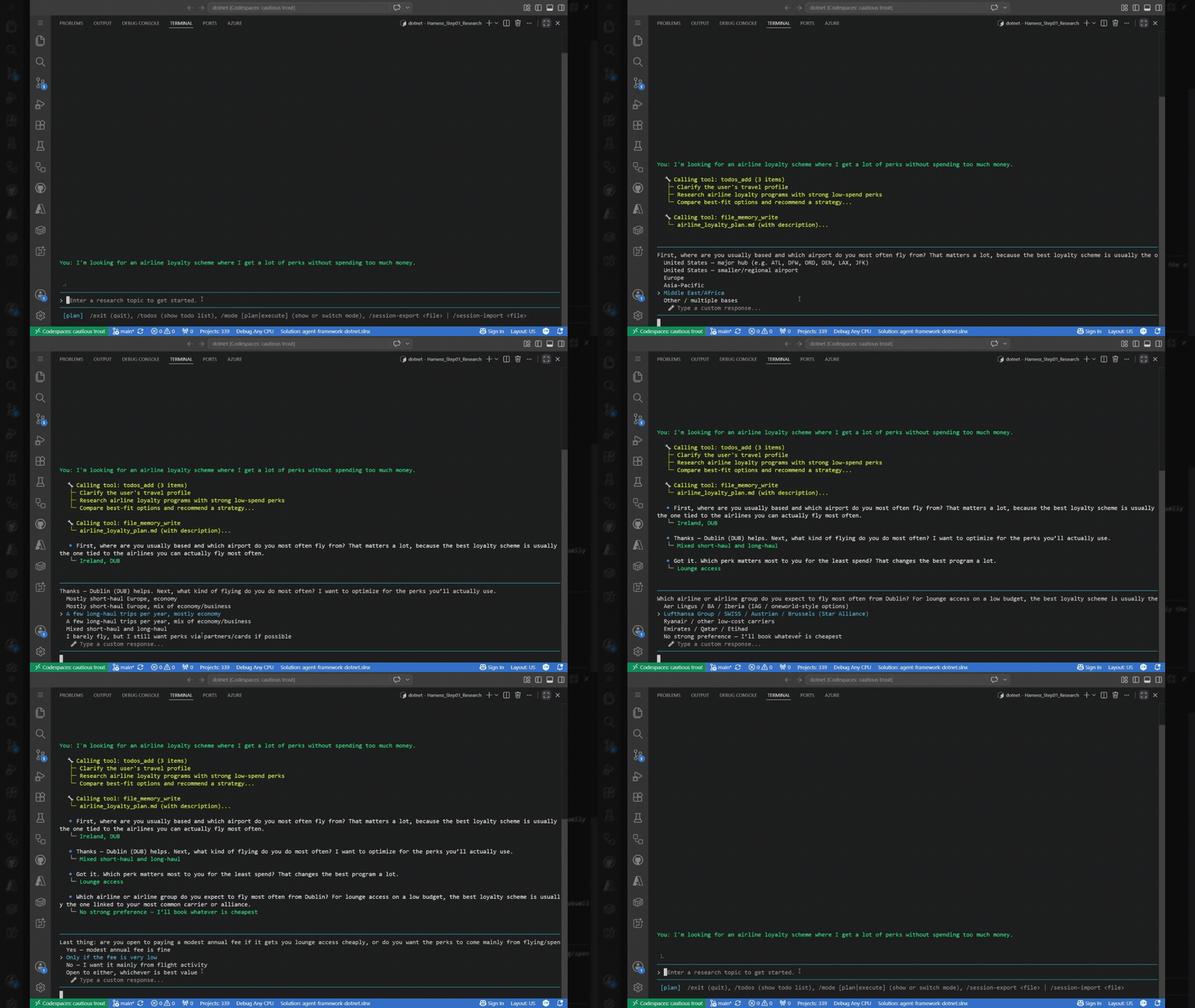
- リサーチアシスタント:トピックを Todo に分解し、プランモードと実行モードを切り替えながらウェブ検索を行い、計画に沿って自律的に作業を進めます。
- データ処理エージェント:承認ゲート付きファイルツールを使用してフォルダ内のファイルを閲覧・分析します。
- ドメイン特化型アシスタント:個人向けファイナンス管理の「クロー」のように、カスタムツール、メモリ、スキル、プランニング機能を統合し、機能ごとに拡張可能な単一のエージェントとして構築できます。
基本のハーンエージェント
このハブは、従来の複雑なパイプラインを単一の呼び出しに集約します。チャットクライアントと指示(および任意のカスタムツール)を提供するだけで、関数呼び出し、プランニング、履歴の永続化・圧縮、承認プロセス、Web 検索、テレメトリといった機能が自動的に付与されます。
.NET
using Azure.AI.Projects;
using Azure.Identity;
using Microsoft.Agents.AI;
using Microsoft.Extensions.AI;
var endpoint = Environment.GetEnvironmentVariable("FOUNDRY_PROJECT_ENDPOINT")
?? throw new InvalidOperationException("FOUNDRY_PROJECT_ENDPOINT is not set.");
var deploymentName = Environment.GetEnvironmentVariable("FOUNDRY_MODEL") ?? "gpt-5.4";
// Microsoft Foundry プロジェクトにバックされた IChatClient を構築...
IChatClient chatClient =
new AIProjectClient(new Uri(endpoint), new DefaultAzureCredential())
.GetProjectOpenAIClient()
.GetResponsesClient()
.AsIChatClient(deploymentName);
// ...そしてこれをハブでラップします。これにより、1 回の呼び出しで完全なエージェントパイプラインが利用可能です。
AIAgent agent = chatClient.AsHarnessAgent(new HarnessAgentOptions
{
ChatOptions = new ChatOptions
{
Instructions = "You are a helpful research assistant. Plan your work, then execute it.",
Tools = [/* your custom AIFunction tools */],
},
});
AgentRunResponse response = await agent.RunAsync("Research the outlook for renewable energy stocks.");
Console.WriteLine(response.Text);
Python
import asyncio
from agent_framework import create_harness_agent
from agent_framework.foundry import FoundryChatClient
from azure.identity import AzureCliCredential
async def main() -> None:
# FoundryChatClient reads FOUNDRY_PROJECT_ENDPOINT and FOUNDRY_MODEL from the environment.
client = FoundryChatClient(credential=AzureCliCredential())
# One call builds a batteries-included agent: planning, history persistence,
# compaction, approvals, web search, and telemetry are all wired in for you.
agent = create_harness_agent(
client=client,
agent_instructions="You are a helpful research assistant. Plan your work, then execute it.",
tools=[], # add your own callable tools here
)
response = await agent.run("Research the outlook for renewable energy stocks.")
print(response.text)
if __name__ == "__main__":
asyncio.run(main())
このたった一つの呼び出しで、関数呼び出し、サービスごとの履歴保存、ToDo リストと計画・実行モードの追跡、コンパクション(要約)、承認プロセス、Web 検索、テレメトリがすべてデフォルトで有効になり、それぞれを個別に設定可能です。必要なものは指示と独自ツールだけです。
実際に作ってみよう:ステップバイステップ
Agent Framework Harness を使って、自分専用の個人財務アシスタントを作ってみませんか?カスタムツール、メモリ、スキル、シェル、CodeAct、バックグラウンドエージェント、ガバナンス、Foundry でのホスト型デプロイなどを追加できます。
「Microsoft Agent Framework」シリーズの「自分だけのクローとエージェント・ハネスを構築する」という記事もご覧ください。
近日公開予定
コアとなるハネスはリリースしますが、一部機能はオプトイン方式でまだ公開していません。すでに利用可能な機能もありますが、さらに改善の余地があると考えており、より多くの顧客フィードバックを集めてから公開したいと考えています。それまでは、これらの機能をオプトインすると警告が表示されます。
- バックグラウンド・エージェント:他のエージェントに並列処理でサブタスクを委譲する機能
- ファイルアクセス:作業ディレクトリにスコープを限定したファイル読み書きツール
- ループ処理:完了条件が満たされるまでエージェントを自動的に再実行する機能
- シェルツールリング:(アルファ版のツールパッケージから)シェルコマンドを実行する機能
結論
ハネスを利用することで、Agent Framework は開発者にすぐに使える本番環境対応のエージェントランタイムを提供します。モデル、指示、ツールはご自身で用意し、フレームワーク側で計画立案、メモリ管理、ツールのオーケストレーション、承認プロセス、コンテキスト管理、テレメトリ処理を担います。
始め方
ドキュメント:Microsoft Learn の「Agent ハネス」
サンプルコード:
.NET – dotnet/samples/02-agents/Harness
Python – python/samples/02-agents/harness
本記事は Microsoft Agent Framework 公式サイトで公開された「The Microsoft Agent Framework Harness is now released」を基にしています。
原文を表示
Your agents can now be built on a stable, batteries-included harness – the loop, planning, memory, context management, approvals, and telemetry that turn a model into an agent that actually does things – in both Python and .NET.
What is an agent harness?
An agent harness is the scaffolding that turns a language model into an agent. A model on its own can only generate text. To have it call tools, work through multi-step tasks, remember what it has done, and keep going until the job is finished, you need a runtime wrapped around the model – and that runtime is the harness.
Agent Framework ships a ready-made one so you don’t have to build that scaffolding yourself. It’s an opinionated, fully customizable, batteries-included agent that wraps a chat client with a complete agentic pipeline, tuned for long-running, autonomous work such as research, data analysis, and general task automation. Internally it’s just a chat-client agent (Agent in Python, ChatClientAgent in .NET) with a curated set of Agent Framework features added – each enabled by default and individually customizable or removable:
Function invocation – the automatic tool-calling loop, with a configurable iteration limit.
Per-service-call history persistence – chat history saved after every model call for crash
recovery and mid-run inspection.
Compaction – context-window management so long tool-calling loops don’t overflow.
Todo & agent-mode providers – a persistent todo list plus plan/execute mode tracking, so the agent plans work then executes it.
File memory – durable session notes and artifacts that survive across turns.
Skills – progressive discovery and loading of packaged domain expertise.
Web search – enables the inference service’s built-in web search tool, when the underlying service provides one, so the agent can ground answers in current information.
Tool approval – “don’t ask again” standing rules plus heuristic auto-approval for safe calls.
Telemetry – built-in OpenTelemetry.
You supply your own chat client and only configure what makes the agent yours – its instructions and its tools. Everything else has a sensible default.
What you can do with it
Here are some examples of the types of agents you can build with it:
Research assistants that plan a topic into todos, switch between plan and execute modes, search the web, and work autonomously through the plan.
Data-processing agents that read and analyze a folder of files with approval-gated file tools.
Domain assistants – like a personal-finance “claw” – that combine custom tools, memory, skills, and planning into a single agent you can grow feature by feature.
A basic harness agent
The harness collapses the whole pipeline into a single call. You bring a chat client, instructions, and (optionally) custom tools; the harness adds function invocation, planning, history persistence, compaction, approvals, web search, and telemetry.
.NET
using Azure.AI.Projects;
using Azure.Identity;
using Microsoft.Agents.AI;
using Microsoft.Extensions.AI;
var endpoint = Environment.GetEnvironmentVariable("FOUNDRY_PROJECT_ENDPOINT")
?? throw new InvalidOperationException("FOUNDRY_PROJECT_ENDPOINT is not set.");
var deploymentName = Environment.GetEnvironmentVariable("FOUNDRY_MODEL") ?? "gpt-5.4";
// Build an IChatClient backed by a Microsoft Foundry project...
IChatClient chatClient =
new AIProjectClient(new Uri(endpoint), new DefaultAzureCredential())
.GetProjectOpenAIClient()
.GetResponsesClient()
.AsIChatClient(deploymentName);
// ...then wrap it in the harness. One call gives you the full agentic pipeline.
AIAgent agent = chatClient.AsHarnessAgent(new HarnessAgentOptions
{
ChatOptions = new ChatOptions
{
Instructions = "You are a helpful research assistant. Plan your work, then execute it.",
Tools = [/* your custom AIFunction tools */],
},
});
AgentRunResponse response = await agent.RunAsync("Research the outlook for renewable energy stocks.");
Console.WriteLine(response.Text);
Python
import asyncio
from agent_framework import create_harness_agent
from agent_framework.foundry import FoundryChatClient
from azure.identity import AzureCliCredential
async def main() -> None:
# FoundryChatClient reads FOUNDRY_PROJECT_ENDPOINT and FOUNDRY_MODEL from the environment.
client = FoundryChatClient(credential=AzureCliCredential())
# One call builds a batteries-included agent: planning, history persistence,
# compaction, approvals, web search, and telemetry are all wired in for you.
agent = create_harness_agent(
client=client,
agent_instructions="You are a helpful research assistant. Plan your work, then execute it.",
tools=[], # add your own callable tools here
)
response = await agent.run("Research the outlook for renewable energy stocks.")
print(response.text)
if __name__ == "__main__":
asyncio.run(main())
That single call gives you function invocation, per-service-call history persistence, a todo list and plan/execute mode tracking, compaction, approvals, web search, and telemetry – all on by default and each configurable. You only supplied the instructions and your tools.
Build a real one, step by step
Why not build your own personal-finance assistant using the Agent Framework harness. You can add: custom tools, memory, skills, shell, CodeAct, background agents, governance, and Foundry hosted deployment,
See the Build your own claw and agent harness with Microsoft Agent Framework series.
Coming soon
While we are releasing the core harness, there are a few opt-in features that we are not releasing yet. It’s possible to use these already, but we think we can make them even better, and we would like to get more customer feedback before we release them. Until such time, you will get a warning when opting into these features:
Background agents – delegate sub-tasks to other agents concurrently.
File access – read/write file tools scoped to a working directory.
Looping – automatically re-invoke the agent until a completion condition is met.
Shell tooling – run shell commands (from the alpha-stage tools package).
Conclusion
With the harness, Agent Framework gives developers a production-ready agent runtime out of the box. Bring your model, instructions, and tools, and let the framework handle planning, memory, tool orchestration, approvals, context management, and telemetry.
Get started
Documentation: Agent Harnesses on Microsoft Learn
Samples:
.NET – dotnet/samples/02-agents/Harness
Python – python/samples/02-agents/harness
The post The Microsoft Agent Framework Harness is now released appeared first on Microsoft Agent Framework.
今日のまとめ
AIデイリーブリーフで今日の重要ニュースをまとめ読み