Fleet が汎用チャットと専門エージェントを併用する理由
本文の状態
日本語全文を表示中
詳細モードで約10分の本文を読めます。
同じ出来事の情報源
この情報源を基点に整理
LangChain Blog
LangChain Blog は、Fleet プラットフォームが汎用的なチャット機能と特定のタスクに特化したエージェントの両方を採用している背景と利点を解説した。
Source Article
元記事を日本語で読む
本文に関係しない購読案内、埋め込み通知、サイト内プロモーションは除いています。
エージェントの作業は通常、2 つのパターンのいずれかに分類されます。あるタスクはアドホック(その場限りの)なもので、助けを求めると、エージェントが数個のツールから文脈を集め、何が変わったかを推論し、回答を提供して作業が完了します。一方、他のタスクは認識可能なパターンに従い、同じ指示と文脈に依存し、同じツールを使用し、実行するたびに一貫した判断を必要とします。
多くの AI プロダクトは、これら 2 つのパターンをすべてワンオフのチャットとして扱います。これは簡単な質問には機能しますが、作業が繰り返される場合には破綻します。その結果、プロンプトの再記述や文脈の再構築が必要となり、チャットスレッドをオペレーティングプロセスのように振る舞わせることに依存することになります。Fleet は、エージェントは作業要件に適合すべきだという考えに基づいて設計されています。アドホックなタスクを処理する汎用チャット(General Purpose Chat)と、永続的な指示、スコープされたツール、トリガー、サブエージェント、メモリを活用して反復作業を処理する専門化されたエージェント(Specialized Agents)が用意されています。
仕組みは以下の通りです。
汎用チャットは低設定の作業向け
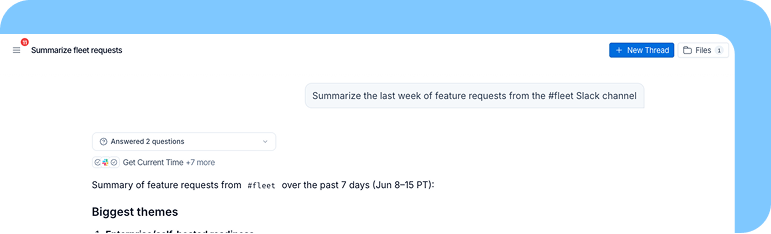
1 週間の休暇から戻り、Slack のスレッド、GitHub のプルリクエスト(PR)、Linear のチケット、カレンダー招待状について追いつく必要があると想像してください。この作業は複数のツールにまたがり、判断を要し、長いサマリーや一連の次のステップを生み出す可能性があります。一度完了すれば、おそらく来週も同じタスクを正確に実行する必要はありません。
汎用チャットは、そのようなリクエストのために構築されています。Fleet にワークスペース全体にわたる広範な作業を任せる際、事前にどのツールやプロンプト、スキルをエージェントが持つべきかを決定する必要はありません。Fleet はワークスペースの統合にアクセスし、ファイルシステムを通じてコンテキストを管理でき、コード、ファイル、またはデータ分析のために実際の環境が必要なタスクには仮想コンピュータを使用します。
必要なものを要求するだけで、Fleet がタスクを実行し、作業が完了すればスレッドは終了します。
専門化されたエージェントは、繰り返し行う作業向けです
反復的な作業には、より永続的なセットアップが必要です。毎週の計画更新、受信トレイの管理、顧客調査ブリーフ、バックログ維持タスクなどは、毎回誰かが同じ期待を再説明する必要に依存すべきではありません。計画用エージェントは、毎週月曜日に Linear をチェックし、リリースされた内容を要約し、ブロックされている作業をフラグ付けし、チームが期待する形式で更新ドラフトを作成できます。受信トレイ用エージェントは、新しいメールを分類し、返信のドラフトを作成し、顧客の問題をエスカレートし、自分で処理したいメッセージを記憶します。
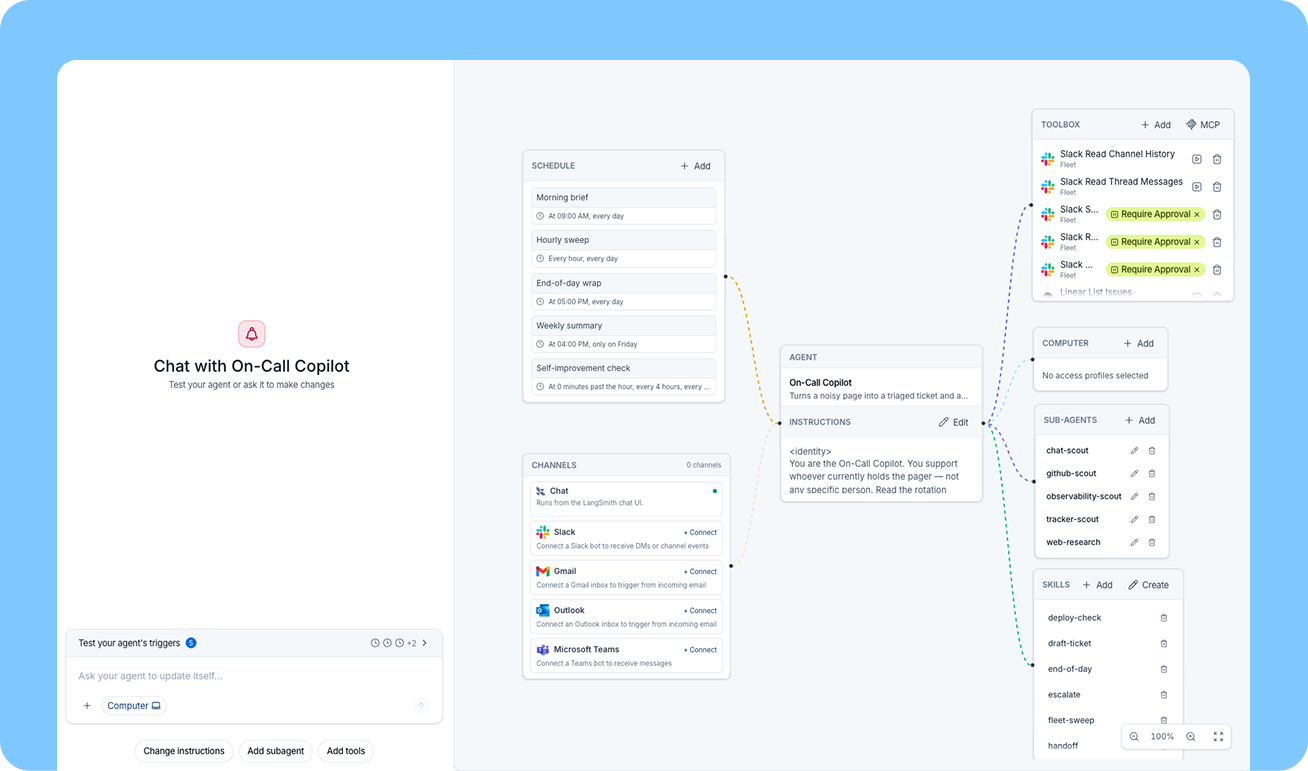
Specialized Agents は、反復作業に安定した居場所を提供します。エージェントの指示を定義し、モデルを選択し、ツールを接続し、スキルを追加し、サブエージェントを作成し、トリガーやスケジュールを連携させることで、構造を自分で設定できます。あるいは、Fleet に自然言語でタスクを記述するだけで、Fleet があなたに最適なエージェント構造の構築をサポートします。
便利なアドホックなタスクは、General Purpose Chat から開始できます。そのタスクがチームの作業プロセスの一部となったとき、Fleet はそれを永続的な指示、スコープされたツール、メモリ、そして適切な実行方法を持つ Specialized Agent に変換できます。設定に対するコントロールは引き続き保持されますが、空白の設定画面から始める必要はありません。
Specialized Agents で定義できること
Specialized Agent が有用なのは、実行ごとに設定が一定であるためです。
Instructions(指示): エージェントのプロンプトは、その役割、意思決定ルール、出力形式、エスカレーション動作、および境界を定義し、反復作業の一貫性を保ちます。
Tools(ツール): Specialized Agent は、業務に必要な特定のツールを受け取り、構築された目的に集中して作業を行います。
モデル: メインエージェントと個別のサブエージェントに対して、使用するモデルを選択できます。スーパーバイザーエージェント は、計画やレビューにはより強力なモデルを、狭い範囲のサブタスクには小規模なモデルを使用することで、速度、コスト、パフォーマンスに応じてモデル選択を最適化することが可能です。
サブエージェント: サブエージェントは、独自の指示、ツール、モデル設定を持つ専門的なスペシャリストとして呼び出せる機能を提供します。これにより、コンテキスト集約型のタスクを、会話履歴を保持するサブエージェントへオフロードでき、メインエージェントのコンテキストが汚染されるのを防ぎます。
スキル: 専門化されたエージェントは、社内で共有されるワークスペーススキルのほか、そのエージェントに限定されたプライベートスキルも利用できます。これにより、反復作業に対して再利用可能なナレッジベースを提供しつつ、ワークスペース内のすべてのエージェントにすべての指示を公開する必要がなくなります。
トリガーとスケジュール: 専門化されたエージェントは、スケジュールに従って実行したり、Slack、Gmail、Outlook、Teams などのツールからのイベントに応じて起動したりできます。Gmail のトリガーを使用すれば、受信トレイに届いた新しいメールごとに実行を開始できます。スケジュールトリガーを使えば、毎朝または毎週同じエージェントを自動的に実行できます。
Computer Access: エージェントがコード、ファイル、または分析のために実際の環境を必要とする場合、Computer Access はエージェントの設定の一部となり得ます。General Purpose Chat では、Computer Access はスレッド単位で有効化でき、各チャットごとにコンテキストが分離されます。一方、Specialized Agent ではこれはエージェントの環境の一部であり、単一の Computer をスレッド全体にスコープするオプションも用意されています。これは、実行間をまたいでコンテキストを維持したい場合に有用です。
最大の相違点は、タスク間でメモリがどのように永続化されるかです。
General Purpose Chat はスレッドレベルのコンテキストを持ち、一時的な作業に適しています。スレッドは発生した出来事を保持し、スレッドが終了すれば作業も完了します。
Specialized Agent はジョブにスコープされたメモリを持っています。事実を記憶し、時間をかけてそれらを更新し、再説明されることなく将来の実行で利用できます。
Linear のチケットを管理し、GitHub の PR を監視するプロダクトマネージャーのエージェントを例にとりましょう。時間が経つにつれて、あるエンジニアはバックエンドの課題を好むこと、別のエンジニアはチケットをより小さな部品に分割することを望んでいること、そして PM はリリースを阻害するバグを即座にエスカレーションしたいことを学習できます。これらの事実は、毎週月曜日に書き換えられるプロンプトの中に存在すべきではありません。それらはエージェントの作業メモリの一部となるべきです。
これが、Specialized Agent が保存されたチャットと異なる理由です。その指示は安定していますが、そのメモリは作業の変化に応じて進化し、各特定のエージェントに合わせてカスタマイズできます。
各エージェントタイプを使用するタイミング
タスクの形状は、タスクの難易度よりも重要です。一度きりのタスクが複雑である場合もあれば、反復的なタスクが単純である場合もあります。考えるべき最良の方法は、取り組んでいる仕事が再利用可能なパターンかどうかです。
使用ケース
汎用チャット
専門化エージェント
エージェントが最も適している場面
一度きり、探索的、またはアドホックな作業
反復的、スケジュール済み、またはイベント駆動型の作業
エージェントの設定
なし。リクエストから開始します。
インストラクション、ツール、スキル、モデル、トリガーを設定します。Fleet は AI を用いてこれらを自動的に設定することもできますが、手動で行うことも可能です。
ツール
利用可能なワークスペース統合を使用可能
作業に必要なツールにスコープを限定
サブエージェント
汎用的なサブエージェントを使用可能
独立したモデル、ツール、プロンプトを持つカスタムサブエージェントを定義可能
スキル
ワークスペーススキル
ワークスペーススキルおよびプライベートエージェントスキル
メモリ
スレッドレベルのコンテキスト
エージェントのジョブにスコープを限定した永続メモリと、スレッドレベルのコンテキスト
コンピュータアクセス
スレッドごとに有効化可能
エージェント環境の一部として選択され、スレッドごとまたはエージェントごとに設定可能
要するに、業務が広範囲または一時的な場合は汎用チャットを使用し、繰り返し委任したい責任となった業務には専門エージェントを使用してください。
これが実現すること
Fleet により、チームは支援から始め、反復作業を委任へと発展させることができます。
まずは汎用チャットで、Fleet に現状の把握、アカウントのリサーチ、ドキュメントの要約、CSV の分析、または返信文のドラフト作成などを依頼できます。これらのタスクの多くは一時的なもので構いませんし、軽量に保つべきです。
あるパターンが繰り返し現れる場合、Fleet はそれを永続的な形として提供します。エージェントには適切な指示、ツール、スキル、トリガー、サブエージェント、そして記憶が与えられます。チームはもはや「そのタスクのプロンプト方法を覚えている人」に依存する必要はありません。作業には再実行可能な所有者が存在するようになります。
これが Fleet に 2 つのエージェントタイプがある理由です。一部のエージェントは即時的で開かれたタスクを支援し、他のエージェントは反復的な責任を引き受け、業務固有の記憶を構築するにつれて改善していきます。Fleet は両方をサポートしています。なぜなら、チームがエージェントを使って実際の業務を遂行するには、この 2 つのパターンの両方が必要だからです。
始めたい場合は、Fleet を無料でお試しください。より技術的な詳細については、ドキュメントをご覧ください。
原文を表示
Agent work usually falls into one of two patterns. Some tasks are ad hoc: you ask for help, the agent gathers context from a few tools, reasons through what changed, gives you an answer, and the work is done. Other tasks follow a recognizable pattern and depend on the same instructions and context, use the same tools, and require consistent judgment each time they run.
A lot of AI products treat both patterns as one-off chat. That works for quick questions, but it breaks down when the work repeats. You end up rewriting prompts, rebuilding context, and relying on a chat thread to act like an operating process. Fleet is built around the idea that agents should match the work requirements. There’s a General Purpose Chat that handles ad hoc tasks, while Specialized Agents handle recurring work with durable instructions, scoped tools, triggers, subagents, and memory.
Here’s how it works.
General Purpose Chat is for low-setup work
Imagine you are back from a week of vacation and need to catch up on Slack threads, GitHub PRs, Linear tickets, and calendar invites. The work spans several tools, requires judgment, and may produce a long summary or a set of next steps. Once it’s done, you probably do not need that exact task to run again next week.
General Purpose Chat is built for that kind of request. You can ask Fleet to handle broad work across your workspace without deciding which tools, prompts, or skills the agent should have ahead of time. It can access your workspace integrations, manage context through the file system, and use a virtual computer when the task needs a real environment for code, files, or data analysis.
You ask for the thing you need, Fleet executes the task, and the thread can end when the work is done.
Specialized Agents are for work you do repeatedly
Recurring work needs a more durable setup. Weekly planning updates, inbox management, customer research briefs, and backlog maintenance tasks should not depend on someone re-explaining the same expectations every time. A planning agent can check Linear every Monday, summarize what shipped, flag blocked work, and draft the update in the format your team expects. An inbox agent can classify new emails, draft replies, escalate customer issues, and remember which messages you want to handle yourself.
Specialized Agents give recurring work a stable home. You can configure the structure yourself by defining the agent’s instructions, choosing its model, attaching tools, adding skills, creating subagents, and connecting triggers or schedules. Or you can describe the task to Fleet in plain language, and Fleet will help build the right agent structure for you.
A useful ad hoc task can start in General Purpose Chat. When that task becomes part of how the team works, Fleet can turn it into a Specialized Agent with durable instructions, scoped tools, memory, and the right way to run. You still have control over the setup, but you do not have to start from a blank configuration screen.
What Specialized Agents let you define
Specialized Agents are useful because the configuration is consistent across runs.
Instructions: The agent's prompt defines its role, decision rules, output format, escalation behavior, and boundaries, which keeps repeated work consistent.
Tools: A Specialized Agent gets the specific tools it needs for the job, keeping the agent focused on the work it was built to do.
Models: You can choose the model for the main agent and for individual subagents. A supervisor agent might use a stronger model for planning or review, then smaller models for narrower subtasks. this allows you to optimize model selection for speed, cost, and performance.
subagents: subagents give a Specialized Agent callable specialists with their own instructions, tools, and model choices. This helps offload context-intensive tasks into subagents with their own conversation history, ensuring you don’t pollute the context of the main agent.
Skills: Specialized Agents can use workspace skills that are shared across the company and private skills scoped to that agent. This gives recurring work a reusable knowledge base without exposing every instruction to every agent in the workspace.
Triggers and schedules: Specialized Agents can run on a schedule or in response to events from tools like Slack, Gmail, Outlook, and Teams. A Gmail trigger can start a run for every new email sent to your inbox. A scheduled trigger can run the same agent every morning or every week.
Computer Access: When an agent needs a real environment for code, files, or analysis, Computer Access can be part of the agent's setup. In General Purpose Chat, Computer Access can be enabled on a per-thread basis, so context is isolated for each chat. In a Specialized Agent, it is part of the agent's environment, with the option to scope a single Computer across threads. This is useful when you want to maintain context across runs.
The biggest difference is how memory persists across tasks
General Purpose Chat has thread-level context, which fits temporary work. The thread holds what happened, and when the thread is done, the work is done.
Specialized Agents have memory scoped to the job. They can remember facts, update them over time, and use them on future runs without needing to be reminded.
Take a product-manager agent that manages Linear tickets and watches GitHub PRs. Over time, it can learn that one engineer prefers backend issues, another wants tickets broken into smaller pieces, and the PM wants release-blocking bugs escalated immediately. Those facts should not live in a prompt someone rewrites every Monday. They should become part of the agent's working memory.
This is what makes a Specialized Agent feel different from a saved chat. Its instructions are stable, but its memory can evolve as the work changes, and its memory can be tailored for each specific agent.
When to use each agent type
Task shape matters more than task difficulty. A one-off task can be complex, and a recurring task can be straightforward. The best way to think of it is whether the job you’re working on is a reusable pattern.
| Use Case | General Purpose Chat | Specialized Agent |
|---|---|---|
| Agent is best for | One-off, exploratory, or ad hoc work | Recurring, scheduled, or event-driven work |
| Agent setup | None. Start with a request. | Configure instructions, tools, skills, model, and triggers. Fleet can configure these for you with AI, or you can do so manually. |
| Tools | Can use available workspace integrations | Scoped to the tools needed for the job |
| Subagents | Can use generic subagents | Can define custom subagents with independent models, tools and prompts |
| Skills | Workspace skills | Workspace skills and private agent skills |
| Memory | Thread-level context | Persistent memory scoped to the agent's job and thread-level context |
| Computer Access | Enabled per thread | Chosen as part of the agent environment and configured as either per-thread or per-agent |
In short: use General Purpose Chat when the work is broad or temporary, and use a Specialized Agent when the work has become a responsibility you want to delegate repeatedly.
What this enables
Fleet lets teams start with assistance and graduate repeated work into delegation.
You can begin in General Purpose Chat by asking Fleet to catch you up, research an account, summarize documents, analyze a CSV, or draft a response. Many of those tasks will stay one-off, which is fine. They should remain lightweight.
When a pattern keeps coming back, Fleet lets you give it a durable form. The agent gets the right instructions, tools, skills, triggers, subagents, and memory. The team no longer depends on the person who remembers how to prompt the task. The work has an owner that can run again.
This is the reason Fleet has two agent types. Some agents help with immediate, open-ended tasks. Others take on recurring responsibilities and improve as they build job-specific memory. Fleet supports both because teams need both patterns to get real work done with agents.
To get started, you can try Fleet free. To dive into more of the technical details, read the docs.
今日のまとめ
AIデイリーブリーフで今日の重要ニュースをまとめ読み