Qwen 3.8 27B は優秀だが過剰思考がデフォルト
本文の状態
日本語全文を表示中
詳細モードで約16分の本文を読めます。
同じ出来事の情報源
この情報源を基点に整理
Simon Willison Blog
アリババのQwen研究ラボが公開した27Bパラメータのビジョン対応LLM「Qwen 3.8」は性能が卓越しているものの、デフォルト設定で過度な推論を行うため、開発者は設定変更やコンテキスト調整が必要となる。
AI深層分析を開く2026年8月17日 07:31
AI深層分析
キーポイント
Qwen 3.8 27B の高性能発表と期待
アリババの Qwen 研究ラボが Apache 2 ライセンスで公開した 27B パラメータモデルは、同社の既存最強モデルや前世代モデルを上回る性能を示す自己申告ベンチマークを有している。
デフォルトの「xhigh」推論設定による問題
モデルは複雑なタスク向けに設計されたデフォルト設定「reasoning_effort: xhigh」を採用しており、これが単純なタスクでも過度な思考(オーバーシンキング)を引き起こす原因となっている。
実運用におけるコンテキスト制限の課題
LM Studio のデフォルト設定では 8,192 トークンの制限がすぐに飽和し、生成に数十分を要する事態が発生したが、最大コンテキスト長(262,144 トークン)への拡張でこの問題は解消された。
推論深度の調整機能とコスト管理
Qwen 3.8 は「medium」や「low」といった推論深度を調整する機能を備えており、速度やコストを最適化するためにユーザーが手動で設定を変更する必要がある。
推論機能のオフによる生成速度の劇的向上
推論機能を無効化することで、SVG生成に要する時間が21分から約2分へと短縮された。
重要な引用
Qwen's documentation describes the model as defaulting to `xhigh` for the reasoning effort
This is a hilarious default. It's absolutely not a good way to run the model, especially on consumer hardware.
I quickly ran into problems with LM Studio's default context limit of 8,192 tokens - Qwen was using them all up thinking about even the most mundane of problems.
Was that worth waiting 21 minutes for? Absolutely not.
編集コメントを表示
編集コメント
高性能なモデルがリリースされる際、そのデフォルト設定が必ずしもすべてのユースケースに適しているわけではないという点は、開発者が常に留意すべき重要な洞察である。ベンチマークの数値だけでなく、実際の運用環境での挙動や設定の柔軟性を確認することが、成功した導入のカギとなる。
Source Article
元記事を日本語で読む
本文に関係しない購読案内、埋め込み通知、サイト内プロモーションは除いています。
金曜日に大々的にリリースされたのは、アリババの Qwen 研究ラボが開発した Apache 2 ライセンスの 27B パラメータ規模を持つビジョン対応 LLM「Qwen 3.8 27B」です。このモデルには期待していました。27B というサイズは、スペックのあるノート PC で動かすのにちょうど良く、その前作である Qwen 3.6 27B も非常に印象的なものでした。
Qwen が自社の ベンチマーク結果 を報告している内容を見ると、これは目を見張るほどです。このモデルは、前作の Qwen 3.6 27B はもちろんのこと、今年 5 月まで Qwen が持つ最強クラスのモデルの一つだったクローズドな「Qwen 3.7-Plus」をも上回るスコアを示しています。今後の独立系ベンチマークでの評価も注目されます。
私はこのモデルを、128GB メモリを搭載した M5 Max MacBook Pro と、NVIDIA DGX Spark の 2 台の異なるマシンで動かしています。どちらでも LM Studio を使用し、17GB の Q4_K_M 量子化版 を実行しています。また、Spark では llama-server を直接使って試すこともありました。
デフォルト設定が過剰な推論を引き起こす
Qwen のドキュメントによると、このモデルは推論の強度に対してデフォルトで xhigh が設定されています。私が試している LM Studio 用の GGUF モデルも、そのデフォルト設定を維持しています:
Qwen3.8 には公式に「reasoning_effort」がサポートされており、これを使って推論の深さを調整しコストをコントロールできます。デフォルト設定は xhigh で、これは徹底的な分析が必要な複雑なタスク向けです。
「medium」: 精度と速度のバランス
「low」: 効率を重視した推論で、速度とコストの最適化
これは非常に面白いデフォルト設定です。特に一般ユーザー向けのハードウェアでこのモデルを動かすには、決して良い方法ではありません。私はこれまで、その結果が非常に面白おかしいと感じてきました。
LM Studio のデフォルト設定である 8,192 トークンのコンテキスト制限で Qwen を動かすと、すぐに問題が発生しました。Qwen は些細な問題に対しても過剰に思考を巡らせてしまい、コンテキスト容量をすべて使い切ってしまうのです。
そこで、最大コンテキスト長である 262,144 トークンまで拡張してモデルを読み込みました。その結果、この問題は解消されました。
このように、コンテキスト長を拡張した最初の試みで生成された、ペリカンが自転車に乗っている SVG の画像があります。生成には21 分を要し、3,223 トークンの出力を得るために 22,276 トークンもの推論トークンが使われました。その推論の過程についてはこちらで確認できます。

ローカルマシンで動作するモデルから生成した SVG 画像の中で、これほどまでに優れたペリカンのイラストはこれまでありませんでした。しかもこの Qwen モデルは非常に軽量で、ディスク上の容量はわずか 17GB です。
この結果には多くの魅力があります:
- 自転車フレームの形状が正しい
- 自転車の両側に足がついている(これは非常に稀です)
- ペリカンの嘴袋が明確に描かれている
- 翼がハンドルバーに触れるまで伸びている!
- 動きの線は手前にあるのではなく、奥にある
- 背景もセンスが良い。太陽、雲、丘、花、草が心地よく配置されています。
しかし、21 分待った価値があったでしょうか?答えは「いいえ」です。
推論機能をオフにして同じプロンプトを実行した結果がこちらです:詳細はこちら。この場合は3,715 トークンを生成し、所要時間は 137 秒(約 2 分半)でした。

念のため、OpenRouter を経由して、先週リリースされたより大規模な Qwen 3.8 2.4T-A95B モデルで同じプロンプトを実行した結果もご紹介します。こちらがその華麗なアニメーション SVG です:
お使いのブラウザは HTML5 ビデオをサポートしていません。
「Qwen は xhigh モードで考えすぎ傾向がある」と述べましたが、実際どれほどひどいのでしょうか?
私は、先ほどの設定(デフォルトの超高レベル)を維持したまま、はるかにシンプルなプロンプトを試してみました。
draw an svg of a circle
Qwen の思考プロセスは以下のように始まりました。
ユーザーは円の SVG 描画を求めています。シンプルなリクエストですが、これは丹念に作り込まれた作品にしたいですね。単なる `` を超えるものを作りましょう。個性のある自己完結型の SVG ファイルです。「幾何学的な円の研究」として、微妙なアニメーション、重なり合うリング、特徴的な配色を取り入れましょう。範囲は適切に保ちます:ユーザーが求めているのは円の SVG です。核となるのは円ですが、工夫を凝らせます。コンパスや図形描画のような同心のガイドライン、目盛り線、メインの円には柔らかいグラデーション塗りつぶし、控えめな環境的な動き(ゆっくり回転する点線のリングや脈打つような発光など)を加えましょう。「動作軽減」への配慮は CSS の領域ですが、SVG 内の SMIL や CSS で対応可能です。配色の選択肢:暖かい紙に深いティールインク?それともオフホワイトの背景に鮮やかなバーミリオン色の円とネイビーの建設ラインで、バウハウスやコンパス描画のような雰囲気?「幾何学的な研究」スタイルを選びましょう。クールなスレート色か、明るい紙白か?クリーム色とテラコッタ色の組み合わせでなければ、紙白でも問題ありません。[...]
数分後、このように 非常に美しいアニメーション付きの円が生成されました。しかし、これは私が求めたものとは全く異なっていました!
ブラウザが HTML5 ビデオをサポートしていません。
私の強い推奨:デフォルト設定は無視してください。まずは Qwen 3.8 27B を、推論レベルを低く、あるいはゼロに設定して実行することをお勧めします。このモデルは素晴らしいのですが、デフォルトの設定ではスタート地点として最適ではありません。
境界ボックスの検出が非常に得意です
ビジョンモデルの性能を試す面白い方法の一つに、写真内のアイテムに対してどの程度正確に境界ボックスを返せるかを確認するテストがあります。以前の Qwen モデルはこのタスクをうまくこなしていたので、今回はフラミンゴではなくペリカン(オオワシ)の写真に境界ボックスを描かせて試してみました。
過去には 0 から 1000 のスケールを指定すると良い結果が得られることを知っています。そこで以下のようなプロンプトを試しました。
llm -a https://static.inaturalist.org/photos/714731804/large.jpg \
  -m lmstudio/qwen/qwen3.8-27b \
'Return JSON bounding boxes for the pelicans in this photo, 0-1000 scale for each dimension'こちらがその推論の追跡記録です(Gist)。この結果、以下のような出力が得られました。
[
  {"bbox_2d": [195, 290, 370, 780], "label": "pelicans"},
  {"bbox_2d": [445, 320, 675, 850], "label": "pelicans"}
]
これは *非常に良い一致* です。写真の上にこれらのボックスを重ねて表示したものがこちらです。
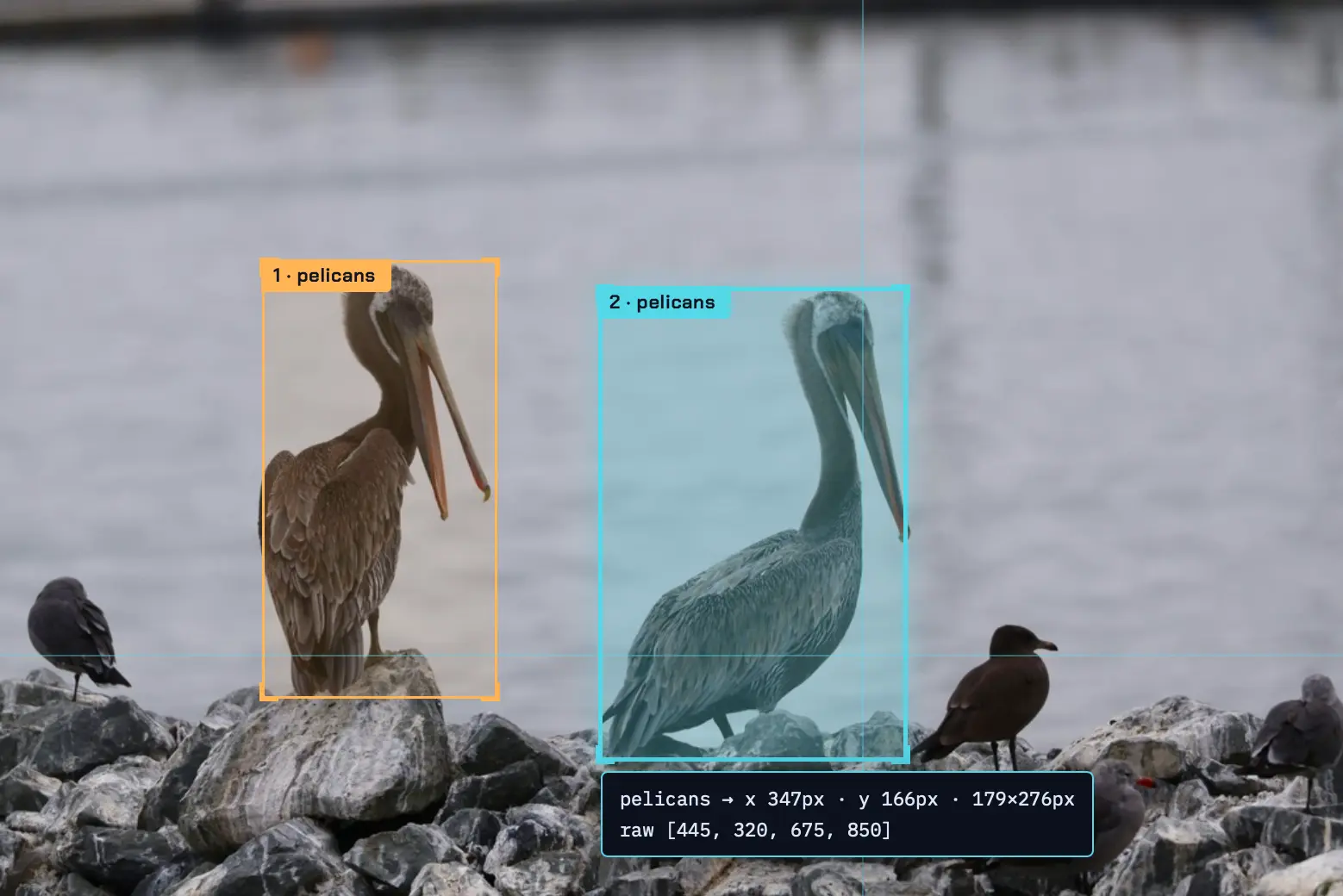
境界ボックスのラベリングツールを構築する
この境界ボックスの可視化は、私がオフラインでノートパソコン上で実行した、Qwen 3.8 27B に自作させた新しいカスタムツールを使用して行われました。
思考の深さを調整し忘れたため、結果は過剰に設計されたものになってしまいましたが、それでも この単一のプロンプト から 完全なインターフェース を作り出すことに成功しました。
[
   {"bbox_2d": [195, 290, 370, 780], "label": "pelicans"},
   {"bbox_2d": [445, 320, 675, 850], "label": "pelicans"}
]
画像の URL を入力するボックスと、上記のような JSON 形式を入力するためのテキストエリアを持つ HTML ページを構築してください。 ページに画像を追加し、その幅と高さを測定した上で、bbox_2d の座標値を 0 から 1000 の範囲でスケーリングされたものとして扱い、実際の画像サイズに合わせてスケール変換します。その後、ラベル付きのボックスを画像上に描画します。
このスクリーンショットは、私が実際に指示しなかった機能の一つを示しています。テスト用の写真がない場合でも使えるデモシーンです。
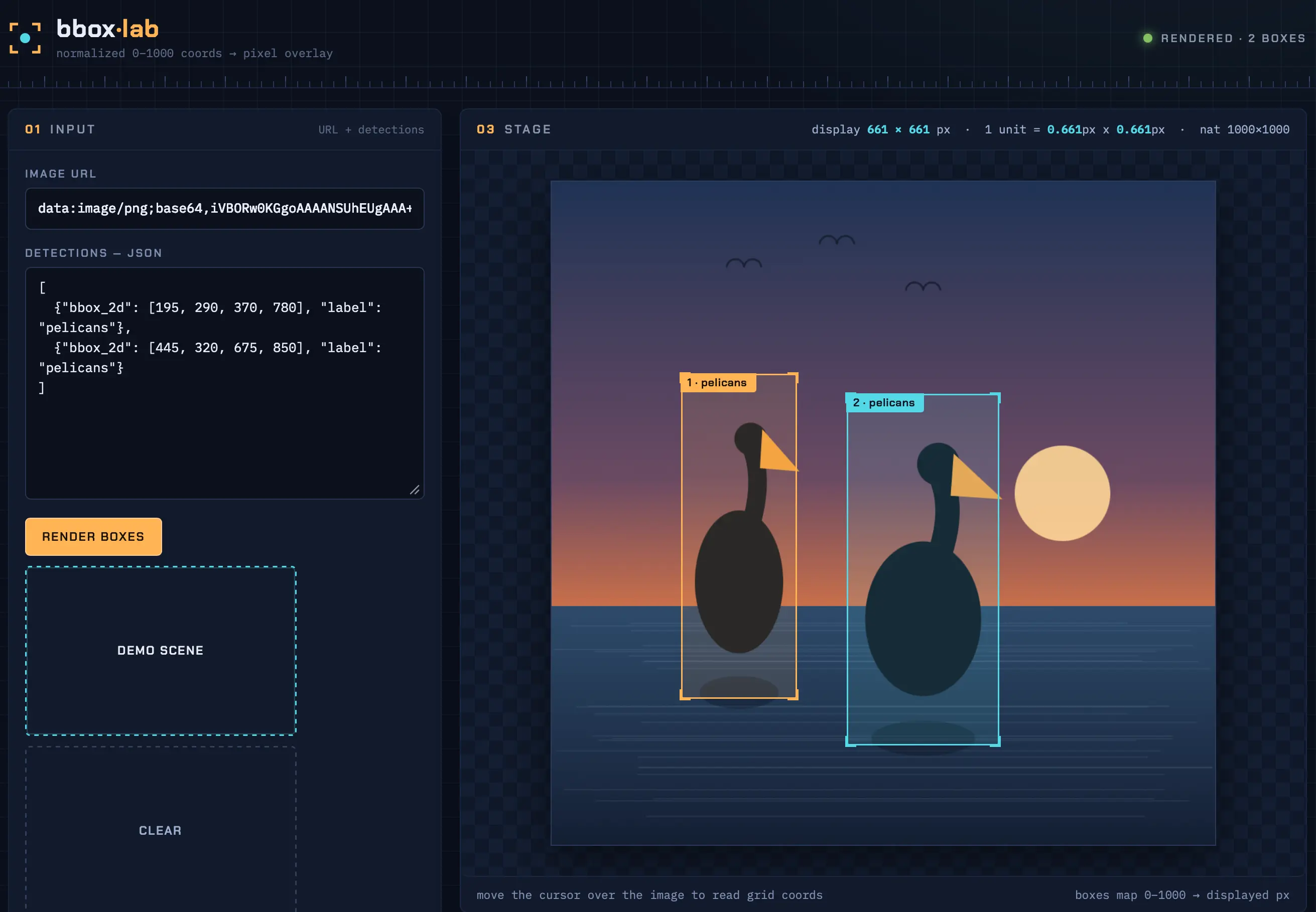
思考トレースの該当部分では、プロンプトで提示した例の JSON に「pelicans(ペリカン)」というラベルが含まれていたため、モデルが自らペリカンの絵を描くことを決定しました。
「既知の画像を利用する『サンプル読み込み』は可能でしょうか?外部画像に依存できませんが…画像 URL 入力はユーザー提供のものなので、『サンプルで試す』ボタンを追加できますね。[…] ふむ、キャンバスにシンプルなシーンを描画してデータ URL としてエクスポートし、それを画像として読み込めば、自己完結型でデモも可能です! […] ただし、ユーザーが指定した座標は実際のペリカン画像用なので、生成したプレースホルダーでも拡大縮小のデモには十分です。1000x1000 のプレースホルダーを生成しましょう:グラデーションの水と、指定されたバウンディングボックス(bbox)に配置された2つの blob 状の「ペリカン」シルエット。同じスケールを使用します。可愛らしくも、0-1000 の正確な位置にシルエットを配置してボックスが整合している様子を示せます。これで面白く自己完結型のデモになります。シンプルに保ちましょう:空のグラデーション、太陽、水、ペリカン風の形状(楕円形の体、丸い頭、嘴)。bbox の中心に配置します。」
(世界中のモデルが、機会があればどこでもペリカンの絵を描く傾向を持っているのではないかという不安を少し抱いています。これは、私がほぼ2年間も自分の愚かなベンチマークを使い続けたことが影響しているのかもしれません。)
この過剰な推論は本当に必要なのでしょうか?少なくとも一部では、そうかもしれません。私は推論機能をオフにして試してみましたが、こちら の結果になり、(テキストはこちら)、ほぼ機能はしますが、ボックスの位置が正しくありませんでした。
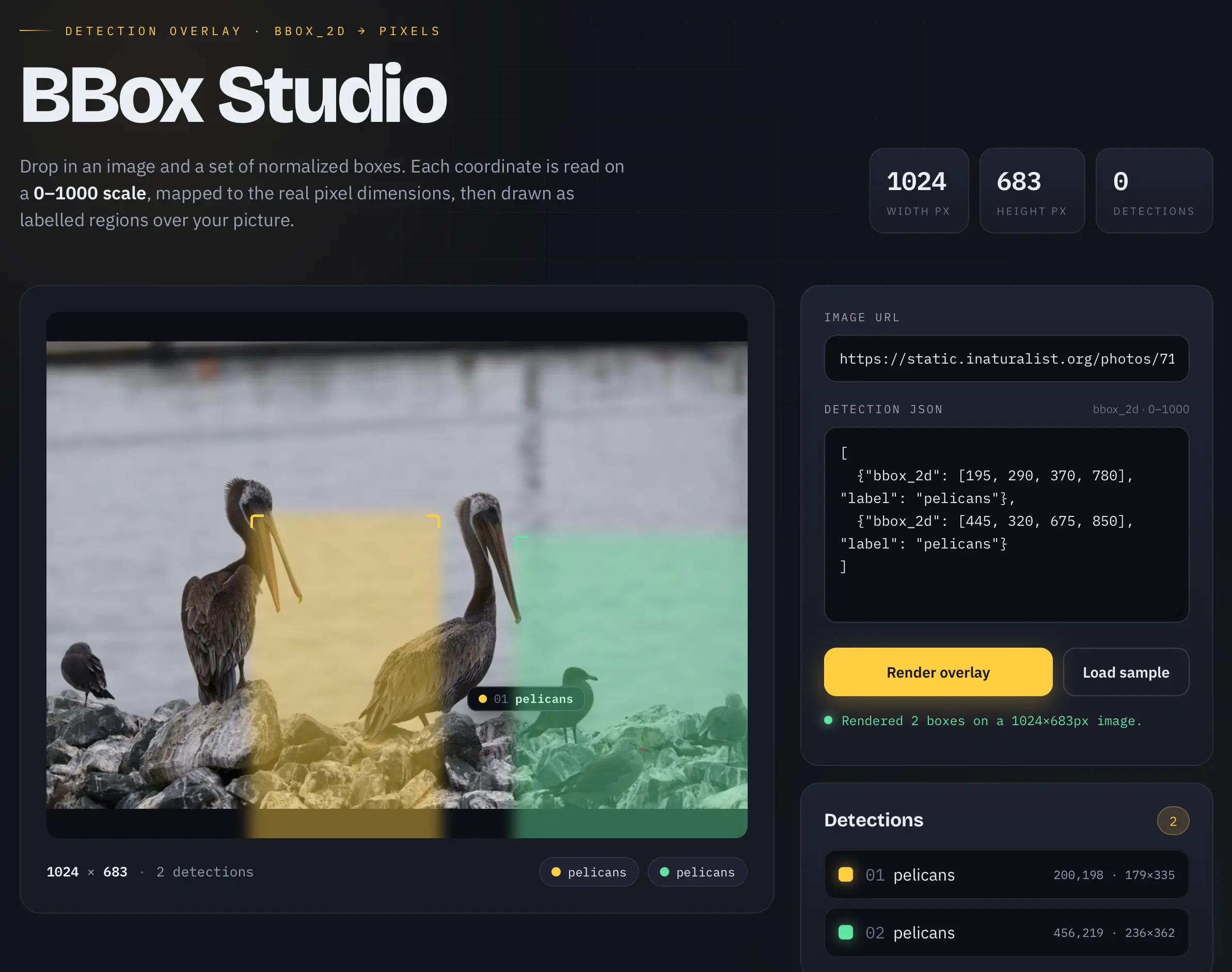
つまり、推論機能なしでは、一度の試行で完全に動作するツールを生成するのは難しかったです。いくつかの追加プロンプトで達成できる可能性はありますが、これは推論機能がどのように結果を変えるかを示す良い例と言えます。
コードエージェントを駆動できるのか
ローカルモデルがコードエージェントのループを成功裏に実行するのに十分な性能を持っているかどうかは、大きな疑問の一つです。コードエージェントには、長いコンテキストの処理能力、強力なコード生成機能、そして確実なツール呼び出し機能が求められます。紙面上では Qwen 3.8 27B はこれら三つの要件すべてを満たしていますが、果たしてこのタスクをこなせるのでしょうか。
Pi(https://pi.dev/)を使った初期の実験は非常に有望な結果でした。私は、他の選択肢に比べてシステムプロンプトが短く、小規模モデルのテストに適しているため Pi を選びました。
Spark 環境で LM Studio 上で動作する Qwen 3.8 27B を Pi に使用するため、tailscale serve で共有設定した上で、~/.pi/agent/models.json に以下の内容を追加しました。
{
  "providers": {
    "spark": {
      "baseUrl": "https://spark-18b3.tail68a31.ts.net/v1",
      "api": "openai-responses",
      "apiKey": "dummy",
      "models": [
        {
          "id": "qwen3.8-27b",
          "reasoning": true
        }
      ]
    }
  }
}
私の ~/dev/datasette フォルダで、以下のコマンドを実行しました。
pi --provider spark --model qwen3.8-27bそして、次のようなプロンプトを入力しました。 (原文の技術表記: pi --provider spark --model qwen3.8-27b)
「認証の仕組みはどうなっているのか?」
一連の推論とツール呼び出しを経て、さまざまなファイルにアクセスした結果、この回答が生成されました。これは非常に堅牢な内容です。
ただ、一つ問題がありました。私はその会話履歴を共有したいと考えていたのです。そこで、Pi と Qwen 3.8 27B に ~/.pi/agent/sessions/--Users-simon-Dropbox-dev-datasette-- ディレクトリ内の JSONL 形式のセッション記録ファイルを指させ、「この jsonl を markdown に変換する Python コードを書いてください」とプロンプトしました。
すると、Qwen は pi_jsonl_to_md.py というスクリプトを作成し、実際にテストまで行いました。これはまさに私が求めていた機能でした。このツールを使って公開したセッション記録がこちらです。
速度への挑戦
これまでのところ、非常に有望な状況です。17GB のモデルをハイエンドなコンシューマー向けハードウェア上で動作させ、コードの記述やツールの操作、画像への注釈付けなど、実務で LLM に求めるべき機能をすべてこなしています。
しかし、一つ大きな欠点があります。特に「過剰に考え込む」状態になると顕著ですが、そうでない場合でも、その速度は決して速いとは言えません。 (原文の技術表記: how does auth work?、Write Python code to convert this jsonl to markdown)
LM Studio で得られるトークン生成速度は、1 秒間に約 15〜30 トークン程度です。決して悪くはない数字ですが、ホスト型 API モデルに比べて明らかに遅いため、そちらへ乗り換えるにはまだハードルがあります。例えば Artificial Analysis のデータによると、OpenAI の 5.6 Sol は 1 秒間に 74 トークンを処理し、5.6 Luna に至っては驚異的な 184 トークン/秒を記録しています。
しかし、嬉しいことに、このモデルが公開されてからわずか 2 日しか経っていないにもかかわらず、コミュニティはすでに高速化のための取り組みを開始しています。
最も有望な最適化手法の一つは、モデル自体に組み込まれています。Qwen は Multi-Token Prediction というアーキテクチャの工夫をサポートしており、これは低コストなメカニズムが先読みして複数のトークンを予測し、メインモデルがその正誤を素早く検証する仕組みです。これにより、推論パフォーマンスに劇的な向上をもたらす可能性があります。
llama.cpp の開発者である Georgi Gerganov 氏の ツイート を参考に、Spark 上で MTP を有効にしてモデルを実行してみました。
llama serve \
 -hf  ggml-org/Qwen3.8-27B-GGUF:Q4_K_M \
 -hfd ggml-org/Qwen3.8-27B-GGUF:Q4_0 \
 --spec-default \
 --spec-type draft-mtp \
 --reasoning-preserve
結果は予想通り、著しい速度向上が確認できました。GPT-5.6 の Codex で Spark 上での 比較ベンチマーク を実施したところ、--spec-type draft-mtp オプションを指定したサーバーは、LM Studio のデフォルト GGUF モデルよりも約 72% 高い性能を発揮しました。
今後数週間で、このモデルをより高速に提供するためのイノベーションがさらに進むことを期待しています。MLX コミュニティもまた、いくつかの工夫を仕掛けているはずです。
いくつかの観察
17GB のファイルでこれだけのことが自宅のマシンで実行できるのは「奇跡」です。今年、ローカルモデルがいかに劇的に進化しているか、改めて感銘を受けました。一年前であれば、これは最高峰かつ高価なプロプライエタリモデルと互角に戦えるレベルでしたが、今では高性能なラップトップでも動作します。
このモデルを日常使いの主力として使うのを阻んでいる唯一の要因はパフォーマンスです。M5 Mac でも DGX Spark でも、体感速度は遅いと感じられます。これは密結合型(非 MoE)モデルに共通する課題で、大量のメモリ帯域幅が必要となるためです。
原文を表示
Friday's big release was Qwen 3.8 27B, an Apache 2 licensed 27B parameter vision-capable LLM from Alibaba's Qwen research lab. I've been looking forward to this one: 27B is an excellent size for running a model on a reasonably specced laptop, and its predecessor Qwen 3.6 27B was impressive.
Qwen's self-reported benchmarks for this model are eye-opening. They show a boost from both Qwen 3.6 27B *and* the closed-weight Qwen 3.7-Plus, which was one of Qwen's strongest models of any size as recently as May this year. It will be interesting to hear what independent benchmarks have to say about the model.
I've been running the model on two different machines: my 128GB M5 Max MacBook Pro, and an NVIDIA DGX Spark. On both machines I'm running LM Studio and their 17GB Q4_K_M quantized build. I also tried using llama-server directly on the Spark.
The default of extra high results in spectacular over-thinking
Qwen's documentation describes the model as defaulting to xhigh for the reasoning effort, and the LM Studio GGUF I've been trying preserves that default:
Qwen3.8 comes with official support for reasoning_effort, which can be used to adjust reasoning depth and control cost:
xhigh (default): for complex tasks demanding thorough analysis
medium: balancing accuracy and speed
low: efficient reasoning optimizing for speed and cost
This is a *hilarious* default. It's absolutely not a good way to run the model, especially on consumer hardware. I've been finding the results extremely entertaining.
I quickly ran into problems with LM Studio's default context limit of 8,192 tokens - Qwen was using them all up thinking about even the most mundane of problems. I loaded the model with the full 262,144 maximum context length and that problem went away.
Here's the pelican riding a bicycle SVG I got from my first attempt with that increased context length. It took 21 minutes to generate, using 22,276 reasoning tokens to produce 3,223 tokens of output. You can read the reasoning trace here.
This is by far the best pelican SVG I've been able to generate with a model that runs on a local machine - and this Qwen is pretty small, just a 17GB file on disk. There's a lot to like about this:
- The bicycle frame is the right shape
- It has legs on each side of the bike - that's very rare
- Good, clear pelican pouch
- The wings extend to touch the handlebars!
- The motion lines are behind, not in front
- It has a tasteful background - nice sun, clouds, hill, flowers and grass.
Was that worth waiting 21 minutes for? Absolutely not.
Here's that same prompt run with reasoning turned off - transcript here. This one produced 3,715 tokens and took 137s - just over two minutes.
And just for completeness, I used OpenRouter to run the same prompt through the much larger Qwen 3.8 2.4T-A95B (released last week) and got this snazzy animated SVG:
Your browser does not support HTML5 video.
I said Qwen at xhigh has a tendency to over-think things, but how bad really is it?
I tried a much simpler prompt, again with that default extra high setting:
draw an svg of a circle
Qwen's reasoning trace started like this:
The user is asking for an SVG drawing of a circle. Simple request — but I want it to be a carefully crafted piece. Let me make something that goes beyond just : a single self-contained SVG file with character — maybe a geometric "circle study," with subtle animation, layered rings, and a distinctive palette.
Keep the scope right: they asked for an SVG of a circle. So the core is a circle. But I can add craft: concentric guide circles (like a compass/geometry drawing), tick marks, a soft gradient fill on the main circle, restrained ambient motion (a slowly rotating dashed ring, pulsing glow). Respect prefers-reduced-motion? That's more for CSS; SVG SMIL or CSS inside SVG will do.
Palette options: deep teal ink on warm paper? Or bold vermilion circle on off-white with navy construction lines — Bauhaus/compass-drawing vibe. Let me go with a "geometric study" look: cool slate background, or bright paper white? Paper white is fine if it's not the cream-and-terracotta combo. [...]
Several minutes later it produced this *absolutely beautiful* animated circle, which was entirely not what I had asked for!
Your browser does not support HTML5 video.
My strong recommendation: ignore that default. Run Qwen 3.8 27B on low or even no reasoning levels at first. It's a great model, but wow that default setting is a bad place to start.
It's very good at bounding boxes
A fun way to test a vision model is to see how well it can return bounding boxes around items in a photograph. I've seen previous Qwen models deal well with this, so I decided to put it to the test drawing bounding boxes around some pelicans.
I've seen asking for 0-1000 scale produce good results in the past. I tried this:
llm -a https://static.inaturalist.org/photos/714731804/large.jpg \
  -m lmstudio/qwen/qwen3.8-27b \
  'Return JSON bounding boxes for the pelicans in this photo, 0-1000 scale for each dimension'
Here's the reasoning trace, which produced this:
[
  {"bbox_2d": [195, 290, 370, 780], "label": "pelicans"},
  {"bbox_2d": [445, 320, 675, 850], "label": "pelicans"}
]
This is *such a good match*. Here are those boxes rendered on top of the photo:
Building a tool to label bounding boxes
That visualization of the bounding boxes was taken using a new custom tool that I had Qwen 3.8 27B build for me, running offline on my laptop.
I forgot to dial down the thinking effort so it was *massively over-engineered*, but it did manage to produce this full interface from this single prompt:
`
[
{"bbox_2d": [195, 290, 370, 780], "label": "pelicans"},
{"bbox_2d": [445, 320, 675, 850], "label": "pelicans"}
]
> Build an HTML page which has an input box for accepting the URL to an image and a textarea for accepting the above style of JSON.
> It appends the image to the page, measures its width and height, then treats the coords in the bbox_2d as scaled from 0-1000 and scales them against the actual width and height, then it renders labelled boxes over the image.
This screenshot shows one of the features I did *not* ask for - a demo scene, for if you don't have a photograph to test the tool with:

Here's the relevant segment of the thinking trace, where it decided to draw its own pelicans purely because I had used the label "pelicans" in the example JSON I gave it in the prompt:
> Also a "load sample" that uses a known image? Can't depend on external images, but… the image URL input is user-provided; I could add a "try with sample" button [...] Hmm, I can draw a simple scene on canvas, export it as a data URL, and load it into the image — that's self-contained and demo-able! [...] But the user's coords are for an actual pelican image; a generated placeholder can still demo the scaling. Generate a 1000x1000 placeholder: gradient water + two blob-like "pelican" silhouettes placed at the given bboxes (using the same scale — cute: silhouettes at the exact 0-1000 positions, showing the boxes align). This makes for a fun, self-contained demo. Keep it simple: sky gradient, sun, water, two pelican-ish shapes (ellipse body, circle head, beak). Place at bbox centers.
(I'm slightly nervous that models around the world might have a bias towards drawing pelicans at any chance they can get, brought on by nearly two years of exposure to my own stupid benchmark.)
Is all that over-thinking necessary? Maybe it is, at least a bit. I tried with reasoning turned off and got [this version](https://static.simonwillison.net/static/2026/qwen-no-thinking-bbox.html), ([transcript here](https://gist.github.com/simonw/8e78b1c64d9a56d08eedb954aa9445ee)), which nearly works but shows the boxes in the wrong place:

So without reasoning it didn't quite one-shot a working tool. I'm sure it could get there with some follow-up prompts, but this is a good example of how reasoning can make a difference.
### Yes, it can drive coding agents
One of the biggest questions around local models is whether or not they have enough horsepower to successfully run a coding agent loop. Coding agents require long context, strong code generation support and reliable tool-calling. On paper Qwen 3.8 27B has all three of these, so is it up to the task?
My initial experiments with [Pi](https://pi.dev/) have been very promising. I chose Pi because it has a shorter system prompt than most other options, making it a better fit for trying out smaller models.
I configured Pi to use Qwen 3.8 27B running in LM Studio on the Spark (shared via `tailscale serve`) by adding this to `~/.pi/agent/models.json`:
{
"providers": {
"spark": {
"baseUrl": "https://spark-18b3.tail68a31.ts.net/v1",
"api": "openai-responses",
"apiKey": "dummy",
"models": [
{
"id": "qwen3.8-27b",
"reasoning": true
}
]
}
}
}
Then ran `pi --provider spark --model qwen3.8-27b` in my `~/dev/datasette` folder and prompted:

> how does auth work?

After a sequence of reasoning and tool calls that accessed a bunch of different files it produced [this reply](https://gist.github.com/simonw/6693d74a6bd45f641d43ceb9961dd95f#core-idea-actors--plugins-no-built-in-user-accounts), which is very solid.

Just one problem: I wanted to share that transcript. So I pointed Pi and Qwen 3.8 27B at the JSONL transcript file in `~/.pi/agent/sessions/--Users-simon-Dropbox-dev-datasette--` and prompted:

> Write Python code to convert this jsonl to markdown

And it built and tested this [pi_jsonl_to_md.py](https://github.com/simonw/tools/blob/main/python/pi_jsonl_to_md.py), which did exactly what I needed. Here's [that session transcript](https://gist.github.com/simonw/491e55ac9d741202ea0af5d9d93775d4), published using the tool that it created.

### The quest for speed

So far this is all looking *very* promising. We have a 17GB model that runs on high-end consumer hardware and can write code, drive tools, annotate images and generally do everything that I need from an LLM for getting real work done.

There's one very significant catch: it feels slow - especially when it starts over-thinking, but even without that it's not particularly sprightly.

I've been getting around 15-30 tokens a second from LM Studio. That's not terrible, but it's slow enough that it's going to be hard to win me away from hosted API models, which can return results a whole lot faster. Artificial Analysis [track token speed](https://artificialanalysis.ai/models#speed) and show OpenAI 5.6 Sol at 74 tokens/second and 5.6 Luna at an impressive 184/second.

The good news is that the community have been exploring ways to speed things up since the model was first released two days ago.

One of the most promising optimizations is baked into the model itself. Qwen supports [Multi-Token Prediction](https://sebastianraschka.com/llm-architecture-gallery/mtp/), an architecture trick where a cheaper mechanism guesses several tokens ahead and the main model can then quickly verify if the guesses were correct. This can have quite a dramatic effect on inference performance.

Based on [this tweet](https://twitter.com/ggerganov/status/2088340681701925253) from `llama.cpp` creator Georgi Gerganov I tried running the model with MTP like this on the Spark:
llama serve \
-hf ggml-org/Qwen3.8-27B-GGUF:Q4_K_M \
-hfd ggml-org/Qwen3.8-27B-GGUF:Q4_0 \
--spec-default \
--spec-type draft-mtp \
--reasoning-preserve
And sure enough, this gave me a significant boost. I had GPT-5.6 in Codex run [a comparative benchmark on the Spark](https://gist.github.com/simonw/b08c7eb9c126c806ba8987e269ea736b) and the `--spec-type draft-mtp` server outperformed the LM Studio default GGUF by around 72%.

I expect we'll see a whole lot more innovation around serving this model faster over the next few weeks. The MLX community likely have some tricks brewing as well.

### Some observations

The fact that a 17GB file can do all of this stuff on my home machines is a *miracle*. Once again, I'm delighted and amazed at how much progress local models have made this year. A year ago this would have been competitive with the best and most expensive of the proprietary models - today it can run on a capable laptop.

The only thing holding this back from being a daily driver is performance. It feels pretty slow on both the M5 Mac and the DGX Spark. That's the catch with these dense (non-Mixture-of-Experts) models - they require a whole lot of memory bandwidth関連記事
News to Guide
ニュースの次に確認する
発表内容を、現在の料金や仕様と照らし合わせられる関連ガイドです。
今日のまとめ
AIデイリーブリーフで今日の重要ニュースをまとめ読み